
Android 错误集合
1. Error:java.util.concurrent.ExecutionException: com.android.tools.aapt2.Aapt2Exception: AAPT2 error: check logs for details
解决:
在工程的gradle.properties文件中添加以下命令:
android.enableAapt2=false
2. java.net.ProtocolException: Unexpected status line: <html>
原因:
在网络请求的 url 地址上所带参数 password 通过 Base64.DEFAULT 加密后,带有 \n 换行符,即参数的问题导致该问题。
解决:
通过 Base64.NOWRAP 去掉换行后,错误解决。
3. java.lang.IllegalStateException:Not allowed to start service Intent : app is in background uid UidRecord
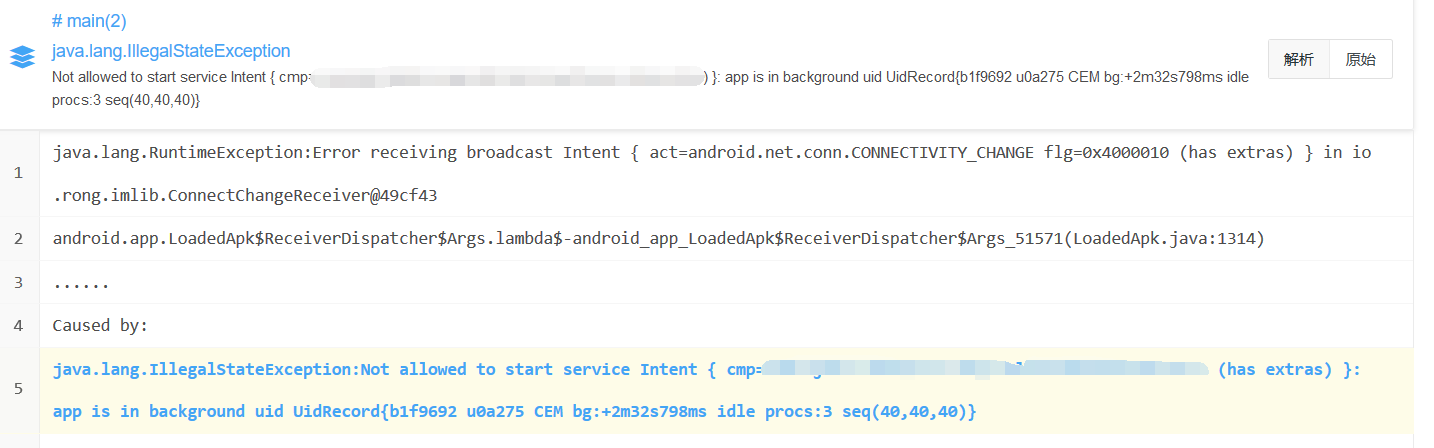
Android 8.0 不再允许后台service直接通过startService方式去启动,我们需要 context.startService()替换为context.startForegroundService();
Intent i = new Intent(context, MediaPlaybackService.class);

context.startForegroundService(i, CURRENT);
在 MediaPlaybackService 的 onCreate()方法 设置为前台进程:
public void onCreate() {

       super.onCreate();

      NotificationManager mNotificationManager = (NotificationManager) getSystemService(Context.NOTIFICATION_SERVICE);

    // notification id

    final String channelId = MusicBrowserActivity.MUSIC_NOTIFICATION_CHANNEL;

    // create notification channel

    NotificationChannel mChannel = new NotificationChannel(channelId, "MUSIC", NotificationManager.IMPORTANCE_LOW);

    mNotificationManager.createNotificationChannel(mChannel);

    // set channel id

    Notification status = new Notification.Builder(MediaPlaybackService.this).setChannelId(channelId).build();

    // start for foreground process

    startForeground(PLAYBACKSERVICE_STATUS, status);

}
4. Faild to post notification on channel "null"
NotificationChannel 是 android8.0 新增的特性,如果App的 targetSDKVersion >= 26,没有设置 channel 通知渠道的话,就会导致通知无法展示。
解决: 创建 Channel
String channelID = "1";
String channelName = "channel_name";

NotificationChannel channel = new NotificationChannel(channelID, channelName, NotificationManager.IMPORTANCE_HIGH);

NotificationManager manager = (NotificationManager) context.getSystemService(Context.NOTIFICATION_SERVICE);

manager.createNotificationChannel(channel);

Notification.Builder builder = new Notification.Builder(context);

builder.setContentText(msgDesc);
builder.setContentTitle(msgTitle);

//创建通知时指定channelID

builder.setChannelId(channelID);

Notification notification = builder.build();
上面代码是针对android8.0,我们还要兼容低版本系统以及channel属性设置。
5. found an invalid color. java.util.concurrentException:com.android.builder.interal.aapt.v2.Aapt2Exception: AAPT2 error
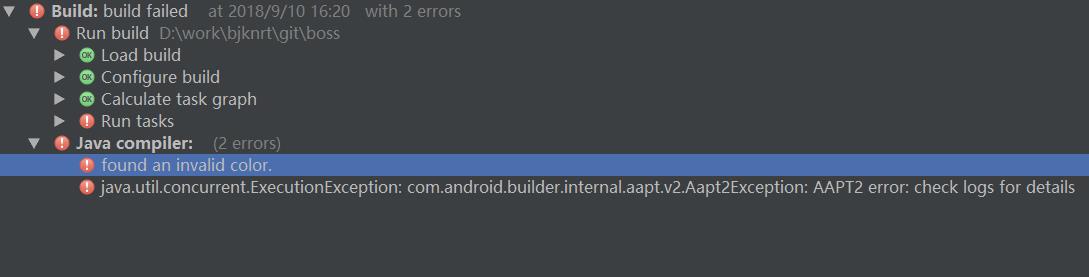
出现这个问题的原因是项目中引入了一个 .9 图片引起的,需要更改一下.9图片的四边的黑线(拉长或者缩短都可以)。
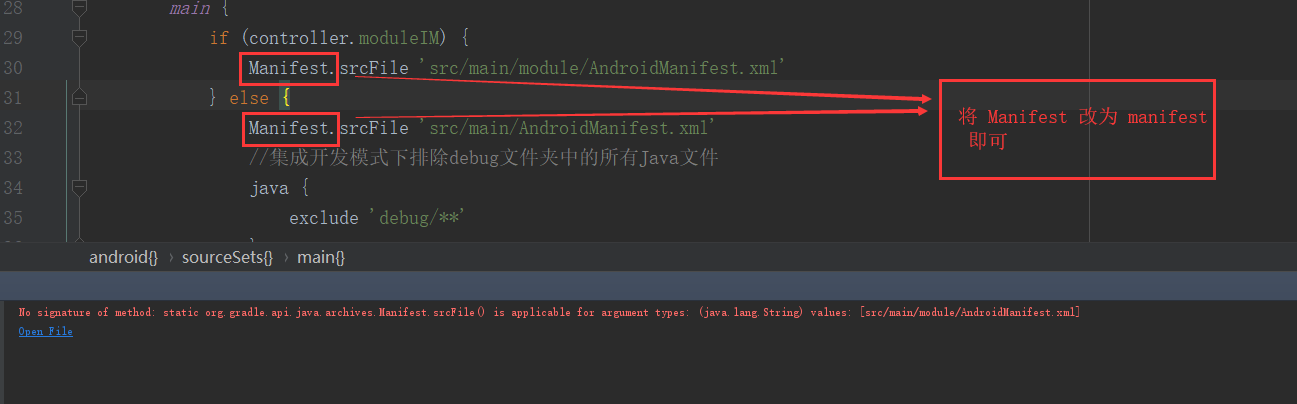
6. No signature of method: static org.gradle.api.java.archives.Manifest.srcFile() is applicable for argument types: (java.lang.String) values ...
7. Kotlin compiler:
Unresolved reference: BaseApplication
'onCreate' overrides nothing

场景: 在 common 组件里放置 BaseApplication 或者 BaseActivity ,在其他 module 中继承出现这个问题。原因是 common 组件未配置 kotlin
解决: 在 common 的 build.gradle 最上方添加:
apply plugin: 'kotlin-android'

apply plugin: 'kotlin-android-extensions'
8. javax.crypto.BadPaddingException: error:1e000065:Cipher functions:OPENSSL_internal:BAD_DECRYPT
导致这个问题的原因就是 密钥不对 ,要严格按照密钥的生成规则
9. Error: Program type already present: ****** .BuildConfig
Android studio Throwing the wrong way is because 2 module have the same package name in AndroidManifest.xml, and can modify different names. 这个问题是出现在 Android 4.x ,在Android 5.x以上就没有问题了。根本原因未探索
解决: 将相同包名中的其中一个改成其他报名
10. java.lang.IllegalArgumentException: Unknown pattern character 'X'
"yyyy-MM-dd'T'HH:mm:ss.SSSXXX" 使用该格式转化时间格式,出现问题 。测试:Android6.0 以及 Android4.4上均出现问题。 原因:X is available only from Nougat+.
苟且解决方案: 将 "yyyy-MM-dd'T'HH:mm:ss.SSSXXX" 改为 "yyyy-MM-dd'T'HH:mm:ss.SSS"
. io.reactivex.exceptions.UndeliverableException: The exception could not be delivered to the consumer because it has already canceled/disposed the flow or the exception has nowhere to go to begin with.
解决:
//RxJava2 取消订阅后,抛出的异常无法捕获,导致程序崩溃

        RxJavaPlugins.setErrorHandler {

            LogUtil.e(it.message ?: "RxJavaError")

        }
Android 错误集合的更多相关文章
- Android --资料集合
google android 官方教程 http://hukai.me/android-training-course-in-chinese/basics/index.html android视频资料 ...
- Gradle DSL method found: ‘android()’错误
Gradle DSL method found: ‘android()’错误 和上个错误一样这个也是因为在新版本的Gradle中android()方法已经废弃,但是要注意android()只是在整个项 ...
- Android icons集合
Android icons集合: Be aware that the style changes occur fairly regularly with each major release, so ...
- Android - 错误:"No resource found that matches the given name android:Theme.Material"
Android - 错误:"No resource found that matches the given name android:Theme.Material" 本文地址: ...
- springboot整合mybatis步骤以及错误集合
1.首先在springboot项目中的pomx文件引入官方的依赖 <groupId>org.mybatis.spring.boot</groupId> <artifact ...
- 【Android应用开发】Android Studio 错误集锦 -- 将所有的 AS 错误集合到本文
. 一. 编译错误 1. "AndroidManifest.xml file not found" 错误 (1) 报错信息 报错信息 : -- Message Make : Inf ...
- ionic build Android错误记录未解决
1.try itcordova -v cordova create testing cd testing cordova plugin add cordova-plugin-sim cordova p ...
- Android错误
1. [2016-09-16 14:25:45 - X_Card] Found 2 versions of android-support-v4.jar in the dependency list, ...
- Android错误:W/ResourceType(2411): No package identifier when getting value for resource number 0x
报错信息: 07-04 11:14:43.064: W/ResourceType(2411): No package identifier when getting value for resourc ...
随机推荐
- Android平台MediaCodec避坑指北
https://www.jianshu.com/p/5d62a3cf0741 最近使用MediaCodec做编解码H264,写一点东西以免自己再次掉坑. 先说一下具体环境,使用的是,Windows10 ...
- php打乱数组二维数组、多维数组
//这个是针对二维数组的!下面针对多维数组的乱序方法<?php function shuffle_assoc($list) { if (!is_array($list)) return $lis ...
- spring 配置文件属性设置默认值以及读取环境变量值
在 Spring 中为 javabean 注入属性文件中的属性值一般人都知道的,可以通过 org.springframework.beans.factory.config.PropertyPlaceh ...
- vfio
VFIO简介 Documentation/vfio.txt 还是不理解IOMMU.北桥.PCI的MMIO和ioremap file:///C:/Users/shaohefe/Downloads/vt- ...
- 一条命令,根据进程名判断有进程输出up,无进程无输出
这个研究了好一会, 由于开发需要,提供的命令. shell命令,可以按照分号分割,也可以按照换行符分割.如果想一行写入多个命令,可以通过“';”分割. a=`ps -ef | grep nginx | ...
- 浅谈 DDoS 攻击与防御
浅谈 DDoS 攻击与防御 原创: iMike 运维之美 什么是 DDoS DDoS 是英文 Distributed Denial of Service 的缩写,中文译作分布式拒绝服务.那什么又是拒 ...
- ARM 架构、ARM7、ARM9、STM32、Cortex M3 M4 、51、AVR 之间有什么区别和联系?(转载自知乎)
ARM架构: 由英国ARM公司设计的一系列32位的RISC微处理器架构总称,现有ARMv1~ARMv8种类. ARM7: 一类采用ARMv3或ARMv4架构的,使用冯诺依曼结构的内核. ...
- stm32最简单的实现BootLoader
BootLoader大家应该都知道是干什么的,简单的来说就是程序开始运行前的一段程序. 在成熟的产品中,通常都是采用BootLoader方式来升级产品的程序.也就是IAP升级.在了解完基本的实现原理后 ...
- C# 基于任务的异步模式的创建与使用的简单示例
对于窗体程序,使用基于任务的异步模式需要用到Task类,下面示例下非常简单的用法. 1.创建一个拥有异步方法的类 该类拥有一个异步方法DoSomthingAsync,根据微软建议的命名规则该方法要带A ...
- bzoj1458: 士兵占领 网络流
链接 https://www.lydsy.com/JudgeOnline/problem.php?id=1458 也可以去luogu 思路 想成倒着删去点,使得依旧满足覆盖!! 左边横,右边列,之间用 ...