
Windows Azure Web Site (19) Azure Web App链接到VSTS
《Windows Azure Platform 系列文章目录》
之前遇到一个问题,客户在海外使用
我参考了一下国内Azure China的文档:https://school.azure.cn/blog/495,自己验证了一下,做了细微的修改。
1.我们需要设置从海外VSTS,到国内Azure China的链接。需要注册到Azure AD里
2.将上面的脚本下载到D盘根目录。并且将扩展名重命名为ps1。
3.安装Azure PowerShell,并执行下面的命令
D:\RegisterVsts2Mooncake.ps1 -subscriptionName '[YourAzureChinaSubscriptionName]' -password '[YourPassword]' -resourceGroupName '[YourAzureChinaResourceGroup]'
注意:第一个参数subscriptionName是订阅名称
password是密码。注意这个密码不一定是AzureChina登录的密码,我们可以设置为其他的密码。请牢记这个密码,我们会在步骤7中使用
resourceGroupName是资源组名称
4.执行完毕后,如下图:

5.我们登录VSTS,然后选择
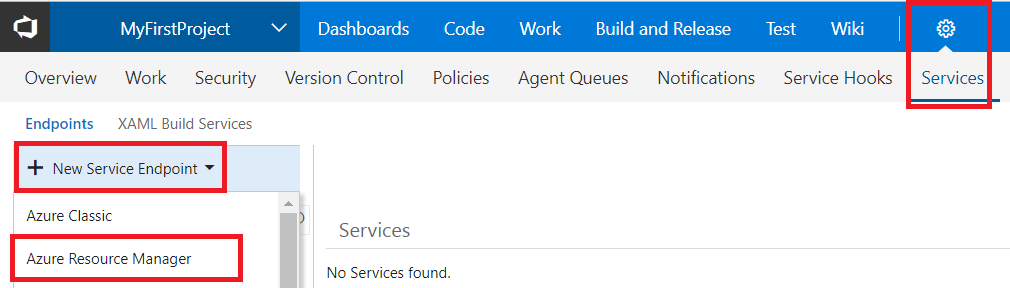
6.在弹出的窗口中,选择use the full version of the endpoint dialog
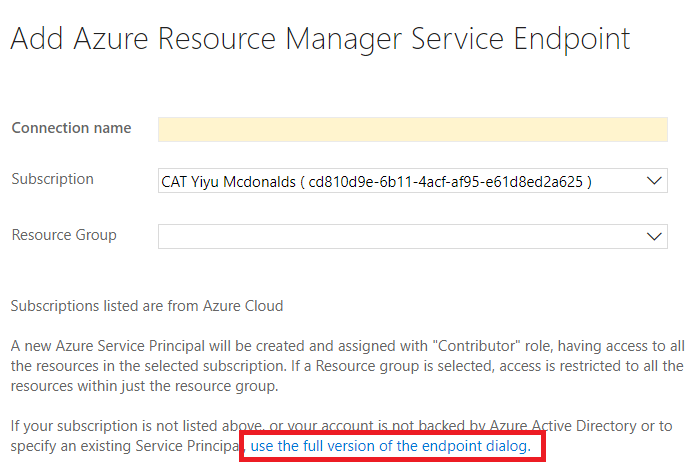
7.然后将步骤4中的输出结果,输入到下图中对应的内容。
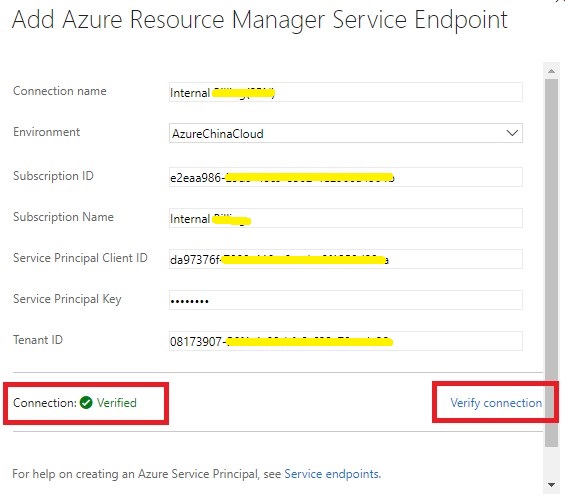
点击上图的Verify Connection,就验证通过,可以链接到Azure China了
Windows Azure Web Site (19) Azure Web App链接到VSTS的更多相关文章
- Windows Azure Web Site (18) Azure Web App设置MIME
<Windows Azure Platform 系列文章目录> 在笔者之前的文章中,介绍了我们在使用Azure Web App,可以把静态资源保存到Azure Storage中: Wind ...
- Windows Azure Web Site (16) Azure Web Site HTTPS
<Windows Azure Platform 系列文章目录> 我们在使用微软云Azure Web App的时候,会使用微软的二级域名:http://xxx.chinacloudsites ...
- Windows Azure Web Site (17) Azure Web Site 固定公网IP地址
<Windows Azure Platform 系列文章目录> 在之前的文档中,笔者介绍了Azure Web Site是一个多租户的环境,每个部署单元有一个可以通过Internet访问的入 ...
- Windows Azure Web Site (8) 设置Web Site时区
<Windows Azure Platform 系列文章目录> 许多已经使用Azure Web Site的用户已经发现了,Azure Web Site默认的系统时间是UTC时区. 比如我们 ...
- Windows Azure Web Site (12) Azure Web Site配置文件
<Windows Azure Platform 系列文章目录> 本文将介绍如何在Azure Web Site里配置连接字符串. 本文分为以下几个步骤: 1.在本地ASP.NET项目使用W ...
- Windows Azure Web Site (13) Azure Web Site备份
<Windows Azure Platform 系列文章目录> 我们在使用Windows Azure Web Site的时候,经常会遇到需要对Web Site进行备份的情况.在这里笔者简单 ...
- Windows Azure Web Site (14) Azure Web Site IP白名单
<Windows Azure Platform 系列文章目录> 我们知道,在Azure Cloud Service和Virtual Machine,可以通过Endpoint ACL (Ac ...
- [New Portal]Windows Azure Web Site (3) 创建Web Site和云端数据库
<Windows Azure Platform 系列文章目录> 在前一章的内容里,我介绍了使用Windows Azure Management Portal创建Web Site.本章,我将 ...
- Windows Azure Web Site (17) 设置Web App TimeOut时间
<Windows Azure Platform 系列文章目录> 我们在开发Azure Web App的时候,如果页面加载时间过长,可能需要设置Time Out时间. 在这里笔者简单介绍一下 ...
随机推荐
- Vim删除文件到行首或者行尾
vim用的不是很熟练,只是有时候需要的时候会学习一下 我们知道,vim有三种模式,一种是一般模式,一种是编辑模式,另外一种是命令行模式 在一般模式下,可以进行删除,复制粘贴等操作,在编辑模式下可以编辑 ...
- Pytorch自定义dataloader以及在迭代过程中返回image的name
pytorch官方给的加载数据的方式是已经定义好的dataset以及loader,如何加载自己本地的图片以及label? 形如数据格式为 image1 label1 image2 label2 ... ...
- 百练6247-过滤多余的空格-2015正式B题
B:过滤多余的空格 总时间限制: 1000ms 内存限制: 65536kB 描述 一个句子中也许有多个连续空格,过滤掉多余的空格,只留下一个空格. 输入 一行,一个字符串(长度不超过200),句子的 ...
- SQLAlchemy中表结构的一对一
1.先导入相对应的库 from flask import Flask from flask_sqlalchemy import SQLAlchemy import pymysql pymysql.in ...
- XML中DTD,XSD的区别与应用
XML我们并不陌生,在企业级应用中有很广的用途.具体就不再说,下面介绍一下DTD,XSD的区别并以XSD为例看spring中定义与使用.1.DTD(Documnet Type Definition)D ...
- PAT-1084(外观数列 ) && PAT-1085 (PAT单位排行)
1084 利用字符串string的可加性 #include <bits/stdc++.h> using namespace std; int main () { int x,n; cin ...
- 更改MySQL数据库的编码为utf8mb4
原文:http://blog.csdn.net/woslx/article/details/49685111 utf-8编码可能2个字节.3个字节.4个字节的字符,但是MySQL的utf8编码只支持3 ...
- UVA11077 Find the Permutations
题意 PDF 给出1~n的一个排列,可以通过一系列的交换变成{1,2,-,n}.比如{2,1,4,3}需要两次交换.给定n和k,统计有多少个排列至少需要k次交换才能变成{1,2,-,n}. 分析 将给 ...
- expect脚本实例
#!/usr/bin/expect //必须写这句,表明使用expect,有些系统可能没有自带,使用yum install expect -y 安装 spawn ssh 192.168.2.128 / ...
- Chrome——F12 谷歌开发者工具详解
我们这里介绍主要的几块:Console.Source.Network Console 大家都有用过各种类型的浏览器,每种浏览器都有自己的特色,本人拙见,在我用过的浏览器当中,我是最喜欢Chrome的, ...