
react native中使用ScrollableTabView
第一步,下载依赖
npm install react-native-scrollable-tab-view --save
第二步,引入
import ScrollableTabView, { ScrollableTabBar, DefaultTabBar } from 'react-native-scrollable-tab-view';
第三步,使用
class TabTopView extends Component {

    render() {

        return (

            <ScrollableTabView

                style={styles.container}

                renderTabBar={() => <DefaultTabBar />}

                tabBarUnderlineStyle={styles.lineStyle}

                tabBarActiveTextColor='#FF0000'>

                <Text style={styles.textStyle} tabLabel='娱乐'>娱乐</Text>

                <Text style={styles.textStyle} tabLabel='科技'>科技</Text>

                <Text style={styles.textStyle} tabLabel='军事'>军事</Text>

                <Text style={styles.textStyle} tabLabel='体育'>体育</Text>

            </ScrollableTabView>

        );

    }
由于我把里面的一层提出来循环了,所以在上面使用方法的时候直接找了另一种方法
效果图是
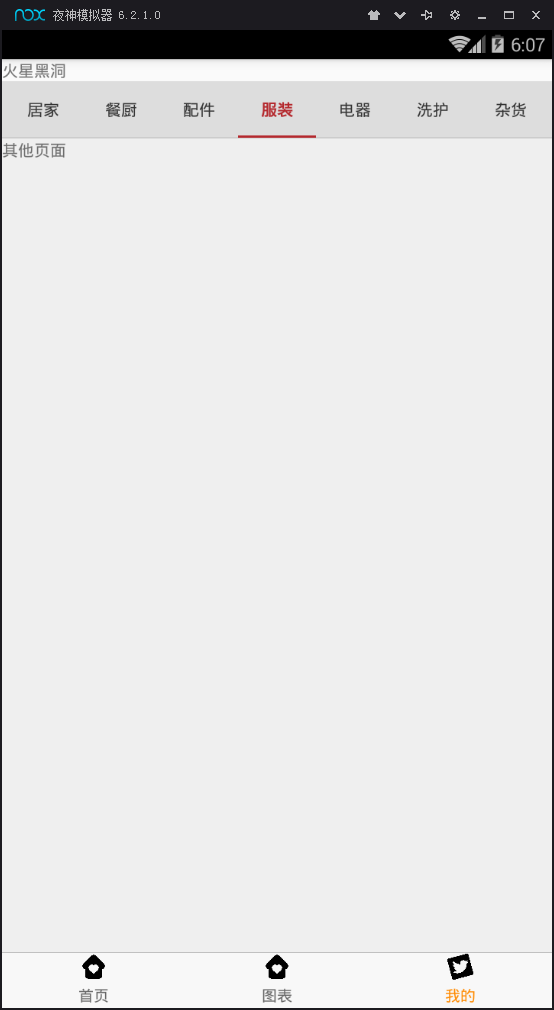
完整代码是 home.js
import React, { Component } from 'react';

import {  StyleSheet,View,Text,Dimensions } from 'react-native';

import ScrollableTabView, { ScrollableTabBar, DefaultTabBar } from 'react-native-scrollable-tab-view';

// 取得屏幕的宽高Dimensions

const { width, height } = Dimensions.get('window');

export default class App extends Component{

    constructor(props) {

        super(props);

        this.state = {

            tabShow: false,

            label: ['推荐', '新品', '居家', '餐厨', '配件', '服装', '电器', '洗护', '杂货', '饮食', '婴童', '志趣'],

        };

    }

    componentDidMount() {

        setTimeout(() => {

            this.setState({

                tabShow: true

            });

        }, 0)

    }

    // 滑动tab

    renderScrollableTab() {

        let label = this.state.label

        if (this.state.tabShow){

            return (

                <ScrollableTabView

                        renderTabBar={() => <ScrollableTabBar />}

                        tabBarBackgroundColor='#ddd'

                        tabBarActiveTextColor='#b4282d'

                        tabBarInactiveTextColor='#333'

                        tabBarUnderlineStyle={styles.tabBarUnderline}

                >

                        {

                            label.map((item, index) => {

                                if (item == '推荐') {

                                    return (

                                        <Text tabLabel={item} key={index}>推荐</Text>

                                    )

                                } else {

                                    return (

                                        <Text tabLabel={item} key={index}>其他页面</Text>

                                    )

                                }

                            })

                        }

                </ScrollableTabView>

            )

        }

    }

    render(){

        return(

            <View style={styles.container}>

                <View style={{ flex: 1 }}>

                    {this.renderScrollableTab()}

                </View>

            </View>

        )

    }

}

const styles = StyleSheet.create({

    container: {

        flex: 1,

        alignItems: 'center',

        backgroundColor: '#efefef',

    },

    navLeft: {

        alignItems: 'center',

        marginLeft: 10,

    },

    navRight: {

        alignItems: 'center',

        marginRight: 10,

    },

    navIcon: {

        height: 20,

        width: 20,

    },

    navText: {

        fontSize: 10,

    },

    searchBox: {

        flexDirection: 'row',

        alignItems: 'center',

        justifyContent: 'center',

        width: width * 0.7,

        backgroundColor: '#ededed',

        borderRadius: 5,

        height: 30,

    },

    searchIcon: {

        width: 16,

        height: 16,

        marginRight: 6,

    },

    searchContent: {

        color: '#666',

        fontSize: 14,

    },

    tabBarUnderline: {

        backgroundColor: '#b4282d',

        height: 2,

    }

});
react native中使用ScrollableTabView的更多相关文章
- [RN] React Native中使用 react-native-scrollable-tab-view嵌套在ScrollView里,导致 子内容 在安卓上无法显示
React Native中使用 react-native-scrollable-tab-view嵌套在ScrollView里,导致 子内容 在安卓上无法显示 问题: 0.9.0 或 0.8.0 版本的 ...
- React Native 中 CSS 的使用
首先声明,此文原作者为黎 跃春 React Native中CSS 内联样式 对象样式 使用Stylesheet.Create 样式拼接 导出样式对象 下面的代码是index.ios.js中的代码: / ...
- react native中的欢迎页(解决首加载白屏)
参照网页: http://blog.csdn.net/fengyuzhengfan/article/details/52712829 首先是在原生中写一些方法,然后通过react native中js去 ...
- React Native中的网络请求fetch和简单封装
React Native中的网络请求fetch使用方法最为简单,但却可以实现大多数的网络请求,需要了解更多的可以访问: https://segmentfault.com/a/1190000003810 ...
- [转] 「指尖上的魔法」 - 谈谈 React Native 中的手势
http://gold.xitu.io/entry/55fa202960b28497519db23f React-Native是一款由Facebook开发并开源的框架,主要卖点是使用JavaScrip ...
- [转] 在React Native中使用ART
http://bbs.reactnative.cn/topic/306/%E5%9C%A8react-native%E4%B8%AD%E4%BD%BF%E7%94%A8art 前半个月捣腾了一下Rea ...
- react native中使用echarts
开发平台:mac pro node版本:v8.11.2 npm版本:6.4.1 react-native版本:0.57.8 native-echarts版本:^0.5.0 目标平台:android端收 ...
- react native中一次错误排查 Error:Error: Duplicate resources
最近一直在使用react native中,遇到了很多的坑,同时也学习到了一些移动端的开发经验. 今天在做一个打包的测试时,遇到了一个问题,打包过程中报错“Error:Error: Duplicate ...
- 在React Native中,使用fetch网络请求 实现get 和 post
//在React Native中,使用fetch实现网络请求 /* fetch 是一个封装程度更高的网络API, 使用了Promise * Promise 是异步编程的一种解决方案 * Promise ...
随机推荐
- [No0000147]深入浅出图解C#堆与栈 C# Heap(ing) VS Stack(ing)理解堆与栈4/4
前言 虽然在.Net Framework 中我们不必考虑内在管理和垃圾回收(GC),但是为了优化应用程序性能我们始终需要了解内存管理和垃圾回收(GC).另外,了解内存管理可以帮助我们理解在每一个程 ...
- React 入门实例
React 入门实例教程 一.安装 React 的安装包,可以到官网下载. $ git clone git@github.com:ruanyf/react-demos.git 如果你没安装 git, ...
- JDBC---Mysql(1)
使用MySQL需要导mysql-connector-java-5.1.7-bin.jar包 所有的java.sql.Driver实现类,都提供了static块,块内的代码就是把自己注册到DriverM ...
- 彻底卸载tv
1.卸载 2.C:\Program Files (x86),找到teamviewer选项,右击删除 3.开始--输入regedit,打开注册表,找到如下路径:HKEY_LOCAL_MACHINE\SO ...
- elasticsearch 出现“java.lang.OutOfMemoryError: Java heap space”
默认情况下,Elasticsearch JVM默认使用最小和最大大小为2 GB的堆.迁移到生产环境时,配置堆大小以确保Elasticsearch堆足够的大很重要的. Elasticsearch将通过X ...
- 【PyQt5-Qt Designer】Qt 的标准对话框总结
PyQt5 各种弹出对话框的总结 忙碌了两天才总结完,深刻体会到 “编程在实践中才能领悟更深”,后续有了更多的 理解继续来补充... 效果如下: 参考: https://www.cnblogs.com ...
- SpringBoot 使用RedisTemplate操作Redis
新版: import java.util.List; import java.util.Map; import java.util.Set; import java.util.concurrent.T ...
- python中由于中文路径引起的os.path.isfile(imgpath) == False问题
昨天在用python脚本处理文件的时候,遇到了题述问题,明明文件时存在的,但是在用os.path.isfile(imgpath) == False进行判断的时候总是成立,在一开始以为是正反斜杠wind ...
- iis子站点
在iis已有的站点下可以继续添加”应用程序”,就构成子站点:需要访问子站点app下的程序,只想在controller/action前,加个app就行,即app/controller/action 这样 ...
- Navicat工具的使用 2
再双击t1表 进入表 往里面填数据插记录就可以了 tab键往下行 新建一张dep表 部门表 #4. 设计表:外键 新建dep表 员工表新增dep_id 做外键 #5. 新建查询 可以直接在这里查询,不 ...