
GoldenGate 12.3 MA架构介绍系列(4)–Restful API介绍
OGG 12.3 MA中最大的变化就是使用了restful api,在前面介绍的各个服务模块,其实就是引用restful api开发而来,这些API同时也提供对外的集成接口,详细接口可参考:
http://docs.oracle.com/goldengate/c1230/gg-winux/OGGRA/QuickStart.html
服务分类
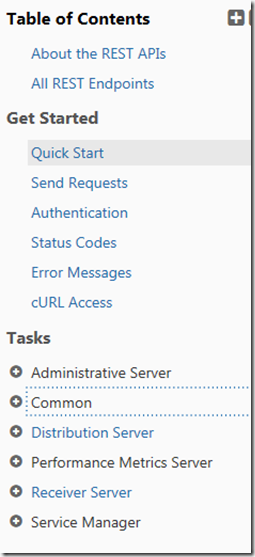
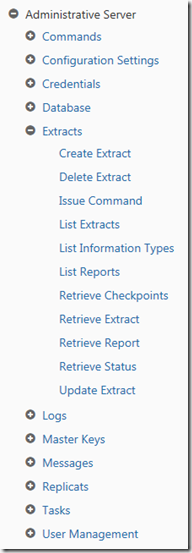
从上面可以看出,主要按服务模块分类,各服务模块又根据包含的功能分类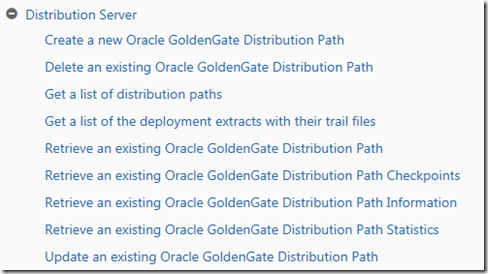
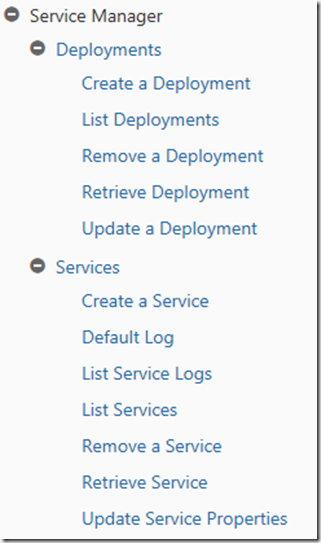
通过提供的API,可以在定制程序中实现对OGG的完全控制。
使用示例
创建用户
curl -i -X POST -u admin:admin -H "Accept: application/json" -d "{\"credential\":\"test\",\"info\":\"fullname\"}" http://192.168.89.132:9101/services/v2/authorizations/user/test
或者把数据保存到文件后引用
curl -i -X POST -u admin:admin -H "Accept: application/json" --data @Q:\data.json http://192.168.89.132:9101/services/v2/authorizations/user/caidl
data.json:
|
{ "credential":"test", "info":"test user #3" } |
删除用户
curl -i -X DELETE -u admin:admin -H "Accept: application/json" http://192.168.89.132:9101/services/v2/authorizations/user/test
response
|
HTTP/1.1 401 Unauthorized Content-Security-Policy: script-src 'self' 'unsafe-eval' 'unsafe-inline' X-Frame-Options: SAMEORIGIN X-XSS-Protection: 1; mode=block X-Content-Type-Options: nosniff Cache-Control: max-age=0, no-cache, no-store, must-revalidate Pragma: no-cache Expires: 0 Set-Cookie: ogg.sca…; Domain=192.168.89.132; Path=/; HttpOnly Content-Type: application/json Content-Length: 559 {"$schema":"api:standardResponse","links":[{"href":"http://192.168.89.132:9101/services/v2/authorizations/user/test","mediaType":"application/json","rel":"canonical"},{"href":"http://192.168.89.132:9101/services/v2/authorizations/user/test","mediaType":"application/json","rel":"self"}],"messages":[{"$schema":"ogg:message","code":"OGG-12070","issued":"2017-12-23T12:06:42Z","severity":"ERROR","title":"'test' cannot be located in the user database for the specified role. 'user'.","type":http://www.w3.org/Protocols/rfc2616/rfc2616-sec10.html#sec10.4.2}]} |
创建extract
ogg_ext.json
| {
"config":[ "Extract EXT2", "ExtTrail X2 Format Release 12.3", "UseridAlias ggsrc", "Table tkggadmin.*;" ], "source":{ "tranlogs":"classic" }, "credentials":{ "alias":"ggsrc" }, "registration":"default", "begin":"now", "targets":[ { "name":"X2" } ] } |
curl -i -X POST -u admin:admin -H "Accept: application/json" --data @Q:\ogg_ext.json http://192.168.89.132:9101/services/v2/extracts/EXT2
获取各个服务的信息
[oracle@ol73 ~]$ curl -i -X GET -u admin:admin -H "Content-Type: application/json" http://192.168.89.132:9100/services/v2/deployments/demo1/services
| HTTP/1.1 200 OK
Content-Security-Policy: script-src 'self' 'unsafe-eval' 'unsafe-inline' X-Frame-Options: SAMEORIGIN X-XSS-Protection: 1; mode=block X-Content-Type-Options: nosniff Cache-Control: max-age=0, no-cache, no-store, must-revalidate Pragma: no-cache Expires: 0 Set-Cookie: =; Domain=192.168.89.132; Path=/; HttpOnly Content-Type: application/json Content-Length: 1764 {"$schema":"api:standardResponse","links":[{"href":"http://192.168.89.132:9100/services/v2/deployments/demo1/services","mediaType":"application/json","rel":"canonical"},{"href":"http://192.168.89.132:9100/services/v2/deployments/demo1/services","mediaType":"application/json","rel":"self"},{"href":"http://192.168.89.132:9100/services/v2/metadata-catalog/services","mediaType":"application/schema+json","rel":"describedby"}],"messages":[],"response":{"$schema":"ogg:collection","items":[{"$schema":"ogg:collectionItem","links":[{"href":"http://192.168.89.132:9100/services/v2/deployments/demo1/services","mediaType":"application/json","rel":"parent"},{"href":"http://192.168.89.132:9100/services/v2/deployments/demo1/services/adminsrvr","mediaType":"application/json","rel":"canonical"}],"name":"adminsrvr"},{"$schema":"ogg:collectionItem","links":[{"href":"http://192.168.89.132:9100/services/v2/deployments/demo1/services","mediaType":"application/json","rel":"parent"},{"href":"http://192.168.89.132:9100/services/v2/deployments/demo1/services/distsrvr","mediaType":"application/json","rel":"canonical"}],"name":"distsrvr"},{"$schema":"ogg:collectionItem","links":[{"href":"http://192.168.89.132:9100/services/v2/deployments/demo1/services","mediaType":"application/json","rel":"parent"},{"href":"http://192.168.89.132:9100/services/v2/deployments/demo1/services/pmsrvr","mediaType":"application/json","rel":"canonical"}],"name":"pmsrvr"},{"$schema":"ogg:collectionItem","links":[{"href":"http://192.168.89.132:9100/services/v2/deployments/demo1/services","mediaType":"application/json","rel":"parent"},{"href":"http://192.168.89.132:9100/services/v2/deployments/demo1/services/recvsrvr","mediaType":"application/json","rel":"canonical"}],"name":"recvsrvr"}]}} |
获取admin server 信息
[oracle@ol73 ~]$ curl -i -X GET -u admin:admin -H "Content-Type: application/json" http://192.168.89.132:9100/services/v2/deployments/demo1/services/adminsrvr
|
HTTP/1.1 200 OK Content-Security-Policy: script-src 'self' 'unsafe-eval' 'unsafe-inline' X-Frame-Options: SAMEORIGIN X-XSS-Protection: 1; mode=block X-Content-Type-Options: nosniff Cache-Control: max-age=0, no-cache, no-store, must-revalidate Pragma: no-cache Expires: 0 Set-Cookie: sruY=; Domain=192.168.89.132; Path=/; HttpOnly Content-Type: application/json Content-Length: 798 {"$schema":"api:standardResponse","links":[{"href":"http://192.168.89.132:9100/services/v2/deployments/demo1/services/adminsrvr","mediaType":"application/json","rel":"canonical"},{"href":"http://192.168.89.132:9100/services/v2/deployments/demo1/services/adminsrvr","mediaType":"application/json","rel":"self"},{"href":"http://192.168.89.132:9100/services/v2/metadata-catalog/service","mediaType":"application/schema+json","rel":"describedby"}],"messages":[],"response":{"$schema":"ogg:service","config":{"authorizationDetails":{"common":{"allow":["Basic","x-Cert"]}},"authorizationEnabled":true,"legacyProtocolEnabled":true,"network":{"serviceListeningPort":9101},"security":false,"taskManagerEnabled":true,"workerThreadCount":5},"configForce":true,"enabled":true,"quiet":true,"status":"running"}} |
至此,有关goldengate 12.3 micorservice architect的介绍到此结束。
GoldenGate 12.3 MA架构介绍系列(4)–Restful API介绍的更多相关文章
- GoldenGate 12.3 MA架构介绍系列(1) - 安装
GoldenGate 12.3微服务架构与传统架构的区别可参考: http://www.cnblogs.com/margiex/p/7439574.html 下载地址:http://www.oracl ...
- GoldenGate 12.3 MA架构介绍系列(2) - 数据同步测试
安装配置可参考上一篇:http://www.cnblogs.com/margiex/p/8071957.html 安装完成之后,会自动启动ServiceManager服务,此时,可以通过浏览器访问. ...
- GoldenGate 12.3 MA架构介绍系列(5) - 静默安装
软件下载地址 http://www.oracle.com/technetwork/middleware/goldengate/downloads/index.html 下载基于MicroService ...
- GoldenGate 12.3 MA架构介绍系列(3) - 各功能模块介绍
在新版的ogg 12.3 microservice architect中,提供了4个不同的服务模块和命令行模块. Admin Server: 负责连接用户.trandata, checkpoint的添 ...
- RESTful API - 介绍
目录 RESTful API 介绍 RESTful介绍 RESTful API设计指南 API与用户的通信协议 域名 版本(Versioning) 路径(Endpoint) 浏览器请求方式(metho ...
- Spring Boot 2.x 编写 RESTful API (一) RESTful API 介绍 & RestController
用Spring Boot编写RESTful API 学习笔记 RESTful API 介绍 REST 是 Representational State Transfer 的缩写 所有的东西都是资源,所 ...
- python 全栈开发,Day95(RESTful API介绍,基于Django实现RESTful API,DRF 序列化)
昨日内容回顾 1. rest framework serializer(序列化)的简单使用 QuerySet([ obj, obj, obj]) --> JSON格式数据 0. 安装和导入: p ...
- nova创建虚拟机源码分析系列之一 restful api
开始学习openstack源码,源码文件多,分支不少.按照学习的方法走通一条线是最好的,而网上推荐的最多的就是nova创建虚机的过程.从这一条线入手,能够贯穿openstack核心服务.写博文仅做学习 ...
- Restful api介绍
网络应用程序,分为前端和后端两个部分.当前的发展趋势,就是前端设备层出不穷(手机.平板.桌面电脑.其他专用设备......). 因此,必须有一种统一的机制,方便不同的前端设备与后端进行通信.这导致AP ...
随机推荐
- 004-js-md5
参看地址:https://www.bootcdn.cn/blueimp-md5/
- EOS 开发终极神器-vscode (你绝对找不到的干货)
https://eosfans.io/topics/323 前言:最近一直苦于EOS开发没有好用的IDE,用了很多,试了很多,都让人觉得有些差强人意.于是乎笔者在经过,长时间的查找实践中,终于找到了e ...
- NN中BP推导及w不能初始化为0
转自:为什么w不能初始化为0,而是要随机初始化?https://zhuanlan.zhihu.com/p/27190255 通俗理解BP.https://zhuanlan.zhihu.com/p/24 ...
- 【LeetCode每天一题】Median of Two Sorted Arrays(两数组中的中位数)
There are two sorted arrays nums1 and nums2 of size m and n respectively. Find the median of the tw ...
- Photoshop去图片水印——适用复杂图片上有水印
该方法适合复杂图片上有水印的,不过这个只适合水印只是文字而没有背景的那种.不是所有的水印图片都适合处理.下面是处理前后的对照 工具/原料 photoshop8.0 方法/步骤 1 打开需要 ...
- MySQL数据类型--与MySQL零距离接触2-14MySQL默认约束
创建一个数据表,多加一个字段sex性别,1男,2女,3保密.默认的是3,也就是保密. 但是查看表的时候,会将默认值3赋予这个字段.
- HttpClient超时设置setConnectionTimeout和setSoTimeout
http是基于TCP/IP进行通信的,tcp通过3次握手建立连接,并最终以4次挥手终止通信. 知乎上对三次握手和四次挥手有如下解释: 作者:知乎用户链接:https://www.zhihu.com/q ...
- exec函数族的作用与讲解
apue看到第八章,对exec函数族的理解一直都很混乱,总觉得不对劲儿,其实不能理解的先暂时跳过,看到后面,再结合实例也就慢慢的理解了. 以下内容转自:http://www.cppblog.com/p ...
- vue中使用kindeditor富文本编辑器
1.去官网下载kindeditor 2.将其放在一个名为kindeditor的文件夹里,并且将它放在vue里的static文件夹下 3.创建kindeditor.vue <template> ...
- LA 2218 Triathlon(半平面交)
Triathlon [题目链接]Triathlon [题目类型]半平面交 &题解: 做了2道了,感觉好像套路,都是二分答案,判断半平面交是否为空. 还有刘汝佳的代码总是写const +& ...