
[svc]inotify+rsync解决nfs单点问题
安装配置inotify
yum install inotify* -y

[root@n2 shell]# rpm -qa|grep inotify

inotify-tools-3.14-8.el7.x86_64

inotify-tools-devel-3.14-8.el7.x86_64

[root@n2 shell]# rpm -ql inotify-tools-3.14-8.el7.x86_64

/usr/bin/inotifywait   # 监控目录变换的

/usr/bin/inotifywatch  # 统计次数的
搞清楚inotify的原理
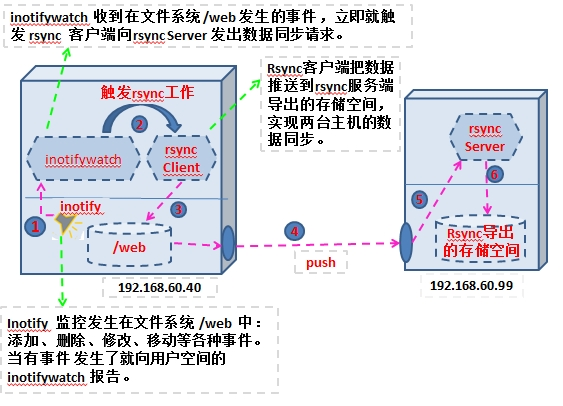
inotifywait -h #查看参数

	--format <fmt>	Print using a specified printf-like format

	              	string; read the man page for more details.

	--timefmt <fmt>	strftime-compatible format string for use with

	              	%T in --format string.

    --excludei <pattern> #排除不监控哪些

	-e|--event <event1> [ -e|--event <event2> ... ]   #这个是核心

		Listen for specific event(s).  If omitted, all events are

		listened for.

Exit status:

	0  -  An event you asked to watch for was received.

	1  -  An event you did not ask to watch for was received

	      (usually delete_self or unmount), or some error occurred.

	2  -  The --timeout option was given and no events occurred

	      in the specified interval of time.

Events:

	access		file or directory contents were read

	modify		file or directory contents were written

	attrib		file or directory attributes changed

	close_write	file or directory closed, after being opened in

	           	writeable mode

	close_nowrite	file or directory closed, after being opened in

	           	read-only mode

	close		file or directory closed, regardless of read/write mode

	open		file or directory opened

	moved_to	file or directory moved to watched directory

	moved_from	file or directory moved from watched directory

	move		file or directory moved to or from watched directory

	create		file or directory created within watched directory

	delete		file or directory deleted within watched directory

	delete_self	file or directory was deleted

	unmount		file system containing file or directory unmounted
- 同时开两个窗口, 客户端启动inotifywait监控本地的/data目录

inotifywait -mrq --timefmt '%d/%m/%y %H:%M' --format '%T%w%f' -e create /data

    -m|--monitor    保持监控monitor

    -r|--recursive  递归监控

    -q|--quiet      仅打印简单事件

    -e|--event      指定监控事件

- 在本地/data目录新建目录

可以看到日志:

17/03/18 10:56/data/11.md

思路是写shell,每次发生一次变更就执行rsync
生产中使用inotify同步
#!/usr/bin/env bash

/usr/bin/inotifywait -mrq --format '%w%f' -e create,close_write,delete /data |\

while read file;do

    cd / && rsync -az ./data/ --delete rsync_backup@192.168.14.11::data --password-file=/etc/rsync.password

done
sh inotify.sh & #这样即可

/bin/sh /root/shell/inotify.sh -& #放在rc.local里
生产rsync参数优化
[root@n2 shell]# ls -l /proc/sys/fs/inotify/

total 0

-rw-r--r-- 1 root root 0 Mar 17 10:53 max_queued_events   # 设置单进程可监控的文件数

-rw-r--r-- 1 root root 0 Mar 17 10:53 max_user_instances  # 设置每个用户可运行的iniotifywait或iniotifywatch命令的进程数

-rw-r--r-- 1 root root 0 Mar 17 10:53 max_user_watches    # 设置inotify实例时间队列可容纳的事件数量

echo "50000000" > /proc/sys/fs/inotify/max_user_watches

echo "50000000" > /proc/sys/fs/inotify/max_queued_events
inotify性能测试:
10-300K 每秒200-300个并发,基本不会延迟.如果每s同步1000个,则nfsbackup会有延迟
1,如果能接受延迟,可以用
2,可以用多个目录多个脚本同时同步.
3,可以针对文件同步,每一次只同步变化的文件,而已.但是想归想,但效果不好
4,可以用别的方案,如drbd
[svc]inotify+rsync解决nfs单点问题的更多相关文章
- NFS +inotify+rsync 实现数据的远程挂载与实时增量备份
NFS 网络文件系统 功能: 用户可以像访问自己的本地文件系统一样使用网络中的远端系统上的文件 原理: 用户进程-->RPC服务(portman)-->tcp/ip协议栈-->远端主 ...
- 【集群实战】共享存储实时备份(解决nfs共享存储的单点问题)
1. nfs存储的单点问题 如果nfs服务器宕机了,则所有的nfs客户机都会受到影响.一旦宕机,会丢失部分用户的数据.为了解决单点问题,需要实现共享存储的实时备份,即:将nfs服务端共享目录下的数据实 ...
- 项目cobbler+lamp+vsftp+nfs+数据实时同步(inotify+rsync)
先配置好epel源 [root@node3 ~]#yum install epel-release -y 关闭防火墙和selinux [root@node3 ~]#iptables -F [root@ ...
- 【转载】inotify+rsync实时同步 解决同步慢问题 (转载备记)
原文地址:http://www.ttlsa.com/web/let-infotify-rsync-fast/ 背景 我们公司在用inotify+rsync做实时同步,来解决分布式集群文件一致性的问题. ...
- 真正的inotify+rsync实时同步 彻底告别同步慢
真正的inotify+rsync实时同步 彻底告别同步慢 http://www.ttlsa.com/web/let-infotify-rsync-fast/ 背景 我们公司在用in ...
- 第2章 rsync(二):inotify+rsync详细说明和sersync
本文目录: inotify+rsync 1.1 安装inotify-tools 1.2 inotifywait命令以及事件分析 1.3 inotify应该装在哪里 1.4 inotify+rsync示 ...
- 实时同步inotify+rsync
目的,要求 nfs储存服务器与backup备份服务器,数据同步,万一nfs储存服务器挂了,数据还在 实时同步备份软件服务 1)inotify 实时同步软件 2)sersync 实时同步软件 实时同步原 ...
- rsync(二):inotify+rsync详细说明和sersync
以下是rsync系列篇: inotify+rsync 如果要实现定时同步数据,可以在客户端将rsync加入定时任务,但是定时任务的同步时间粒度并不能达到实时同步的要求.在Linux kernel 2. ...
- CentOS 6.x Inotify+Rsync
CentOS 6.x Inotify+Rsync yum -y install lrzsz [root@rsync ~]# mount -t nfs 10.6.100.75:/volume1/pace ...
随机推荐
- 缓存击穿、缓存失效及热点key的解决方案
分布式缓存是网站服务端经常用到的一种技术,在读多写少的业务场景中,通过使用缓存可以有效地支撑高并发的访问量,对后端的数据库等数据源做到很好地保护.现在市面上有很多分布式缓存,比如Redis.Memca ...
- python tkinter-按钮.标签.文本框、输入框
按钮 无功能按钮 Button的text属性显示按钮上的文本 tkinter.Button(form, text='hello button').pack() 无论怎么变幻窗体大小,永远都在窗体的最上 ...
- 洛谷 P1433 吃奶酪【DFS】+剪枝
题目链接:https://www.luogu.org/problemnew/show/P1433 题目描述 房间里放着n块奶酪.一只小老鼠要把它们都吃掉,问至少要跑多少距离?老鼠一开始在(0,0)点处 ...
- 【Java并发核心七】计划任务ScheduleExecutorService
Java中定时任务Timer工具类提供了计划任务的实现,但是Timer工具类是以队列的方式来管理线程的,并不是以线程池的方式,这样在高并发的情况下,运行效率会有点低. ScheduleExecutor ...
- 【python学习-6】异常处理
最近在网上看到了一种学习方法名叫费曼学习法,说的是学习一个东西的时候,要尝试着给别人讲出来,就是一种备课式的学习. 第一步,选择一个你想要理解的概念, 然后拿出一张白纸, 把这个概念写在白纸的最上边. ...
- 多线程学习笔记九之ThreadLocal
目录 多线程学习笔记九之ThreadLocal 简介 类结构 源码分析 ThreadLocalMap set(T value) get() remove() 为什么ThreadLocalMap的键是W ...
- Table 'performance_schema.session_status' doesn't exist错误,解决办法
Mysql升级到5.7+之后一直出现Table 'performance_schema.session_status' doesn't exist错误,解决办法 1. 进入Mysql的安装目录的bin ...
- django常用命令
model 创建表的命令 (1): python manage.py makemigrations (2): python manage.py migrate 创建一个project项目 django ...
- js实现截取或查找字符串中的子字符串
获取 答案: var string0="sss.sscdyfasdfdgfg";//sscdy获取 ,); 答案是采用substr方法. 定义和用法:substr方法用于返回一个从 ...
- react-native布局篇
原文链接:http://www.ncloud.hk/%E6%8A%80%E6%9C%AF%E5%88%86%E4%BA%AB/react-native%E5%B8%83%E5%B1%80/ 一.宽度和 ...