
[ASP.NET MVC]视图是如何呈现的 (续)
在上一篇文章中,我们知道了通过Controller执行ActionResult的Execute可以找到对应Controler对应的ViewEngine,然后在View中把Action的结果显示出来。那么ViewEngine到底是如何工作的?
我们首先从ViewReult的FindView方法开始
|
protectedoverrideViewEngineResult FindView(ControllerContext context) { ViewEngineResult result = ViewEngineCollection.FindView(context, ViewName, MasterName); if (result.View != null) { return result; } // we need to generate an exception containing all the locations we searched … } |
根据ControllerContext和ViewName,以及MasterName找到对应的ViewEngineResult对象。我们还是以HelloController和Index为例。那么这里result将返回Views/Hello/Index.cshtml编译后的实例。我们进入FindView方法,看看其具体的实现。
上述方法调用的是ViewEngineCollection类的虚方法FindView
|
publicvirtualViewEngineResult FindView(ControllerContext controllerContext, string viewName, string masterName) { if (controllerContext == null) { thrownewArgumentNullException("controllerContext"); } if (String.IsNullOrEmpty(viewName)) { thrownewArgumentException(MvcResources.Common_NullOrEmpty, "viewName"); } return Find(e => e.FindView(controllerContext, viewName, masterName, true), e => e.FindView(controllerContext, viewName, masterName, false)); } |
它又调用其私有的方法
|
privateViewEngineResult Find(Func<IViewEngine, ViewEngineResult> cacheLocator, Func<IViewEngine, ViewEngineResult> locator) { // First, look up using the cacheLocator and do not track the searched paths in non-matching view engines // Then, look up using the normal locator and track the searched paths so that an error view engine can be returned return Find(cacheLocator, trackSearchedPaths: false) ?? Find(locator, trackSearchedPaths: true); } |
然后又调用
|
privateViewEngineResult Find(Func<IViewEngine, ViewEngineResult> lookup, bool trackSearchedPaths) { // Returns // 1st result // OR list of searched paths (if trackSearchedPaths == true) // OR null ViewEngineResult result; List<string> searched = null; if (trackSearchedPaths) { searched = newList<string>(); } foreach (IViewEngine engine in CombinedItems) { if (engine != null) { result = lookup(engine); if (result.View != null) { return result; } if (trackSearchedPaths) { searched.AddRange(result.SearchedLocations); } } } if (trackSearchedPaths) { // Remove duplicate search paths since multiple view engines could have potentially looked at the same path returnnewViewEngineResult(searched.Distinct().ToList()); } else { returnnull; } } |
注意,这里传入了一个Func<IViewEngine, ViewEngineResult>。输入一个IViewEngine类型,请注意ViewEngine是实际来自ViewEnglieCollection的属性CombinedItems。该对象来自IResolver<IEnumerable<IViewEngine>>接口的Current属性,其类型为IEnuerable<IViewEngine>。其实就是传入一个IViewEngine,然后一个ViewEngileResult。比如下面的例子:
|
// details of ViewEngineCollection.Find(*) Func<IViewEngine, System.Web.Mvc.ViewEngineResult> cacheLocator = e => e.FindView(ControllerContext, "ViewInstance", "", false); IViewEngine razorViewEngine = newRazorViewEngine(); System.Web.Mvc.ViewEngineResult result = cacheLocator(razorViewEngine); |
请注意,IResolver<IEnumerable<IViewEngine>>的默认实例是newMultiServiceResolver<IViewEngine>(() => Items);
【有待于确认】。我们查看其构造函数,可以发现
|
public MultiServiceResolver(Func<IEnumerable<TService>> itemsThunk) { if (itemsThunk == null) { thrownewArgumentNullException("itemsThunk"); } _itemsThunk = itemsThunk; _resolverThunk = () => DependencyResolver.Current; _itemsFromService = newLazy<IEnumerable<TService>>(() => _resolverThunk().GetServices<TService>()); } |
也就是说IResolver的实例来自DependencyResolver.Current。通过DependencyResolver的定义,我们得知Current属性返回的单列new DenpendencyResolver.InnerCurrent,InnerCurrent其实就是newDefaultDependencyResolver()。DedendencyResolver在创建,创建单列的DefaultDependencyResolver,并将其赋值给_current和_currentCache。_currentCache对应的是InnerCurrentCache,该属性在创建View使没有使用,在创建Controller的时候会使用。
然后,调用ViewResult对象View属性的Render方法,次方法首先会创建View实例。
|
object instance = null; Type type = BuildManager.GetCompiledType(ViewPath); if (type != null) { instance = ViewPageActivator.Create(_controllerContext, type); } |
而实际上,现在的ViewPageActivator实际是newBuildManagerViewEngine.DefaultViewPageActivator(dependencyResolver),而这里的denpendencyResolver就是DefaultDependencyResolver。
OK,我们最后来看一下instance是如何创建的:
|
_resolverThunk().GetService(type) ?? Activator.CreateInstance(type); |
请注意,_resolverThunk = () => DependencyResolver.Current;由此可见在默认的PageActivator内部的私有Fun变量_resolverThunk同样来自DefaultDependencyResolver.Current。
而instance要么DefaultDependencyResolver的GetService()创建,要么通过Activator.CreateInstance来创建,其实它们内部根本没有多少差别。
|
publicobject GetService(Type serviceType) { // Since attempting to create an instance of an interface or an abstract type results in an exception, immediately return null // to improve performance and the debugging experience with first-chance exceptions enabled. if (serviceType.IsInterface || serviceType.IsAbstract) { returnnull; } try { returnActivator.CreateInstance(serviceType); } catch { returnnull; } } |
由此可见,GetService内部还是调用了Activator.CreateInstance方法创建实例。
剖析如何获取View的具体信息
- 获取View的Path
|
// show the details of retrieving view path publicActionResult List() { string[] ViewLocationFormats = new[] { "~/Views/{1}/{0}.cshtml", "~/Views/{1}/{0}.vbhtml", "~/Views/Shared/{0}.cshtml", "~/Views/Shared/{0}.vbhtml" }; string name = "List"; string controllerName = "InnerView"; string areaName = ""; List<ViewLocation> allLocations = newList<ViewLocation>(); foreach (string viewLocationFormat in ViewLocationFormats) allLocations.Add(newViewLocation(viewLocationFormat)); DisplayModeProvider instance = DisplayModeProvider.Instance; for (int i = 0; i < allLocations.Count; i++) { ViewLocation location = allLocations[i]; string virtualPath = location.Format(name, controllerName, areaName); DisplayInfo virtualPathDisplayInfo = instance.GetDisplayInfoForVirtualPath(virtualPath, ControllerContext.HttpContext, path => FileExists(ControllerContext, path), null); if (virtualPathDisplayInfo == null) continue; var viewPath = virtualPathDisplayInfo.FilePath; Response.Write(viewPath); } return View(); } |
返回结果为:

- 获取View的对象
|
publicActionResult Activator() { // remove the dependency IDependencyResolver dependencyResolver = DependencyResolver.Current; IResolver<IViewPageActivator> activatorResolver = newSingleServiceResolver<IViewPageActivator>( () => null, newDefaultViewPageActivator(dependencyResolver), "BuildManagerViewEngine constructor"); IViewPageActivator pageActivator = activatorResolver.Current; // HelloMVC.Controllers.InnerViewController Object controllerInstance = pageActivator.Create(ControllerContext, this.GetType()); // Page instance IBuildManager buildManager = newBuildManagerWrapper(); Object viewpageInstance = pageActivator.Create(ControllerContext, buildManager.GetCompiledType("~/Views/InnerView/List.cshtml ")); Response.Write(string.Format("controllerInstance is {0} <br /> viewpageInstance is {1}", controllerInstance.GetType(), viewpageInstance.GetType())); return View(); } |
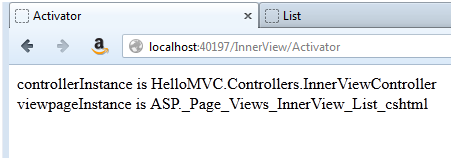
http://www.professionals-helpdesk.com/2012/08/exploring-mvc-framwwork-in-deep_10.html exploring MVC framework in deep – DependencyResolver Class
[ASP.NET MVC]视图是如何呈现的 (续)的更多相关文章
- [ASP.NET MVC]视图是如何呈现的
为了搞清楚ASP.NET MVC的请求过程,我们计划从结果追踪到源头.使用VS2012创建一个空白的ASP.NET MVC项目 然后创建一个HelloController 创建一个HelloView. ...
- ASP.NET MVC 视图(五)
ASP.NET MVC 视图(五) 前言 上篇讲解了视图中的分段概念.和分部视图的使用,本篇将会对Razor的基础语法简洁的说明一下,前面的很多篇幅中都有涉及到视图的调用,其中用了很多视图辅助器,也就 ...
- ASP.NET MVC 视图(四)
ASP.NET MVC 视图(四) 前言 上篇对于利用IoC框架对视图的实现进行依赖注入,最后还简单的介绍一下自定义的视图辅助器是怎么定义和使用的,对于Razor语法的细节和辅助器的使用下篇会说讲到, ...
- ASP.NET MVC 视图(一)
ASP.NET MVC 视图(一) 前言 从本篇开始就进入到了MVC中的视图部分,在前面的一些篇幅中或多或少的对视图和视图中的一些对象的运用进行了描述,不过毕竟不是视图篇幅说的不全面,本篇首先为大家讲 ...
- Asp.net MVC 视图引擎
Asp.net MVC视图引擎有两种: 1.ASPX View Engine 这个做过WebForm的人都清楚 设计目标:一个用于呈现Web Form页面的输出的视图引擎. 2.Razor View ...
- ASP.NET MVC 之Model的呈现
ASP.NET MVC 之Model的呈现(仅此一文系列三) 本文目的 我们来看一个小例子,在一个ASP.NET MVC项目中创建一个控制器Home,只有一个Index: public class H ...
- 【ASP.NET MVC系列】浅谈ASP.NET MVC 视图
ASP.NET MVC系列文章 [01]浅谈Google Chrome浏览器(理论篇) [02]浅谈Google Chrome浏览器(操作篇)(上) [03]浅谈Google Chrome浏览器(操作 ...
- ASP.NET MVC 视图(三)
ASP.NET MVC 视图(三) 前言 上篇对于Razor视图引擎和视图的类型做了大概的讲解,想必大家对视图的本身也有所了解,本篇将利用IoC框架对视图的实现进行依赖注入,在此过程过会让大家更了解的 ...
- ASP.NET MVC 视图(二)
ASP.NET MVC 视图(二) 前言 上篇中对于视图引擎只是做了简单的演示,对于真正的理解视图引擎的工作过程可能还有点模糊,本篇将会对由MVC框架提供给我们的Razor视图引擎的整个执行过程做一个 ...
随机推荐
- jquery预加载的几种方式
实际编写前端页面时,有时候希望一打开某个页面就加载一些方法.下面是4种预加载方法. ①页面加载完之前执行,与嵌入的js加载方式一样(写jquery插件的时候使用) (function ($) { al ...
- Linux网络编程:socket文件传输范例
基于TCP流协议的socket网络文件传输Demo: 实现:C语言功能:文件传输(可以传任何格式的文件) /********************************************** ...
- python BeautifulSoup的简单使用
官网:https://www.crummy.com/software/BeautifulSoup/bs4/doc/ 参考:https://www.cnblogs.com/yupeng/p/336203 ...
- html-轮播图
<!DOCTYPE html> <html> <head> <title>纯CSS代码实现图片轮播 </title> <meta ch ...
- 使用GPStracker自建卫星定位跟踪平台
经常有人问,我能不能手机定位跟踪谁谁谁,我能不能定位跟踪我的车,等等问题. 话说不难,确实,需要客户端和服务端结合起来就能实现. 今天就给大家介绍一下GPStracker,一套开源的定位跟踪系统,有手 ...
- GraphQL入门3(Mutation)
创建一个新的支持Mutation的Schema. var GraphQLSchema = require('graphql').GraphQLSchema; var GraphQLObjectType ...
- nginx: [emerg] bind() to 0.0.0.0:80 failed (98: Address already in use) 解决办法
遇到这个问题,是因为某个服务正在使用80端口; 解决步骤: 1.使用netstat命令查看80端口被哪个服务占用了 netstat -ant | grep 80 1 2.关闭80端口 /etc/ini ...
- Quality of Service 0, 1 & 2
来自:http://www.hivemq.com/blog/mqtt-essentials-part-6-mqtt-quality-of-service-levels Quality of Servi ...
- 使用Git添加Tag的方法
简述作为版本管理工具,Git可以对某个版本打上标签(tag),表示本版本为发行版.在发布软件,以及使用CocoaPods创建依赖库等情况时,需要对其版本使用标签注释.故简单总结一下添加tag的方式. ...
- funny
var life = { "work_hard","have_fun","make_history" };