
Linux svn服务器搭建
一、安装
yum -y install subversion
二、建立版本库目录
mkdir /var/svn/svnrepos
三、创建svn版本库
svnadmin create /var/svn/svnrepos/versionrepo
四、进入目录,有以下文件
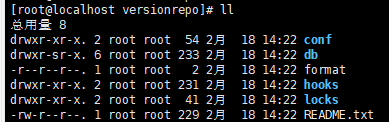
进入config目录,可以看到:

authz:负责账号权限的管理,控制账号是否读写权限
passwd:负责账号和密码的用户名单管理
svnserve.conf:svn服务器配置文件
五、用户密码、权限(重点)
编辑authz , vim authz
### This file is an example authorization file for svnserve.

### Its format is identical to that of mod_authz_svn authorization

### files.

### As shown below each section defines authorizations for the path and

### (optional) repository specified by the section name.

### The authorizations follow. An authorization line can refer to:

###  - a single user,

###  - a group of users defined in a special [groups] section,

###  - an alias defined in a special [aliases] section,

###  - all authenticated users, using the '$authenticated' token,

###  - only anonymous users, using the '$anonymous' token,

###  - anyone, using the '*' wildcard.

###

### A match can be inverted by prefixing the rule with '~'. Rules can

### grant read ('r') access, read-write ('rw') access, or no access

### ('').

[aliases]

# joe = /C=XZ/ST=Dessert/L=Snake City/O=Snake Oil, Ltd./OU=Research Institute/CN=Joe Average

[groups]

# harry_and_sally = harry,sally

# harry_sally_and_joe = harry,sally,&joe

# [/foo/bar]

# harry = rw

# &joe = r

# * =

# [repository:/baz/fuz]

# @harry_and_sally = rw

# * = r

[/]

cmingzhen = r
[/]
cmingzhen = r
表示用户只有读的权限
vim passwd
### This file is an example password file for svnserve.

### Its format is similar to that of svnserve.conf. As shown in the

### example below it contains one section labelled [users].

### The name and password for each user follow, one account per line.

[users]

# harry = harryssecret

# sally = sallyssecret

cmingzhen = 123456
形式就是
账号 = 密码
vim svnserver.conf
### This file controls the configuration of the svnserve daemon, if you

### use it to allow access to this repository.  (If you only allow

### access through http: and/or file: URLs, then this file is

### irrelevant.)

### Visit http://subversion.apache.org/ for more information.

[general]

### The anon-access and auth-access options control access to the

### repository for unauthenticated (a.k.a. anonymous) users and

### authenticated users, respectively.

### Valid values are "write", "read", and "none".

### Setting the value to "none" prohibits both reading and writing;

### "read" allows read-only access, and "write" allows complete

### read/write access to the repository.

### The sample settings below are the defaults and specify that anonymous

### users have read-only access to the repository, while authenticated

### users have read and write access to the repository.

#anon-access = read

anon-access = none

auth-access = write

### The password-db option controls the location of the password

### database file.  Unless you specify a path starting with a /,

### the file's location is relative to the directory containing

### this configuration file.

### If SASL is enabled (see below), this file will NOT be used.

### Uncomment the line below to use the default password file.

password-db = passwd

### The authz-db option controls the location of the authorization

### rules for path-based access control.  Unless you specify a path

### starting with a /, the file's location is relative to the the

### directory containing this file.  If you don't specify an

### authz-db, no path-based access control is done.

### Uncomment the line below to use the default authorization file.

authz-db = authz

### This option specifies the authentication realm of the repository.

### If two repositories have the same authentication realm, they should

### have the same password database, and vice versa.  The default realm

### is repository's uuid.

realm = /var/svn/svnrepos/versionrepo

### The force-username-case option causes svnserve to case-normalize

### usernames before comparing them against the authorization rules in the

### authz-db file configured above.  Valid values are "upper" (to upper-

### case the usernames), "lower" (to lowercase the usernames), and

### "none" (to compare usernames as-is without case conversion, which

### is the default behavior).

# force-username-case = none

[sasl]

### This option specifies whether you want to use the Cyrus SASL

### library for authentication. Default is false.

### This section will be ignored if svnserve is not built with Cyrus

### SASL support; to check, run 'svnserve --version' and look for a line

### reading 'Cyrus SASL authentication is available.'

# use-sasl = true

### These options specify the desired strength of the security layer

### that you want SASL to provide. 0 means no encryption, 1 means

### integrity-checking only, values larger than 1 are correlated

### to the effective key length for encryption (e.g. 128 means 128-bit

### encryption). The values below are the defaults.

# min-encryption = 0

# max-encryption = 256
anon-access = none: 不允许匿名访问
auth-access = write 这个这么写就可以了
password-db = passwd 设置密码文件
authz-db = authz 设置认证文件目录
realm = /var/svn/svnrepos/versionrepo 这个引到你的仓库的地址
六、
关闭防火墙,开启3690端口(这个自行百度)。执行命令:
svnserve -d -r /var/svn/svnrepos
然后就可以通过客户端访问了。先用浏览器测试访问 ip:3690/versionrepo,有东西跑出来就是成功了。接下来就是用客户端连接check out 代码了。
七、check out
svn://ip:3690/versionrepo 就可以导出来,但是现在是空的。
可以在这个文件夹添加自己的东西然后提交。
八、重启
本人一般都是用关了再开的办法:
关: 先找出进程号: ps -aux | grep svn
然后找到对应的进程号,kill -9 进程号
Linux svn服务器搭建的更多相关文章
- linux svn 服务器搭建问题
我的svn版本 svn, version 1.7.14 (r1542130) compiled Nov 20 2015, 19:25:09 Copyright (C) 2013 The Apache ...
- linux svn服务器搭建、客户端操作、备份与恢复
Subversion(SVN)是一个开源的版本控制系統,管理着随时间改变的数据.这些数据放置在一个中央资料档案库中,这个档案库很像一个普通的文件服务器,它会记住每一次文件的变动,这样就可以把档案恢复到 ...
- Linux下的SVN服务器搭建
Linux下的SVN服务器搭建 鉴于在搭建时,参考网上很多资料,网上资料在有用的同时,也坑了很多人 本文的目的,也就是想让后继之人在搭建svn服务器时不再犯错,不再被网上漫天的坑爹作品所坑害,故此总 ...
- Linux下的SVN服务器搭建
鉴于在搭建时,参考网上很多资料,网上资料在有用的同时,也坑了很多人 本文的目的,也就是想让后继之人在搭建svn服务器时不再犯错,不再被网上漫天的坑爹作品所坑害,故此总结 /******开始****** ...
- Linux下SVN服务器搭建配置
Linux下SVN服务器搭建配置 1.SVN服务安装 yum install subversion 2.创建SVN代码仓库 mkdir /data/svn svnadmin create /data/ ...
- linux 中 svn 服务器搭建 重启
鉴于在搭建时,参考网上很多资料,网上资料在有用的同时,也坑了很多人 本文的目的,也就是想让后继之人在搭建svn服务器时不再犯错,不再被网上漫天的坑爹作品所坑害,故此总结 /******开始****** ...
- Linux SVN服务器的搭建配置及分支的创建与合并
第一步:通过yum命令安装svnserve,命令如下: >yum -y install subversion 若需查看svn安装位置,可以用以下命令: >rpm -ql subversio ...
- Linux centos7 下 svn 服务器搭建
摘自:https://www.cnblogs.com/mymelon/p/5483215.html 鉴于在搭建时,参考网上很多资料,网上资料在有用的同时,也坑了很多人 本文的目的,也就是想让后继之人在 ...
- Linux下的SVN服务器搭建(转)
Linux下的SVN服务器搭建 鉴于在搭建时,参考网上很多资料,网上资料在有用的同时,也坑了很多人 本文的目的,也就是想让后继之人在搭建svn服务器时不再犯错,不再被网上漫天的坑爹作品所坑害,故此 ...
随机推荐
- oracle11g重新安装oem
1.重新设置sys sysman DBSNMP密码 alter user dbsnmp identified by **: 2.select 'drop public synonym '|| syno ...
- Android Launcher分析和修改10——HotSeat深入进阶
前面已经写过Hotseat分析的文章,主要是讲解如何在Launcher里面配置以及修改Hotseat的参数.今天主要是讲解一下如何在Hotseat里面的Item显示名称.这个小问题昨天折腾了半天,最后 ...
- Thrift 源码学习一——源码结构
Thrift 客户端与服务端的交互图 源码结构 传输层 TTransport: TTransport:客户端传输层抽象基础类,read.write.flush.close 等方法 TSocket 与 ...
- ubuntu下使用golang、qml与ubuntu sdk开发桌面应用 (简单示例)
找了很长时间go的gui库,试了gtk,准备试qt的时候发现了这个qml库,试了下很好用. ##准备工作 **1.Go 1.2RC1** go的版本应该不能低于这个,我是在1.2RC发布当天升级后发现 ...
- Java知多少(54)断言详解
断言的概念 断言用于证明和测试程序的假设,比如“这里的值大于 5”.断言可以在运行时从代码中完全删除,所以对代码的运行速度没有影响. 断言的使用 断言有两种方法: 一种是 assert<< ...
- Ubuntu 中的VI和vim
转载出处:http://blog.csdn.net/xiajun07061225/article/details/7039413 或功能键[Home]:移动到这一行的最前面字符处. $或功能键[End ...
- CentOS 7.4编译安装Nginx1.10.3+MySQL5.7.16
准备篇 一.防火墙配置 CentOS 7.x默认使用的是firewall作为防火墙,这里改为iptables防火墙. 1.关闭firewall: systemctl stop firewalld.se ...
- 内存溢出OutOfMemory
https://blog.csdn.net/hzy38324/article/details/76719105 https://blog.csdn.net/u010833547/article/det ...
- Git服务器环境搭建(打造属于自己的存储库)
Git服务器搭建之CentOs7-阿里云搭建 首先使用连接工具连接到远程的阿里云服务器CentOs7上. 1.安装Git及创建用户 # 安装Git $ yum install git # 创建一个gi ...
- Fiddler 简介
Fiddler 简介: (1) Fiddler 是一个抓包工具,主要用来对 HTTP 请求进行分析,浏览器按 F12 也可以进行抓包,但是比较轻量,不支持一些复杂的抓包:(2) WireShark 工 ...