
Nginx与keepalived实现高可用
主keepalived设置
#安装keepalived

[root@localhost ~]# yum -y install keepalived

#安装nginx

[root@localhost ~]# yum -y install nginx

——————————————————————————————————

#keepalived配置文件

[root@localhost ~]# vim /etc/keepalived/keepalived.conf

! Configuration File for keepalived

global_defs {

   notification_email {

     acassen@firewall.loc

     failover@firewall.loc

     sysadmin@firewall.loc

   }

   notification_email_from Alexandre.Cassen@firewall.loc

   smtp_server 192.168.200.1

   smtp_connect_timeout

   router_id LVS_DEVEL

   vrrp_skip_check_adv_addr

   vrrp_strict

   vrrp_garp_interval

   vrrp_gna_interval

}

vrrp_script check_nginx {  #引入脚本文件

    script "/shell/nginx_check.sh"

    interval

    weight -

}

vrrp_instance VI_1 {

    state MASTER   #主

    interface eno16777728 #心跳网卡

    virtual_router_id

    priority  #优先级

    advert_int

    authentication {

        auth_type PASS

        auth_pass

    }

    virtual_ipaddress {

        192.168.200.201

    }

    track_script {

    check_nginx     #引用脚本

    }

}

______________________________________________________

#装备测试文件

[root@localhost ~]# echo "" > /usr/share/nginx/html/index.html
从keepalived设置
#安装keepalived

[root@localhost ~]# yum -y install keepalived

#安装nginx

[root@localhost ~]# yum -y install nginx

______________________________________________________________

#keepalived配置文件

[root@localhost ~]# vim /etc/keepalived/keepalived.conf

! Configuration File for keepalived

global_defs {

   notification_email {

     acassen@firewall.loc

     failover@firewall.loc

     sysadmin@firewall.loc

   }

   notification_email_from Alexandre.Cassen@firewall.loc

   smtp_server 192.168.200.1

   smtp_connect_timeout

   router_id LVS_DEVEL

   vrrp_skip_check_adv_addr

   vrrp_strict

   vrrp_garp_interval

   vrrp_gna_interval

}

vrrp_script check_nginx {

    script "/shell/nginx_check.sh"

    interval

    weight -

}

vrrp_instance VI_1 {

    state BACKUP

    interface eno16777728

    virtual_router_id

    priority

    advert_int

    authentication {

        auth_type PASS

        auth_pass

    }

    virtual_ipaddress {

        192.168.200.201

    }

    track_script {

    check_nginx

    }

}

———————————————————————————————————

#准备测试文件

[root@localhost ~]# echo "" > /usr/share/nginx/html/index.html
三、测试
主服务器工作时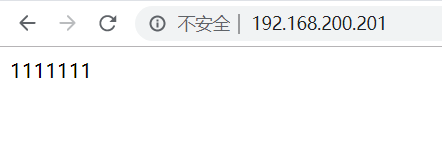
从服务器工作时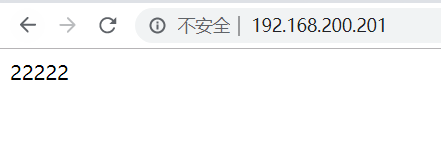
四、nginx_check.sh shell文件,配置为周期性任务
#!/bin/bash

count="$(ps -C nginx --no-header|wc -l)"

if [ $count -eq  ];then

        systemctl restart nginx

        sleep

        if [ ps -c nginx --no-header|wc -l -eq  ];then

                systemctl stop keepalived

        fi

fi

#给脚本加执行权限

chmod +x /shell/nginx_check.sh
Nginx与keepalived实现高可用的更多相关文章
- nginx与keepalived实现高可用+Apache实现负载均衡
nginx与keepalived实现高可用 本实验使用了四台虚拟机 两台需要安装nginx及keepalived 两台安装Apache nginx可以源码安装也可以用yum安装nginx yum安装n ...
- docker 部署nginx 使用keepalived 部署高可用
一.体系架构 在Keepalived + Nginx高可用负载均衡架构中,keepalived负责实现High-availability (HA) 功能控制前端机VIP(虚拟网络地址),当有设备发生故 ...
- nginx使用keepalived实现高可用
环境: 主:linux-node1 110.0.0.137 备:linux-node2 110.0.0.138 VIP: 110.0.0.120 NGINX安装: # rpm -ivh h ...
- 架构设计:负载均衡层设计方案(6)——Nginx + Keepalived构建高可用的负载层
1.概述 前两遍文章中,我们一直在说后文要介绍Nginx + Keepalived的搭建方式.这篇文章开始,我们就来兑现前文的承诺,后续的两篇文章我们将介绍Nginx + Keepalived和 LV ...
- Keepalived+LVS+Nginx负载均衡之高可用
Keepalived+LVS+Nginx负载均衡之高可用 上一篇写了nginx负载均衡,此篇实现高可用(HA).系统整体设计是采用Nginx做负载均衡,若出现Nginx单机故障,则导致整个系统无法正常 ...
- Nginx keepalived实现高可用负载均衡详细配置步骤
Keepalived是一个免费开源的,用C编写的类似于layer3, 4 & 7交换机制软件,具备我们平时说的第3层.第4层和第7层交换机的功能.主要提供loadbalancing(负载均衡) ...
- Nginx系列二:(Nginx Rewrite 规则、Nginx 防盗链、Nginx 动静分离、Nginx+keepalived 实现高可用)
一.Nginx Rewrite 规则 1. Nginx rewrite规则 Rewrite规则含义就是某个URL重写成特定的URL(类似于Redirect),从某种意义上说为了美观或者对搜索引擎友好, ...
- Keepalived+Nginx实现负载均衡高可用
一.负载均衡高可用 Nginx作为负载均衡器,所有请求都到了Nginx,可见Nginx处于非常重点的位置,如果Nginx服务器宕机后端web服务将无法提供服务,影响严重. 为了避免负载均衡服务器的宕机 ...
- suse 12 编译部署Keepalived + nginx 为 kube-apiserver 提供高可用
文章目录 编译部署nginx 下载nginx源码包 编译nginx 配置nginx.conf 配置nginx为systemctl管理 分发nginx二进制文件和配置文件 启动kube-nginx服务 ...
随机推荐
- 设计模式之单例模式(Java)
单例模式 问题 多线程操作同一对象保证对象的一致性 解决思路 只有一次实例化过程,产生一个实例化对象,并提供返回该对象的方法. 单例模式的分类 1 饿汉式 在加载类的时候就产生实例对象 public ...
- SSM框架之SpringMVC(6)异常处理及拦截器
SpringMVC(6)异常处理及拦截器 1.异常处理 1.1.异常处理的思路 系统中异常包括两类:预期异常和运行时异常 RuntimeException,前者通过捕获异常从而获取异常信息,后者主 ...
- DOMContentLoaded vs jQuery.ready vs onload, How To Decide When Your Code Should Run
At a Glance Script tags have access to any element which appears before them in the HTML. jQuery.rea ...
- English:2019100401_Suffix"ery"
Ax_introduction source a Frech mean to "state,quality,act,place where etc" 1)After the ver ...
- Java学习笔记-Java文件操作流
day03 输入输出流:读入写出 节点流: 有明确的来源和去向 往往对字节操作 节点流又叫低级流.字节流 处理流: 没有明确的来源和去向 往往对低级流或其他高级流进行操作,不能独立 ...
- kubernets学习笔记
K8s CI :持续集成CD :持续交付 D --DeliveryCD :持续部署 D --Deployment Kubernetes Cluster: Masters: (3-host 做高可用)A ...
- mysql数据库基础SQL语句总结篇
常用的sql增删改查语句 创建数据库:create database db_name character set utf8;删除数据库:drop database db_name;切换数据库:use ...
- PHPStorm 初遇 Xdebug (xdebug代码调试及性能分析)
centos 7 下PHP7安装xdebug # 下载xdebug wget https://xdebug.org/files/xdebug-2.7.2.tgz # 解压 tar -xf xdebug ...
- chrome 插件备份
- Python深拷贝与浅拷贝区别
可变类型 如list.dict等类型,改变容器内的值,容器地址不变. 不可变类型 如元组.字符串,原则上不可改变值.如果要改变对象的值,是将对象指向的地址改变了 浅拷贝 对于可变对象来说,开辟新的内存 ...