
【ASP.NET Core学习】基础
public static IHostBuilder CreateDefaultBuilder(string[] args)

{

    var builder = new HostBuilder();

    builder.UseContentRoot(Directory.GetCurrentDirectory());

    builder.ConfigureHostConfiguration(config =>

    {

        config.AddEnvironmentVariables(prefix: "DOTNET_");

        if (args != null)

        {

            config.AddCommandLine(args);

        }

    });

    builder.ConfigureAppConfiguration((hostingContext, config) =>

    {

        var env = hostingContext.HostingEnvironment;

        config.AddJsonFile("appsettings.json", optional: true, reloadOnChange: true)

                .AddJsonFile($"appsettings.{env.EnvironmentName}.json", optional: true, reloadOnChange: true);

        if (env.IsDevelopment() && !string.IsNullOrEmpty(env.ApplicationName))

        {

            var appAssembly = Assembly.Load(new AssemblyName(env.ApplicationName));

            if (appAssembly != null)

            {

                config.AddUserSecrets(appAssembly, optional: true);

            }

        }

        config.AddEnvironmentVariables();

        if (args != null)

        {

            config.AddCommandLine(args);

        }

    })

    .ConfigureLogging((hostingContext, logging) =>

    {

        var isWindows = RuntimeInformation.IsOSPlatform(OSPlatform.Windows);

        // IMPORTANT: This needs to be added *before* configuration is loaded, this lets

        // the defaults be overridden by the configuration.

        if (isWindows)

        {

            // Default the EventLogLoggerProvider to warning or above

            logging.AddFilter<EventLogLoggerProvider>(level => level >= LogLevel.Warning);

        }

        logging.AddConfiguration(hostingContext.Configuration.GetSection("Logging"));

        logging.AddConsole();

        logging.AddDebug();

        logging.AddEventSourceLogger();

        if (isWindows)

        {

            // Add the EventLogLoggerProvider on windows machines

            logging.AddEventLog();

        }

    })

    .UseDefaultServiceProvider((context, options) =>

    {

        var isDevelopment = context.HostingEnvironment.IsDevelopment();

        options.ValidateScopes = isDevelopment;

        options.ValidateOnBuild = isDevelopment;

    });

    return builder;

}
从上面代码看见这个方法帮我们处理的东西
- 设置根目录为当前目录
- 配置应用程序配置
- 配置日志配置
- 配置依赖注入
配置文件
{"Setting": {

    "Name": "Wilson",

    "Date": "2019-10-28"

  }

}
public IndexModel(IConfiguration config)

{
  var name = config.GetSection("Setting").GetValue<string>("Name");
  var date = config.GetSection("Setting").GetValue<DateTime>("Date");
}
二、通过IOptions注入
1. 在ConfigureServices添加Options支持和配置文件节点
public void ConfigureServices(IServiceCollection services)

{

    services.AddOptions();

    services.Configure<Setting>(Configuration.GetSection("Setting"));

}
2. 构造函数里面注入IOptions
public IndexModel(IOptions<Setting> option)

{

    var setting = option.Value;

    var name = setting.Name;

    var date = setting.Date;

}
三、绑定到类
public IndexModel(IConfiguration config)

{

    var setting = new Setting();

    config.GetSection("Setting").Bind(setting);

}
或者
public IndexModel(IConfiguration config)

{

    var setting = config.GetSection("Setting").Get<Setting>();

}
四、页面读取配置文件
@using Microsoft.Extensions.Configuration

@inject IConfiguration Configuration

<div class="text-center">

    <h3 class="color-red">@Configuration["Setting:Name"]</h3>

</div>
我个人推荐使用第二种方式去读取配置文件,因为它隐藏了如何读取配置文件,只需要获取我们关心的信息即可,第一,第三种都在不同地方使用硬编码的方式去读取(当然可以设置为常量),而且还有知道节点信息
开发过程通常不同环境是读取不同配置,ASPNET Core提供了一个很方便的方法去实现
截取源代码部分代码
var env = hostingContext.HostingEnvironment;

config.AddJsonFile("appsettings.json", optional: true, reloadOnChange: true)

      .AddJsonFile($"appsettings.{env.EnvironmentName}.json", optional: true, reloadOnChange: true);
它会除了加载appsettings.json外,还好加载当前环境的json配置文件
我们只要设置当前环境环境变量(项目设置或者当前电脑环境变量添加ASPNETCORE_ENVIRONMENT)就能加载不同配置文件
日志
截取源代码部分代码
var isWindows = RuntimeInformation.IsOSPlatform(OSPlatform.Windows);

// IMPORTANT: This needs to be added *before* configuration is loaded, this lets

// the defaults be overridden by the configuration.

if (isWindows)

{

    // Default the EventLogLoggerProvider to warning or above

    logging.AddFilter<EventLogLoggerProvider>(level => level >= LogLevel.Warning);

}

logging.AddConfiguration(hostingContext.Configuration.GetSection("Logging"));

logging.AddConsole();

logging.AddDebug();

logging.AddEventSourceLogger();

if (isWindows)

{

    // Add the EventLogLoggerProvider on windows machines

    logging.AddEventLog();

}
除了配置基本信息,Windows操作系统Waring以上的日志还会写入到EventLog
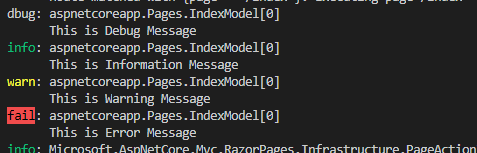
现在我们写几个日志试试,因为配置了,所以我们直接注入logger写日志
public IndexModel(Logger<IndexModel> logger)

{

    logger.LogDebug("This is Debug Message");

    logger.LogInformation("This is Information Message");

    logger.LogWarning("This is Warning Message");

    logger.LogError("This is Error Message");

}
看到控制台输出
接着我们看看Evenlog有没有写入数

我们看到警告基本以上的日志都写入了
实际应用我们通常需要将日志写入文本文件,但ASPNET Core内置日志记录提供程序并没有提供文本文件的程序,但是我们可以使用第三方日志组件(例如log4net)
1. Nuget添加log4net(Microsoft.Extensions.Logging.Log4Net.AspNetCore)
2. 调用日志记录框架提供的 ILoggerFactory 扩展方法。
public void Configure(IApplicationBuilder app, IWebHostEnvironment env, ILoggerFactory loggerFactory)

{

    loggerFactory.AddLog4Net();

    .....

}
访问一下,看看写入日志
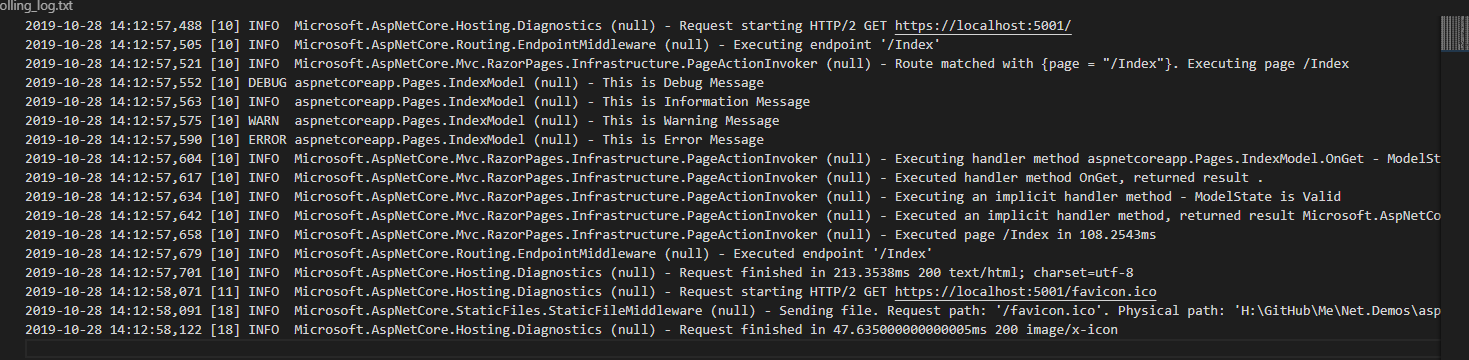
可以看到,除了中间那段是我们写入的,其他都是系统的日志
在源代码里面可以看到,系统是添加Logging节点的配置信息,里面可以指定日志类别
"Logging": {

  "LogLevel": {

    "Default": "Debug",

    "System": "Warning",

    "Microsoft": "Warning"

  }

}

可以设置莫一类别的日志级别
"Logging": {

  "LogLevel": {

    "Default": "Debug",

    "System": "Warning",

    "Microsoft": "Information",

    "Microsoft.AspNetCore.Mvc":"Warning"

  }

}
只能设置大的级别再设置小级别才有效,即若只设置Microsoft.AspNetCore.Mvc,不设置Microsoft就不起效果
依赖注入
ASP.NET Core 支持依赖关系注入 (DI) 软件设计模式,这是一种在类及其依赖关系之间实现控制反转 (IoC) 的技术。
在CreateDefaultBuilder最后是一个扩展方法,使用默认的DefaultServiceProviderFactory
ASP.NET Core 提供三种注册方法
| 方法 | 描述 | 适合场景 |
|---|---|---|
|
AddTransient
|
每次从服务容器进行请求时都是新建 | 轻量级、 无状态的服务 |
|
AddScoped
|
每次请求/连接是同一个对象 | Http请求需要保持同一个对象 |
|
AddSingleton
|
单例 | 单例对象 |
一、添加服务
public void ConfigureServices(IServiceCollection services)

{
   ...


    services.AddSingleton<IServiceSingleton, ServiceSingleton>();

    services.AddScoped<IServiceScoped, ServiceScoped>();

    services.AddTransient<IServicesTransient, ServicesTransient>();

    services.AddTransient<IMyService, MyService>();

}
public IndexModel(IServicesTransient servicesTransient)

{

}
2. 通过IHttpContextAccessor获取
2.1 注入IHttpContextAccessor
public void ConfigureServices(IServiceCollection services)

{

    services.AddSingleton<IHttpContextAccessor, HttpContextAccessor>();

}
2.2 通过RequestServices获取
var service = accessor.HttpContext.RequestServices.GetService<IMyService>();

service.Run();
三、使用第三方容器
内置的容器实现最基本的注入方式,已经能满足大部分项目需求。但是有时候可能需要特殊的需求,例如属性注入、基于名称的注入、自定义生存期管理等功能时,内置的容器不支持这些功能。下面介绍如何替换内置容器,以Autofac为例
1. nuget 添加Autofac.Extensions.DependencyInjection
2. Program替换容器
public static IHostBuilder CreateHostBuilder(string[] args) =>

            Host.CreateDefaultBuilder(args)

                .UseServiceProviderFactory(new AutofacServiceProviderFactory())
3. Startup类添加方法ConfigureContainer
public void ConfigureContainer(ContainerBuilder builder)

{

    builder.RegisterType<HttpContextAccessor>().As<IHttpContextAccessor>();

    builder.RegisterAssemblyTypes(System.Reflection.Assembly.GetExecutingAssembly())

            .Where(m => m.Name.Contains("Service"))

            .AsImplementedInterfaces()

            .InstancePerLifetimeScope();

}
这是ASPNET Core 3.0+版本替换Autofac方法,3.0不支持返回IServiceProvider
【ASP.NET Core学习】基础的更多相关文章
- 2019年ASP.NET Core学习路线
- [先决条件] + C# + Entity Framework + ASP.NET Core + SQL 基础知识 - [通用开发技能] + 学习 GIT, 在 GitHub 中创建开源项目 + 掌 ...
- ASP.NET Core学习系列
.NET Core ASP.NET Core ASP.NET Core学习之一 入门简介 ASP.NET Core学习之二 菜鸟踩坑 ASP.NET Core学习之三 NLog日志 ASP.NET C ...
- WebAPI调用笔记 ASP.NET CORE 学习之自定义异常处理 MySQL数据库查询优化建议 .NET操作XML文件之泛型集合的序列化与反序列化 Asp.Net Core 轻松学-多线程之Task快速上手 Asp.Net Core 轻松学-多线程之Task(补充)
WebAPI调用笔记 前言 即时通信项目中初次调用OA接口遇到了一些问题,因为本人从业后几乎一直做CS端项目,一个简单的WebAPI调用居然浪费了不少时间,特此记录. 接口描述 首先说明一下,基于 ...
- ASP.NET Core学习指导
ASP.NET Core 学习指导 "工欲善其事必先利其器".我们在做事情之前,总应该做好充分的准备,熟悉自己的工具.就像玩游戏有一些最低配置一样,学习一个新的框架,也需要有一些基 ...
- Asp.Net Core学习笔记:入门篇
Asp.Net Core 学习 基于.Net Core 2.2版本的学习笔记. 常识 像Django那样自动检查代码更新,自动重载服务器(太方便了) dotnet watch run 托管设置 设置项 ...
- ASP.NET Core学习零散记录
赶着潮流听着歌,学着.net玩着Core 竹子学Core,目前主要看老A(http://www.cnblogs.com/artech/)和tom大叔的博客(http://www.cnblogs.com ...
- ASP.NET Core学习之一 入门简介
一.入门简介 在学习之前,要先了解ASP.NET Core是什么?为什么?很多人学习新技术功利心很重,恨不得立马就学会了. 其实,那样做很不好,马马虎虎,联系过程中又花费非常多的时间去解决所遇到的“问 ...
- ASP.NET Core学习总结(1)
经过那么长时间的学习,终于想给自己这段时间的学习工作做个总结了.记得刚开始学习的时候,什么资料都没有,光就啃文档.不过,值得庆幸的是,自己总算还有一些Web开发的基础.至少ASP.NET的WebFor ...
- ASP.NET Core学习之三 NLog日志
上一篇简单介绍了日志的使用方法,也仅仅是用来做下学习,更何况只能在console输出. NLog已是日志库的一员大佬,使用也简单方便,本文介绍的环境是居于.NET CORE 2.0 ,目前的版本也只有 ...
随机推荐
- 利用 DFA 算法实现文字过滤
一.DEA 算法简介 在实现文字过滤的算法中,DFA是唯一比较好的实现算法. DFA 全称为:Deterministic Finite Automaton,即确定有穷自动机.其特征为:有一个有限状态集 ...
- XAF Architecture XAF架构
Applications built with the eXpressApp Framework are comprised of several functional blocks. The dia ...
- JS---DOM---part4 课程介绍 & part3 复习
part4 课程介绍 事件 1. 绑定事件的区别 2. 移除绑定事件的方式及区别和兼容代码 3. 事件的三个阶段 4. 事件冒泡 5. 为同一个元素绑定多个不同的事件,指向的是同一个事件处理函数 6. ...
- Apache—伪静态配置和使用
https://jingyan.baidu.com/article/ae97a646a7419bbbfd461df7.html https://blog.csdn.net/weixin_4178205 ...
- Jenkins工程中SQL语句执行的方法
前言 网上很多jenkins工程中基于shell或批处理方式调用sql文件执行sql命令的方式,大部分都是需要基于sql文件来完成的,因此在sql语句发生变化时需要去jenkins服务端修改对应的sq ...
- DG重启之后主备数据不同步
问题描述:本来配置好的DG第二天重启之后,发现主备库数据不能同步,在主库上执行日志切换以及创建表操作都传不到备库上,造成这种错误的原因是主库实例断掉后造成备库日志与主库无法实时接收 主库:orcl ...
- eth-trunk学习笔记
转载自https://blog.csdn.net/qq_38265137/article/details/80404340
- WSL2(预览版)体验笔记
WSL2安装 WSL2在今年5月份Microsoft Build大会上发布了,但至今Windows10一直没收到更新推送,我想这么久过去就算没进入正式,至少也到了RC版了吧,于是开始折腾准备体验一把. ...
- C语言笔记 01_介绍&环境设置&编译执行
前言 我是作为一个前端开发者入的编程世界,经过时间的推移,我发现对于编程底层的一些东西一点都不了解,只拘泥于表面,所以想尝试学习C语言然后进一步了解底层机制. 介绍 C 语言是一种通用的.面向过程式的 ...
- C# -- 多线程向同一文件写入
1. 多线程向同一文件写入Log. public delegate void AsyncLog(string str1, string str2); private void Test() { Con ...