
SpringBoot中如何灵活的实现接口数据的加解密功能?
数据是企业的第四张名片,企业级开发中少不了数据的加密传输,所以本文介绍下SpringBoot中接口数据加密、解密的方式。
本文目录
一、加密方案介绍
对接口的加密解密操作主要有下面两种方式:
- 自定义消息转换器
优势:仅需实现接口,配置简单。
劣势:仅能对同一类型的MediaType进行加解密操作,不灵活。
- 使用spring提供的接口RequestBodyAdvice和ResponseBodyAdvice
优势:可以按照请求的Referrer、Header或url进行判断,按照特定需要进行加密解密。
比如在一个项目升级的时候,新开发功能的接口需要加解密,老功能模块走之前的逻辑不加密,这时候就只能选择上面的第二种方式了,下面主要介绍下第二种方式加密、解密的过程。
二、实现原理
RequestBodyAdvice可以理解为在@RequestBody之前需要进行的 操作,ResponseBodyAdvice可以理解为在@ResponseBody之后进行的操作,所以当接口需要加解密时,在使用@RequestBody接收前台参数之前可以先在RequestBodyAdvice的实现类中进行参数的解密,当操作结束需要返回数据时,可以在@ResponseBody之后进入ResponseBodyAdvice的实现类中进行参数的加密。
RequestBodyAdvice处理请求的过程:
RequestBodyAdvice源码如下:
 public interface RequestBodyAdvice {

    boolean supports(MethodParameter methodParameter, Type targetType,
            Class<? extends HttpMessageConverter<?>> converterType);

    HttpInputMessage beforeBodyRead(HttpInputMessage inputMessage, MethodParameter parameter,
            Type targetType, Class<? extends HttpMessageConverter<?>> converterType) throws IOException;

    Object afterBodyRead(Object body, HttpInputMessage inputMessage, MethodParameter parameter,
            Type targetType, Class<? extends HttpMessageConverter<?>> converterType);

    @Nullable
    Object handleEmptyBody(@Nullable Object body, HttpInputMessage inputMessage, MethodParameter parameter,
            Type targetType, Class<? extends HttpMessageConverter<?>> converterType);

}
调用RequestBodyAdvice实现类的部分代码如下:
 protected <T> Object readWithMessageConverters(HttpInputMessage inputMessage, MethodParameter parameter,
            Type targetType) throws IOException, HttpMediaTypeNotSupportedException, HttpMessageNotReadableException {

        MediaType contentType;
        boolean noContentType = false;
        try {
            contentType = inputMessage.getHeaders().getContentType();
        }
        catch (InvalidMediaTypeException ex) {
            throw new HttpMediaTypeNotSupportedException(ex.getMessage());
        }
        if (contentType == null) {
            noContentType = true;
            contentType = MediaType.APPLICATION_OCTET_STREAM;
        }

        Class<?> contextClass = parameter.getContainingClass();
        Class<T> targetClass = (targetType instanceof Class ? (Class<T>) targetType : null);
        if (targetClass == null) {
            ResolvableType resolvableType = ResolvableType.forMethodParameter(parameter);
            targetClass = (Class<T>) resolvableType.resolve();
        }

        HttpMethod httpMethod = (inputMessage instanceof HttpRequest ? ((HttpRequest) inputMessage).getMethod() : null);
        Object body = NO_VALUE;

        EmptyBodyCheckingHttpInputMessage message;
        try {
            message = new EmptyBodyCheckingHttpInputMessage(inputMessage);

            for (HttpMessageConverter<?> converter : this.messageConverters) {
                Class<HttpMessageConverter<?>> converterType = (Class<HttpMessageConverter<?>>) converter.getClass();
                GenericHttpMessageConverter<?> genericConverter =
                        (converter instanceof GenericHttpMessageConverter ? (GenericHttpMessageConverter<?>) converter : null);
                if (genericConverter != null ? genericConverter.canRead(targetType, contextClass, contentType) :
                        (targetClass != null && converter.canRead(targetClass, contentType))) {
                    if (logger.isDebugEnabled()) {
                        logger.debug("Read [" + targetType + "] as \"" + contentType + "\" with [" + converter + "]");
                    }
                    if (message.hasBody()) {
                        HttpInputMessage msgToUse =
                                getAdvice().beforeBodyRead(message, parameter, targetType, converterType);
                        body = (genericConverter != null ? genericConverter.read(targetType, contextClass, msgToUse) :
                                ((HttpMessageConverter<T>) converter).read(targetClass, msgToUse));
                        body = getAdvice().afterBodyRead(body, msgToUse, parameter, targetType, converterType);
                    }
                    else {
                        body = getAdvice().handleEmptyBody(null, message, parameter, targetType, converterType);
                    }
                    break;
                }
            }
        }
        catch (IOException ex) {
            throw new HttpMessageNotReadableException("I/O error while reading input message", ex);
        }

        if (body == NO_VALUE) {
            if (httpMethod == null || !SUPPORTED_METHODS.contains(httpMethod) ||
                    (noContentType && !message.hasBody())) {
                return null;
            }
            throw new HttpMediaTypeNotSupportedException(contentType, this.allSupportedMediaTypes);
        }

        return body;
    }
从上面源码可以到当converter.canRead()和message.hasBody()都为true的时候,会调用beforeBodyRead()和afterBodyRead()方法,所以我们在实现类的afterBodyRead()中添加解密代码即可。
ResponseBodyAdvice处理响应的过程:
ResponseBodyAdvice源码如下:
public interface ResponseBodyAdvice<T> {

    boolean supports(MethodParameter returnType, Class<? extends HttpMessageConverter<?>> converterType);

    @Nullable
    T beforeBodyWrite(@Nullable T body, MethodParameter returnType, MediaType selectedContentType,
            Class<? extends HttpMessageConverter<?>> selectedConverterType,
            ServerHttpRequest request, ServerHttpResponse response);

}
调用ResponseBodyAdvice实现类的部分代码如下:
if (selectedMediaType != null) {
            selectedMediaType = selectedMediaType.removeQualityValue();
            for (HttpMessageConverter<?> converter : this.messageConverters) {
                GenericHttpMessageConverter genericConverter =
                        (converter instanceof GenericHttpMessageConverter ? (GenericHttpMessageConverter<?>) converter : null);
                if (genericConverter != null ?
                        ((GenericHttpMessageConverter) converter).canWrite(declaredType, valueType, selectedMediaType) :
                        converter.canWrite(valueType, selectedMediaType)) {
                    outputValue = (T) getAdvice().beforeBodyWrite(outputValue, returnType, selectedMediaType,
                            (Class<? extends HttpMessageConverter<?>>) converter.getClass(),
                            inputMessage, outputMessage);
                    if (outputValue != null) {
                        addContentDispositionHeader(inputMessage, outputMessage);
                        if (genericConverter != null) {
                            genericConverter.write(outputValue, declaredType, selectedMediaType, outputMessage);
                        }
                        else {
                            ((HttpMessageConverter) converter).write(outputValue, selectedMediaType, outputMessage);
                        }
                        if (logger.isDebugEnabled()) {
                            logger.debug("Written [" + outputValue + "] as \"" + selectedMediaType +
                                    "\" using [" + converter + "]");
                        }
                    }
                    return;
                }
            }
        }
从上面源码可以到当converter.canWrite()为true的时候,会调用beforeBodyWrite()方法,所以我们在实现类的beforeBodyWrite()中添加解密代码即可。
三、实战
新建一个spring boot项目spring-boot-encry,按照下面步骤操作。
- pom.xml中引入jar
  <dependencies>
        <dependency>
            <groupId>org.springframework.boot</groupId>
            <artifactId>spring-boot-starter-web</artifactId>
        </dependency>

        <dependency>
            <groupId>org.projectlombok</groupId>
            <artifactId>lombok</artifactId>
            <optional>true</optional>
        </dependency>
        <dependency>
            <groupId>org.springframework.boot</groupId>
            <artifactId>spring-boot-starter-test</artifactId>
            <scope>test</scope>
            <exclusions>
                <exclusion>
                    <groupId>org.junit.vintage</groupId>
                    <artifactId>junit-vintage-engine</artifactId>
                </exclusion>
            </exclusions>
        </dependency>

        <dependency>
            <groupId>com.alibaba</groupId>
            <artifactId>fastjson</artifactId>
            <version>1.2.60</version>
        </dependency>
    </dependencies>
- 请求参数解密拦截类
DecryptRequestBodyAdvice代码如下:
/**
 * 请求参数 解密操作
 *
 * @Author: Java碎碎念
 * @Date: 2019/10/24 21:31
 *
 */
@Component
@ControllerAdvice(basePackages = "com.example.springbootencry.controller")
@Slf4j
public class DecryptRequestBodyAdvice implements RequestBodyAdvice {

    @Override
    public boolean supports(MethodParameter methodParameter, Type targetType, Class<? extends HttpMessageConverter<?>> converterType) {
        return true;
    }

    @Override
    public HttpInputMessage beforeBodyRead(HttpInputMessage inputMessage, MethodParameter methodParameter, Type targetType, Class<? extends HttpMessageConverter<?>> selectedConverterType) throws IOException {
        return inputMessage;
    }

    @Override
    public Object afterBodyRead(Object body, HttpInputMessage inputMessage, MethodParameter parameter, Type targetType, Class<? extends HttpMessageConverter<?>> converterType) {
        String dealData = null;
        try {
            //解密操作
            Map<String,String> dataMap = (Map)body;
            String srcData = dataMap.get("data");
            dealData = DesUtil.decrypt(srcData);
        } catch (Exception e) {
            log.error("异常!", e);
        }
        return dealData;
    }

    @Override
    public Object handleEmptyBody(@Nullable Object var1, HttpInputMessage var2, MethodParameter var3, Type var4, Class<? extends HttpMessageConverter<?>> var5) {
        log.info("3333");
        return var1;
    }

}
- 响应参数加密拦截类
EncryResponseBodyAdvice代码如下:
/**
 * 请求参数 解密操作
 *
 * @Author: Java碎碎念
 * @Date: 2019/10/24 21:31
 *
 */
@Component
@ControllerAdvice(basePackages = "com.example.springbootencry.controller")
@Slf4j
public class EncryResponseBodyAdvice implements ResponseBodyAdvice<Object> {

    @Override
    public boolean supports(MethodParameter returnType, Class<? extends HttpMessageConverter<?>> converterType) {
        return true;
    }

    @Override
    public Object beforeBodyWrite(Object obj, MethodParameter returnType, MediaType selectedContentType,
                                  Class<? extends HttpMessageConverter<?>> selectedConverterType, ServerHttpRequest serverHttpRequest,
                                  ServerHttpResponse serverHttpResponse) {
        //通过 ServerHttpRequest的实现类ServletServerHttpRequest 获得HttpServletRequest
        ServletServerHttpRequest sshr = (ServletServerHttpRequest) serverHttpRequest;
        //此处获取到request 是为了取到在拦截器里面设置的一个对象 是我项目需要,可以忽略
        HttpServletRequest request = sshr.getServletRequest();

        String returnStr = "";

        try {
            //添加encry header,告诉前端数据已加密
            serverHttpResponse.getHeaders().add("encry", "true");
            String srcData = JSON.toJSONString(obj);
            //加密
            returnStr = DesUtil.encrypt(srcData);
            log.info("接口={},原始数据={},加密后数据={}", request.getRequestURI(), srcData, returnStr);

        } catch (Exception e) {
            log.error("异常!", e);
        }
        return returnStr;
    }
- 新建controller类
TestController代码如下:
/**
 * @Author: Java碎碎念
 * @Date: 2019/10/24 21:40
 */
@RestController
public class TestController {

    Logger log = LoggerFactory.getLogger(getClass());

    /**
     * 响应数据 加密
     */
    @RequestMapping(value = "/sendResponseEncryData")
    public Result sendResponseEncryData() {
        Result result = Result.createResult().setSuccess(true);
        result.setDataValue("name", "Java碎碎念");
        result.setDataValue("encry", true);
        return result;
    }

    /**
     * 获取 解密后的 请求参数
     */
    @RequestMapping(value = "/getRequestData")
    public Result getRequestData(@RequestBody Object object) {
        log.info("controller接收的参数object={}", object.toString());
        Result result = Result.createResult().setSuccess(true);
        return result;
    }
}
- 其他类在源码中,后面有github地址
四、测试
- 访问响应数据加密接口
使用postman发请求http://localhost:8888/sendResponseEncryData,可以看到返回数据已加密,请求截图如下:
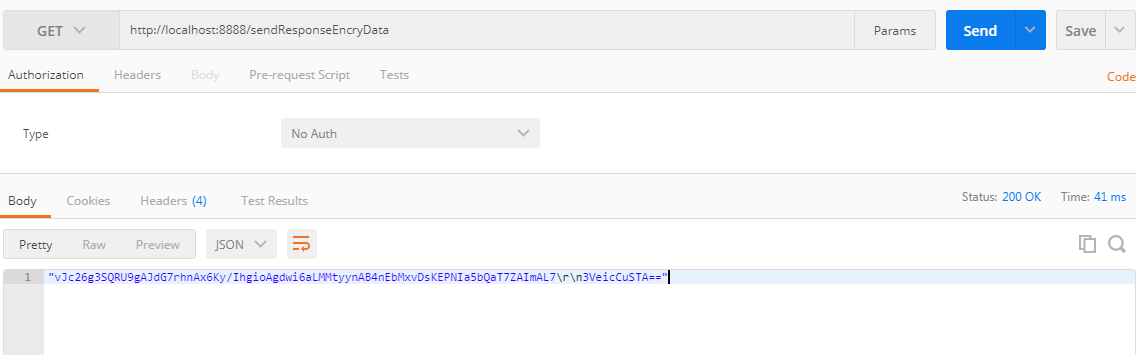
响应数据加密截图
后台也打印相关的日志,内容如下:
接口=/sendResponseEncryData

原始数据={"data":{"encry":true,"name":"Java碎碎念"},"success":true}

加密后数据=vJc26g3SQRU9gAJdG7rhnAx6Ky/IhgioAgdwi6aLMMtyynAB4nEbMxvDsKEPNIa5bQaT7ZAImAL7
3VeicCuSTA==
- 访问请求数据解密接口
使用postman发请求http://localhost:8888/getRequestData,可以看到请求数据已解密,请求截图如下:
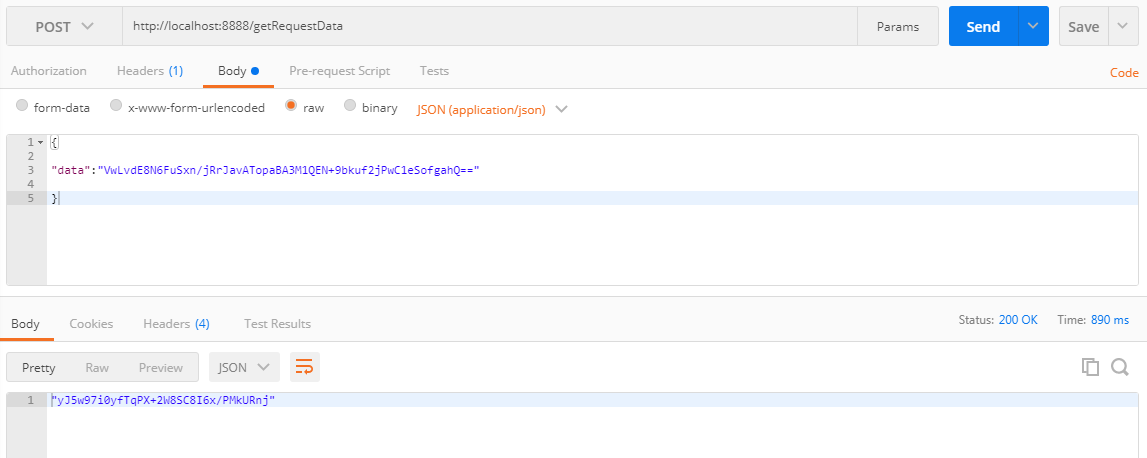
请求数据解密截图
后台也打印相关的日志,内容如下:
接收到原始请求数据={"data":"VwLvdE8N6FuSxn/jRrJavATopaBA3M1QEN+9bkuf2jPwC1eSofgahQ=="}

解密后数据={"name":"Java碎碎念","des":"请求参数"}
五、踩到的坑
- 测试解密请求参数时候,请求体一定要有数据,否则不会调用实现类触发解密操作。
到此SpringBoot中如何灵活的实现接口数据的加解密功能的功能已经全部实现,有问题欢迎留言沟通哦!
完整源码地址: https://github.com/suisui2019/springboot-study
推荐阅读
1.SpringBoot中神奇的@Enable*注解?
2.Java中Integer.parseInt和Integer.valueOf,你还傻傻分不清吗?
3.SpringCloud系列-整合Hystrix的两种方式
4.SpringCloud系列-利用Feign实现声明式服务调用
5.手把手带你利用Ribbon实现客户端的负载均衡
限时领取免费Java相关资料,涵盖了Java、Redis、MongoDB、MySQL、Zookeeper、Spring Cloud、Dubbo/Kafka、Hadoop、Hbase、Flink等高并发分布式、大数据、机器学习等技术。
关注下方公众号即可免费领取:

SpringBoot中如何灵活的实现接口数据的加解密功能?的更多相关文章
- 使用JDK中的安全包对数据进行加解密
本文以使用DES对称加密算法为例使用jdk对数据进行加密解密. 首先需要了解Provider类,它是jdk引入的密码服务提供者概念,实现了Java安全性的一部分或者全部.Provider 可能实现的服 ...
- 一个注解搞定SpringBoot接口定制属性加解密
前言 上个月公司另一个团队做的新项目上线后大体上运行稳定,但包括研发负责人在内的两个人在项目上线后立马就跳槽了,然后又交接给了我这个「垃圾回收人员」. 本周甲方另一个厂家的监控平台扫描到我们这个项目某 ...
- Mybatis使用TypeHandler实现数据的加解密转换
参考: MyBatis之TypeHandler: https://www.cnblogs.com/yulinfeng/p/5991170.html 前段时间收到这么个需求:为安全起见,要求在数据库 ...
- java 根据秘钥,对数据进行加解密
package test; import com.alibaba.fastjson.JSONObject; import sun.misc.BASE64Decoder; import sun.misc ...
- SpringBoot中Post请求提交富文本数据量过大参数无法获取的问题
yml增加配置 # 开发环境配置 server: tomcat: max-http-form-post-size: -1
- 前后端通信中使用Ajax与后台接口api交互(以登录功能为例)
一.查阅开发文档 首先,要做这个功能前,我们必须先查阅后台接口文档,了解使用登录接口时,需要提交哪些参数,并且接口使用返回的数据. 这里我使用了一个返回json格式数据的登录接口为例,讲解怎么使用Aj ...
- Vue中结合Flask与Node.JS的异步加载功能实现文章的分页效果
你好!欢迎阅读我的博文,你可以跳转到我的个人博客网站,会有更好的排版效果和功能. 此外,本篇博文为本人Pushy原创,如需转载请注明出处:http://blog.pushy.site/posts/15 ...
- SpringBoot中如何优雅的读取yml配置文件?
YAML是一种简洁的非标记语言,以数据为中心,使用空白.缩进.分行组织数据,从而使得表示更加简洁易读.本文介绍下YAML的语法和SpringBoot读取该类型配置文件的过程. 本文目录 一.YAML基 ...
- springboot中,使用redisTemplate操作redis
知识点: springboot中整合redis springboot中redisTemplate的使用 redis存数据时,key出现乱码问题 一:springboot中整合redis (1)pom. ...
随机推荐
- PTA A1014
A1014 Waiting in Line (30 分) 题目内容 Suppose a bank has N windows open for service. There is a yellow l ...
- 当 K8s 集群达到万级规模,阿里巴巴如何解决系统各组件性能问题?
作者 | 阿里云容器平台高级技术专家 曾凡松(逐灵) 本文主要介绍阿里巴巴在大规模生产环境中落地 Kubernetes 的过程中,在集群规模上遇到的典型问题以及对应的解决方案,内容包含对 etcd.k ...
- (一)spring 高级装配-@Profile
1.环境与profile 示例:数据库配置 a:通过@Bean注解,通过EmbeddedDatabaseBuilder创建数据源 @Bean(destroyMethod="shutdown& ...
- Hadoop入门 之 Hadoop的安装
1.安装Hadoop的三大步骤 答:1.Linux环境,2.JDK环境,3.配置Hadoop. 2.安装Linux 答:利用阿里云,腾讯云等公有云.选择Ubuntu进行安装,然后利用小putty进行操 ...
- supervisor模块学习使用
supervisor组件 supervisord supervisord是supervisor的服务端程序. 启动supervisor程序自身,启动supervisor管理的子进程,响应来自clien ...
- 第八届蓝桥杯java b组第一题
1,标题: 购物单 小明刚刚找到工作,老板人很好,只是老板夫人很爱购物.老板忙的时候经常让小明帮忙到商场代为购物.小明很厌烦,但又不好推辞. 这不,XX大促销又来了!老板夫人开出了长长的购 ...
- 环境搭建-CentOS集群搭建
环境搭建-CentOS集群搭建 写在前面 最近有许多小伙伴问我,大数据的hadoop分布式集群该如何去搭建.所以,想着,就写一篇博客,帮助到更多刚入门大数据的人.本博客会一步一步带你实现一个Hadoo ...
- tomcat 配置jvm参数
设置JVM参数在Windows下,在$TOMCAT_HOME/bin/catalina.bat,Linux下,在$TOMCAT_HOME/bin/catalina.sh的前面,增加如下设置: JAVA ...
- $(document).height 与$(window).height的区别
$(document).scrollTop() 获取垂直滚动的距离 (即当前滚动的地方的窗口顶端到整个页面顶端的距离)$(document).scrollLeft() 这是获取水平滚动条的距离 要获取 ...
- 尝鲜 vue3.x 新特性 - CompositionAPI
0. 基础要求 了解常见的 ES6 新特性 ES6 的导入导出语法 解构赋值 箭头函数 etc... 了解 vue 2.x 的基本使用 组件 常用的指令 生命周期函数 computed.watch.r ...