
NLP(一)语料库和WordNet
原文链接:http://www.one2know.cn/nlp1/
- 访问语料库
NLTK数据库的安装:http://www.nltk.org/data.html
NLTK语料库列表:http://www.nltk.org/nltk_data/
内部访问(以Reuters corpus为例):
import nltk

from nltk.corpus import reuters

# 下载路透社语料库

nltk.download('reuters')

# 查看语料库的内容

files = reuters.fileids()

print(files)

# 访问其中一个文件的内容

words14826 = reuters.words(['test/14826'])

print(words14826[:20])

# 输出主题(一共90个)

reutersGenres = reuters.categories()

print(reutersGenres)

# 访问一个主题,一句话一行输出

for w in reuters.words(categories=['tea']):

    print(w + ' ',end='')

    if w is '.':

        print()
- 下载外部语料库并访问(以影评数据集为例)
下载数据集:http://www.cs.cornell.edu/people/pabo/movie-review-data/
本例下载了1000积极和1000消极的影评
from nltk.corpus import CategorizedPlaintextCorpusReader

# 读取语料库

reader = CategorizedPlaintextCorpusReader(r'D:\PyCharm 5.0.3\WorkSpace\2.NLP\语料库\1.movie_review_data_1000\txt_sentoken',r'.*\.txt',cat_pattern=r'(\w+)/*')

print(reader.categories())

print(reader.fileids())

# 语料库分成两类

posFiles = reader.fileids(categories='pos')

negFiles = reader.fileids(categories='neg')

# 从posFiles或negFiles随机选择一个文件

from random import randint

fileP = posFiles[randint(0,len(posFiles)-1)]

fileN = negFiles[randint(0,len(negFiles)-1)]

# 逐句打印随机的选择文件

for w in reader.words(fileP):

    print(w + ' ',end='')

    if w is '.':

        print()

for w in reader.words(fileN):

    print(w + ' ',end='')

    if w is '.':

        print()
CategorizedPlaintextCorpusReader类通过参数的设置,从内部将样本加载到合适的位置
- 语料库中的词频计算和计数分布分析
以布朗语料库为例:布朗大学 500个文本 15个类
import nltk

from nltk.corpus import brown

nltk.download('brown')

# 查看brown中的类别

print(brown.categories())

# 挑选出三种类别,并获取其中的疑问词

genres = ['fiction','humor','romance']

whwords = ['what','which','how','why','when','where','who']

# 迭代器分别分析3种类

for i in range(0,len(genres)):

    genre = genres[i]

    print()

    print("Analysing '"+ genre + "' wh words")

    genre_text = brown.words(categories = genre)

    print(genre_text)

    # 返回输入单词对象的wh类及对应的频率

    fdist = nltk.FreqDist(genre_text)

    for wh in whwords:

        print(wh + ':',fdist[wh],end='  ')

    print()
输出:
['adventure', 'belles_lettres', 'editorial', 'fiction', 'government', 'hobbies', 'humor', 'learned', 'lore', 'mystery', 'news', 'religion', 'reviews', 'romance', 'science_fiction']

Analysing 'fiction' wh words

['Thirty-three', 'Scotty', 'did', 'not', 'go', 'back', ...]

what: 128  which: 123  how: 54  why: 18  when: 133  where: 76  who: 103

Analysing 'humor' wh words

['It', 'was', 'among', 'these', 'that', 'Hinkle', ...]

what: 36  which: 62  how: 18  why: 9  when: 52  where: 15  who: 48

Analysing 'romance' wh words

['They', 'neither', 'liked', 'nor', 'disliked', 'the', ...]

what: 121  which: 104  how: 60  why: 34  when: 126  where: 54  who: 89
- 网络文本和聊天文本的词频分布
import nltk

from nltk.corpus import webtext

# nltk.download('webtext')

print(webtext.fileids())

# 选择一个数据文件,并计算频率分布,获得FreqDist的对象fdist

fileid = 'singles.txt'  # 个人广告

wbt_words = webtext.words(fileid)

fdist = nltk.FreqDist(wbt_words)

# 获取高频单词及其计数

print('最多出现的词 "' , fdist.max() , '" :' , fdist[fdist.max()])

# 获取所有单词的计数

print(fdist.N())

# 找出最常见的10个词

print(fdist.most_common(10))

# 将单词和频率制成表格

print(fdist.tabulate(5))

# 将单词和频率制成分布图

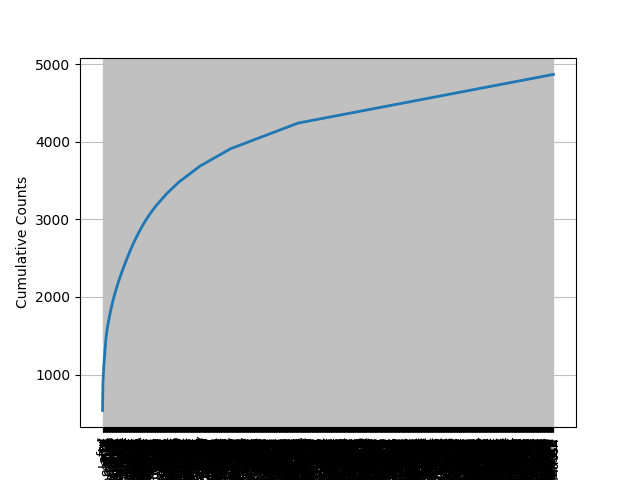
fdist.plot(cumulative=True) # 计数显示,cumulative=percents为百分比显示
输出:
['firefox.txt', 'grail.txt', 'overheard.txt', 'pirates.txt', 'singles.txt', 'wine.txt']

最多出现的词 " , " : 539

4867

[(',', 539), ('.', 353), ('/', 110), ('for', 99), ('and', 74), ('to', 74), ('lady', 68), ('-', 66), ('seeks', 60), ('a', 52)]

  ,   .   / for and

539 353 110  99  74

None
累计计数分布图:
- 使用WordNet获取一个词的不同含义
# import nltk

# nltk.download('wordnet')

from nltk.corpus import wordnet as wn

chair = 'chair'

# 输出chair的各种含义

chair_synsets = wn.synsets(chair)

print('Chair的意思:',chair_synsets,'\n\n')

# 迭代输出 含义,含义的定义,同义词条,例句

for synset in chair_synsets:

    print(synset,': ')

    print('Definition: ',synset.definition())

    print('Lemmas/Synonymous words: ',synset.lemma_names())

    print('Example: ',synset.examples(),'\n')
输出:
Chair的意思: [Synset('chair.n.01'), Synset('professorship.n.01'), Synset('president.n.04'), Synset('electric_chair.n.01'), Synset('chair.n.05'), Synset('chair.v.01'), Synset('moderate.v.01')]

Synset('chair.n.01') :

Definition:  a seat for one person, with a support for the back

Lemmas/Synonymous words:  ['chair']

Example:  ['he put his coat over the back of the chair and sat down']

Synset('professorship.n.01') :

Definition:  the position of professor

Lemmas/Synonymous words:  ['professorship', 'chair']

Example:  ['he was awarded an endowed chair in economics']

Synset('president.n.04') :

Definition:  the officer who presides at the meetings of an organization

Lemmas/Synonymous words:  ['president', 'chairman', 'chairwoman', 'chair', 'chairperson']

Example:  ['address your remarks to the chairperson']

Synset('electric_chair.n.01') :

Definition:  an instrument of execution by electrocution; resembles an ordinary seat for one person

Lemmas/Synonymous words:  ['electric_chair', 'chair', 'death_chair', 'hot_seat']

Example:  ['the murderer was sentenced to die in the chair']

Synset('chair.n.05') :

Definition:  a particular seat in an orchestra

Lemmas/Synonymous words:  ['chair']

Example:  ['he is second chair violin']

Synset('chair.v.01') :

Definition:  act or preside as chair, as of an academic department in a university

Lemmas/Synonymous words:  ['chair', 'chairman']

Example:  ['She chaired the department for many years']

Synset('moderate.v.01') :

Definition:  preside over

Lemmas/Synonymous words:  ['moderate', 'chair', 'lead']

Example:  ['John moderated the discussion']
- 上位词和下位词
下位词更具体,上位词更一般(泛化)
以bed.n.01和woman.n.01为例:
from nltk.corpus import wordnet as wn

woman = wn.synset('woman.n.01')

bed = wn.synset('bed.n.01')

# 返回据有直系关系的同义词集,上位词!

print(woman.hypernyms())

woman_paths = woman.hypernym_paths()

# 打印从根节点到woman.n.01的所有路径

for idx,path in enumerate(woman_paths):

    print('\n\nHypernym Path :',idx+1)

    for synset in path:

        print(synset.name(),',',end='')

# 更具体的术语,下位词!

types_of_bed = bed.hyponyms()

print('\n\nTypes of beds(Hyponyms): ',types_of_bed)

# 打印出更有意义的lemma(词条)

print('\n',sorted(set(lemma.name() for synset in types_of_bed for lemma in synset.lemmas())))
输出:
[Synset('adult.n.01'), Synset('female.n.02')]

Hypernym Path : 1

entity.n.01 ,physical_entity.n.01 ,causal_agent.n.01 ,person.n.01 ,adult.n.01 ,woman.n.01 ,

Hypernym Path : 2

entity.n.01 ,physical_entity.n.01 ,object.n.01 ,whole.n.02 ,living_thing.n.01 ,organism.n.01 ,person.n.01 ,adult.n.01 ,woman.n.01 ,

Hypernym Path : 3

entity.n.01 ,physical_entity.n.01 ,causal_agent.n.01 ,person.n.01 ,female.n.02 ,woman.n.01 ,

Hypernym Path : 4

entity.n.01 ,physical_entity.n.01 ,object.n.01 ,whole.n.02 ,living_thing.n.01 ,organism.n.01 ,person.n.01 ,female.n.02 ,woman.n.01 ,

Types of beds(Hyponyms):  [Synset('berth.n.03'), Synset('built-in_bed.n.01'), Synset('bunk.n.03'), Synset('bunk_bed.n.01'), Synset('cot.n.03'), Synset('couch.n.03'), Synset('deathbed.n.02'), Synset('double_bed.n.01'), Synset('four-poster.n.01'), Synset('hammock.n.02'), Synset('marriage_bed.n.01'), Synset('murphy_bed.n.01'), Synset('plank-bed.n.01'), Synset('platform_bed.n.01'), Synset('sickbed.n.01'), Synset('single_bed.n.01'), Synset('sleigh_bed.n.01'), Synset('trundle_bed.n.01'), Synset('twin_bed.n.01'), Synset('water_bed.n.01')]

 ['Murphy_bed', 'berth', 'built-in_bed', 'built_in_bed', 'bunk', 'bunk_bed', 'camp_bed', 'cot', 'couch', 'deathbed', 'double_bed', 'four-poster', 'hammock', 'marriage_bed', 'plank-bed', 'platform_bed', 'sack', 'sickbed', 'single_bed', 'sleigh_bed', 'truckle', 'truckle_bed', 'trundle', 'trundle_bed', 'twin_bed', 'water_bed']
- 基于WordNet计算某种词性的多义性
以名词n为例:
from nltk.corpus import wordnet as wn

type = 'n' #动词v,副词r,形容词a

# 返回WordNet中所有type类型的同义词集

sysnets = wn.all_synsets(type)

# 将所有词条合并成一个大list

lemmas = []

for sysnet in sysnets:

    for lemma in sysnet.lemmas():

        lemmas.append(lemma.name())

# 删除重复词条,list=>set

lemmas = set(lemmas)

# 计算每个词条type类型的含义数并加到一起

count = 0

for lemma in lemmas:

    count = count + len(wn.synsets(lemma,type)) # lemma在type类型下的所有含义

# 打印所有数值

print('%s总词条数: '%(type),len(lemmas))

print('%s总含义数: '%(type),count)

print('%s平均多义性: '%(type),count/len(lemmas))
输出:
n总词条数:  119034

n总含义数:  152763

n平均多义性:  1.2833560159282222
NLP(一)语料库和WordNet的更多相关文章
- nltk安装及wordnet使用详解
环境:python2.7.10 首先安装pip 在https://pip.pypa.io/en/stable/installing/ 下载get-pip.py 然后执行 python get-pip. ...
- 自然语言处理--nltk安装及wordnet使用详解
环境:python2.7.10 首先安装pip 在https://pip.pypa.io/en/stable/installing/ 下载get-pip.py 然后执行 python get-pip. ...
- 【NLP】大数据之行,始于足下:谈谈语料库知多少
大数据之行,始于足下:谈谈语料库知多少 作者:白宁超 2016年7月20日13:47:51 摘要:大数据发展的基石就是数据量的指数增加,无论是数据挖掘.文本处理.自然语言处理还是机器模型的构建,大多都 ...
- NLP语料库
文本语料库是一个大型结构化文本的集合 NLTK包含了许多语料库: (1)古滕堡语料库 (2)网络和聊天文本 (3)布朗语料库 (4)路透社语料库 (5)就职演讲语料库 (6)标注文本语料库 词汇列表 ...
- NLP—WordNet——词与词之间的最小距离
WordNet,是由Princeton 大学的心理学家,语言学家和计算机工程师联合设计的一种基于认知语言学的英语词典.它不是光把单词以字母顺序排列,而且按照单词的意义组成一个“单词的网络”.我们这次的 ...
- lecture1-Word2vec实战班-七月在线nlp
nltk的全称是natural language toolkit,是一套基于python的自然语言处理工具集.自带语料库.词性分类库.自带分类分词等功能.强大社区支持.很多简单版wrapper 文本处 ...
- (Stanford CS224d) Deep Learning and NLP课程笔记(二):word2vec
本节课将开始学习Deep NLP的基础--词向量模型. 背景 word vector是一种在计算机中表达word meaning的方式.在Webster词典中,关于meaning有三种定义: the ...
- NLP十大里程碑
NLP十大里程碑 2.1 里程碑一:1985复杂特征集 复杂特征集(complex feature set)又叫做多重属性(multiple features)描写.语言学里,这种描写方法最早出现在语 ...
- 利用Tensorflow进行自然语言处理(NLP)系列之一Word2Vec
同步笔者CSDN博客(https://blog.csdn.net/qq_37608890/article/details/81513882). 一.概述 本文将要讨论NLP的一个重要话题:Word2V ...
随机推荐
- IrisSkin2.dll 添加皮肤
使用说明:把控件拖到你的form上,只需一行代码,即可实现整个form包括其所有控件的皮肤的更换,总共有几十套皮肤供使用,非常方便.省去你设计开发软件皮肤系统的时间和精力.全部源代码就一行: skin ...
- three出现状态200的报错
报错代码如下: {status: 200, data: {…}} "sa_SpringUserFindOneView_findPbUserByUserId"header.vue?1 ...
- eclipse Mac 下补全代码
1. 每次输入都自动提示 点击 Eclipse,使其成为第一响应者,preferences->Java->Editor->Content Assist再右下角 Auto activa ...
- 简易数据分析 08 | Web Scraper 翻页——点击「更多按钮」翻页
这是简易数据分析系列的第 8 篇文章. 我们在Web Scraper 翻页--控制链接批量抓取数据一文中,介绍了控制网页链接批量抓取数据的办法. 但是你在预览一些网站时,会发现随着网页的下拉,你需要点 ...
- darknet是如何对数据集做resize的?
在准备数据集时,darknet并不要求我们预先对图片resize到固定的size. darknet自动帮我们做了图像的resize. darknet训练前处理 本文所指的darknet版本:https ...
- Flink 从0到1学习 —— Flink 中如何管理配置?
前言 如果你了解 Apache Flink 的话,那么你应该熟悉该如何像 Flink 发送数据或者如何从 Flink 获取数据.但是在某些情况下,我们需要将配置数据发送到 Flink 集群并从中接收一 ...
- Java编程基础阶段笔记 day 07 面向对象编程(上)
面向对象编程 笔记Notes 面向对象三条学习主线 面向过程 VS 面向对象 类和对象 创建对象例子 面向对象的内存分析 类的属性:成员变量 成员变量 VS 局部变量 类的方法 方法的重载 可变个 ...
- 0R电阻在PCB布线中对布线畅通的一个小妙用
在PCB布线中,我们都会尽量节约板子空间,将元器件排布的紧密一些,难免会遇到布线不通的时候. 博主下面就来说一个关于0R电阻在PCB布线使之畅通的一个小妙用. 使用0R电阻前 假设我们这个TXD的线周 ...
- Kafka 系列(三)—— Kafka 生产者详解
一.生产者发送消息的过程 首先介绍一下 Kafka 生产者发送消息的过程: Kafka 会将发送消息包装为 ProducerRecord 对象, ProducerRecord 对象包含了目标主题和要发 ...
- java并发系列 - 第28天:实战篇,微服务日志的伤痛,一并帮你解决掉
这是java高并发系列第28篇文章. 环境:jdk1.8. 本文内容 日志有什么用? 日志存在的痛点? 构建日志系统 日志有什么用? 系统出现故障的时候,可以通过日志信息快速定位问题,修复bug,恢复 ...