
vue入门:用户管理demo1
该demo由前端请求后台服务器获取数据进行渲染
- 使用到的技术点
- 1.使用到的vue指令:
{{}}v-ifv-forv-model- 2.使用到的事件:
@click点击事件,@keyup.enter回车- 3.使用到的事件修饰符:
.prevent阻止事件默认行为- 4.使用
vue-resource发起请求获取服务端返回的数据- 5.使用生命周期函数
created(),即在页面渲染前请求用户列表- 6.自定义私有过滤器
- 7.js base64编码:
window.btoa(), base64解码:window.atob()
- 后台接口说明
获取用户信息列表
| key | value | 备注 |
|---|---|---|
| url | http://192.168.1.40:9001/hubtest/user/getUserList |
|
| method | get |
7 |
请求体
无
响应体
{

    "code":0,

    "data":[

        {

            "id":0,

            "password":"123456",

            "username":"macy"

        }

    ],

    "message":"success"

}
添加用户
| key | value | 备注 |
|---|---|---|
| url | http://192.168.1.40:9001/hubtest/user/addUser |
|
| method | post |
|
| Content-Type | application/json |
请求体
{

    "username":"macy",

    "password":"123"

}
响应体
{

    "code":0,

    "data":{

        "id":1566550425674,

        "password":"123",

        "username":"macy"

    },

    "message":"success"

}
根据用户id删除用户
| key | value | 备注 |
|---|---|---|
| url | http://192.168.1.40:9001/hubtest/user/deleteUserById/{userId} |
|
| method | get |
请求体
无
响应体
{

  "code":0,

  "data":{

      "id":0,

      "password":"123456",

      "username":"macy"

  },

  "message":"success"

}
- 实例
<!DOCTYPE html>
<html lang="en">
<head>
<meta charset="UTF-8">
<title>用户管理案例</title>
<link rel="stylesheet" href="./css/bootstrap-4.3.1.css">
<script src="./js/vue-2.4.0.js"></script>
<script src="./js//vue-resource.js"></script>
<style>
body{
font-size: 14px;
}
</style>
</head>
<body>
<div id = "app">
<!-- 提示信息 -->
<!-- 当提示信息不为空且昵称为空时,则显示 -->
<div class="alert alert-danger mt-2" v-if = "errMsg != ''">
<span>{{ errMsg }}</span>
<!-- 把提示信息置为空,则不显示 -->
<button type="button" class="close" @click = "errMsg = ''">
<span aria-hidden="true">×</span>
</button>
</div>
<!-- 添加用户 -->
<form class="form-inline mb-2 mt-2">
<div class="form-group ml-2">
<label>用户名:</label>
<input type="text" class="form-control" v-model = "username">
</div>
<div class="form-group ml-2">
<label>密码:</label>
<input type="text" class="form-control" v-model = "password">
</div>
<div class="form-group ml-2">
<input type="button" class="btn btn-primary btn-sm" value="添加" @click = "addUser">
</div>
<div class="form-group ml-2">
<!-- 回车搜索 -->
<input type="text" class="form-control" placeholder="search..." v-model = "keyword" @keyup.enter= "getFilterUserList">
</div>
</form>
<!-- 显示用户列表 -->
<table class="table table-bordered" >
<thead>
<tr>
<th>编号</th>
<th>用户名</th>
<th>密码</th>
<th>操作</th>
</tr>
</thead>
<tbody>
<tr v-for = "item in filterUserList" :key = "item.id">
<td>{{ item.id }}</td>
<td>{{ item.username }}</td>
<!-- 使用过滤器对密码进行格式化 -->
<td>{{ item.password | passwordFormat }}</td>
<td>
<!-- .prevent禁止默认行为,如果不加上,vue会报语法错误 -->
<a href="javascript:void()" class="btn btn-link btn-sm" @click.prevent = "delUser(item.id)">删除</a>
</td>
</tr>
</tbody>
</table>
</div>
<script>
var vue = new Vue({
el : '#app',
data : {
errMsg : '',//错误提示信息
keyword : '',//搜索关键字
username : '',//用户名
password : '',//密码
userList : [],//用户列表
filterUserList :[]//过滤后的用户列表
},
// 生命周期函数,当创建vue实例后,调用获取用户列表的接口
created(){
this.getUserList();
},
methods : {
//查询用户列表
getUserList(){
//调用获取用户列表接口
this.$http.get("http://192.168.1.40:9001/hubtest/user/getUserList").then(
resp => {//成功时回调
// 获取服务端返回的数据赋值到data属性的userList中
this.userList = this.filterUserList = resp.body.data;
},
resp => {//失败时回调
}
);
},
//添加用户
addUser(){
//1.对字段进行判空
if (this.username === ''){
return this.errMsg = '用户名不为空';
}
if (this.password === ''){
return this.errMsg = '密码不为空';
}
//2.调用添加用户接口
this.$http.post("http://192.168.1.40:9001/hubtest/user/addUser",{username:this.username,password:this.password}).then(
resp => {
//当添加用户成功时,重新加载用户列表
this.getUserList();
},
resp => {}
);
//3.去除错误提示信息和用户信息
this.errMsg = this.username = this.password = '';
},
//删除用户
delUser(userId){
this.$http.get("http://192.168.1.40:9001/hubtest/user/deleteUserById/"+userId).then(
resp => {
//删除用户成功时,重新加载用户列表
this.getUserList();
},
resp => {}
);
},
// 根据关键字过滤用户
getFilterUserList(){
//过滤前把用户列表添加到过滤的列表,否则一次过滤后,该数组的记录不是最初的数据
this.filterUserList = this.userList;
//根据关键字过滤
this.filterUserList = this.filterUserList.filter((item) => {
if (item.username.includes(this.keyword)){
return item;
}
});
}
},
filters:{
// 定义密码base64编码过滤器
passwordFormat(input){
//把密码明文使用base64编码
//编码:window.btoa()
//解码:window.atob()
return btoa(input);
}
}
});
</script>
</body>
</html>
- 效果
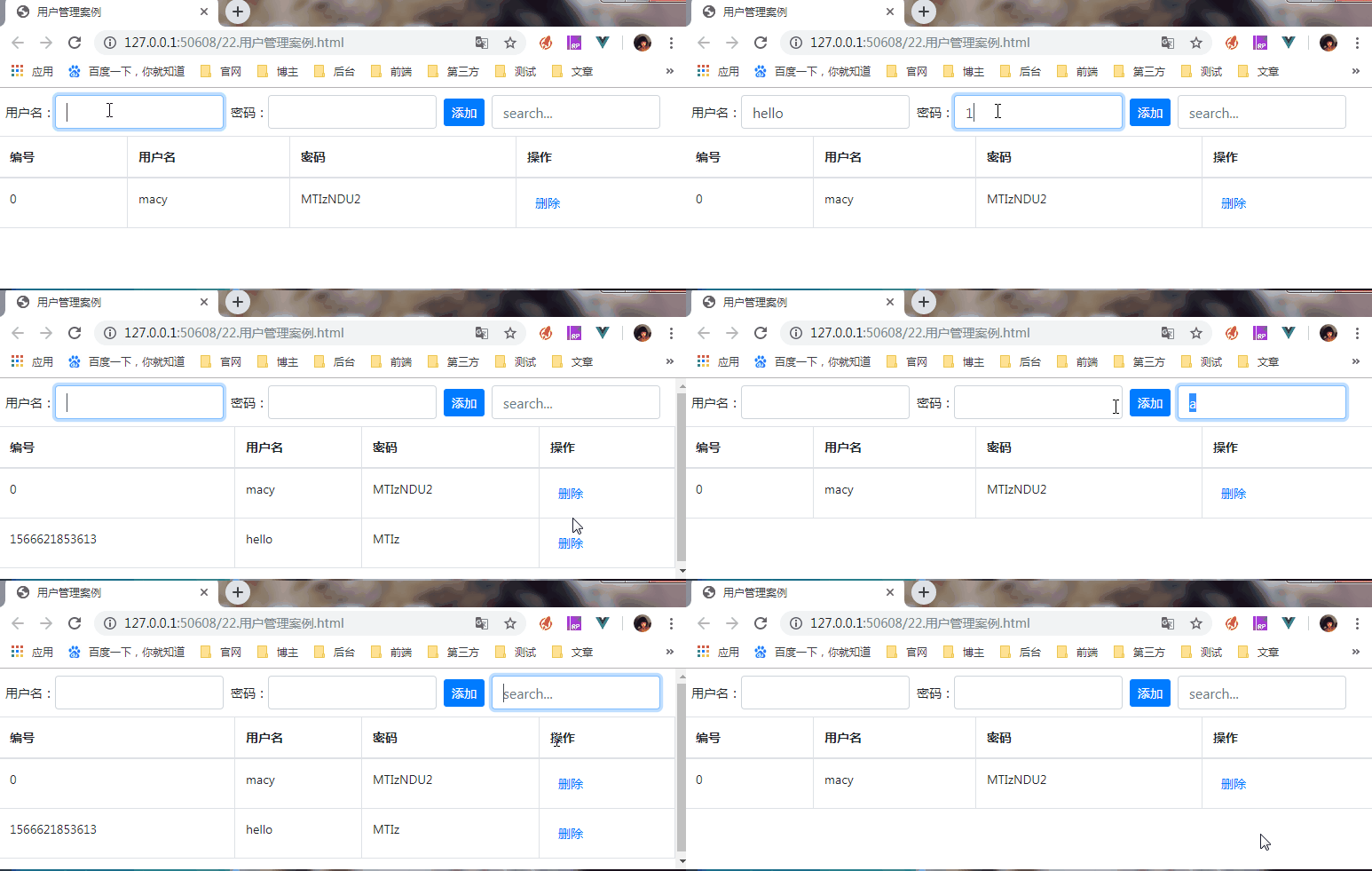
vue入门:用户管理demo1的更多相关文章
- 练习vue(用户管理)1
<!DOCTYPE html> <html> <head> <meta charset="UTF-8"> <title> ...
- 使用vue实现用户管理 添加及删除功能
简单的管理系统-增删改查 添加及删除功能 <!DOCTYPE html> <html> <head> <meta charset="UTF-8&qu ...
- vue入门:用户管理demo
该demo纯前端实现 使用到vue技术点: 1.在该demo中使用到的vue指令:{{}}. v-if. v-model. @click v-for 2.在该demo中使用到的事件修饰符: .prev ...
- 一步步使用SpringBoot结合Vue实现登录和用户管理功能
前后端分离开发是当今开发的主流.本篇文章从零开始,一步步使用SpringBoot结合Vue来实现日常开发中最常见的登录功能,以及登录之后对用户的管理功能.通过这个例子,可以快速入门SpringBoot ...
- 基于vue.js的简单用户管理
功能描述:添加.修改.搜索过滤 效果图: <!DOCTYPE html> <html lang="en"> <head> <title&g ...
- vue学习笔记—bootstrap+vue用户管理
vue,读音view,简单易用的前端框架.特点如下: 1.一个mvvm的前端框架,内部做好了html中dom对象和后台用js语言定义的变量的双向绑定 2.中国人尤雨溪维护的个人项目,中文资料多,和go ...
- Vue + Element UI 实现权限管理系统 前端篇(十二):用户管理模块
用户管理模块 添加接口 在 http/moduls/user.js 中添加用户管理相关接口. import axios from '../axios' /* * 用户管理模块 */ // 保存 exp ...
- 循序渐进VUE+Element 前端应用开发(15)--- 用户管理模块的处理
在前面随笔介绍了ABP+Vue前后端的整合处理,包括介绍了ABP的后端设计,以及前端对ABP接口API的ES6的封装,通过JS的继承类处理,极大减少了重复臃肿的代码,可以简化对后端API接口的封装,而 ...
- (大数据工程师学习路径)第一步 Linux 基础入门----用户及文件权限管理
用户及文件权限管理 实验介绍 1.Linux 中创建.删除用户,及用户组等操作. 2.Linux 中的文件权限设置. 一.Linux 用户管理 Linux 是一个可以实现多用户登陆的操作系统,比如“李 ...
随机推荐
- TreeMap原理实现及常用方法
目录 一. TreeMap概述 二. 红黑树回顾 三. TreeMap构造 四. put方法 五. get 方法 六. remove方法 七. 遍历 八. 总结 前面我们分别讲了Map接口的两个实现类 ...
- 【算法•日更•第十九期】动态规划:RMQ问题
▎前言 首先先来说一下RMB是什么,当然是人民币啦. 今天我们要学的这个东西不一般,叫做RMQ问题,那么它和RMB有什么关系呢?待小编细细说来. ▎前置技能:动态规划 不会的同志请戳这里迅速了解动态规 ...
- HDU-1576 A/B 基础数论+解题报告
HDU-1576 A/B 基础数论+解题报告 题意 求(A/B)%9973,但由于A很大,我们只给出n(n=A%9973) (我们给定的A必能被B整除,且gcd(B,9973) = 1). 输入 数据 ...
- [leetcode] 111.Mininum Depth of Binary Tree (Easy)
原题 寻找二叉树最短深度 这里用了dfs,beat 100%,4ms class Solution { public: int minDepth(TreeNode *root, int minNum ...
- C#命名规范(简述)
命名空间,类,事件,接口,常量,属性,方法使用Pascal命名,即首字母大写 参数,变量(类字段)使用camel命名法,即首字母小写. Pascal 方式--所有单词第一个字母大写,其他字母小写. ...
- github项目readme.md文件如何编写
参考链接:http://blog.csdn.net/Bone_ACE/article/details/48318675
- git_stats安装及使用
git_stats是仓库代码统计工具,今天我们要求用git_stats工具做项目的代码统计,也是一步一坑的找到了一些方法,在这里记录一下 一.安装 git_stats可以在windows和linux使 ...
- memcached.c 源码分析
上文分析了memcached的autoconf过程以及configure, make过程,可以看到,memcached可执行文件是由memcached-memcached.o以及其他文件连接后编译出来 ...
- Kubernetes容器集群管理环境 - 完整部署(上篇)
Kubernetes(通常称为"K8S")是Google开源的容器集群管理系统.其设计目标是在主机集群之间提供一个能够自动化部署.可拓展.应用容器可运营的平台.Kubernetes ...
- umask 默认权限控制和特殊权限
权限简单介绍: 在Linux中,创建目录或者文件之后总会有默认的权限.共9个,分为三组.分别代表u.g.o(属主.属组.其他用户).r.w.x 也代表各自的权限. r:读 在文件中的权限代表次文件 ...