
Docker常见报错解决方法记录
【问题一】OCI runtime exec failed......executable file not found in $PATH": unknown
[root@localhost home]# docker exec -it container-test bash

OCI runtime exec failed: exec failed: container_linux.go:346: starting container process caused "exec: \"bash\": executable file not found in $PATH": unknown
【分析】
由于镜像系统不一,使用错误shell解释器导致,可尝试以下其中一种方案。
【解决】
docker exec -it container-test /bin/bash

docker exec -it container-test /bin/sh

docker exec -it container-test /bin/csh
【问题二】http: server gave HTTP response to HTTPS client
$ docker push xxx.xxx.xxx.xxx:/java-

The push refers to repository [xxx.xxx.xxx.xxx/java-]

Get https://xxx.xxx.xxx.xxx:5000/v2/: http: server gave HTTP response to HTTPS client
【分析】
Docker自从1.3.X之后docker registry交互默认使用的是HTTPS,但是搭建私有镜像默认使用的是HTTP服务导致。
【解决】
# 修改启动文件第12行
# vim /usr/lib/systemd/system/docker.service
# ExecStart=/usr/bin/dockerd --insecure-registry xxx.xxx.xxx.xxx:5000
# 或者增加deamon.json文件配置
$ vim /etc/docker/daemon.json

{

    "insecure-registries":["xxx.xxx.xxx.xxx:5000"]

}
# 最后重启服务
$ systemctl daemon-reload

$ systemctl restart docker
【问题三】getsockopt: connection refused
【分析】
没有指定镜像要上传的具体地址导致。
【解决】
docker tag <image> <ip:port/image>

docker push ip:port/image
【问题四】Cannot connect to the Docker daemon at unix:///var/run/docker.sock. Is the docker daemon running?
【分析】
异常卸载关闭导致。
【解决】
$ systemctl daemon-reload

$ sudo service docker restart

$ sudo service docker status (should see active (running))
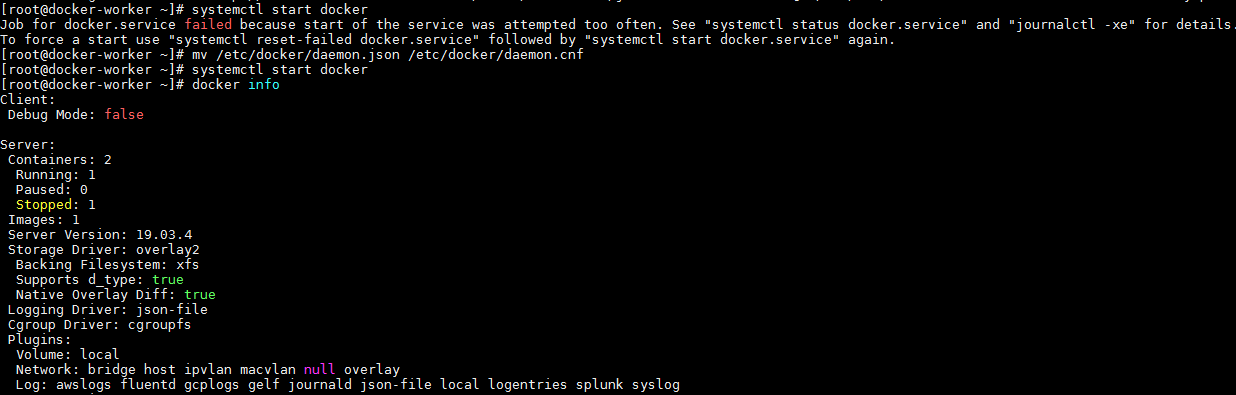
【问题五】Job for docker.service failed because the control process exited with error code. See "systemctl status docker.service" and "journalctl -xe" for details.
【分析】
修改daemon配置文件/etc/docker/daemon.json来使用加速器导致
【解决】
1、删除 "registry-mirrors": ["镜像加速地址"]
2、把daemon.json 改为 daemon.conf
【问题六】image jmdiservice:1206 could not be accessed on a registry to record its digest.
Each node will access jmdiservice:1206 independently, possibly leading to different nodes running different versions of the image.

【分析】
创建service时未指定registry地址(这样主节点也可以创建成功,这因为主节点本地存在该镜像),但是同样会导致子节点获取的镜像时也使用本地缓存,也就有可能导致使用的镜像不一致,或者获取不到。
【解决】
指定registry地址即可。

【问题】error pulling image configuration: Get https:// ...... x509: certificate has expired or is not yet valid
进行镜像拉取时报错

【分析】
很多人会被第一句所蒙蔽,按照网上教程进行修改etc/sysconfig/docker,之后发现还是没有用。
其实这里重点是最后一句"certificate has expired",这里一般是本地时间不正确导致证书验证过期,同步时间即可。
【解决】

# 首先查看时间与时区
date -R

# 时区不正确更新命令
cp -f /usr/share/zoneinfo/Asia/Shanghai /etc/localtime

# 时间不正确更新命令
ntpdate ntp.api.bz  # 命令安装: yum install ntp
# 手工方式更新
date -s "2019-12-12 20:12:30"
Docker常见报错解决方法记录的更多相关文章
- 03:git常见报错解决方法
1.1 git常见报错解决方法 1.warning: LF will be replaced by CRLF in .idea/workspace.xml. 参考博客:https://www.cnbl ...
- Mysql常见报错解决方法
一:登录报错 ERROR 1045 (28000): Access denied for user 'mysql'@'localhost' (using password: NO) mysql日志文件 ...
- React 开发常见报错解决方法
1. 使用 redux 的异步 action 时浏览器报错: Error: Actions must be plain objects. Use custom middleware for async ...
- tomcat常见报错解决方法汇总
报错一:内存泄漏,字眼This is very likely to create a memory leak. 解决方法:修改tomcat内存. 在tomcat/bin目录下,修改catalina.s ...
- js常见报错解决方法
1.获得类名document.getElementsClassName(常出现一个问题): getClassName("gn","pt")[0].appendC ...
- Django 连接 MySQL 数据库及常见报错解决
目录 Django 连接 MySQL数据库及常见报错解决 终端或者数据库管理工具连接 MySQL ,并新建项目所需数据库 安装访问 MySQL 的 Python 模块 Django 相关配置 可能会遇 ...
- SSH 报错解决方法记录汇总
SSH 密钥签名失败 情景: 使用 SSH 密钥验证身份时 报错: sign_and_send_pubkey: signing failed: agent refused operation 环境: ...
- Python编程常见报错解决(一)
1.报错一: SyntaxError: (unicode error) 'utf-8' codec can't decode byte 0xca in position 0: invalid cont ...
- Play! 1.x Eclipse Debug调试报错解决方法记录
使用Play eclipsify xxxx[项目路径],可以把play new xxxx[项目路径]创建的工程生成为Eclipse的项目 但是在Debug AS 调试的时候,会报以下错误 Error ...
随机推荐
- 纯CSS焦点轮播效果-功能可扩展
个人博客: http://mcchen.club 纯CSS3实现模拟焦点轮播效果,支持JQ等扩展各项功能.废话少说,直接贴代码. <!DOCTYPE html> <html> ...
- mac 下修改 jenkins 端口以及Jenkins的启动、关闭与更新
安装包安装的Jenkins修改默认端口的方法: 先关闭jenkins ; 命令行下修改端口:sudo defaults write /Library/Preferences/org.jenkins-c ...
- Java中ArrayList和LinkedList的性能分析
ArrayList和LinkedList是Java集合框架中经常使用的类.如果你只知道从基本性能比较ArrayList和LinkedList,那么请仔细阅读这篇文章. ArrayList应该在需要更多 ...
- postman动态数据获取
1.以获取token(JWT)和uid为例 2.在登录接口的tests中写入代码(因为登录接口报文信息中有返回JWT和uid) 3.在其他接口中需要用到JWT和uid的地方设置变量{{JWT}}和{{ ...
- [Mathematics][MIT 18.02]Detailed discussions about 2-D and 3-D integral and their connections
Since it is just a sort of discussion, I will just give the formula and condition without proving th ...
- 《深入理解Java虚拟机》-----第13章 线程安全与锁优化
概述 在软件业发展的初期,程序编写都是以算法为核心的,程序员会把数据和过程分别作为独立的部分来考虑,数据代表问题空间中的客体,程序代码则用于处理这些数据,这种思维方式直接站在计算机的角度去抽象问题和解 ...
- 机器学习:weka中Evaluation类源码解析及输出AUC及交叉验证介绍
在机器学习分类结果的评估中,ROC曲线下的面积AOC是一个非常重要的指标.下面是调用weka类,输出AOC的源码: try { // 1.读入数据集 Instances data = new Inst ...
- HDU 1506 Largest Rectangle in a Histogram(区间DP)
题目网址:http://acm.hdu.edu.cn/showproblem.php?pid=1506 题目: Largest Rectangle in a Histogram Time Limit: ...
- 17.Linux搭建网络仓库
1.搭建一个网络仓库 服务端:10.0.0.201 1.准备软件包(1.光盘 2.缓存 3.联网下载 4.同步) 1.挂载光盘 mount /dev/cdrom 2.通过ftp共享软件包存放的目录 y ...
- 多种方式实现AOP
一.使用代理工厂完成声明式增强 1.创建业务接口 public interface IdoSomeService { public void doSomething(); } 2.创建接口实现类 pu ...