
Maven搭建SpringMvc
Maven搭建SpringMvc,只需跟着一步步操作
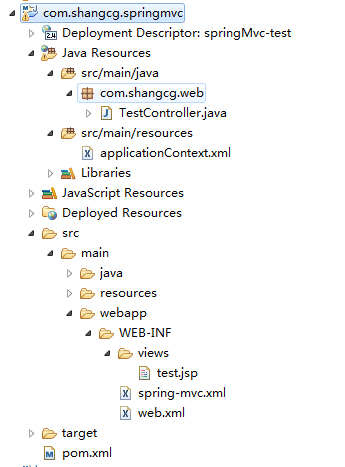
项目结构
1 创建Maven项目
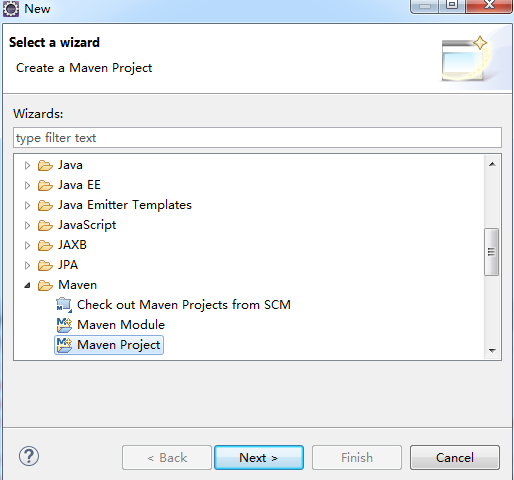
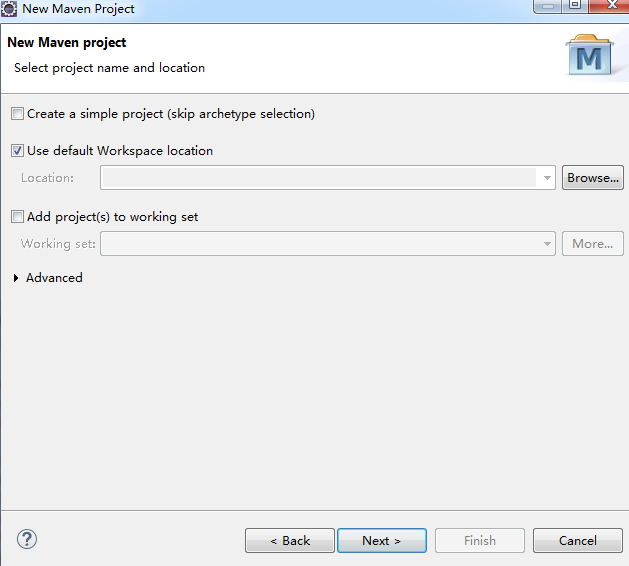

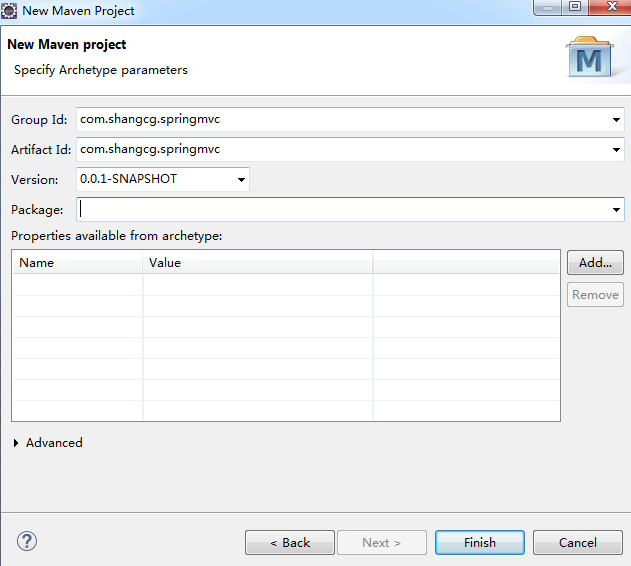
index,jsp报错不用管,配置完pom就好了,也可以直接删除掉
2 pom.xml添加依赖
   <dependency>

       <groupId>org.springframework</groupId>

    <artifactId>spring-webmvc</artifactId>

     <version>${spring.version}</version>

    </dependency>

    <dependency>

        <groupId>org.springframework</groupId>

        <artifactId>spring-web</artifactId>

        <version>${spring.version}</version>

    </dependency>

    <dependency>

        <groupId>javax.servlet</groupId>

        <artifactId>javax.servlet-api</artifactId>

        <version>3.1.0</version>

   </dependency>
完整pom.xml
<project xmlns="http://maven.apache.org/POM/4.0.0" xmlns:xsi="http://www.w3.org/2001/XMLSchema-instance"

  xsi:schemaLocation="http://maven.apache.org/POM/4.0.0 http://maven.apache.org/maven-v4_0_0.xsd">

  <modelVersion>4.0.0</modelVersion>

  <groupId>com.shangcg.springmvc</groupId>

  <artifactId>com.shangcg.springmvc</artifactId>

  <packaging>war</packaging>

  <version>0.0.1-SNAPSHOT</version>

  <name>com.shangcg.springmvc Maven Webapp</name>

  <url>http://maven.apache.org</url>

  <properties>

      <spring.version>4.0.5.RELEASE</spring.version>

  </properties>

  <dependencies>

    <dependency>

      <groupId>junit</groupId>

      <artifactId>junit</artifactId>

      <version>3.8.1</version>

      <scope>test</scope>

    </dependency>

    <dependency>

        <groupId>org.springframework</groupId>

        <artifactId>spring-webmvc</artifactId>

        <version>${spring.version}</version>

    </dependency>

    <dependency>

        <groupId>org.springframework</groupId>

        <artifactId>spring-web</artifactId>

        <version>${spring.version}</version>

    </dependency>

    <dependency>

        <groupId>javax.servlet</groupId>

        <artifactId>javax.servlet-api</artifactId>

        <version>3.1.0</version>

    </dependency>

  </dependencies>

  <build>

    <finalName>com.shangcg.springmvc</finalName>

  </build>

</project>
3配置web.xml
<?xml version="1.0" encoding="UTF-8"?>

<web-app xmlns:xsi="http://www.w3.org/2001/XMLSchema-instance"

    xmlns="http://java.sun.com/xml/ns/javaee"

    xsi:schemaLocation="http://java.sun.com/xml/ns/javaee http://java.sun.com/xml/ns/javaee/web-app_3_0.xsd"

    id="WebApp_ID" version="3.0">

    <display-name>springMvc-test</display-name>

    <!-- 指定Spring Bean的配置文件所在目录。默认配置在WEB-INF目录下 -->

    <context-param>

        <param-name>contextConfigLocation</param-name>

        <param-value>classpath*:/applicationContext.xml</param-value>

    </context-param>

    <!-- Spring配置 -->

    <listener>

        <listener-class>org.springframework.web.context.ContextLoaderListener</listener-class>

    </listener>

    <!-- Spring MVC配置 -->

    <servlet>

        <servlet-name>spring</servlet-name>

        <servlet-class>org.springframework.web.servlet.DispatcherServlet</servlet-class>

        <!-- 可以自定义servlet.xml配置文件的位置和名称,默认为WEB-INF目录下,名称为[<servlet-name>]-servlet.xml,如spring-servlet.xml -->

        <init-param>

            <param-name>contextConfigLocation</param-name>

            <param-value>/WEB-INF/spring-mvc.xml</param-value>

        </init-param>

        <load-on-startup>1</load-on-startup>

    </servlet>

    <servlet-mapping>

        <servlet-name>spring</servlet-name>

        <url-pattern>/</url-pattern>

    </servlet-mapping>

    <!-- 中文过滤器 -->

    <filter>

        <filter-name>CharacterEncodingFilter</filter-name>

        <filter-class>org.springframework.web.filter.CharacterEncodingFilter</filter-class>

        <init-param>

            <param-name>encoding</param-name>

            <param-value>UTF-8</param-value>

        </init-param>

        <init-param>

            <param-name>forceEncoding</param-name>

            <param-value>true</param-value>

        </init-param>

    </filter>

    <filter-mapping>

        <filter-name>CharacterEncodingFilter</filter-name>

        <url-pattern>/*</url-pattern>

    </filter-mapping>

    <welcome-file-list>

        <welcome-file>index.jsp</welcome-file>

    </welcome-file-list>

</web-app>
4 新建spring-mvc.xml(具体位置请看项目结构图)
<?xml version="1.0" encoding="UTF-8" standalone="no"?>

<beans xmlns="http://www.springframework.org/schema/beans"

    xmlns:context="http://www.springframework.org/schema/context"

    xmlns:aop="http://www.springframework.org/schema/aop" xmlns:mvc="http://www.springframework.org/schema/mvc"

    xmlns:p="http://www.springframework.org/schema/p" xmlns:xsi="http://www.w3.org/2001/XMLSchema-instance"

    xsi:schemaLocation="http://www.springframework.org/schema/beans  http://www.springframework.org/schema/beans/spring-beans-4.0.xsd

        http://www.springframework.org/schema/context http://www.springframework.org/schema/context/spring-context-4.0.xsd

        http://www.springframework.org/schema/mvc http://www.springframework.org/schema/mvc/spring-mvc-4.0.xsd

        http://www.springframework.org/schema/aop http://www.springframework.org/schema/aop/spring-aop-4.0.xsd">

    <!-- 自动扫描的包名 -->

    <context:component-scan base-package="com.shangcg.web" />

    <!-- 默认的注解映射的支持 -->

    <mvc:annotation-driven>

        <mvc:message-converters>

            <bean class="org.springframework.http.converter.StringHttpMessageConverter" />

            <bean

                class="org.springframework.http.converter.ResourceHttpMessageConverter" />

        </mvc:message-converters>

    </mvc:annotation-driven>

    <!-- 视图解释类,定义跳转的文件的前后缀 -->

    <bean class="org.springframework.web.servlet.view.InternalResourceViewResolver">

        <property name="prefix" value="/WEB-INF/views/"/>

        <property name="suffix" value=".jsp"/>

    </bean>

    <!-- 对静态资源文件的访问  -->

    <mvc:default-servlet-handler />

</beans>
5 新建applicationContext.xml
<?xml version="1.0" encoding="UTF-8"?>

<beans xmlns="http://www.springframework.org/schema/beans" xmlns:xsi="http://www.w3.org/2001/XMLSchema-instance" xmlns:mvc="http://www.springframework.org/schema/mvc"

    xmlns:context="http://www.springframework.org/schema/context" xmlns:tx="http://www.springframework.org/schema/tx" xmlns:util="http://www.springframework.org/schema/util"

    xmlns:aop="http://www.springframework.org/schema/aop"

    xsi:schemaLocation="http://www.springframework.org/schema/beans http://www.springframework.org/schema/beans/spring-beans-4.0.xsd

        http://www.springframework.org/schema/mvc http://www.springframework.org/schema/mvc/spring-mvc-4.0.xsd

        http://www.springframework.org/schema/context http://www.springframework.org/schema/context/spring-context-4.0.xsd

        http://www.springframework.org/schema/util http://www.springframework.org/schema/util/spring-util-4.0.xsd

        http://www.springframework.org/schema/tx http://www.springframework.org/schema/tx/spring-tx.xsd

        http://www.springframework.org/schema/aop http://www.springframework.org/schema/aop/spring-aop-4.0.xsd">

    <!-- 注解注册 -->

    <context:annotation-config />

    <context:component-scan base-package="com.test" />

</beans>
6 新建TestController
package com.shangcg.web;

import javax.servlet.http.HttpServletRequest;

import org.springframework.stereotype.Controller;

import org.springframework.web.bind.annotation.RequestMapping;

import org.springframework.web.bind.annotation.ResponseBody;

import org.springframework.web.servlet.ModelAndView;

@Controller

@RequestMapping("/testController")

public class TestController {

    @RequestMapping(value="/getView")

    @ResponseBody

    public ModelAndView getTest(HttpServletRequest request){

        ModelAndView modelAndView = new ModelAndView("test");

        return modelAndView;

    }

}
7新建test.jsp
<%@ page language="java" contentType="text/html; charset=UTF-8"

    pageEncoding="UTF-8"%>

<!DOCTYPE html PUBLIC "-//W3C//DTD HTML 4.01 Transitional//EN" "http://www.w3.org/TR/html4/loose.dtd">

<html>

<head>

<meta http-equiv="Content-Type" content="text/html; charset=UTF-8">

<title>I AM TITLE</title>

</head>

<body>

    Hello World!!!

</body>

</html>
8发布tomact服务,添加到tomact后start
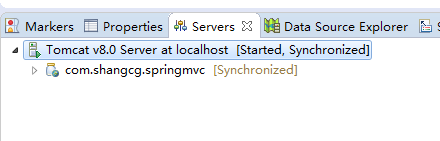

9 访问http://localhost:8080/com.shangcg.springmvc/testController/getView

项目已上传https://github.com/shangcg/mavenSpringMvc
如果导入Eclipse之后启动不起来,需要手动添加一下依赖:
选中项目右键---properties--deployment assembly--add-java build path entries--maven denpencies双击 ,如下图
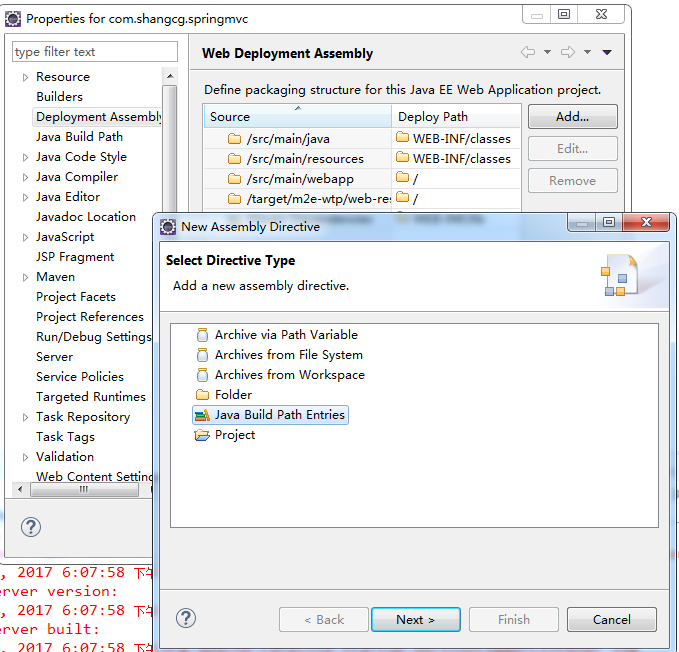
之后重启即可,报错不影响启动
Maven搭建SpringMvc的更多相关文章
- 手把手Maven搭建SpringMVC+Spring+MyBatis框架(超级详细版)
手把手Maven搭建SpringMVC+Spring+MyBatis框架(超级详细版) SSM(Spring+SpringMVC+Mybatis),目前较为主流的企业级架构方案.标准的MVC设计模式, ...
- Maven搭建SpringMVC+Hibernate项目详解 【转】
前言 今天复习一下SpringMVC+Hibernate的搭建,本来想着将Spring-Security权限控制框架也映入其中的,但是发现内容太多了,Spring-Security的就留在下一篇吧,这 ...
- idea使用maven搭建springmvc
最近学着搭建springmvc,写此博客记录一下 idea版本:2016.3.1maven: apache-maven-3.3.9tomcat:apache-tomcat-8.5.8 1.New Pr ...
- Maven搭建SpringMVC+Hibernate项目详解
前言 今天复习一下SpringMVC+Hibernate的搭建,本来想着将Spring-Security权限控制框架也映入其中的,但是发现内容太多了,Spring-Security的就留在下一篇吧,这 ...
- Maven搭建SpringMVC+Hibernate项目详解(转)
前言 今天复习一下SpringMVC+Hibernate的搭建,本来想着将Spring-Security权限控制框架也映入其中的,但是发现内容太多了,Spring-Security的就留在下一篇吧,这 ...
- Maven 搭建SpringMvc+Spring+Mybatis详细记录
总觉得,看比人写的总是那么好,每次搭建框架时都会找博客,找教程来跟着一步一步走,虽然很快搭建成功了,但是经常情况是我并不知道我干了什么,也不记得具体步骤,到底为什么要这么做,今天我详细记录了一下自己搭 ...
- 从头开始基于Maven搭建SpringMVC+Mybatis项目(1)
技术发展日新月异,许多曾经拥有霸主地位的流行技术短短几年间已被新兴技术所取代. 在Java的世界中,框架之争可能比语言本身的改变更让人关注.近几年,SpringMVC凭借简单轻便.开发效率高.与spr ...
- maven搭建springmvc+mybatis项目
上一篇中已经成功使用maven搭建了一个web项目,本篇描述在此基础上怎么搭建一个基于springmvc+mybatis环境的项目. 说了这么久,为什么那么多人都喜欢用maven搭建项目?我们都知道m ...
- Maven搭建SpringMVC + SpringJDBC项目详解
前言 上一次复习搭建了SpringMVC+Mybatis,这次搭建一下SpringMVC,采用的是SpringJDBC,没有采用任何其他的ORM框架,SpringMVC提供了一整套的WEB框架,所以如 ...
随机推荐
- SpringBoot之配置文件的注入
@PropertySource&@ImportResource&@Bean @PropertySource:加载指定的配置文件: /** * 将配置文件中配置的每一个属性的值,映射到这 ...
- PHP限制上传文件大小
在php.ini中修改如下变量,如要限制为100M upload_max_filesize = 100M post_max_size = 100M 重启Apache
- Java中数组操作 java.util.Arrays 类常用方法的使用
任何一门编程语言,数组都是最重要和常用的数据结构之一,但不同的语言对数组的构造与处理是不尽相同的. Java中提供了java.util.Arrays 类能方便地操作数组,并且它提供的所有方法都是静态的 ...
- AB实验的高端玩法系列3 - AB组不随机?观测试验?Propensity Score
背景 都说随机是AB实验的核心,为什么随机这么重要呢?有人说因为随机所以AB组整体不存在差异,这样才能准确估计实验效果(ATE) \[ ATE = E(Y_t(1) - Y_c(0)) \] 那究竟随 ...
- 前后端对称加密(AES)
后端实现(JAVA) package com.vcgeek.hephaestus.demo; import org.apache.commons.codec.binary.Base64; import ...
- 【重构】AndroidStudio中代码重构菜单Refactor功能详解
代码重构几乎是每个程序员在软件开发中必须要不断去做的事情,以此来不断提高代码的质量.Android Stido(以下简称AS)以其强大的功能,成为当下Android开发工程师最受欢迎的开发工具,也是A ...
- 虚拟机kali linux与windows主机共享文件
在windows中我们可以直接拖拽文件,有的时候wmtools无效 很苦恼 从kali中托文件就不可以, 于是那就用到了共享文件夹 一.在虚拟机名称处右键,选择设置,会弹出一个设置框 二.选择选项-& ...
- Scrapy爬虫day1——环境配置
安装 Scrapy pip install scrapy 配置虚拟环境 mkvirtualenv Spider 创建项目 在Spider的虚拟环境中运行 scrapy startproject Boo ...
- [考试反思]1031csp-s模拟测试95:优势
假的三首杀.因为交文件所以他们都不往OJ上交. 假装是三首杀吧.嗯. 然而昨天还是没有AK.好像说是按照64位评测机的评测结果为准. 但是联赛省选的机子好像都是32位的?也就是和我们正在用的一致. 所 ...
- 运维自动化管理服务器 CheungSSH
CheungSSH 是一款中国人自主研发的Linux运维自动化管理服务器软件,后端使用 Python 语言+Django 的 Web 框架,前端使用 Bootstrap+Javascript+jQue ...