
【Redis】02 Redis 搭建与操作
Redis的安装及启动停止
官网地址:
https://redis.io/download
使用wget命令下载redis
wget 下载地址
下载:
[root@VM-0-7-centos ~]# wget http://download.redis.io/releases/redis-6.0.6.tar.gz?_ga=2.77545751.366490453.1596769060-1648792050.1596769060

--2020-08-07 10:58:00--  http://download.redis.io/releases/redis-6.0.6.tar.gz?_ga=2.77545751.366490453.1596769060-1648792050.1596769060

Resolving download.redis.io (download.redis.io)... 45.60.125.1

Connecting to download.redis.io (download.redis.io)|45.60.125.1|:80... connected.

HTTP request sent, awaiting response... 200 OK

Length: 2228781 (2.1M) [application/octet-stream]

Saving to: ‘redis-6.0.6.tar.gz?_ga=2.77545751.366490453.1596769060-1648792050.1596769060’

100%[===============================================================================================================>] 2,228,781   19.6KB/s   in 87s

2020-08-07 10:59:28 (25.0 KB/s) - ‘redis-6.0.6.tar.gz?_ga=2.77545751.366490453.1596769060-1648792050.1596769060’ saved [2228781/2228781]
发现下载之后的文件url参数也不会去掉,重命名一下:
mv redis-6.0.6.tar.gz?_ga=2.77545751.366490453.1596769060-1648792050.1596769060 redis-6.0.6.tar.gz
安装编译器,下载的资源是二进制文件,不能直接使用
yum install gcc-c++
yum下载安装:
[root@VM-0-7-centos ~]# yum install gcc-c++

Loaded plugins: fastestmirror, langpacks

Loading mirror speeds from cached hostfile

docker-ce-stable                                                                                                                  | 3.5 kB  00:00:00

epel                                                                                                                              | 4.7 kB  00:00:00

extras                                                                                                                            | 2.9 kB  00:00:00

os                                                                                                                                | 3.6 kB  00:00:00

updates                                                                                                                           | 2.9 kB  00:00:00

(1/2): epel/7/x86_64/updateinfo                                                                                                   | 1.0 MB  00:00:00

(2/2): epel/7/x86_64/primary_db                                                                                                   | 6.9 MB  00:00:01

Resolving Dependencies

--> Running transaction check

---> Package gcc-c++.x86_64 0:4.8.5-39.el7 will be installed

--> Processing Dependency: libstdc++-devel = 4.8.5-39.el7 for package: gcc-c++-4.8.5-39.el7.x86_64

--> Running transaction check

---> Package libstdc++-devel.x86_64 0:4.8.5-39.el7 will be installed

--> Finished Dependency Resolution

Dependencies Resolved

=========================================================================================================================================================

 Package                                   Arch                             Version                                   Repository                    Size

=========================================================================================================================================================

Installing:

 gcc-c++                                   x86_64                           4.8.5-39.el7                              os                           7.2 M

Installing for dependencies:

 libstdc++-devel                           x86_64                           4.8.5-39.el7                              os                           1.5 M

Transaction Summary

=========================================================================================================================================================

Install  1 Package (+1 Dependent package)

Total download size: 8.7 M

Installed size: 25 M

Is this ok [y/d/N]: y

Downloading packages:

(1/2): libstdc++-devel-4.8.5-39.el7.x86_64.rpm                                                                                    | 1.5 MB  00:00:00

(2/2): gcc-c++-4.8.5-39.el7.x86_64.rpm                                                                                            | 7.2 MB  00:00:01

---------------------------------------------------------------------------------------------------------------------------------------------------------

Total                                                                                                                    6.7 MB/s | 8.7 MB  00:00:01

Running transaction check

Running transaction test

Transaction test succeeded

Running transaction

  Installing : libstdc++-devel-4.8.5-39.el7.x86_64                                                                                                   1/2

  Installing : gcc-c++-4.8.5-39.el7.x86_64                                                                                                           2/2

  Verifying  : gcc-c++-4.8.5-39.el7.x86_64                                                                                                           1/2

  Verifying  : libstdc++-devel-4.8.5-39.el7.x86_64                                                                                                   2/2

Installed:

  gcc-c++.x86_64 0:4.8.5-39.el7

Dependency Installed:

  libstdc++-devel.x86_64 0:4.8.5-39.el7

Complete!
解压Tar包:
tar -zxvf redis-6.0.6.tar.gz
查看目录结构:
[root@VM-0-7-centos redis-6.0.6]# ll

total 264

-rw-rw-r--  1 root root 80561 Jul 21 02:08 00-RELEASENOTES

-rw-rw-r--  1 root root    51 Jul 21 02:08 BUGS

-rw-rw-r--  1 root root  2381 Jul 21 02:08 CONTRIBUTING

-rw-rw-r--  1 root root  1487 Jul 21 02:08 COPYING

drwxrwxr-x  6 root root  4096 Jul 21 02:08 deps

-rw-rw-r--  1 root root    11 Jul 21 02:08 INSTALL

-rw-rw-r--  1 root root   151 Jul 21 02:08 Makefile

-rw-rw-r--  1 root root  6888 Jul 21 02:08 MANIFESTO

-rw-rw-r--  1 root root 20806 Jul 21 02:08 README.md

-rw-rw-r--  1 root root 83392 Jul 21 02:08 redis.conf

-rwxrwxr-x  1 root root   275 Jul 21 02:08 runtest

-rwxrwxr-x  1 root root   280 Jul 21 02:08 runtest-cluster

-rwxrwxr-x  1 root root   679 Jul 21 02:08 runtest-moduleapi

-rwxrwxr-x  1 root root   281 Jul 21 02:08 runtest-sentinel

-rw-rw-r--  1 root root 10743 Jul 21 02:08 sentinel.conf

drwxrwxr-x  3 root root  4096 Jul 21 02:08 src

drwxrwxr-x 11 root root  4096 Jul 21 02:08 tests

-rw-rw-r--  1 root root  3055 Jul 21 02:08 TLS.md

drwxrwxr-x  9 root root  4096 Jul 21 02:08 utils
发现编译失败,原因是因为Redis6版本需要5版本的GCC才能编译成功
而当前这个服务器的GCC版本只有4
索性升级GCC:
https://blog.csdn.net/wfx15502104112/article/details/96508940
再次编译终于成功:
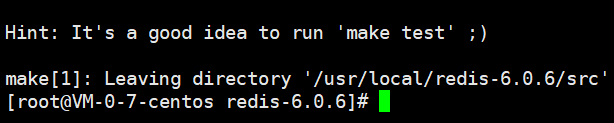
安装到指定位置:
make install PREFIX=/usr/local/redis
查看目录有这些程序表示成功:
[root@VM-0-7-centos bin]# ll

total 36872

-rwxr-xr-x 1 root root 4729200 Aug  7 11:53 redis-benchmark

-rwxr-xr-x 1 root root 9331352 Aug  7 11:53 redis-check-aof

-rwxr-xr-x 1 root root 9331352 Aug  7 11:53 redis-check-rdb

-rwxr-xr-x 1 root root 5018336 Aug  7 11:53 redis-cli

lrwxrwxrwx 1 root root      12 Aug  7 11:53 redis-sentinel -> redis-server

-rwxr-xr-x 1 root root 9331352 Aug  7 11:53 redis-server
文件说明:
redis-benchmark:redis性能测试工具

redis-check-aof:检查aof日志的工具

redis-check-dump:检查rdb日志的工具

redis-cli:连接用的客户端

redis-server:redis服务进程
复制源码包中的配置文件redis.conf 存放到redis的conf目录中
conf目录自己创建
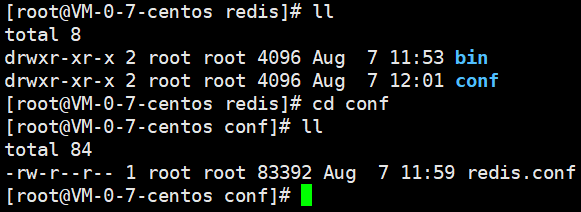
启动Redis
携带配置文件作为参数项启动
/usr/local/redis/bin/redis-server ../conf/redis.conf
配置信息说明:
 daemonize:

如需要在后台运行,把该项的值改为yes

pdifile:

把pid文件放在/var/run/redis.pid,可以配置到其他地址

bind:

指定redis只接收来自该IP的请求,

如果不设置,那么将处理所有请求,在生产环节中最好设置该项

port:

监听端口,默认为6379

timeout:

设置客户端连接时的超时时间,单位为秒

loglevel:

等级分为4级,debug,revbose,notice和warning。生产环境下一般开启notice

logfile:

配置log文件地址,默认使用标准输出,即打印在命令行终端的端口上

database:

设置数据库的个数,默认使用的数据库是0

save:

设置redis进行数据库镜像的频率

rdbcompression:

在进行镜像备份时,是否进行压缩

dbfilename:

镜像备份文件的文件名

dir:

数据库镜像备份的文件放置的路径

slaveof:

设置该数据库为其他数据库的从数据库

masterauth:

当主数据库连接需要密码验证时,在这里设定

requirepass:

设置客户端连接后进行任何其他指定前需要使用的密码

maxclients:

限制同时连接的客户端数量

maxmemory:

设置redis能够使用的最大内存

appendonly:

开启appendonly模式后,

redis会把每一次所接收到的写操作都追加到appendonly.aof文件中,

当redis重新启动时,会从该文件恢复出之前的状态

appendfsync:

设置appendonly.aof文件进行同步的频率

vm_enabled:

是否开启虚拟内存支持

vm_swap_file:

设置虚拟内存的交换文件的路径

vm_max_momery:

设置开启虚拟内存后,redis将使用的最大物理内存的大小,默认为0

vm_page_size:

设置虚拟内存页的大小

vm_pages:

设置交换文件的总的page数量

vm_max_thrrads:

设置vm IO同时使用的线程数量
这样的启动关闭终端即销毁:
[root@VM-0-7-centos bin]# /usr/local/redis/bin/redis-server ../conf/redis.conf

31817:C 07 Aug 2020 12:05:25.341 # oO0OoO0OoO0Oo Redis is starting oO0OoO0OoO0Oo

31817:C 07 Aug 2020 12:05:25.341 # Redis version=6.0.6, bits=64, commit=00000000, modified=0, pid=31817, just started

31817:C 07 Aug 2020 12:05:25.341 # Configuration loaded

                _._

           _.-``__ ''-._

      _.-``    `.  `_.  ''-._           Redis 6.0.6 (00000000/0) 64 bit

  .-`` .-```.  ```\/    _.,_ ''-._

 (    '      ,       .-`  | `,    )     Running in standalone mode

 |`-._`-...-` __...-.``-._|'` _.-'|     Port: 6379

 |    `-._   `._    /     _.-'    |     PID: 31817

  `-._    `-._  `-./  _.-'    _.-'

 |`-._`-._    `-.__.-'    _.-'_.-'|

 |    `-._`-._        _.-'_.-'    |           http://redis.io

  `-._    `-._`-.__.-'_.-'    _.-'

 |`-._`-._    `-.__.-'    _.-'_.-'|

 |    `-._`-._        _.-'_.-'    |

  `-._    `-._`-.__.-'_.-'    _.-'

      `-._    `-.__.-'    _.-'

          `-._        _.-'

              `-.__.-'

31817:M 07 Aug 2020 12:05:25.342 # WARNING: The TCP backlog setting of 511 cannot be enforced because /proc/sys/net/core/somaxconn is set to the lower value of 128.

31817:M 07 Aug 2020 12:05:25.342 # Server initialized

31817:M 07 Aug 2020 12:05:25.342 # WARNING overcommit_memory is set to 0! Background save may fail under low memory condition. To fix this issue add 'vm.overcommit_memory = 1' to /etc/sysctl.conf and then reboot or run the command 'sysctl vm.overcommit_memory=1' for this to take effect.

31817:M 07 Aug 2020 12:05:25.342 # WARNING you have Transparent Huge Pages (THP) support enabled in your kernel. This will create latency and memory usage issues with Redis. To fix this issue run the command 'echo never > /sys/kernel/mm/transparent_hugepage/enabled' as root, and add it to your /etc/rc.local in order to retain the setting after a reboot. Redis must be restarted after THP is disabled.

31817:M 07 Aug 2020 12:05:25.343 * Ready to accept connections

^C31817:signal-handler (1596773129) Received SIGINT scheduling shutdown...

31817:M 07 Aug 2020 12:05:29.751 # User requested shutdown...

31817:M 07 Aug 2020 12:05:29.751 * Saving the final RDB snapshot before exiting.

31817:M 07 Aug 2020 12:05:29.755 * DB saved on disk

31817:M 07 Aug 2020 12:05:29.755 * Removing the pid file.

31817:M 07 Aug 2020 12:05:29.755 # Redis is now ready to exit, bye bye...
VIM打开redis.conf设置后台运行:

更改为YES
行号开启:
:setnumber
再次启动会以后台程序启动:
[root@VM-0-7-centos conf]# /usr/local/redis/bin/redis-server ../conf/redis.conf

32447:C 07 Aug 2020 12:10:18.741 # oO0OoO0OoO0Oo Redis is starting oO0OoO0OoO0Oo

32447:C 07 Aug 2020 12:10:18.741 # Redis version=6.0.6, bits=64, commit=00000000, modified=0, pid=32447, just started

32447:C 07 Aug 2020 12:10:18.741 # Configuration loaded
客户端访问:
/usr/local/redis/bin/redis-cli -h 127.0.0.1 -p 6379

退出客户端:
quit
关闭Redis:
正常关闭redis服务:
/usr/local/redis/bin/redis-server shutdown
以杀死进程方式关闭:
pkill redis-server
设置开机自启动Redis:
打开启动加载项:
vim /etc/rc.local
空白处加入启动命令即可:
/usr/local/redis/bin/redis-server ../conf/redis.conf
【Redis】02 Redis 搭建与操作的更多相关文章
- Redis 02: redis基础知识 + 5种数据结构 + 基础操作命令
Redis基础知识 1).测试redis服务的性能: redis-benchmark 2).查看redis服务是否正常运行: ping 如果正常---pong 3).查看redis服务器的统计信息: ...
- redis集群搭建及常用操作
前言: Redis 是一个高性能的key-value数据库. redis的出现,很大程度补偿了memcached这类key/value存储的不足,在部 分场合可以对关系数据库起到很好的补充作用.它提供 ...
- redis集群搭建及启动、停止、重启操作【转】
redis版本:redis-5.0.3.tar.gz 操作系统:完全新安装的centos7.6系统 使用一台虚拟机模拟6个redis节点,3个master,3个slave,虚拟机IP为192.168. ...
- Redis入门,对Redis的理解和基本环境搭建及操作
Redis入门使用 参考:https://blog.csdn.net/hellozpc/article/details/81267030 一).缓存的用途举例 1.前端页面广告的数据无需每次查询后台系 ...
- redis集群搭建及设置账户(转)
Redis集群搭建以及为集群设置密码 介绍安装环境与版本 用两台虚拟机模拟6个节点,一台机器3个节点,创建出3 master.3 salve 环境. redis 采用 redis-3.2.4 版本. ...
- Redis与Redis 伪集群环境的搭建
一 .准备工作 GCC编译环境 ruby运行环境 安装ruby脚本运行包 二.环境安装 1.GCC环境 首先,因为redis是由C语言编写的,所以需要安装GCC环境,可以用 gcc -v 命令来检查是 ...
- Redis主从架构搭建和哨兵模式(四)
一主一从,往主节点去写,在从节点去读,可以读到,主从架构就搭建成功了 1.启用复制,部署slave node wget http://downloads.sourceforge.net/tcl/tcl ...
- 02 . Redis哨兵
Redis高可用概述 在 Web 服务器中,高可用 是指服务器可以 正常访问 的时间,衡量的标准是在 多长时间 内可以提供正常服务(99.9%.99.99%.99.999% 等等).在 Redis ...
- Redis集群搭建与简单使用【转】
Redis集群搭建与简单使用 安装环境与版本 用两台虚拟机模拟6个节点,一台机器3个节点,创建出3 master.3 salve 环境. redis 采用 redis-3.2.4 版本. 两台虚拟机都 ...
- [Intel Edison开发板] 04、Edison开发基于nodejs和redis的服务器搭建
一.前言 intel-iot-examples-datastore 是Intel提供用于所有Edison开发板联网存储DEMO所需要的服务器工程.该工程是基于nodejs和redis写成的一个简单的工 ...
随机推荐
- 剑指Offer-54.字符流中第一个不重复的字符(C++/Java)
题目: 请实现一个函数用来找出字符流中第一个只出现一次的字符.例如,当从字符流中只读出前两个字符"go"时,第一个只出现一次的字符是"g".当从该字符流中读出前 ...
- VictoriaLogs 要凭什么革了各家日志存储的命
如果大家对时序指标的存储方案有些了解,那大概率会听过 VictoriaMetrics,VictoriaMetrics 号称 Prometheus 的升级版,在性能和成本方面也确实做得很好,如果是夜莺新 ...
- jsp和servlet的区别、共同点、各自应用的范围?
JSP是Servlet技术的扩展,本质上就是Servlet的简易方式.JSP编译后是"类servlet".Servlet和JSP最主要的不同点在于: Servlet的应用逻辑是在J ...
- 一个常见的 JavaScript 解构陷阱
在日常的 JavaScript 编码中,我们经常使用解构语法来提取对象中的属性.假设我们有一个名为 fetchResult 的对象,代表从接口返回的数据,其中包含一个字段名为 data. const ...
- Merry Christmas 礼物
Tips:当你看到这个提示的时候,说明当前的文章是由原emlog博客系统搬迁至此的,文章发布时间已过于久远,编排和内容不一定完整,还请谅解` Merry Christmas 礼物 日期:2020-12 ...
- 洛谷 P4913 二叉树深度
题目链接:二叉树深度 思路 存储二叉树的各个节点并递归搜索二叉树深度. 题解 #include <bits/stdc++.h> using namespace std; #define l ...
- Android 7 修改启动动画和开机声音
背景 在修改开机音量的时候,发现找不到对应的声音功能调用. 因此了解了一下安卓的开机声音是如何实现的. 安卓4~安卓7 都可以这么做. 参考: https://blog.csdn.net/chen82 ...
- FFMpeg 中的数据结构
FFMpeg 中比较重要的函数以及数据结构如下: 数据结构: (1) AVFormatContext (2) AVOutputFormat (3) AVInputFormat (4) AVCodecC ...
- 开发板测试手册——USB 4G 模块、GPS 定位功能操作步骤详解(3)
目录 4 USB 4G 模块测试 41 4.1 网络功能测试 42 4.2 短信功能测试 43 4.3 GPS 定位功能测试 44 4.4 通话功能测试 45 4.5 测试程序编译 46 5 USB ...
- 国产化率100%!全志科技A40i工业核心板规格书资料分享
1.核心板简介 创龙科技SOM-TLA40i是一款基于全志科技A40i处理器设计的4核ARM Cortex-A7国产工业核心板,每核主频高达1.2GHz. 核心板通过邮票孔连接方式引出CSI.TVIN ...