
springboot获取七牛云空间文件列表及下载功能
原文摘自:https://www.codernav.com
第一步:新建springboot项目,引入jar包,其中hutool-all是工具类,用来写文件下载,可以随意更换。
<!--工具类-->

        <dependency>

            <groupId>cn.hutool</groupId>

            <artifactId>hutool-all</artifactId>

            <version>5.2.0</version>

        </dependency>

        <!--七牛云相关jar包-->

        <dependency>

            <groupId>com.qiniu</groupId>

            <artifactId>qiniu-java-sdk</artifactId>

            <version>[7.2.0, 7.2.99]</version>

        </dependency>

        <dependency>

            <groupId>com.squareup.okhttp3</groupId>

            <artifactId>okhttp</artifactId>

            <version>3.14.2</version>

            <scope>compile</scope>

        </dependency>

        <dependency>

            <groupId>com.google.code.gson</groupId>

            <artifactId>gson</artifactId>

            <version>2.8.5</version>

            <scope>compile</scope>

        </dependency>

        <dependency>

            <groupId>com.qiniu</groupId>

            <artifactId>happy-dns-java</artifactId>

            <version>0.1.6</version>

            <scope>test</scope>

        </dependency>

        <dependency>

            <groupId>junit</groupId>

            <artifactId>junit</artifactId>

            <version>4.12</version>

            <scope>test</scope>

        </dependency>
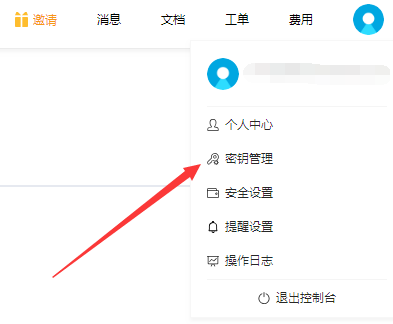
第二步:登录七牛云,在秘钥管理中找到accessKey和secretKey
第三步:写测试类,代码结构如下:
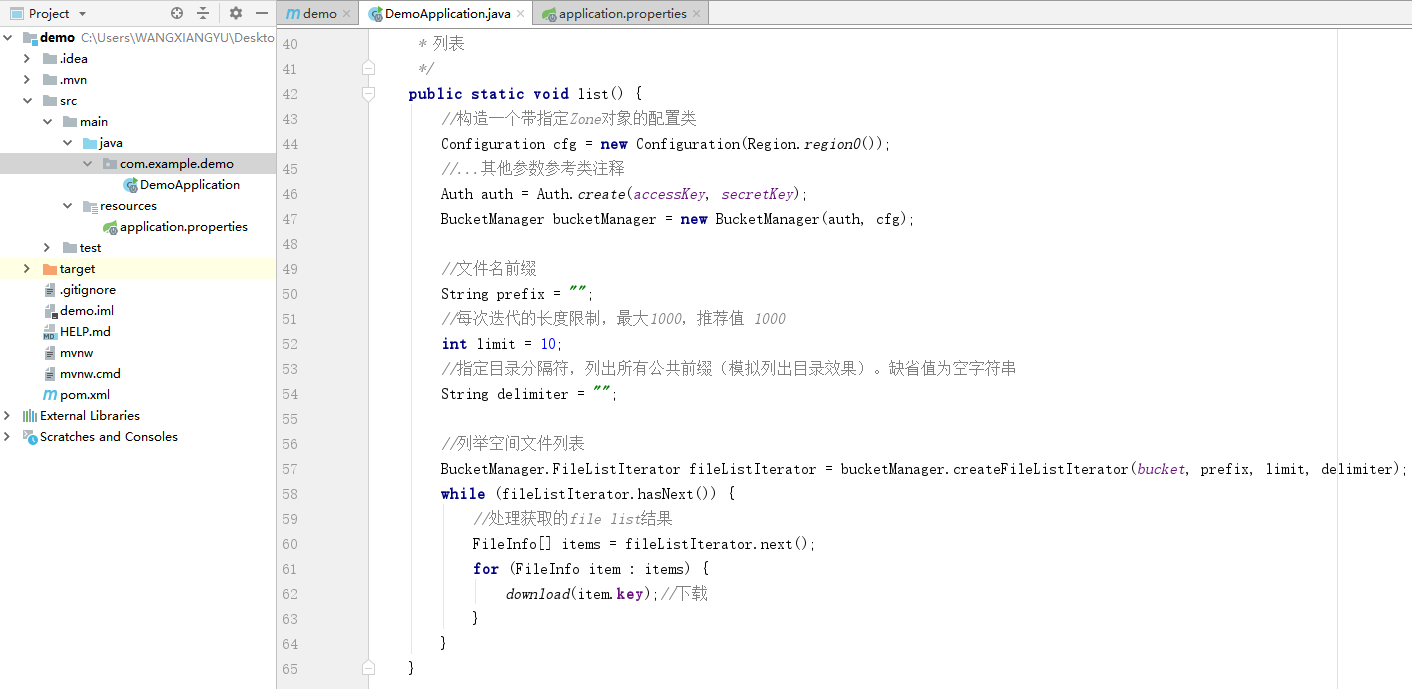
package com.example.demo;

import cn.hutool.core.date.DateUnit;

import cn.hutool.core.date.DateUtil;

import cn.hutool.core.io.FileUtil;

import cn.hutool.core.io.StreamProgress;

import cn.hutool.core.lang.Console;

import cn.hutool.http.HttpUtil;

import com.qiniu.common.Zone;

import com.qiniu.storage.BucketManager;

import com.qiniu.storage.Configuration;

import com.qiniu.storage.Region;

import com.qiniu.storage.model.FileInfo;

import com.qiniu.util.Auth;

import org.springframework.boot.SpringApplication;

import org.springframework.boot.autoconfigure.SpringBootApplication;

import java.io.UnsupportedEncodingException;

import java.net.URLEncoder;

/**

 * 架构师小跟班 www.codernav.com

 * 官方API说明:https://developer.qiniu.com/kodo/sdk/1239/java#1

 */

@SpringBootApplication

public class DemoApplication {

    //七牛云秘钥AK

    static String accessKey = "xxxxxxxxxxxxxxxxxxxxxxx";

    //七牛云秘钥SK

    static String secretKey = "xxxxxxxxxxxxxxxxxxxxxxx";

    //七牛云空间名称

    static String bucket = "xxxxxx";

    public static void main(String[] args) {

        SpringApplication.run(DemoApplication.class, args);

        list();

    }

    /**

     * 列表

     */

    public static void list() {

        //构造一个带指定Zone对象的配置类

        Configuration cfg = new Configuration(Region.region0());

        //...其他参数参考类注释

        Auth auth = Auth.create(accessKey, secretKey);

        BucketManager bucketManager = new BucketManager(auth, cfg);

        //文件名前缀

        String prefix = "";

        //每次迭代的长度限制,最大1000,推荐值 1000

        int limit = 10;

        //指定目录分隔符,列出所有公共前缀(模拟列出目录效果)。缺省值为空字符串

        String delimiter = "";

        //列举空间文件列表

        BucketManager.FileListIterator fileListIterator = bucketManager.createFileListIterator(bucket, prefix, limit, delimiter);

        while (fileListIterator.hasNext()) {

            //处理获取的file list结果

            FileInfo[] items = fileListIterator.next();

            for (FileInfo item : items) {

                download(item.key);//下载

            }

        }

    }

    /**

     * 下载

     */

    public static void download(String fileName) {

        String domainOfBucket = "cdn.jiagou1216.com";

        String encodedFileName = null;

        try {

            encodedFileName = URLEncoder.encode(fileName, "utf-8").replace("+", "%20");

        } catch (UnsupportedEncodingException e) {

            e.printStackTrace();

        }

        String publicUrl = String.format("%s/%s", domainOfBucket, encodedFileName);

        Auth auth = Auth.create(accessKey, secretKey);

        long expireInSeconds = 3600;//1小时,可以自定义链接过期时间

        String finalUrl = auth.privateDownloadUrl(publicUrl, expireInSeconds);

        System.out.println(finalUrl);

        HttpUtil.downloadFile(finalUrl, FileUtil.file("d://七牛云"));

    }

}
springboot获取七牛云空间文件列表及下载功能的更多相关文章
- PHP获取Linux当前目录下文件并实现下载功能
使用nginx转发过去给php server{ listen 9099; server_name 18.5.6.2; location / { proxy_http_version 1.1; root ...
- 利用cropper插件裁剪本地图片,然后将裁剪过后的base64图片上传至七牛云空间
现在做的项目需要做一些图片处理,由于时间赶急,之前我便没有处理图片,直接将图片放在input[type=file]里面,以文件的形式提交给后台,这样做简直就是最低级的做法,之后各种问题便出来了,人物头 ...
- C#获取七牛云token/删除七牛云图片接口
// 获取七牛token public ApiResponse GetQiniuToken(QiniuToken req) { try { Mac mac = new Mac(req.AccessKe ...
- C/C++ 获取目录下的文件列表信息
在C/C++编程时,需要获取目录下面的文件列表信息. 1.数据结构 struct dirent { long d_ino; /* inode number 索引 ...
- JavaWeb实现文件上传下载功能实例解析
转:http://www.cnblogs.com/xdp-gacl/p/4200090.html JavaWeb实现文件上传下载功能实例解析 在Web应用系统开发中,文件上传和下载功能是非常常用的功能 ...
- JavaWeb实现文件上传下载功能实例解析 (好用)
转: JavaWeb实现文件上传下载功能实例解析 转:http://www.cnblogs.com/xdp-gacl/p/4200090.html JavaWeb实现文件上传下载功能实例解析 在Web ...
- Poco之ftp获取文件列表以及下载文件
#include <iostream>#include <string>#include <vector>#include <algorithm>#in ...
- C# 文件上传下载功能实现 文件管理引擎开发
Prepare 本文将使用一个NuGet公开的组件技术来实现一个服务器端的文件管理引擎,提供了一些简单的API,来方便的实现文件引擎来对您自己的软件系统的文件进行管理. 在Visual Studio ...
- php实现文件上传下载功能小结
文件的上传与下载是项目中必不可少的模块,也是php最基础的模块之一,大多数php框架中都封装了关于上传和下载的功能,不过对于原生的上传下载还是需要了解一下的.基本思路是通过form表单post方式实现 ...
- 文件一键上传、汉字转拼音、excel文件上传下载功能模块的实现
----------------------------------------------------------------------------------------------[版权申明: ...
随机推荐
- JS-1基本语法
初识JavaScript JavaScript是一种运行在客户端的脚本语言 脚本语言:不需要编译,运行过程中由js解释器(js引擎)逐行来进行解释并执行 现在也可以基于Node.js技术进行服务器编程 ...
- 来自 AI Secure 实验室的 LLM 安全排行榜简介
近来,LLM 已深入人心,大有燎原之势.但在我们将其应用于千行百业之前,理解其在不同场景下的安全性和潜在风险显得尤为重要.为此,美国白宫发布了关于安全.可靠.可信的人工智能的行政命令; 欧盟人工智能法 ...
- 基于python源码的啸叫抑制算法解析
一 原理解析 从下图一中可以看出,该算法的原理也是先检测出来啸叫,然后通过陷波器来进行啸叫抑制的,和笔者以前分析的所用方法基本耦合. 二 源码分析 函数PAPR:计算峰值功率和平均功率的比 ...
- JSF之Action 与ActionListener的区别
事件 检验 参数 事件产生 页面跳转 Action 有 无参数,不传入当前控件,有返回值 当铵钮被单击时产生事件.提交表单 返回页面---根据配置文件跳转 ActionLis ...
- Welcome to YARP - 2.1配置功能 - 配置文件
目录 Welcome to YARP - 1.认识YARP并搭建反向代理服务 Welcome to YARP - 2.配置功能 2.1 - 配置文件(Configuration Files) 2.2 ...
- 07.Android之多媒体问题
目录介绍 7.0.0.1 加载bitmap图片的时候需要注意什么?为何bitmap容易造成OOM?如何计算Bitmap占用内存? 7.0.0.2 如何理解recycle释放内存问题?图片加载到内存其实 ...
- 01.Android之基础组件问题
目录介绍 1.0.0.1 说下Activity的生命周期?屏幕旋转时生命周期?异常条件会调用什么方法? 1.0.0.2 后台的Activity被系统回收怎么办?说一下onSaveInstanceSta ...
- 记录--uniapp开发安卓APP视频通话模块初实践
这里给大家分享我在网上总结出来的一些知识,希望对大家有所帮助 视频通话SDK用的即构的,uniapp插件市场地址 推送用的极光的,uniapp插件市场地址 即构音视频SDK uniapp插件市场的貌似 ...
- C# 人脸比对服务,自带模型,离线部署
软件说明 基于以下开源项目,做了再次封装 GitHub - ViewFaceCore/ViewFaceCore: C# 超简单的离线人脸识别库.( 基于 SeetaFace6 ) 可以一键开启服务: ...
- KingbaseES V8R3 集群运维系列 -- sync_flag参数配置
案例说明: 在KingbaseES V8R3集群一主二备的架构中,配置了流复制为同步(sync)模式,但是集群启动后,流复制状态中显示备库是async模式(备库和主库数据已经同步),从备库的rec ...