
Java进行excel的导入导出操作
excel表格的导出导入在业务中经常会遇到,下面介绍hutool和easyExcel两种操作excel的工具
测试的实体类
通过mybatis-plus生成的,用于导出数据的实体类
@Getter

@Setter

@TableName("device_info")

@ApiModel(value = "DeviceInfo对象", description = "")

public class DeviceInfo implements Serializable {

    @ApiModelProperty("设备ID")

    @TableId(value = "device_id",type = IdType.ASSIGN_UUID)

    private String deviceId;

    @ApiModelProperty("设备名称")

    @TableField("device_name")

    private String deviceName;

    @ApiModelProperty("设备编号")

    @TableField("device_no")

    private String deviceNo;

    @ApiModelProperty("设备型号")

    @TableField("device_model")

    private String deviceModel;

    @ApiModelProperty("新建时间")

    @TableField("create_time")

    private LocalDateTime createTime;

    @ApiModelProperty("更新时间")

    @TableField("update_time")

    private LocalDateTime updateTime;

    @ApiModelProperty("创建人")

    @TableField("created_by")

    private String createdBy;

    @ApiModelProperty("更新人")

    @TableField("updated_by")

    private String updatedBy;

    @ApiModelProperty("版本")

    @TableField("version")

    private Long version;

}
Mapper文件
package com.example.demo.mapper;

import com.example.demo.entity.DeviceInfo;

import com.baomidou.mybatisplus.core.mapper.BaseMapper;

import org.apache.ibatis.annotations.Mapper;

@Mapper

public interface DeviceInfoMapper extends BaseMapper<DeviceInfo> {

}
Mapper的xml文件
<?xml version="1.0" encoding="UTF-8"?>

<!DOCTYPE mapper PUBLIC "-//mybatis.org//DTD Mapper 3.0//EN" "http://mybatis.org/dtd/mybatis-3-mapper.dtd">

<mapper namespace="com.example.demo.mapper.DeviceInfoMapper">

    <!-- 通用查询映射结果 -->

    <resultMap id="BaseResultMap" type="com.example.demo.entity.DeviceInfo">

        <id column="device_id" property="deviceId" />

        <result column="device_name" property="deviceName" />

        <result column="device_no" property="deviceNo" />

        <result column="device_model" property="deviceModel" />

        <result column="create_time" property="createTime" />

        <result column="update_time" property="updateTime" />

        <result column="created_by" property="createdBy" />

        <result column="updated_by" property="updatedBy" />

        <result column="version" property="version" />

    </resultMap>

    <!-- 通用查询结果列 -->

    <sql id="Base_Column_List">

        device_id, device_name, device_no, device_model, create_time, update_time, created_by, updated_by, version

    </sql>

</mapper>
IService接口
package com.example.demo.service;

import com.example.demo.entity.DeviceInfo;

import com.baomidou.mybatisplus.extension.service.IService;

import javax.servlet.http.HttpServletResponse;

import java.io.IOException;

import java.io.InputStream;

public interface IDeviceInfoService extends IService<DeviceInfo> {

    void exportExcel(HttpServletResponse response) throws IOException;

    boolean importExcel(InputStream inputStream);

}
1、使用hutool导出
优点:hutool有很多工具类,包括ExcelWrite和ExcelReader工具类,写代码也很简洁,我觉得简单的导入导出优先可以使用
缺点:导出不支持excel模板,很难将一些特定数据放在特定的单元格中,导入不好读表格的特殊信息,如批注信息等
增加依赖
<dependency>

    <groupId>cn.hutool</groupId>

    <artifactId>hutool-all</artifactId>

    <version>5.7.22</version>

</dependency>
导入的表格
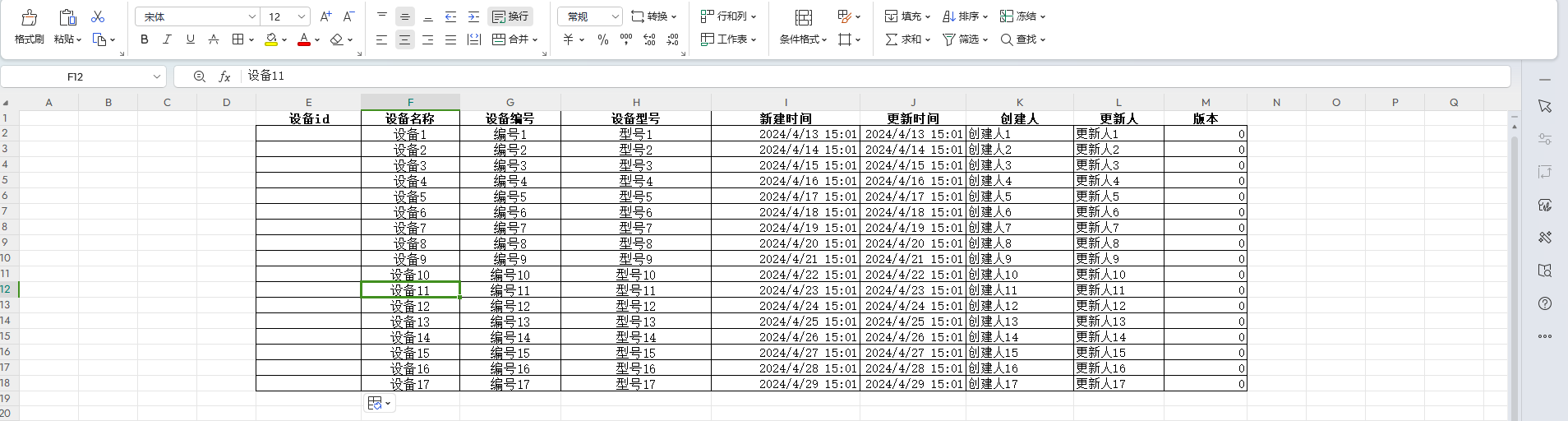
导出的表格
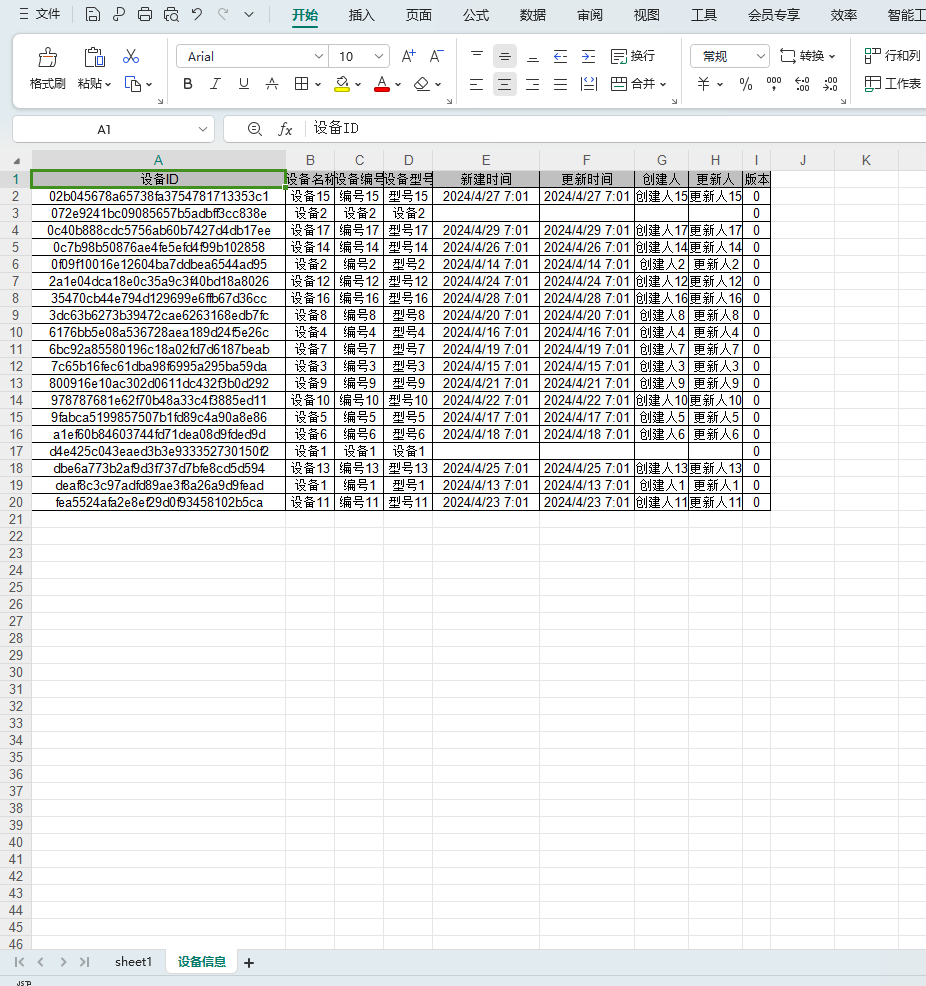
如果要好看的格式、列宽、行距,可以通过以下代码设置单元格的格式,
StyleSet style = writer.getStyleSet();

style.getHeadCellStyle().setFillBackgroundColor(IndexedColors.WHITE.getIndex());

writer.getCell(0,0).getCellStyle().setFillForegroundColor(IndexedColors.WHITE.getIndex());
代码实现
以下是controller类
package com.example.demo.controller;

import com.example.demo.service.IDeviceInfoService;

import io.swagger.annotations.ApiOperation;

import org.springframework.web.bind.annotation.GetMapping;

import org.springframework.web.bind.annotation.PostMapping;

import org.springframework.web.bind.annotation.RequestMapping;

import org.springframework.web.bind.annotation.RestController;

import org.springframework.web.multipart.MultipartFile;

import javax.annotation.Resource;

import javax.servlet.http.HttpServletResponse;

import java.io.IOException;

@RestController

@RequestMapping("/device-info")

public class DeviceInfoController {

    @Resource

    private IDeviceInfoService deviceInfoService;

    @GetMapping("/exportExcel")

    @ApiOperation(value = "导出模板表格测试")

    public void exportExcel(HttpServletResponse response) throws IOException {

        deviceInfoService.exportExcel(response);

    }

    @PostMapping("importExcel")

    @ApiOperation(value = "导入表格测试")

    public boolean importExcel(MultipartFile file) throws IOException {

        return deviceInfoService.importExcel(file.getInputStream());

        }

}
以下是进行简单导入导出操作的Service
package com.example.demo.service.impl;

import cn.hutool.poi.excel.ExcelReader;

import cn.hutool.poi.excel.ExcelUtil;

import cn.hutool.poi.excel.ExcelWriter;

import com.baomidou.mybatisplus.extension.service.impl.ServiceImpl;

import com.example.demo.entity.DeviceInfo;

import com.example.demo.mapper.DeviceInfoMapper;

import com.example.demo.service.IDeviceInfoService;

import io.swagger.annotations.ApiModelProperty;

import org.springframework.stereotype.Service;

import javax.servlet.http.HttpServletResponse;

import java.io.IOException;

import java.io.InputStream;

import java.lang.reflect.Field;

import java.net.URLEncoder;

import java.time.LocalDate;

import java.util.List;

@Service

public class DeviceInfoServiceImpl extends ServiceImpl<DeviceInfoMapper, DeviceInfo> implements IDeviceInfoService {

    @Override

    public void exportExcel(HttpServletResponse response) throws IOException {

        //导出的表格名称

        String targetFileName = "测试导出表格" + LocalDate.now();

        String suffix = ".xlsx";

        //设置接口响应结果格式

        response.reset();

        //response为HttpServletResponse对象

        response.setContentType("application/vnd.openxmlformats-officedocument.spreadsheetml.sheet");

        response.setCharacterEncoding("utf-8");

        response.addHeader("Content-Disposition", "attachment;fileName=" + URLEncoder.encode(targetFileName + suffix, "UTF-8"));

        List<DeviceInfo> deviceInfoList = this.list();

        // 通过工具类创建writer,默认创建xls格式

        ExcelWriter writer = ExcelUtil.getWriter();

        //获取注解的值,跟excel表的表头对应

        Field[] fields = DeviceInfo.class.getDeclaredFields();

        for (int i = 0; i < fields.length; i++) {

            String header = fields[i].getDeclaredAnnotation(ApiModelProperty.class).value();

            writer.addHeaderAlias( fields[i].getName(),header);

        }

        //可以新建sheet,将数据导出成多个sheet

        writer.setSheet("设备信息");

// 一次性写出内容,使用默认样式

        writer.write(deviceInfoList);

        //根据单元格内容自动调整列宽

        writer.autoSizeColumnAll();

//out为OutputStream,需要写出到的目标流

        writer.flush(response.getOutputStream());

// 关闭writer,释放内存

        writer.close();

    }

    @Override

    public boolean importExcel(InputStream inputStream) {

        ExcelReader reader = ExcelUtil.getReader(inputStream, 0);

        //获取注解的值,跟excel表的表头对应

        Field[] fields = DeviceInfo.class.getDeclaredFields();

        for (int i = 0; i < fields.length; i++) {

            String header = fields[i].getDeclaredAnnotation(ApiModelProperty.class).value();

            reader.addHeaderAlias(header, fields[i].getName());

        }

        List<DeviceInfo> deviceInfoList = reader.read(0, 1, DeviceInfo.class);

        return this.saveOrUpdateBatch(deviceInfoList);

    }

}
2、使用easyExcel导出
增加依赖
<dependency>

    <groupId>com.alibaba</groupId>

    <artifactId>easyexcel</artifactId>

    <version>3.2.1</version>

</dependency>
导入的表格
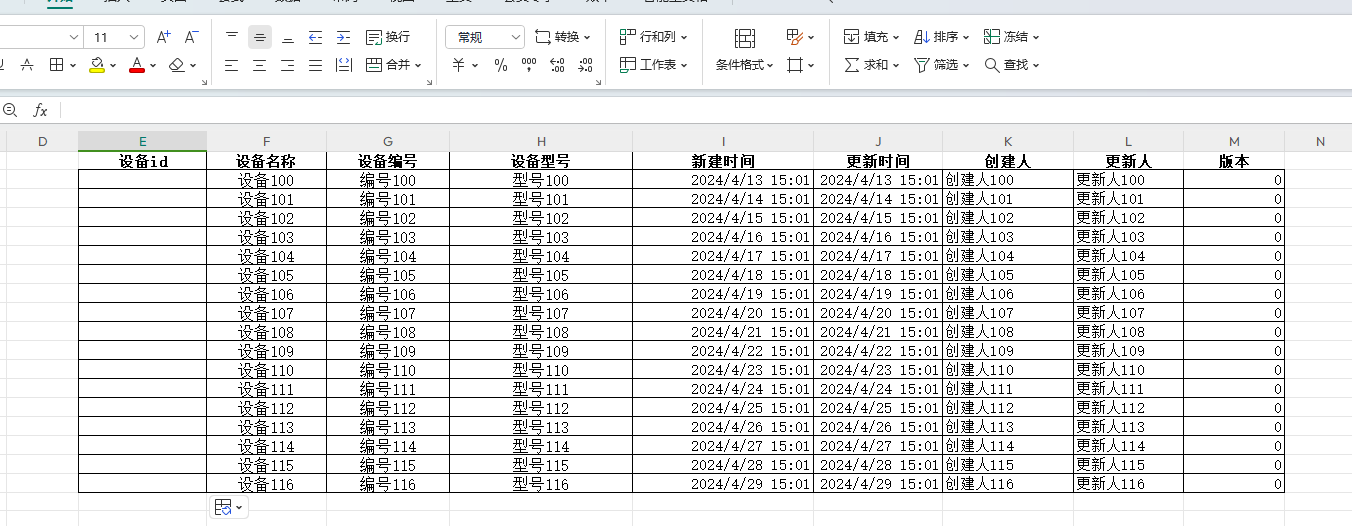
导出的表格
预先做好的导出模板
这是进行导出的模板,需要在每一个单元格写上实体的字段名称,程序才能精确将数据填到相应的位置
如{.deviceId}在字段名称前有个 . 表示数据是一个List,如{listSize}表示数据只是一个单元格的值
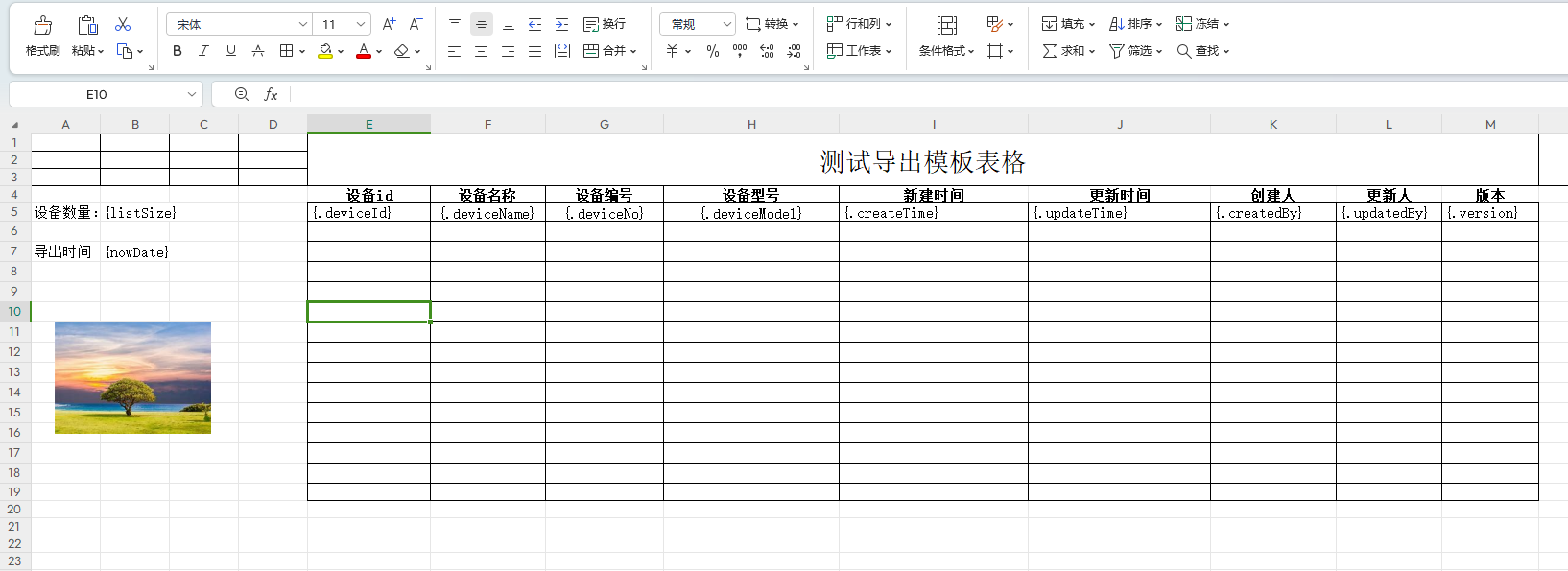
导出的模板文件放在资源下面
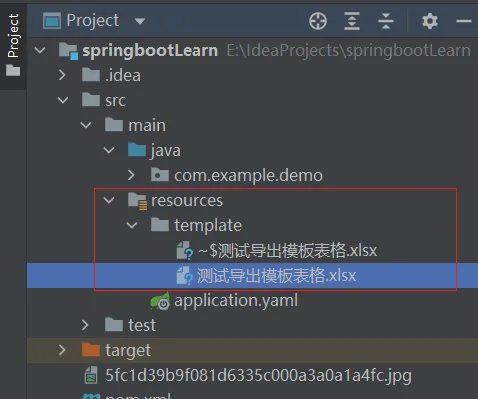
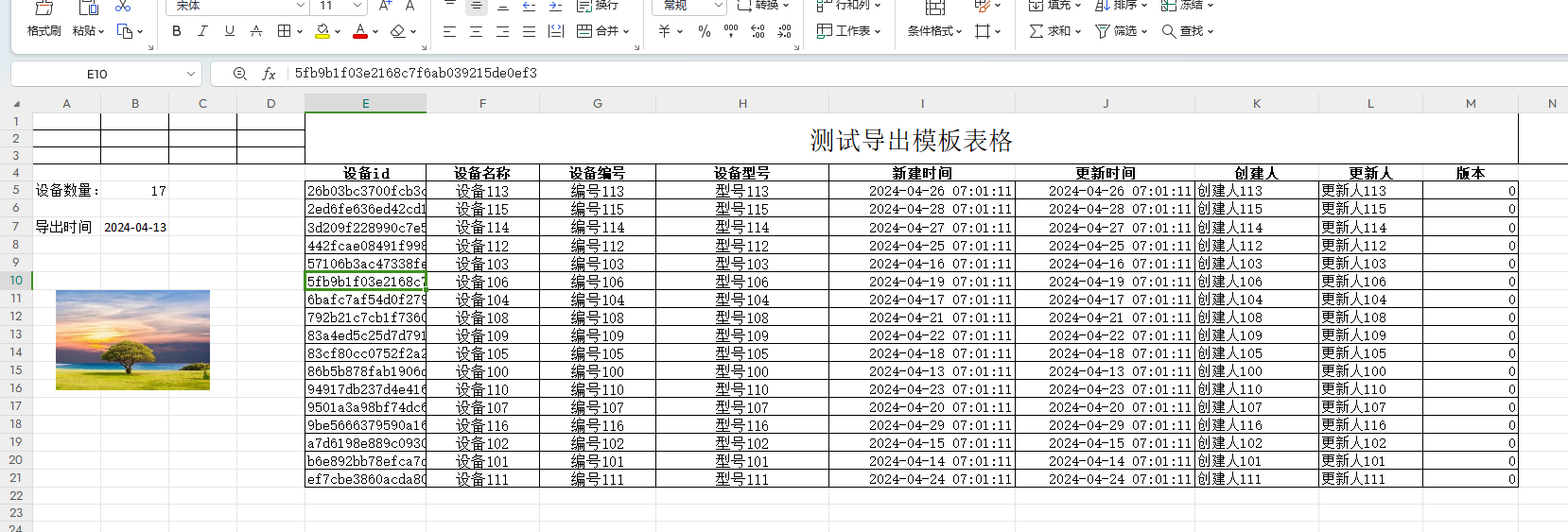
导出的表格结果
代码实现
Controller类
package com.example.demo.controller;

import com.alibaba.excel.EasyExcel;

import com.example.demo.entity.DeviceInfo;

import com.example.demo.listener.DeviceInfoListener;

import com.example.demo.service.IDeviceInfoService;

import io.swagger.annotations.ApiOperation;

import org.springframework.web.bind.annotation.*;

import org.springframework.web.multipart.MultipartFile;

import javax.annotation.Resource;

import javax.servlet.http.HttpServletResponse;

import java.io.IOException;

@RestController

@RequestMapping("/device-info")

public class DeviceInfoController {

    @Resource

    private IDeviceInfoService deviceInfoService;

    @GetMapping("/exportExcel")

    @ApiOperation(value = "导出模板表格测试")

    public void exportExcel(HttpServletResponse response) throws IOException {

        deviceInfoService.exportExcel(response);

    }

    @PostMapping("importExcel")

    @ApiOperation(value = "导入表格测试")

    public boolean importExcel(MultipartFile file) throws IOException {

        EasyExcel.read(file.getInputStream(),DeviceInfo.class,new DeviceInfoListener(deviceInfoService)).sheet().doRead();

        return true;

    }

}
实现导出逻辑的Service类
package com.example.demo.service.impl;

import cn.hutool.poi.excel.ExcelReader;

import cn.hutool.poi.excel.ExcelUtil;

import com.alibaba.excel.EasyExcelFactory;

import com.alibaba.excel.ExcelWriter;

import com.alibaba.excel.write.metadata.WriteSheet;

import com.baomidou.mybatisplus.extension.service.impl.ServiceImpl;

import com.example.demo.entity.DeviceInfo;

import com.example.demo.mapper.DeviceInfoMapper;

import com.example.demo.service.IDeviceInfoService;

import io.swagger.annotations.ApiModelProperty;

import org.springframework.core.io.ClassPathResource;

import org.springframework.stereotype.Service;

import javax.servlet.http.HttpServletResponse;

import java.io.File;

import java.io.IOException;

import java.io.InputStream;

import java.lang.reflect.Field;

import java.net.URLEncoder;

import java.time.LocalDate;

import java.util.HashMap;

import java.util.List;

import java.util.Map;

@Service

public class DeviceInfoServiceImpl extends ServiceImpl<DeviceInfoMapper, DeviceInfo> implements IDeviceInfoService {

    @Override

    public void exportExcel(HttpServletResponse response) throws IOException {

        //导出的表格名称

        String targetFileName = "测试导出表格" + LocalDate.now();

        String suffix = ".xlsx";

        //根据相对路径获取模板表格的内容

        ClassPathResource resource = new ClassPathResource("template/测试导出模板表格.xlsx");

        File bathFile = resource.getFile();

        //设置接口响应结果格式

        response.reset();

        //response为HttpServletResponse对象

        response.setContentType("application/vnd.openxmlformats-officedocument.spreadsheetml.sheet");

        response.setCharacterEncoding("utf-8");

        response.addHeader("Content-Disposition", "attachment;fileName=" + URLEncoder.encode(targetFileName + suffix, "UTF-8"));

        List<DeviceInfo> deviceInfoList = this.list();

        Map<String,Object> map = new HashMap<>();

        map.put("listSize",deviceInfoList.size() );

        map.put("nowDate",LocalDate.now() );

        //将模板复制到目标表格中

        ExcelWriter excelWriter = EasyExcelFactory.write(response.getOutputStream()).withTemplate(bathFile).build();

        //将列表的值写入表格中,要求实体类的字段名称与模板中的名称一致

        WriteSheet sheet = EasyExcelFactory.writerSheet().build();

        excelWriter.fill(map,sheet);

        excelWriter.fill(deviceInfoList, sheet);

        excelWriter.finish();

    }

}
导入需要写一个数据监听类,实现readListener接口
package com.example.demo.listener;

import com.alibaba.excel.context.AnalysisContext;

import com.alibaba.excel.read.listener.ReadListener;

import com.alibaba.excel.util.ListUtils;

import com.alibaba.fastjson.JSON;

import com.example.demo.entity.DeviceInfo;

import com.example.demo.service.IDeviceInfoService;

import lombok.extern.slf4j.Slf4j;

import java.util.List;

@Slf4j

public class DeviceInfoListener implements ReadListener<DeviceInfo> {

    /**

     * 每隔100条存储数据库,然后清理list ,方便内存回收

     */

    private static final int BATCH_COUNT = 100;

    /**

     * 缓存的数据

     */

    private List<DeviceInfo> cachedDataList = ListUtils.newArrayListWithExpectedSize(BATCH_COUNT);

    private IDeviceInfoService deviceInfoService;

    public DeviceInfoListener( ) {

    }

    public DeviceInfoListener(IDeviceInfoService deviceInfoService) {

        this.deviceInfoService = deviceInfoService;

    }

    @Override

    public void invoke(DeviceInfo data, AnalysisContext context) {

        log.info("解析到一条数据:{}", JSON.toJSONString(data));

        cachedDataList.add(data);

        // 达到BATCH_COUNT了,需要去存储一次数据库,防止数据几万条数据在内存,容易OOM

        if (cachedDataList.size() >= BATCH_COUNT) {

            saveData();

            // 存储完成清理 list

            cachedDataList = ListUtils.newArrayListWithExpectedSize(BATCH_COUNT);

        }

    }

    @Override

    public void doAfterAllAnalysed(AnalysisContext context) {

// 这里也要保存数据,确保最后遗留的数据也存储到数据库

        saveData();

        log.info("所有数据解析完成!");

    }

    /**

     * 加上存储数据库

     */

    private void saveData() {

        log.info("{}条数据,开始存储数据库!", cachedDataList.size());

        deviceInfoService.saveOrUpdateBatch(cachedDataList);

        log.info("存储数据库成功!");

    }

}
Java进行excel的导入导出操作的更多相关文章
- c# .Net :Excel NPOI导入导出操作教程之读取Excel文件信息及输出
c# .Net :Excel NPOI导入导出操作教程之读取Excel文件信息及输出 using NPOI.HSSF.UserModel;using NPOI.SS.UserModel;using S ...
- java实现excel的导入导出(poi详解)[转]
java实现excel的导入导出(poi详解) 博客分类: java技术 excel导出poijava 经过两天的研究,现在对excel导出有点心得了.我们使用的excel导出的jar包是poi这个 ...
- java 中Excel的导入导出
部分转发原作者https://www.cnblogs.com/qdhxhz/p/8137282.html雨点的名字 的内容 java代码中的导入导出 首先在d盘创建一个xlsx文件,然后再进行一系列 ...
- JAVA对Excel的导入导出
今天需要对比2个excel表的内容找出相同:由于要学的还很多上手很慢所以在这做个分享希望对初学的有帮助: 先是pom的配置: <dependency> <groupId>org ...
- c# .Net :Excel NPOI导入导出操作教程之List集合的数据写到一个Excel文件并导出
将List集合的数据写到一个Excel文件并导出示例: using NPOI.HSSF.UserModel;using NPOI.SS.UserModel;using System;using Sys ...
- java实现excel的导入导出(poi详解)
经过两天的研究,现在对excel导出有点心得了.我们使用的excel导出的jar包是poi这个阿帕奇公司的一个项目,后来被扩充了.是比较好用的excel导出工具. 下面来认识一下这个它吧. 我们知道要 ...
- C# .Net :Excel NPOI导入导出操作教程之将Excel文件读取并写到数据库表,示例分享
using (FileStream fileReader = File.OpenRead(@"C:\Users\Administrator\Desktop\112.xls")) ...
- c# .Net :Excel NPOI导入导出操作教程之数据库表信息数据导出到一个Excel文件并写到磁盘示例分享
string sql = @"select * from T_Excel"; ----------------DataTable Star---------------- ...
- 循序渐进开发WinForm项目(5)--Excel数据的导入导出操作
随笔背景:在很多时候,很多入门不久的朋友都会问我:我是从其他语言转到C#开发的,有没有一些基础性的资料给我们学习学习呢,你的框架感觉一下太大了,希望有个循序渐进的教程或者视频来学习就好了. 其实也许我 ...
- VB中Excel 2010的导入导出操作
VB中Excel 2010的导入导出操作 编写人:左丘文 2015-4-11 近来这已是第二篇在讨论VB的相关问题,今天在这里,我想与大家一起分享一下在VB中如何从Excel中导入数据和导出数据到Ex ...
随机推荐
- C++//queue 队列 容器 先进先出 只有队头 队尾能被外界访问 因此不允许有遍历行为
1 //queue 队列 容器 先进先出 只有队头 队尾能被外界访问 因此不允许有遍历行为 2 3 4 #include<iostream> 5 #include<queue> ...
- 牛客“迎新春,过大年”多校程序设计竞赛A题
题目描述: 这里有个小trick 当时也看到数据范围的问题了 \(n是1e6 \quad \sum_{i=1}^na[i]<=5e7\) 我们考虑不同的数\(1 \quad 2 \quad .. ...
- 在winform中如何嵌入第三方软件窗体✨
相关win32api的学习 SetParent [DllImport("user32.dll ", EntryPoint = "SetParent")] pri ...
- rst文件查看(Sphinx)
reStructuredText ( RST . ReST 或 reST )是一种用于文本数据的文件格式,主要用于 Python 编程语言社区的技术文档. 在下载了别人的Python源文件里面有rst ...
- MES集成警报灯系统,Http远程控制系统设计
核心功能设计 警报灯实机演示:https://www.bilibili.com/video/BV1294y1M7f3?p=2 接受服务器发送http·post请求远程控制警报灯,可接入MES等系统. ...
- mongo Payload document size is larger than maximum of 16777216. 如何处理
MongoDB中的文档大小限制为16MB(即16777216字节).如果你遇到Payload document size is larger than maximum of 16777216的错误,意 ...
- 在Blazor中使用Chart.js快速创建图表
前言 BlazorChartjs是一个在Blazor中使用Chart.js的库(支持Blazor WebAssembly和Blazor Server两种模式),它提供了简单易用的组件来帮助开发者快速集 ...
- iOS Modern Collection View
TL;DR 使用的技术: Compositional layout + Diffable data source.iOS 14+. 创建 layout 以描述布局: 创建 dataSource 以提供 ...
- OREPA:阿里提出训练也很快的重参数策略,内存减半,速度加倍 | CVPR 2022
论文提出了在线重参数方法OREPA,在训练阶段就能将复杂的结构重参数为单卷积层,从而降低大量训练的耗时.为了实现这一目标,论文用线性缩放层代替了训练时的BN层,保持了优化方向的多样性和特征表达能力.从 ...
- KingbaseES 名词解释之timeline
timeline定义 每当归档文件恢复完成后,创建一个新的时间线用来区别新生成的WAL记录.WAL文件名由时间线和日志序号组成 引入timeline的意义 为了理解引入时间线的背景,我们来分析一下,如 ...