
Servlet--HttpServlet实现doGet和doPost请求的原理(转)
- Servlet(Server Applet):全称Java Servlet。是用Java编写的服务器端程序。其主要功能在于交互式地浏览和修改数据,生成动态Web内容。
- 狭义的Servlet是指 Java语言实现的一个接口,广义的Servlet是指任何实现了这个Servlet接口的类。
- HttpServlet: 指能够处理 HTTP 请求的 servlet,它在原有 Servlet 接口上添加了一些与 HTTP 协议处理方法,它比 Servlet 接口的功能更为强大。因此开发人员在编写Servlet时,通常应继承这个类,而避免直接去实现Servlet接口。
- HttpServlet 在实现 Servlet 接口时,覆写了 service 方法,该方法体内的代码会自动判断用户的请求方式,如为 GET 请求,则调用 HttpServlet 的 doGet 方法,如为 Post 请求,则调用 doPost 方法。因此,开发人员在编写 Servlet 时,通常只需要覆写 doGet 或 doPost 方法,而不要去覆写 service 方法。
参考:https://blog.csdn.net/HeatDeath/article/details/79057168
转:https://blog.csdn.net/m0_38039437/article/details/75264012
一、HttpServlet简介
1、HttpServlet是GenericServlet的子类,又是在GenericServlet的基础上做了增强。
2、HttpServlet方法
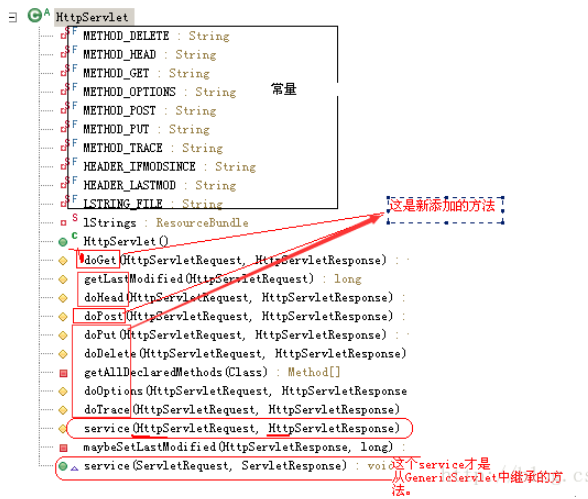
二、HTTP实现doGet或doPost请求项目介绍
1、通过实现doGet请求和doPost请求实例来了解内部的工作原理。
2、doGet请求和doPost请求实例代码介绍:
A:创建一个Servlet类继承HttpServlet类
B:在index.jsp页面创建一个超链接请求
3、doGet请求和doPost请求实例实施介绍:
A、创建一个webproject项目。
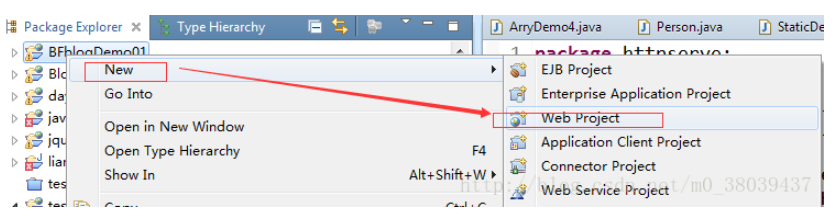
B、创建一个Servlet类的名称为HttpServ继承HttpServlet类同时覆写doGet方法和doPost方法。
1、
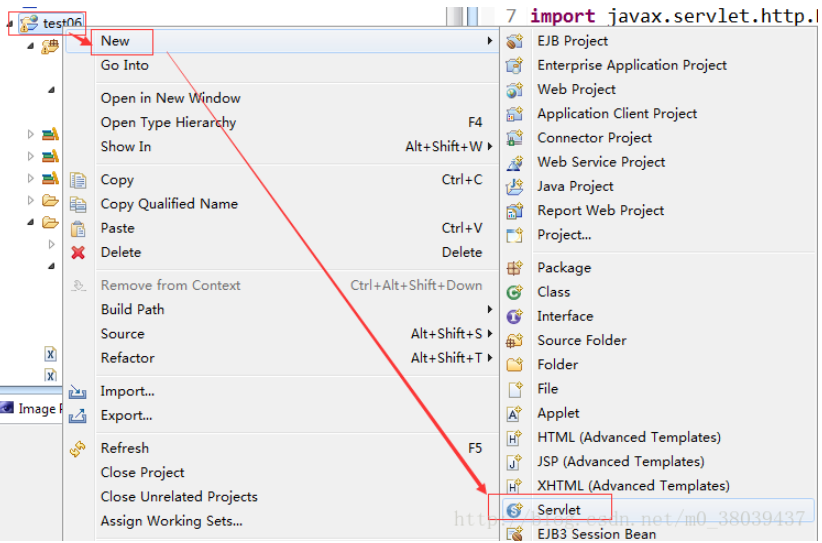
2、
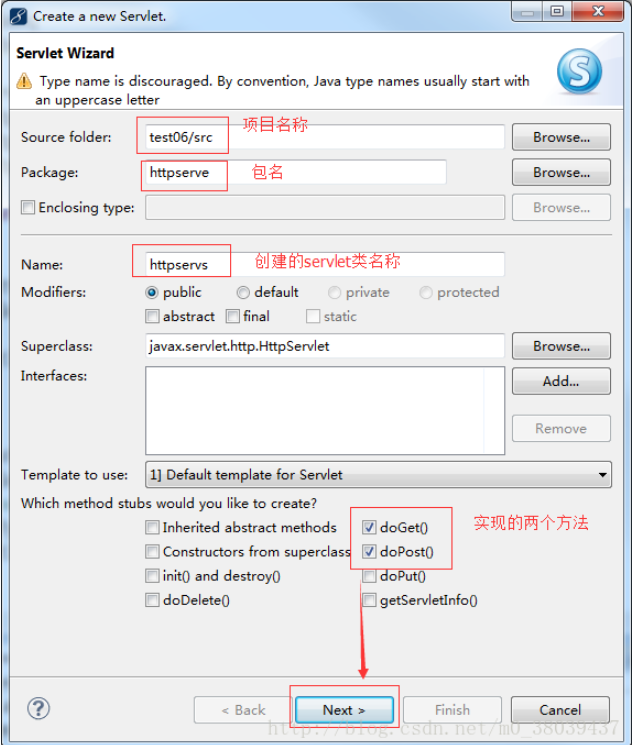
3、配置web.xml文件
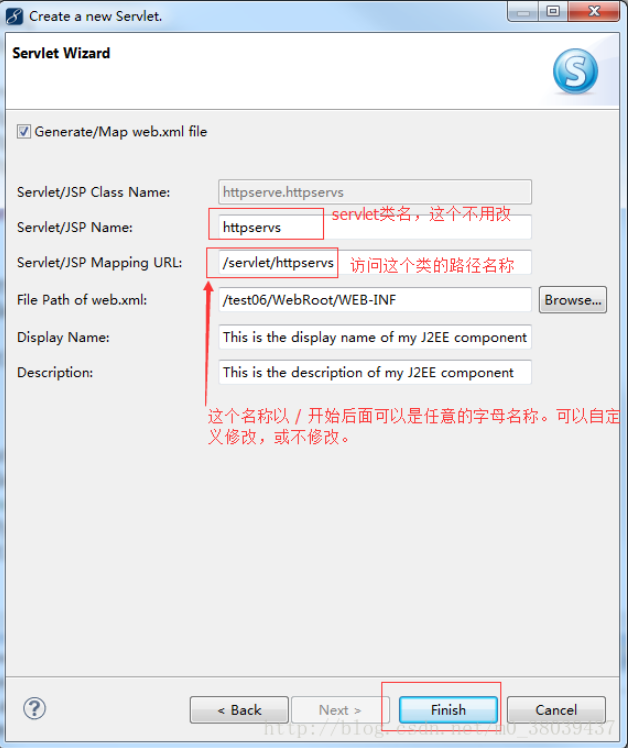
4、创建Servlet代码展示

package httpserve;

import java.io.IOException;

import java.io.PrintWriter;

import javax.servlet.ServletException;

import javax.servlet.http.HttpServlet;

import javax.servlet.http.HttpServletRequest;

import javax.servlet.http.HttpServletResponse;

public class HttpServ extends HttpServlet {

    public void doGet(HttpServletRequest request, HttpServletResponse response)

            throws ServletException, IOException {

        System.out.println("发送get请求。。。。。。。。。。。");

    }

    protected void doPost(HttpServletRequest req, HttpServletResponse resp)

            throws ServletException, IOException {

        // TODO Auto-generated method stub

        resp.setContentType("text/html;charset=UTF-8");

        System.out.println("发送post方法。。。。。。。。。。");

    }
5、web.xml配置文件代码展示
<?xml version="1.0" encoding="UTF-8"?>

<web-app version="3.0"

    xmlns="http://java.sun.com/xml/ns/javaee"

    xmlns:xsi="http://www.w3.org/2001/XMLSchema-instance"

    xsi:schemaLocation="http://java.sun.com/xml/ns/javaee http://java.sun.com/xml/ns/javaee/web-app_3_0.xsd">

  <servlet>

    <description>This is the description of my J2EE component</description>

    <display-name>This is the display name of my J2EE component</display-name>

    <servlet-name>HttpServ</servlet-name>

    <servlet-class>httpserve.HttpServ</servlet-class>

  </servlet>

  <servlet-mapping>

    <servlet-name>HttpServ</servlet-name>

    <url-pattern>/http</url-pattern>

  </servlet-mapping>

</web-app>
C、在index.jsp页面创建一个超链接请求
<%@ page language="java" import="java.util.*" pageEncoding="UTF-8"%>

<%

String path = request.getContextPath();

String basePath = request.getScheme()+"://"+request.getServerName()+":"+request.getServerPort()+path+"/";

%>

<!DOCTYPE HTML PUBLIC "-//W3C//DTD HTML 4.01 Transitional//EN">

<html>

  <head>

    <base href="<%=basePath%>">

    <title>My JSP 'index.jsp' starting page</title>

    <meta http-equiv="pragma" content="no-cache">

    <meta http-equiv="cache-control" content="no-cache">

    <meta http-equiv="expires" content="0">

    <meta http-equiv="keywords" content="keyword1,keyword2,keyword3">

    <meta http-equiv="description" content="This is my page">

    <!--

    <link rel="stylesheet" type="text/css" href="styles.css">

    -->

  </head>

  <body>

    This is my JSP page. <br>

    <a href="http://localhost:8080/test06/http">get请求1</a><br/>

    <!-- 对于一个html页面来说,如果没有以http开始,则默认的前面会加上

        协议类型://目前这个页面所在的服务器:目前端口/目前项目/你给的这个名称 -->

    <a href="http">get请求2</a><hr/>

    <form method = "post" action="http">

        <input type="submit" value="提交"/>

    </form>

  </body>

</html>
D、发送doGet请求和doPost请求
a、在浏览器中输入测试地址,http://127.0.0.1:8080/test06/
b、打开项目的首页后分别点击get请求1、get请求2、和 post请求(提交按钮)
c、在控制台可以观察到分别调用了doGet和doPost方法。
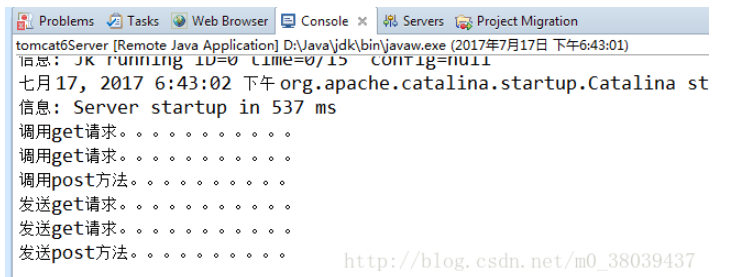
三、HTTP实现doGet或doPost请求原理介绍
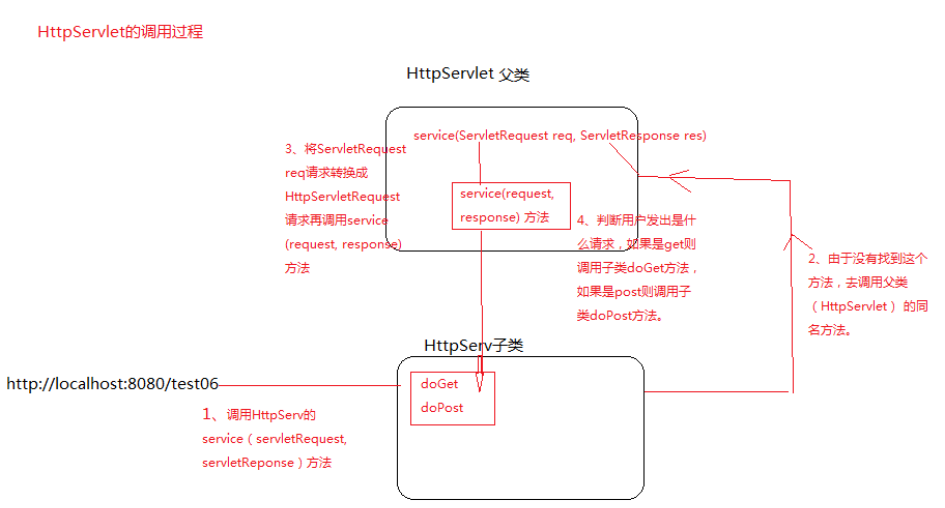
1、浏览器发送请求到HttpSevr类调用HttpServ的service(servletRequest, servletReponse)方法
2、由于没有找到这个方法,去调用父类(HttpServlet) 的同名方法。
3、父类的service方法将ServletRequest req请求转换成HttpServletRequest请求,再去调用service(request, response) 方法。
将ServletRequest req请求转换成HttpServletRequest请求再调用service(request, response) 方法源码如下:
public void service(ServletRequest req, ServletResponse res)

        throws ServletException, IOException {

        HttpServletRequest  request;

        HttpServletResponse response;

        try {

            request = (HttpServletRequest) req;

            response = (HttpServletResponse) res;

        } catch (ClassCastException e) {

            throw new ServletException("non-HTTP request or response");

        }

        service(request, response);

    }
4、 调用的service(request, response) 方法功能是判断用户发出是什么请求,如果是get则调用子类(HttpSevr)的doGet方法,如果是post则调用子类(HttpSevr)的doPost方法。
service(request, response) 方法源码如下:
protected void service(HttpServletRequest req, HttpServletResponse resp)

        throws ServletException, IOException {

        String method = req.getMethod();

        if (method.equals(METHOD_GET)) {

            long lastModified = getLastModified(req);

            if (lastModified == -1) {

                // servlet doesn't support if-modified-since, no reason

                // to go through further expensive logic

                doGet(req, resp);

            } else {

                long ifModifiedSince;

                try {

                    ifModifiedSince = req.getDateHeader(HEADER_IFMODSINCE);

                } catch (IllegalArgumentException iae) {

                    // Invalid date header - proceed as if none was set

                    ifModifiedSince = -1;

                }

                if (ifModifiedSince < (lastModified / 1000 * 1000)) {

                    // If the servlet mod time is later, call doGet()

                    // Round down to the nearest second for a proper compare

                    // A ifModifiedSince of -1 will always be less

                    maybeSetLastModified(resp, lastModified);

                    doGet(req, resp);

                } else {

                    resp.setStatus(HttpServletResponse.SC_NOT_MODIFIED);

                }

            }

        } else if (method.equals(METHOD_HEAD)) {

            long lastModified = getLastModified(req);

            maybeSetLastModified(resp, lastModified);

            doHead(req, resp);

        } else if (method.equals(METHOD_POST)) {

            doPost(req, resp);

        } else if (method.equals(METHOD_PUT)) {

            doPut(req, resp);

        } else if (method.equals(METHOD_DELETE)) {

            doDelete(req, resp);

        } else if (method.equals(METHOD_OPTIONS)) {

            doOptions(req,resp);

        } else if (method.equals(METHOD_TRACE)) {

            doTrace(req,resp);

        } else {

            //

            // Note that this means NO servlet supports whatever

            // method was requested, anywhere on this server.

            //

            String errMsg = lStrings.getString("http.method_not_implemented");

            Object[] errArgs = new Object[1];

            errArgs[0] = method;

            errMsg = MessageFormat.format(errMsg, errArgs);

            resp.sendError(HttpServletResponse.SC_NOT_IMPLEMENTED, errMsg);

        }

    }
5、调用关系图
四、注意事项:
1、如果在HttpServ中覆盖了service(ServletRequest,SerlvetResonse)方法则这个类的所实现的doGet/doPost都不会再执行了。
因为service(ServletRequest,SerlvetResonse)是最高接口Servlet定义规范。在tomcat调用时,一定会在最终的子类中去找这个方法且调用它。
如果最终的子类没有则会调用父的service(ServletRequest,SerlvetResonse)。
2、如果覆盖了serivce(HttpServletRequest,HtpServletResponse)则会执行httpServlet中的service(ServletRequest,SerlvetResonse),但是由于子类中已经覆盖了serivce(HttpServletRequest,HtpServletResponset)所以,httpServlet中的serivce(HttpServletRequest,HtpServletResponset)就不再执行了,而是直接执行子类中同名同参数方法,且doXxxx也不会执行了,因为子类的serivce(HttpServletRequest,HtpServletResponset)没有调用doXxxx.
3、如果继承了HttpServlet没有实现任何的doXxx方法则会抛出一个异常
五:客户端请求和返回数据用到的常用方法 https://www.cnblogs.com/xdp-gacl/p/3798347.html
Servlet--HttpServlet实现doGet和doPost请求的原理(转)的更多相关文章
- Servlet--HttpServlet实现doGet和doPost请求的原理
转:https://blog.csdn.net/m0_38039437/article/details/75264012 一.HttpServlet简介 1.HttpServlet是GenericSe ...
- 1.2(学习笔记)Servlet基础(doGet、doPost、生命周期、页面跳转)
一.doGet()与doPost() 我们在TestServlet类中重写doGet().doPost().service(). import javax.servlet.ServletExcepti ...
- SERVLET中的doGet与doPost两个方法之间的区别
get和post是http协议的两种方法,另外还有head, delete等 这两种方法有本质的区别,get只有一个流,参数附加在url后,大小个数有严格限制且只能是字符串.post的参数是通过另外的 ...
- servlet中的doGet()与doPost()以及service()的用法
doget和dopost的区别 get和post是http协议的两种方法,另外还有head, delete等 1.这两种方法有本质的区别,get只有一个流,参数附加在url后,大小个数有严格限制且只能 ...
- Servlet学习二——doGet和doPost
1.get和post是http协议中的两种方法,还有其它,读写一般数据还能满足: 2.get只有一个流,参数附加在url后,且大小个数有严格限制,这个限制因浏览器而有所不同,get传递数据,实际上是将 ...
- 自定义servlet重写doGet或doPost方法是如何实现多态的
我们知道,如果我们自定义一个servlet继承HttpServlet,并且重写HttpServlet中的doGet或doPost方法,那么从浏览器发送过来的request请求将调用HttpServle ...
- 去除myeclipse中doget和dopost方法中的注释
当我们使用myeclipse新建servlet时发现doget和dopost方法中有一些无用的注释,每次新建一个servlet时都要手动删除特别麻烦. 下面就教大家如何去除这些注释! 以myeclip ...
- 简单的Servlet结合Jsp实现请求和响应以及对doGet和doPost的浅析
1.新建jsp,创建表单 <body> <form action="/MyfirstWeb/login"> username:<input type= ...
- servlet中service() 和doGet() 、doPost() 学习笔记
Sevlet接口定义如下: 与Sevlet接口相关的结构图: service() 方法是 Servlet 的核心.每当一个客户请求一个HttpServlet 对象,该对象的service() 方法就要 ...
- servlet 中 service ,doGet , doPost 关系
web.xml <?xml version="1.0" encoding="UTF-8"?> <web-app version="2 ...
随机推荐
- Linux0.11内核笔记(-)
基础知识 C语言.汇编知识.嵌入式汇编.x86处理器和编程的相关知识和.UNIX操作系统设计 Linus在最初开发Linux操作系统时参考了MINIX操作系统:<操作系统:设计与实现>一种 ...
- UPS设备在物流机房中的应用浅析
1 UPS 简介 UPS 即不间断电源 (Uninterruptible Power Supply),是一种含有储能装置的不间断电源.主要用于给部分对电源稳定性要求较高的设备,提供不间断的电源. 当市 ...
- C# 中的 数组[]、ArrayList、List
C# 中的 数组[].ArrayList.List 数组 在 C# 中,数组实际上是对象,而不只是如在 C 和 C++ 中的连续内存的可寻址区域. 属性: 数组可以是一维.多维或交错的. 创建数组实例 ...
- Django: 后台常用操作
指定状态码 return JsonResponse(data, status=201) Djano删除数据库 删除对应数据库后,删除对应文件 删除对应的记录 Django后台管理 创建超级管理员 py ...
- 2023-08-12:用go语言写算法。实验室需要配制一种溶液,现在研究员面前有n种该物质的溶液, 每一种有无限多瓶,第i种的溶液体积为v[i],里面含有w[i]单位的该物质, 研究员每次可以选择一瓶
2023-08-12:用go语言写算法.实验室需要配制一种溶液,现在研究员面前有n种该物质的溶液, 每一种有无限多瓶,第i种的溶液体积为v[i],里面含有w[i]单位的该物质, 研究员每次可以选择一瓶 ...
- SpringBoot+Mybatis-Plus+Mysql的保姆级搭建
本文通过简单的示例代码和说明,让读者能够了解Mybatis-Plus+Mysql的简单使用 必须说明的是,本文有部分内容是为了后续的微服务写的,所以如果只想用Mybatis-Plus的话,直接使用ba ...
- 《深入理解Java虚拟机》读书笔记:字节码指令简介
字节码指令简介 Java虚拟机的指令由一个字节长度的.代表着某种特定操作含义的数字(称为操作码,Opcode)以及跟随其后的零至多个代表此操作所需参数(称为操作数,Operands)而构成.由于Jav ...
- 【pytorch】目标检测:YOLO的基本原理与YOLO系列的网络结构
利用深度学习进行目标检测的算法可分为两类:two-stage和one-stage.two-stage类的算法,是基于Region Proposal的,它包括R-CNN,Fast R-CNN, Fast ...
- vue3+vite2动态绑定图片优雅解决方案
优雅解决方案在最下面,小伙伴们儿可以直接前往 背景 在vue3+vite2项目中,我们有时候想要动态绑定资源,比如像下面的代码这样: <template> <div> < ...
- Unity TextMeshPro 添加中文字体遇见的问题以及解决方案
前言 按标准官方教程为 Unity TextMeshPro 添加中文字体时出现了各种奇奇怪怪的问题,于是有了这篇随笔. 中文字体解决方案 以下步骤适用于 TextMeshPro 3.0.6. 字符数量 ...