
centos8平台编译安装nginx1.18.0
一,nginx的官网:
http://nginx.org/
说明:刘宏缔的架构森林是一个专注架构的博客,地址:https://www.cnblogs.com/architectforest
对应的源码可以访问这里获取: https://github.com/liuhongdi/
说明:作者:刘宏缔 邮箱: 371125307@qq.com
二,下载与解压nginx
1,下载
[root@centos8 source]# wget http://nginx.org/download/nginx-1.18.0.tar.gz
2, 解压缩
[root@centos8 source]# tar -zxvf nginx-1.18.0.tar.gz
三,编译与安装nginx
1,configure
#--prefix 指定安装路径
#--with-http_stub_status_module 允许查看nginx状态的模块
# --with-http_ssl_module 支持https的模块
[root@centos8 nginx-1.18.0]# ./configure --prefix=/usr/local/soft/nginx-1.18.0 --with-http_stub_status_module --with-http_ssl_module
2,编译并安装
[root@centos8 nginx-1.18.0]# make && make install
四, configure报错的解决
说明:如果相应的软件包已安装不会报错,写在这里供参考
1,问题1,configure提示:
./configure: error: the HTTP rewrite module requires the PCRE library.

You can either disable the module by using --without-http_rewrite_module

option, or install the PCRE library into the system, or build the PCRE library

statically from the source with nginx by using --with-pcre=<path> option.
解决:
[root@os3 nginx-1.18.0]# yum install pcre-devel
2,问题2,configure提示:
./configure: error: SSL modules require the OpenSSL library.

You can either do not enable the modules, or install the OpenSSL library

into the system, or build the OpenSSL library statically from the source

with nginx by using --with-openssl=<path> option.
解决:
[root@os3 nginx-1.18.0]# yum install openssl openssl-devel
五,测试编译安装的效果:查看nginx的版本
[root@centos8 nginx-1.18.0]# /usr/local/soft/nginx-1.18.0/sbin/nginx -v

nginx version: nginx/1.18.0
六,如何查看nginx的配置编译参数?
[root@centos8 nginx-1.18.0]# /usr/local/soft/nginx-1.18.0/sbin/nginx -V

nginx version: nginx/1.18.0

built by gcc 8.3.1 20190507 (Red Hat 8.3.1-4) (GCC)

built with OpenSSL 1.1.1c FIPS  28 May 2019

TLS SNI support enabled

configure arguments: --prefix=/usr/local/soft/nginx-1.18.0 --with-http_stub_status_module --with-http_ssl_module
注意区分和上一条查看版本命令的区别: -v参数分别是小写和大写
七,使systemctl能管理运行nginx服务
1,运行的准备工作:配置日志目录
[root@centos8 conf]# mkdir /data/nginx

[root@centos8 conf]# mkdir /data/nginx/logs
2,运行的准备工作:创建nginx用户
[root@centos8 conf]# groupadd nginx
#-g:指定所属的group
#-s:指定shell,因为它不需要登录,所以用/sbin/nologin
#-M:不创建home目录,因为它不需要登录
[root@centos8 conf]# useradd -g nginx -s /sbin/nologin -M nginx
3,简单配置nginx
[root@centos8 conf]# vi nginx.conf
内容:
指定运行nginx的用户和组是:nginx
user nginx nginx;
发生错误时要写入到错误日志(目录用上面创建好的)
error_log /data/nginx/logs/error.log;
指定pid的路径
pid logs/nginx.pid;
日志格式(取消注释即可)
   log_format  main  '$remote_addr - $remote_user [$time_local] "$request" '

                      '$status $body_bytes_sent "$http_referer" '

                      '"$http_user_agent" "$http_x_forwarded_for"';
指定访问日志的路径和格式(目录用上面创建好的)
access_log /data/nginx/logs/access.log main;
4,生成service文件:
[root@centos8 ~]# vi /usr/lib/systemd/system/nginx.service
内容:
[Unit]

Description=nginx-The High-performance HTTP Server

After=network.target

[Service]

Type=forking

PIDFile=/usr/local/soft/nginx-1.18.0/logs/nginx.pid

ExecStartPre=/usr/local/soft/nginx-1.18.0/sbin/nginx -t -c /usr/local/soft/nginx-1.18.0/conf/nginx.conf

ExecStart=/usr/local/soft/nginx-1.18.0/sbin/nginx -c /usr/local/soft/nginx-1.18.0/conf/nginx.conf

ExecReload=/usr/local/soft/nginx-1.18.0/sbin/nginx -s reload

ExecStop=/usr/local/soft/nginx-1.18.0/sbin/nginx -s stop

PrivateTmp=true

[Install]

WantedBy=multi-user.target
5,启动服务
重新加载服务文件
[root@centos8 ~]# systemctl daemon-reload
启动:
[root@centos8 ~]# systemctl start nginx
6,查看效果:
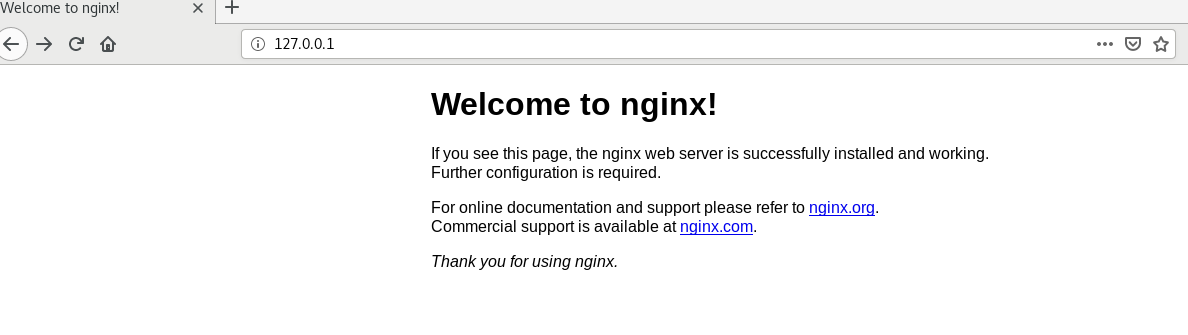
从浏览器访问安装机器的ip的80端口即可:
看例子截图:
7,查看日志目录
[root@centos8 conf]# ll /data/nginx/logs/

总用量 8

-rw-r--r-- 1 root root 1477 4月  22 18:49 access.log

-rw-r--r-- 1 root root 1195 4月  22 18:32 error.log
日志已成功写入
八,查看centos版本
[root@centos8 ~]# cat /etc/redhat-release

CentOS Linux release 8.1.1911 (Core)
centos8平台编译安装nginx1.18.0的更多相关文章
- CentOS 6.2编译安装Nginx1.2.0+MySQL5.5.25+PHP5.3.13
CentOS 6.2编译安装Nginx1.2.0+MySQL5.5.25+PHP5.3.132013-10-24 15:31:12标签:服务器 防火墙 file 配置文件 written 一.配置好I ...
- CentOS 7.0编译安装Nginx1.6.0+MySQL5.6.19+PHP5.5.14
准备篇: CentOS 7.0系统安装配置图解教程 http://www.osyunwei.com/archives/7829.html 一.配置防火墙,开启80端口.3306端口 CentOS 7. ...
- CentOS7 编译安装 nginx-1.10.0
对于NGINX 支持epoll模型 epoll模型的优点 定义: epoll是Linux内核为处理大批句柄而作改进的poll,是Linux下多路复用IO接口select/poll的增强版本,它能显著的 ...
- CentOS 6.2编译安装Nginx1.2.0+MySQL5.5.25+PHP5.3.13+博客系统WordPress3.3.2
说明: 操作系统:CentOS 6.2 32位 系统安装教程:CentOS 6.2安装(超级详细图解教程): http://www.osyunwei.com/archives/1537.html 准备 ...
- CentOS 7.0编译安装Nginx1.6.0+MySQL5.6.19+PHP5.5.14方法分享
一.配置防火墙,开启80端口.3306端口 CentOS 7.0默认使用的是firewall作为防火墙,这里改为iptables防火墙. 1.关闭firewall: systemctl stop fi ...
- ansible:安装nginx1.18.0(使用role功能)
一,ansible使用role的用途? roles分别将变量/文件/任务/模板/handler等放置于单独的目录中, 并可以方便的include各目录下的功能 roles使playbook能实现代码被 ...
- centos7 安装 nginx-1.18.0 并设置开机自启动
一.到官网下载nginx Mainline version: nginx主力版本,为开发版 Stable version: 稳定版,在生产环境中选择此版本进行安装 Legacy versions: ...
- centos7下编译安装nginx-1.16.0
一.下载nginx源码 http://nginx.org/en/download.html 如:nginx-1.16.0.tar.gz 二.创建用户和组,并解压 groupadd www userad ...
- centos7 编译安装nginx1.16.0( 完整版 )
一.安装依赖包 yum install -y gcc gcc-c++ pcre pcre-devel zlib zlib-devel openssl openssl-devel 依赖包说明: 1.编译 ...
随机推荐
- 搭建MQTT学习平台
关于MQTT协议的介绍就不赘述了,网上资料非常多,直接入正题. MQTT协议的实现非常多,我选择了一个非常轻量级的开源项目来学习MQTT协议——mosquitto,官网:www.mosquitto.o ...
- win10家庭版启用远程桌面
此电脑右键属性->远程设置->允许远程协助连接这台计算机 勾选 下载RDP Wrapper 地址:https://github.com/stascorp/rdpwrap/releases ...
- 被喷了!聊聊我开源的RPC框架那些事
前段时间利用业余时间写了一个简单的 RPC 框架,花费了不少精力.开源出来之后,少部分不太友好的技术人站在上帝视角说了风凉话.就很难受,兄弟,谁还没有一个玻璃心. 简单吐槽一波,给大家聊聊关于 gui ...
- 理解Java中的final关键字
final关键字的基本用法 1. 修饰类 出于安全考虑,类无法被继承 2. 修饰方法 防止继承类修改方法private方法会隐式指定为final方法: 3. 修饰变量 基本数据类型,初始化后不能再修改 ...
- python文档翻译之使用python解释器
Python解释器通常安装在/usr/local/bin/python3.6,把/usr/local/bin目录设置到UNIX shell的搜索路径就可以使用下面的命令运行python: python ...
- 使用vue-cli(vue脚手架)快速搭建项目
vue-cli 是一个官方发布 vue.js 项目脚手架,使用 vue-cli 可以快速创建 vue 项目.这篇文章将会从实操的角度,介绍整个搭建的过程. 1. 避坑前言 其实这次使用vue-cli的 ...
- 1.Strom-概述
- 栈的Java实现-分别使用数组和链表
栈是非常重要的数据结构,栈具有后进先出的特点. 在JVM内部,每个线程维护一个栈,对于每个方法调用,入栈一个元素,成为栈帧,当方法执行完成后,对应的栈帧出栈. 栈帧中,也包含一个栈,称为操作数栈. 一 ...
- Java基础一篇过(五)Map这篇就够了
文章更新时间:2020/03/03 一.Map介绍 Map是Java的一个接口,没有继承,以Key--Value的形式来储存元素信息,常用到的有3个子类实现: HashMap 底层数据结构是散列桶(数 ...
- kubeadm单集群部署k8s1.15.1&flannel网络
说明 本次实验在Windows下的VMware进行 系统配置及初始化配置在所有的主机执行 容器镜像全部替换为国内可拉取的 pod网络采用flannel 实验环境 主机名 IP地址 角色 OS CPU/ ...