
在Python中使用OpenCV(CV2)对图像进行边缘检测
转载:https://blog.csdn.net/cumtb2002/article/details/107798767
Modules used:
使用的模块:
For this, we will use the opencv-python module which provides us various functions to work on images.
为此,我们将使用opencv-python模块,该模块为我们提供了处理图像的各种功能。
Download opencv-python
下载opencv-python
- General Way:
- pip install opencv-python
- Pycharm Users:
- Go to the project Interpreter and install this module from there.
opencv-python Module:
opencv-python模块:
opencv-python is a python library that will solve the Computer Vision Problems and provides us various functions to edit the Images.
opencv-python是一个python库,它将解决计算机视觉问题并为我们提供编辑图像的各种功能。
Note: The edge Detection is possible only in grayscale Image.
注意:只能在灰度图像中进行边缘检测。
What we will do in this script?
我们将在此脚本中做什么?
To detect the edges of the images we will use opencv-python various Functions and Provide thresholds.
为了检测图像的边缘,我们将使用opencv-python的各种功能并提供阈值。
In this article we will detect the edge of the Image with the help of various functions and the accuracy of edge increases as we go down,
在本文中,我们将借助各种功能来检测图像的边缘,并且当我们下降时边缘的精度会提高,
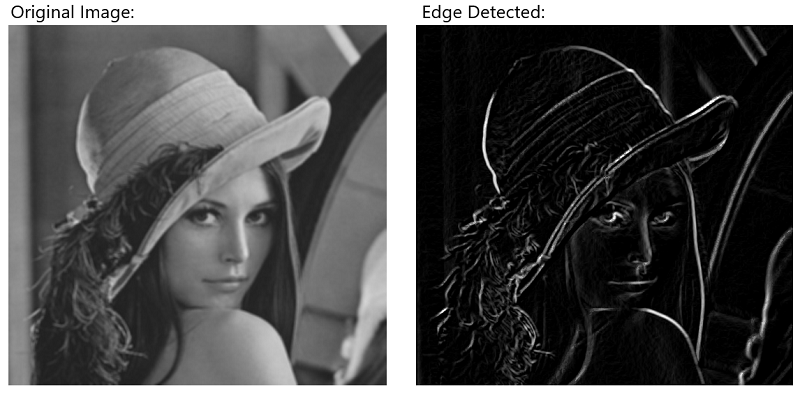
Sobel Function: This Function will create the Horizontal and vertical edges and after that, we will use the Bitwise or operator to combine them
Sobel函数 :此函数将创建水平边缘和垂直边缘,然后,我们将使用按位或运算符将它们组合
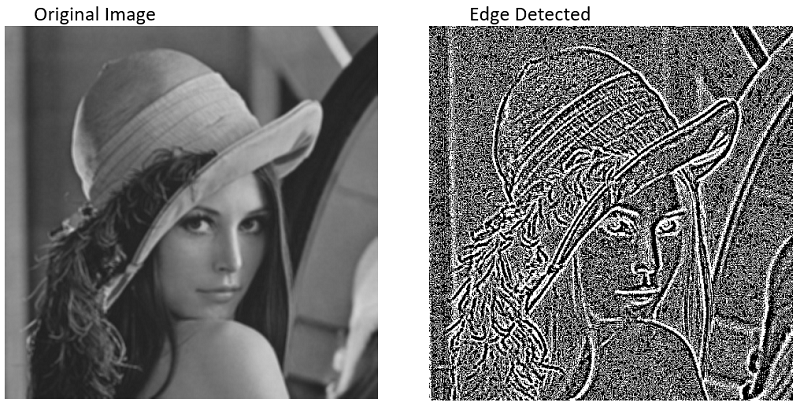
Laplacian Function: This Function is the simplest Function in which we just have to put the Grayscale Variable into it, and we will get the edge detected image.
拉普拉斯函数 :此函数是最简单的函数,只需要将灰度变量放入其中,就可以得到边缘检测到的图像。
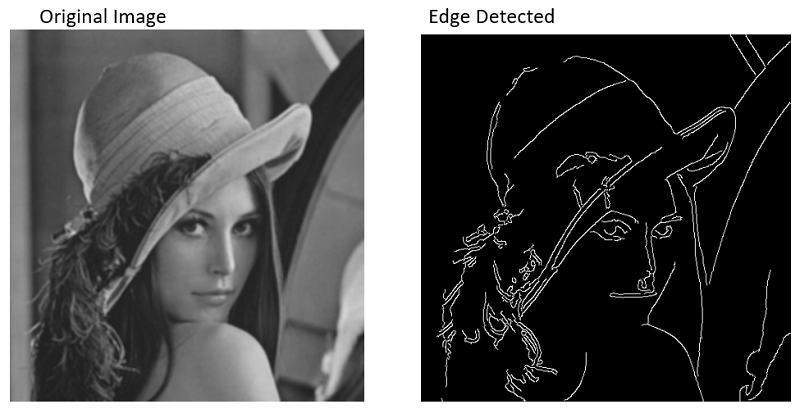
Canny Function: This is the most powerful function for edge detection and most accurate.
Canny功能 :这是边缘检测功能最强大且最准确的功能。
Let's see the code:
让我们看一下代码:
1)使用Sobel函数 (1) Using Sobel Function)
- # importing the module
- import cv2
- # read the image and store the data in a variable
- image=cv2.imread("/home/abhinav/PycharmProjects/untitled1/b.jpg")
- # make it grayscale
- Gray=cv2.cvtColor(image,cv2.COLOR_BGR2GRAY)
- # Make it with the help of sobel
- # make the sobel_horizontal
- # For horizontal x axis=1 and yaxis=0
- # for vertical x axis=0 and y axis=1
- Horizontal=cv2.Sobel(Gray,0,1,0,cv2.CV_64F)
- # the thresholds are like
- # (variable,0,<x axis>,<y axis>,cv2.CV_64F)
- Vertical=cv2.Sobel(Gray,0,0,1,cv2.CV_64F)
- # DO the Bitwise operation
- Bitwise_Or=cv2.bitwise_or(Horizontal,Vertical)
- # Show the Edged Image
- cv2.imshow("Sobel Image",Bitwise_Or)
- cv2.imshow("Original Image",Gray)
- cv2.waitKey(0)
- cv2.destroyAllWindows()
Output:
输出:
2)拉普拉斯函数 (2) Laplacian Function)
- # importing the module
- import cv2
- # read the image and store the data in a variable
- image=cv2.imread("/home/abhinav/PycharmProjects/untitled1/b.jpg")
- # make it grayscale
- Gray=cv2.cvtColor(image,cv2.COLOR_BGR2GRAY)
- # Make Laplacian Function
- Lappy=cv2.Laplacian(Gray,cv2.CV_64F)
- cv2.imshow("Laplacian",Lappy)
- cv2.imshow("Original",Gray)
- cv2.waitKey(0)
- cv2.destroyAllWindows()
Output:
输出:
3)使用Canny函数 (3) Using Canny Function)
- # importing the module
- import cv2
- # read the image and store the data in a variable
- image=cv2.imread("/home/abhinav/PycharmProjects/untitled1/b.jpg")
- # make it grayscale
- Gray=cv2.cvtColor(image,cv2.COLOR_BGR2GRAY)
- # Make canny Function
- canny=cv2.Canny(Gray,40,140)
- # the threshold is varies bw 0 and 255
- cv2.imshow("Canny",canny)
- cv2.imshow("Original",Gray)
- cv2.waitKey(0)
- cv2.destroyAllWindows()
Output:
输出:
翻译自: https://www.includehelp.com/python/edge-detection-of-image-using-opencv-cv2.aspx
在Python中使用OpenCV(CV2)对图像进行边缘检测的更多相关文章
- OpenCV-Python(1)在Python中使用OpenCV进行人脸检测
OpenCV是如今最流行的计算机视觉库,而我们今天就是要学习如何安装使用OpenCV,以及如何去访问我们的摄像头.然后我们一起来看看写一个人脸检测程序是如何地简单,简单到只需要几行代码. 在开始之前, ...
- Python下的OpenCV学习 02 —— 图像的读取与保存
OpenCV提供了众多对图片操作的函数,其中最基本的就是图片的读取与输出了. 一.读取图片 利用OpenCV读取一张图片是非常容易的,只需要用到 imread() 函数,打开shell或者cmd,进入 ...
- python中使用Opencv进行车牌号检测——2018.10.24
初学Python.Opencv,想用它做个实例解决车牌号检测. 车牌号检测需要分为四个部分:1.车辆图像获取.2.车牌定位.3.车牌字符分割和4.车牌字符识别 在百度查到了车牌识别部分车牌定位和车牌字 ...
- python中使用Opencv进行人脸识别
上一节讲到人脸检测,现在讲一下人脸识别.具体是通过程序采集图像并进行训练,并且基于这些训练的图像对人脸进行动态识别. 人脸识别前所需要的人脸库可以通过两种方式获得:1.自己从视频获取图像 2.从人 ...
- python中使用Opencv进行人脸检测
这两天学习了人脸识别,看了学长写的代码,边看边码边理解搞完了一边,再又是自己靠着理解和记忆硬码了一边,感觉还是很生疏,就只能来写个随笔加深一下印象了. 关于人脸识别,首先需要了解的是级联分类器Casc ...
- python中使用OpenCV处理图片
1.导入OpenCV包 import cv2 2.读取图片 cv2.imread(image_path, mode) 读入函数,包含两个参数,第一个为图片路径及图片名,第二个为读取图片方 ...
- Python中cv2库和matplotlib库色彩空间排布不一致
今天在python中读如图片时发现以下问题: 1.在from matplotlib import pyplot as plt之后,再import cv2 cv2.imshow()不能正常使用,还不知道 ...
- Python开发:OpenCV版本差异所引发的cv2.findContours()函数传参问题
一.问题如下: cv2.findContours()这个方法是用来找出轮廓值的: # cv2.findContours找出轮廓值,cv2.RETR_EXTERNAL表示图像的外轮廓 binary, c ...
- 使用python开启你的opencv之旅---图像的读入,存储
python的便捷是如此的引人着迷,而opencv给python提供的接口使我们能够使用python来快速验证我们的想法,或者与别的模块快速结合,在这个系列文章我会通过jupyter notebook ...
随机推荐
- Resharper 2020 免费破解版
如果你是一名.NET开发人员,但是你却不使用ReSharper,那么你就不是一个合格的码农了,因为这是一个强大的神器,你值得拥有!当然,用它的代价是,启动VS会变得非常慢,非常卡,但是需要知道,磨刀不 ...
- oeasy教您玩转linux010202软件包管理apt
顾一下 上一部分我们都讲了什么?
- 【HttpRunner v3.x】笔记 ——4. 测试用例-结构解析
一.官方首推pytest格式 上篇文章我们知道了,httprunner可以支持三种格式的用例,分别是pytest.yaml和json.yaml和json是以前的版本所使用的用例格式,但是在3.x版本上 ...
- vue学习笔记一
vue 颠覆式的开发方式 解疑 为什么要学习vue? 降低项目的复杂度 就业需要 vue难不难? 特别简单 相比于React,vue有什么优势? 前端三大框架:Angular.React.Vue Vu ...
- vue实现局部预览打印
html <div id="subOutputRank-print"> <h1></h1> </div> js doPrint(e) ...
- File类与IO流
一.File类与IO流 数组.集合等内容都是把数据放在内存里面,一旦关机或者断电,数据就会立刻从内存里面消失.而IO主要讲文件的传输(输入和输出),把内存里面的数据持久化到硬盘上,如.txt .avi ...
- Java进阶专题(十三) 从电商系统角度研究多线程(上)
前言 本章节主要分享下,多线程并发在电商系统下的应用.主要从以下几个方面深入:线程相关的基础理论和工具.多线程程序下的性能调优和电商场景下多线程的使用. 多线程J·U·C 线程池 概念 回顾线程创 ...
- Oracle中树形查询使用方法
树形查询一般用于上下级场合,使用的特殊sql语法包括level,prior,start with,connect by等,下面将就实例来说明其用法. 表定义: create table tb_hier ...
- 难道主键除了自增就是GUID?支持k8s等分布式场景下的id生成器了解下
背景 主键(Primary Key),用于唯一标识表中的每一条数据.所以,一个合格的主键的最基本要求应该是唯一性. 那怎么保证唯一呢?相信绝大部分开发者在刚入行的时候选择的都是数据库的自增id,因为这 ...
- 2020重新出发,JAVA高级,JVM种设计模式
Java的23种设计模式全面解析 设计模式(Design Pattern)是前辈们对代码开发经验的总结,是解决特定问题的一系列套路.它不是语法规定,而是一套用来提高代码可复用性.可维护性.可读性.稳健 ...