
SpringBoot 整合邮件oh-my-email 实现发送邮件功能
导读
最近手头上要负责整个Message Gateway服务的搭建,涉及到:微信推送(点我直达)、短信、邮件等等,到github上发现有个微型的开源邮件框架,整理下来,以备项目中使用到,到时候应该会使用MQ(RocketMQ 点我直达),异步的方式实现,先写一个简单demo。
github官网地址
添加依赖
        <dependency>

            <groupId>io.github.biezhi</groupId>

            <artifactId>oh-my-email</artifactId>

            <version>0.0.4</version>

        </dependency>

        <dependency>

            <groupId>com.mitchellbosecke</groupId>

            <artifactId>pebble</artifactId>

            <version>2.2.0</version>

        </dependency>
控制层代码
package com.ybchen.springbootohmyemail.controller;

import com.mitchellbosecke.pebble.PebbleEngine;

import com.mitchellbosecke.pebble.error.PebbleException;

import com.mitchellbosecke.pebble.template.PebbleTemplate;

import io.github.biezhi.ome.OhMyEmail;

import io.github.biezhi.ome.SendMailException;

import org.springframework.web.bind.annotation.GetMapping;

import org.springframework.web.bind.annotation.RestController;

import javax.annotation.PostConstruct;

import java.io.File;

import java.io.IOException;

import java.io.StringWriter;

import java.io.Writer;

import java.net.MalformedURLException;

import java.net.URL;

import java.util.HashMap;

import java.util.Map;

import static io.github.biezhi.ome.OhMyEmail.SMTP_QQ;

/**

 * @ClassName:EmailController

 * @Description:邮件控制层

 * @Author:chenyb

 * @Date:2020/11/26 11:43 上午

 * @Versiion:1.0

 */

@RestController

public class EmailController {

    // 该邮箱修改为你需要测试的邮箱地址

    private static final String TO_EMAIL = "xxxx@isoftstone.com";

    @PostConstruct

    public void init() {

        // 配置,一次即可

        OhMyEmail.config(SMTP_QQ(false), "543210188@qq.com", "qq邮箱smtp密码");

    }

    @GetMapping("testSendText")

    public String testSendText() throws SendMailException {

        OhMyEmail.subject("这是一封测试TEXT邮件")

                .from("小姐姐的邮箱")

                .to(TO_EMAIL)

                .text("信件内容")

                .send();

        return "发送成功";

    }

    @GetMapping("testSendHtml")

    public String testSendHtml() throws SendMailException {

        OhMyEmail.subject("这是一封测试HTML邮件")

                .from("小姐姐的邮箱")

                .to(TO_EMAIL)

                .html("<h1 font=red>信件内容</h1>")

                .send();

        return "发送成功";

    }

    @GetMapping("testSendAttach")

    public String testSendAttach() throws SendMailException {

        OhMyEmail.subject("这是一封测试附件邮件")

                .from("小姐姐的邮箱")

                .to(TO_EMAIL)

                .html("<h1 font=red>信件内容</h1>")

                .attach(new File("/Users/biezhi/Downloads/hello.jpeg"), "测试图片.jpeg")

                .send();

        return "发送成功";

    }

    @GetMapping("testSendAttachURL")

    public String testSendAttachURL() throws SendMailException {

        try {

            OhMyEmail.subject("这是一封测试网络资源作为附件的邮件")

                    .from("小姐姐的邮箱")

                    .to(TO_EMAIL)

                    .html("<h1 font=red>信件内容</h1>")

                    .attachURL(new URL("https://avatars1.githubusercontent.com/u/2784452?s=40&v=4"), "测试图片.jpeg")

                    .send();

        } catch (MalformedURLException e) {

            e.printStackTrace();

        }

        return "发送成功";

    }

    @GetMapping("testPebble")

    public String testPebble() throws IOException, PebbleException, SendMailException {

        PebbleEngine engine = new PebbleEngine.Builder().build();

        PebbleTemplate compiledTemplate = engine.getTemplate("register.html");

        Map<String, Object> context = new HashMap<String, Object>();

        context.put("username", "biezhi");

        context.put("email", "admin@biezhi.me");

        Writer writer = new StringWriter();

        compiledTemplate.evaluate(writer, context);

        String output = writer.toString();

        System.out.println(output);

        OhMyEmail.subject("这是一封测试Pebble模板邮件")

                .from("小姐姐的邮箱")

                .to(TO_EMAIL)

                .html(output)

                .send();

        return "发送成功";

    }

}
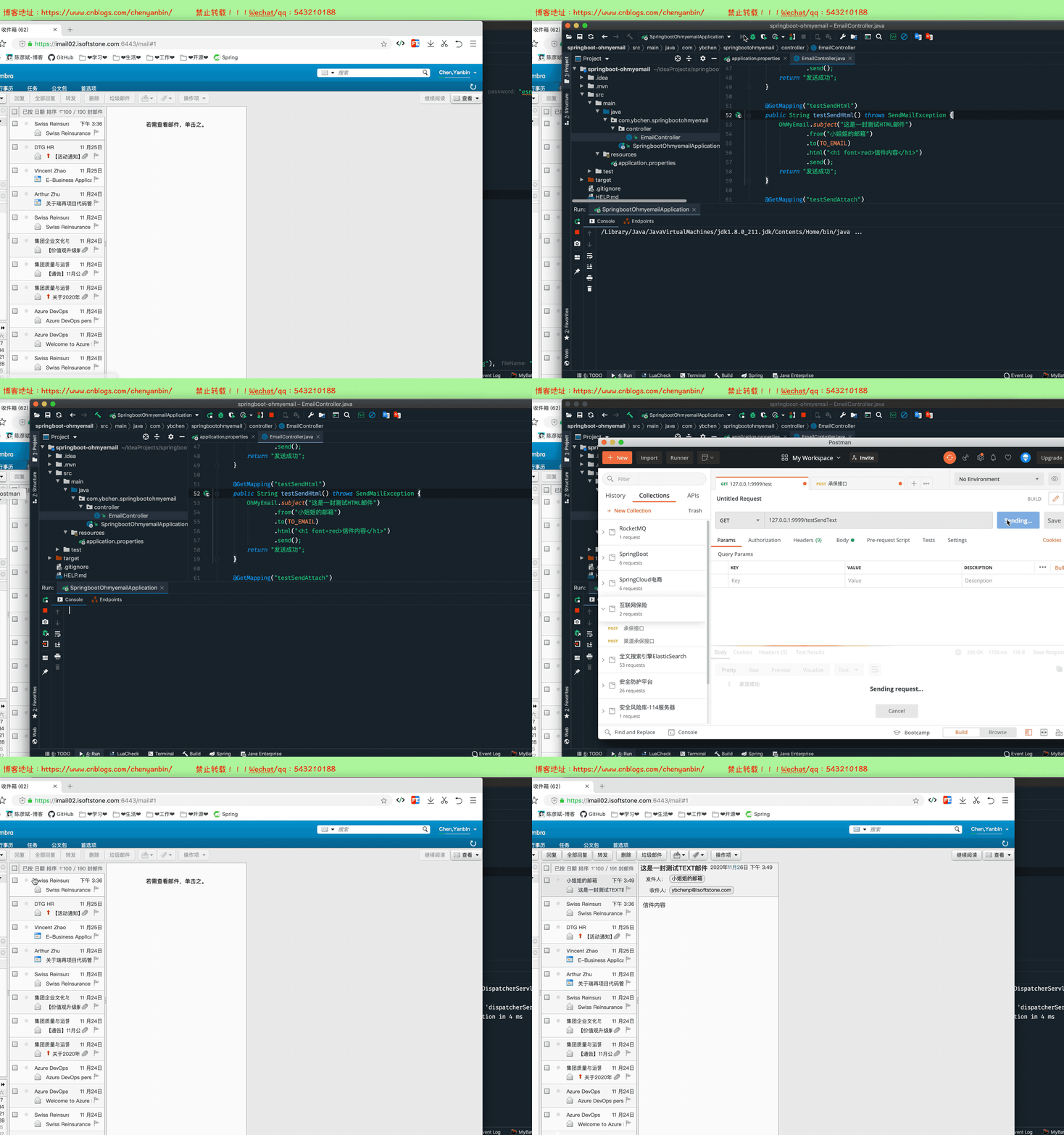
测试
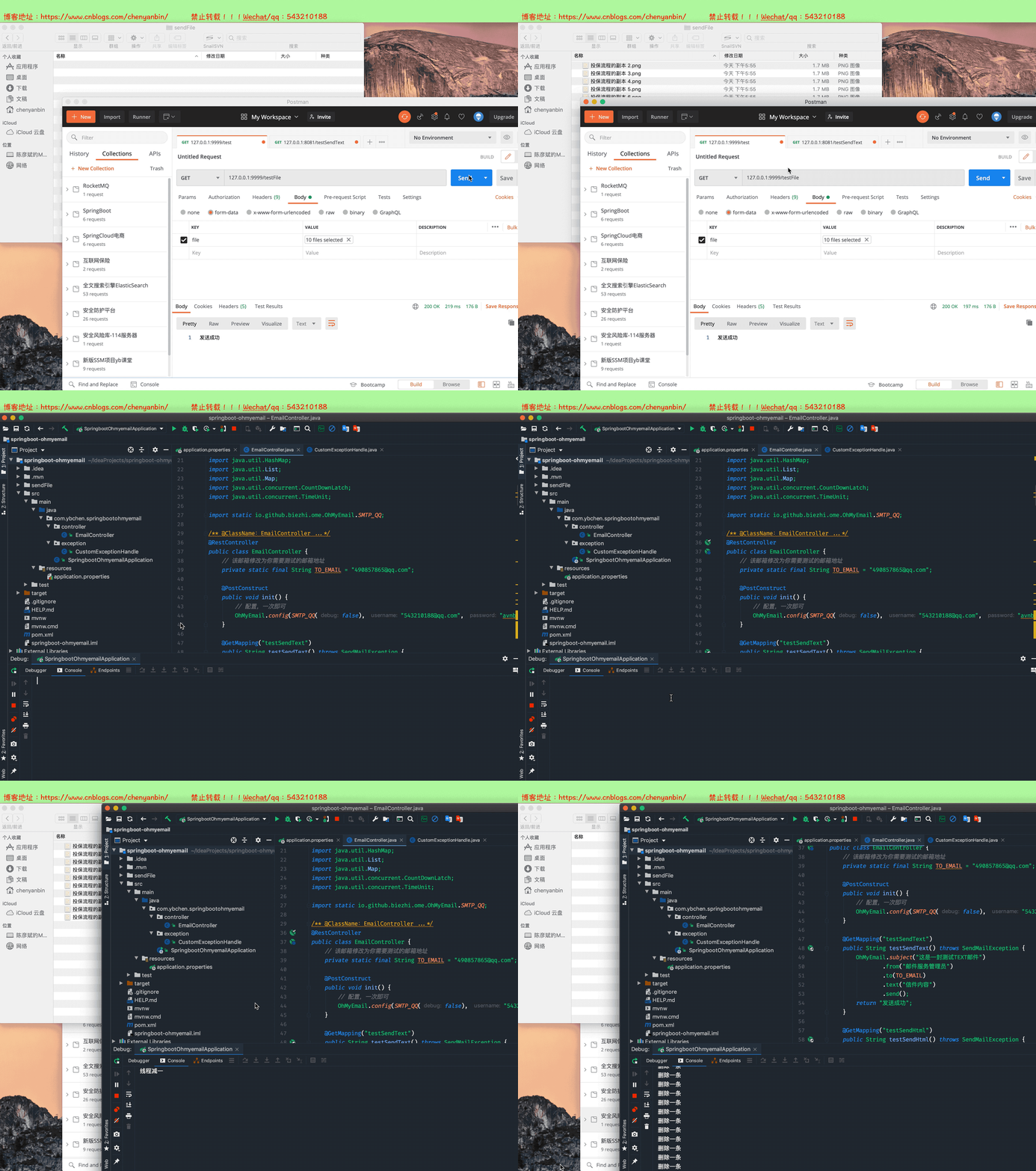
多线程并发发送邮件
    @GetMapping("testFile")

    public String testFile(@RequestParam("file") MultipartFile[] files) throws Exception {

        try {

            List<String> listPath = new ArrayList<String>(files.length);

            CountDownLatch countDownLatch=new CountDownLatch(1);

            OhMyEmail ohMyEmail = OhMyEmail.subject("这是一封测试附件的邮件")

                    .from("邮件服务管理员")

                    .to(TO_EMAIL)

                    .html("<h1 font=red>信件内容</h1><br/>邮件测试内容")

                    .attachURL(new URL("https://avatars1.githubusercontent.com/u/2784452?s=40&v=4"), "测试图片.jpeg")

                    .attachURL(new URL("https://images.cnblogs.com/cnblogs_com/chenyanbin/1560326/o_qianxun.jpg"), "测试图片.jpeg");

            if (files.length>10){

                return "文件个数超过10个";

            }

            if (files.length > 0) {

                File currentFile = new File("");

                String currentFilePath = currentFile.getCanonicalPath() + File.separator + "sendFile" + File.separator;

                for (int i = 0; i < files.length; i++) {

                    MultipartFile multipartFile = files[i];

                    String fullPath = currentFilePath + multipartFile.getOriginalFilename();

                    File destFile = new File(fullPath);

                    destFile.getParentFile().mkdirs();

                    multipartFile.transferTo(destFile);

                    listPath.add(fullPath);

                    System.out.println(fullPath);

                    ohMyEmail.attach(new File(fullPath));

                }

            }

            new Thread(()->{

                try {

                    ohMyEmail.send();

                } catch (SendMailException e) {

                    e.printStackTrace();

                }finally {

                    countDownLatch.countDown();

                    System.out.println("线程减一");

                }

            }).start();

            new Thread(()->{

                try {

                    countDownLatch.await();

                } catch (InterruptedException e) {

                    e.printStackTrace();

                }

                try {

                    TimeUnit.SECONDS.sleep(3);

                } catch (InterruptedException e) {

                    e.printStackTrace();

                }

                for (int i = 0; i < listPath.size(); i++) {

                    File delFile=new File(listPath.get(i));

                    delFile.delete();

                    System.out.println("删除一条");

                }

            }).start();

        } catch (MalformedURLException e) {

            e.printStackTrace();

        }

        return "发送成功";

    }
设置上传文件大小
在application.properties中添加如下
spring.servlet.multipart.max-file-size=50MB

spring.servlet.multipart.max-request-size=50MB
全局异常拦截超过文件大小
package com.ybchen.springbootohmyemail.exception;

import org.slf4j.Logger;

import org.slf4j.LoggerFactory;

import org.springframework.web.bind.annotation.ControllerAdvice;

import org.springframework.web.bind.annotation.ExceptionHandler;

import org.springframework.web.bind.annotation.ResponseBody;

import org.springframework.web.multipart.MaxUploadSizeExceededException;

/**

 * 异常处理类

 */

@ControllerAdvice

public class CustomExceptionHandle {

    private final static Logger logger = LoggerFactory.getLogger(CustomExceptionHandle.class);

    //监听这个异常

    @ExceptionHandler(value = Exception.class)

    @ResponseBody

    public Object handle(Exception ex) {

        logger.error("[ 系统异常 ] ===============》 {}", ex);

        return "系统内部错误";

    }

    @ExceptionHandler(value = MaxUploadSizeExceededException.class)

    @ResponseBody

    public Object handleMaxUploadSizeExceededException(Exception ex) {

        logger.error("[ 系统异常 ] ===============》 {}", ex);

        System.out.println("文件大小超过50MB");

        return "文件大小超过50MB";

    }

}
SpringBoot 整合邮件oh-my-email 实现发送邮件功能的更多相关文章
- Springboot】Springboot整合邮件服务(HTML/附件/模板-QQ、网易)
介绍 邮件服务是常用的服务之一,作用很多,对外可以给用户发送活动.营销广告等:对内可以发送系统监控报告与告警. 本文将介绍Springboot如何整合邮件服务,并给出不同邮件服务商的整合配置. 如图所 ...
- springboot整合邮件
一.邮件相关知识补充 SMTP(Simple Mail Transfer Protocol) 即简单邮件传输协议,它是一组用于由源地址到目的地址传送邮件的规则,由它来控制信件的中转方式.SMTP协议属 ...
- springboot系列九,springboot整合邮件服务、整合定时任务调度
一.整合邮件服务 如果要进行邮件的整合处理,那么你一定需要有一个邮件服务器,实际上 java 本身提供有一套 JavaMail 组件以实现邮件服务器的搭建,但是这个搭建的服务器意义不大,因为你现在搭建 ...
- SpringBoot整合Redis使用Restful风格实现CRUD功能
前言 本篇文章主要介绍的是SpringBoot整合Redis,使用Restful风格实现的CRUD功能. Redis 介绍 Redis 是完全开源免费的,遵守BSD协议,是一个高性能的key-valu ...
- SpringBoot整合邮件发送
本节介绍SpringBoot项目如何快速配置和发送邮件,包括简单的邮件配置.发送简单邮件.发送HTML邮件.发送携带附件的邮件等. 示例源码在:https://github.com/laolunsi/ ...
- springboot整合邮件发送(163邮箱发送为例)
先登录163邮箱获取授权 勾选后安装提示会叫你设置授权密码之类的:记住授权的密码 1.引入maven依赖 <dependency> <groupId>org.springfr ...
- springboot整合项目-商城个人头像上传功能
上传头像的功能 持久层 1.sql语句的规划 avatar varchar(50) str - 字节流 将对象文件保存在操作系统上,然后在把这个文件的路径个记录下来,保存在avatar中,因为相比于字 ...
- SpringBoot系列九:SpringBoot服务整合(整合邮件服务、定时调度、Actuator监控)
声明:本文来源于MLDN培训视频的课堂笔记,写在这里只是为了方便查阅. 1.概念:SpringBoot 服务整合 2.背景 在进行项目开发的时候经常会遇见以下的几个问题:需要进行邮件发送.定时的任务调 ...
- SpringBoot整合Swagger和Actuator
前言 本篇文章主要介绍的是SpringBoot整合Swagger(API文档生成框架)和SpringBoot整合Actuator(项目监控)使用教程. SpringBoot整合Swagger 说明:如 ...
随机推荐
- 4G工业路由器的信号强度应该怎么保证呢?
在M2M无线方面,最薄弱的环节是差的间歇性的信号强度.低信号电平导致系统性能差,响应时间慢和可靠性问题.对于系统安装人员和其他4G工业路由器供应商,如何确保最佳的蜂窝信号强度? 检查2G/3G/4G信 ...
- Redis常用命令(6)——SortedSet
ZADD 格式:ZADD key score member [[score member] [score member] ...] 作用:向有序集合key中插入一个或多个元素.如果元素已经存在,更新s ...
- 完美解决CentOS8 yum安装AppStream报错,更新yum后无法makecache的问题
问题 CentOS 8 yum安装软件时,提示无法从AppStream下载 [root@C8-3 ~]# yum -y install httpd mariadb-server mariadb php ...
- DP百题练(三)
目录 DP百题练(三) DP百题练(三) 不知不觉也刷了 50 道 DP 题了,感觉确实有较大的进步.(2020.3.20) 这里的 (三) 主要用来记录 DP 的各种优化(倍增.数据结构.斜率.四边 ...
- Java反射复习笔记
目录 反射 获取反射的三种方式: Class对象的功能 获取 成员变量/成员变量们 获取 成员方法/成员方法们 获取构造方法们 获取全类名 Field:成员变量 Method:成员方法 Constru ...
- 3、编程语言与Python介绍
一 引子 基于上一章所学,有了计算机硬件,再在硬件之上安装好操作系统,我们就有了一个应用程序的运行平台,我们接下来的任务就是学习如何使用某款编程语言来开发应用程序. 本章的主题是先了解一下编程语言,然 ...
- 从零到千万用户,我是如何一步步优化MySQL数据库的?
写在前面 很多小伙伴留言说让我写一些工作过程中的真实案例,写些啥呢?想来想去,写一篇我在以前公司从零开始到用户超千万的数据库架构升级演变的过程吧. 本文记录了我之前初到一家创业公司,从零开始到用户超千 ...
- 论文解读 - Relational Pooling for Graph Representations
1 简介 本文着眼于对Weisfeiler-Lehman算法(WL Test)和WL-GNN模型的分析,针对于WL测试以及WL-GNN所不能解决的环形跳跃连接图(circulant skip link ...
- 手动实现简单的tomcat服务器
手动实现tomcat服务器的流程: 分析具体的实现步骤: 1,浏览器和后端服务如何实现通信,首先传输的数据要遵循http协议,通过tcp也就是我们常说的套接字编程来实现,具体的底层数据传输肯定就是我们 ...
- Python学习笔记4:函数
1.函数 函数就是一段具有特点功能的.可重用的语句组. 在Python中函数是以关键词 def 开头,空格之后连接函数名和圆括号(),最后一个冒号:结尾. 函数名只能包含字符串.下划线和数字且不能以数 ...