
SpringBoot 整合邮件oh-my-email 实现发送邮件功能
导读
最近手头上要负责整个Message Gateway服务的搭建,涉及到:微信推送(点我直达)、短信、邮件等等,到github上发现有个微型的开源邮件框架,整理下来,以备项目中使用到,到时候应该会使用MQ(RocketMQ 点我直达),异步的方式实现,先写一个简单demo。
github官网地址
添加依赖
        <dependency>

            <groupId>io.github.biezhi</groupId>

            <artifactId>oh-my-email</artifactId>

            <version>0.0.4</version>

        </dependency>

        <dependency>

            <groupId>com.mitchellbosecke</groupId>

            <artifactId>pebble</artifactId>

            <version>2.2.0</version>

        </dependency>
控制层代码
package com.ybchen.springbootohmyemail.controller;

import com.mitchellbosecke.pebble.PebbleEngine;

import com.mitchellbosecke.pebble.error.PebbleException;

import com.mitchellbosecke.pebble.template.PebbleTemplate;

import io.github.biezhi.ome.OhMyEmail;

import io.github.biezhi.ome.SendMailException;

import org.springframework.web.bind.annotation.GetMapping;

import org.springframework.web.bind.annotation.RestController;

import javax.annotation.PostConstruct;

import java.io.File;

import java.io.IOException;

import java.io.StringWriter;

import java.io.Writer;

import java.net.MalformedURLException;

import java.net.URL;

import java.util.HashMap;

import java.util.Map;

import static io.github.biezhi.ome.OhMyEmail.SMTP_QQ;

/**

 * @ClassName:EmailController

 * @Description:邮件控制层

 * @Author:chenyb

 * @Date:2020/11/26 11:43 上午

 * @Versiion:1.0

 */

@RestController

public class EmailController {

    // 该邮箱修改为你需要测试的邮箱地址

    private static final String TO_EMAIL = "xxxx@isoftstone.com";

    @PostConstruct

    public void init() {

        // 配置,一次即可

        OhMyEmail.config(SMTP_QQ(false), "543210188@qq.com", "qq邮箱smtp密码");

    }

    @GetMapping("testSendText")

    public String testSendText() throws SendMailException {

        OhMyEmail.subject("这是一封测试TEXT邮件")

                .from("小姐姐的邮箱")

                .to(TO_EMAIL)

                .text("信件内容")

                .send();

        return "发送成功";

    }

    @GetMapping("testSendHtml")

    public String testSendHtml() throws SendMailException {

        OhMyEmail.subject("这是一封测试HTML邮件")

                .from("小姐姐的邮箱")

                .to(TO_EMAIL)

                .html("<h1 font=red>信件内容</h1>")

                .send();

        return "发送成功";

    }

    @GetMapping("testSendAttach")

    public String testSendAttach() throws SendMailException {

        OhMyEmail.subject("这是一封测试附件邮件")

                .from("小姐姐的邮箱")

                .to(TO_EMAIL)

                .html("<h1 font=red>信件内容</h1>")

                .attach(new File("/Users/biezhi/Downloads/hello.jpeg"), "测试图片.jpeg")

                .send();

        return "发送成功";

    }

    @GetMapping("testSendAttachURL")

    public String testSendAttachURL() throws SendMailException {

        try {

            OhMyEmail.subject("这是一封测试网络资源作为附件的邮件")

                    .from("小姐姐的邮箱")

                    .to(TO_EMAIL)

                    .html("<h1 font=red>信件内容</h1>")

                    .attachURL(new URL("https://avatars1.githubusercontent.com/u/2784452?s=40&v=4"), "测试图片.jpeg")

                    .send();

        } catch (MalformedURLException e) {

            e.printStackTrace();

        }

        return "发送成功";

    }

    @GetMapping("testPebble")

    public String testPebble() throws IOException, PebbleException, SendMailException {

        PebbleEngine engine = new PebbleEngine.Builder().build();

        PebbleTemplate compiledTemplate = engine.getTemplate("register.html");

        Map<String, Object> context = new HashMap<String, Object>();

        context.put("username", "biezhi");

        context.put("email", "admin@biezhi.me");

        Writer writer = new StringWriter();

        compiledTemplate.evaluate(writer, context);

        String output = writer.toString();

        System.out.println(output);

        OhMyEmail.subject("这是一封测试Pebble模板邮件")

                .from("小姐姐的邮箱")

                .to(TO_EMAIL)

                .html(output)

                .send();

        return "发送成功";

    }

}
测试
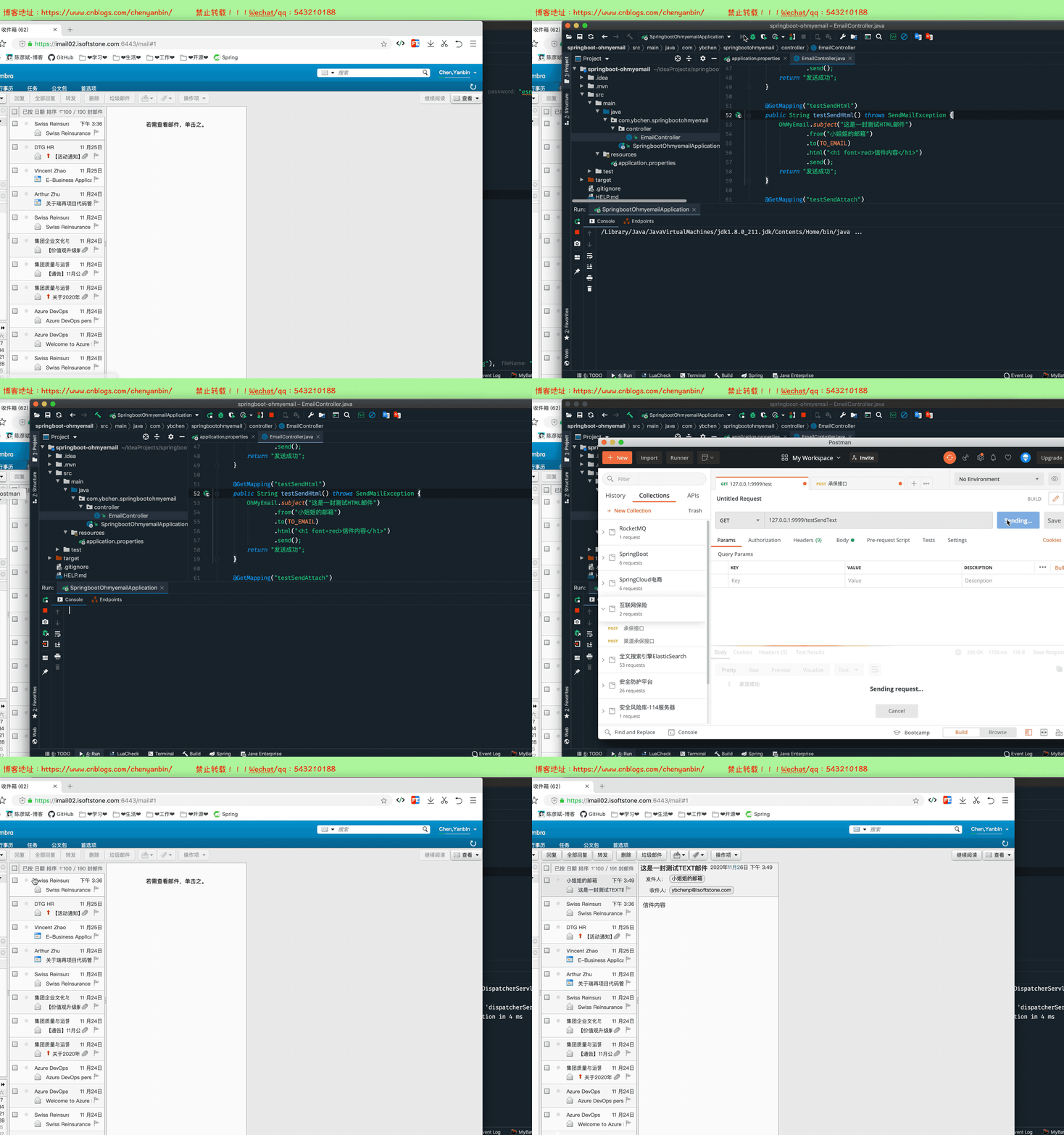
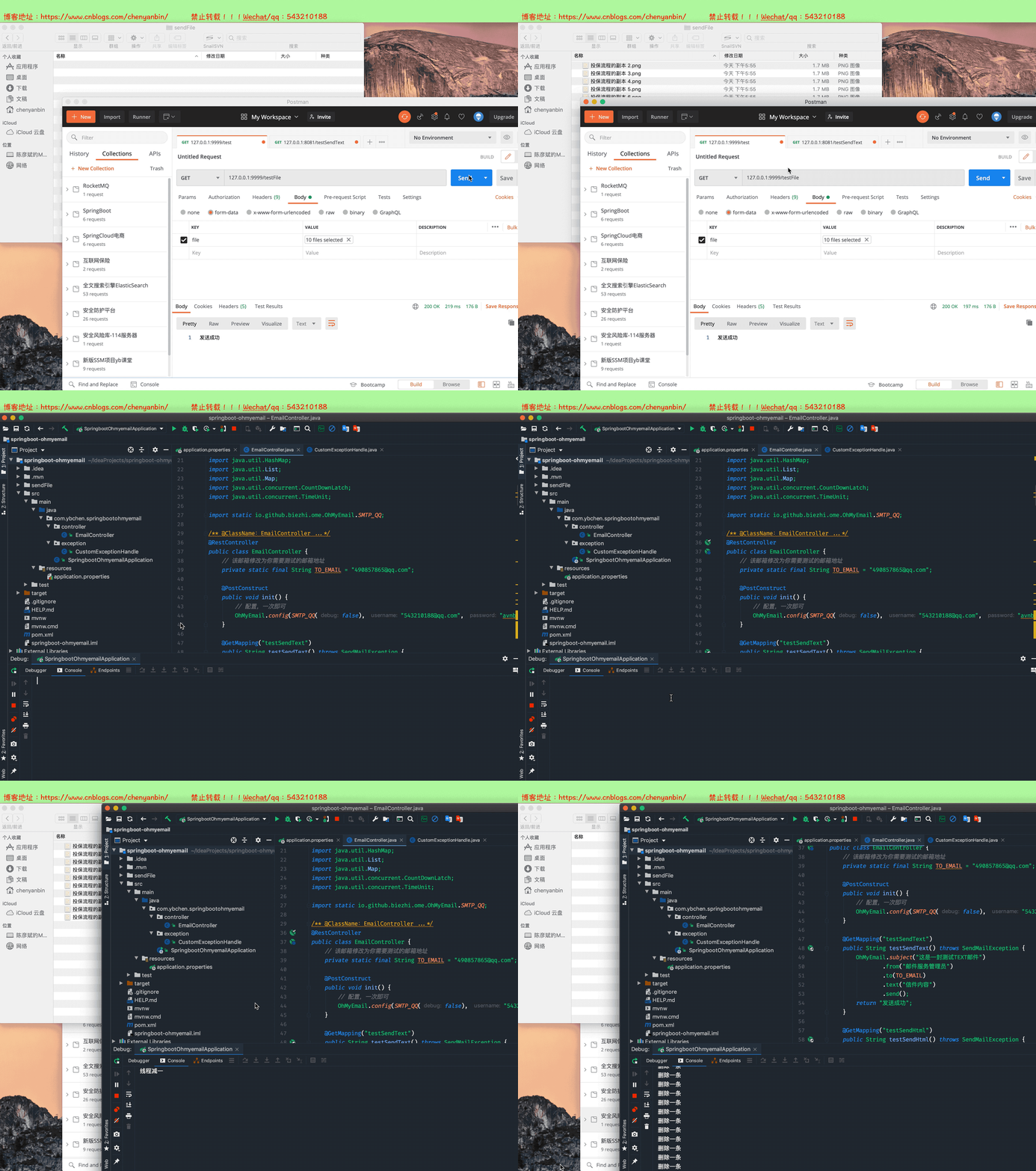
多线程并发发送邮件
    @GetMapping("testFile")

    public String testFile(@RequestParam("file") MultipartFile[] files) throws Exception {

        try {

            List<String> listPath = new ArrayList<String>(files.length);

            CountDownLatch countDownLatch=new CountDownLatch(1);

            OhMyEmail ohMyEmail = OhMyEmail.subject("这是一封测试附件的邮件")

                    .from("邮件服务管理员")

                    .to(TO_EMAIL)

                    .html("<h1 font=red>信件内容</h1><br/>邮件测试内容")

                    .attachURL(new URL("https://avatars1.githubusercontent.com/u/2784452?s=40&v=4"), "测试图片.jpeg")

                    .attachURL(new URL("https://images.cnblogs.com/cnblogs_com/chenyanbin/1560326/o_qianxun.jpg"), "测试图片.jpeg");

            if (files.length>10){

                return "文件个数超过10个";

            }

            if (files.length > 0) {

                File currentFile = new File("");

                String currentFilePath = currentFile.getCanonicalPath() + File.separator + "sendFile" + File.separator;

                for (int i = 0; i < files.length; i++) {

                    MultipartFile multipartFile = files[i];

                    String fullPath = currentFilePath + multipartFile.getOriginalFilename();

                    File destFile = new File(fullPath);

                    destFile.getParentFile().mkdirs();

                    multipartFile.transferTo(destFile);

                    listPath.add(fullPath);

                    System.out.println(fullPath);

                    ohMyEmail.attach(new File(fullPath));

                }

            }

            new Thread(()->{

                try {

                    ohMyEmail.send();

                } catch (SendMailException e) {

                    e.printStackTrace();

                }finally {

                    countDownLatch.countDown();

                    System.out.println("线程减一");

                }

            }).start();

            new Thread(()->{

                try {

                    countDownLatch.await();

                } catch (InterruptedException e) {

                    e.printStackTrace();

                }

                try {

                    TimeUnit.SECONDS.sleep(3);

                } catch (InterruptedException e) {

                    e.printStackTrace();

                }

                for (int i = 0; i < listPath.size(); i++) {

                    File delFile=new File(listPath.get(i));

                    delFile.delete();

                    System.out.println("删除一条");

                }

            }).start();

        } catch (MalformedURLException e) {

            e.printStackTrace();

        }

        return "发送成功";

    }
设置上传文件大小
在application.properties中添加如下
spring.servlet.multipart.max-file-size=50MB

spring.servlet.multipart.max-request-size=50MB
全局异常拦截超过文件大小
package com.ybchen.springbootohmyemail.exception;

import org.slf4j.Logger;

import org.slf4j.LoggerFactory;

import org.springframework.web.bind.annotation.ControllerAdvice;

import org.springframework.web.bind.annotation.ExceptionHandler;

import org.springframework.web.bind.annotation.ResponseBody;

import org.springframework.web.multipart.MaxUploadSizeExceededException;

/**

 * 异常处理类

 */

@ControllerAdvice

public class CustomExceptionHandle {

    private final static Logger logger = LoggerFactory.getLogger(CustomExceptionHandle.class);

    //监听这个异常

    @ExceptionHandler(value = Exception.class)

    @ResponseBody

    public Object handle(Exception ex) {

        logger.error("[ 系统异常 ] ===============》 {}", ex);

        return "系统内部错误";

    }

    @ExceptionHandler(value = MaxUploadSizeExceededException.class)

    @ResponseBody

    public Object handleMaxUploadSizeExceededException(Exception ex) {

        logger.error("[ 系统异常 ] ===============》 {}", ex);

        System.out.println("文件大小超过50MB");

        return "文件大小超过50MB";

    }

}
SpringBoot 整合邮件oh-my-email 实现发送邮件功能的更多相关文章
- Springboot】Springboot整合邮件服务(HTML/附件/模板-QQ、网易)
介绍 邮件服务是常用的服务之一,作用很多,对外可以给用户发送活动.营销广告等:对内可以发送系统监控报告与告警. 本文将介绍Springboot如何整合邮件服务,并给出不同邮件服务商的整合配置. 如图所 ...
- springboot整合邮件
一.邮件相关知识补充 SMTP(Simple Mail Transfer Protocol) 即简单邮件传输协议,它是一组用于由源地址到目的地址传送邮件的规则,由它来控制信件的中转方式.SMTP协议属 ...
- springboot系列九,springboot整合邮件服务、整合定时任务调度
一.整合邮件服务 如果要进行邮件的整合处理,那么你一定需要有一个邮件服务器,实际上 java 本身提供有一套 JavaMail 组件以实现邮件服务器的搭建,但是这个搭建的服务器意义不大,因为你现在搭建 ...
- SpringBoot整合Redis使用Restful风格实现CRUD功能
前言 本篇文章主要介绍的是SpringBoot整合Redis,使用Restful风格实现的CRUD功能. Redis 介绍 Redis 是完全开源免费的,遵守BSD协议,是一个高性能的key-valu ...
- SpringBoot整合邮件发送
本节介绍SpringBoot项目如何快速配置和发送邮件,包括简单的邮件配置.发送简单邮件.发送HTML邮件.发送携带附件的邮件等. 示例源码在:https://github.com/laolunsi/ ...
- springboot整合邮件发送(163邮箱发送为例)
先登录163邮箱获取授权 勾选后安装提示会叫你设置授权密码之类的:记住授权的密码 1.引入maven依赖 <dependency> <groupId>org.springfr ...
- springboot整合项目-商城个人头像上传功能
上传头像的功能 持久层 1.sql语句的规划 avatar varchar(50) str - 字节流 将对象文件保存在操作系统上,然后在把这个文件的路径个记录下来,保存在avatar中,因为相比于字 ...
- SpringBoot系列九:SpringBoot服务整合(整合邮件服务、定时调度、Actuator监控)
声明:本文来源于MLDN培训视频的课堂笔记,写在这里只是为了方便查阅. 1.概念:SpringBoot 服务整合 2.背景 在进行项目开发的时候经常会遇见以下的几个问题:需要进行邮件发送.定时的任务调 ...
- SpringBoot整合Swagger和Actuator
前言 本篇文章主要介绍的是SpringBoot整合Swagger(API文档生成框架)和SpringBoot整合Actuator(项目监控)使用教程. SpringBoot整合Swagger 说明:如 ...
随机推荐
- 【Golang】vscode 设置 go 开发环境
步骤 1. 始 Golang 语言开发选择一款合适的编辑器,能加速你敲字的灵感,这里推荐微软的 Visual Studio Code,简称 vscode. 2. 安装 go 插件 首先需要安装 go ...
- debian 安裝SSH 增加新用戶 并使用sudo
1 新建新用戶user 2 3 adduser user 4 5 passwd 123654 6 7 exit 刚安装好的Debian默认还没有sudo功能. 1.安装sudo # apt-get i ...
- 【QT】QThread源码浅析
本章会挑出QThread源码中部分重点代码来说明QThread启动到结束的过程是怎么调度的.其次因为到了Qt4.4版本,Qt的多线程就有所变化,所以本章会以Qt4.0.1和Qt5.6.2版本的源码来进 ...
- 【Kata Daily 190919】Sort Out The Men From Boys(排序)
题目: Scenario Now that the competition gets tough it will Sort out the men from the boys . Men are th ...
- springboot data jdbc 数据库日期和查询出来的结果不一致
解决方法: 一.将serverTimezone=UTC改为CTT url: jdbc:mysql://localhost:3306/moviechoicesystem?serverTimezone=C ...
- CentOS修改镜像源头
CentOS6改为阿里镜像源: 1. cd /etc/yum.repos.d 2. mv CentOS-Base.repo CenOS-Base.repo.bak 3. wget http://mir ...
- /etc/resolv.conf文件自动恢复的解决方法
/etc/resolv.conf文件自动恢复的解决方法: service NetworkManager stop #后台进程关闭 chkconfig NetworkManager off #配置关闭, ...
- MyBatis——MyBatis开发流程
创建项目(IDEA中) 在IDEA中创建 MyBatis项目,详细流程如下: 这里有一点需要注意,我们创建的是Maven项目,如果大家以前没有配置过Maven环境的话,在创建完项目之后,需要配置一下M ...
- 【java从入门到精通】day10-Java流程控制2-switch多选择结构
1.switch多选择结构 switch case语句判断一个变量与一系列值中某个值是否相等,每个值称为一个分支. switch语句中的变量类型可以是: byte.short.int或者char 从j ...
- 流量控制--5.Classless Queuing Disciplines (qdiscs)
Classless Queuing Disciplines (qdiscs) 本文涉及的队列规则(Qdisc)都可以作为接口上的主qdisc,或作为一个classful qdiscs的叶子类.这些是L ...