
Python之根据四个坐标确定其位于左上下右上下
1、导入模块
import numpy as np
2、存储所需要确定位置的四个坐标点
# 所需要确定位置的四个坐标

coordinate = [[2570, 1948], [2391, 1919], [2411, 1792], [2591, 1821]]  # 常规矩形坐标

# coordinate = [[0, 1], [1, 0], [1, 2], [2, 1]]  # 非常规(菱形)矩形坐标,用以验证代码

coordinate = np.array(coordinate)
3、求出中心坐标点
center = coordinate[0]

for _ in range(1, 4):

    center = center + coordinate[_]

center = center / 4
4、找出x轴小于中心坐标点的点 left_coordinate
coordinate_temp = coordinate.copy() # 复制一份坐标,避免原坐标被破坏

left_coordinate = [] # 存储x轴小于中心坐标点的点

delete_index = []

# 将 x轴小于中心坐标点的点 存储进left_coordinate

for _ in range(4):

    if(coordinate[_][0] < center[0]):

        left_coordinate.append(coordinate[_])

        delete_index.append(_)

# 将存储进 left_coordinate 的元素从coordinate_temp中删除

coordinate_temp = np.delete(coordinate_temp, delete_index, axis=0)
5、确定四个坐标所处位置 'left_top', 'right_top', 'right_bottom', 'left_bottom'
思路:
若 len(left_coordinate) == 2:
比较left_coordinate中的坐标,其y轴小于中心坐标点的,确定为 左下,另一个确定为左上
比较coordinate_temp中的坐标,其y轴小于中心坐标点的,确定为 右下,另一个确定为右上
若 len(left_coordinate) == 1:
确定该点为左下
比较coordinate_temp中的坐标,找出其x轴大于中心坐标点的,确定为右上,并删除该点,
比较剩下两点的y轴,大的确定为左上,小的确定为右下
left_coordinate_temp = left_coordinate.copy() # 避免程序过程因为left_coordinate的变动而导致最初的条件判断错误

if(len(left_coordinate_temp) == 2):

    delete_index = []

    for _ in range(2):

        if(left_coordinate[_][1] < center[1]):

            left_bottom = left_coordinate[_]

            delete_index.append(_)

            break

    left_coordinate = np.delete(left_coordinate, delete_index, axis=0)

    left_top = left_coordinate[0]

    for _ in range(2):

        if(coordinate_temp[_][1] < center[1]):

            right_bottom = coordinate_temp[_]

            coordinate_temp = np.delete(coordinate_temp, [_], axis=0)

            break

    right_top = coordinate_temp[0]

elif(len(left_coordinate_temp) == 1):

    left_bottom = left_coordinate[0]

    delete_index = []

    for _ in range(3):

        if(coordinate_temp[_][0] == center[0] and coordinate_temp[_][1] > center[1]):

            left_top = coordinate_temp[_]

            delete_index.append(_)

        if(coordinate_temp[_][0] == center[0] and coordinate_temp[_][1] < center[1]):

            right_bottom = coordinate_temp[_]

            delete_index.append(_)

    coordinate_temp = np.delete(coordinate_temp, delete_index, axis=0)

    right_top = coordinate_temp[0]
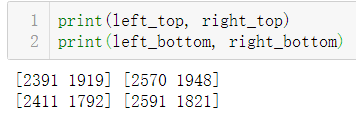
6、检验定位效果
print(left_top, right_top)

print(left_bottom, right_bottom)
运行结果:

Python之根据四个坐标确定其位于左上下右上下的更多相关文章
- Python 基础语法(四)
Python 基础语法(四) --------------------------------------------接 Python 基础语法(三)------------------------- ...
- 初学 Python(十四)——生成器
初学 Python(十四)--生成器 初学 Python,主要整理一些学习到的知识点,这次是生成器. # -*- coding:utf-8 -*- ''''' 生成式的作用: 减少内存占有,不用一次性 ...
- Python第二十四天 binascii模块
Python第二十四天 binascii模块 binascii用来进行进制和字符串之间的转换 import binascii s = 'abcde' h = binascii.b2a_hex(s) # ...
- Python/MySQL(四、MySQL数据库操作)
Python/MySQL(四.MySQL数据库操作) 一.数据库条件语句: case when id>9 then ture else false 二.三元运算: if(isnull(xx)0, ...
- python学习第四讲,python基础语法之判断语句,循环语句
目录 python学习第四讲,python基础语法之判断语句,选择语句,循环语句 一丶判断语句 if 1.if 语法 2. if else 语法 3. if 进阶 if elif else 二丶运算符 ...
- Python第十四天 序列化 pickle模块 cPickle模块 JSON模块 API的两种格式
Python第十四天 序列化 pickle模块 cPickle模块 JSON模块 API的两种格式 目录 Pycharm使用技巧(转载) Python第一天 安装 shell 文件 Py ...
- python学习第四次笔记
python学习第四次记录 列表list 列表可以存储不同数据类型,而且可以存储大量数据,python的限制是 536870912 个元素,64位python的限制是 1152921504606846 ...
- 【转】python 历险记(四)— python 中常用的 json 操作
[转]python 历险记(四)— python 中常用的 json 操作 目录 引言 基础知识 什么是 JSON? JSON 的语法 JSON 对象有哪些特点? JSON 数组有哪些特点? 什么是编 ...
- 第四百零五节,centos7下搭建sentry错误日志服务器,接收python以及Django错误,
第四百零五节,centos7下搭建sentry错误日志服务器,接收python以及Django错误, 注意:版本,不然会报错 Docker >=1.11Compose >1.6.0 通过d ...
随机推荐
- IDEA必备插件系列-Rainbow Brackets(彩虹括号)
Rainbow Brackets ,就是彩虹括号,各种鲜明颜色的括号 这个一个开源的项目: https://github.com/izhangzhihao/intellij-rainbow-brack ...
- 嵌入式linux下获取flash分区大小
在嵌入式系统中,由于flash存储空间有限,或者是存储数据,实现数据的循环删除,需要获取到分区的使用情况,可以通过系统下的函数statfs来获取使用情况:实现代码如下: flashInfo.cpp # ...
- Jenkins=====》部署到构建完成
目录 序言 正文 插件 系统管理 构建Maven项目 结尾 序言 大家好,我是龙宝,来自一个正在爬坑的java程序员,欢迎观看这一期的jenkins部署篇(V_V) 正文 这里我们直接上图看步 ...
- 工作小记[csv文件、admin中filed与list_display区别、ModuleNotFoundError: No module named'xxx'、django创建admin用户]
CSV-Comma Separated Values,CSV文件可以直接用Excel表格打开,如果用文本打开属性之间用逗号隔开,Python有直接操作CSV文件的函数. fileds字段控制“修改添加 ...
- 2020-04-13:怎么在日志里排查错误,该用哪些Linux命令
能通过less命令打开文件,通过Shift+G到达文件底部,再通过?+关键字的方式来根据关键来搜索信息. 能通过grep的方式查关键字,具体用法是, grep 关键字 文件名,如果要两次在结果里查找的 ...
- 2020-04-07:假如你们系统接收十几种报文,用什么方式对应的各自的service,总不能都用if-else判断吧
福哥答案2020-04-08: 策略,工厂.
- 栈及其简单应用(python代码)
栈属于线性结构(Linear Struncture),要搞清楚这个概念,首先要明白”栈“原来的意思,如此才能把握本质."栈“者,存储货物或供旅客住宿的地方,可引申为仓库.中转站,所以引入到计 ...
- Flutter 打包程序 build android apk
Step-1 Java 路径 找到java路径, 可使用[flutter doctor -v] Step-2: 进入目录 找到路径后 C:\Program Files\Java\jre1.8.0_23 ...
- 可以用命令行控制eclipse断点增加删除、远程调试创建与启动的插件
java # 创建断点(支持条件断点) curl -X PUT -H "Content-Type:application/json" --data '{"language ...
- 【NOI2014】魔法森林 - 动态加边SPFA
题目描述 为了得到书法大家的真传,小 E 同学下定决心去拜访住在魔法森林中的隐 士.魔法森林可以被看成一个包含 n 个节点 m 条边的无向图,节点标号为 1,2,3,…,n,边标号为 1,2,3,…, ...