
Python之根据四个坐标确定其位于左上下右上下
1、导入模块
import numpy as np
2、存储所需要确定位置的四个坐标点
# 所需要确定位置的四个坐标

coordinate = [[2570, 1948], [2391, 1919], [2411, 1792], [2591, 1821]]  # 常规矩形坐标

# coordinate = [[0, 1], [1, 0], [1, 2], [2, 1]]  # 非常规(菱形)矩形坐标,用以验证代码

coordinate = np.array(coordinate)
3、求出中心坐标点
center = coordinate[0]

for _ in range(1, 4):

    center = center + coordinate[_]

center = center / 4
4、找出x轴小于中心坐标点的点 left_coordinate
coordinate_temp = coordinate.copy() # 复制一份坐标,避免原坐标被破坏

left_coordinate = [] # 存储x轴小于中心坐标点的点

delete_index = []

# 将 x轴小于中心坐标点的点 存储进left_coordinate

for _ in range(4):

    if(coordinate[_][0] < center[0]):

        left_coordinate.append(coordinate[_])

        delete_index.append(_)

# 将存储进 left_coordinate 的元素从coordinate_temp中删除

coordinate_temp = np.delete(coordinate_temp, delete_index, axis=0)
5、确定四个坐标所处位置 'left_top', 'right_top', 'right_bottom', 'left_bottom'
思路:
若 len(left_coordinate) == 2:
比较left_coordinate中的坐标,其y轴小于中心坐标点的,确定为 左下,另一个确定为左上
比较coordinate_temp中的坐标,其y轴小于中心坐标点的,确定为 右下,另一个确定为右上
若 len(left_coordinate) == 1:
确定该点为左下
比较coordinate_temp中的坐标,找出其x轴大于中心坐标点的,确定为右上,并删除该点,
比较剩下两点的y轴,大的确定为左上,小的确定为右下
left_coordinate_temp = left_coordinate.copy() # 避免程序过程因为left_coordinate的变动而导致最初的条件判断错误

if(len(left_coordinate_temp) == 2):

    delete_index = []

    for _ in range(2):

        if(left_coordinate[_][1] < center[1]):

            left_bottom = left_coordinate[_]

            delete_index.append(_)

            break

    left_coordinate = np.delete(left_coordinate, delete_index, axis=0)

    left_top = left_coordinate[0]

    for _ in range(2):

        if(coordinate_temp[_][1] < center[1]):

            right_bottom = coordinate_temp[_]

            coordinate_temp = np.delete(coordinate_temp, [_], axis=0)

            break

    right_top = coordinate_temp[0]

elif(len(left_coordinate_temp) == 1):

    left_bottom = left_coordinate[0]

    delete_index = []

    for _ in range(3):

        if(coordinate_temp[_][0] == center[0] and coordinate_temp[_][1] > center[1]):

            left_top = coordinate_temp[_]

            delete_index.append(_)

        if(coordinate_temp[_][0] == center[0] and coordinate_temp[_][1] < center[1]):

            right_bottom = coordinate_temp[_]

            delete_index.append(_)

    coordinate_temp = np.delete(coordinate_temp, delete_index, axis=0)

    right_top = coordinate_temp[0]
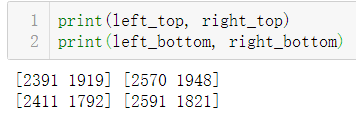
6、检验定位效果
print(left_top, right_top)

print(left_bottom, right_bottom)
运行结果:

Python之根据四个坐标确定其位于左上下右上下的更多相关文章
- Python 基础语法(四)
Python 基础语法(四) --------------------------------------------接 Python 基础语法(三)------------------------- ...
- 初学 Python(十四)——生成器
初学 Python(十四)--生成器 初学 Python,主要整理一些学习到的知识点,这次是生成器. # -*- coding:utf-8 -*- ''''' 生成式的作用: 减少内存占有,不用一次性 ...
- Python第二十四天 binascii模块
Python第二十四天 binascii模块 binascii用来进行进制和字符串之间的转换 import binascii s = 'abcde' h = binascii.b2a_hex(s) # ...
- Python/MySQL(四、MySQL数据库操作)
Python/MySQL(四.MySQL数据库操作) 一.数据库条件语句: case when id>9 then ture else false 二.三元运算: if(isnull(xx)0, ...
- python学习第四讲,python基础语法之判断语句,循环语句
目录 python学习第四讲,python基础语法之判断语句,选择语句,循环语句 一丶判断语句 if 1.if 语法 2. if else 语法 3. if 进阶 if elif else 二丶运算符 ...
- Python第十四天 序列化 pickle模块 cPickle模块 JSON模块 API的两种格式
Python第十四天 序列化 pickle模块 cPickle模块 JSON模块 API的两种格式 目录 Pycharm使用技巧(转载) Python第一天 安装 shell 文件 Py ...
- python学习第四次笔记
python学习第四次记录 列表list 列表可以存储不同数据类型,而且可以存储大量数据,python的限制是 536870912 个元素,64位python的限制是 1152921504606846 ...
- 【转】python 历险记(四)— python 中常用的 json 操作
[转]python 历险记(四)— python 中常用的 json 操作 目录 引言 基础知识 什么是 JSON? JSON 的语法 JSON 对象有哪些特点? JSON 数组有哪些特点? 什么是编 ...
- 第四百零五节,centos7下搭建sentry错误日志服务器,接收python以及Django错误,
第四百零五节,centos7下搭建sentry错误日志服务器,接收python以及Django错误, 注意:版本,不然会报错 Docker >=1.11Compose >1.6.0 通过d ...
随机推荐
- 034_go语言中的工作池
代码演示 package main import "fmt" import "time" func worker(id int, jobs <-chan ...
- 2020-04-05:谈一下spring事务传播
- C#LeetCode刷题之#263-丑数(Ugly Number)
问题 该文章的最新版本已迁移至个人博客[比特飞],单击链接 https://www.byteflying.com/archives/3862 访问. 编写一个程序判断给定的数是否为丑数.丑数就是只包含 ...
- Who Am I? Personality Detection based on Deep Learning for Texts 阅读笔记
文章目录 源代码github地址 摘要 2CLSTM 过程 1. 词嵌入 2. 2LSTM处理 3. CNN学习LSGCNN学习LSG 4. Softmax分类 源代码github地址 https:/ ...
- Ansible常用模块-yum模块
yum模块 name 必选 指定安装包名 state 执行命令 present installed removed latest absent 其中installed and present等效 ...
- LeetCode 91,点赞和反对五五开,这题是好是坏由你来评判
本文始发于个人公众号:TechFlow,原创不易,求个关注 今天是LeetCode专题的第57篇文章,我们一起来看看LeetCode第91题,解码方法(Decode ways). 这道题官方给定的难度 ...
- Spring Boot 教程 - 文件上传下载
在日常的开发工作中,基本上每个项目都会有各种文件的上传和下载,大多数文件都是excel文件,操作excel的JavaAPI我用的是apache的POI进行操作的,POI我之后会专门讲到.此次我们不讲如 ...
- node-sass 报错的解决方法
今天在运行项目发现原来好好的项目报错了.报错大致信息如下: 这段代码是我升级node之后里面根据不同的项目位置什么的会有所不同. 简单的说,这段代码意思是node-sass 不兼容 node v8 的 ...
- 【算法•日更•第三十一期】KMP算法
▎前言 这次要讲的HMP算法KMP算法很简单,是用于处理字符串的,之前一直以为很难,其实也不过如此(说白了就是优化一下暴力). ▎处理的问题 通常处理的问题是这样的:给定两个字符串s1和s2,其中s1 ...
- Android CC框架中,新建组件无法显示布局问题
出错: 当在创建新的组件时,跳转到新组件成功,但是无法正确显示布局,即获取到布局文件的控件等. 原因: 当在创建新的组件时,默认生成MainActivity以及其布局activity_main.每个组 ...