
Java 根据模板导出PDF
前言
本文为我搜集的根据模板导出PDF的方法整理而来,所以贴了好多帖子的链接。有的方法仅适合特殊的业务场景,可以根据业务需求选择合适的方法。写的不好请轻喷。
思路一:直接导出pdf
使用itext模板导出pdf
适用范围
业务生成的 pdf 是具有固定格式或者模板的文字及其图片等内容,使用模板,只需要将不一致的地方改成文本域,然后进行文字填充就可以了;如果涉及的业务不能有模块化可以提取出来东西,从开头一步一步去绘画。
参考链接
JAVA 使用Itext模板生成pdf,解决图片插入,文本域超出字体缩放,半自动换行
java根据模板生成pdf文件并导出缺点
超出文本域的部分的文字(若不设置自动调整文字大小)则会不显示,无法自动分页。(暂未找到解决方案)
思路二:先导出word再转成pdf
1)导出word
Freemarker
官方参考手册:http://freemarker.foofun.cn/toc.html
Freemarker 将数据填入 .ftl 模板导出 word(.doc/.docx)
参考链接:
缺点:
导出的 .doc / .docx 实际上是 xml 文件,用办公软件能正常打开使用。但是转 PDF 的时候发现转不成功。转过之后的 PDF 显示的不是 word 的格式字符,而是像 xml 文件的标签及字符。
Freemarker 结合 .docx 格式的本质将数据填入 .docx 里面的 document.xml 文件导出 .docx
参考链接:
优点:
可转换为 pdf
相关错误:
A. Date 格式的数据传输报错!
解决方案:${(initialTime?string("yyyy-MM-dd HH:mm:ss"))!}
附:
a. 循环行及表单行是否显示功能参考链接:
SpringBoot整合Freemarker导出word文档表格
freemarker合并单元格,if、else标签的使用,null、空字符串处理
如:
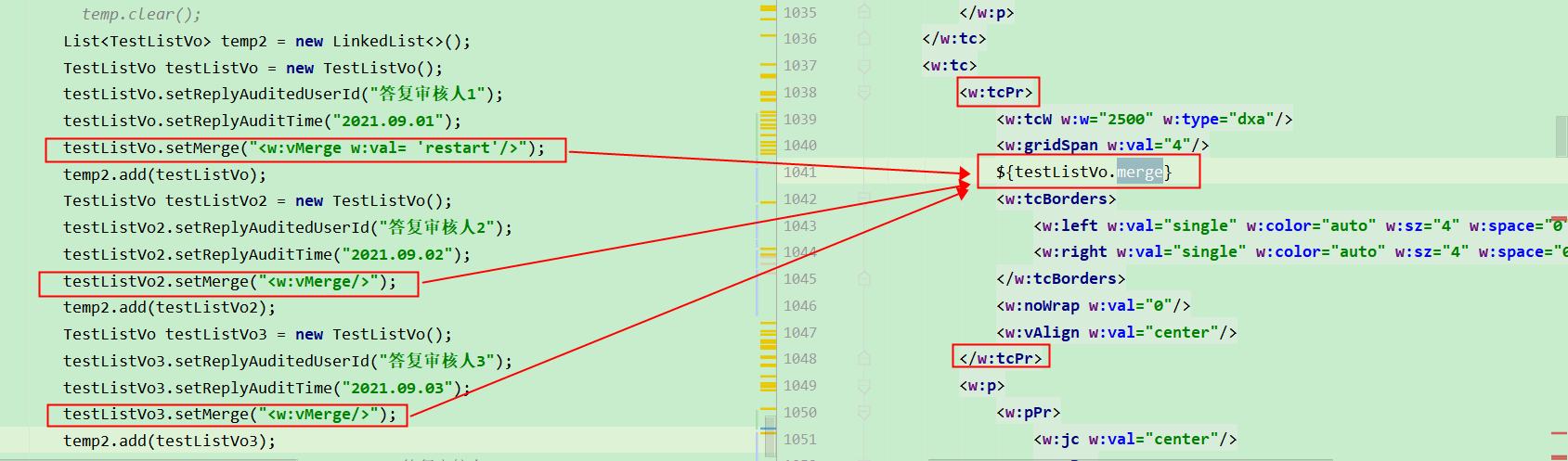
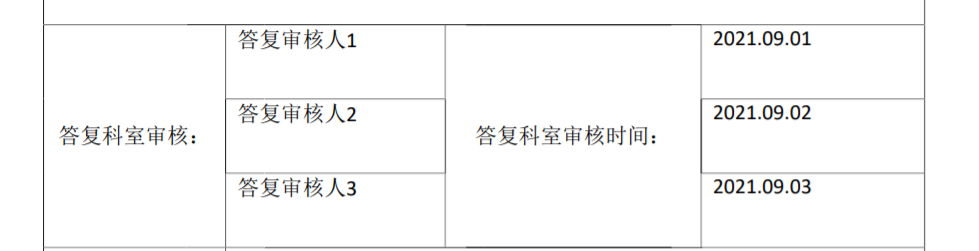
导出结果如下:
也可向参考链接2一样,在 xml 上定义插入对应的合并代码(如下图)。

docx4j
结合 .docx 格式的本质将数据填入 .docx 里面的 document.xml 文件导出 .docx
POI
Poi的导出word和转pdf --已试过,可行
Aspose.word(需要license)(未尝试)
2)word转pdf
docx4j 将 .docx 转 pdf
方法一:使用 docx4j2.8.1在 docx 模板填入数据并且转 pdf
方法二:将 docx 转 pdf
相关错误:
A.导出的 PDF 乱码(检查 word 文件中的字体是否在字体库中)
使用docx4j实现docx转pdf(解决linux环境下中文乱码问题)
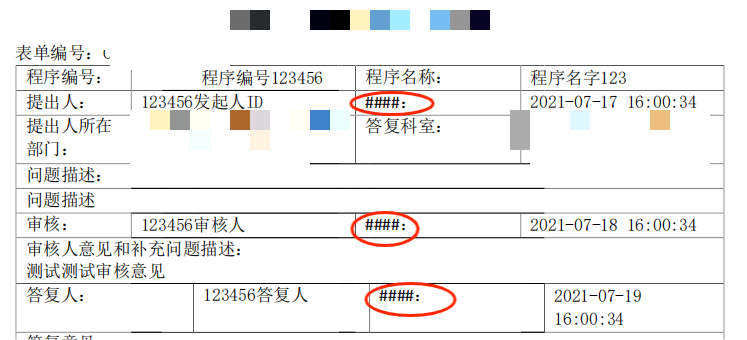
B.注意:存在样式 bug!!!
暂未找到解决方案。
Spire.Doc 实现 word (.doc / .docx)转 pdf(尝试了免费版,可行)
有付费版和免费版,免费版仅支持三页内的 word 转 pdf
aspose.word 将 word 转 pdf (未尝试)
最终方案
docx4j spire.doc.free + freemarker
模板准备
将占位变量名写在模板 testTemplate.docx的对应位置上,用
${}包起来。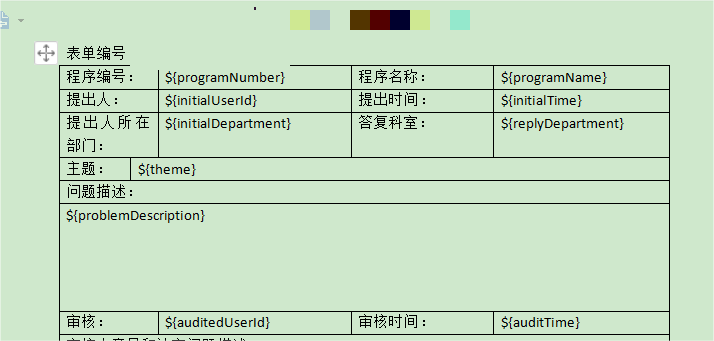
把复制一份副本,将副本 .docx 的后缀名重命名为 .zip。解压后找到 /word/document.xml,编译器打开文件,代码格式化后,对比例如 ${repliedUserId} 的占位参数是否被拆开(如果拆开需手动修改),修改名字为 testDocument.xml。
将源模板 testTemplate.docx 和 testDocument.xml 放到相应位置。
maven依赖
    <dependencies>

        <!--        动态生成word-->

        <dependency>

            <groupId>org.freemarker</groupId>

            <artifactId>freemarker</artifactId>

            <version>2.3.22</version>

        </dependency>

        <!--        docx转pdf-->

        <dependency>

            <groupId>org.docx4j</groupId>

            <artifactId>docx4j-JAXB-Internal</artifactId>

            <version>8.2.4</version>

        </dependency>

        <dependency>

            <groupId>org.docx4j</groupId>

            <artifactId>docx4j-export-fo</artifactId>

            <version>8.2.4</version>

        </dependency>

        <!--        https://www.e-iceblue.cn/spiredocforjava/spire-doc-for-java-program-guide-content.html-->

        <!-- https://mvnrepository.com/artifact/e-iceblue/spire.doc.free -->

        <dependency>

            <groupId>e-iceblue</groupId>

            <artifactId>spire.doc.free</artifactId>

            <version>5.2.0</version>

        </dependency>

    </dependencies>

    <repositories>

        <repository>

            <id>com.e-iceblue</id>

            <name>e-iceblue</name>

            <url>https://repo.e-iceblue.cn/repository/maven-public/</url>

        </repository>

    </repositories>
Controller
@PostMapping("/pdfExport")

public ResponseEntity exportPdf(@RequestParam Map<String, Object> params) {

    try {

        // 查找业务数据

        TestEntity testEntity = testService.querySheet(params);

        // 格式转换时的暂存文件名

        String fileUuid = UUID.randomUUID().toString().replaceAll("-", "");

        String toDocxPath = "E://project//test//ToPDF//word//" + fileUuid + ".docx";

        String toPdfPath = "E://project//test//ToPDF//pdf//" + fileUuid + ".pdf";

        String toXmlPath = "E://project//test//ToPDF//xml//" + fileUuid + ".xml";

        String docxTemplate = "E://project//test//ToPDF//template//testTemplate.docx";

        // .xml转.docx(testDocument.xml表示在项目的相对路径下)

        XmlToDocx.toDocx("testDocument.xml",docxTemplate, toXmlPath, toDocxPath, testEntity);

        // .docx转.pdf

        WordToPdf.docxToPdf(toDocxPath, toPdfPath);

        // 下载pdf并删除本地pdf

        ResponseEntity response = WordToPdf.downloadPdf("这是PDF的名字啊", toPdfPath);

        return response;

    } catch (Exception e) {

        throw new BusinessException("下载PDF失败!" + e.getMessage());

    }

}
XmlToDocx类
import java.io.*;

import java.util.Enumeration;

import java.util.Map;

import java.util.zip.ZipEntry;

import java.util.zip.ZipException;

import java.util.zip.ZipFile;

import java.util.zip.ZipOutputStream;

/**

 * 其实docx属于zip的一种,这里只需要操作word/document.xml中的数据,其他的数据不用动

 *

 * @author

 *

 */

public class XmlToDocx {

    /**

     *

     * @param xmlTemplate xml的文件名

     * @param docxTemplate docx的路径和文件名(.docx模板)

     * @param xmlTemp  填充完数据的临时xml

     * @param toFilePath  目标文件名

     * @param object  需要动态传入的数据

     */

    public static void toDocx(String xmlTemplate, String docxTemplate, String xmlTemp, String toFilePath, Object object)  {

        try {

            // 1.object是动态传入的数据

            // 这个地方不能使用FileWriter因为需要指定编码类型否则生成的Word文档会因为有无法识别的编码而无法打开

//            Writer w1 = new OutputStreamWriter(new FileOutputStream(xmlTemp), "gb2312");

            Writer w1 = new OutputStreamWriter(new FileOutputStream(xmlTemp), "utf-8");

            // 2.把object中的数据动态由freemarker传给xml

            XmlTplUtil.process(xmlTemplate, object, w1);

            // 3.把填充完成的xml写入到docx中

            XmlToDocx xtd = new XmlToDocx();

            File xmlTempFile = new File(xmlTemp);

            xtd.outDocx(xmlTempFile, docxTemplate, toFilePath);

            // 删除临时xml文件

            xmlTempFile.delete();

        }catch (Exception e) {

            e.printStackTrace();

        }

    }

    /**

     *

     * @param documentFile 动态生成数据的docunment.xml文件

     * @param docxTemplate docx的模板

     * @param toFilePath  需要导出的文件路径

     * @throws ZipException

     * @throws IOException

     */

    public void outDocx(File documentFile, String docxTemplate, String toFilePath) throws ZipException, IOException {

        try {

            File docxFile = new File(docxTemplate);

            ZipFile zipFile = new ZipFile(docxFile);

            Enumeration<? extends ZipEntry> zipEntrys = zipFile.entries();

            ZipOutputStream zipout = new ZipOutputStream(new FileOutputStream(toFilePath));

            int len = -1;

            byte[] buffer = new byte[1024];

            while (zipEntrys.hasMoreElements()) {

                ZipEntry next = zipEntrys.nextElement();

                InputStream is = zipFile.getInputStream(next);

                // 把输入流的文件传到输出流中 如果是word/document.xml由我们输入

                zipout.putNextEntry(new ZipEntry(next.toString()));

                if ("word/document.xml".equals(next.toString())) {

                    InputStream in = new FileInputStream(documentFile);

                    while ((len = in.read(buffer)) != -1) {

                        zipout.write(buffer, 0, len);

                    }

                    in.close();

                } else {

                    while ((len = is.read(buffer)) != -1) {

                        zipout.write(buffer, 0, len);

                    }

                    is.close();

                }

            }

            zipout.close();

        } catch (Exception e) {

            e.printStackTrace();

        }

    }

}
WordToPdf类
import org.apache.commons.io.IOUtils;

import org.docx4j.Docx4J;

import org.docx4j.fonts.IdentityPlusMapper;

import org.docx4j.fonts.Mapper;

import org.docx4j.fonts.PhysicalFonts;

import org.docx4j.openpackaging.exceptions.Docx4JException;

import org.docx4j.openpackaging.packages.WordprocessingMLPackage;

import org.springframework.http.HttpHeaders;

import org.springframework.http.HttpStatus;

import org.springframework.http.ResponseEntity;

import java.io.*;

import java.net.URLEncoder;

public class WordToPdf {

    /**

     * (Docx4J).docx转.pdf(当docx的一行全是英文以及标点符号时转换的Pdf那一行会超出范围 https://segmentfault.com/q/1010000043372748)

     * @param docxPath docx文件路径

     * @param pdfPath 输出的pdf文件路径

     * @throws Exception

     */

    @Deprecated

    public static boolean docxToPdf(String docxPath, String pdfPath) throws Exception {

        FileOutputStream out = null;

        try {

            File docxfile = new File(docxPath);

            WordprocessingMLPackage pkg = Docx4J.load(docxfile);

            Mapper fontMapper = new IdentityPlusMapper();

            fontMapper.put("隶书", PhysicalFonts.get("LiSu"));

            fontMapper.put("宋体", PhysicalFonts.get("SimSun"));

            fontMapper.put("微软雅黑", PhysicalFonts.get("Microsoft Yahei"));

            fontMapper.put("黑体", PhysicalFonts.get("SimHei"));

            fontMapper.put("楷体", PhysicalFonts.get("KaiTi"));

            fontMapper.put("新宋体", PhysicalFonts.get("NSimSun"));

            fontMapper.put("华文行楷", PhysicalFonts.get("STXingkai"));

            fontMapper.put("华文仿宋", PhysicalFonts.get("STFangsong"));

            fontMapper.put("仿宋", PhysicalFonts.get("FangSong"));

            fontMapper.put("幼圆", PhysicalFonts.get("YouYuan"));

            fontMapper.put("华文宋体", PhysicalFonts.get("STSong"));

            fontMapper.put("华文中宋", PhysicalFonts.get("STZhongsong"));

            fontMapper.put("等线", PhysicalFonts.get("SimSun"));

            fontMapper.put("等线 Light", PhysicalFonts.get("SimSun"));

            fontMapper.put("华文琥珀", PhysicalFonts.get("STHupo"));

            fontMapper.put("华文隶书", PhysicalFonts.get("STLiti"));

            fontMapper.put("华文新魏", PhysicalFonts.get("STXinwei"));

            fontMapper.put("华文彩云", PhysicalFonts.get("STCaiyun"));

            fontMapper.put("方正姚体", PhysicalFonts.get("FZYaoti"));

            fontMapper.put("方正舒体", PhysicalFonts.get("FZShuTi"));

            fontMapper.put("华文细黑", PhysicalFonts.get("STXihei"));

            fontMapper.put("宋体扩展", PhysicalFonts.get("simsun-extB"));

            fontMapper.put("仿宋_GB2312", PhysicalFonts.get("FangSong_GB2312"));

            fontMapper.put("新細明體", PhysicalFonts.get("SimSun"));

            pkg.setFontMapper(fontMapper);

            out = new FileOutputStream(pdfPath);

            //docx4j  docx转pdf

            FOSettings foSettings = Docx4J.createFOSettings();

//            foSettings.setWmlPackage(pkg);

            foSettings.setOpcPackage(pkg);

            Docx4J.toFO(foSettings, out, Docx4J.FLAG_EXPORT_PREFER_XSL);

//            Docx4J.toPDF(pkg, out);

            // 删除源.docx文件

            docxfile.delete();

            return true;

//        } catch (FileNotFoundException e) {

//            e.printStackTrace();

//        } catch (Docx4JException e) {

//            e.printStackTrace();

        } catch (Exception e) {

            e.printStackTrace();

            return false;

        } finally {

            if (out != null) {

                try {

                    out.close();

                } catch (IOException e) {

                    e.printStackTrace();

                }

            }

        }

    }

    /**

     * https://www.e-iceblue.cn/spiredocforjavaconversion/java-convert-word-to-pdf.html

     * (spire.doc.free:

     *             免费版有篇幅限制。在加载或保存 Word 文档时,要求 Word 文档不超过 500 个段落,25 个表格。

     *             同时将 Word 文档转换为 PDF 和 XPS 等格式时,仅支持转换前三页。)

     * (spire.doc.free)word转pdf

     * @param wordInPath word输入路径

     * @param pdfOutPath Pdf输出路径

     * @return

     */

    public static boolean convertWordToPdf(String wordInPath, String pdfOutPath) {

        try {

            //实例化Document类的对象

            Document doc = new Document();

            //加载Word

            doc.loadFromFile(wordInPath);

            //保存为PDF格式

            doc.saveToFile(pdfOutPath, FileFormat.PDF);

            return true;

        } catch (Exception e) {

//            e.printStackTrace();

            return false;

        } finally {

            // 删除源word文件

            File docxfile = new File(wordInPath);

            if (docxfile.exists()) {

                docxfile.delete();

            }

        }

    }

}
Java 根据模板导出PDF的更多相关文章
- java根据模板导出PDF(利用itext)
一.制作模板 1.下载Adobe Acrobat 9 Pro软件(pdf编辑器),制作模板必须使用该工具. 2.下载itextpdf-5.5.5.jar.itext-asian-5.2.0.j ...
- java根据模板导出pdf
在网上看了一些Java生成pdf文件的,写的有点乱,有的不支持写入中文字体,有的不支持模板,有的只是随便把数据放里面生成文件,完全不考虑数据怎样放置的以及以后的维护性,想想还是自己总结一个完全版的导出 ...
- java根据模板导出PDF详细教程
原文:https://blog.csdn.net/pengyufight/article/details/75305128 题记:由于业务的需要,需要根据模板定制pdf文档,经测试根据模板导出word ...
- Java利用模板生成pdf并导出
1.准备工作 (1)Adobe Acrobat pro软件:用来制作导出模板 (2)itext的jar包 2.开始制作pdf模板 (1)先用word做出模板界面 (2)文件另存为pdf格式文件 (3) ...
- java通过freemarker模板导出pdf
需求:将网页内容导出为pdf文件,其中包含文字,图片,echarts图 原理:利用freemarker模板与数据渲染所得到的html内容,通过ITextRenderer对象解析html内容生成pdf ...
- java模板导出PDF
本次完善综合特点: 一对一,点对点的给对应的地方写值,比如模板里面放了个name标识,在程序里把“张三”赋给name,那么输出的pdf里面name的地方就变成了张三,准确方便快捷 支持中文,可以使用自 ...
- java利用itext导出pdf
项目中有一功能是导出历史记录,可以导出pdf和excel,这里先说导出pdf.在网上查可以用那些方式导出pdf,用itext比较多广泛. 导出pdf可以使用两种方式,一是可以根据已有的pdf模板,进行 ...
- java根据模板生成pdf
原文链接:https://www.cnblogs.com/wangpeng00700/p/8418594.html 在网上看了一些Java生成pdf文件的,写的有点乱,有的不支持写入中文字体,有的不支 ...
- Java按模板导出Excel———基于Aspose实现
目录 开发环境 先看效果 引入jar包 校验许可证 导出方法 测试结果 占位符 开发环境 jdk 1.8 Maven 3.6 SpringBoot 2.1.4.RELEASE aspose-cells ...
- Java无模板导出Excel,Apache-POI插件实现
开发环境 jdk 1.8 Maven 3.6 Tomcat 8.5 SpringBoot 2.1.4.RELEASE Apache-POI 3.6 Idea 注意: 我是在现有的基于SpringBoo ...
随机推荐
- CodeSmith 简单使用和常用模板
1.简介 CodeSmith 是一种基于模板的代码生成工具,它使用类似于 ASP.NET的语法来生成任意类型的代码或文本. 2.软件布局 整体布局和visual studio系列相似,用过VS开发对此 ...
- EPICS Archiver Appliance的定制部署2
EPICS Archiver Appliance的定制部署1 按上面的步骤Archiver可以跑起来了,试了一下,发现waveform不能archive,看服务状态: 看起来正常,怀疑在profile ...
- php .inc 文件
inc 文件顾名思义是include file的意思.即PHP的包含文件,这里用后缀来表示文件的作用, inc文件一般加载一些设置 举个例子 <? php//这里是数据库连接的配置信息db. ...
- Linux提权之:利用capabilities提权
Linux提权之:利用capabilities提权 目录 Linux提权之:利用capabilities提权 1 背景 2 Capabilities机制 3 线程与文件的capabilities 3. ...
- [EULAR文摘] 在总人群中监测ACPA能否预测早期关节炎
标签: 类风湿关节炎; 抗CCP抗体; 预测因子; 病程演变 在总人群中监测ACPA能否预测早期关节炎 Verstappen SM, et al. EULAR 2015. Present ID: OP ...
- 病程极短(≤16周)的495例未分化关节炎患者随访2年的结局[EULAR2015_SAT0055]
病程极短(≤16周)的495例未分化关节炎患者随访2年的结局 SAT0055 TWO-YEAR OUTCOME IN 495 PATIENTS WITH UNDIFFERENTIATED ARTH ...
- 3D模型轻量化
近几年,随着国内外文化产业的迅猛发展,3D建模行业迎来黄金发展期. 尤其是在元宇宙时代及数字体验经济时代的大背景下,越来越多的实时.可交互的3D内容将出现在人们的生活中. 有关3D建模师而言,无疑,行 ...
- SpringMVC基础源码分析(一)
实现Controller的三种方式分析 每种实现的方式对应的HanderAdapter都不同. 实现Controller接口 该接口对应的HanderAdapter为SimpleControllerH ...
- ol序号并在序号加背景色
<style type="text/css"> .list {list-style-type: none;margin: 0;padding: 0 0 0 30px;} ...
- vue学习笔记:环境搭建
一.安装node.js node.js的官方地址为:https://nodejs.org/en/download/ 下载好安装包点击安装,基本就是下一步.下一步.... 安装完成后可以通过以下两种方式 ...