
Vue学习:实现用户没有登陆时,访问后自动跳转登录页面
设计思路
- 定义路由的时候配置属性,这里使用needLogin标记访问页面是否需要登录
- 设置路由守卫,每个页面在跳转之前都要经过验证,校验用户信息是否存在,不存在跳转到登录页
- 用户登录后将用户信息存储在localStorage
- 退出登录后,将用户信息清空
代码实现
1、router文件夹的index.js文件中
- 在router中每个地址在meta属性中配置needLogin熟悉,判断访问页面是否需要登录
- 404页面放在最后,匹配所有链接,实现输入不存在的地址时自动跳转404页面
import Vue from 'vue'

import Router from 'vue-router'

import LoginCard from "../components/LoginCard";

import Home from "../components/Home";

import ErrorPage from "../components/ErrorPage";

Vue.use(Router)

export default new Router({

  routes: [

    {

      path: '/',

      name: 'LoginCard',

      component: LoginCard,

      meta: {

        needLogin: false

      }

    },

    {

      path: '/loginCard',

      name: 'LoginCard',

      component: LoginCard,

      meta: {

        needLogin: false

      }

    },

    {

      path: '/home',

      name: 'Home',

      component: Home,

      meta: {

        needLogin: true

      }

    }, {

      path: '/*',

      name: 'ErrorPage',

      component: ErrorPage,

      meta:{

        needLogin: false

      }

    }

  ]

})
2、在main.js中定义一个路由前置守卫,每次跳转页面进行判断,没有登陆自动挑战登陆界面
import Vue from 'vue'

import App from './App'

import router from './router'

import VueRouter from "vue-router";

import ElementUI from 'element-ui'

import 'element-ui/lib/theme-chalk/index.css'

import * as auth from './utils/auth'

import store from './store'

import Vuex from "vuex";

Vue.config.productionTip = false;

Vue.use(ElementUI);

Vue.use(VueRouter);

Vue.use(Vuex)

//这个方法需要放在new Vue之前,不然按F5刷新页面不会调用这个方法

router.beforeEach(function (to, from, next) {

  console.log('是否需要登录才能访问')

  if (to.meta.needLogin) {

    if (auth.getAdminInfo()) {

      console.log(auth.getAdminInfo())

      console.log('有cookie信息')

      next();

    }else {

      console.log('无cookie信息')

      next({

        path:'/loginCard'

      });

    }

  }else{

    next();

  }

})

new Vue({

  el: '#app',

  router,

  store,

  components: { App },

  template: '<App/>'

})
3、编写一个存储数据的工具,使用cookie存储用户登录后的信息
import Cookies from 'js-cookie'

const adminInfo = "adminInfo"

//获取用户信息

export function getAdminInfo() {

  const admin = Cookies.get(adminInfo)

  if(admin){

    return JSON.parse(admin)

  }

  return ''

}

//存储用户信息

export function setAdminInfo(admin) {

  return Cookies.set(adminInfo, JSON.stringify(admin))

}

//移除用户信息

export function removeAdminInfo() {

  return Cookies.remove(adminInfo)

}
4、写一个登录页面,用户登录后就将数据存储在cookie中
 <template>

  <div>

    <el-form ref="loginForm" :rules="formRules" :model="loginUser" label-width="80px" class="login-box">

      <h3 style="margin-bottom: 50px">欢迎登录</h3>

      <el-form-item label="用户名" prop="username">

        <el-input prefix-icon="el-icon-user" type="text" v-model="loginUser.username"  placeholder="请输入用户名" :maxlength="50" clearable></el-input>

      </el-form-item>

      <el-form-item label="密码" prop="password">

        <el-input prefix-icon="el-icon-lock" type="password" v-model="loginUser.password"  placeholder="请输入密码" :maxlength="50" clearable>

        </el-input>

      </el-form-item>

      <el-form-item>

        <el-button type="primary" @click="onSubmit">登陆</el-button>

        <el-button icon="" @click="resetForm">重置</el-button>

      </el-form-item>

    </el-form>

  </div>

</template>

<script>

import * as auth from '../utils/auth'

export default {

  name: 'LoginCard',

  data() {

    return {

      loginUser: {

        username: '',

        password: '',

      },

      formRules: {

        //制定表单输入的规则

        username: [{required: true, message: '用户名不能为空', trigger: 'blur'}],

        password: [{required: true, message: '密码不能为空', trigger: 'blur'}]

      }

    }

  },

  methods: {

    onSubmit() {

      //判断表单是否符合规则

      this.$refs['loginForm'].validate((valid) => {

          if (valid) {

            if (this.loginUser.username !== '123456' || this.loginUser.password !== '123456'){

              this.$message({

                message:'账号或密码错误',

                type: 'error',

              });

              return;

            }

            auth.setAdminInfo(this.loginUser);

            this.$router.push({path:'/home'});

          }

        }

      )

    },

    resetForm(){

      this.$refs['loginForm'].resetFields();

    },

  }

}

</script>

<style scoped>

.login-box {

  border: 1px solid #DCDFE6;

  width: 400px;

  margin: 180px auto;

  padding: 35px 35px 15px 35px;

  border-radius: 5px;

}

</style>
5、编写一个退出页面,用户退出以后,将用户信息从cookie中去除,跳转到登陆页面
 <template>

  <div>

    <h1>主页面</h1>

    <el-button @click="logout">退出登录</el-button>

  </div>

</template>

<script>

import * as auth from '../utils/auth'

export default {

  name : 'Home',

  data() {

    return {

    };

  },

  methods: {

    logout(){

      auth.removeAdminInfo();

      this.$router.push({path:'/loginCard'});

    }

  },

  mounted() {

  }

}

</script>
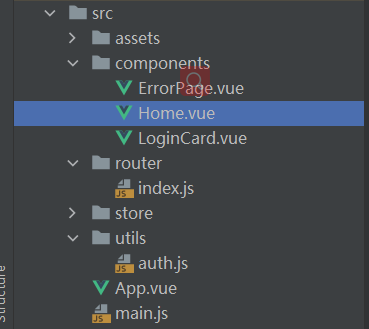
基本目录结构是这样的
Vue学习:实现用户没有登陆时,访问后自动跳转登录页面的更多相关文章
- 【Filter 不登陆无法访问】web项目中写一个过滤器实现用户不登陆,直接给链接,无法进入页面的功能
在web项目中写一个过滤器实现用户不登陆,直接给链接,无法进入页面,而重定向到登陆界面的功能. 项目是用springMVC+spring+hibernate实现 (和这个没有多大关系) 第一步: 首先 ...
- 详解springmvc控制登录用户session失效后跳转登录页面
springmvc控制登录用户session失效后跳转登录页面,废话不多少了,具体如下: 第一步,配置 web.xml <session-config> <session-timeo ...
- nginx证书制作以及配置https并设置访问http自动跳转https(反向代理转发jboss)
nginx证书制作以及配置https并设置访问http自动跳转https 默认情况下ssl模块并未被安装,如果要使用该模块则需要在编译时指定–with-http_ssl_module参数,安装模块依赖 ...
- HBuilder开发APP自动登录时跳过"登录页面"
刚接触开发公司APP项目,用HBuilder开发工具. manifest.json中的入口页面就是"登录页面",现在获取到自动登录状态是true,但是真机联调时"登录页面 ...
- 百度Site App的uaredirect.js实现手机访问,自动跳转网站手机版
以下为代码,可放置在网站foot底部文件,或者haead顶部文件,建议将代码放在网站顶部,这样可以实现手机访问立即跳转! <script src="http://siteapp.bai ...
- ajax前置处理实现异步请求session过期时跳转登录页面
第一篇博文,mark一下zhq[0]. 问题描述:用户页面,当session过期或都session注销后,普通页面后端都会有过滤器,session过期Redirect到登录页面,但是ajax请求后端只 ...
- mediawiki登录时第一次会跳回登录页面,第二次才能登录成功
原因是:LocalSetting.php中的$wgServer属性使用的是ip,改为域名后成功解决问题 补充:改为域名后使用ip访问会出现第一次登录跳回登录界面的情况,应该根据实际情况来设置$wgSe ...
- jsp+js完成用户一定时间未操作就跳到登录页面
<% String path = request.getContextPath(); String basePath = request.getScheme() + "://" ...
- 11.VUE学习之提交表单时拿到input里的值
<!DOCTYPE html> <html> <head> <meta charset="utf-8"> <meta http ...
- vue学习(四)登陆、注册、首页模板页区分
按照上面文章配置完毕后,会发现有个问题,我登陆页面.注册页面是不需要视图页的. 开始配置路由 重新配置main.js 引入 import App from './App' //引入vue组件 更改启动 ...
随机推荐
- 【每日一题】【第n个 n-->0】19./NC53 【删除】链表的倒数第 N 个结点-211123/220127
给你一个链表,删除链表的倒数第 n 个结点,并且返回链表的头结点. 答案: import java.util.*; /* * public class ListNode { * int val; * ...
- 【十次方微服务后台开发】Day02:加密与JWT鉴权、微服务注册中心、配置中心、熔断器、网关、消息总线、部署与持续集成、容器管理与监控Rancher、influxDB、grafana
一.密码加密与微服务鉴权JWT 1.BCrypt密码加密 Spring Security 提供了BCryptPasswordEncoder类,实现Spring的PasswordEncoder接口使用B ...
- 解读JVM级别本地缓存Caffeine青出于蓝的要诀2 —— 弄清楚Caffeine的同步、异步回源方式
大家好,又见面了. 本文是笔者作为掘金技术社区签约作者的身份输出的缓存专栏系列内容,将会通过系列专题,讲清楚缓存的方方面面.如果感兴趣,欢迎关注以获取后续更新. 上一篇文章中,我们继Guava Cac ...
- python运算符与基本数据类型
Python种类 JavaPython cPython ***** pypy 字节码 和 机器码 Python程序: 1. 终端: C:\python35\python.exe D:\1.py 解释器 ...
- 时钟同步服务器ntp安装文档
应用场景 同步时钟很有必要,如果服务器的时间差过大会出现不必要的问题 大数据产生与处理系统是各种计算设备集群的,计算设备将统一.同步的标准时间用于记录各种事件发生时序, 如E-MAIL信息.文件创建和 ...
- Atcoder Beginner Contest ABC 284 Ex Count Unlabeled Graphs 题解 (Polya定理)
题目链接 弱化版(其实完全一样) u1s1,洛谷上这题的第一个题解写得很不错,可以参考 直接边讲Polya定理边做这题 问题引入:n颗珠子组成的手串,每颗珠子有两种不同的颜色, 如果两个手串能够在旋转 ...
- 可持久化并查集学习笔记 | 题解P3402 可持久化并查集
简要题意 你需要维护一个并查集,支持版本回退,查连通性,合并两个点. 特别的,没进行一次操作都要新建一个版本. 前置知识 可持久化数组,如果您不会,出门左转 [模板]可持久化线段树 1(可持久化数组) ...
- iOS Reveal 4 安装详解简单粗暴
项目在测试的时候,然后拿了公司最低配置的ipod 来装我们的项目,但是呢,我们的项目居然掉帧很厉害,然后看了一下别人的app,居然不卡,然后就想去看看,别人是怎么做到的.然后呢?就走上了Reveal之 ...
- arm架构的M1对有i386和x86的架构不兼容
error: Building for iOS, but the linked and embedded framework 'AliyunNlsSdk.framework' was built fo ...
- while2.c程序
/*while2.c程序->注意分號的位置*/ 1 #include<stdio.h> 2 int main(void) 3 { 4 int n=0; 5 6 while(n++&l ...