
mongodb使用自带命令工具导出导入数据
记录 mongo 数据库用原生自带的命令工具使用 json 文件方式进行导入、导出的操作!
在一次数据更新中,同事把老数据进行了清空操作,但是新的逻辑数据由于某种原因(好像是她的电脑中病毒了),一直无法正常连接数据库进行数据插入,然后下午2点左右要给甲方演示,所以要紧急恢复本地的部分数据到生产库。
在此之前我只用过 mongo 自带的命令 mongoexport 进行过导出操作,把数据库的某个 collection 导出为 json 文件,那么这次是要先导出再导入,实现了一个完整的数据迁移闭环,所以在此记录一下,以备不时之需。
一、下载 mongo 工具包
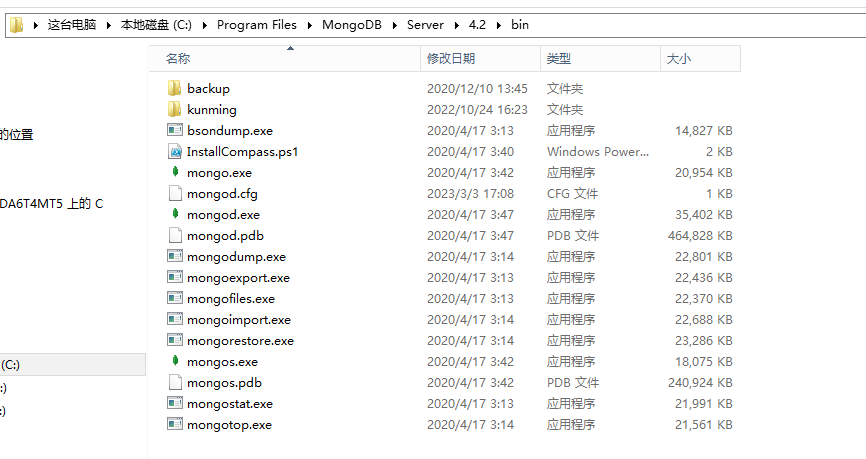
mongo工具包包括管理数据的一些工具 exe 文件,具体如下:
- mongoexport.exe:导出数据命令工具
- mongoimport.exe:导入数据命令工具
- bsondump.exe: 用于将导出的BSON文件格式转换为JSON格式
- mongodump.exe: 用于从mongodb数据库中导出BSON格式的文件,类似于mysql的dump工具mysqldump
- mongofiles.exe: 用于和mongoDB的GridFS文件系统交互的命令,并可操作其中的文件,它提供了我们本地系统与GridFS文件系统之间的存储对象接口
- mongorestore.exe: 用于恢复导出的BSON文件到 mongodb 数据库中
- mongostat.exe: 当前 mongod 状态监控工具,像linux中监控linux的vmstat
- mongotop.exe: 提供了一个跟踪mongod数据库花费在读写数据的时间,为每个collection都会记录,默认记录时间是按秒记录
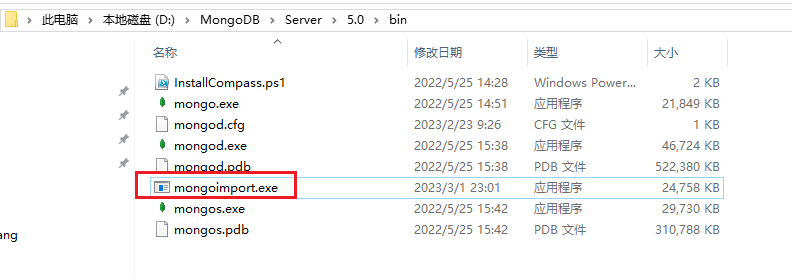
这个工具跟 mongo 的版本有关系,部分版本自带该工具包,比如下图的 4.x 版本,我用的 5.0 版本没有自带工具包,所以我需要先去官网下载工具包文件,然后把 bin 目录下的工具复制到 5.0 版本的 bin 目录下,才能进行数据的导出、导入操作。
工具包的下载地址为:mongo工具包下载地址,解压后把bin文件夹里的文件全部拷贝到 MongoDB 安装目录bin文件夹下。
二、导出数据
进入到 mongo 的安装目录 bin 下,使用 mongoexport 工具进行数据的 导出 操作
1、无密码导出操作:
mongoexport.exe -h localhost:28007 -d database -c result -o D:/project/result.json
2、有密码的导出操作:
mongoexport.exe -h localhost:28007 -d database -u admin -p 123456 -c result -o D:/project/result.json
三、导入数据
进入到 mongo 的安装目录 bin 下,使用 mongoimport 工具进行数据的 导入 操作
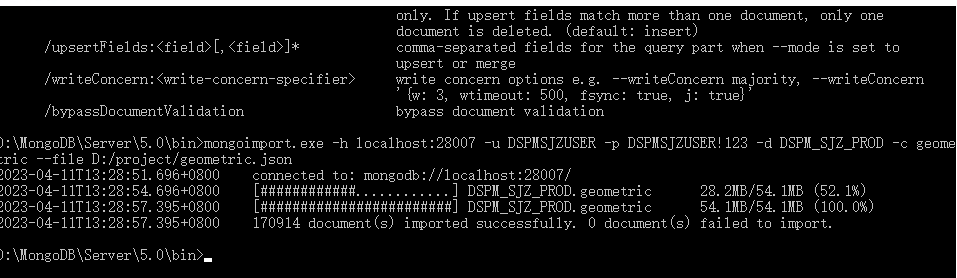
mongoimport.exe -h localhost:28007 -u admin -p 123456 -d database -c result --file D:/project/result.json
执行结果如下表示导入成功
D:\MongoDB\Server\5.0\bin>mongoimport.exe -h localhost:28007 -u admin -p 123456 -d database -c result --file D:/project/result.json

2023-04-11T13:34:39.799+0800    connected to: mongodb://localhost:28007/

2023-04-11T13:34:42.799+0800    [#######.................] DSPM_SJZ_PROD.result 20.2MB/66.4MB (30.4%)

2023-04-11T13:34:45.799+0800    [##############..........] DSPM_SJZ_PROD.result 40.5MB/66.4MB (61.1%)

2023-04-11T13:34:48.799+0800    [#####################...] DSPM_SJZ_PROD.result 60.4MB/66.4MB (91.0%)

2023-04-11T13:34:49.660+0800    [########################] DSPM_SJZ_PROD.result 66.4MB/66.4MB (100.0%)

2023-04-11T13:34:49.660+0800    386810 document(s) imported successfully. 0 document(s) failed to import.
参数释义:
-h :指的是 host 主机地址
-u :指的是用户账号
-p :指的是账户密码
-d :指的是数据库 database 简称
-c :指的是表 collection 简称
-o :指的是导出路径 output 简称
--file :指的是需要导入的文件
四、其他
使用过程中可以使用 --help 进行参数意思的查看
D:\MongoDB\Server\5.0\bin>mongoimport --help

Usage:

  mongoimport <options> <connection-string> <file>

Import CSV, TSV or JSON data into MongoDB. If no file is provided, mongoimport reads from stdin.

Connection strings must begin with mongodb:// or mongodb+srv://.

See http://docs.mongodb.com/database-tools/mongoimport/ for more information.

general options:

      /help                                       print usage

      /version                                    print the tool version and exit

      /config:                                    path to a configuration file

verbosity options:

  /v, /verbose:<level>                            more detailed log output (include multiple times for more verbosity,

                                                  e.g. -vvvvv, or specify a numeric value, e.g. --verbose=N)

      /quiet                                      hide all log output

connection options:

  /h, /host:<hostname>                            mongodb host to connect to (setname/host1,host2 for replica sets)

      /port:<port>                                server port (can also use --host hostname:port)

ssl options:

      /ssl                                        connect to a mongod or mongos that has ssl enabled

      /sslCAFile:<filename>                       the .pem file containing the root certificate chain from the

                                                  certificate authority

      /sslPEMKeyFile:<filename>                   the .pem file containing the certificate and key

      /sslPEMKeyPassword:<password>               the password to decrypt the sslPEMKeyFile, if necessary

      /sslCRLFile:<filename>                      the .pem file containing the certificate revocation list

      /sslFIPSMode                                use FIPS mode of the installed openssl library

      /tlsInsecure                                bypass the validation for server's certificate chain and host name

authentication options:

  /u, /username:<username>                        username for authentication

  /p, /password:<password>                        password for authentication

      /authenticationDatabase:<database-name>     database that holds the user's credentials

      /authenticationMechanism:<mechanism>        authentication mechanism to use

      /awsSessionToken:<aws-session-token>        session token to authenticate via AWS IAM

kerberos options:

      /gssapiServiceName:<service-name>           service name to use when authenticating using GSSAPI/Kerberos

                                                  (default: mongodb)

      /gssapiHostName:<host-name>                 hostname to use when authenticating using GSSAPI/Kerberos (default:

                                                  <remote server's address>)

namespace options:

  /d, /db:<database-name>                         database to use

  /c, /collection:<collection-name>               collection to use

uri options:

      /uri:mongodb-uri                            mongodb uri connection string

input options:

  /f, /fields:<field>[,<field>]*                  comma separated list of fields, e.g. -f name,age

      /fieldFile:<filename>                       file with field names - 1 per line

      /file:<filename>                            file to import from; if not specified, stdin is used

      /headerline                                 use first line in input source as the field list (CSV and TSV only)

      /jsonArray                                  treat input source as a JSON array

      /parseGrace:<grace>                         controls behavior when type coercion fails - one of: autoCast,

                                                  skipField, skipRow, stop (default: stop)

      /type:<type>                                input format to import: json, csv, or tsv

      /columnsHaveTypes                           indicates that the field list (from --fields, --fieldsFile, or

                                                  --headerline) specifies types; They must be in the form of

                                                  '<colName>.<type>(<arg>)'. The type can be one of: auto, binary,

                                                  boolean, date, date_go, date_ms, date_oracle, decimal, double, int32,

                                                  int64, string. For each of the date types, the argument is a datetime

                                                  layout string. For the binary type, the argument can be one of:

                                                  base32, base64, hex. All other types take an empty argument. Only

                                                  valid for CSV and TSV imports. e.g. zipcode.string(),

                                                  thumbnail.binary(base64)

      /legacy                                     use the legacy extended JSON format

      /useArrayIndexFields                        indicates that field names may include array indexes that should be

                                                  used to construct arrays during import (e.g. foo.0,foo.1). Indexes

                                                  must start from 0 and increase sequentially (foo.1,foo.0 would fail).

ingest options:

      /drop                                       drop collection before inserting documents

      /ignoreBlanks                               ignore fields with empty values in CSV and TSV

      /maintainInsertionOrder                     insert the documents in the order of their appearance in the input

                                                  source. By default the insertions will be performed in an arbitrary

                                                  order. Setting this flag also enables the behavior of --stopOnError

                                                  and restricts NumInsertionWorkers to 1.

  /j, /numInsertionWorkers:<number>               number of insert operations to run concurrently

      /stopOnError                                halt after encountering any error during importing. By default,

                                                  mongoimport will attempt to continue through document validation and

                                                  DuplicateKey errors, but with this option enabled, the tool will stop

                                                  instead. A small number of documents may be inserted after

                                                  encountering an error even with this option enabled; use

                                                  --maintainInsertionOrder to halt immediately after an error

      /mode:[insert|upsert|merge|delete]          insert: insert only, skips matching documents. upsert: insert new

                                                  documents or replace existing documents. merge: insert new documents

                                                  or modify existing documents. delete: deletes matching documents

                                                  only. If upsert fields match more than one document, only one

                                                  document is deleted. (default: insert)

      /upsertFields:<field>[,<field>]*            comma-separated fields for the query part when --mode is set to

                                                  upsert or merge

      /writeConcern:<write-concern-specifier>     write concern options e.g. --writeConcern majority, --writeConcern

                                                  '{w: 3, wtimeout: 500, fsync: true, j: true}'

      /bypassDocumentValidation                   bypass document validation
mongodb使用自带命令工具导出导入数据的更多相关文章
- 使用BCP实用工具导出导入数据
https://docs.microsoft.com/zh-cn/sql/tools/bcp-utility?view=sql-server-ver15 bcp 实用工具可以在 Microsoft S ...
- Mysql 用命令行导出导入数据方法
方法一: 导出参考:https://www.cnblogs.com/activiti/p/6700044.html 用mysqldump可以导出整个数据库里的表和数据,不单单是只导出某个表的数据 命令 ...
- mysql 命令行导出导入数据
导出数据库(sql脚本) mysqldump -u 用户名 -p 数据库名 > 导出的文件名mysqldump -u root -p --databases db_name > test ...
- GreenPlum/postgres copy命令导出/导入数据
一.COPY命令简单实用 1.copy在postgres与GreenPlum介绍 1.1 postgrespostgres的COPY命令可以快速的导出/导入数据到postgresql数据库中,支持常用 ...
- mysql进阶(十三)命令行导出导入数据库
MySQL命令行导出导入数据库 MySQL命令行导出数据库: 1,进入MySQL目录下的bin文件夹:cd MySQL中到bin文件夹的目录 如我输入的命令行:cd D:\Program Files\ ...
- 第二百九十节,MySQL数据库-MySQL命令行导出导入数据库,数据库备份还原
MySQL命令行导出导入数据库,数据库备份还原 MySQL命令行导出数据库:1,进入MySQL目录下的bin文件夹:cd MySQL中到bin文件夹的目录如我输入的命令行:cd C:\Program ...
- 使用MongoDB命令工具导出、导入数据
Windows 10家庭中文版,MongoDB 3.6.3, 前言 在前面的测试中,已经往MongoDB的数据库中写入了一些数据.现在要重新测试程序,数据库中的旧数据需要被清理掉,可是,又想保存之前写 ...
- Oracle在dos命令下导出导入
DOS下运行的命令,也可以加参数在SQL/PLUS环境下运行简单例子实现 单表备份(前提库的结构是一样的)导出:开始钮->运行->输入CMD->进入DOS界面EXP 用户名/密码@连 ...
- mysql命令行导出导入数据库
一.MYSQL的命令行模式的设置: 桌面->我的电脑->属性->环境变量->新建->PATH=“:path\mysql\bin;”其中path为MYSQL的安装路径.二. ...
- 使用命令行工具mysqlimport导入数据
Usage: mysqlimport [OPTIONS] database textfile ... mysqlimport 程序是一个将以特定格式存放的文本数据(如通过“select * into ...
随机推荐
- Jquery ajax参数设置(转)
参数名 类型 描述 url String (默认: 当前页地址) 发送请求的地址. type String (默认: "GET") 请求方式 ("POST" 或 ...
- c# datagridview列宽自适应设置
- 简介及spring mvc初体验
一.C\S和B\S C/S C/S 是 Client/Server 的简写,简称客户端/服务器模式.例如 QQ 是客户端和服务器模式,首先安装一个客户端到个人电脑,然后登入到腾讯服务器. 缺点:更新不 ...
- SqlServer提示对象名无效
执行脚本 exec sp_msforeachtable "sp_changeobjectowner '?','dbo'"
- api加密与校验
一.函数代码 /** * 校验 * @data (请求的数组) * @salt (加密盐) * */ private function verify(array $data, $salt){ $sig ...
- Docker基本概念及命令
1.Docker三个重要概念:仓库(Repository).镜像(image)和容器(Container) Docker基本用法: docker 命令关键字(COMMAND) 一系列的参数 dock ...
- 使用Chloe 连接MySql服务器
1.需要安装的依赖 Chloe Chloe.MySql MySql.Data(6.9.12) 这个版本对framework没有具体的版本要求 对于 MySql 数据库,需要安装 Install-Pac ...
- 实验七:基于REST API的SDN北向应用实践
(一)基本要求 编写Python程序,调用OpenDaylight的北向接口实现以下功能 (1) 利用Mininet平台搭建下图所示网络拓扑,并连接OpenDaylight: (2) 下发指令删除s1 ...
- grpc - 使用
grpc 工具 BloomRPC GRPC - 使用 protobuf 定义protobuf,并将protobuf文件,通过java的plugin打包生成java-grpc相关文件.参照:grpc-p ...
- 密码破解-john的使用
john类似于hashcat一样,也是一款密码破解方式,john跟专注于系统密码的破解,并且和hashcat一样在kali中自带 hash请见hash的简单使用 重要的参数 --wordlist=字典 ...