
vivado报错vivado 12-8300 launch hls failed please see vivado hls.log for details
报错:
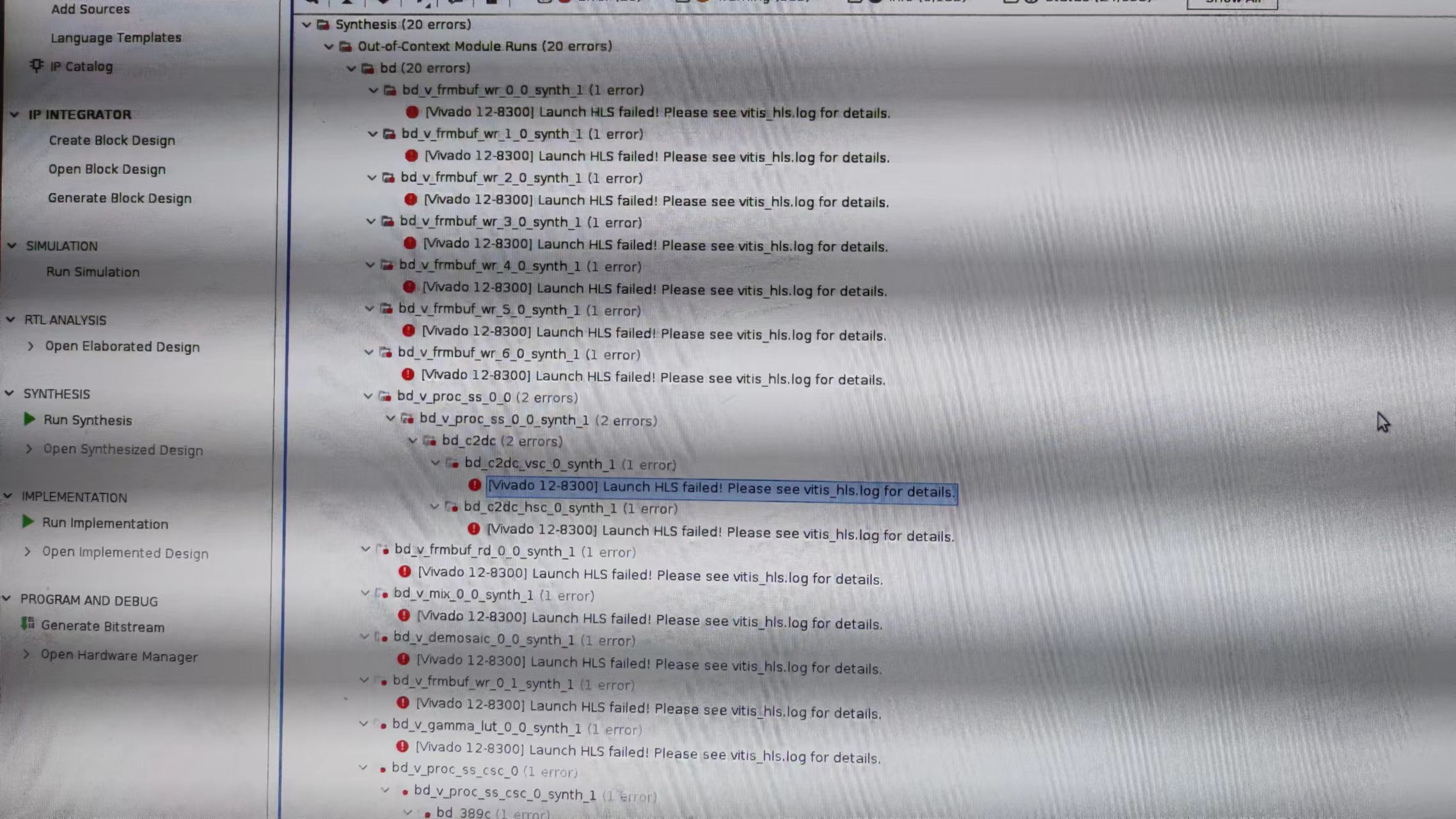
解决方案:
1. Download the "y2k22_patch-1.2.zip" file attached to this page

2. Unzip the file into the installation root location

Default Windows installation location C:\Xilinx

Default Linux installation location: /opt/Xilinx or /tools/Xilinx

Note: While extracting this patch on Windows, make sure that the destination folder does not contain the Zip file name (y2k22_patch-1.2.zip). For example, if the installation root is C:\Xilinx make sure that after the extraction the y2k22_patch folder is under C:\Xilinx, i.e : C:\Xilinx\y2k22_patch

3. Open the README and follow the instructions for the specific version you are applying the patch to.

4. A successful output of the script will look like the following for each version of the tool it is being applied to:

[2022-01-07] INFO: This script (version: 1.2) patches Xilinx Tools for HLS Y2k22 bug for the following release:

2014.*, 2015.*, 2016.*, 2017.*, 2018.*, 2019.*, 2020.* and 2021.*

[2022-01-07] UPDATE: /tools/xilinx/Vivado/2021.1/common/scripts

[2022-01-07] COPY: /tools/xilinx/y2k22_patch/automg_patch_20220104.tcl  to

/tools/xilinx/Vivado/2021.1/common/scripts/automg_patch_20220104.tcl

[2022-01-07] UPDATE: /tools/xilinx/Vitis_HLS/2021.1/common/scripts

[2022-01-07] COPY: /tools/xilinx/y2k22_patch/automg_patch_20220104.tcl  to

/tools/xilinx/Vitis_HLS/2021.1/common/scripts/automg_patch_20220104.tcl
y2k22_patch-1.2.zip下载链接:blob:https://support.xilinx.com/2e1e42b0-5ef5-4dcd-af27-bacb88733cd8
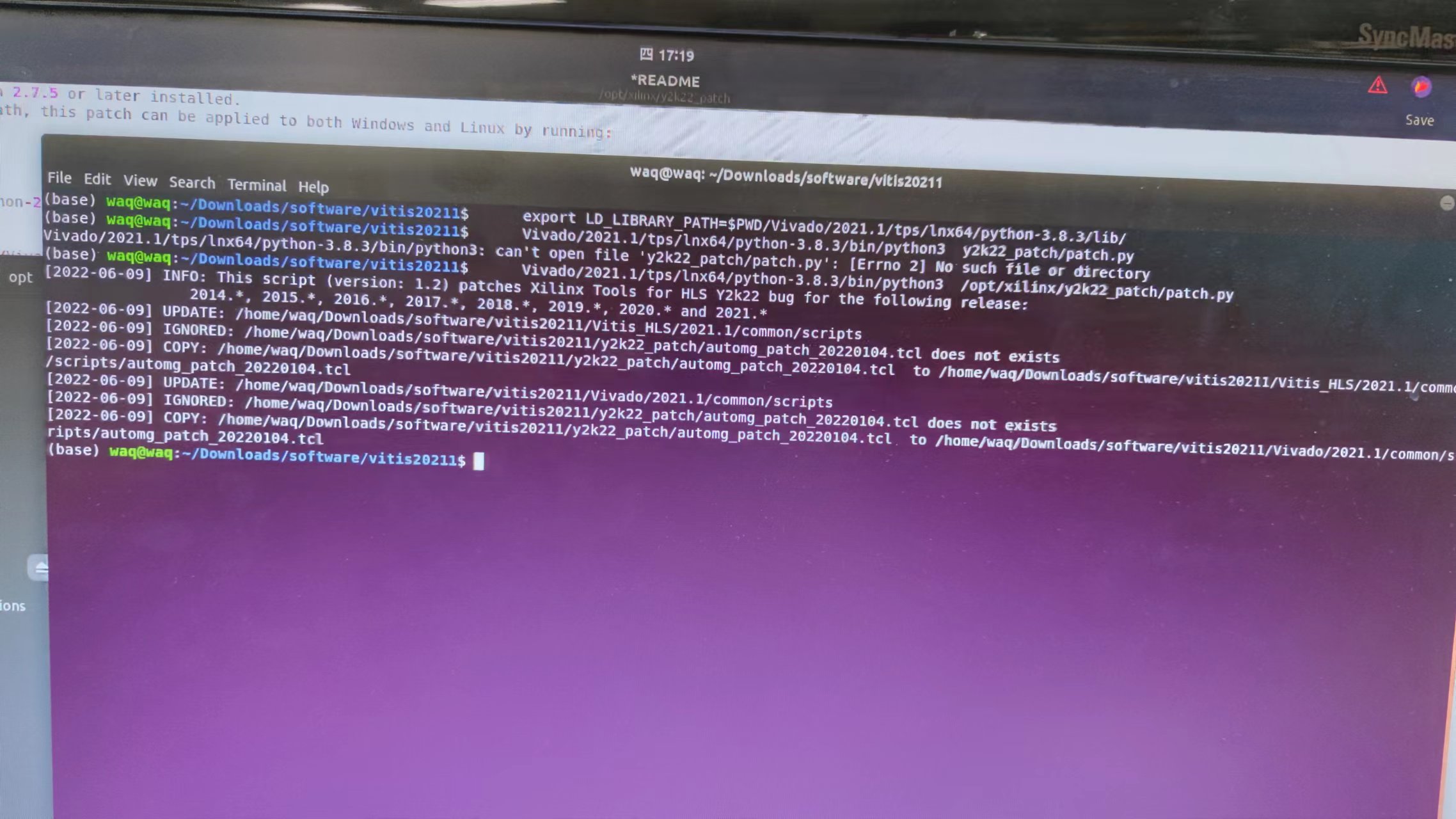
ubuntu18.04 vitis2021.1环境下执行补丁后屏幕打印信息:
vivado报错vivado 12-8300 launch hls failed please see vivado hls.log for details的更多相关文章
- 推送GitHub报错 fatal: Out of memory, malloc failed 解决办法
现象: 推送GitHub时,出现如下报错 fatal: Out of memory, malloc failed (tried to allocate XXXXXX bytes)error: fail ...
- docker 报错: Job for docker.service failed because the control process exited with error code. See "systemctl status docker.service" and "journalctl -xe" for details.
centos 启动docker服务报错: Job for docker.service failed because the control process exited with error cod ...
- tomcat启动报错:Injection of autowired dependencies failed
tomcat启动报错:Injectjion of autowired dependencies failed 环境: 操作系统:centos6.5 tomcat: 7.0.52 jdk:openjdk ...
- import cx_Oracle报错,提示importError: DLL load failed: 不是有效的Win32程序。
问题说明1:WIN32,python是2.7版本,本地oracle client是32位的.import cx_Oracle报错,提示importError: DLL load failed: 该模块 ...
- Tomcat启动报错ERROR:transport error 202:bind failed:Address already
昨天在服务器上拷贝了一个tomcat项目,修改了server.xml之后启动居然报错ERROR:transport error 202:bind failed:Address already,应该是远 ...
- 启动项目报错:org.apache.catalina.LifecycleException: Failed to start component
原因 环境异常重启,项目java进程未关闭,原项目的端口依旧在占用. 一般为8080端口被占用 解决方法 以下两种方法都可以解决,原理相同(结束异常进程) 1. 简单粗暴: 打开任务管理器找到java ...
- nginx报错 nginx: [alert] kill(25903, 1) failed (3: No such process)
当nginx 中报错 时 nginx报错 nginx: [alert] kill(25903, 1) failed (3: No such process) 通过在nginx/sbin,目录下 运行命 ...
- git clone报错: Out of memory, malloc failed (tried to allocate 524288000 bytes)
IDEA 拉取项目报错:Out of memory, malloc failed (tried to allocate 524288000 bytes) 执行 git config --global ...
- keras 或 tensorflow 调用GPU报错:Blas GEMM launch failed
GPU版的tensorflow在模型训练时遇到Blas GEMM launch failed错误,或者keras遇到相同错误(keras 一般将tensorflow作为backend,如果安装了GPU ...
- IDE Goland DEBUG报错(could not launch process: decoding dwarf section info at offset 0x0: too short)
背景: 在升级GO版本到1.11后发现Goland的Debug报错,如下:could not launch process: decoding dwarf section info at offset ...
随机推荐
- keepalived 主备使用
keepalived 主备使用 本篇主要介绍一下 keepalived 的基本的 主备使用 1.概述 什么是 keepalived呢,它是一个集群管理中 保证集群高可用的软件,防止单点故障,keepa ...
- jQuery使用 前端框架Bootstrap
目录 jQuery查找标签 1.基本选择器 2.组合选择器 3.后代选择器 4.属性选择器 5.基本筛选器 7.筛选器方法 链式操作的本质 操作标签 1.class操作 2.位置操作 3.文本操作 4 ...
- python安装与初识
一.Linux基础 - 计算机以及日后我们开发的程序防止的服务器的简单操作 二.Python开发 http://www.cnblogs.com/wupeiqi/articles/5433893.htm ...
- mybatis-config.xml 说明
mybatis-config.xml 说明 文件结构 MyBatis 的配置文件包含了会深深影响 MyBatis 行为的设置和属性信息. 配置文档的顶层结构如下: configuration(配置) ...
- [WPF]xml序列化以及反序列化数据
代码 XML序列化工具类 public static class XMLHelper { /// <summary> /// 将对象序列化为指定的文件名 /// </summary& ...
- wkhtmltopdf 目录对象使用 及 目录样式分享
最近又是更新了报告模板的样式新使用了目录对象 因为直接生成的目录样式比较丑所以这边使用的是自定义xsl 直接生成的目录样式 自定义样式 因为需求所以写了些特殊判断 <xsl:if test=&q ...
- 8KB的C#贪吃蛇游戏热点答疑和.NET7版本
在之前的一篇文章<看我是如何用C#编写一个小于8KB的贪吃蛇游戏>中,介绍了在.NET Core 3.0的环境下如何将贪吃蛇游戏降低到8KB.不过也有很多小伙伴提出了一些疑问和看法,主要是 ...
- 标准&有效的项目开发流程
代码版本管理 在项目中,代码的版本管理非常重要.每个需求版本的代码开发在版本控制里都应该经过以下几个步骤. 在master分支中拉取该需求版本的两个分支,一个feature分支,一个release分支 ...
- vivo 超大规模消息中间件实践之路
作者:vivo 互联网存储技术团队-Luo Mingbo.中间件团队- Liu Runyun 本文根据"2022 vivo开发者大会"现场演讲内容整理而成. 本文主要介绍超大数据规 ...
- File类获取功能的方法-File类判断功能的方法
File类获取功能的方法 获取功能的方法 public string getAbsolutePath()∶返回此File的绝对路径名字符串. public string getPath() ︰将此Fi ...