
Bootstrap5 如何创建多媒体对象
一、在Bootstra5中使用媒体对象
Bootstrap 媒体对象在版本 5 中已经停止支持了。但是,我们仍然可以使用 flex 和 margin 创建包含左对齐或右对齐媒体对象(如图像或视频)以及文本内容(如博客评论、推文等)的布局 。
<!doctype html>

<html lang="zh-CN">

<head>

<meta charset="utf-8">

<meta name="viewport" content="width=device-width, initial-scale=1">

<link href="https://cdn.jsdelivr.net/npm/bootstrap@5.1.3/dist/css/bootstrap.min.css" rel="stylesheet">

<script src="https://cdn.jsdelivr.net/npm/bootstrap@5.1.3/dist/js/bootstrap.bundle.min.js"></script>

</head>

<body>

<div class="container-fluid">

    <div class="row">

        <div class="col-md-2"></div>

        <div class="col-md-8">

        <br>

        <div class="d-flex">

            <div class="flex-shrink-0">

                <img src="img/xyz.png" class="rounded-circle" alt="Sample Image">

            </div>

            <div class="flex-grow-1 ms-3">

                <h5>Bootstrap 5 <small class="text-muted"><i>iyuyi.xyz@gmail.com</i></small></h5>

                <p>Will you do the same for me? It's time to face the music I'm no longer your muse. Heard it's beautiful, be the judge and my girls gonna take a vote. I can feel a phoenix inside of me. Heaven is jealous of our love, angels are crying from up above. Yeah, you take me to utopia.</p>

            </div>

        </div>

        <div class="col-md-2"></div>

    </div>

 </div>

</body>

</html>
显示的结果如下

我们还可以创建媒体对象的其他变体。
将 .rounded 或 .rounded-circle 等图像修饰符类应用于图像来创建圆角或圆形图像。
<div class="d-flex">

    <div class="flex-shrink-0">

        <img src="img/xyz.png" class="rounded-circle" alt="Sample Image">

    </div>

    <div class="flex-grow-1 ms-3">

        <h5>Bootstrap 5 <small class="text-muted"><i>iyuyi.xyz@gmail.com</i></small></h5>

        <p>Will you do the same for me? It's time to face the music I'm no longer your muse. Heard it's beautiful, be the judge and my girls gonna take a vote. I can feel a phoenix inside of me. Heaven is jealous of our love, angels are crying from up above. Yeah, you take me to utopia.</p>

    </div>

</div>
显示的结果如下

二、创建嵌套的媒体对象
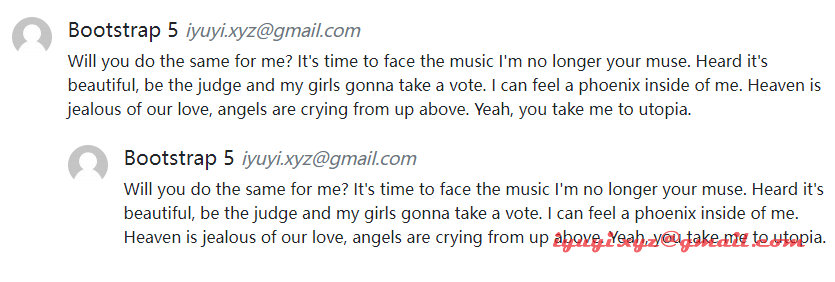
媒体对象也可以嵌套在其他媒体对象中。
<div class="d-flex">

    <div class="flex-shrink-0">

        <img src="img/xyz.png" class="rounded-circle" alt="Sample Image">

    </div>

    <div class="flex-grow-1 ms-3">

        <h5>Bootstrap 5 <small class="text-muted"><i>iyuyi.xyz@gmail.com</i></small></h5>

        <p>Will you do the same for me? It's time to face the music I'm no longer your muse. Heard it's beautiful, be the judge and my girls gonna take a vote. I can feel a phoenix inside of me. Heaven is jealous of our love, angels are crying from up above. Yeah, you take me to utopia.</p>

        <!-- Nested media object -->

        <div class="d-flex mt-4">

            <div class="flex-shrink-0">

                <img src="img/xyz.png" class="rounded-circle" alt="Sample Image">

            </div>

            <div class="flex-grow-1 ms-3">

                <h5>Bootstrap 5 <small class="text-muted"><i>iyuyi.xyz@gmail.com</i></small></h5>

                <p>Will you do the same for me? It's time to face the music I'm no longer your muse. Heard it's beautiful, be the judge and my girls gonna take a vote. I can feel a phoenix inside of me. Heaven is jealous of our love, angels are crying from up above. Yeah, you take me to utopia.</p>

            </div>

        </div>

    </div>

</div>
嵌套媒体对象显示的结果如下
三、媒体对象对齐
我们还可以通过简单地调整 HTML 代码本身来更改内容以及媒体对象的水平对齐方式。
<div class="d-flex">

     <div class="flex-grow-1 me-3">

         <h5>Bootstrap 5 <small class="text-muted"><i>iyuyi.xyz@gmail.com</i></small></h5>

         <p>Will you do the same for me? It's time to face the music I'm no longer your muse. Heard it's beautiful, be the judge and my girls gonna take a vote. I can feel a phoenix inside of me. Heaven is jealous of our love, angels are crying from up above. Yeah, you take me to utopia.</p>

     </div>

     <div class="flex-shrink-0">

         <img src="img/xyz.png" alt="Sample Image">

     </div>

</div>
显示的结果如下

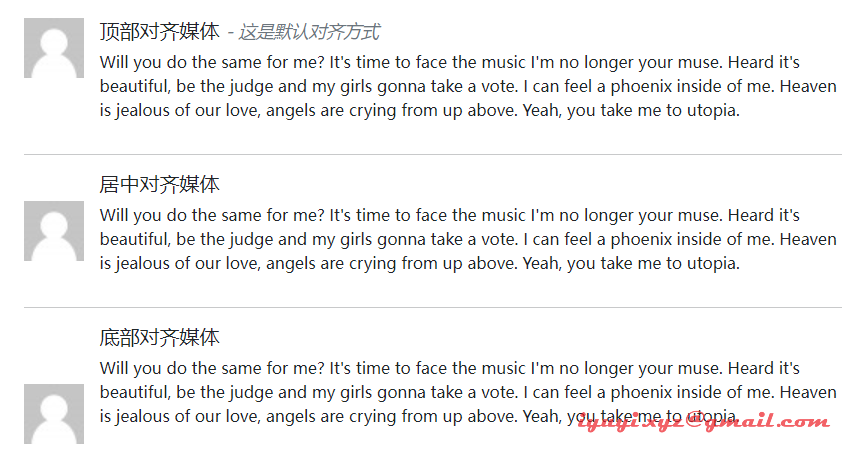
除此之外,我们还可以使用 flexbox 实用程序类在内容块的中间或底部对齐图像或其他媒体对象,例如,可以使用 .align-self-center 类进行垂直居中对齐,使用 .align-self-end 类用于底部对齐。
默认情况下,媒体对象内的媒体是顶部对齐的。
<!--顶部对齐媒体-->

<div class="d-flex">

    <div class="flex-shrink-0">

        <img src="img/xyz.png" width="60" height="60" alt="Sample Image">

    </div>

    <div class="flex-grow-1 ms-3">

        <h5>顶部对齐媒体 <small class="text-muted"><i>- 这是默认对齐方式</i></small></h5>

        <p>Will you do the same for me? It's time to face the music I'm no longer your muse. Heard it's beautiful, be the judge and my girls gonna take a vote. I can feel a phoenix inside of me. Heaven is jealous of our love, angels are crying from up above. Yeah, you take me to utopia.</p>

    </div>

</div>

<hr>

<!--居中对齐媒体-->

<div class="d-flex">

    <div class="flex-shrink-0 align-self-center">

        <img src="img/xyz.png" width="60" height="60" alt="Sample Image">

    </div>

    <div class="flex-grow-1 ms-3">

        <h5>居中对齐媒体</h5>

        <p>Will you do the same for me? It's time to face the music I'm no longer your muse. Heard it's beautiful, be the judge and my girls gonna take a vote. I can feel a phoenix inside of me. Heaven is jealous of our love, angels are crying from up above. Yeah, you take me to utopia.</p>

    </div>

</div>

<hr>

<!--底部对齐媒体-->

<div class="d-flex">

    <div class="flex-shrink-0 align-self-end">

        <img src="img/xyz.png" width="60" height="60" alt="Sample Image">

    </div>

    <div class="flex-grow-1 ms-3">

        <h5>底部对齐媒体</h5>

        <p>Will you do the same for me? It's time to face the music I'm no longer your muse. Heard it's beautiful, be the judge and my girls gonna take a vote. I can feel a phoenix inside of me. Heaven is jealous of our love, angels are crying from up above. Yeah, you take me to utopia.</p>

    </div>

</div>
显示的结果如下
Bootstrap5 如何创建多媒体对象的更多相关文章
- Bootstrap<基础二十七> 多媒体对象(Media Object)
Bootstrap 中的多媒体对象(Media Object).这些抽象的对象样式用于创建各种类型的组件(比如:博客评论),我们可以在组件中使用图文混排,图像可以左对齐或者右对齐.媒体对象可以用更少的 ...
- BootStrap学习(5)_多媒体对象&列表组
一.多媒体对象 这些抽象的对象样式用于创建各种类型的组件(比如:博客评论),我们可以在组件中使用图文混排,图像可以左对齐或者右对齐.媒体对象可以用更少的代码来实现媒体对象与文字的混排. .media: ...
- Bootstrap-CL:多媒体对象
ylbtech-Bootstrap-CL:多媒体对象 1.返回顶部 1. Bootstrap 多媒体对象(Media Object) 本章我们将讲解 Bootstrap 中的多媒体对象(Media O ...
- bootstrap学习笔记 多媒体对象
本文将介绍Bootstrap中的多媒体对象(Media Object).这些抽象的对象样式用于创建各种类型的组件(比如博客评论),我们可以在组件中使用图文混排,图像可以左对齐或者右对齐.媒体对象可以用 ...
- 创建javaScript对象的方法
一.工厂模式 function person (name,age) { var p=new Object(); p.name=name; p.age=age; p.showMessage=functi ...
- .net下灰度模式图像在创建Graphics时出现:无法从带有索引像素格式的图像创建graphics对象 问题的解决方案。
在.net下,如果你加载了一副8位的灰度图像,然后想向其中绘制一些线条.或者填充一些矩形.椭圆等,都需要通过Grahpics.FromImage创建Grahphics对象,而此时会出现:无法从带有索引 ...
- win7 装了VB虚拟机 开始挺好用 后来突然就打不开了 提示如下错误:(如图)创建 COM 对象失败.
创建 COM 对象失败. 应用程序将被中断. Start tag expected, '<' not found. Location: 'C:\Users\Mike/.VirtualBox\Vi ...
- 在这个看脸的世界,该如何优雅的创建JS对象
Javascript是一门解释型的语言,是基于对象的,严格来说并不怎么符合的面向对象的标准,显著的特点就是函数就是“一等对象”,与传统的面向对象语言不同的时,Javascript有“一千种”方法来创建 ...
- java 创建string对象机制 字符串缓冲池 字符串拼接机制
对于创建String对象的机制,在这一过程中涉及的东西还是值得探究一番的. 首先看通过new String对象和直接赋值的方式有什么区别,看如下代码: public static void main( ...
随机推荐
- 【黄啊码】MySQL入门—3、我用select *,老板直接赶我坐火车回家去,买的还是站票
大家好!我是黄啊码,学会了DDL语句了吗?那我们今天就来学习一下基本的查询语法,我见过很多外包机构的程序员都是万物皆可select *,然后项目跑了一段时间就基本跑不动了,问就回答:服务器配置不够,加 ...
- Ubu18开机自启动-Systemd
参考链接: https://blog.csdn.net/qq_16268979/article/details/114771854 本文内容为个人测试记录,具体文件目录请以读者自己电脑为准,此处只是提 ...
- ZJOI2016 小星星 题解
我一生之敌是状压 本文发表于 洛谷博客:https://www.luogu.com.cn/blog/LoveMC/solution-p3349 Cnblogs:https://www.cnblogs. ...
- 如何应对外包公司(文思海辉)的Python后端面试
原文转载自「刘悦的技术博客」https://v3u.cn/a_id_151 最近春招如火如荼,我接触到的几位同学也纷纷去市场里试了试水,不得不说由于疫情的影响,导致目前中等水平的开发者择业有了些许困难 ...
- 笃情开源:我和 Apache DolphinScheduler 社区的故事
背景 本文的主人翁是 2 次飞机参会现场交流,四天研究就把 DolphinScheduler 用上生产的来自车联网行业的大数据 boy - 黄立同学.怎么样,听起来是不是有点 crazy?下面就来看看 ...
- JS 取Json数据中对象特定属性值
解析JSON JSON 数据 var str = '[{"a": "1","b": "2"}, {"a&quo ...
- 百亿数据百亿花, 库若恒河沙复沙,Go lang1.18入门精炼教程,由白丁入鸿儒,Go lang数据库操作实践EP12
Golang可以通过Gorm包来操作数据库,所谓ORM,即Object Relational Mapping(数据关系映射),说白了就是通过模式化的语法来操作数据库的行对象或者表对象,对比相对灵活繁复 ...
- jsp获取多选框组件的值
jsp获取多选框组件的值 1.首先写一个带有多选框的前台页 1 <%@ page language="java" contentType="text/html; c ...
- 使用Python的selenium库制作脚本,支持后台运行
本文介绍如何使用Python的selenium库制作脚本.概念: Selenium是一个用于测试网站的自动化测试工具,支持各种浏览器包括Chrome.Firefox.Safari等主流界面 ...
- Java项目生成电脑桌面快捷脚本
一.场景说明 经常需要查询以及设置手机验证码,一般验证码都是放在Redis,为了节省短信费,可以直接设置Redis,本篇内容主要介绍如何便捷查询和设置手机验证码,非开发人员也会操作. 二.Java代码 ...