
echarts系列-带图教你调整左右位置x轴样式网格虚线刻度居中双轴Y轴滚动上下移动文字旋转改分割线颜色部分字体改色折注混合,X轴的颜色,X轴字体颜色,调整柱子颜色,调整小图标图例的大小和位置,鼠标hover时候的样式,用纵向阴影
上面先说注意事项
1.如果使用show hidden控制图表显示隐藏,某些切换效果很奇怪,比如饼图,会从左上角开始放大,很丑,这个时候我们可以设置其宽高来解决问题,给其设置宽高后,切换的奇怪效果即可消失。
<!-- 饼图組件 -->

<div class="chart01" echarts #myEchart01 [options]="option01"></div>

.chart01{

  width: 23.426vw;

  height: 21.523vw;

}

import { Component, OnInit, ElementRef, ViewChild } from '@angular/core';

import { NgxEchartsService } from 'ngx-echarts';

@Component({

  selector: 'app-echart04',

  templateUrl: './echart04.component.html',

  styleUrls: ['./echart04.component.less']

})

export class Echart04Component implements OnInit {

  constructor(

    private es: NgxEchartsService,

  ) { }

  ngOnInit(): void {

  }

  ngAfterViewInit() {

    this.setEcharts01()

  }

  @ViewChild('myEchart01', { static: false }) myEchart01: ElementRef;

  option01 = {

    title: {

      text: '2323',

      textStyle: { fontSize: 26 },

      left: 'center',

      top: 'center',

    },

    tooltip: {

      trigger: 'item',

      formatter: '{b} : {c} ({d}%)',

    },

    series: [

      {

        type: 'pie',

        radius: ['34%', '57%'],

        center: ['50%', '50%'],

        selectedMode: 'single',

        data: [

          { value: 100, name: '中' },

          { value: 200, name: '高' },

          { value: 50, name: '低' },

        ],

        emphasis: {

          // 这个是鼠标放上去时候的阴影

          itemStyle: {

            shadowBlur: 10,

            shadowOffsetX: 5,

            shadowColor: 'rgba(0, 0, 0, 0.5)',

          },

        },

      },

    ],

  };

  setEcharts01() {

    this.es.getInstanceByDom(this.myEchart01.nativeElement).setOption(this.option01);

  }

}
1.饼图怎么调整左右位置
只需要调整option.series里的center: ['30%', '50%']
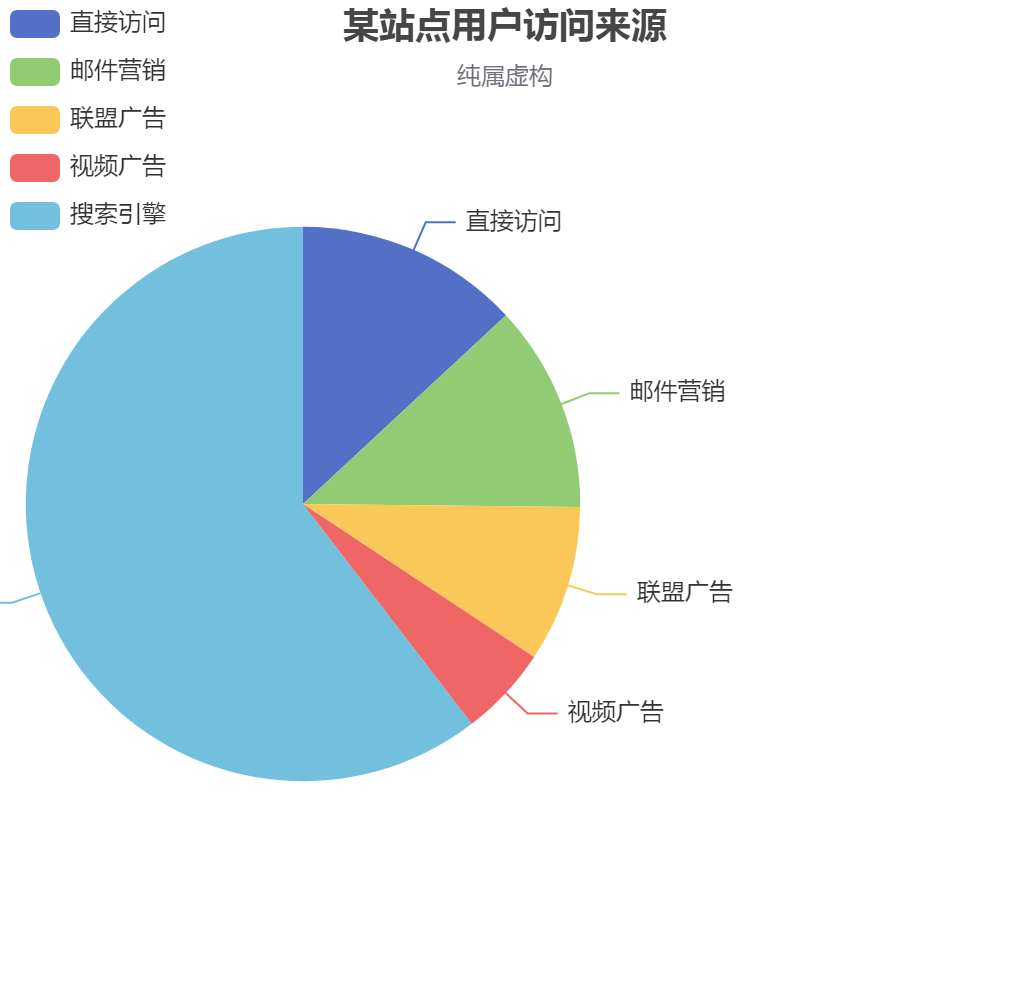
option = {

    title: {

        text: '某站点用户访问来源',

        subtext: '纯属虚构',

        left: 'center'

    },

    tooltip: {

        trigger: 'item'

    },

    legend: {

        orient: 'vertical',

        left: 'left',

    },

    series : [  // 把饼图挪到了左边

        {

            name: '访问来源',

            type: 'pie',

            radius : '55%',

            center: ['30%', '50%'],  //  这个代码~~

            data:[

                {value:335, name:'直接访问'},

                {value:310, name:'邮件营销'},

                {value:234, name:'联盟广告'},

                {value:135, name:'视频广告'},

                {value:1548, name:'搜索引擎'}

            ],

            itemStyle: {

                emphasis: {

                    shadowBlur: 10,

                    shadowOffsetX: 0,

                    shadowColor: 'rgba(0, 0, 0, 0.5)'

                }

            }

        }

    ]

};

    ]
2.更改x轴样式,控制样式里的X轴字在中间, 距离Y轴还有点距离

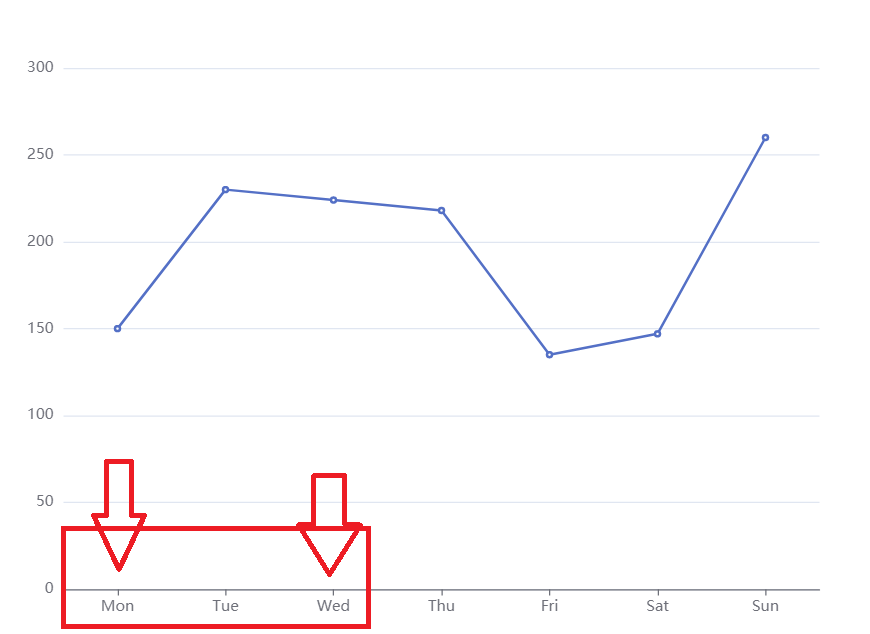
xAxis: {

      type: 'category',

      axisTick: { alignWithLabel: true }, // 控制样式里的X轴字在中间距离Y轴还有点距离

      data: ['5', '10', '15', '20', '25', '30'],

    },
3.echarts将网格线设置成虚线
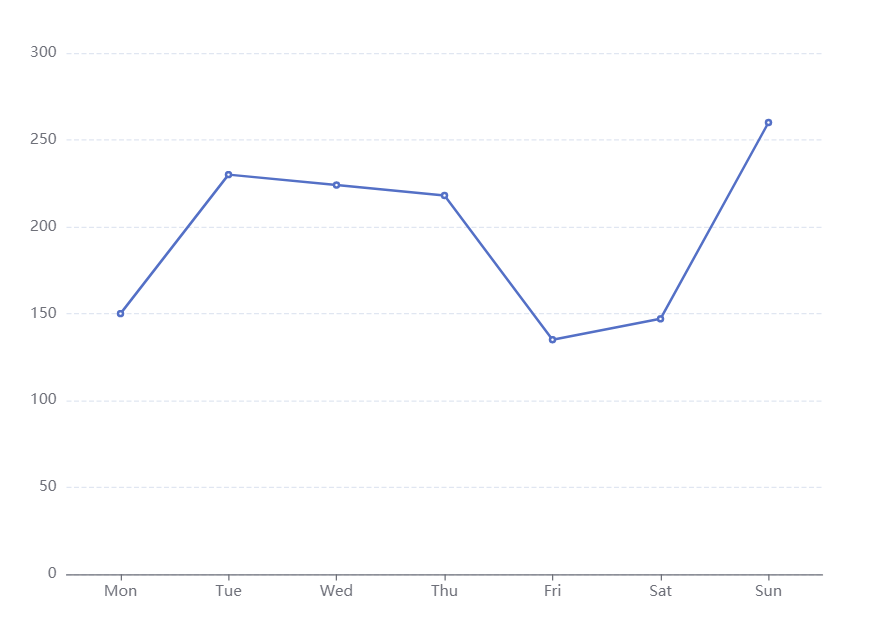
yAxis: {

    splitLine :{    //网格线

        lineStyle:{

            type:'dashed'    //设置网格线类型 dotted:虚线   solid:实线

        },

        show:true //隐藏或显示

    }

}
4.x轴刻度居中
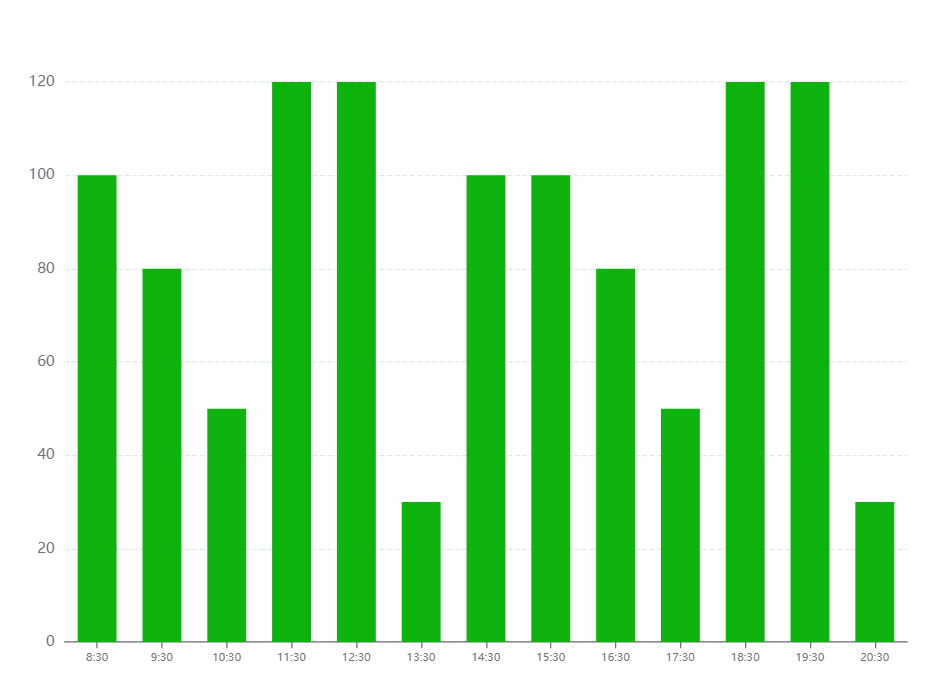
option = {

    tooltip: {

      trigger: 'axis',

      axisPointer: {

        // 坐标轴指示器,坐标轴触发有效

        type: 'shadow',

        // 默认为直线,可选为:'line' | 'shadow'

      },

    },

    toolbox: {

        show: true,

        feature: {

            dataView: {readOnly: false},

            restore: {},

            saveAsImage: {}

        }

    },

    grid: { top: '12%', left: '3%', right: '4%', bottom: '3%', containLabel: true },

    xAxis: [

      {

        type: 'category',

        data: ['8:30', '9:30', '10:30', '11:30', '12:30', '13:30', '14:30', '15:30', '16:30', '17:30', '18:30', '19:30', '20:30'],

        axisTick: { alignWithLabel: true }, // 刻度居中核心代码

        axisLabel: {

          textStyle: {

            // color: 'black', // 修改X轴文字的颜色

            fontSize: '9', // 修改X轴文字大小

          }

        },

      },

    ],

    // xAxis: [

    //   {

    //     data: [100, 80, 50, 120, 120, 30, 100, 100, 80, 50, 120, 120, 30, 100],

    //     show: false,

    //   },

    //   {

    //     data: ['8:30', '9:30', '10:30', '11:30', '12:30', '13:30', '14:30', '15:30', '16:30', '17:30', '18:30', '19:30', '20:30', '21:30'],

    //     position: 'bottom',

    //     boundaryGap: false,

    //     axisPointer: {

    //       show: false,

    //     },

    //     nameTextStyle: {

    //       color: '#999',

    //     },

    //     axisLine: {

    //       show: false,

    //     },

    //     axisTick: {

    //       show: false,

    //     },

    //     axisLabel: {

    //       // interval: 0,

    //       // color: '#999999',

    //       textStyle: {

    //         color: 'red', // 修改X轴文字的颜色

    //         fontSize: '9', // 修改X轴文字大小

    //       }

    //     },

    //     // splitLine: { // 背景竖着的刻度线

    //     //     show: true,

    //     //     lineStyle: {

    //     //         color: '#F1F1F1',

    //     //     },

    //     // },

    //   },

    // ],

    yAxis: [{

      type: 'value',

      splitLine: {    //网格线

        lineStyle: {

          type: 'dashed'    //设置网格线类型 dotted:虚线   solid:实线

        },

        show: true //隐藏或显示

      }

    }],

    series: [{

      name: '直接访问', type: 'bar', barWidth: '60%', data: [100, 80, 50, 120, 120, 30, 100, 100, 80, 50, 120, 120, 30, 100],

      itemStyle: {

        normal: {

          //这里是重点

          color: function (params) {

            // var colorList = ['#c23531', '#2f4554', '#61a0a8', '#d48265', '#91c7ae', '#749f83', '#ca8622'];

            // return colorList[params.dataIndex]

            return '#0eb30e'

          }

        }

      }

    }],

  }
5.echarts X轴区间柱形图,X轴 刻度数组长度 比 数据数组长度 多一个
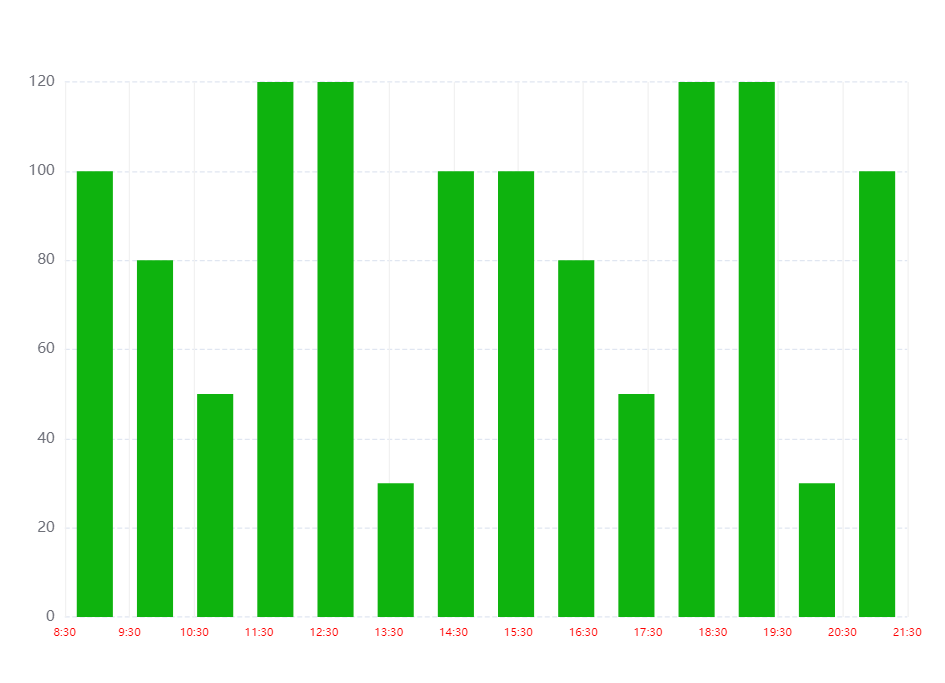
option = {

    tooltip: {

      trigger: 'axis',

      axisPointer: {

        // 坐标轴指示器,坐标轴触发有效

        type: 'shadow',

        // 默认为直线,可选为:'line' | 'shadow'

      },

    },

    toolbox: {

        show: true,

        feature: {

            dataView: {readOnly: false},

            restore: {},

            saveAsImage: {}

        }

    },

    grid: { top: '12%', left: '3%', right: '4%', bottom: '3%', containLabel: true },

    // xAxis: [

    //   {

    //     type: 'category',

    //     data: ['8:30', '9:30', '10:30', '11:30', '12:30', '13:30', '14:30', '15:30', '16:30', '17:30', '18:30', '19:30', '20:30'],

    //     axisTick: { alignWithLabel: true }, // 刻度居中核心代码

    //     axisLabel: {

    //       textStyle: {

    //         // color: 'black', // 修改X轴文字的颜色

    //         fontSize: '9', // 修改X轴文字大小

    //       }

    //     },

    //   },

    // ],

    xAxis: [  // 核心代码--双x轴刻度

      {

        data: [100, 80, 50, 120, 120, 30, 100, 100, 80, 50, 120, 120, 30, 100],

        show: false,

      },

      {

        data: ['8:30', '9:30', '10:30', '11:30', '12:30', '13:30', '14:30', '15:30', '16:30', '17:30', '18:30', '19:30', '20:30', '21:30'],

        position: 'bottom',

        boundaryGap: false,

        axisPointer: {

          show: false,

        },

        nameTextStyle: {

          color: '#999',

        },

        axisLine: {

          show: false,

        },

        axisTick: {

          show: false,

        },

        axisLabel: {

          // interval: 0,

          // color: '#999999',

          textStyle: {

            color: 'red', // 修改X轴文字的颜色

            fontSize: '9', // 修改X轴文字大小

          }

        },

        splitLine: { // 背景竖着的刻度线

            show: true,

            lineStyle: {

                color: '#F1F1F1',

            },

        },

      },

    ],

    yAxis: [{

      type: 'value',

      splitLine: {    //网格线

        lineStyle: {

          type: 'dashed'    //设置网格线类型 dotted:虚线   solid:实线

        },

        show: true //隐藏或显示

      }

    }],

    series: [{

      name: '直接访问', type: 'bar', barWidth: '60%', data: [100, 80, 50, 120, 120, 30, 100, 100, 80, 50, 120, 120, 30, 100],

      itemStyle: {

        normal: {

          //这里是重点

          color: function (params) {

            // var colorList = ['#c23531', '#2f4554', '#61a0a8', '#d48265', '#91c7ae', '#749f83', '#ca8622'];

            // return colorList[params.dataIndex]

            return '#0eb30e'

          }

        }

      }

    }],

  }
6.设置y轴区间,最大值最小值,显得数据波动很好~~~
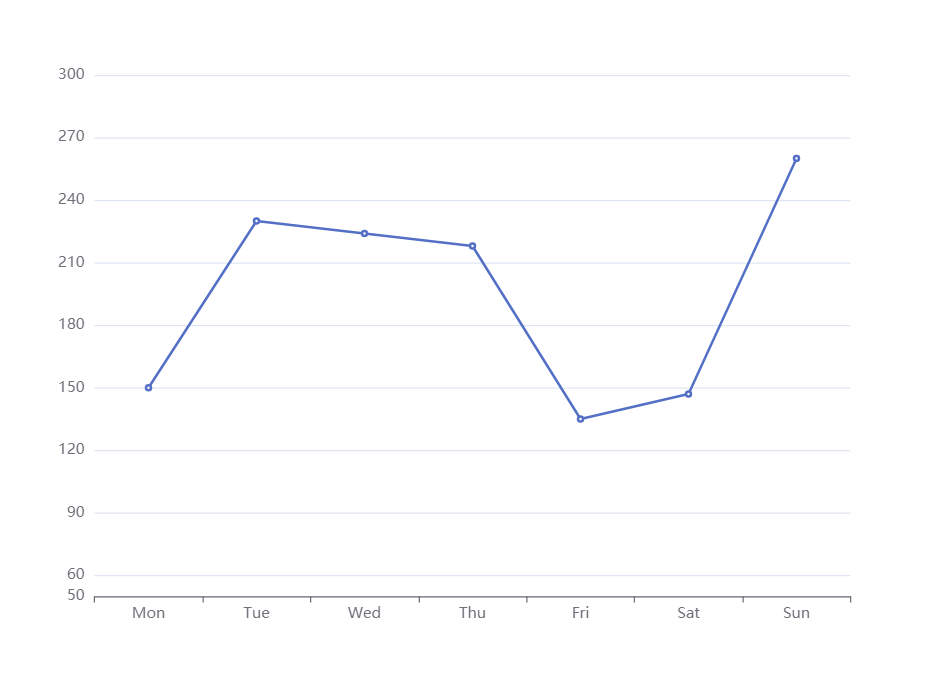
option = {

    xAxis: {

        type: 'category',

        data: ['Mon', 'Tue', 'Wed', 'Thu', 'Fri', 'Sat', 'Sun']

    },

    toolbox: {

        feature: {

            saveAsImage: {}

        }

    },

    yAxis: {

        type: 'value',

        min:50,

        max:300,

        splitNumber:10 // 好用切割成十份

    },

    series: [{

        data: [150, 230, 224, 218, 135, 147, 260],

        type: 'line'

    }]

};
7.dataZoom控制Y轴滚动
看图
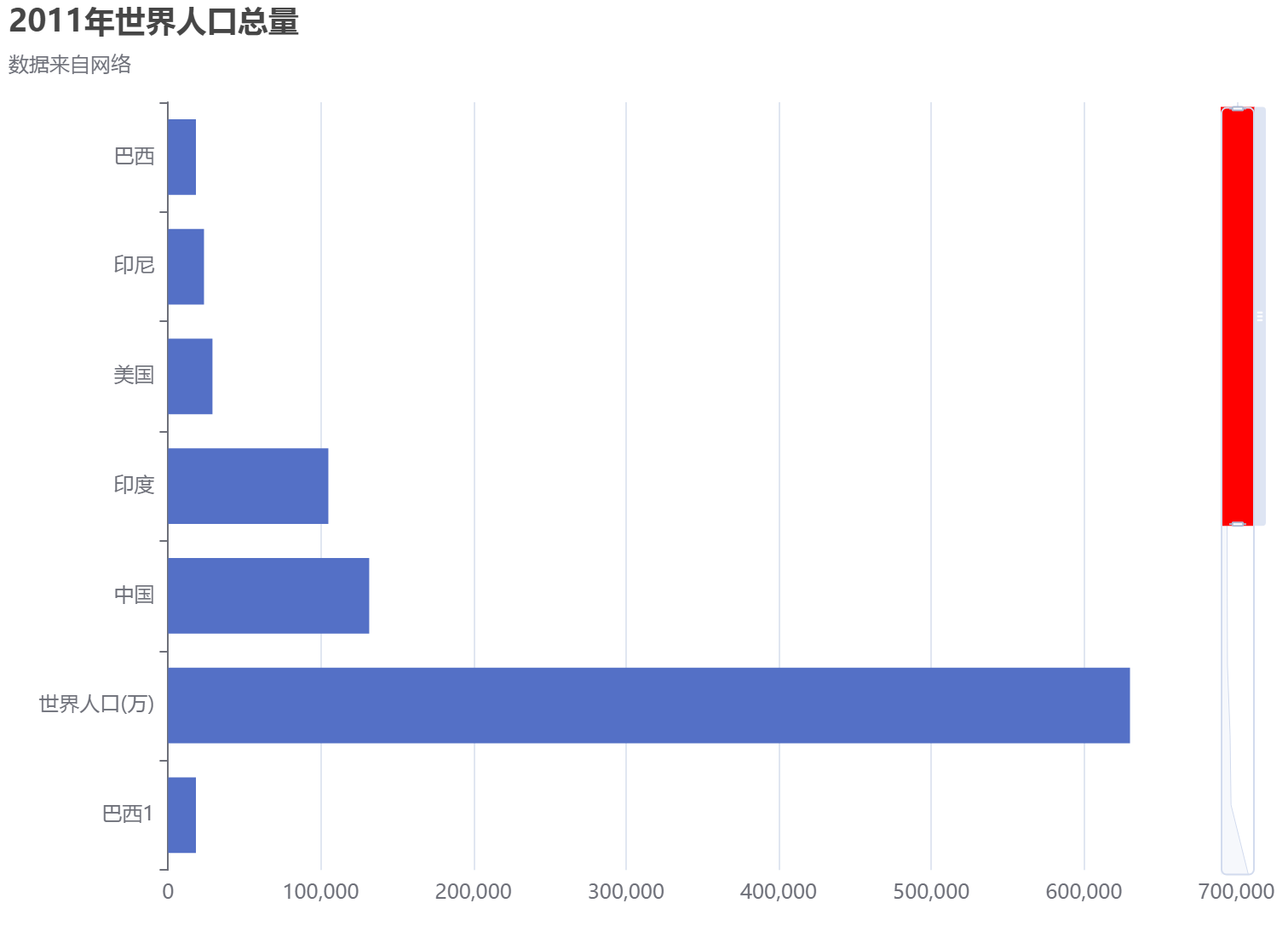
option = {

  title: {

    text: '2011年世界人口总量',

    subtext: '数据来自网络',

  },

  tooltip: {

    trigger: 'axis',

    axisPointer: {

      type: 'shadow',

    },

  },

  // legend: {

  //     data: ['2011年']

  // },

  grid: {

    left: '3%',

    right: '4%',

    bottom: '3%',

    containLabel: true,

  },

  xAxis: {

    type: 'value',

    boundaryGap: [0, 0.01],

  },

  yAxis: {

    type: 'category',

    inverse: true,

    data: [

      '巴西',

      '印尼',

      '美国',

      '印度',

      '中国',

      '世界人口(万)',

      '巴西1',

      '印1尼',

      '美1国',

      '印度1',

      '中1国',

      '世界1人口(万)',

    ],

  },

  dataZoom: [

    {

       show: false,

      zoomLock: true,

    },

    { type: 'slider',

      show: true,

      startValue: 0, // 控制显示几个数据

      endValue: 5, // 控制显示几个数据

      orient: 'vertical',

      showDetail: false, // 拖动时候滚动条上下是否显示详情

      showDataShadow: true,

      zoomLock: true,//设置为 true 则锁定选择区域的大小,也就是说,只能平移,不能缩放

      backgroundColor: 'white',

      fillerColor: 'red', // 滚动条颜色

      handleSize: '10', // 滚动条上面的那个把手大小

      x2: 20, // 滚动条距离右边的距离

      width: 20, // 滚动条的宽度

      zoomOnMouseWheel:true,  //滚轮是否触发缩放

      moveOnMouseMove:true,  //鼠标滚轮触发滚动

      moveOnMouseWheel:true

    }

  ],

  series: [

    {

      name: '2011年',

      type: 'bar',

      data: [

        18203,

        23489,

        29034,

        104970,

        131744,

        630230,

        18203,

        23489,

        29034,

        104970,

        131744,

        630230,

      ],

    },

  ],

}
鼠标滚动控制Y轴数据上下移动
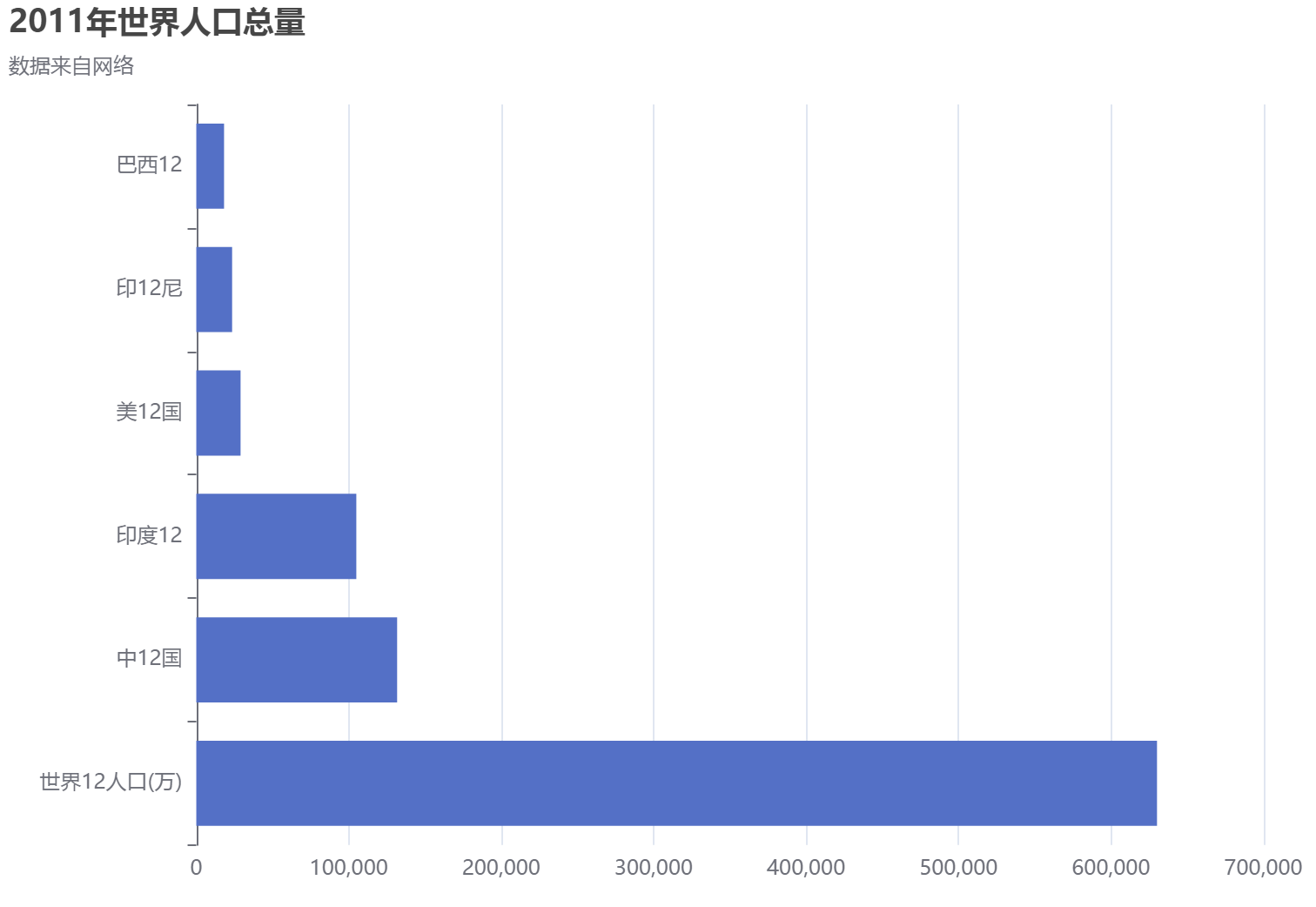
option = {

  title: {

    text: '2011年世界人口总量',

    subtext: '数据来自网络',

  },

  tooltip: {

    trigger: 'axis',

    axisPointer: {

      type: 'shadow',

    },

  },

  // legend: {

  //     data: ['2011年']

  // },

  grid: {

    left: '3%',

    right: '4%',

    bottom: '3%',

    containLabel: true,

  },

  xAxis: {

    type: 'value',

    boundaryGap: [0, 0.01],

  },

  yAxis: {

    type: 'category',

    inverse: true,

    data: [

      '巴西',

      '印尼',

      '美国',

      '印度',

      '中国',

      '世界人口(万)',

      '巴西1',

      '印1尼',

      '美1国',

      '印度1',

      '中1国',

      '世界1人口(万)',

      '巴西12',

      '印12尼',

      '美12国',

      '印度12',

      '中12国',

      '世界12人口(万)',

    ],

  },

  dataZoom: [

    {

       show: false,

      zoomLock: false,

    },

    { type: 'inside', //改为slider的话就会出现滚动条,inside隐藏滚动条

      show: true,

      startValue: 0, // 控制显示几个数据

      endValue: 5, // 控制显示几个数据

      orient: 'vertical',

      showDetail: false, // 拖动时候滚动条上下是否显示详情

      showDataShadow: true,

    //   zoomLock: true,//设置为 true 则锁定选择区域的大小,也就是说,只能平移,不能缩放

      backgroundColor: 'white',

      fillerColor: 'red', // 滚动条颜色

      handleSize: '10', // 滚动条上面的那个把手大小

      x2: 20, // 滚动条距离右边的距离

      width: 20, // 滚动条的宽度

      zoomOnMouseWheel:false,  //滚轮是否触发缩放,同时要设置zoomLock: false

      moveOnMouseMove:true,  //鼠标左键拖动触发滚动,同时要设置zoomLock: false

      moveOnMouseWheel:true // 鼠标滚轮带动滚动,同时要设置zoomLock: false

    }

  ],

  series: [

    {

      name: '2011年',

      type: 'bar',

      data: [

        18203,

        23489,

        29034,

        104970,

        131744,

        630230,

        18203,

        23489,

        29034,

        104970,

        131744,

        630230,

        18203,

        23489,

        29034,

        104970,

        131744,

        630230,

      ],

    },

  ],

}
折线图+离散图
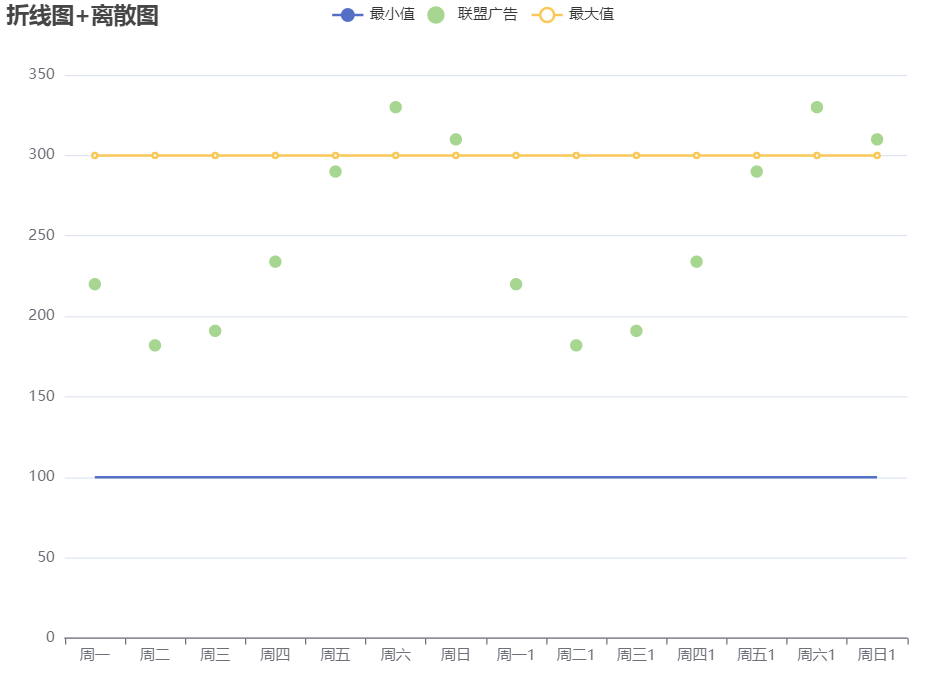
option = {

    title: {

        text: '折线图+离散图'

    },

    tooltip: {

        trigger: 'axis'

    },

    legend: {

        data: ['最小值', '联盟广告', '最大值']

    },

    grid: {

        left: '3%',

        right: '4%',

        bottom: '3%',

        containLabel: true

    },

    toolbox: {

        feature: {

            saveAsImage: {}

        }

    },

    xAxis: {

        type: 'category',

        // boundaryGap: false, // 控制折线图距离Y轴是否有距离

        data: ['周一', '周二', '周三', '周四', '周五', '周六', '周日','周一1', '周二1', '周三1', '周四1', '周五1', '周六1', '周日1']

    },

    yAxis: {

        type: 'value'

    },

    series: [

        {

            name: '最小值',

            type: 'line',

            symbol: "none", // 去掉折线上面的小圆点

            // stack: '总量', // 几个设置一样的会变成堆叠

            data: [100, 100, 100, 100, 100, 100, 100,100, 100, 100, 100, 100, 100, 100]

        },

        {

            name: '联盟广告',

            type: 'scatter',

            // stack: '总量', // 几个设置一样的会变成堆叠

            data: [220, 182, 191, 234, 290, 330, 310,220, 182, 191, 234, 290, 330, 310]

        },

        {

            name: '最大值',

            type: 'line',

            // symbol: "none", // 去掉折线上面的小圆点

            // stack: '总量', // 几个设置一样的会变成堆叠

            data: [300, 300, 300, 300, 300, 300, 300,300, 300, 300, 300, 300, 300, 300]

        },

    ]

};
配置了横坐标旋转,同一个X轴所属柱子间距,非同一个X轴柱子间距,上下左右距离
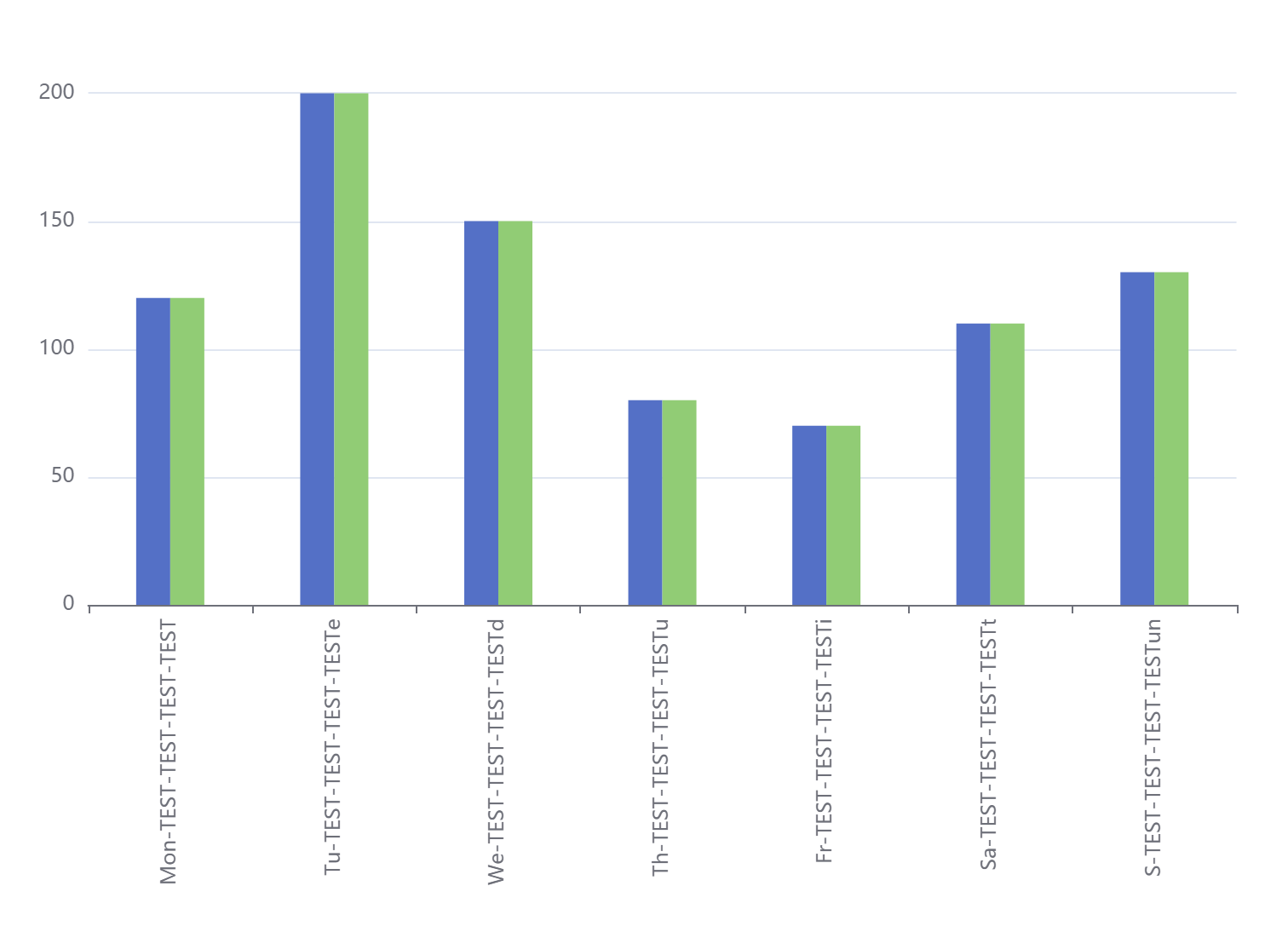
option = {

  // 配置了横坐标旋转,同一个X轴所属柱子间距,非同一个X轴柱子间距,上下左右距离,以及横坐标部分涂色

  tooltip: {

    trigger: 'axis',

    axisPointer: {

      type: 'cross',

      crossStyle: {

        color: '#999'

      }

    }

  },

  grid: { top: '10%', left: '3%', right: '4%', bottom: '5%', containLabel: true },

  xAxis: {

    type: 'category',

    axisLabel: {

      interval: 0,

      rotate: 90

    },

    data: [

      'Mon-TEST-TEST-TEST-TEST',

      'Tu-TEST-TEST-TEST-TESTe',

      'We-TEST-TEST-TEST-TESTd',

      'Th-TEST-TEST-TEST-TESTu',

      'Fr-TEST-TEST-TEST-TESTi',

      'Sa-TEST-TEST-TEST-TESTt',

      'S-TEST-TEST-TEST-TESTun'

    ]

  },

  yAxis: {

    type: 'value'

  },

  series: [

    {

      name: '蒸发量1',

      barWidth: 20, //设置柱子的宽度

      barGap: '0%' /*控制的是单个X坐标的多个柱子的间距*/,

      //   barCategoryGap:'0%',/*控制非自己孩子之间的间距*/

      data: [120, 200, 150, 80, 70, 110, 130],

      type: 'bar'

    },

    {

      name: '蒸发量2',

      barWidth: 20, //设置柱子的宽度

      data: [120, 200, 150, 80, 70, 110, 130],

      type: 'bar'

    }

  ]

}
饼图添加中间的数字
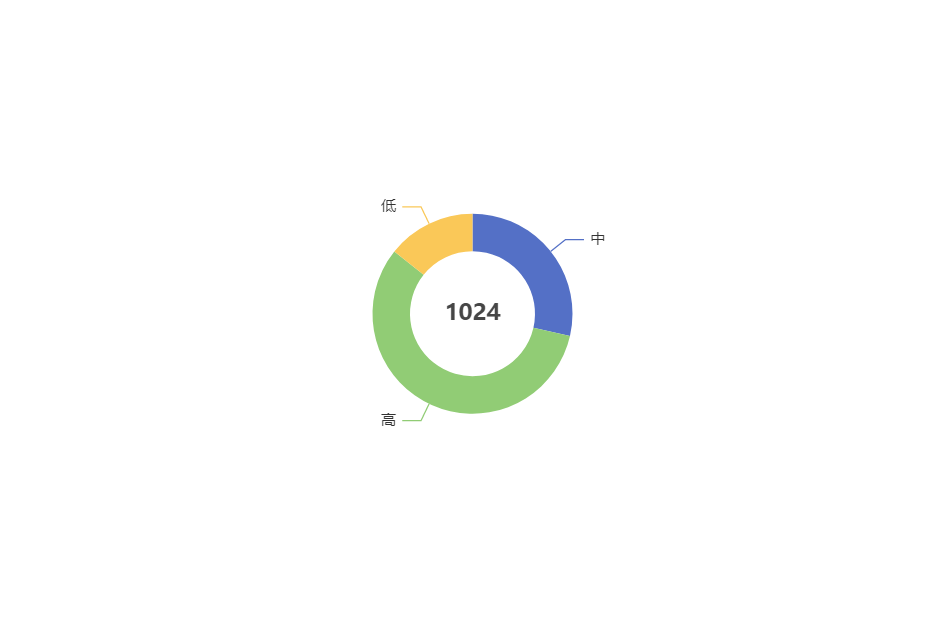
option = {

    title: {

        text: '1024',

        left: 'center',

        top: 'center',

            // center: ['50%', '50%'],

    },

     toolbox: {

        show: true,

        feature: {

            mark: {show: true},

            dataView: {show: true, readOnly: false},

            restore: {show: true},

            saveAsImage: {show: true}

        }

    },

    tooltip: {

        trigger: 'item',

        formatter: '{a} <br/>{b} : {c} ({d}%)'

    },

    series: [

        {

            type: 'pie',

            // radius: '65%',

            radius: [50, 80],

            center: ['50%', '50%'],

            selectedMode: 'single',

            data: [

                {value: 100, name: '中'},

                {value: 200, name: '高'},

                {value: 50, name: '低'}

            ],

            emphasis: { // 这个是鼠标放上去时候的阴影

                itemStyle: {

                    shadowBlur: 10,

                    shadowOffsetX: 5,

                    shadowColor: 'rgba(0, 0, 0, 0.5)'

                }

            }

        }

    ]

};
鼠标滚轮滚动移动数据,以及添加标识字
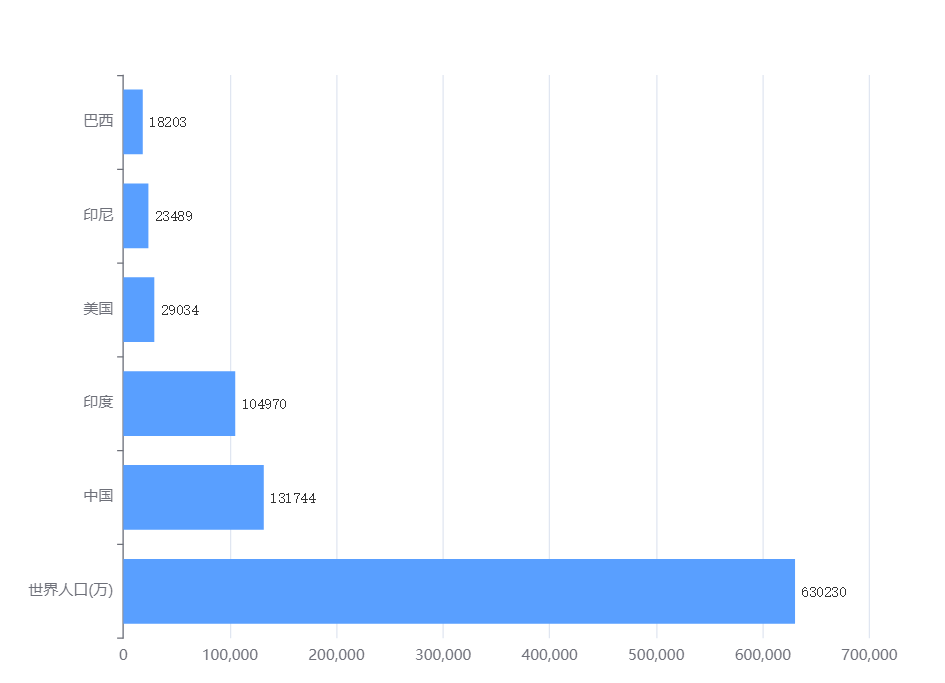
option = {

  tooltip: {

    trigger: 'axis',

    axisPointer: {

      type: 'shadow',

    },

  },

   toolbox: {

        feature: {

            saveAsImage: {}

        }

    },

  // legend: {

  //     data: ['2011年']

  // },

  grid: {

    left: '3%',

    right: '8%',

    bottom: '3%',

    containLabel: true,

  },

  xAxis: {

    type: 'value',

    boundaryGap: [0, 0.01],

  },

  yAxis: {

    type: 'category',

    inverse: true,

    data: [

      '巴西',

      '印尼',

      '美国',

      '印度',

      '中国',

      '世界人口(万)',

      '巴西1',

      '印1尼',

      '美1国',

      '印度1',

      '中1国',

      '世界1人口(万)',

      '巴西12',

      '印12尼',

      '美12国',

      '印度12',

      '中12国',

      '世界12人口(万)',

    ],

  },

  dataZoom: [

    {

       show: false,

    backgroundColor: 'red',

      zoomLock: false,

    },

    { type: 'inside', //改为slider的话就会出现滚动条,inside隐藏滚动条

      show: true,

      startValue: 0, // 控制显示几个数据

      endValue: 5, // 控制显示几个数据

      orient: 'vertical',

      showDetail: false, // 拖动时候滚动条上下是否显示详情

      showDataShadow: true,

    //   zoomLock: true,//设置为 true 则锁定选择区域的大小,也就是说,只能平移,不能缩放

      backgroundColor: 'white',

      fillerColor: 'red', // 滚动条颜色

      handleSize: '10', // 滚动条上面的那个把手大小

      x2: 20, // 滚动条距离右边的距离

      width: 20, // 滚动条的宽度

      zoomOnMouseWheel:false,  //滚轮是否触发缩放,同时要设置zoomLock: false

      moveOnMouseMove:true,  //鼠标左键拖动触发滚动,同时要设置zoomLock: false

      moveOnMouseWheel:true // 鼠标滚轮带动滚动,同时要设置zoomLock: false

    }

  ],

  series: [

    {

      name: '2011年',

      type: 'bar',

      itemStyle: {

                color:  '#599fff' // 柱子的颜色

            },

             label: {

                show: true, // 柱子后面的字体

                precision: 1,

                position: 'right',

                valueAnimation: true,

                fontFamily: 'monospace'

            },

      data: [

        18203,

        23489,

        29034,

        104970,

        131744,

        630230,

        18203,

        23489,

        29034,

        104970,

        131744,

        630230,

        18203,

        23489,

        29034,

        104970,

        131744,

        630230,

      ],

    },

  ]

};
多种样式调节,X轴颜色Y轴颜色 、分割线颜色
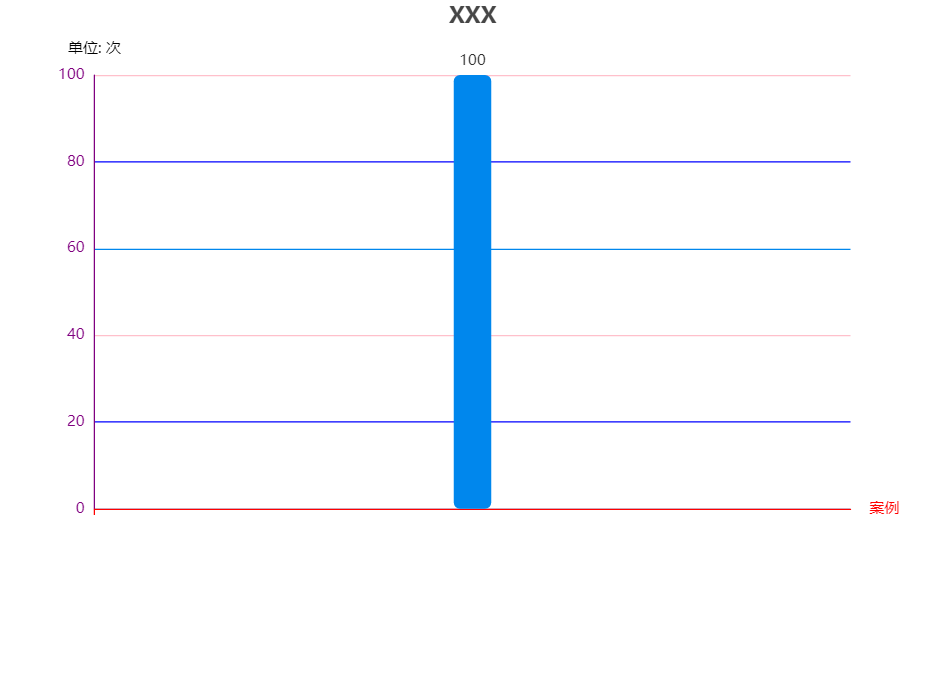
option = {

  title: {

    text: 'XXX',

    x: 'center'

  },

  //color: colorArr,

  tooltip: {

    trigger: 'axis',

    axisPointer: { // 坐标轴指示器,坐标轴触发有效

      type: 'shadow' // 默认为直线,可选为:'line' | 'shadow'

    }

  },

  toolbox: {

    feature: {

      saveAsImage: {}

    }

  },

  grid: {

    y2: 140

  },

  xAxis: {

    type: 'category',

    name: '案例',

    data: [''],

    axisLabel: {

      interval: 0,//横轴信息全部显示

      rotate: -30,//-30度角倾斜显示

    },

    axisLine: {

      lineStyle: {

        color: 'red', // x轴颜色

        width: 1,//这里是为了突出显示加上的

      }

    }

  },

  yAxis: {

    type: 'value',

    name: '单位: 次',

    splitLine: {

      lineStyle: {

        // 使用深浅的间隔色

        color: ['#0087ED', 'blue', 'pink']

      }

    },

    nameTextStyle: {

      color: ['#ddddd'] // y轴的标识字

    },

    axisLine: {

      show: true, // 控制y轴这个线是否出来

      lineStyle: {

        color: 'purple', // y轴字体颜色

        width: 1,//这里是为了突出显示加上的

      }

    }

  },

  series: [{

    name: '这里放名字',

    type: 'bar',

    stack: '次数',

    label: {

      normal: {

        show: true,

        position: 'top'

      }

    },

    data: ['100'],

    color: ['#0087ED'],

    itemStyle: {

      normal: {

        barBorderRadius: 5,

      }

    },

    barWidth: 30,

  }]

};
修改标题到中间,调整大小
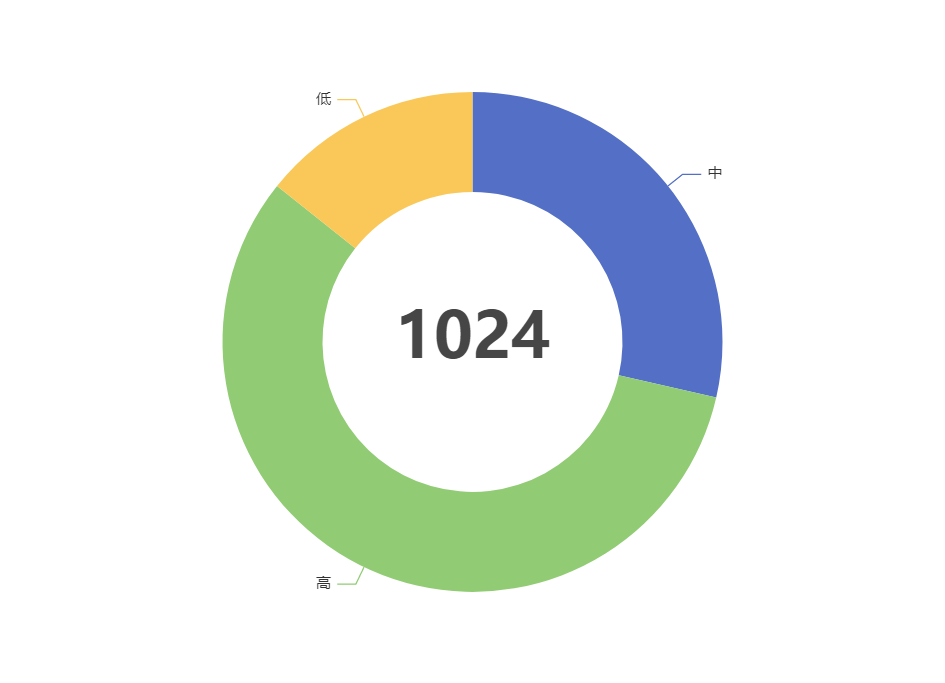
{

    title: {

      text: '1024',

      textStyle:{fontSize:50},

      left: 'center',

      top: 'center',

    },

    tooltip: {

      trigger: 'item',

      formatter: '{b} : {c} ({d}%)'

    },

    series: [

      {

        type: 'pie',

        // radius: [120, 200],

radius: ['50%', '80%'], // 这个是按比例,上面那个是按固定值

        center: ['50%', '50%'],

        selectedMode: 'single',

        data: [

          { value: 100, name: '中' },

          { value: 200, name: '高' },

          { value: 50, name: '低' }

        ],

        emphasis: { // 这个是鼠标放上去时候的阴影

          itemStyle: {

            shadowBlur: 10,

            shadowOffsetX: 5,

            shadowColor: 'rgba(0, 0, 0, 0.5)'

          }

        }

      }

    ]

  };
修改部分字体颜色
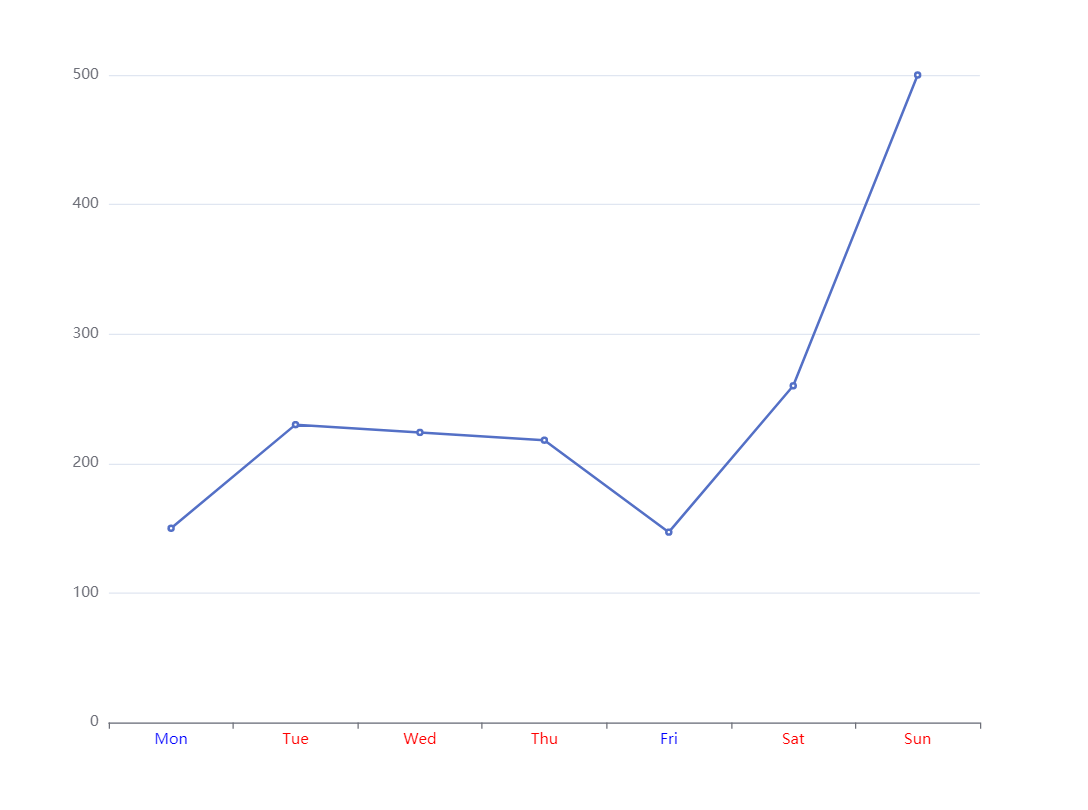
    let data1 = [150, 230, 224, 218, 147, 260, 500]

    option = {

      xAxis: {

        type: 'category',

        axisLabel: {

          color: function (value, index) {

            console.log(value, index)

            return data1[index] > 200 ? 'red' : 'blue'

          }

        },

        data: ['Mon', 'Tue', 'Wed', 'Thu', 'Fri', 'Sat', 'Sun']

      },

      yAxis: {

        type: 'value'

      },

      series: [{

        data: data1,

        type: 'line'

      }]

    };
修改柱状图每个柱子的颜色,根据数据橫坐標部分字體顏色,修改柱子間距
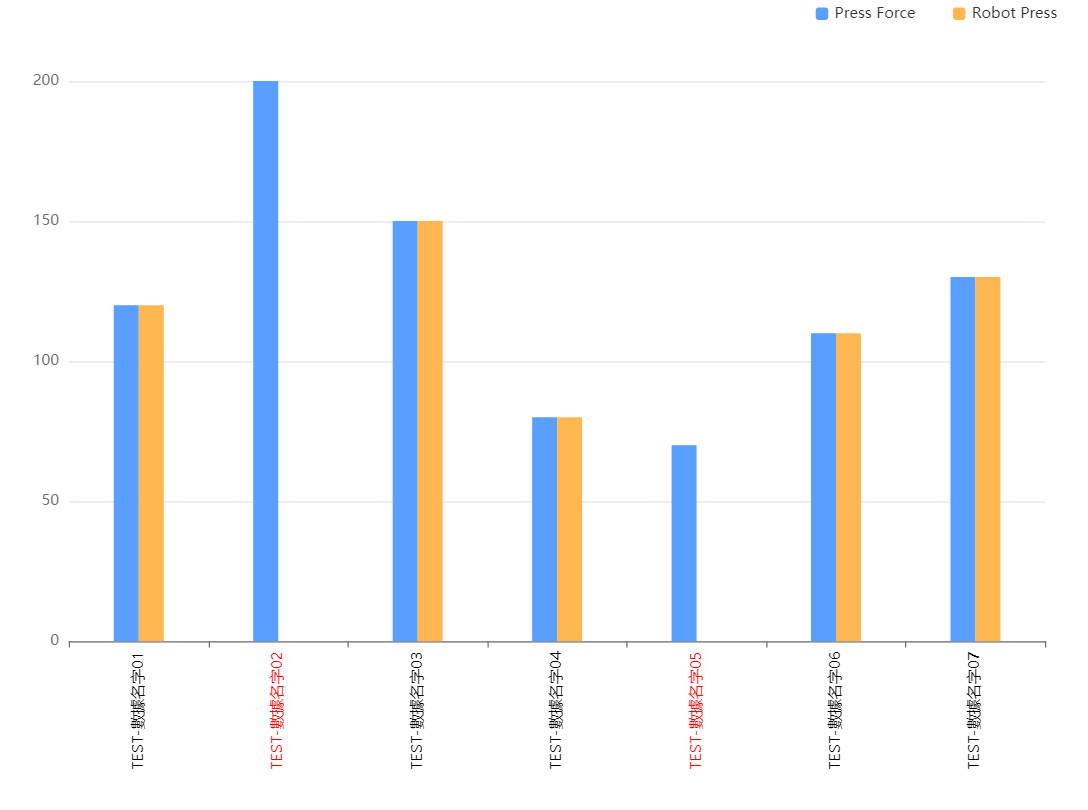
 myData = {

    nameData: [ // 橫坐標顯示的值

      'TEST-數據名字01',

      'TEST-數據名字02',

      'TEST-數據名字03',

      'TEST-數據名字04',

      'TEST-數據名字05',

      'TEST-數據名字06',

      'TEST-數據名字07'

    ],

    pData: [120, 200, 150, 80, 70, 110, 130],

    rData: [120, 0, 150, 80, 0, 110, 130]

  }

  option = {

       toolbox: {

        feature: {

            saveAsImage: {}

        }

    },

    legend: {

      data: ['Pr', 'Ro'],

      right: 20,

      itemHeight: 10,

      itemWidth: 10,

      itemGap: 30,

    },

    // 配置了横坐标旋转,同一个X轴所属柱子间距,非同一个X轴柱子间距,上下左右距离,以及横坐标部分涂色

    tooltip: {

      trigger: 'axis',

      axisPointer: {

        type: 'cross',

        crossStyle: {

          color: '#999'

        }

      }

    },

    grid: { top: '10%', left: '3%', right: '4%', bottom: '5%', containLabel: true },

    xAxis: {

      type: 'category',

      axisLabel: {

        interval: 0,

        rotate: 90,

        color: (value, index) => {

          // 柱狀圖用紅色框線標出壓力值為0的設備Station ID ,若進行壓力參數名稱的點選,紅色框線隨之改變

          return this.myData.rData[index] === 0 ? 'red' : 'black'

        }

      },

      data: this.myData.nameData

    },

    yAxis: {

      type: 'value'

    },

    series: [

      {

        name: 'Press',

        barWidth: 20, //设置柱子的宽度

        barGap: '0%' /*控制的是单个X坐标的多个柱子的间距*/,

        //   barCategoryGap:'0%',/*控制非自己孩子之间的间距*/

        data: this.myData.pData,

        itemStyle: {

          normal: {

            color: '#599fff'

          }

        },

        type: 'bar'

      },

      {

        name: 'Robot',

        barWidth: 20, //设置柱子的宽度

        data: this.myData.rData,

        itemStyle: {

          normal: {

            color: '#ffb752'

          }

        },

        type: 'bar'

      }

    ]

  }
修改echarts折线图拐点大小样式以及添加点点的边框,改变折线的样式
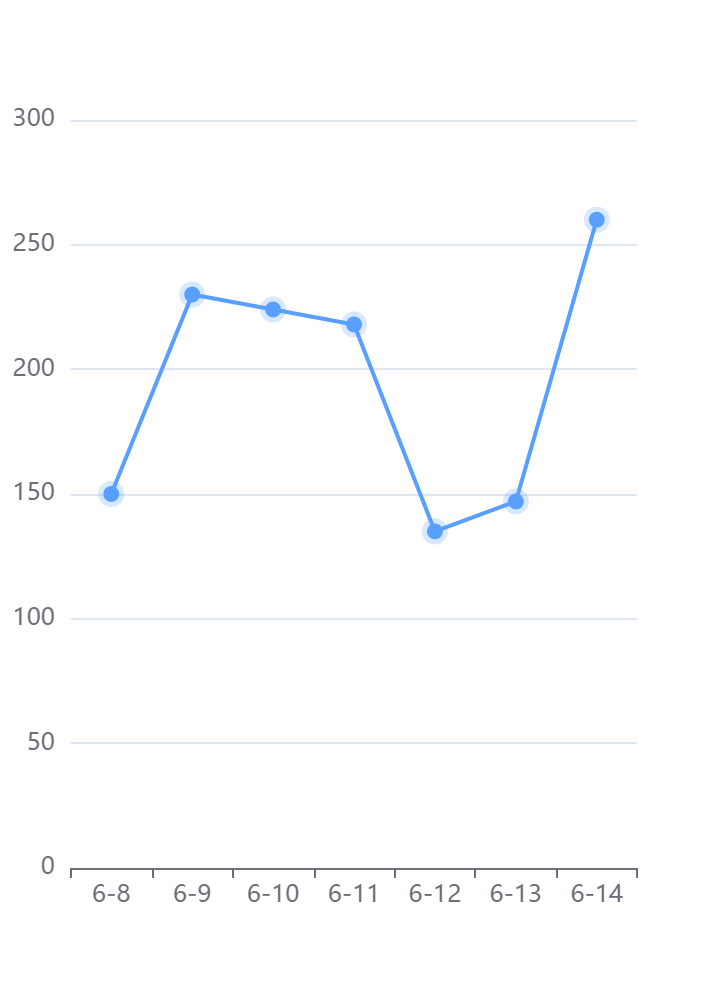
option = {

        tooltip: {

          trigger: 'axis',

        },

        xAxis: {

          type: 'category',

          data: ['6-8', '6-9', '6-10', '6-11', '6-12', '6-13', '6-14'],

        },

        yAxis: {

          type: 'value',

        },

        series: [

          {

            data: [150, 230, 224, 218, 135, 147, 260],

            type: 'line',

            symbol: 'circle', //拐点设置为实心

            symbolSize: 8, //拐点大小

            animation: true, //false: hover圆点不缩放 .true:hover圆点默认缩放

            lineStyle: {

              normal: {

                color: '#599fff', //折线的颜色

                width: '2', //折线粗细

              },

            },

            itemStyle: {

              normal: {

                color: '#599fff', //拐点颜色

                borderColor: 'rgba(89, 159, 255, 0.24)', //拐点边框颜色

                borderWidth: 5, //拐点边框大小

              },

              //   emphasis: {

              //         color: '#000000'//hover拐点颜色定义

              //     }

            },

          },

        ],

      }
折注混合,X轴的颜色,X轴字体颜色,调整柱子颜色,调整小图标图例的大小和位置,鼠标hover时候的样式,用纵向阴影
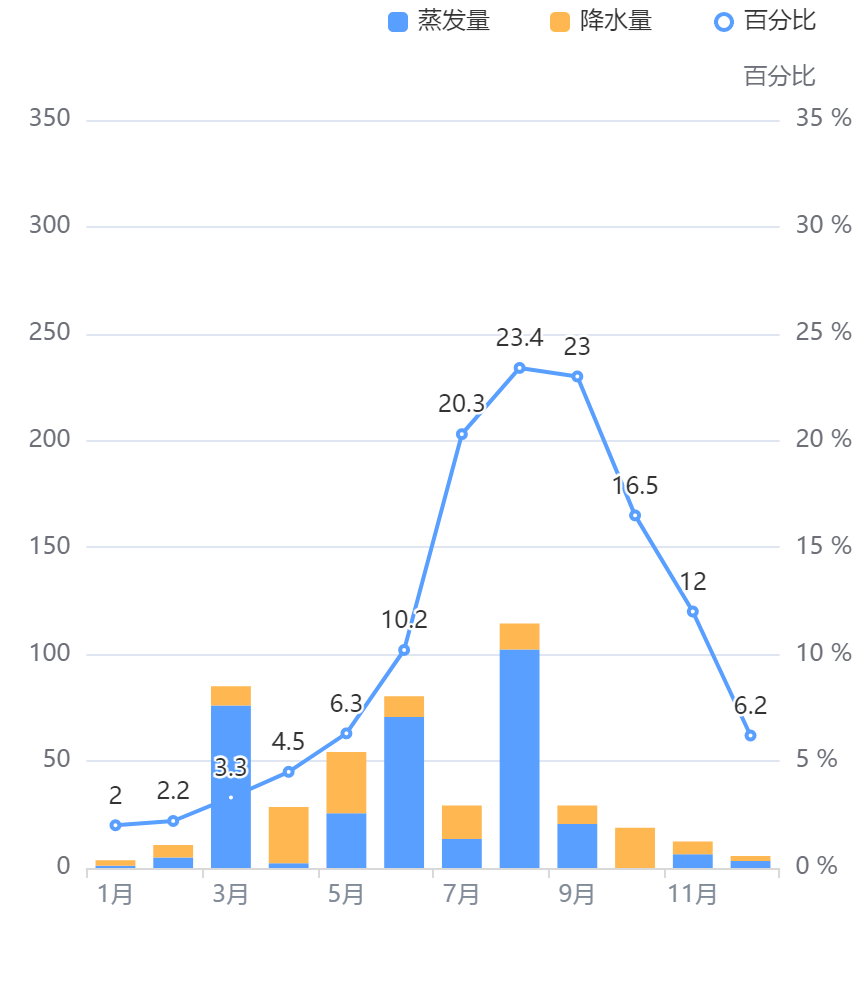
// 折注混合,X轴的颜色,X轴字体颜色,调整柱子颜色,调整小图标图例的大小和位置,鼠标hover时候的样式,用纵向阴影

      option = {

        tooltip: {

          trigger: 'axis',

          axisPointer: {

            // 坐标轴指示器,坐标轴触发有效

            type: 'shadow', // 默认为直线,可选为:'line' | 'shadow'

          },

        },

        legend: {

          // 调整小图标图例的大小和位置

          data: ['蒸发量', '降水量', '百分比'],

          right: 20,

          itemHeight: 10,

          itemWidth: 10,

          itemGap: 30,

        },

        xAxis: [

          {

            type: 'category',

            data: [

              '1月',

              '2月',

              '3月',

              '4月',

              '5月',

              '6月',

              '7月',

              '8月',

              '9月',

              '10月',

              '11月',

              '12月',

            ],

            axisPointer: {

              type: 'shadow',

            },

            axisLabel: {

              color: '#828c99', // x轴字体颜色

            },

            axisLine: {

              lineStyle: {

                color: '#d9d9d9', // x轴颜色

                width: 1, //这里是为了突出显示加上的

              },

            },

          },

        ],

        yAxis: [

          {

            type: 'value',

            // name: '水量', 左侧y轴标题

            min: 0,

            max: 350,

            interval: 50,

            // axisLabel: { 左侧y轴单位

            //     formatter: '{value} ml'

            // }

          },

          {

            type: 'value',

            name: '百分比',

            min: 0,

            max: 35,

            interval: 5,

            axisLabel: {

              formatter: '{value} %',

            },

          },

        ],

        series: [

          {

            name: '蒸发量',

            type: 'bar',

            stack: '堆叠',

            itemStyle: {

              normal: {

                // 柱子颜色--蓝色

                color: '#599fff',

              },

            },

            data: [

              1.0,

              4.9,

              76.0,

              2.2,

              25.6,

              70.7,

              13.6,

              102.2,

              20.6,

              0.0,

              6.4,

              3.3,

            ],

          },

          {

            name: '降水量',

            type: 'bar',

            stack: '堆叠',

            itemStyle: {

              normal: {

                // 柱子颜色--黄色

                color: '#ffb752',

              },

            },

            data: [

              2.6,

              5.9,

              9.0,

              26.4,

              28.7,

              9.7,

              15.6,

              12.2,

              8.7,

              18.8,

              6.0,

              2.3,

            ],

          },

          {

            name: '百分比',

            type: 'line',

            itemStyle: {

              normal: {

                // 颜色

                color: '#599fff',

              },

            },

            label: {

              show: true,

              position: 'top',

            },

            yAxisIndex: 1,

            data: [

              2.0,

              2.2,

              3.3,

              4.5,

              6.3,

              10.2,

              20.3,

              23.4,

              23.0,

              16.5,

              12.0,

              6.2,

            ],

          },

        ],

      }
去除饼图标注省略号配置
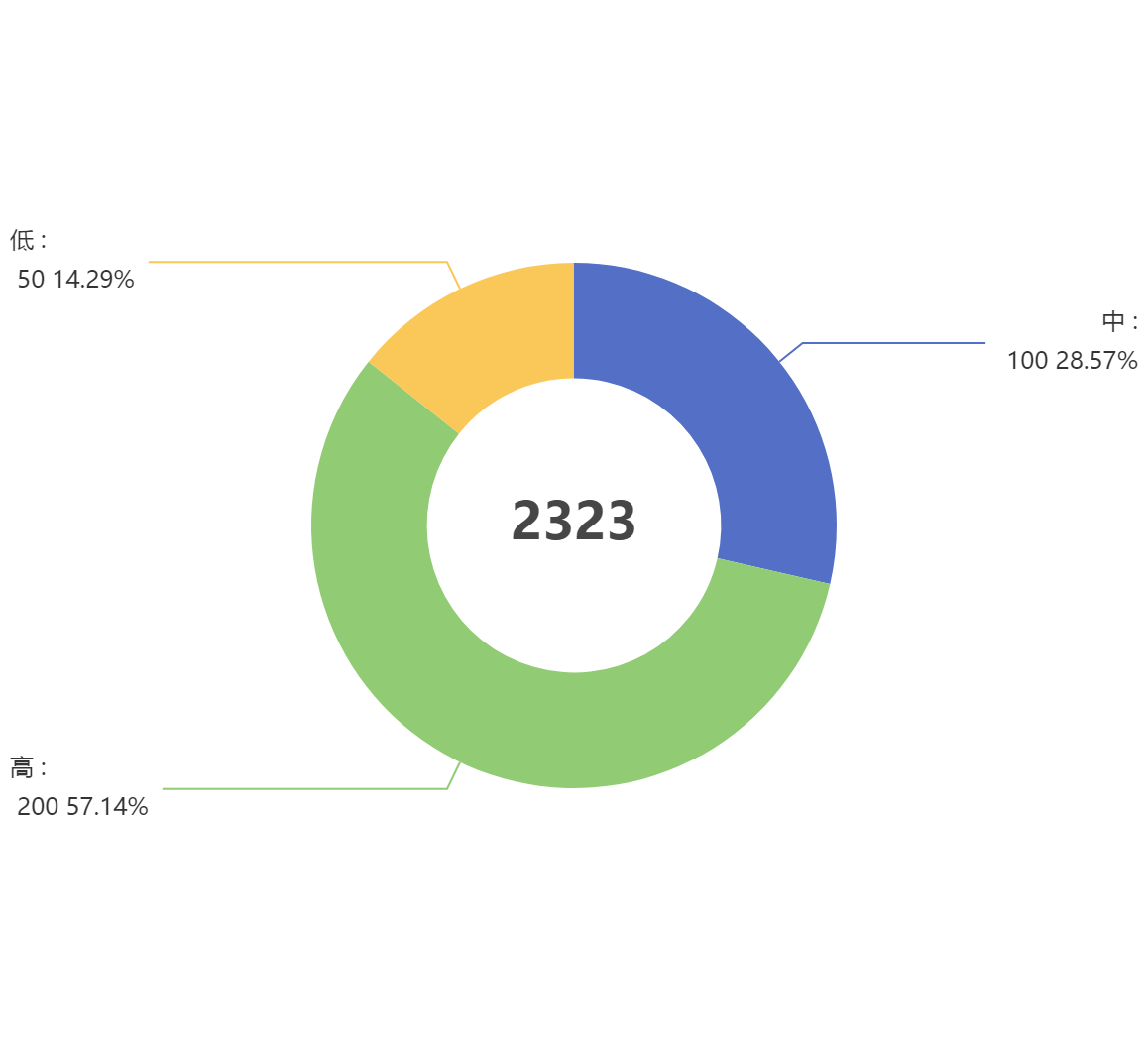
option = {

    title: {

      text: '2323',

      textStyle: { fontSize: 26 },

      left: 'center',

      top: 'center',

    },

    tooltip: {

      trigger: 'item',

      formatter: '{b} : {c} {d}%',

    },

    series: [

      {

        type: 'pie',

        radius: ['28%', '50%'],

        label: {

              alignTo: 'edge', // 去除标注省略号配置

                edgeDistance: 5, // 去除标注省略号配置

                lineHeight:20, // 去除标注省略号配置

          formatter: '{b} :\n {c} {d}%', // 去除标注省略号配置

      },

        data: [

          { value: 100, name: '中' },

          { value: 200, name: '高' },

          { value: 50, name: '低' },

        ],

        emphasis: {

          // 这个是鼠标放上去时候的阴影

          itemStyle: {

            shadowBlur: 10,

            shadowOffsetX: 5,

            shadowColor: 'rgba(0, 0, 0, 0.5)',

          },

        },

      },

    ],

  };
修改饼图颜色
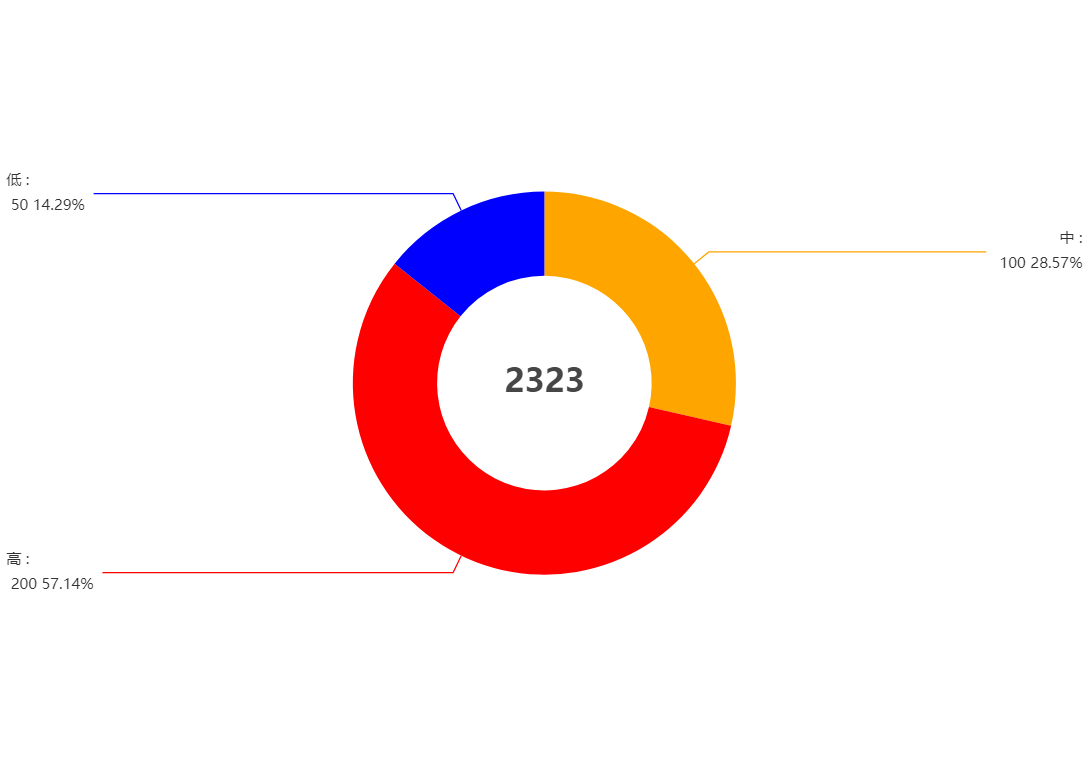
option = {

    title: {

      text: '2323',

      textStyle: { fontSize: 26 },

      left: 'center',

      top: 'center',

    },

    toolbox: {

        feature: {

            saveAsImage: {}

        }

    },

    tooltip: {

      trigger: 'item',

      formatter: '{b} : {c} {d}%',

    },

    series: [

      {

        type: 'pie',

        radius: ['28%', '50%'],

        label: {

              alignTo: 'edge', // 去除标注省略号配置

                edgeDistance: 5, // 去除标注省略号配置

                lineHeight:20, // 去除标注省略号配置

          formatter: '{b} :\n {c} {d}%', // 去除标注省略号配置

      },

        data: [

          { value: 100, name: '中',itemStyle: {color:"orange"} },

          { value: 200, name: '高' ,itemStyle: {color:"red"}},

          { value: 50, name: '低' ,itemStyle: {color:"blue"}},

        ],

        emphasis: {

          // 这个是鼠标放上去时候的阴影

          itemStyle: {

            shadowBlur: 10,

            shadowOffsetX: 5,

            shadowColor: 'rgba(0, 0, 0, 0.5)',

          },

        },

      },

    ],

  };
echarts系列-带图教你调整左右位置x轴样式网格虚线刻度居中双轴Y轴滚动上下移动文字旋转改分割线颜色部分字体改色折注混合,X轴的颜色,X轴字体颜色,调整柱子颜色,调整小图标图例的大小和位置,鼠标hover时候的样式,用纵向阴影的更多相关文章
- 深入浅出ECharts系列 (二) 折线图
深入浅出ECharts系列(二) 目标 本次教程的目标是实现“折线图堆叠”折线,实现结果如图: 2. 准备工作 a) 首先下载ECharts插件,你可以根据自己的实际需求选择你想要下载 ...
- 一起来玩echarts系列(一)------箱线图的分析与绘制
一.箱线图 Box-plot 箱线图一般被用作显示数据分散情况.具体是计算一组数据的中位数.25%分位数.75%分位数.上边界.下边界,来将数据从大到小排列,直观展示数据整体的分布情况. 大部分正常数 ...
- echarts 折柱混合图 (绑数据后)
html: <div class="flot-chart-content" id="flot-dashboard-chart"></div&g ...
- echarts系列之动态修改柱状图颜色
echarts根据某一变量动态修改柱状图颜色 1.option中参数配置项series { "name":"Android", "type" ...
- echarts 中 柱图 、折线图、柱图层叠
app.title = '折柱混合'; option = { tooltip: { trigger: 'axis', axisPointer: { type: 'cross', crossStyle: ...
- echarts展示箱型图&正态分布曲线
效果图: 直接上代码吧: <!DOCTYPE HTML> <html> <head> <style type="text/css"> ...
- echarts之折线图配置(附带图例很多做成分页效果)
<!DOCTYPE html> <html lang="en"> <head> <meta charset="utf-8&quo ...
- 百度 echarts K线图使用
看个效果图先 首先在需要插入图例的HTML中嵌入 <div id="main" style="height:400px"></div> ...
- WPF仿百度Echarts人口迁移图
GitHub地址:https://github.com/ptddqr/wpf-echarts-map/tree/master 关于大名鼎鼎的百度Echarts我就不多说了 不了解的朋友直接看官方的例子 ...
- [UML]UML系列——类图class的关联关系(聚合、组合)
关联的概念 关联用来表示两个或多个类的对象之间的结构关系,它在代码中表现为一个类以属性的形式包含对另一个类的一个或多个对象的应用. 程序演示:关联关系(code/assocation) 假设:一个公司 ...
随机推荐
- nrf9160开机测试(做主控)——连接nrfcloud云
由于作者水平有限,如有披漏欢迎指正. 测试流程: 1.前期开发准备(硬件) 2.开发环境准备(软件) 3.连接云 4.GPS测试 一.前期开发准备: nrf9160-DK版 nRF Connect f ...
- 创建外部表步骤及解决ORA-29913:执行ODCIETTABLEOPEN调出时出错
创建外部表步骤 建立目录对象(用sys用户创建.授权) 外部表所在路径一定要写对!!! create directory ext_data as 'D:\ORACLE'; grant read,wri ...
- ML-梯度下降法的详细推导与代码实现
计算 对于线性回归,梯度下降法的目标就是找到一个足够好的向量\(\theta\),使代价函数\(J(\theta) = \sum_{i=1}^{m}(\hat{y}-y_{i})^{2}\)取得最小值 ...
- SIP会话发起协议 - 先知道是什么(一)
少年,思无邪,最最动人. 协议概述 SIP会话发起协议是VoIP技术中最常用的协议之一.它是一种应用层协议,与其它应用层协议协同工作,通过Internet控制多媒体通信会话. SIP采用SDP(会话描 ...
- 7.Vue常用属性
1. data:数据属性 在之前的学习中我们已经了解到了data,属性中存放的就是js变量 <script> new Vue({ el: '#app', // data data: { u ...
- 2021-2022 ICPC, NERC, Northern Eurasia Onsite (Unrated, Online Mirror, ICPC Rules, Teams Preferred) J. Job Lookup
题意 n个节点,n<=200,你需要构造这n个几点成为一棵树,并且这棵树的中序遍历为1-n; 你构造树的节点之间的最短路构成一个n×n的最短距离矩阵d: 同时给你n×n的权重矩阵c:最最小的Σd ...
- 4.drf-版本管理
根据RESTful规范,后端API中需要体现出版本,DRF中支持5种版本的设置,常见的三种如下 1. URL的GET中传递参数 在视图类中定义 from rest_framework.versioni ...
- 2022春每日一题:Day 34
题目:lowbit求和 (没有找到哪个公开题库有这个题) 题意:求数组中任意一对数的异或和的lowbit的总和. 对于异或,二进制位中两个数相等则为0,反之为1,而且此题是要求lowbit,那我们利用 ...
- Go语言核心36讲38
到目前为止,我们已经一起陆陆续续地学完了Go语言中那些最重要也最有特色的概念.语法和编程方式.我对于它们非常喜爱,简直可以用如数家珍来形容了. 在开始今天的内容之前,我先来做一个简单的总结. Go语言 ...
- DP?
杨斌涵//aad69d38 分治优化DP 分治优化1D/1D dp 对于一类 \[f(x) = \min_{k = y}^{x - 1} w(l, r) \] 即所有 \(w(l,r)\) 事先已知, ...