
新建Github仓库并上传本地代码
按照Github的教程 Adding a local repository to GitHub using Git
1. 创建空的Github仓库
创建远程仓库 ,注意不要勾选Add a README file,如果勾选会生成一笔提交,如果本地仓库也提交了代码,会导致拉取/推送代码失败。
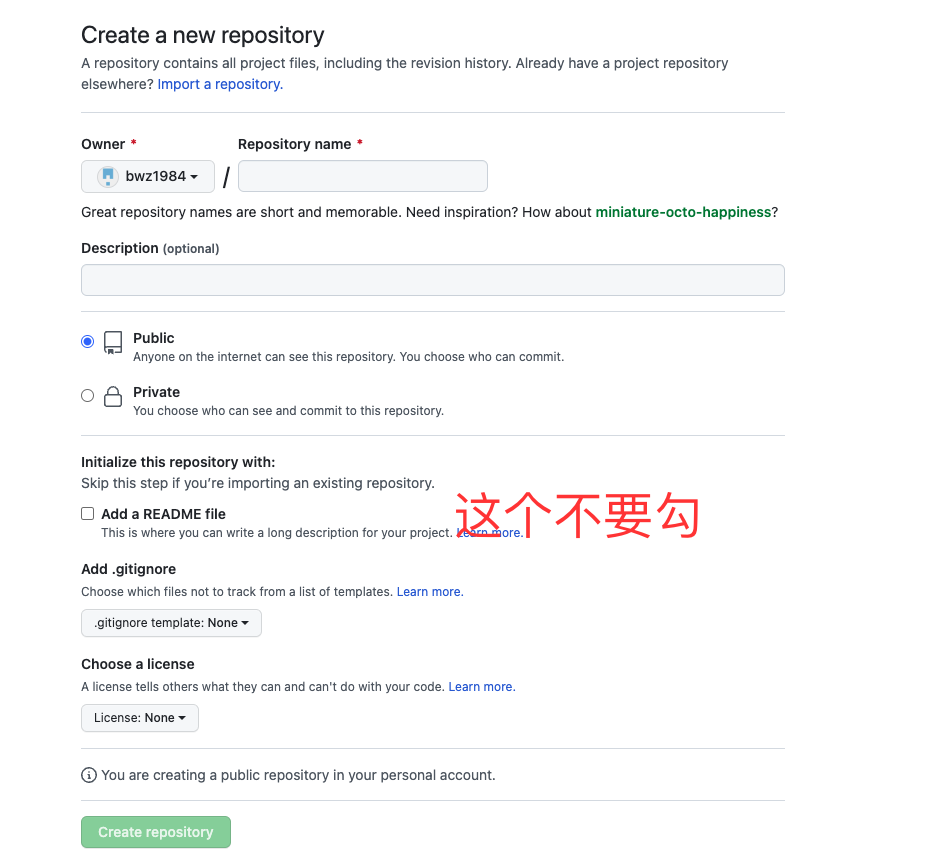
2. 切换到本地环境,初始化仓库
$ git init -b main3. 添加本地文件并提交
$ git add .

# Adds the files in the local repository and stages them for commit. 若要取消暂存文件,请使用“git reset HEAD YOUR-FILE”。

$ git commit -m "First commit"

# Commits the tracked changes and prepares them to be pushed to a remote repository. 要删除此提交并修改文件,请使用 'git reset --soft HEAD~1' 并再次提交和添加文件。
4. 关联本地仓库和远程仓库
$ git remote add origin  <REMOTE_URL>

# Sets the new remote

$ git remote -v

# Verifies the new remote URL
5. 推送代码到远程仓库
$ git push -u origin main

# Pushes the changes in your local repository up to the remote repository you specified as the origin如果勾选了Add a README file ,执行最后一步,推送本地代码到远程仓库时会报错
error: failed to push some refs to 'github.com:bwz1984/sql2code.git'

hint: Updates were rejected because the tip of your current branch is behind

hint: its remote counterpart. Integrate the remote changes (e.g.

hint: 'git pull ...') before pushing again.

hint: See the 'Note about fast-forwards' in 'git push --help' for details.
因此尝试拉取远程代码
$ git pull origin main终端提示如下
hint: Pulling without specifying how to reconcile divergent branches is

hint: discouraged. You can squelch this message by running one of the following

hint: commands sometime before your next pull:

hint:

hint:   git config pull.rebase false  # merge (the default strategy)

hint:   git config pull.rebase true   # rebase

hint:   git config pull.ff only       # fast-forward only

hint:

hint: You can replace "git config" with "git config --global" to set a default

hint: preference for all repositories. You can also pass --rebase, --no-rebase,

hint: or --ff-only on the command line to override the configured default per

hint: invocation.

fatal: refusing to merge unrelated histories重点在于最后一句,Git提示fatal: refusing to merge unrelated histories,原因分析如下
You have a new Git repository with some commits. You then try to pull from an existing remote repo. The merge becomes incompatible because the histories for branch and remote pull are different. Git sees the situation as you trying to merge two completely unrelated branches, and it doesn’t know what to do.
解决方案
$ git pull origin main --allow-unrelated-histories

$ git push origin main
新建Github仓库并上传本地代码的更多相关文章
- 在github上新建一个仓库并上传本地工程
扫盲:在github上新建一个仓库并上传本地工程 http://1ke.co/course/194 我自己新建了个项目,一步一步流程如下. zhoudd@desay:~/桌面/mini_embed_d ...
- github 仓库共享上传权限
https://blog.csdn.net/qq_33210042/article/details/79717497 打开仓库 -> Settings -> Collaborators 然 ...
- 【GIT】Github上传本地代码详解
本教程结合Github服务端和客户端完成本地代码上传至Github,下面进行详细讲解: 1.创建Github账号,这一个步骤应该不用太多解释,直接上官网进行注册登录即可https://github.c ...
- 上传本地代码及更新代码到GitHub教程
上传本地代码及更新代码到GitHub教程 上传本地代码 第一步:去github上创建自己的Repository,创建页面如下图所示: 红框为新建的仓库的https地址 第二步: echo " ...
- git配置SSH Key,上传本地代码至github
git配置全局的name和email git config --global user.name "name" git config --global user.email &qu ...
- github小白上传本地代码及更新代码到GitHub及华为云教程
上传本地代码 第一步:去github上创建自己的Repository,创建页面如下图所示: 红框为新建的仓库的https地址 第二步: echo "# Test" >> ...
- 【Hyeri】上传本地代码到Github
个人摸索出的上传本地代码到Github的办法 首先配置SSH Key(首次需要配置) 1.设置本地ssh key,打开git bash,输入命令: ssh -keygen -t rsa -C &quo ...
- mac 上传本地代码到 Github 教程
网上有很多关于windows系统上传本地代码到github的文章,但是自己用的是mac,在网上也找了相关文章,实践的过程中还是遇到了很多问题,现在把自己的成功实践分享出来,希望能对大家有帮助. 1.首 ...
- (超详细)使用git命令行将本地仓库代码上传到github或gitlab远程仓库
(超详细)使用git命令行将本地仓库代码上传到github或gitlab远程仓库 本地创建了一个 xcode 工程项目,现通过 命令行 将该项目上传到 github 或者 gitlab 远程仓库,具体 ...
随机推荐
- .NET混合开发解决方案24 WebView2对比CefSharp的超强优势
系列目录 [已更新最新开发文章,点击查看详细] WebView2控件应用详解系列博客 .NET桌面程序集成Web网页开发的十种解决方案 .NET混合开发解决方案1 WebView2简介 .NE ...
- 全国降雨侵蚀力因子R值
数据下载链接:百度云下载链接 降雨侵蚀力因子其实是反应降雨对土壤侵蚀的潜在能力,就是降雨的冲刷对土壤的侵蚀效应. 在过去几天查阅文献资料的过程中,本人亲眼看见过的关于因子R的计算方法就超过30种 ...
- Qt+ECharts开发笔记(二):Qt窗口动态调整大小,使ECharts跟随Qt窗口大小变换而变换大小
前言 上一篇将ECharts嵌入Qt中,在开始ECharts使用之前,还有一个很重要的功能,就是在窗口变换大小的时候,ECharts的图表尺寸也要跟随Qt窗口变换大小而变换大小. Demo演示 ...
- ShardingSphere 云上实践:开箱即用的 ShardingSphere-Proxy 集群
本次 Apache ShardingSphere 5.1.2 版本更新为大家带来了三大全新功能,其中之一即为使用 ShardingSphere-Proxy chart 在云环境中快速部署一套 Shar ...
- Go死锁——当Channel遇上Mutex时
背景 用metux lock for循环,在for循环中又 向带缓冲的Channel 写数据时,千万要小心死锁! 最近,我在测试ws长链接网关,平均一个星期会遇到一次服务假死问题,因为并不是所有rou ...
- redis 集群 slots are covered by nodes.
原因数据数据损坏.需要修复 1.检测 redis-cli --cluster check 127.0.0.1:7000 2.检测结果 slots are covered by nodes3.进行修复 ...
- Template -「网络流 & 二分图」
EK. 很少用到,知道思想即可. 懒得写封装的屑. queue<int> q; int Cap[MAXN][MAXN], Flow[MAXN][MAXN], Aug[MAXN], fa[M ...
- Java代码优化的30个小技巧
前言 我之前写过两篇关于优化相关的问题:<聊聊sql优化的15个小技巧>和<聊聊接口性能优化的11个小技巧>,发表之后,在全网受到广大网友的好评.阅读量和点赞率都很高,说明了这 ...
- 报告指SpaceX估值已达到1000亿美元,埃隆马斯克以此回击其接受政府补贴的批判
SpaceX首席执行官埃隆-马斯克(Elon Musk)表示,名下的航天发射服务供应商市值已达到1000亿美元.该金额是根据上个月的评估报告确认的,标志着SpaceX在完成最新一轮融资,并筹集超过10 ...
- @DS("slave") 多数据源兼容事务问题解决方案
SpringBoot项目中用到多数据源,在方法上又必须加事务处理,此时可以对使用了@DS的方法或类添加@Transactional并添加事务隔离级别 举例: 1.这是一个方法,方法内需要实现多数据源查 ...