
新建Github仓库并上传本地代码
按照Github的教程 Adding a local repository to GitHub using Git
1. 创建空的Github仓库
创建远程仓库 ,注意不要勾选Add a README file,如果勾选会生成一笔提交,如果本地仓库也提交了代码,会导致拉取/推送代码失败。
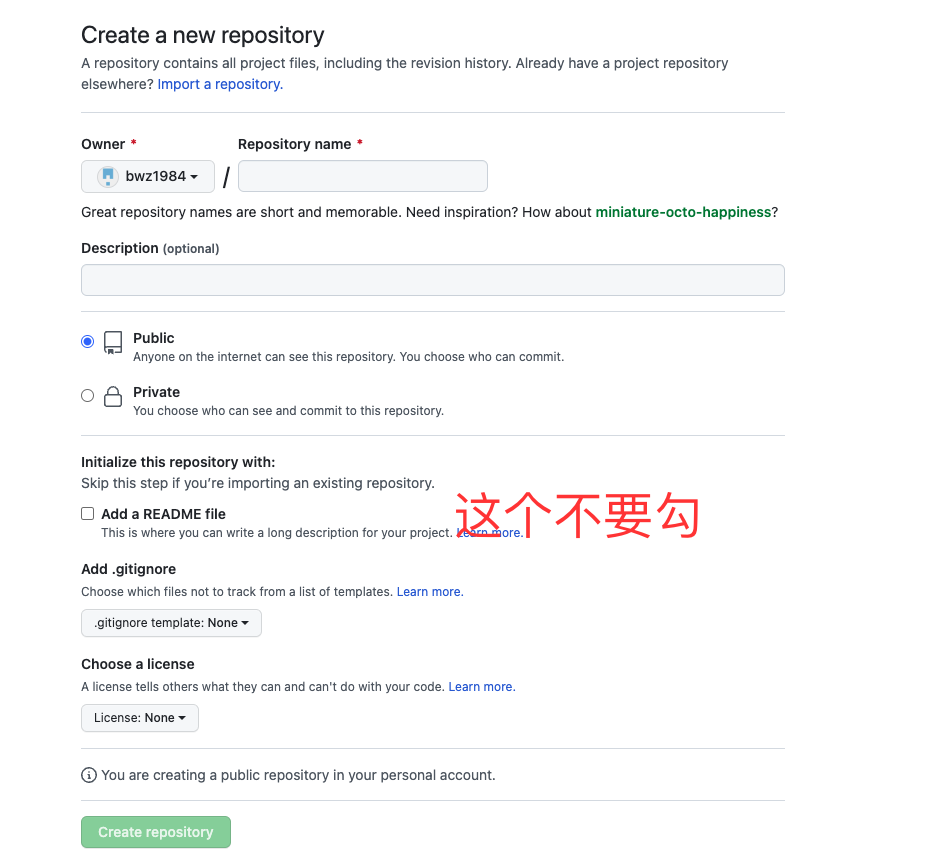
2. 切换到本地环境,初始化仓库
$ git init -b main3. 添加本地文件并提交
$ git add .

# Adds the files in the local repository and stages them for commit. 若要取消暂存文件,请使用“git reset HEAD YOUR-FILE”。

$ git commit -m "First commit"

# Commits the tracked changes and prepares them to be pushed to a remote repository. 要删除此提交并修改文件,请使用 'git reset --soft HEAD~1' 并再次提交和添加文件。
4. 关联本地仓库和远程仓库
$ git remote add origin  <REMOTE_URL>

# Sets the new remote

$ git remote -v

# Verifies the new remote URL
5. 推送代码到远程仓库
$ git push -u origin main

# Pushes the changes in your local repository up to the remote repository you specified as the origin如果勾选了Add a README file ,执行最后一步,推送本地代码到远程仓库时会报错
error: failed to push some refs to 'github.com:bwz1984/sql2code.git'

hint: Updates were rejected because the tip of your current branch is behind

hint: its remote counterpart. Integrate the remote changes (e.g.

hint: 'git pull ...') before pushing again.

hint: See the 'Note about fast-forwards' in 'git push --help' for details.
因此尝试拉取远程代码
$ git pull origin main终端提示如下
hint: Pulling without specifying how to reconcile divergent branches is

hint: discouraged. You can squelch this message by running one of the following

hint: commands sometime before your next pull:

hint:

hint:   git config pull.rebase false  # merge (the default strategy)

hint:   git config pull.rebase true   # rebase

hint:   git config pull.ff only       # fast-forward only

hint:

hint: You can replace "git config" with "git config --global" to set a default

hint: preference for all repositories. You can also pass --rebase, --no-rebase,

hint: or --ff-only on the command line to override the configured default per

hint: invocation.

fatal: refusing to merge unrelated histories重点在于最后一句,Git提示fatal: refusing to merge unrelated histories,原因分析如下
You have a new Git repository with some commits. You then try to pull from an existing remote repo. The merge becomes incompatible because the histories for branch and remote pull are different. Git sees the situation as you trying to merge two completely unrelated branches, and it doesn’t know what to do.
解决方案
$ git pull origin main --allow-unrelated-histories

$ git push origin main
新建Github仓库并上传本地代码的更多相关文章
- 在github上新建一个仓库并上传本地工程
扫盲:在github上新建一个仓库并上传本地工程 http://1ke.co/course/194 我自己新建了个项目,一步一步流程如下. zhoudd@desay:~/桌面/mini_embed_d ...
- github 仓库共享上传权限
https://blog.csdn.net/qq_33210042/article/details/79717497 打开仓库 -> Settings -> Collaborators 然 ...
- 【GIT】Github上传本地代码详解
本教程结合Github服务端和客户端完成本地代码上传至Github,下面进行详细讲解: 1.创建Github账号,这一个步骤应该不用太多解释,直接上官网进行注册登录即可https://github.c ...
- 上传本地代码及更新代码到GitHub教程
上传本地代码及更新代码到GitHub教程 上传本地代码 第一步:去github上创建自己的Repository,创建页面如下图所示: 红框为新建的仓库的https地址 第二步: echo " ...
- git配置SSH Key,上传本地代码至github
git配置全局的name和email git config --global user.name "name" git config --global user.email &qu ...
- github小白上传本地代码及更新代码到GitHub及华为云教程
上传本地代码 第一步:去github上创建自己的Repository,创建页面如下图所示: 红框为新建的仓库的https地址 第二步: echo "# Test" >> ...
- 【Hyeri】上传本地代码到Github
个人摸索出的上传本地代码到Github的办法 首先配置SSH Key(首次需要配置) 1.设置本地ssh key,打开git bash,输入命令: ssh -keygen -t rsa -C &quo ...
- mac 上传本地代码到 Github 教程
网上有很多关于windows系统上传本地代码到github的文章,但是自己用的是mac,在网上也找了相关文章,实践的过程中还是遇到了很多问题,现在把自己的成功实践分享出来,希望能对大家有帮助. 1.首 ...
- (超详细)使用git命令行将本地仓库代码上传到github或gitlab远程仓库
(超详细)使用git命令行将本地仓库代码上传到github或gitlab远程仓库 本地创建了一个 xcode 工程项目,现通过 命令行 将该项目上传到 github 或者 gitlab 远程仓库,具体 ...
随机推荐
- Python教程:随机验证码生成和join 字符串
函数:string.join() Python中有join()和os.path.join()两个函数,具体作用如下: join(): 连接字符串数组.将字符串.元组.列表中的元素以指定的字符(分隔符) ...
- Elasticsearch面试题
Elasticsearch面试题 1.Elasticsearch是如何实现master选举的? 1.对所有可以成为master的节点根据nodeId排序,每次选举每个节点都把自己所知道节点排一次序,然 ...
- 强化学习-学习笔记7 | Sarsa算法原理与推导
Sarsa算法 是 TD算法的一种,之前没有严谨推导过 TD 算法,这一篇就来从数学的角度推导一下 Sarsa 算法.注意,这部分属于 TD算法的延申. 7. Sarsa算法 7.1 推导 TD ta ...
- 阿里云 python3 使用duplicity
前言 公司业务中使用的备份工具一直是alicloud-duplicity,一直也没研究.后来业务出问题了,看了看,原来是基于duplicity开发的,使用了半天,感觉很不错,我感觉他的特点有: 加密备 ...
- 4-10 CS后台项目练习-3 || Redis
13. 类别管理--根据id查询类别详情--持久层 13.1. 规划SQL语句 本次需要执行的SQL语句大致是: select * from pms_category where id=? 关于字段列 ...
- 千万不要把Request传递到异步线程里面!有坑!
你好哇,我是歪歪. 前几天在网上冲浪的时候看到一篇技术文章,讲的是他把一个 request 请求传递到了线程池里面,然后遇到了一个匪夷所思的情况. 他写了这篇文章,把自己针对这个问题的探索过程分享了出 ...
- C++中关于cout相关的输出格式(操作流算子)
这边需要注意的是如果使用到setpercision,一定要引入iomanip头文件,否则编译会出错 注意以下的操作流算子都是在头文件iomanip中定义的,强烈建议使用的时候引入改头文件否则可能会出现 ...
- Jetpack Compose学习(8)——State及remeber
原文地址: Jetpack Compose学习(8)--State状态及remeber关键字 - Stars-One的杂货小窝 之前我们使用TextField,使用到了两个关键字remember和mu ...
- javascript相邻节点元素获取
<script> window.onload = function () { var myLinkItem = document.getElementById('linkItem'); v ...
- php date函数和首位带0问题
一.带零 echo date('Y-m-d'); 2012-08-08 二.不带零 echo date('Y-n-j'); 2012-8-8 以下为参数详解(转载): a - "am&quo ...