
Canvas入门07- 自定义实现虚线的绘制
预备知识
直线的斜率
一条直线与某平面直角坐标系x轴正半轴方向的夹角的正切值即该直线相对于该坐标系的斜率。
对于一条直线 y = kx +b,k就是直线的斜率。
斜率的计算
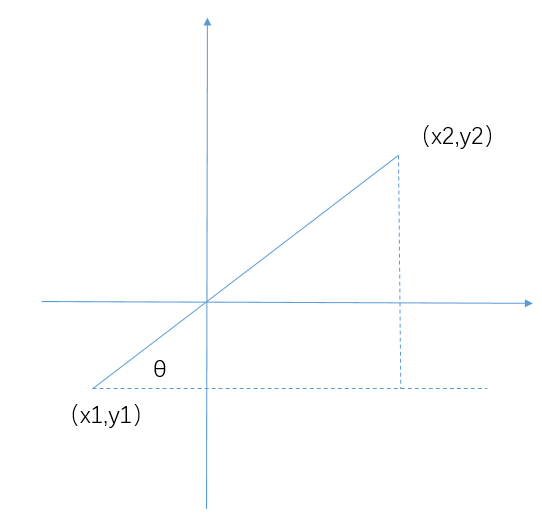
对于一条已知的线段,求斜率θ,使用反正切函数
θ=arctan((y2-y1) / (x2-x1))
在JavaScript中对应的API是 Math.atan2(y, x)
atan2 方法返回一个 -PI到 PI 之间的数值,表示点 (x, y) 对应的偏移角度。这是一个逆时针角度,以弧度为单位,正X轴和点 (x, y) 与原点连线 之间。注意此函数接受的参数:先传递 y 坐标,然后是 x 坐标。
直线上任意一点坐标的计算
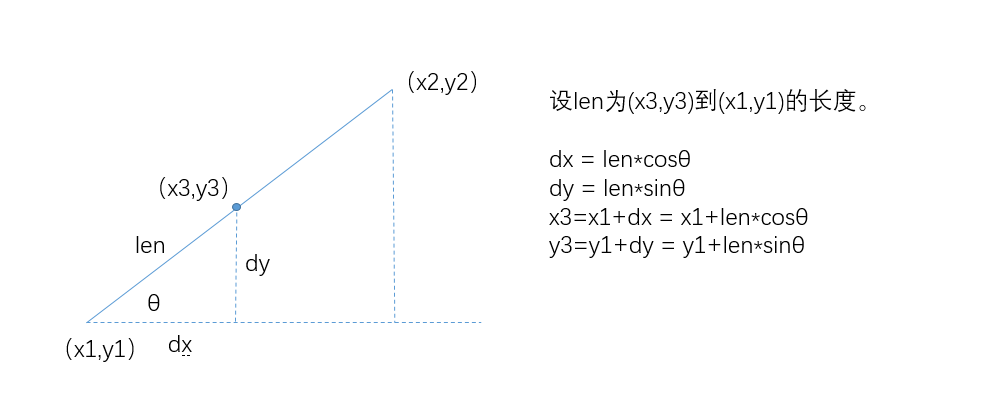
实现思路
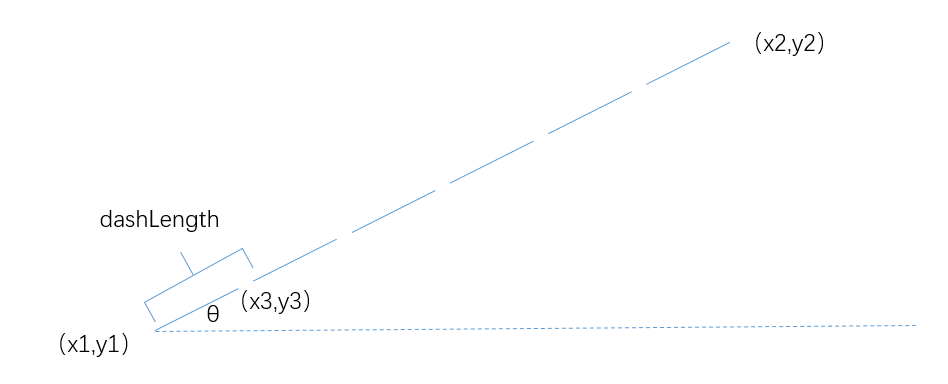
- 获取直线的总长度
- 计算直线上共有多少个虚线段
- 循环计算虚线段的起始点,并绘制
<!DOCTYPE html>

<html lang="en">

<head>

    <meta charset="UTF-8">

    <meta name="viewport" content="width=device-width, initial-scale=1.0">

    <meta http-equiv="X-UA-Compatible" content="ie=edge">

    <title>Drawing Lines with Rubber Bands</title>

    <style>

     body {

         background: #eeeeee;

     }

     #canvas {

        background: #ffffff;

        cursor: pointer;

        margin-left: 10px;

        margin-top: 10px;

        -webkit-box-shadow: 4px 4px 8px rgba(0,0,0,.5);

        -moz-box-shadow: 4px 4px 8px rgba(0,0,0,.5);

        box-shadow: 4px 4px 8px rgba(0,0,0,.5);

     }

    </style>

</head>

<body>

    <canvas id="canvas" width="600" height="600">

        Canvas not supported

    </canvas>

    <script src="./example.js"></script>

</body>

</html>
var canvas = document.getElementById('canvas'),

    context = canvas.getContext('2d');

// Functions ........................................................

function drawDashedLine(ctx, x1, y1, x2, y2, dashLength) {

    dashLength = dashLength || 5;

    var deltaX = x2 - x1;

    var deltaY = y2 - y1;

    // get the total length of the line

    var lineLength = Math.sqrt(deltaX * deltaX + deltaY * deltaY);

    // calculate the angle of the line

    var lineangle = Math.atan2(y2 - y1, x2 - x1);

    // calculate the number of dashes

    var numDashes = Math.floor(lineLength / dashLength); // 向下取整

    for (var i = 0; i < numDashes; i++) {

        ctx.moveTo(x1 + i * dashLength * Math.cos(lineangle), y1 + i * dashLength * Math.sin(lineangle));

        ctx.lineTo(x1 + ((i + 1) * dashLength - 2) * Math.cos(lineangle), y1 + ((i + 1) * dashLength - 2) * Math.sin(lineangle));

        ctx.stroke();

    }

}

context.lineWidth = 2;

context.strokeStyle = 'blue';

drawDashedLine(context, 20, 20, canvas.width - 20, 20, 10);

drawDashedLine(context, canvas.width - 20, 20, canvas.width - 20, canvas.height - 20, 10);

drawDashedLine(context, 20, 20, 20, canvas.height - 20, 10);

drawDashedLine(context, 20, canvas.height - 20, canvas.width - 20, canvas.height - 20, 10);

drawDashedLine(context, 20, 20, canvas.width - 20, canvas.height - 20, 10);

drawDashedLine(context, canvas.width - 20, 20, 20, canvas.height - 20, 10);
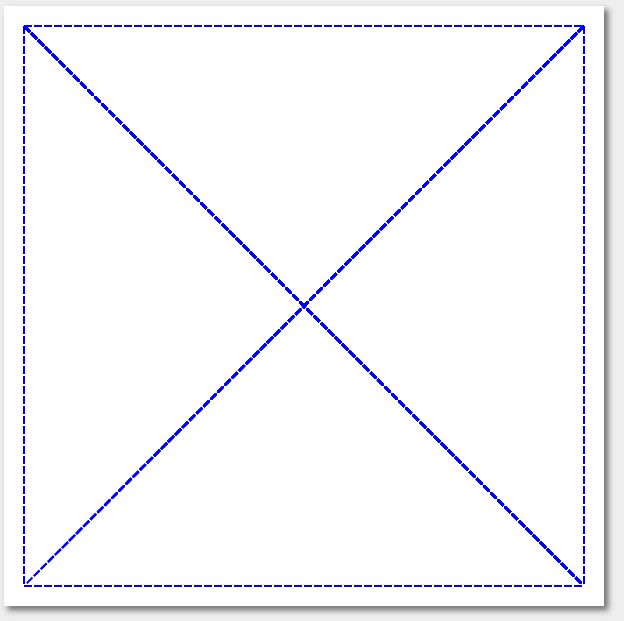
实现效果:
Canvas入门07- 自定义实现虚线的绘制的更多相关文章
- Canvas入门(3):图像处理和绘制文字
来源:http://www.ido321.com/997.html 一.图像处理(非特别说明,所有结果均来自最新版Google) 在HTML 5中,不仅可以使用Canvas API绘制图形,也可以用于 ...
- Canvas入门(2):图形渐变和图像形变换
来源:http://www.ido321.com/986.html 一.图形渐变(均在最新版Google中测试) 1.绘制线性渐变 1: // 获取canvas 的ID 2: var canvas = ...
- Canvas入门(1):绘制矩形、圆、直线、曲线等基本图形
来源:http://www.ido321.com/968.html 一.Canvas的基础知识 Canvas是HTML 5中新增的元素,专门用于绘制图形.canvas元素就相当于一块“画布”,一块无色 ...
- Android显示框架:自定义View实践之绘制篇
文章目录 一 View 二 Paint 2.1 颜色处理 2.2 文字处理 2.3 特殊处理 三 Canvas 3.1 界面绘制 3.2 范围裁切 3.3 集合变换 四 Path 4.1 添加图形 4 ...
- 自定义View(2)canas绘制基本图形的示例
效果 代码: void drawSample(Canvas canvas) { /* * 方法 说明 drawRect 绘制矩形 drawCircle 绘制圆形 drawOval 绘制椭圆 drawP ...
- HTML5 canvas入门
HTML5 Canvas入门 <canvas> 标签定义图形,比如图表和其他图像,您必须使用脚本来绘制图形.在画布上(Canvas)画一个红色矩形,渐变矩形,彩色矩形,和一些彩色的文字. ...
- canvas入门之时钟的实现
canvas 入门之作: 三步实现一个时钟: 直接上效果: step 1 : 背景制作首先制作从1-12的数字: var canvas = document.getElementById('ca ...
- Canvas入门到高级详解(上)
神奇的 canvas--AICODER 全栈培训 IT 培训专家 一.canvas 简介 1.1 什么是 canvas?(了解) 是 HTML5 提供的一种新标签 <canvas>< ...
- Canvas 入门案例
五. Canvas 入门案例 1. canvas 圆形绘制 <!DOCTYPE html> <html lang="en"> <head> ...
- Android 虚线实现绘制 - DashPathEffect
前言: 通过view绘制虚实线,采用Android自带API--DashPathEffect.具体使用请参考更多的链接,这里只是讲解. 构造函数 DashPathEffect 的构造函数有两个参数: ...
随机推荐
- python _str_方法
_str_方法: 使用:如: class Car: def __init__(self,newWheelNum,newColor): self.wheelNum=newWheelNum self.co ...
- shell报错:-bash: [: ==: 期待一元表达式 解决方法 ([: ==: unary operator expected)
shell报错:-bash: [: ==: 期待一元表达式 解决方法 ([: ==: unary operator expected) blogdaren 2015-02-26 抢沙发 14916人 ...
- SpringBoot之持久化框架
在之前的 Spring学习之旅(十二)--持久化框架 中我们介绍了 JPA 的使用,今天我们就来了解下另一种持久化框架 Mybatis. 一.集成 Mybatis 1.1 准备工作 新建用户表 CRE ...
- DevExpress Windows 10 v19.1新版亮点:UWP控件新功能全面解析
行业领先的.NET界面控件DevExpress 日前正式发布v19.1版本,本站将以连载的形式介绍各版本新增内容.在本系列文章中将为大家介绍DevExpress WPF v19.1中新增的一些控件及部 ...
- 指数家族-Beta分布
2. Beta分布 2.1 Beta分布 我们将由几个问题来得引出几个分布: 问题一:1: 2:把这个 个随机变量排序后得到顺序统计量 3:问 是什么分布 首先我们尝试计算 落在一个区间 ...
- easygui _1
GUI---图形用户界面 什么是GUI? GUI是Graphical User Interface(图形用户界面)的缩写.在GUI中,并不是键入文本和返回值,用户可以看到文本框,窗口,按钮等图形 ...
- UVALive 3211 : Now or later 【2-SAT】
题目链接 题意及题解参见lrj训练指南 #include<bits/stdc++.h> using namespace std; ; struct TwoSAT { int n; vect ...
- pluginManagement的坑
想用protobuf-maven-plugin插件,用了<pluginManagement/>标签包裹<plugin/>,就引不进来,去掉就可以引进来.需要研究下. <b ...
- (60) 结构体指针、结构体变量嵌套、结构体指针嵌套、函数指针、数组指针、指针数组、typedef 综合运用
#include<stdio.h> #include<iostream> #include<malloc.h> /* author : 吴永聪 program: 结 ...
- Spring Boot教程(二十三)使用Swagger2构建强大的RESTful API文档(2)
添加文档内容 在完成了上述配置后,其实已经可以生产文档内容,但是这样的文档主要针对请求本身,而描述主要来源于函数等命名产生,对用户并不友好,我们通常需要自己增加一些说明来丰富文档内容.如下所示,我们通 ...