
Html5 学习笔记 【PC固定布局】 实战2 导航栏搜索区域
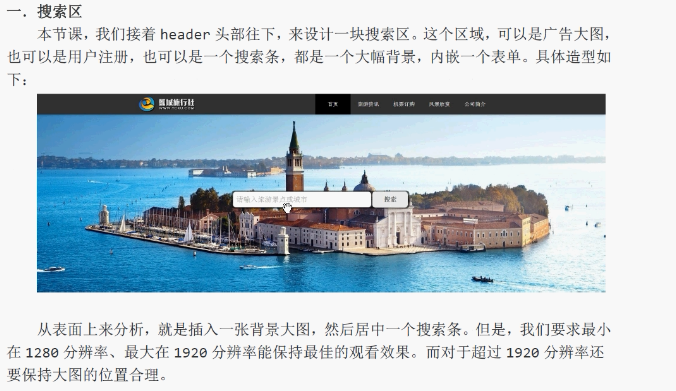
<!DOCTYPE html>

<html lang="zh-cn">

<head>

    <meta charset="UTF-8">

    <title>项目实战 PC端固定布局</title>

    <link rel="stylesheet" href="css/style.css">

</head>

<body>

    <!-- body nav section 需要h1~h6标题大纲 div header不需要  -->

    <header id="header">

        <div class="center">

            <!-- 一个页面最好就一个h1 让搜索引擎能更好的抓取关键字 -->

            <h1 class="logo">旅行社</h1>

            <nav class="link">

                <h2 class="none">网站导航</h2>

                <ul>

                    <li class="active"><a href="###">首页</a></li>

                    <li><a href="###">旅游咨询</a></li>

                    <li><a href="###">机票订购</a></li>

                    <li><a href="###">风景欣赏</a></li>

                    <li><a href="###">公司简介</a></li>

                </ul>

            </nav>

        </div>

    </header>

    <div id="search">

        <div class="center"></div>

        <input type="text" class="search" placeholder="请输入想要去的景点">

        <button class="button">搜索</button>

    </div>

<!--     <head>header</head>

    <section>

        <h2>bootstrap</h2>

        <p>一个html5 标准框架</p>

    </section>

    <footer>footer</footer> -->

</body>

</html>
css文件:
@charset "utf-8";

/*------------------------------------第一节导航栏部分------------------------------------*/

/*本身外边距*/

body, h1, ul {

    margin:;

    padding:;

}

/* 去除ul小圆点 */

ul {

    list-style: outside none none;

}

/* a 标签不需要下划线 */

a {

    text-decoration: none;

}

.none {

    display: none;

}

#header {

    width: 100%;

    min-width: 1263px;

    height: 70px;

    background: #333;

    /*header做个阴影*/

    box-shadow: 0 5px 10px rgba(0,0,0,0.3);

    position: relative;

    z-index:;

}

#header .center {

    width: 1263px;

    height: 70px;

    margin: 0 auto;

}

#header .logo {

    width: 240px;

    height: 70px;

    background-image: url(../img/logo.png);

    /* h1中的字向左移动到不能看到 */

    text-indent: -9999px;

    float: left;

}

#header .link {

    width: 650px;

    height: 70px;

    float: right;

    /* 字体淡灰 */

    color: #eee;

    /* 文字垂直居中 设定高度和 ul高度相同即可 */

    line-height: 70px;

}

#header .link li {

    width: 120px;

    /* li 文字横向铺平 */

    float: left;

    text-align: center;

}

#header .link a {

    color: #eee;

    display: block;

}

#header .link a:hover,

#header .active a {

    background-color: #000;

}

/*--------------------------------第二节 搜索框部分---------------------------------*/

/*search 搜索图片*/

#search {

    width: 100%;

    /*缩小页面滚动条右侧出现白色区域*/

    min-width: 1263px;

    height: 600px;

    background: url(../img/search.jpg) no-repeat center;

    position: relative;

}

/*背景色div部分*/

#search .center {

    width: 600px;

    height: 60px;

    background-color: #000;

    position: absolute;

    top: 50%;

    left: 50%;

    /*上右下左*/

    margin: -30px 0 0 -300px;

    /*园边框*/

    border-radius: 10px;

    /*透明度*/

    opacity: 0.6;

}

/*input 输入框部分*/

#search .search {

    width: 446px;

    height: 54px;

    background-color: #fff;

    position: absolute;

    top: 50%;

    left: 50%;

    /*上右下左*/

    margin: -28px 0 0 -296px;

    color: #666;

    border: 1px solid #666;

    border-radius: 10px;

    font-size: 24px;

    padding: 0 10px;

    /*处理某些浏览器点击后出现外边框*/

    outline: none;

}

/*搜索按钮部分*/

#search .button {

    width: 120px;

    height: 54px;

    background-color: #fff;

    position: absolute;

    top: 50%;

    left: 50%;

    /*上右下左*/

    margin: -28px 0 0 175px;

    color: #666;

    border: 1px solid #666;

    border-radius: 10px;

    font-size: 24px;

    cursor: pointer;

    /*处理某些浏览器点击后出现外边框*/

    outline: none;

    font-weight: bold;

}
Html5 学习笔记 【PC固定布局】 实战2 导航栏搜索区域的更多相关文章
- CSS学习笔记--Div+Css布局实战(入门)
基本页面布局 本教程带着大家做一个简单的页面布局 最重效果如下: 1.第一部,先创建上下左右4个DIV <!DOCTYPE html> <html> <head lang ...
- [html5] 学习笔记-响应式布局
1.响应式布局介绍 响应式布局是2010年5月份提出的一个概念,简而言之,就是一个网站能够兼容多个终端——而不是每一个终端做一个特定的版本.这个概念是为了兼容移动互联网浏览而诞生的,其目的是为用户提供 ...
- Bootstrap学习笔记(8)--响应式导航栏
说明: 1. 响应式导航栏,就是右上角的三道杠,点一下下方出现隐藏的导航栏.如果屏幕够大就显示所有的导航选项,如果屏幕小比如手机,就显示部分,剩下的放到三道杠里隐藏. 2. 外面套一个大的div,其实 ...
- amazeui学习笔记--css(布局相关3)--辅助类Utility
amazeui学习笔记--css(布局相关3)--辅助类Utility 一.总结 1.元素清除浮动: 添加 am-cf 这个 class 即可 2.水平滚动: .am-scrollable-horiz ...
- amazeui学习笔记--css(布局相关1)--网格Grid
amazeui学习笔记--css(布局相关1)--网格Grid 一.总结 基本使用 1.div+class布局:amaze里面采取的就是div+class的布局方式 <div class=&q ...
- html5学习笔记一
HTML5学习笔记 <video>标记:定义视频,Ogg.MPEG4.WebM三种格式 <video src=”movie.ogg” controls=”controls”> ...
- 微信小程序开发:学习笔记[4]——样式布局
微信小程序开发:学习笔记[4]——样式布局 Flex布局 新的布局方式 在小程序开发中,我们需要考虑各种尺寸终端设备上的适配.在传统网页开发,我们用的是盒模型,通过display:inline | b ...
- Html5学习笔记1 元素 标签 属性
<!DOCTYPE html> <html lang="en"> <head> <meta charset="UTF-8&quo ...
- amazeui学习笔记--css(布局相关2)--等分网格 AVG Grid
amazeui学习笔记--css(布局相关2)--等分网格 AVG Grid 一.总结 1.与grid区别:网格中:am-g + am-u-xx-n 等分网格中只有一个: am-avg-sm-4(在u ...
随机推荐
- python学习二十四天函数参数之默认参数
函数参数就是向函数传递参数,可以传递一个,可以是更多个,有的参数有值,有的没有,函数可以设置默认参数,默认参数必须放参数最后面. 1,不传递参数,设置默认参数 def hello(a,b,c='123 ...
- rabbitmq部署安装
1.安装rabbitmq需要提前安装erlang,相关下载地址:http://www.erlang.org/downloads,需要注意:默认安装的RabbitMQ 监听端口是5672 启动和 ...
- go中布尔类型bool的用法
示例 // bool布尔类型的用法 package main import ( "fmt" "unsafe" ) func main() { // bool类型 ...
- [转载]Linux上使用ssl进行端口转发
原文地址:Linux上使用ssl进行端口转发 作者:呼延十 背景介绍 作为一个后端程序员,经常要和别人联调接口,每当这时,总是被公司的各种,dev,qa,pre,prod环境搞得头疼,,,我真的只是想 ...
- AES加密的C语言实现
摘自网上一种AES加密,用C语言实现通过32字节密钥对16字节长度数据进行加密. #include <string.h> #include <stdio.h> #ifndef ...
- nginx日志切割脚本shell
nginx-log-rotate.sh: #!/bin/bash#---------------------------------------------# Comment:Used for rot ...
- python集合set,交集,并集,差集,对称差集,子集和超集
python集合set,交集,并集,差集,对称差集,子集和超集 x = {1, 2, 3, 4} y = {2, 4, 5, 6} # 交集(取x中与y中相同部分) print(x.intersect ...
- update all line start with -- to space
update all line start with -- to space ^--.*$
- robotframework
常用关键字* Settings * Library Selenium2Library1* Keywords * 打开浏览器 [Arguments] ${url} ${browser} [Documen ...
- html5 lineTo的使用例子
demo.js function draw(id) { var CANVAS=document.getElementById(id); var context=CANVAS.getContext('2 ...