
6、Shiro之自定义realm
1、创建一个包存放我们自定义的realm文件:
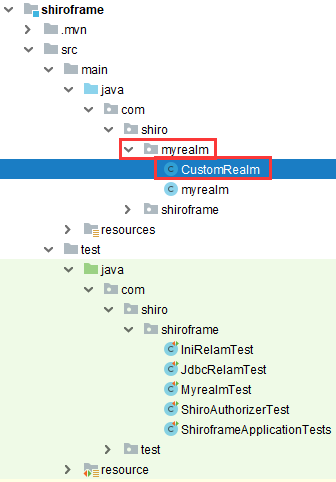
创建一个类名为CustomRealm继承AuthorizingRealm并实现父类AuthorizingRealm的方法,最后重写:
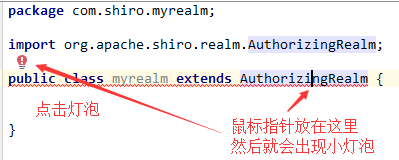
CustomRealm代码:
package com.shiro.myrealm;

import org.apache.shiro.authc.AuthenticationException;

import org.apache.shiro.authc.AuthenticationInfo;

import org.apache.shiro.authc.AuthenticationToken;

import org.apache.shiro.authc.SimpleAuthenticationInfo;

import org.apache.shiro.authz.AuthorizationInfo;

import org.apache.shiro.authz.SimpleAuthorizationInfo;

import org.apache.shiro.crypto.hash.Hash;

import org.apache.shiro.realm.AuthorizingRealm;

import org.apache.shiro.subject.PrincipalCollection;

import java.util.HashMap;

import java.util.HashSet;

import java.util.Map;

import java.util.Set;

public class CustomRealm extends AuthorizingRealm {

    //认证方法

    @Override

    protected AuthenticationInfo doGetAuthenticationInfo(AuthenticationToken authenticationToken) throws AuthenticationException {

        /**

         * 重写认证方法

         */

        //1、从主体传过来的认证信息中获取用户名

        String username = (String) authenticationToken.getPrincipal();

        //2、通过用户名到数据库获取凭证

        String password = getPassWordByUsername(username);

        if (password == null) {

            return null;

        }

        SimpleAuthenticationInfo simpleAuthenticationInfo = new SimpleAuthenticationInfo("miyue", password, "test");

        return simpleAuthenticationInfo;

    }

    //授权方法

    @Override

    protected AuthorizationInfo doGetAuthorizationInfo(PrincipalCollection principalCollection) {

        /**

         * 重新授权方法

         */

        String username = (String) principalCollection.getPrimaryPrincipal();

        //从角色和缓存中获取角色数据

        Set<String> roles = getRolesByUsername(username);

        //从角色和缓存中获取权限数据

        Set<String> permission = getPermissionsByUsername(username);

        SimpleAuthorizationInfo simpleAuthorizationInfo=new SimpleAuthorizationInfo();

        simpleAuthorizationInfo.setRoles(roles);

        simpleAuthorizationInfo.setStringPermissions(permission);

        return simpleAuthorizationInfo;

    }

    //下面使用map,set模拟数据库数据返回

    Map<String, String> map = new HashMap<String, String>();

    {

        map.put("miyue", "houru");

    }

    private String getPassWordByUsername(String username) {

        return map.get(username) == null ? null : map.get(username);

    }

    private Set<String> getRolesByUsername(String username) {

        Set<String> set = new HashSet<>();

        set.add("admin");

        set.add("user");

        return set;

    }

    private Set<String> getPermissionsByUsername(String username) {

        Set<String> set = new HashSet<>();

        set.add("user:delete");

        set.add("user:add");

        return set;

    }

}
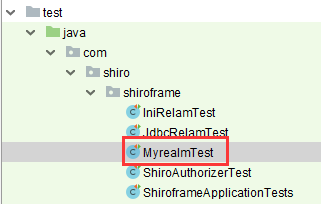
新建一个测试类MyrealmTest,测试我们自定义的realm:
package com.shiro.shiroframe;

import com.shiro.myrealm.CustomRealm;

import org.apache.shiro.SecurityUtils;

import org.apache.shiro.authc.UsernamePasswordToken;

import org.apache.shiro.mgt.DefaultSecurityManager;

import org.apache.shiro.subject.Subject;

import org.junit.jupiter.api.Test;

public class MyrealmTest {

    //引入我们自定义的realm

    CustomRealm customRealm = new CustomRealm();

    @Test

    public void MyrealmTest() {

        DefaultSecurityManager defaultSecurityManager = new DefaultSecurityManager();

        defaultSecurityManager.setRealm(customRealm);

        SecurityUtils.setSecurityManager(defaultSecurityManager);

        Subject subject = SecurityUtils.getSubject();

        UsernamePasswordToken usernamePasswordToken = new UsernamePasswordToken("miyue", "houru");

        subject.login(usernamePasswordToken);

        System.err.println(subject.isAuthenticated());

        subject.checkRoles("admin");

        subject.checkPermission("user:add");

    }

}
上面测试类,验证通过,则控制台不报错,否则报错;
6、Shiro之自定义realm的更多相关文章
- shiro中自定义realm实现md5散列算法加密的模拟
shiro中自定义realm实现md5散列算法加密的模拟.首先:我这里是做了一下shiro 自定义realm散列模拟,并没有真正链接数据库,因为那样东西就更多了,相信学到shiro的人对连接数据库的一 ...
- shiro(二)自定义realm,模拟数据库查询验证
自定义一个realm类,实现realm接口 package com; import org.apache.shiro.authc.*; import org.apache.shiro.realm.Re ...
- shiro之自定义realm
Shiro认证过程 创建SecurityManager--->主体提交认证--->SecurityManager认证--->Authenticsto认证--->Realm验证 ...
- Shiro -- (三) 自定义Realm
简介: Realm:域,Shiro 从从 Realm 获取安全数据(如用户.角色.权限),就是说 SecurityManager 要验证用户身份,那么它需要从 Realm 获取相应的用户进行比较以确定 ...
- 使用Spring配置shiro时,自定义Realm中属性无法使用注解注入解决办法
先来看问题 纠结了几个小时终于找到了问题所在,因为shiro的realm属于Filter,简单说就是初始化realm时,spring还未加载相关业务Bean,那么解决办法就是将springmvc ...
- (十)shiro之自定义Realm以及自定义Realm在web的应用demo
数据库设计 pom.xml <project xmlns="http://maven.apache.org/POM/4.0.0" xmlns:xsi="http:/ ...
- 权限框架 - shiro 自定义realm
上篇文章中是使用的默认realm来实现的简单登录,这仅仅只是个demo,真正项目中使用肯定是需要连接数据库的 首先创建自定义realm文件,如下: 在shiro中注入自定义realm的完全限定类名: ...
- Shiro第二篇【介绍Shiro、认证流程、自定义realm、自定义realm支持md5】
什么是Shiro shiro是apache的一个开源框架,是一个权限管理的框架,实现 用户认证.用户授权. spring中有spring security (原名Acegi),是一个权限框架,它和sp ...
- shiro自定义Realm
1.1 自定义Realm 上边的程序使用的是shiro自带的IniRealm,IniRealm从ini配置文件中读取用户的信息,大部分情况下需要从系统的数据库中读取用户信息,所以需要自定义realm. ...
随机推荐
- CentOS 设置 yum源
什么是 yum Yum(全称 Yellow Dog Updater)是一个在 Fedora 和 RedHat 以及 CentOS 中的 Shell 前端软件包管理器.基于 RPM 包管理,能够从指定的 ...
- 常用的一些js校验
参考:https://blog.csdn.net/xxjmlgb/article/details/49467717 var valNull;//非空校验 var valSpecial;//特殊字符校验 ...
- 使用consul
eureka官方已经正式宣布:自2.0起不再维护该项目,并在github 项目wiki上放出了一段吓唬人的话: 大意就是:从2.x起,官方不会继续开发了,如果需要使用2.x,风险自负.但其实我觉得问题 ...
- unittest装饰器:只执行一次方法
@classmethod def setUpClass(cls): print "start!" @classmethod def tearDownCla ...
- HTTPS加密原理与过程
HTTPS加密原理与过程 HTTP 超文本传输协议一种属于应用层的协议 缺点: 通信使用明文(不加密),内容可能会被窃听 不验证通信方的身份,因此有可能遭遇伪装 无法证明报文的完整性,所以有可能已遭篡 ...
- Python 输出百分比
注:python3环境试验 0x00 使用参数格式化{:2%} {:.2%}: 显示小数点后2位 print('{:.2%}'.format(10/50)) #percent: 20.00% {:.0 ...
- RMQ 2d 模板
#include<iostream> #include<cstdio> #include<string.h> #include<string> #inc ...
- Codeforces Gym 100814C Connecting Graph 树剖并查集/LCA并查集
初始的时候有一个只有n个点的图(n <= 1e5), 现在进行m( m <= 1e5 )次操作 每次操作要么添加一条无向边, 要么询问之前结点u和v最早在哪一次操作的时候连通了 /* * ...
- 如何给自己的Python项目制作安装包
Packaging Python Projects¶ 本教程将指导您如何打包一个简单的Python项目.它将向您展示如何添加必要的文件和结构来创建包,如何构建包以及如何将其上载到Python包索引. ...
- 重大更新:DeepFaceLab更新至2019.12.20
本次更新增加SAEHD:lr_dropout参数,训练时可以打开或者禁用(默认禁用),每次换脸经过足够的训练后可以启用此选项以减少重复次数,从而获得额外的清晰度.还有一个比较有意义的更新是增加了图片元 ...