
基于Nginx+nginx-rtmp-module+ffmpeg搭建rtmp、hls流媒体服务器
上篇文章是基于Red5与ffmpeg实现rtmp处理NVR或摄像头的监控视频处理方案,有兴趣的朋友可以查看。
Nginx及nginx-rtmp-module安装
新建目录
mkdir /usr/local/mginx下载
cd /usr/local/nginx

wget http://nginx.org/download/nginx-1.12.2.tar.gz

wget https://codeload.github.com/arut/nginx-rtmp-module/zip/master
解压
tar -zxvf nginx-1.12.2.tar.gz

unzip nginx-rtmp-module-master.zip
安装
nginx的一些模块依赖一些lib库,在安装nginx之前,须先安装这些lib库,
依赖库主要有g++、gcc、openssl-devel、pcre-devel和zlib-devel 视情况执行如下命令安装
yum install gcc-c++

yum install pcre pcre-devel

yum install zlib zlib-devel

yum install openssl openssl--devel
nginx-rtmp-module模块安装
cd /usr/local/nginx/nginx-1.12.2

#完成rtmp模块安装

./configure --add-module=/usr/local/nginx/nginx-rtmp-module-master

make

make install
至此nginx及相关模块安装完毕
配置及启动服务支持rtmp
修改配置
cd /usr/local/nginx/conf

vim nginx.conf
#user nobody;
worker_processes 1;
#error_log logs/error.log;
#error_log logs/error.log notice;
#error_log logs/error.log info;
#pid logs/nginx.pid;
events {
worker_connections 1024;
}
rtmp {
server {
listen 1935;
chunk_size 4096;
application vod {
play /usr/local/nginx/html/hls;
}
application live {
live on;
}
}
}
http {
include mime.types;
default_type application/octet-stream;
#log_format main '$remote_addr - $remote_user [$time_local] "$request" '
# '$status $body_bytes_sent "$http_referer" '
# '"$http_user_agent" "$http_x_forwarded_for"';
#access_log logs/access.log main;
sendfile on;
#tcp_nopush on;
#keepalive_timeout 0;
keepalive_timeout 65;
#gzip on;
server {
listen 80;
server_name localhost;
#charset koi8-r;
#access_log logs/host.access.log main;
location / {
root html;
index index.html index.htm;
}
#error_page 404 /404.html;
# redirect server error pages to the static page /50x.html
#
error_page 500 502 503 504 /50x.html;
location = /50x.html {
root html;
}
#fastdfs 将 /group1/M00 映射到 /usr/local/fastdfs/file/data
location /group1/M00 {
alias /usr/local/fastdfs/file/data;
}
# proxy the PHP scripts to Apache listening on 127.0.0.1:80
#
#location ~ \.php$ {
# proxy_pass http://127.0.0.1;
#}
# pass the PHP scripts to FastCGI server listening on 127.0.0.1:9000
#
#location ~ \.php$ {
# root html;
# fastcgi_pass 127.0.0.1:9000;
# fastcgi_index index.php;
# fastcgi_param SCRIPT_FILENAME /scripts$fastcgi_script_name;
# include fastcgi_params;
#}
# deny access to .htaccess files, if Apache's document root
# concurs with nginx's one
#
#location ~ /\.ht {
# deny all;
#}
}
# another virtual host using mix of IP-, name-, and port-based configuration
#
#server {
# listen 8000;
# listen somename:8080;
# server_name somename alias another.alias;
# location / {
# root html;
# index index.html index.htm;
# }
#}
# HTTPS server
#
#server {
# listen 443 ssl;
# server_name localhost;
# ssl_certificate cert.pem;
# ssl_certificate_key cert.key;
# ssl_session_cache shared:SSL:1m;
# ssl_session_timeout 5m;
# ssl_ciphers HIGH:!aNULL:!MD5;
# ssl_prefer_server_ciphers on;
# location / {
# root html;
# index index.html index.htm;
# }
#}
}服务管理
cd /usr/local/nginx/sbin

nginx #启动服务

nginx -s stop #管理服务
直播
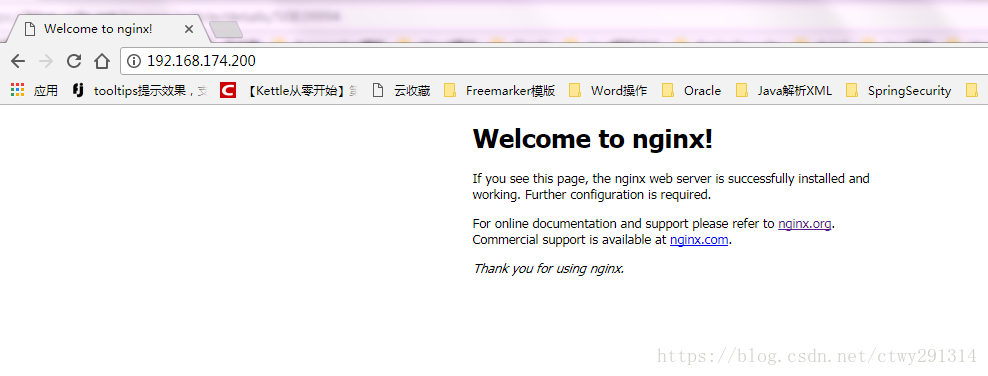
http服务测试 http://127.0.0.1/
利用ffmpeg进行推流直播
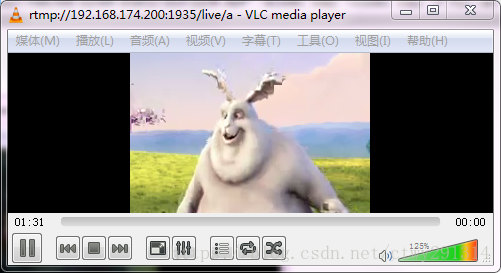
ffmpeg -re -i "E:\ffmpeg-20180227-fa0c9d6-win64-static\bin\1234.mp4" -acodec copy -vcodec copy -f flv -an rtmp://192.168.174.200:1935/live/a 利用vlc测试,地址:rtmp://192.168.174.200:1935/live/a
点播
将本地mp4文件复制到/usr/local/nginx/html/hls
利用vlc测试:rtmp://192.168.174.200:1935/vod/1234.mp4
配置支持hls
工作流程
点播:准备好视频文件MP4,使用ffmpeg将其转成TS格式文件,然后继续使用ffmpeg将其切片并生成播放列表M3U8文件,将所得TS分片与M3U8文件放到nginx服务器目录下,开启http服务器后,同一局域网内用手机输入网络地址可查看点播视频。
直播:使用VLC软件将视频以rtsp流的形式发出,使用ffmpeg接收这个rtsp流并实时切割到http服务器下,开启服务器后,同一局域网内用手机输入网络地址可查看直播视频。
修改配置文件
cd /usr/local/nginx/conf

vim mime.types

#在 application/zip zip; 这一行后面增加2行:

application/x-mpegURL m3u8;

application/vnd.apple.mpegurl m3u8;

vim video/x-msvideo

#avi;行后,增加1行:

video/MP2T ts;
点播
使用ffmpeg将mp4格式文件转成TS格式文件
ffmpeg -y -i 1234.mp4 -vcodec copy -acodec copy -vbsf h264_mp4toannexb test.ts使用ffmpeg将TS文件切成ts分片并产生m3u8文件
ffmpeg -i test.ts -c copy -map 0 -f segment -segment_list playlist.m3u8 -segment_time 2 test%03d.ts将所得的ts分片和m3u8文件放到nginx\html目录下
vlc输入[ http://192.168.174.200:80/playlist.m3u8 ]即可看到点播视频
注:192.168.174.200是本机的局域网ip,也即http服务器的ip
直播
将视频以rtsp流的形式从vlc上发出来(具体方法请自查)
使用ffmpeg接收rtsp流并自动实时切片到http服务器下
ffmpeg -i rtsp://admin:admin@172.19.12.192/cam/realmonitor?channel=1&subtype=1 -c copy -vcodec h264 -f hls -hls_time 2.0 -hls_list_size 5 -hls_wrap 5 /usr/local/nginx/html/test.m3u8
vlc输入[ http://172.19.12.240/test.m3u8 ]即可看到直播视频
录制
通过ffmpeg向服务器推流,在服务器进行视频录制
ffmpeg -re -i "E:\ffmpeg-20180227-fa0c9d6-win64-static\bin\1234.mp4" -acodec copy -vcodec copy -f flv -an rtmp://192.168.174.200:1935/live/ahttp://192.168.174.200/hls/a/index.m3u8修改nginx.conf配置
rtmp {

    server {

	listen 1935;

	chunk_size 4096;

	application vod {

		play /usr/local/nginx/html/hls;

     	}

    	application live {

                live on;

	        hls on; #这个参数把直播服务器改造成实时回放服务器。

                wait_key on; #对视频切片进行保护,这样就不会产生马赛克了。

                hls_path /usr/local/nginx/html/hls; #切片视频文件存放位置。

                hls_fragment 10s;     #每个视频切片的时长。

                hls_playlist_length 60s;  #总共可以回看的事件,这里设置的是1分钟。

                hls_continuous on; #连续模式。

                hls_cleanup on;    #对多余的切片进行删除。

                hls_nested on;     #嵌套模式。

        }

    }

}
查看已经产生切片视频文件了。其中还有一个index.m3u8。
cd /usr/local/nginx/html/hls/a/

ls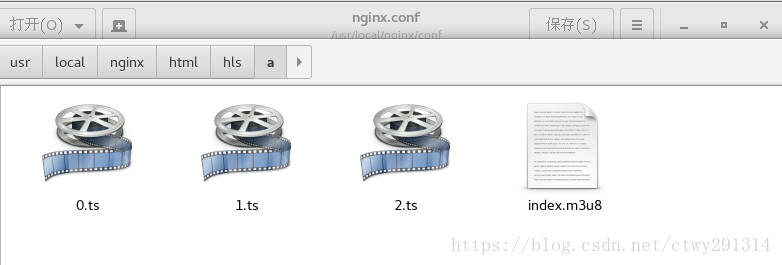
vlc输入[ http://192.168.174.200/hls/a/index.m3u8 ]即可看到视频
基于Nginx+nginx-rtmp-module+ffmpeg搭建rtmp、hls流媒体服务器的更多相关文章
- Ubuntu 14.10下基于Nginx搭建mp4/flv流媒体服务器(可随意拖动)并支持RTMP/HLS协议(含转码工具)
Ubuntu 14.10下基于Nginx搭建mp4/flv流媒体服务器(可随意拖动)并支持RTMP/HLS协议(含转码工具) 最近因为项目关系,收朋友之托,想制作秀场网站,但是因为之前一直没有涉及到这 ...
- nginx+ffmpeg搭建rtmp转播rtsp流的flash服务器
本文概要: nginx是非常优秀的开源服务器,用它来做hls或者rtmp流媒体服务器是非常不错的选择.本文介绍了一种简易方法快速搭建rtmp流媒体服务器,也叫rtsp转播,数据源不是读取文件,而是采用 ...
- CentOS6下基于Nginx搭建mp4/flv流媒体服务器
CentOS6下基于Nginx搭建mp4/flv流媒体服务器(可随意拖动)并支持RTMP/HLS协议(含转码工具) 1.先添加几个RPM下载源 1.1)安装RPMforge的CentOS6源 [roo ...
- Nginx搭建flv mp4流媒体服务器[转]
Nginx搭建flv mp4流媒体服务器 作者:二蛋 时间:December 1, 2014 分类:Note 环境:Centos 6.4 32bit 一.安装依赖包 1.安装zlib wget htt ...
- 用VLC Media Player搭建简单的流媒体服务器
VLC可以作为播放器使用,也可以搭建服务器. 在经历了Helix Server和Darwin Streaming Server+Perl的失败之后,终于找到了一个搭建流媒体简单好用的方法. 这个网址中 ...
- CentOS6下基于Nginx搭建mp4/flv流媒体服务器(可随意拖动)并支持RTMP/HLS协议(含转码工具)
1.先添加几个RPM下载源 1.1)安装RPMforge的CentOS6源 [root@AY130611215205Z ~]# wget -c http://pkgs.repoforge.or ...
- Windows使用Nginx+ffmpeg搭建RTMP服务器
简介Nginx是一款轻量级的Web 服务器/反向代理服务器及电子邮件(IMAP/POP3)代理服务器.nginx-rmtp-module是Nginx服务器的流媒体插件.nginx通过rtmp模块提供r ...
- rtmp与hls流媒体服务器搭建:ubuntu下Nginx搭建初探与rtmp-module的添加
关键词:Nignx(http服务器):rtmp,hls(流媒体服务) 前言:感谢开源,感谢战斗民族.现在在做流媒体服务的一些工作,流媒体服务器搭建的网上教程多入牛毛,但是细细查看,发现很多同志贴上来的 ...
- Nginx搭建hls流媒体服务器
第一种方案:ffmpeg+nginx 新的ffmpeg已经支持HLS.(本人也参与了代码供献,给自己做个广告:)) 点播: 生成hls分片: ffmpeg -i <媒体文件> ...
随机推荐
- Selenium 详解CSS定位
xpath定位是“屠龙刀”,那CSS定位就是"倚天剑了",相对xpath来说,具有语法简单,定位速度快等优点 一.属性定位 1.可以通过元素的id,class,tag标签这三个属性 ...
- (66)Nginx+lua+Redis开发
一. 概述 Nginx是一个高性能,支持高并发的,轻量级的web服务器.目前,Apache依然web服务器中的老大,但是在全球前1000大的web服务器中,Nginx的份额为22.4%.Nginx采用 ...
- 基于数组阻塞队列 ArrayBlockingQueue 的一个队列工具类
java语言基于ArrayBlockingQueue 开发的一个根据特定前缀和后缀的队列.每天自动循环生成. 1.定义队列基类 Cookie package com.bytter.util.queue ...
- eclipse导出java项目jar包(依赖第三方jar包)
一.在项目根目录下建一个文件:MANIFEST.MF 内容: Manifest-Version: 1.0 Class-Path: lib/commons-compress-1.9.jar lib/co ...
- ActiveMQ从入门到精通(一)
这是关于消息中间件ActiveMQ的一个系列专题文章,将涵盖JMS.ActiveMQ的初步入门及API详细使用.两种经典的消息模式(PTP and Pub/Sub).与Spring整合.ActiveM ...
- np.random.shuffle(x)与np.random.permutation(x)
来自:https://blog.csdn.net/brucewong0516/article/details/79012233 将数组打乱随机排列 两种方法: np.random.shuffle(x) ...
- HTTP学习记录:二、请求方法
学习资源主要为:@小坦克HTTP相关博客 最基础的是4种,GET.POST.PUT.DELETE对应着对资源的查.改.增.删.最常用的是GET和POST. GET一般用于获取/查询资源信息: POST ...
- wpf 收集的不错的datagrid样式
<ResourceDictionary xmlns="http://schemas.microsoft.com/winfx/2006/xaml/presentation" x ...
- frewalld假端口
之前服务器没有开启firewalld,上面有lnmp.zabbix服务,后来开启了防火墙,发现端口都在,但是不能访问zabbix,后来用firewalld把端口重新开启.重新加载后才可以访问,这就是f ...
- linux常用终端指令+如何用vim写一个c程序并运行
在装好ubuntu之后今天学习了一些linux的一些基础知识: windows里面打开命令窗口是win+r,在linux系统里面,ctrl+alt+t打开终端,今天的一些指令都是围绕终端来说的 首先s ...