
王颖奇 20171010129《面向对象程序设计(java)》第十五周学习总结
实验十五 GUI编程练习与应用程序部署
实验时间 2018-12-6
学习总结:
理论部分:
◼ JAR文件◼ 应用程序首选项存储◼ Java Web Start
JAR文件:
1.Java程序的打包:程序编译完成后,程序员将.class文件压缩打包为.jar文件后,GUI界面程序就可以直接双击图标运行。
2.jar文件(Java归档)既可以包含类文件,也可包含诸如图像和声音这些其它类型的文件。
3.JAR文件是压缩的,它使用ZIP压缩格式。
jar命令
1 jar命令格式:
jar {ctxui} [vfm0Me] [jar-file] [manifest-file] [entry-point] [-C dir] files ...
2 Jar命令选项(教材581页表13-1):
– -c 创建一个新的或者空的存档文件并加入文件。
– -C 暂时改变到指定的目录
– -e 在清单文件中创建一个条目
– -f 将JAR文件名指定为第二个命令行参数
– -i 为指定的JAR文件产生索引信息
– -m 将一个清单文件(manifest)添加到JAR文件中
– -M 不产生所有项的清单文件(manifest)
– -t 列出存档内容的列表
– -u 更新已存在的JAR文件
– -v 生成详细的输出结果
– -x 解压存档中的命名的(或所有的〕文件
– -0 只存储方式,不用ZIP压缩格式
(1) 创建JAR文件
jar cf jar-file input-file(s)
c---want to Create a JAR file.
eg: 1) jar cf MenuTest.jar *.class *.gif
f---want the output to go to a file rather than to stdout.
2) jar cvf MenuTest.jar *.class *.gif
v---Produces verbose output to stdout.
3) jar cvf MenuTest.jar *
*---create all contents in current directory.
4) jar cv0f MenuTest.jar *
0---don't want the JAR file to be compressed.
(2) 查看JAR文件
jar tf jar-file
t---want to view the Table of contents of the JAR file.
eg: 1) jar tvf MenuTest.jar
v---Produces verbose output to stdout.
(3) 提取JAR文件
jar xf jar-file [archived-file(s)]
x---want to extract files from the JAR archive.
eg: 1) jar xf MenuTest.jar copy.gif(仅提取文件copy.gif)
2) jar xf MenuTest.jar alex/copy.gif(仅提取目录alex下的
文件copy.gif)
3) jar xf MenuTest.jar(提取该JAR中的所有文件或目录)
(4) 更新JAR文件
jar uf jar-file input-file(s)
u---want to update an existing JAR file.
eg: 1) jar uf MenuTest.jar copy.gif
(5) 索引JAR文件
jar i jar-file
i---index an existing JAR file.
eg: 1) jar i MenuTest.jar
清单文件
⚫ 每个JAR文件中包含一个用于描述归档特征的清单文件(manifest)。清单文件被命名为MANIFEST.MF,它位于JAR文件的一个特殊的META-INF子目录中。
⚫ 最小的符合标准的清单文件是很简单的:Manifest-Version:1.0复杂的清单文件包含多个条目,这些条目被分成多个节。第一节被称为主节,作用于整个JAR文件。随后的条目用来指定已命名条目的属性,可以是文件、包或者URL。
⚫ 清单文件的节与节之间用空行分开,最后一行必须以换行符结束。否则,清单文件将无法被正确地读取。
– 创建一个包含清单的JAR文件,应该运行:
jar cfm MyArchive.jar manifest.mf com/*.class
– 要更新一个已有JAR文件的清单,则需要将增加的部分
放置到一个文本文件中,运行如下命令:
jar ufm MyArchive.jar manifest-additions.mf
运行JAR文件
⚫ 用户可以通过下面的命令来启动应用程序:
java –jar MyProgram.jar
⚫ 窗口操作系统,可通过双击JAR文件图标来启动应用程序。
资源
⚫ Java中,应用程序使用的类通常需要一些相关的数据文件,这些文件称为资源(Resource)。
–图像和声音文件。
–带有消息字符串和按钮标签的文本文件。
–二进制数据文件,如:描述地图布局的文件。
⚫ 类加载器知道如何搜索类文件,直到在类路径、存档文件或Web服务器上找到为止。
⚫ 利用资源机制对于非类文件也可以进行同样操作,具体步骤如下:
– 获得资源的Class对象。
– 如果资源是一个图像或声音文件,那么就需要调用getresource(filename)获得资源的URL位置,然后利用getImage或getAudioClip方法进行读取。
– 如果资源是文本或二进制文件,那么就可以使用getResouceAsStream方法读取文件中的数据。
⚫ 资源文件可以与类文件放在同一个目录中,也可以将资源文件放在其它子目录中。具体有以下两种方式:
–相对资源名:如data/text/about.txt它会被解释为相对于加载这个资源的类所在的包。
–绝对资源名:如/corejava/title.txt
⚫ ResourceTest.java程序演示了资源加载的过程。
⚫ 编译、创建JAR文件和执行这个程序的命令如下:
– javac ResourceTest.java
– jar cvfm ResourceTest.jar ResourceTest.mf
*.class *.gif *.txt
– java –jar ResourceTest.jar
1、实验目的与要求
(1) 掌握Java应用程序的打包操作;
(2) 了解应用程序存储配置信息的两种方法;
(3) 掌握基于JNLP协议的java Web Start应用程序的发布方法;
(5) 掌握Java GUI 编程技术。
2、实验内容和步骤
实验1: 导入第13章示例程序,测试程序并进行代码注释。
测试程序1
l 在elipse IDE中调试运行教材585页程序13-1,结合程序运行结果理解程序;
l 将所生成的JAR文件移到另外一个不同的目录中,再运行该归档文件,以便确认程序是从JAR文件中,而不是从当前目录中读取的资源。
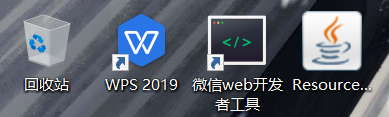
更换位置后仍可运行

l 掌握创建JAR文件的方法;
代码:
package resource;

import java.awt.*;

import java.io.*;

import java.net.*;

import java.util.*;

import javax.swing.*;

/**

 * @version 1.41 2015-06-12

 * @author Cay Horstmann

 */

public class ResourceTest

{

   public static void main(String[] args)

   {

      EventQueue.invokeLater(() -> {

         JFrame frame = new ResourceTestFrame();

         frame.setTitle("ResourceTest");

         frame.setDefaultCloseOperation(JFrame.EXIT_ON_CLOSE);

         frame.setVisible(true);

      });

   }

}

/**

 * A frame that loads image and text resources.

 */

class ResourceTestFrame extends JFrame

{

   private static final int DEFAULT_WIDTH = 300;

   private static final int DEFAULT_HEIGHT = 300;

   public ResourceTestFrame()

   {

      setSize(DEFAULT_WIDTH, DEFAULT_HEIGHT);

      //返回类,并查找带有给定名称的资源。

      URL aboutURL = getClass().getResource("about.gif");

      Image img = new ImageIcon(aboutURL).getImage();

      setIconImage(img);

      //读取文件夹内容,写入到文本区中

      JTextArea textArea = new JTextArea();

      InputStream stream = getClass().getResourceAsStream("about.txt");

      try (Scanner in = new Scanner(stream, "UTF-8"))

      {

         while (in.hasNext())

            textArea.append(in.nextLine() + "\n");

      }

      add(textArea);

   }

}
ResourceTest

运行结果:
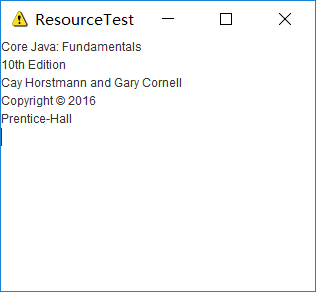
测试程序2
l 在elipse IDE中调试运行教材588页-589程序13-2,结合程序运行结果理解程序;
l 了解Properties类中常用的方法;
代码:
package properties;

import java.awt.EventQueue;

import java.awt.event.*;

import java.io.*;

import java.util.Properties;

import javax.swing.*;

/**

 * A program to test properties. The program remembers the frame position, size,

 * and title.

 * @version 1.01 2015-06-16

 * @author Cay Horstmann

 */

public class PropertiesTest

{

   public static void main(String[] args)

   {

      EventQueue.invokeLater(() -> {

         PropertiesFrame frame = new PropertiesFrame();

         frame.setVisible(true);

      });

   }

}

/**

 * A frame that restores position and size from a properties file and updates

 * the properties upon exit.

 */

class PropertiesFrame extends JFrame

{

   private static final int DEFAULT_WIDTH = 300;

   private static final int DEFAULT_HEIGHT = 200;

   private File propertiesFile;

   private Properties settings;

   public PropertiesFrame()

   {

      // 从属性中获取位置、大小和标题

      String userDir = System.getProperty("user.home");

      File propertiesDir = new File(userDir, ".corejava");

      if (!propertiesDir.exists()) propertiesDir.mkdir();

      propertiesFile = new File(propertiesDir, "program.properties");

      Properties defaultSettings = new Properties();

      defaultSettings.setProperty("left", "0");

      defaultSettings.setProperty("top", "0");

      defaultSettings.setProperty("width", "" + DEFAULT_WIDTH);

      defaultSettings.setProperty("height", "" + DEFAULT_HEIGHT);

      defaultSettings.setProperty("title", "");

      settings = new Properties(defaultSettings);

      if (propertiesFile.exists())

         try (InputStream in = new FileInputStream(propertiesFile))

         {

            settings.load(in);

         }

         catch (IOException ex)

         {

            ex.printStackTrace();

         }

      int left = Integer.parseInt(settings.getProperty("left"));

      int top = Integer.parseInt(settings.getProperty("top"));

      int width = Integer.parseInt(settings.getProperty("width"));

      int height = Integer.parseInt(settings.getProperty("height"));

      setBounds(left, top, width, height);

      // 如果没有标题,询问用户

      String title = settings.getProperty("title");

      if (title.equals(""))

         title = JOptionPane.showInputDialog("Please supply a frame title:");

      if (title == null) title = "";

      setTitle(title);

      //添加指定的窗口侦听器,以从此窗口接收窗口事件。

      addWindowListener(new WindowAdapter()

      {

         public void windowClosing(WindowEvent event)

         {

            settings.setProperty("left", "" + getX());

            settings.setProperty("top", "" + getY());

            settings.setProperty("width", "" + getWidth());

            settings.setProperty("height", "" + getHeight());

            settings.setProperty("title", getTitle());

            try (OutputStream out = new FileOutputStream(propertiesFile))

            {

               settings.store(out, "Program Properties");

            }

            catch (IOException ex)

            {

               ex.printStackTrace();

            }

            System.exit(0);

         }

      });

   }

}
PropertiesTest
运行结果:
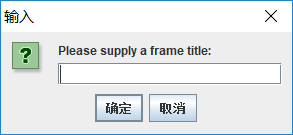
添加title的名字wyq

测试程序3
l 在elipse IDE中调试运行教材593页-594程序13-3,结合程序运行结果理解程序;
l 了解Preferences类中常用的方法;
代码:
package preferences;

import java.awt.*;

import java.io.*;

import java.util.prefs.*;

import javax.swing.*;

import javax.swing.filechooser.*;

/**

 * A program to test preference settings. The program remembers the frame

 * position, size, and title.

 * @version 1.03 2015-06-12

 * @author Cay Horstmann

 */

public class PreferencesTest

{

   public static void main(String[] args)

   {

      EventQueue.invokeLater(() -> {

         PreferencesFrame frame = new PreferencesFrame();

         frame.setDefaultCloseOperation(JFrame.EXIT_ON_CLOSE);

         frame.setVisible(true);

      });

   }

}

/**

 * A frame that restores position and size from user preferences and updates the

 * preferences upon exit.

 */

class PreferencesFrame extends JFrame

{

   private static final int DEFAULT_WIDTH = 300;

   private static final int DEFAULT_HEIGHT = 200;

   private Preferences root = Preferences.userRoot();

   private Preferences node = root.node("/com/horstmann/corejava");

   public PreferencesFrame()

   {

      // get position, size, title from preferences

      int left = node.getInt("left", 0);

      int top = node.getInt("top", 0);

      int width = node.getInt("width", DEFAULT_WIDTH);

      int height = node.getInt("height", DEFAULT_HEIGHT);

      setBounds(left, top, width, height);

      // if no title given, ask user

      String title = node.get("title", "");

      if (title.equals(""))

         title = JOptionPane.showInputDialog("Please supply a frame title:");

      if (title == null) title = "";

      setTitle(title);

      // 设置显示XML文件的文件选择器

      final JFileChooser chooser = new JFileChooser();

      chooser.setCurrentDirectory(new File("."));

      chooser.setFileFilter(new FileNameExtensionFilter("XML files", "xml"));

      // 设置菜单

      JMenuBar menuBar = new JMenuBar();

      setJMenuBar(menuBar);

      JMenu menu = new JMenu("File");

      menuBar.add(menu);

      JMenuItem exportItem = new JMenuItem("Export preferences");

      menu.add(exportItem);

      exportItem

            .addActionListener(event -> {

               if (chooser.showSaveDialog(PreferencesFrame.this) == JFileChooser.APPROVE_OPTION)

               {

                  try

                  {

                     savePreferences();

                     OutputStream out = new FileOutputStream(chooser

                           .getSelectedFile());

                     node.exportSubtree(out);

                     out.close();

                  }

                  catch (Exception e)

                  {

                     e.printStackTrace();

                  }

               }

            });

      JMenuItem importItem = new JMenuItem("Import preferences");

      menu.add(importItem);

      importItem

            .addActionListener(event -> {

               if (chooser.showOpenDialog(PreferencesFrame.this) == JFileChooser.APPROVE_OPTION)

               {

                  try

                  {

                     InputStream in = new FileInputStream(chooser

                           .getSelectedFile());

                     Preferences.importPreferences(in);

                     in.close();

                  }

                  catch (Exception e)

                  {

                     e.printStackTrace();

                  }

               }

            });

      JMenuItem exitItem = new JMenuItem("Exit");

      menu.add(exitItem);

      exitItem.addActionListener(event -> {

         savePreferences();

         System.exit(0);

      });

   }

   public void savePreferences()

   {

      node.putInt("left", getX());

      node.putInt("top", getY());

      node.putInt("width", getWidth());

      node.putInt("height", getHeight());

      node.put("title", getTitle());

   }

}
PreferencesTest
运行结果:


测试程序4
l 在elipse IDE中调试运行教材619页-622程序13-6,结合程序运行结果理解程序;
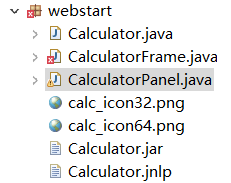
l 掌握基于JNLP协议的java Web Start应用程序的发布方法。
代码:
package webstart;

import java.awt.*;

import javax.swing.*;

/**

 * A calculator with a calculation history that can be deployed as a Java Web Start application.

 * @version 1.04 2015-06-12

 * @author Cay Horstmann

 */

public class Calculator

{

   public static void main(String[] args)

   {

      EventQueue.invokeLater(() ->             {

               CalculatorFrame frame = new CalculatorFrame();

               frame.setDefaultCloseOperation(JFrame.EXIT_ON_CLOSE);

               frame.setVisible(true);

         });

   }

}
Calculator
package webstart;

import java.io.BufferedReader;

import java.io.ByteArrayInputStream;

import java.io.ByteArrayOutputStream;

import java.io.FileNotFoundException;

import java.io.IOException;

import java.io.InputStream;

import java.io.InputStreamReader;

import java.io.OutputStream;

import java.io.PrintStream;

import java.net.MalformedURLException;

import java.net.URL;

import javax.jnlp.BasicService;

import javax.jnlp.FileContents;

import javax.jnlp.FileOpenService;

import javax.jnlp.FileSaveService;

import javax.jnlp.PersistenceService;

import javax.jnlp.ServiceManager;

import javax.jnlp.UnavailableServiceException;

import javax.swing.JFrame;

import javax.swing.JMenu;

import javax.swing.JMenuBar;

import javax.swing.JMenuItem;

import javax.swing.JOptionPane;

/**

 * A frame with a calculator panel and a menu to load and save the calculator history.

 */

public class CalculatorFrame extends JFrame

{

   private CalculatorPanel panel;

   public CalculatorFrame()

   {

      setTitle();

      panel = new CalculatorPanel();

      add(panel);

      JMenu fileMenu = new JMenu("File");

      JMenuBar menuBar = new JMenuBar();

      menuBar.add(fileMenu);

      setJMenuBar(menuBar);

      JMenuItem openItem = fileMenu.add("Open");

      openItem.addActionListener(event -> open());

      JMenuItem saveItem = fileMenu.add("Save");

      saveItem.addActionListener(event -> save());

      pack();

   }

   /**

    * Gets the title from the persistent store or asks the user for the title if there is no prior

    * entry.

    */

   public void setTitle()

   {

      try

      {

         String title = null;

         BasicService basic = (BasicService) ServiceManager.lookup("javax.jnlp.BasicService");

         URL codeBase = basic.getCodeBase();

         PersistenceService service = (PersistenceService) ServiceManager

               .lookup("javax.jnlp.PersistenceService");

         URL key = new URL(codeBase, "title");

         try

         {

            FileContents contents = service.get(key);

            InputStream in = contents.getInputStream();

            BufferedReader reader = new BufferedReader(new InputStreamReader(in));

            title = reader.readLine();

         }

         catch (FileNotFoundException e)

         {

            title = JOptionPane.showInputDialog("Please supply a frame title:");

            if (title == null) return;

            service.create(key, 100);

            FileContents contents = service.get(key);

            OutputStream out = contents.getOutputStream(true);

            PrintStream printOut = new PrintStream(out);

            printOut.print(title);

         }

         setTitle(title);

      }

      catch (UnavailableServiceException | IOException e)

      {

         JOptionPane.showMessageDialog(this, e);

      }

   }

   /**

    * Opens a history file and updates the display.

    */

   public void open()

   {

      try

      {

         FileOpenService service = (FileOpenService) ServiceManager

               .lookup("javax.jnlp.FileOpenService");

         FileContents contents = service.openFileDialog(".", new String[] { "txt" });

         JOptionPane.showMessageDialog(this, contents.getName());

         if (contents != null)

         {

            InputStream in = contents.getInputStream();

            BufferedReader reader = new BufferedReader(new InputStreamReader(in));

            String line;

            while ((line = reader.readLine()) != null)

            {

               panel.append(line);

               panel.append("\n");

            }

         }

      }

      catch (UnavailableServiceException e)

      {

         JOptionPane.showMessageDialog(this, e);

      }

      catch (IOException e)

      {

         JOptionPane.showMessageDialog(this, e);

      }

   }

   /**

    * Saves the calculator history to a file.

    */

   public void save()

   {

      try

      {

         ByteArrayOutputStream out = new ByteArrayOutputStream();

         PrintStream printOut = new PrintStream(out);

         printOut.print(panel.getText());

         InputStream data = new ByteArrayInputStream(out.toByteArray());

         FileSaveService service = (FileSaveService) ServiceManager

               .lookup("javax.jnlp.FileSaveService");

         service.saveFileDialog(".", new String[] { "txt" }, data, "calc.txt");

      }

      catch (UnavailableServiceException e)

      {

         JOptionPane.showMessageDialog(this, e);

      }

      catch (IOException e)

      {

         JOptionPane.showMessageDialog(this, e);

      }

   }

}
CalculatorFrame
package webstart;

import java.awt.*;

import java.awt.event.*;

import javax.swing.*;

import javax.swing.text.*;

/**

   A panel with calculator buttons and a result display.

*/

public class CalculatorPanel extends JPanel

{

   private JTextArea display;

   private JPanel panel;

   private double result;

   private String lastCommand;

   private boolean start;

   /**

      Lays out the panel.

   */

   public CalculatorPanel()

   {

      setLayout(new BorderLayout());

      result = 0;

      lastCommand = "=";

      start = true;

      // add the display

      display = new JTextArea(10, 20);

      add(new JScrollPane(display), BorderLayout.NORTH);

      ActionListener insert = new InsertAction();

      ActionListener command = new CommandAction();

      // add the buttons in a 4 x 4 grid

      panel = new JPanel();

      panel.setLayout(new GridLayout(4, 4));

      addButton("7", insert);

      addButton("8", insert);

      addButton("9", insert);

      addButton("/", command);

      addButton("4", insert);

      addButton("5", insert);

      addButton("6", insert);

      addButton("*", command);

      addButton("1", insert);

      addButton("2", insert);

      addButton("3", insert);

      addButton("-", command);

      addButton("0", insert);

      addButton(".", insert);

      addButton("=", command);

      addButton("+", command);

      add(panel, BorderLayout.CENTER);

   }

   /**

      Gets the history text.

      @return the calculator history

   */

   public String getText()

   {

      return display.getText();

   }

   /**

      Appends a string to the history text.

      @param s the string to append

   */

   public void append(String s)

   {

      display.append(s);

   }

   /**

      Adds a button to the center panel.

      @param label the button label

      @param listener the button listener

   */

   private void addButton(String label, ActionListener listener)

   {

      JButton button = new JButton(label);

      button.addActionListener(listener);

      panel.add(button);

   }

   /**

      This action inserts the button action string to the

      end of the display text.

   */

   private class InsertAction implements ActionListener

   {

      public void actionPerformed(ActionEvent event)

      {

         String input = event.getActionCommand();

         start = false;

         display.append(input);

      }

   }

   /**

      This action executes the command that the button

      action string denotes.

   */

   private class CommandAction implements ActionListener

   {

      public void actionPerformed(ActionEvent event)

      {

         String command = event.getActionCommand();

         if (start)

         {

            if (command.equals("-"))

            {

               display.append(command);

               start = false;

            }

            else

               lastCommand = command;

         }

         else

         {

            try

            {

               int lines = display.getLineCount();

               int lineStart = display.getLineStartOffset(lines - 1);

               int lineEnd = display.getLineEndOffset(lines - 1);

               String value = display.getText(lineStart, lineEnd - lineStart);

               display.append(" ");

               display.append(command);

               calculate(Double.parseDouble(value));

               if (command.equals("="))

                  display.append("\n" + result);

               lastCommand = command;

               display.append("\n");

               start = true;

            }

            catch (BadLocationException e)

            {

               e.printStackTrace();

            }

         }

      }

   }

   /**

      Carries out the pending calculation.

      @param x the value to be accumulated with the prior result.

   */

   public void calculate(double x)

   {

      if (lastCommand.equals("+")) result += x;

      else if (lastCommand.equals("-")) result -= x;

      else if (lastCommand.equals("*")) result *= x;

      else if (lastCommand.equals("/")) result /= x;

      else if (lastCommand.equals("=")) result = x;

   }

}
CalculatorPanel
实验2:GUI综合编程练习
按实验十四分组名单,组内讨论完成以下编程任务:
练习1:采用GUI界面设计以下程序,并进行部署与发布:
l 编制一个程序,将身份证号.txt 中的信息读入到内存中;
l 按姓名字典序输出人员信息;
l 查询最大年龄的人员信息;
l 查询最小年龄人员信息;
l 输入你的年龄,查询身份证号.txt中年龄与你最近人的姓名、身份证号、年龄、性别和出生地;
l 查询人员中是否有你的同乡。
l 输入身份证信息,查询所提供身份证号的人员信息,要求输入一个身份证数字时,查询界面就显示满足查询条件的查询结果,且随着输入的数字的增多,查询匹配的范围逐渐缩小。
代码:
改进前:
package demo1;

import java.awt.*;

import javax.swing.*;

public class ButtonTest {

    public static void main(String[] args) {

        EventQueue.invokeLater(() -> {

            JFrame frame = new Main();

            frame.setTitle("身份证");

            frame.setDefaultCloseOperation(JFrame.EXIT_ON_CLOSE);

            frame.setVisible(true);

        });

    }

}
ButtonTest
package demo1;

import java.io.BufferedReader;

import java.io.File;

import java.io.FileInputStream;

import java.io.InputStreamReader;

import java.io.FileNotFoundException;

import java.io.IOException;

import java.util.ArrayList;

import java.util.Arrays;

import java.util.Collections;

import java.util.Scanner;

import java.awt.*;

import javax.swing.*;

import java.awt.event.*;

public class Main extends JFrame {

    private static ArrayList<Student> studentlist;

    private static ArrayList<Student> list;

    private JPanel panel;

    private JPanel buttonPanel;

    private static final int DEFAULT_WITH = 600;

    private static final int DEFAULT_HEIGHT = 300;

    public Main() {

        studentlist = new ArrayList<>();

        Scanner scanner = new Scanner(System.in);

        File file = new File("C:\\Users\\ASUS\\Desktop\\身份证号.txt");

        try {

            FileInputStream fis = new FileInputStream(file);

            BufferedReader in = new BufferedReader(new InputStreamReader(fis));

            String temp = null;

            while ((temp = in.readLine()) != null) {

                Scanner linescanner = new Scanner(temp);

                linescanner.useDelimiter(" ");

                String name = linescanner.next();

                String number = linescanner.next();

                String sex = linescanner.next();

                String age = linescanner.next();

                String province = linescanner.nextLine();

                Student student = new Student();

                student.setName(name);

                student.setnumber(number);

                student.setsex(sex);

                int a = Integer.parseInt(age);

                student.setage(a);

                student.setprovince(province);

                studentlist.add(student);

            }

        } catch (FileNotFoundException e) {

            System.out.println("学生信息文件找不到");

            e.printStackTrace();

        } catch (IOException e) {

            System.out.println("学生信息文件读取错误");

            e.printStackTrace();

        }

        panel = new JPanel();

        panel.setLayout(new BorderLayout());

        JTextArea jt = new JTextArea();

        panel.add(jt);

        add(panel, BorderLayout.NORTH);

        buttonPanel = new JPanel();

        buttonPanel.setLayout(new GridLayout(1, 7));

        JButton jButton = new JButton("字典排序");

        JButton jButton1 = new JButton("年龄最大和年龄最小");

        JLabel lab = new JLabel("猜猜你的老乡");

        JTextField jt1 = new JTextField();

        JLabel lab1 = new JLabel("找找同龄人(年龄相近):");

        JTextField jt2 = new JTextField();

        JLabel lab2 = new JLabel("输入你的身份证号码:");

        JTextField jt3 = new JTextField();

        JButton jButton2 = new JButton("退出");

        jButton.setBounds(110, 90, 60, 30);

        jButton1.setBounds(110, 90, 60, 30);

        jt1.setBounds(110, 90, 60, 30);

        jt2.setBounds(110, 90, 60, 30);

        jt3.setBounds(110, 90, 60, 30);

        jButton2.setBounds(110, 90, 60, 30);

        jButton.addActionListener(new ActionListener() {

            public void actionPerformed(ActionEvent e) {

                Collections.sort(studentlist);

                jt.setText(studentlist.toString());

            }

        });

        jButton1.addActionListener(new ActionListener() {

            public void actionPerformed(ActionEvent e) {

                int max = 0, min = 100;

                int j, k1 = 0, k2 = 0;

                for (int i = 1; i < studentlist.size(); i++) {

                    j = studentlist.get(i).getage();

                    if (j > max) {

                        max = j;

                        k1 = i;

                    }

                    if (j < min) {

                        min = j;

                        k2 = i;

                    }

                }

                jt.setText("年龄最大:" + studentlist.get(k1) + "年龄最小:" + studentlist.get(k2));

            }

        });

        jButton2.addActionListener(new ActionListener() {

            public void actionPerformed(ActionEvent e) {

                dispose();

                System.exit(0);

            }

        });

        jt1.addActionListener(new ActionListener() {

            public void actionPerformed(ActionEvent e) {

                String find = jt1.getText();

                String text="";

                String place = find.substring(0, 3);

                for (int i = 0; i < studentlist.size(); i++) {

                    if (studentlist.get(i).getprovince().substring(1, 4).equals(place)) {

                        text+="\n"+studentlist.get(i);

                        jt.setText("老乡:" + text);

                    }

                }

            }

        });

        jt2.addActionListener(new ActionListener() {

            public void actionPerformed(ActionEvent e) {

                String yourage = jt2.getText();

                int a = Integer.parseInt(yourage);

                int near = agenear(a);

                int value = a - studentlist.get(near).getage();

                jt.setText("年龄相近:" + studentlist.get(near));

            }

        });

        jt3.addActionListener(new ActionListener() {

            public void actionPerformed(ActionEvent e) {

                list = new ArrayList<>();

                Collections.sort(studentlist);

                String key = jt3.getText();

                for (int i = 1; i < studentlist.size(); i++) {

                    if (studentlist.get(i).getnumber().contains(key)) {

                        list.add(studentlist.get(i));

                        jt.setText("emmm!你可能是:\n" + list);

                        //System.out.println("可能的人:" + studentlist.get(i));

                        //jt.setText("可能的人:" + studentlist.get(i));

                    }

                }

            }

        });

        buttonPanel.add(jButton);

        buttonPanel.add(jButton1);

        buttonPanel.add(lab);

        buttonPanel.add(jt1);

        buttonPanel.add(lab1);

        buttonPanel.add(jt2);

        buttonPanel.add(lab2);

        buttonPanel.add(jt3);

        buttonPanel.add(jButton2);

        add(buttonPanel, BorderLayout.SOUTH);

        setSize(DEFAULT_WITH, DEFAULT_HEIGHT);

    }

    public static int agenear(int age) {

        int min = 53, value = 0, k = 0;

        for (int i = 0; i < studentlist.size(); i++) {

            value = studentlist.get(i).getage() - age;

            if (value < 0)

                value = -value;

            if (value < min) {

                min = value;

                k = i;

            }

        }

        return k;

    }

}
Main
Student:
package demo1;

public class Student implements Comparable<Student> {

    private String name;

    private String number ;

    private String sex ;

    private int age;

    private String province;

    public String getName() {

        return name;

    }

    public void setName(String name) {

        this.name = name;

    }

    public String getnumber() {

        return number;

    }

    public void setnumber(String number) {

        this.number = number;

    }

    public String getsex() {

        return sex ;

    }

    public void setsex(String sex ) {

        this.sex =sex ;

    }

    public int getage() {

        return age;

        }

        public void setage(int age) {

            // int a = Integer.parseInt(age);

        this.age= age;

        }

    public String getprovince() {

        return province;

    }

    public void setprovince(String province) {

        this.province=province ;

    }

    public int compareTo(Student o) {

       return this.name.compareTo(o.getName());

    }

    public String toString() {

        return  name+"\t"+sex+"\t"+age+"\t"+number+"\t"+province+"\n";

    }

}
Student
改进后的Main(请使用该段代码,才能完成实验要求):
package demo1;

import java.io.BufferedReader;

import java.io.File;

import java.io.FileInputStream;

import java.io.InputStreamReader;

import java.io.FileNotFoundException;

import java.io.IOException;

import java.util.ArrayList;

import java.util.Arrays;

import java.util.Collections;

import java.util.Scanner;

import java.awt.*;

import javax.swing.*;

import java.awt.event.*;

public class Main extends JFrame {

    private static ArrayList<Student> studentlist;

    private static ArrayList<Student> list;

    private JPanel panel;

    private JPanel buttonPanel;

    private static final int DEFAULT_WITH = 600;

    private static final int DEFAULT_HEIGHT = 300;

    public Main() {

        studentlist = new ArrayList<>();

        Scanner scanner = new Scanner(System.in);

        File file = new File("C:\\Users\\ASUS\\Desktop\\身份证号.txt");

        try {

            FileInputStream fis = new FileInputStream(file);

            BufferedReader in = new BufferedReader(new InputStreamReader(fis));

            String temp = null;

            while ((temp = in.readLine()) != null) {

                Scanner linescanner = new Scanner(temp);

                linescanner.useDelimiter(" ");

                String name = linescanner.next();

                String number = linescanner.next();

                String sex = linescanner.next();

                String age = linescanner.next();

                String province = linescanner.nextLine();

                Student student = new Student();

                student.setName(name);

                student.setnumber(number);

                student.setsex(sex);

                int a = Integer.parseInt(age);

                student.setage(a);

                student.setprovince(province);

                studentlist.add(student);

            }

        } catch (FileNotFoundException e) {

            System.out.println("学生信息文件找不到");

            e.printStackTrace();

        } catch (IOException e) {

            System.out.println("学生信息文件读取错误");

            e.printStackTrace();

        }

        panel = new JPanel();

        panel.setLayout(new BorderLayout());

        JTextArea jt = new JTextArea();

        panel.add(jt);

        add(panel, BorderLayout.NORTH);

        buttonPanel = new JPanel();

        buttonPanel.setLayout(new GridLayout(1, 7));

        JButton jButton = new JButton("字典排序");

        JButton jButton1 = new JButton("年龄最大和年龄最小");

        JLabel lab = new JLabel("猜猜你的老乡");

        JTextField jt1 = new JTextField();

        JLabel lab1 = new JLabel("找找同龄人(年龄相近):");

        JTextField jt2 = new JTextField();

        JLabel lab2 = new JLabel("输入你的身份证号码:");

        JTextField jt3 = new JTextField();

        JButton jButton2 = new JButton("退出");

        jButton.setBounds(110, 90, 60, 30);

        jButton1.setBounds(110, 90, 60, 30);

        jt1.setBounds(110, 90, 60, 30);

        jt2.setBounds(110, 90, 60, 30);

        jt3.setBounds(110, 90, 60, 30);

        jButton2.setBounds(110, 90, 60, 30);

        jButton.addActionListener(new ActionListener() {

            public void actionPerformed(ActionEvent e) {

                Collections.sort(studentlist);

                jt.setText(studentlist.toString());

            }

        });

        jButton1.addActionListener(new ActionListener() {

            public void actionPerformed(ActionEvent e) {

                int max = 0, min = 100;

                int j, k1 = 0, k2 = 0;

                for (int i = 1; i < studentlist.size(); i++) {

                    j = studentlist.get(i).getage();

                    if (j > max) {

                        max = j;

                        k1 = i;

                    }

                    if (j < min) {

                        min = j;

                        k2 = i;

                    }

                }

                jt.setText("年龄最大:" + studentlist.get(k1) + "年龄最小:" + studentlist.get(k2));

            }

        });

        jButton2.addActionListener(new ActionListener() {

            public void actionPerformed(ActionEvent e) {

                dispose();

                System.exit(0);

            }

        });

        jt1.addActionListener(new ActionListener() {

            public void actionPerformed(ActionEvent e) {

                String find = jt1.getText();

                String text = "";

                String place = find.substring(0, 3);

                for (int i = 0; i < studentlist.size(); i++) {

                    if (studentlist.get(i).getprovince().substring(1, 4).equals(place)) {

                        text += "\n" + studentlist.get(i);

                        jt.setText("老乡:" + text);

                    }

                }

            }

        });

        jt2.addActionListener(new ActionListener() {

            public void actionPerformed(ActionEvent e) {

                String yourage = jt2.getText();

                int a = Integer.parseInt(yourage);

                int near = agenear(a);

                int value = a - studentlist.get(near).getage();

                jt.setText("年龄相近:" + studentlist.get(near));

            }

        });

        jt3.addKeyListener(new KeyAdapter() {

            public void keyTyped(KeyEvent e) {

                list = new ArrayList<>();

                Collections.sort(studentlist);

                String key = jt3.getText();

                for (int i = 1; i < studentlist.size(); i++) {

                    if (studentlist.get(i).getnumber().contains(key)) {

                        list.add(studentlist.get(i));

                        jt.setText("emmm!你可能是:\n" + list);

                    }

                }

            }

        });

        buttonPanel.add(jButton);

        buttonPanel.add(jButton1);

        buttonPanel.add(lab);

        buttonPanel.add(jt1);

        buttonPanel.add(lab1);

        buttonPanel.add(jt2);

        buttonPanel.add(lab2);

        buttonPanel.add(jt3);

        buttonPanel.add(jButton2);

        add(buttonPanel, BorderLayout.SOUTH);

        setSize(DEFAULT_WITH, DEFAULT_HEIGHT);

    }

    public static int agenear(int age) {

        int min = 53, value = 0, k = 0;

        for (int i = 0; i < studentlist.size(); i++) {

            value = studentlist.get(i).getage() - age;

            if (value < 0)

                value = -value;

            if (value < min) {

                min = value;

                k = i;

            }

        }

        return k;

    }

}
Main
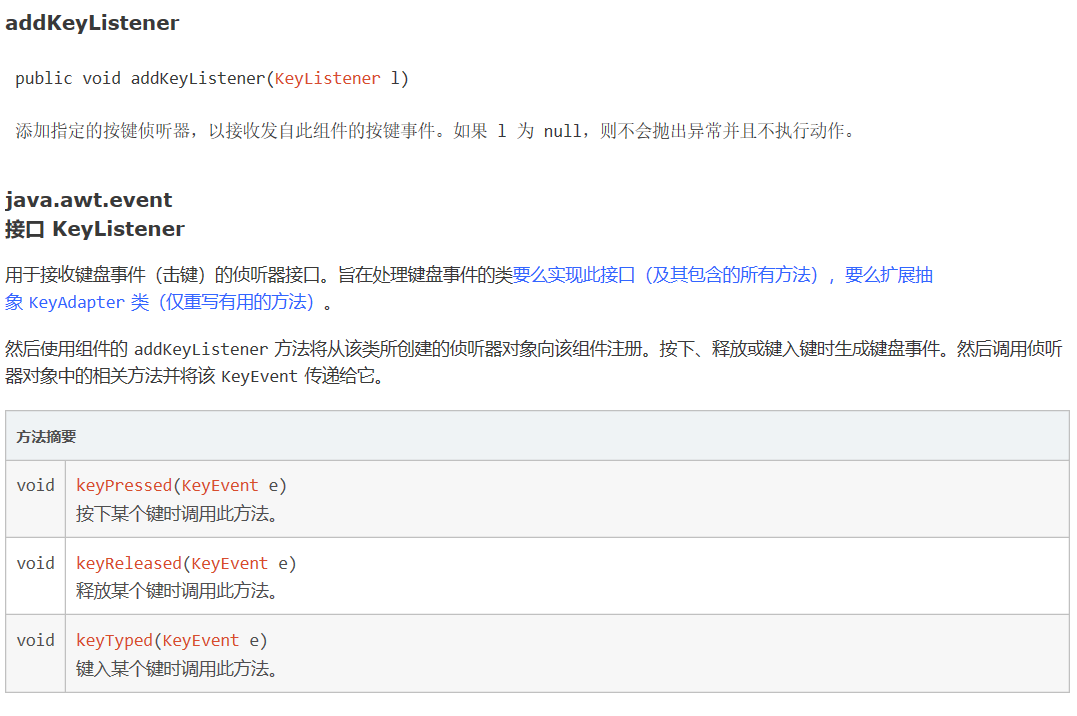
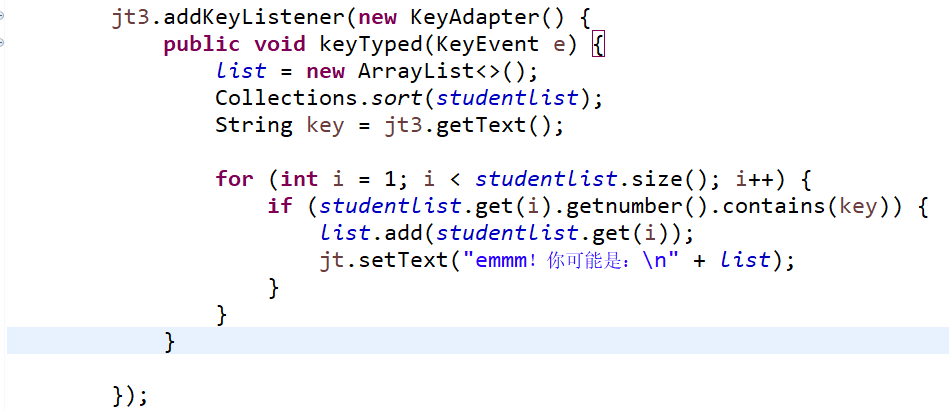
由于使用了addActionListener来添加事件监听器,改进前的程序只能通过敲击回车,才能触发事件的发生(模糊查找的部分)
通过改进,使用addKeyListener来添加事件监听器,不需要使用计时器的方法,也能实现要求(输入身份证信息,查询所提供身份证号的人员信息,要求输入一个身份证数字时,查询界面就显示满足查询条件的查询结果,且随着输入的数字的增多,查询匹配的范围逐渐缩小)
运行结果:
字典排序:

1.查询最大年龄的人员信息;
2.查询最小年龄人员信息;

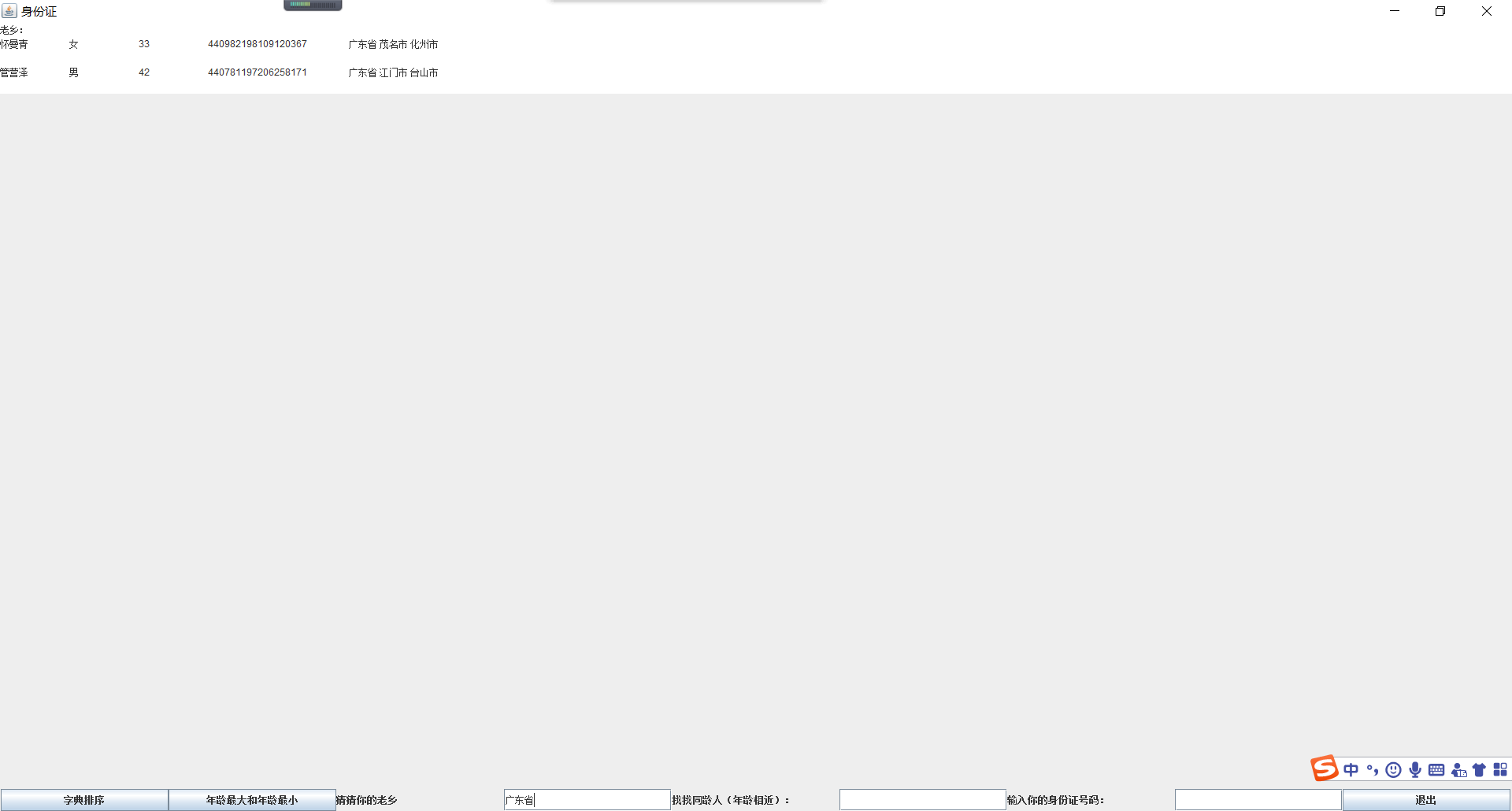
找老乡:
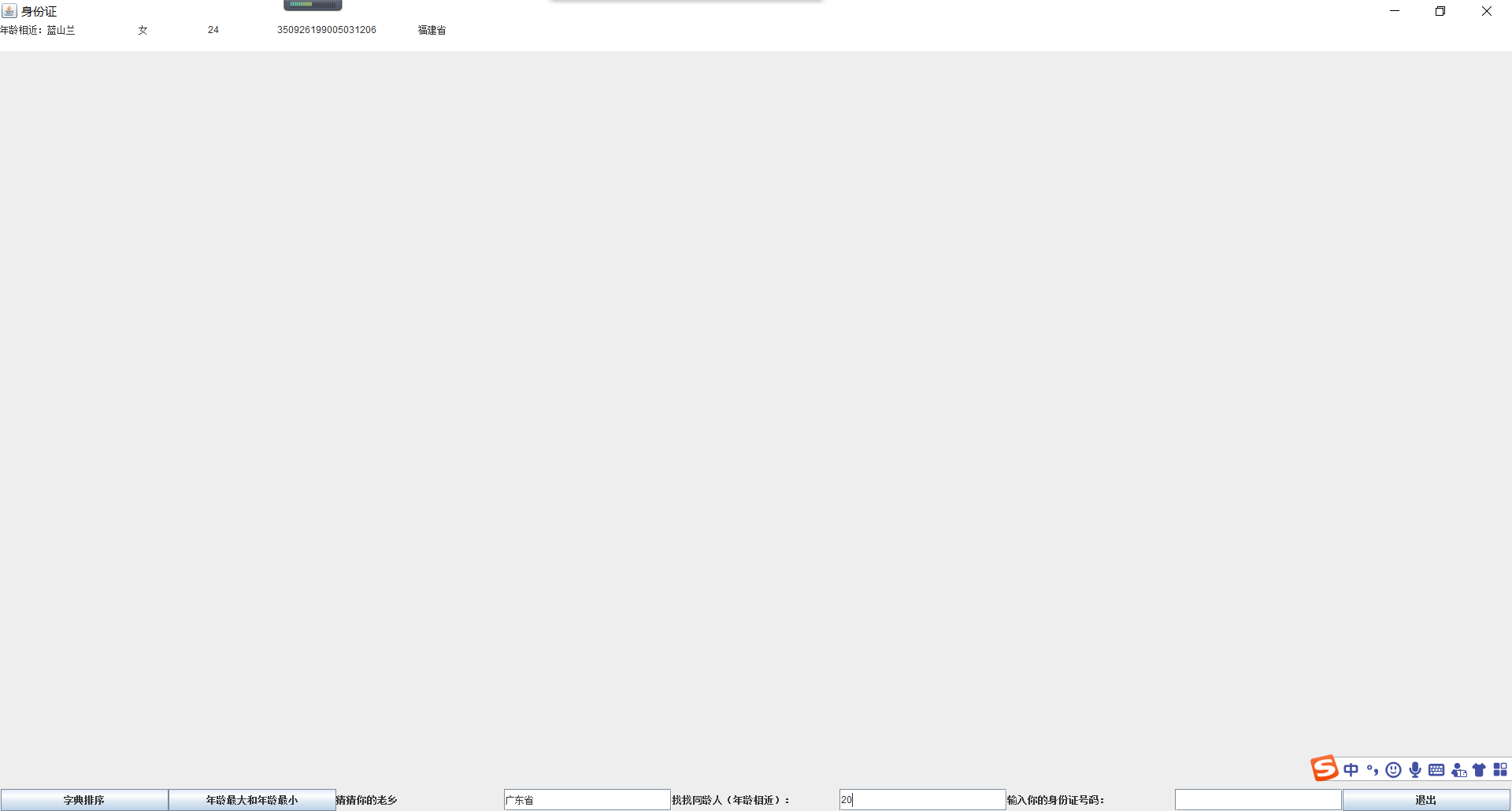
年龄相近的人:
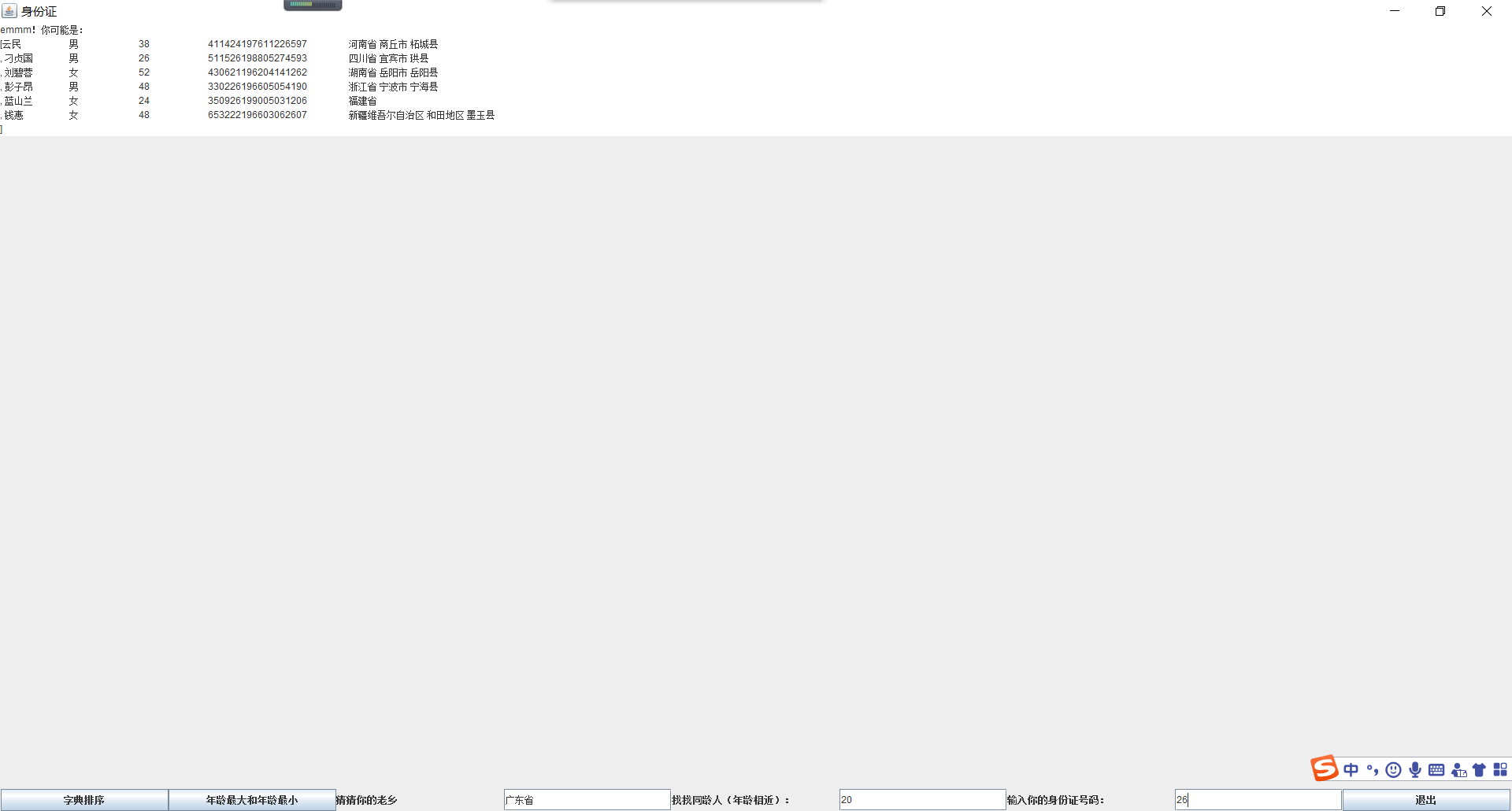
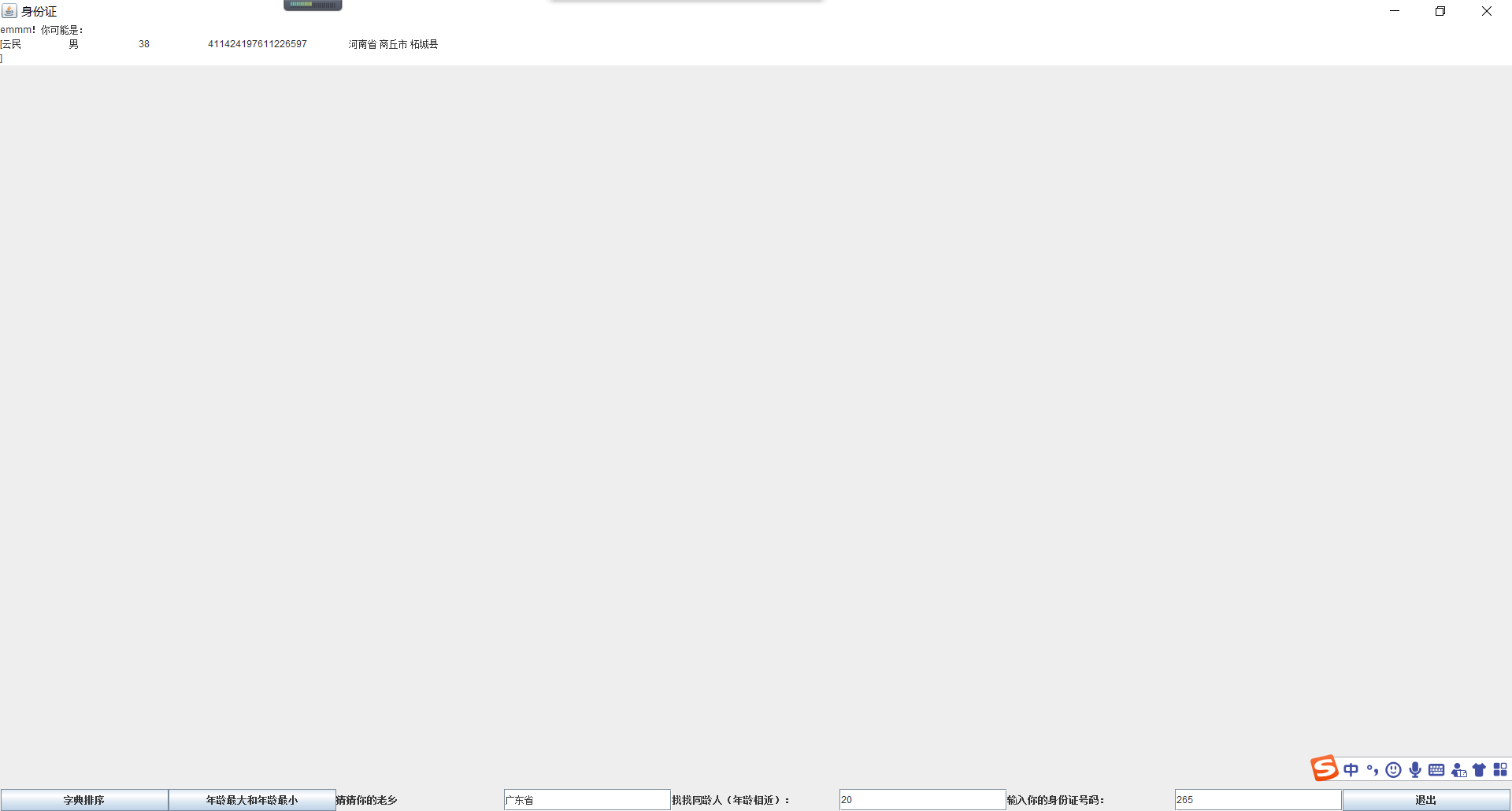
输入身份证信息,查询所提供身份证号的人员信息,要求输入一个身份证数字时,查询界面就显示满足查询条件的查询结果,且随着输入的数字的增多,查询匹配的范围逐渐缩小。
输入数字2时:

输入数字26时:
输入数字265时:
练习2:采用GUI界面设计以下程序,并进行部署与发布
l 编写一个计算器类,可以完成加、减、乘、除的操作
l 利用计算机类,设计一个小学生100以内数的四则运算练习程序,由计算机随机产生10道加减乘除练习题,学生输入答案,由程序检查答案是否正确,每道题正确计10分,错误不计分,10道题测试结束后给出测试总分;
l 将程序中测试练习题及学生答题结果输出到文件,文件名为test.txt。
代码:
package ui_test;

import java.awt.*;

import java.awt.event.ActionEvent;

import java.awt.event.ActionListener;

import java.io.BufferedOutputStream;

import java.io.File;

import java.io.FileOutputStream;

import java.io.IOException;

import java.util.ArrayList;

import javax.swing.*;

public class MyExGUI extends JFrame {

    ArrayList<String> user_zongti = new ArrayList<String>();

    ArrayList<String> user_zonganswer = new ArrayList<String>();

    ArrayList<String> user_answer = new ArrayList<String>();

    ArrayList<String> true_answer = new ArrayList<String>();

    ArrayList<String> jta_timu = new ArrayList<String>();

    ArrayList<String> jta_zong = new ArrayList<String>();

    ArrayList<Integer> user_fenshu = new ArrayList<Integer>();

    JMenuBar jm; // 菜单条组件

    JMenu menu;// 菜单

    JMenuItem item1, item2;// 菜单项

    JMenu build; // 二级菜单

    JMenuItem file, project;

    TextArea answer_all = new TextArea();

    TextField jta = new TextField();

    TextField jta_answer = new TextField();

    JLabel num_answer = new JLabel();

    JLabel answer;

    JToolBar jtb;// 工具条

    JButton jb1, jb2, jb3, jb4, jb5, jb6, jb7, jb_next;

    int answer_count;

    int answer_fenshu;

    public MyExGUI() {

        // 创建菜单

        jm = new JMenuBar();

        menu = new JMenu("文件(F)");

        menu.setMnemonic('f'); // 助记符

        build = new JMenu("新建");

        file = new JMenuItem("文件");

        project = new JMenuItem("答题");

        item1 = new JMenuItem("保存(S)");

        item2 = new JMenuItem("退出");

        answer = new JLabel("第 1 题");

        // 添加菜单项至菜单上

        build.add(file);

        build.add(project);

        menu.add(build);

        menu.add(item1);

        menu.add(item2);

        menu.addSeparator();

        // 将菜单加入至菜单栏

        jm.add(menu);

        JPanel contentPanel = new JPanel();

        contentPanel.setLayout(null);

        JLabel daan = new JLabel("答案");

        JLabel dengyu = new JLabel("=");

        num_answer = answer;

        num_answer.setFont(new Font("宋体", Font.BOLD, 22));

        jb_next = new JButton("下一题");

        jta.setFont(new Font("宋体", Font.BOLD, 22));

        jta_answer.setFont(new Font("宋体", Font.BOLD, 22));

        jb_next.setFont(new Font("宋体", Font.BOLD, 22));

        daan.setFont(new Font("宋体", Font.BOLD, 22));

        dengyu.setFont(new Font("宋体", Font.BOLD, 22));

        contentPanel.add(num_answer);

        contentPanel.add(daan);

        contentPanel.add(dengyu);

        contentPanel.add(jta);

        contentPanel.add(jta_answer);

        contentPanel.add(answer_all);

        contentPanel.add(jb_next);

        num_answer.setBounds(90, 20, 130, 50);

        daan.setBounds(250, 20, 90, 50);

        jta.setBounds(50, 70, 150, 30);

        dengyu.setBounds(205, 70, 20, 20);

        jta_answer.setBounds(230, 70, 100, 30);

        jb_next.setBounds(350, 70, 110, 30);

        answer_all.setBounds(50, 120, 400, 300);

        this.setJMenuBar(jm); // 添加菜单栏,不能设定位置,会自动放在最上部

        this.add(contentPanel);

        this.setTitle("在线答题系统");

        this.setSize(600, 500);

        this.setVisible(true);

        this.setDefaultCloseOperation(JFrame.EXIT_ON_CLOSE);

        item1.addActionListener(new ActionListener() {

            public void actionPerformed(ActionEvent arg0) {

                FileOutputStream outSTr = null;

                BufferedOutputStream Buff = null;

                boolean flag = true;

                File file;

                // String test ;

                do {

                    // test = "test"+count;

                    String inputValue = JOptionPane.showInputDialog("Please input file name");

                    file = new File(inputValue + "test.txt");

                    if (!file.exists()) {

                        // 创建文件

                        try {

                            flag = file.createNewFile();

                        } catch (IOException e) {

                            e.printStackTrace();

                        }

                        flag = false;

                    } else {

                        JOptionPane.showMessageDialog(null, "该文件名已存在,请重新输入", "ERROR", JOptionPane.ERROR_MESSAGE);

                        flag = true;

                    }

                } while (flag);

                // 写入文件

                String u_answer;

                try {

                    outSTr = new FileOutputStream(file);

                    Buff = new BufferedOutputStream(outSTr);

                    System.out.println("选择是后执行的代码" + user_zongti.size() + user_answer.size());

                    for (int i = 0; i < user_zongti.size(); i++) {

                        try {

                            Buff.write(user_zongti.get(i).getBytes());

                            Buff.write("    ".getBytes());

                            u_answer = user_answer.get(i);

                            if (u_answer.equals(""))

                                u_answer = "没有作答";

                            Buff.write(u_answer.getBytes());

                            Buff.write("\r\n".getBytes());

                        } catch (IOException e) {

                            e.printStackTrace();

                            i--;

                        }

                    }

                    Buff.flush();

                    Buff.close();

                } catch (IOException e) {

                    e.printStackTrace();

                }

                try {

                    outSTr.close();

                } catch (IOException e) {

                    e.printStackTrace();

                }

                user_zongti.clear();

                user_answer.clear();

            }

        });

        project.addActionListener(new ActionListener() {

            public void actionPerformed(ActionEvent arg0) {

                arithmetic art = new arithmetic();

                true_answer = art.list_answer;

                jta_timu = art.list_timu;

                jta_zong = art.list;

                answer_count = 1;

                answer_all.setText("");

                for (int i = 0; i < art.list_timu.size(); i++) {

                    user_zongti.add(jta_zong.get(i));

                    answer_all.append(jta_timu.get(i));

                    answer_all.append("\r\n");

                }

                num_answer.setText("第 " + answer_count + " 题");

                jta.setText(jta_timu.get(answer_count - 1));

                answer_count++;

            }

        });

        jb_next.addActionListener(new ActionListener() {

            public void actionPerformed(ActionEvent arg0) {

                String temp;

                temp = jta_answer.getText();

                if (jta.getText().equals("")) {

                    JOptionPane.showMessageDialog(null, "错误,请导入题库", "错误", JOptionPane.ERROR_MESSAGE);

                    return;

                }

                jta_answer.setText("");

                if (answer_count <= 10) {

                    if (isInteger(temp)) {

                        user_answer.add(temp);

                        System.out.println("选择否后执行的代码" + temp + "user_size" + user_answer.size());

                        num_answer.setText("第 " + answer_count + " 题");

                        jta.setText(jta_timu.get(answer_count - 1));

                        answer_count++;

                    } else {

                        JOptionPane.showMessageDialog(null, "错误", "请输入数字", JOptionPane.ERROR_MESSAGE);

                    }

                } else {

                    user_answer.add(temp);

                    System.out.println("选择否后执行的代码" + temp + "user_size" + user_answer.size());

                    answer_fenshu = 0;

                    for (int i = 0; i < user_answer.size(); i++) {

                        if (user_answer.get(i).equals(true_answer.get(i)))

                            answer_fenshu += 5;

                    }

                    user_fenshu.add(answer_fenshu);

                    Object[] options = { "是", "取消" };

                    int res = JOptionPane.showOptionDialog(null, "是否查看成绩", "答题完毕", JOptionPane.DEFAULT_OPTION,

                            JOptionPane.YES_NO_OPTION, null, options, options[0]);

                    if (res == JOptionPane.YES_OPTION) {

                        chart ct = new chart(user_fenshu);

                        ct.setVisible(true);

                    } else {

                        Object[] option = { "是", "取消" };

                        int res1 = JOptionPane.showOptionDialog(null, "是否退出程序", "终止框", JOptionPane.DEFAULT_OPTION,

                                JOptionPane.YES_NO_OPTION, null, option, option[0]);

                        if (res1 == JOptionPane.YES_OPTION) {

                            dispose();

                            System.exit(0);

                        } else {

                        }

                    }

                }

            }

        });

        item2.addActionListener(new ActionListener() {

            public void actionPerformed(ActionEvent e) {

                dispose();

                System.exit(0);

            }

        });

    }

    public static boolean isInteger(String str) {

        for (int i = str.length(); --i >= 0;) {

            if (!Character.isDigit(str.charAt(i))) {

                return false;

            }

        }

        return true;

    }

}
MyExGUI
package ui_test;

public class Main {

    public static void main(String[] args) {

        MyExGUI lg = new MyExGUI();

        //new MyExGUI();

    }

}
Main
package ui_test;

import java.io.BufferedOutputStream;

import java.io.File;

import java.io.FileOutputStream;

import java.io.IOException;

import java.util.ArrayList;

import java.util.Random;

import java.util.Scanner;

public class arithmetic {

    ArrayList<String> list = new ArrayList<String>();

    ArrayList<String> list_timu = new ArrayList<String>();

    ArrayList<String> list_answer = new ArrayList<String>();

    public arithmetic() {

        FileOutputStream outSTr = null;

        BufferedOutputStream Buff = null;

        int number_n = 10, count;

        ArrayList<String> list_temp = new ArrayList<String>();

        String[] operator = new String[] { "+", "-", "*", "/" };

        Random rand = new Random();

        File file1 = new File("test.txt");

        if (file1.exists()) {

            // 创建文件

            try {

                file1.createNewFile();

            } catch (IOException e) {

                e.printStackTrace();

            }

        }

        while (number_n > 0) {

            int[] number_temp = new int[rand.nextInt(2) + 3];

            String[] str_temp = new String[number_temp.length - 1];

            for (int i = 0; i < number_temp.length; i++) {

                if (i < number_temp.length - 1) {

                    number_temp[i] = rand.nextInt(100);

                    list_temp.add(String.valueOf(number_temp[i]));

                    str_temp[i] = operator[rand.nextInt(4)];

                    list_temp.add(str_temp[i]);

                }

                else {

                    number_temp[i] = rand.nextInt(100);

                    list_temp.add(String.valueOf(number_temp[i]));

                }

            }

            count = calculate_RPN(produce_RPN(list_temp));

            if (count != -1) {

                list_timu.add(transform_string(list_temp));

                list_answer.add(String.valueOf(count));

                list_temp.add(" = " + count);

                list.add(transform_string(list_temp));

                number_n--;

                list_temp.clear();

            } else

                list_temp.clear();

            System.out.println(number_n);

        }

        try {

            outSTr = new FileOutputStream(file1);

            Buff = new BufferedOutputStream(outSTr);

            for (int i = 0; i < list.size(); i++) {

                try {

                    Buff.write(list.get(i).getBytes());

                    Buff.write("\r\n".getBytes());

                } catch (IOException e) {

                    e.printStackTrace();

                    i--;

                }

            }

            Buff.flush();

            Buff.close();

        } catch (IOException e) {

            e.printStackTrace();

        }

        // Buff.close();

        try {

            outSTr.close();

        } catch (IOException e) {

            e.printStackTrace();

        }

        for (int i = 0; i < list.size(); i++) {

            System.out.print(list.get(i));

            System.out.println();

        }

        System.out.print("计算完毕!");

    }

    public static int calculate_RPN(ArrayList<String> list_temp) {

        int i = 0, t;

        double a = 0, b = 0;

        String l_temp;

        Stack sk = new Stack(10);

        for (t = 0; t < list_temp.size(); t++) {

            l_temp = list_temp.get(i++);

            if (!isInteger(l_temp)) {

                b = sk.mypop();

                a = sk.mypop();

                switch (l_temp) {

                case "+":

                    sk.mypush(a + b);

                    break;

                case "-":

                    if(!(a<b)) {

                    sk.mypush(a - b);

                    }

                    else

                        return -1;

                    break;

                case "*":

                    sk.mypush(a * b);

                    break;

                case "/":

                    if (b == 0||a<b)

                        return -1;

                    sk.mypush(a / b);

                    break;

                }

                System.out.println("st.mytop: " + sk.mypeek());

            } else {

                sk.mypush((double) Integer.parseInt(l_temp));

            }

        }

        if (!sk.myisempty()) {

            a = sk.mypop();

            b = a - (int) a;

            System.out.println("a:  " + a);

            if (a > 0 && b == 0) {

                return (int) a;

            } else

                return -1;

        } else

            return -1;

    }

    public static ArrayList<String> produce_RPN(ArrayList<String> list_temp) {

        int t = 0, i = 0;

        String tmp;

        Tack mytack = new Tack(10);

        ArrayList<String> lt_temp = new ArrayList<String>();

        while (true) {

            tmp = list_temp.get(i++);

            if (isInteger(tmp)) {

                lt_temp.add(tmp);

            } else {

                if (mytack.myisempty()) {

                    mytack.mypush(tmp);

                }

                else {

                    if (isCPriority(tmp, mytack.mypeek()))

                        mytack.mypush(tmp);

                    else {

                        lt_temp.add(mytack.mypop());

                        mytack.mypush(tmp);

                    }

                }

            }

            if (i >= list_temp.size()) {

                while (!mytack.myisempty())

                    lt_temp.add(mytack.mypop());

                System.out.println(transform_string(list_temp));

                list_temp = lt_temp;

                System.out.println(list_temp);

                return list_temp;

            }

        }

    }

    public static boolean isInteger(String str) {

        for (int i = str.length(); --i >= 0;) {

            if (!Character.isDigit(str.charAt(i))) {

                return false;

            }

        }

        return true;

    }

    public static boolean isCPriority(String str, String s) {

        if ((str + s).equals("*+") || (str + s).equals("*-") || (str + s).equals("/+") || (str + s).equals("/-"))

            return true;

        else

            return false;

    }

    public static String transform_string(ArrayList<String> list_temp) {

        String s = "";

        for (int i = 0; i < list_temp.size(); i++) {

            s += list_temp.get(i);

        }

        return s;

    }

    static class Stack {

        int mytop;

        double stk[];

        public Stack(int num) {

            mytop = -1;

            stk = new double[num];

        }

        /* 出栈 */

        double mypop() {

            double peek = stk[mytop];

            mytop--;

            return peek;

        }

        /* 入栈 */

        void mypush(double x) {

            mytop++;

            stk[mytop] = x;

        }

        /* 判空 */

        Boolean myisempty() {

            if (mytop == -1)

                return true;

            else

                return false;

        }

        /* 取栈顶元素 */

        double mypeek() {

            double peek = stk[mytop];

            return peek;

        }

        /* 栈大小 */

        int mysize() {

            return mytop + 1;

        }

    }

    static class Tack {

        int mytop;

        String tk[];

        public Tack(int num) {

            mytop = -1;

            tk = new String[num];

        }

        /* 出栈 */

        String mypop() {

            String peek = tk[mytop];

            mytop--;

            return peek;

        }

        /* 入栈 */

        void mypush(String x) {

            mytop++;

            tk[mytop] = x;

        }

        /* 判空 */

        Boolean myisempty() {

            if (mytop == -1)

                return true;

            else

                return false;

        }

        /* 取栈顶元素 */

        String mypeek() {

            String peek = tk[mytop];

            return peek;

        }

        /* 栈大小 */

        int mysize() {

            return mytop + 1;

        }

    }

}
arithmetic
package ui_test;

import java.awt.Color;

import java.awt.Graphics;

import java.awt.Graphics2D;

import java.util.ArrayList;

import java.util.Random;

import javax.swing.JFrame;

public class chart extends JFrame{

      //绘制柱形统计图

        ArrayList<Integer> ran=new  ArrayList<Integer>();

        public chart(ArrayList<Integer> scores)

        {

            super();

            getContentPane().setForeground(Color.CYAN);

            setForeground(Color.CYAN);

            setBackground(Color.CYAN);

            for(int i=0;i<scores.size();i++)

            {

                ran.add(scores.get(i));

                System.out.println(scores.get(i));

            }

            setTitle("绘制柱形图");

            setSize(600, 400);

            setDefaultCloseOperation(JFrame.EXIT_ON_CLOSE);

        }

        @Override

        public void paint(Graphics g){

            int Width = getWidth();

            int Height = getHeight();

            int leftMargin = 20;//柱形图左边界

            int topMargin = 50;//柱形图上边界

            Graphics2D g2 = (Graphics2D) g;

            g2.setColor(Color.WHITE);//绘制白色背景

            g2.fillRect(0, 0, Width, Height-100);//绘制矩形图

            g2.setColor(Color.black);

             for(int i=0;i<=10;i++)

             {

                 //绘制灰色横线和百分比

                 g2.drawString((100-10*i)+" ", 15, topMargin+30*i);

                 g2.drawLine(10, topMargin+30*i, Width, topMargin+30*i);//绘制灰色横线

             }

             g2.setColor(Color.RED);

             for(int i=0;i<=ran.size();i++)

             {

                 //绘制柱形图

                 int step = (i+1)*40;//设置每个柱形图的水平间隔为40

                 //绘制矩形

                 g2.fillRoundRect(leftMargin+step*2-5,(100-ran.get(i))*3+50, 40, 300-(100-ran.get(i))*3, 40, 10);

                 //列出测试轮数

                 g2.drawString("第"+(i+1)+"轮", leftMargin+step*2, 380);

             }

         }

}
chart
运行结果:
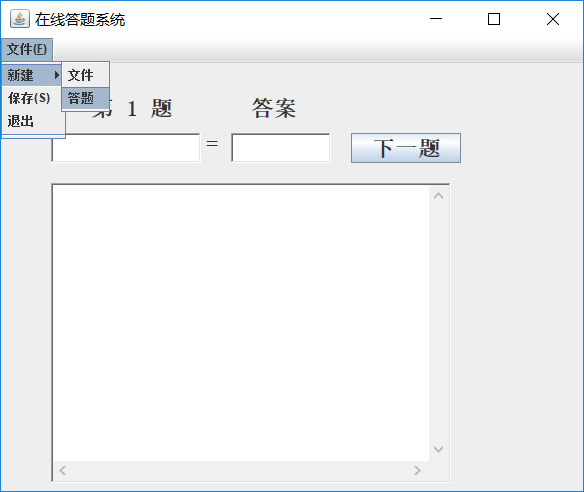
选择答题:
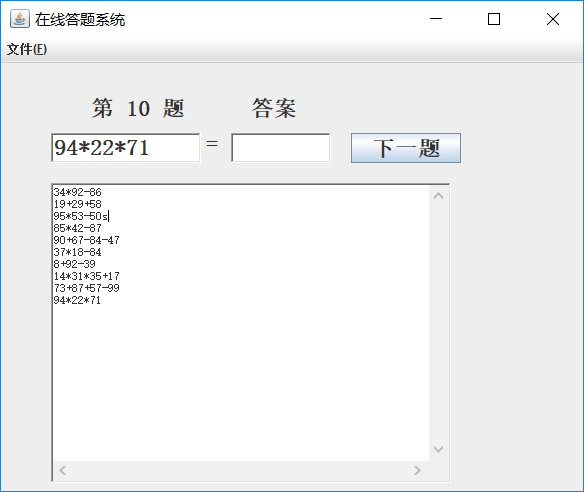
答题完毕后,按照提示可查询成绩:
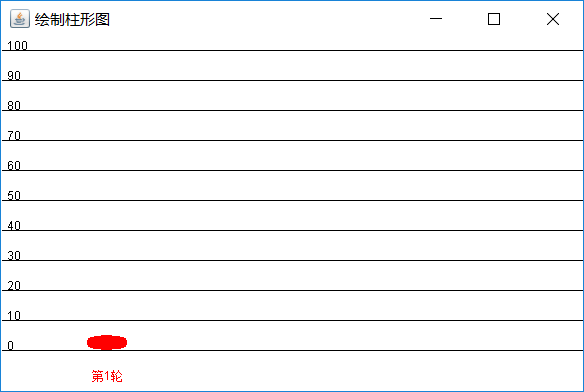
点击文件菜单中的“保存”选项,可保存答题记录:
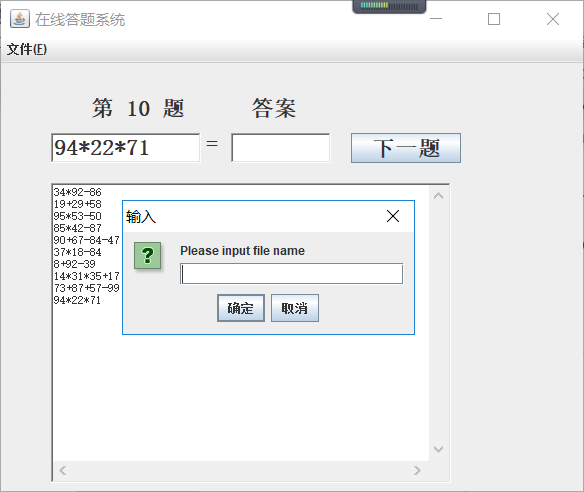
正确答案:
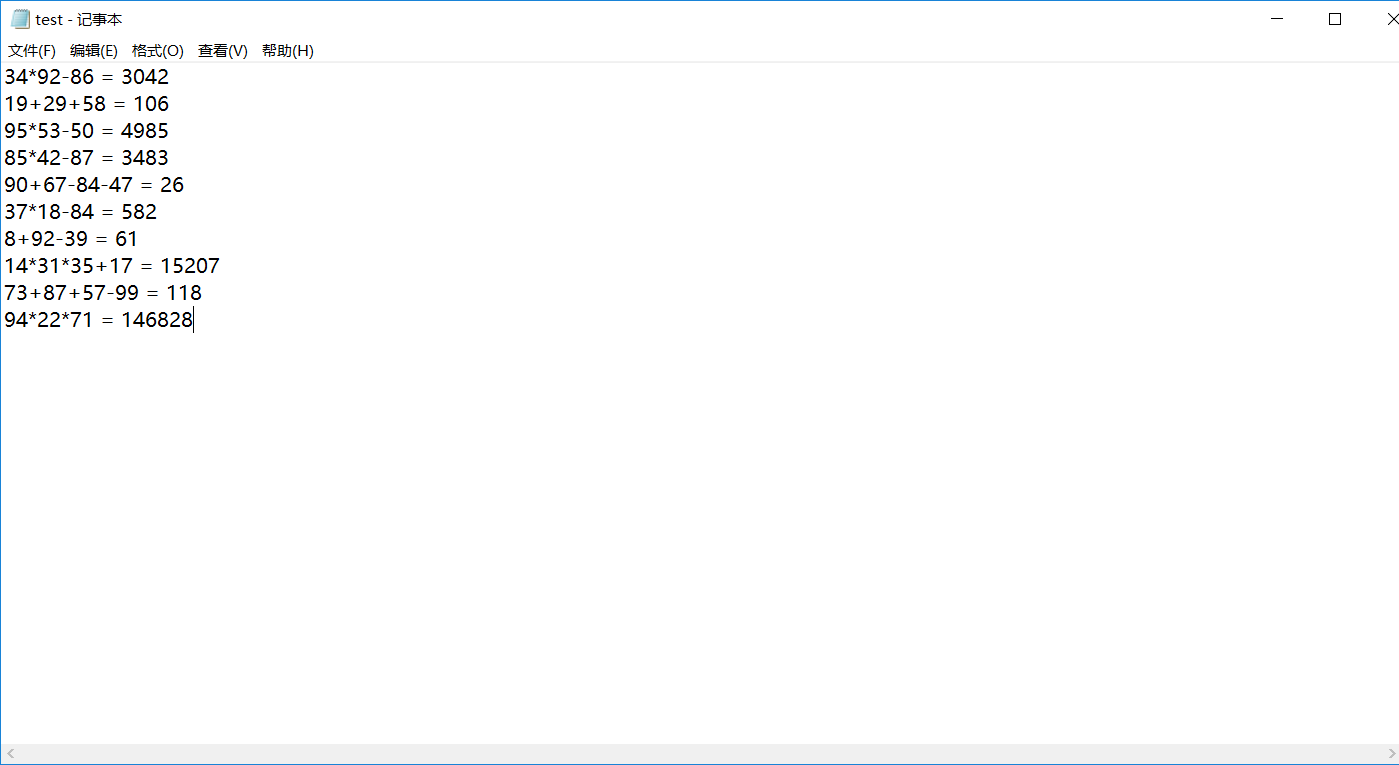
答题记录:
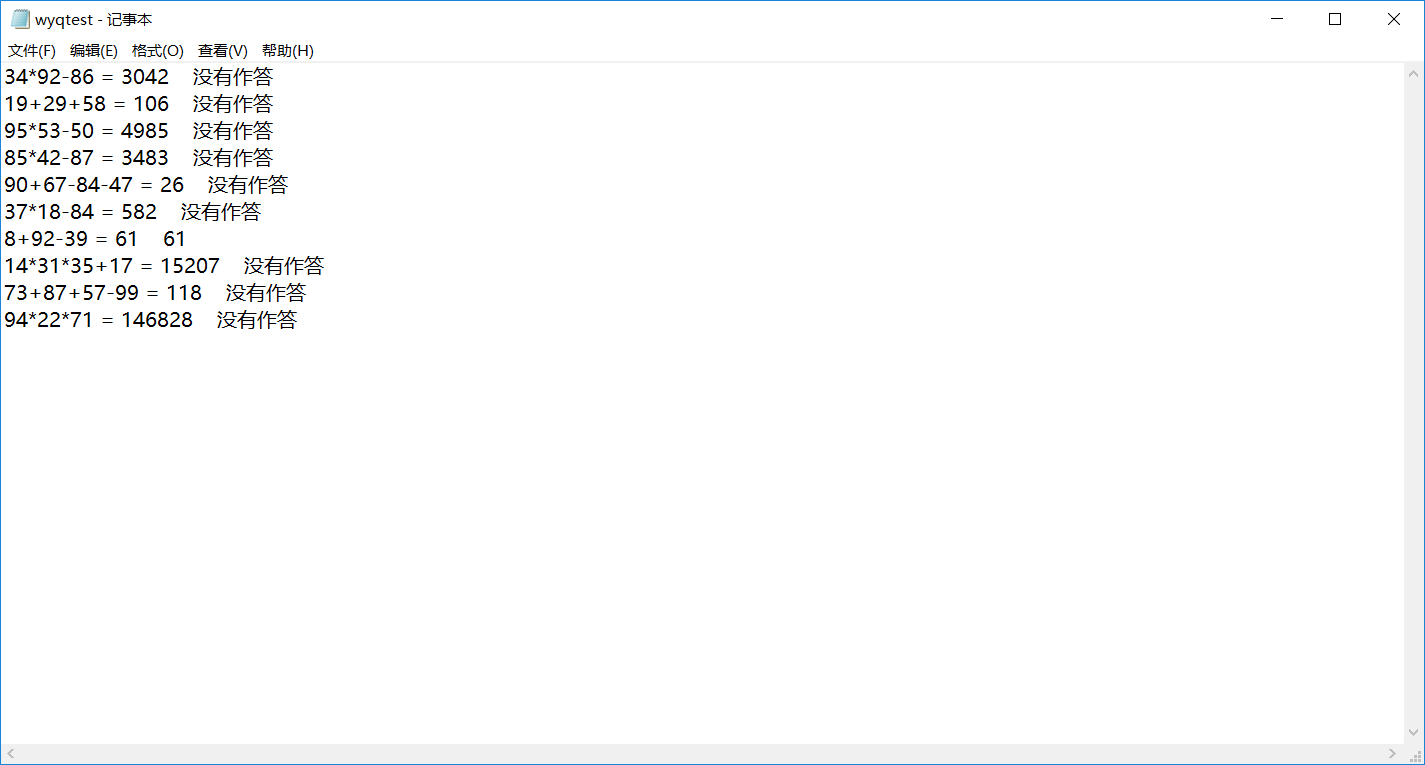
学习感受:
对webstart部分不太理解
王颖奇 20171010129《面向对象程序设计(java)》第十五周学习总结的更多相关文章
- 201571030332 扎西平措 《面向对象程序设计Java》第八周学习总结
<面向对象程序设计Java>第八周学习总结 项目 内容 这个作业属于哪个课程 https://www.cnblogs.com/nwnu-daizh/ 这个作业的要求在哪里 https: ...
- 201771010118马昕璐《面向对象程序设计java》第八周学习总结
第一部分:理论知识学习部分 1.接口 在Java程序设计语言中,接口不是类,而是对类的一组需求描述,由常量和一组抽象方法组成.Java为了克服单继承的缺点,Java使用了接口,一个类可以实现一个或多个 ...
- 201771010134杨其菊《面向对象程序设计java》第八周学习总结
第八周学习总结 第一部分:理论知识 一.接口.lambda和内部类: Comparator与comparable接口: 1.comparable接口的方法是compareTo,只有一个参数:comp ...
- 201771010134杨其菊《面向对象程序设计java》第七周学习总结
第七周学习总结 第一部分:理论知识 1.继承是面向对象程序设计(Object Oriented Programming-OOP)中软件重用的关键技术.继承机制使用已经定义的类作为基础建立新的类定义,新 ...
- 201871010126 王亚涛《面向对象程序设计 JAVA》 第十三周学习总结
内容 这个作业属于哪个课程 https://www.cnblogs.com/nwnu-daizh/ 这个作业的要求在哪里 https://www.cnblogs.com/nwnu-daizh/p/ ...
- 201777010217-金云馨《面向对象程序设计Java》第八周学习总结
项目 内容 这个作业属于哪个课程 https://www.cnblogs.com/nwnu-daizh/ 这个作业的要求在哪里 https://www.cnblogs.com/nwnu-daizh/p ...
- 201871010126 王亚涛 《面向对象程序设计 (Java)》第十七周学习总结
内容 这个作业属于哪个课程 https://www.cnblogs.com/nwnu-daizh/ 这个作业的要求在哪里 https://www.cnblogs.com/nwnu-daizh/p/12 ...
- 马凯军201771010116《面向对象程序设计Java》第八周学习总结
一,理论知识学习部分 6.1.1 接口概念 两种含义:一,Java接口,Java语言中存在的结构,有特定的语法和结构:二,一个类所具有的方法的特征集合,是一种逻辑上的抽象.前者叫做“Java接口”,后 ...
- 周强201771010141《面向对象程序设计Java》第八周学习总结
一.理论知识学习部分 Java为了克服单继承的缺点,Java使用了接口,一个类可以实现一个或多个接口. 接口体中包含常量定义和方法定义,接口中只进行方法的声明,不提供方法的实现. 类似建立类的继承关系 ...
- 20155322 2016-2017-2 《Java面向对象程序设计》第十二周课堂练习之Arrays和String单元测试
20155322 2016-2017-2 <Java面向对象程序设计>第十二周课堂练习之Arrays和String单元测试 练习目地 在IDEA中以TDD的方式对String类和Array ...
随机推荐
- Android UIAutomator自动化测试
描述:UiAutomator接口丰富易用,可以支持所有Android事件操作,事件操作不依赖于控件坐标,可以通过断言和截图验证正确性,非常适合做UI测试. UIAutomator不需要测试人员了解代码 ...
- IE各版本CSS Hack(兼容性处理)语法速查表
为了兼容IE各个版本,需要在CSS中添加额外的代码,比如以前常用的_width.之所以工作,是因为浏览器会忽略不能解析的样式规则,因此举个例子来说,把_width写在width下面,对于非IE浏览器会 ...
- Julia基础语法字符和字符串
1.Julia字符串 2.字符
- Python - 翻译Talk Python To Me (和我聊Python) 播客
“和我聊Python”是一个美国的聊天播客,英文名Talk Python To Me,类似于喜马拉雅的音频课程节目,只不过这个主题是编程语言Python.该节目从2015年的节目到现在,已经超过256 ...
- Laravel 分页 数据丢失问题解决
问题: to do list 中有32条数据,每页10条,共3页. 做完了一个事项之后,准备打卡,发现找不到这个事项. 数据库查询正常,有这一条数据. 原因: 发现是分页出了问题,第1页的数据和第2页 ...
- [复现]GXY2019
前言 当时GXY的时候在复习中,临时抱拂脚,没时间打比赛.就写了一题./(ㄒoㄒ)/~~ babysqli 当时做了写了笔记. 过滤了or,()其中or可以用大小写绕过,可以用order by盲注 第 ...
- Python入门到进阶必看的权威书籍与网站
随着人工智能全面爆发,Python[英文单词:蟒蛇],是一款近年来爆红的计算机编程语言.1989年发明,1991年发行,比目前应用最广的Java还要大7岁,有种大器晚成的感觉. 分享之前我还是要推荐下 ...
- webpack3 babel相关
babel 链接地址 在index.js中写入js6的语法如 let fn = (){ console.log('this is es6') } 执行npm run build 在打包出来的js文件中 ...
- zabbix 微信告警机制
微信告警首先得注册一个企业微信,然后才能实现微信告警.自行百度 微信: 添加一个用户到上面创建的部门里面 创建完成记住 AgentID 和 Secret 下一步:记住企业 ID 1)编辑zabbix ...
- Python不同版本打包程序为.exe文件
安装pyinstaller 测试用的python环境是3.6.2版本 下载地址 https://github.com/pyinstaller/pyinstaller/ 1.打开cmd,切到pyinst ...