
sql05
1、Ado.net
Ado.net是一组由微软提供的使用C#操作数据库的类库


2、连接
首先引入:
using System.Data.SqlClient;
需要使用连接字符串进行连接
using System;

using System.Data.SqlClient;

using System.Text;

namespace Demo

{

    class Program

    {

        static void Main()

        {

            // 连接字符串

            string connStr = "server=127.0.0.1;uid=sa;pwd=123456;database=Demo";

            SqlConnection conn = new SqlConnection(connStr);

            // 连接数据库

            conn.Open();

            Console.WriteLine("连接完成");

            // 关闭连接

            conn.Close();

            conn.Dispose();

            Console.WriteLine("数据库关闭");

            Console.ReadLine();

        }

    }

}
上面所示的是最简单的连接字符串,包括服务地址,账号及密码,数据库名称
使用#region可以划分代码块
3、执行语句
using System;

using System.Data.SqlClient;

using System.Text;

namespace Demo

{

    class Program

    {

        static void Main()

        {

            // 连接字符串

            string connStr = "server=127.0.0.1;uid=sa;pwd=123456;database=Demo";

            SqlConnection conn = new SqlConnection(connStr);

            conn.Open();

            Console.WriteLine("连接完成");

            // 创建sql命令对象

            SqlCommand cmd = new SqlCommand();

            cmd.Connection = conn;

            // 书写SQL脚本

            cmd.CommandText = "insert into [dbo].[user](name,age,ClassId) values(N'徐若瑄',66,103)";

            // 非查询语句执行,返回受影响的行数

            cmd.ExecuteNonQuery();

            Console.WriteLine("语句执行完成");

       conn.Close();

            Console.ReadLine();

        }

    }

}
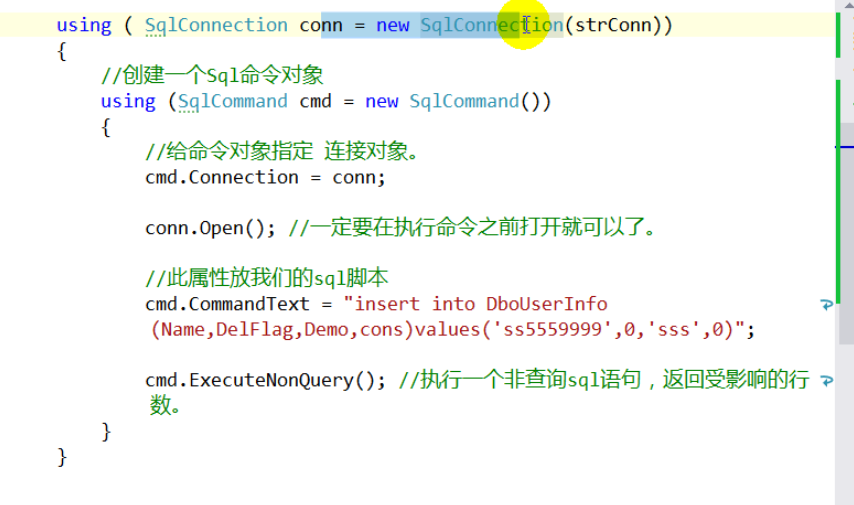
自动释放连接的语法糖
3、连接池
在连接字符串中有一个属性叫pooling,默认为true,意为启用连接池
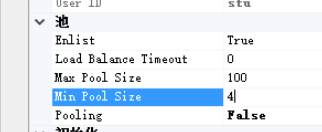
进程池是一个对象池,当我们第一次连接数据库时直接向数据库
请求连接,同时在连接池内生成一个innerConnection对象,当我们通过close释放
连接后,池内的对象不会释放,直接从连接池内取出来,节省我们需要频繁使用数据库的开销。
当连接池内的对象有空闲的,直接使用空闲的;当没有空闲的内连接对象时,未达到连接池上限时,直接向数据库创立一个,
达到上限时需要等待

4、制作一个连接字符串创建器
5、制作一个登陆窗体
using System;

using System.Collections.Generic;

using System.ComponentModel;

using System.Data;

using System.Data.SqlClient;

using System.Drawing;

using System.Linq;

using System.Text;

using System.Threading.Tasks;

using System.Windows.Forms;

namespace UserLogin

{

    public partial class UserLoginFrm : Form

    {

        public UserLoginFrm()

        {

            InitializeComponent();

        }

        private void UserLoginFrm_Load(object sender, EventArgs e)

        {

        }

        private void LoginBtn_Click(object sender, EventArgs e)

        {

            //取走窗体数据进行校验

            if (string.IsNullOrEmpty(UsernameBox.Text.Trim())||

                string.IsNullOrEmpty(PwdBox.Text.Trim()))

            {

                MessageBox.Show("用户名或密码不可为空");

                return;

            }

            //连接数据库进行查询

            string connStr = "server=127.0.0.1;uid=sa;pwd=123456;database=Demo";

            using (SqlConnection conn=new SqlConnection(connStr))

            {

                using (SqlCommand cmd = conn.CreateCommand())

                {

                    conn.Open();

                    string sql = string.Format("select count(1) from LoginUser where Username='{0}' and Password='{1}'",

                        UsernameBox.Text, PwdBox.Text);

                    cmd.CommandText = sql;

                    // 执行查询语句,并只返回查询出来的第一个单元格的值,返回的数据格式也不清楚

                    object result = cmd.ExecuteScalar();

                    int rows = int.Parse(result.ToString());

                    if (rows >= )

                    {

                        MessageBox.Show("成功登录!");

                    }

                    else

                    {

                        MessageBox.Show("登录失败!");

                    }

                }

            }

        }

    }

}
6、配置文件配置连接字符串
在App.config中进行配置:
<?xml version="1.0" encoding="utf-8" ?>

<configuration>

  <connectionStrings>

    <add name="sql" connectionString="server=127.0.0.1;uid=sa;pwd=123456;database=Demo"/>

  </connectionStrings>

    <startup>

        <supportedRuntime version="v4.0" sku=".NETFramework,Version=v4.7.2" />

    </startup>

</configuration>
在专门的一个类中进行引入:
using System.Configuration;

namespace UserLogin

{

    class ConnectionStringHelper

    {

        public static string GetCurrentConnectionString()

        {

            return ConfigurationManager.ConnectionStrings["sql"].ConnectionString;

        }

    }

}
在引用中引入:System.Configuration
之后使用上述类的静态方法即可
------------恢复内容结束------------
sql05的更多相关文章
- pivot 与 unpivot 函数是SQL05新提供的2个函数
pivot 与 unpivot 函数是SQL05新提供的2个函数 ----------------------------------------------------------------- ...
- winserver 08 64位安装sql05 64位提示asp版本注册
将打开 安装IIS 6.0的就可以了,然后重启下
- pivot 与 unpivot 函数是SQL05新提供的2个函数 灰常灰常的实用
转自:http://blog.sina.com.cn/s/blog_5ef755720100cyo3.html pivot函数: create table test(id int,name varch ...
- oracle根据某个字段去重实例
if not object_id('Tempdb..#T') is null drop table #T Go Create table #T([ID] int,[Name] nvarchar(1), ...
- 经典.net面试题目
1. 简述 private. protected. public. internal 修饰符的访问权限. 答 . private : 私有成员, 在类的内部才可以访问. protected : 保 ...
- net面试题
简述 private. protected. public. internal 修饰符的访问权限.答 . private : 私有成员, 在类的内部才可以访问. protected : 保护成 ...
- mysql 联合索引和唯一索引
一般来说.如果有where a=? and b=? and c=? 的语句. 如果表也有DML, 我一般只在a 上建索引. 这也是代价平衡的结果. 一方面 只在a 上建索引那么是 index ran ...
- SQL如何本地数据库连接服务器的数据库
当我们本地数据库的数据作为测试的时候,需要服务器上的数据,但是每次都远程服务器打开数据库查看数据是很麻烦的,那么我们如何让本地的数据库连接服务器上的数据库.前提是你本地的数据库的版本必须和服务器上的数 ...
- 经典.net试题
经典.net面试题目 1. 简述 private. protected. public. internal 修饰符的访问权限. 答 . private : 私有成员, 在类的内部才可以访问. pr ...
随机推荐
- Netty之内存泄露
直接内存是IO框架的绝配,但直接内存的分配销毁不易,所以使用内存池能大幅提高性能. 1.为什么要有引用计数器 Netty里四种主力的ByteBuf,其中UnpooledHeapByteBuf底下的by ...
- Exynos4412开发板-网络-同一网段
1.1 同一网段在不少实验中,都会需要用到局域网的一些基础知识,在技术支持的过程中,发现不少用户对于这个概念非常模糊,导致 IP 地址或者网络环境稍微有点变化,就无法实现实验.如果没有接触过这个概念, ...
- O - Snacks(DFS序)
百度科技园内有nn个零食机,零食机之间通过n−1n−1条路相互连通.每个零食机都有一个值vv,表示为小度熊提供零食的价值. 由于零食被频繁的消耗和补充,零食机的价值vv会时常发生变化.小度熊只能从编号 ...
- RDD(四)——transformation_key_value类型
这里所有算子均只适用于pairRDD.pairRDD的数据类型是(k,v)形式的键值对: PartitionBy(Partitioner) 对pairRDD进行分区操作,如果原有的partioner和 ...
- 安装php7.2
1,yum源默认的版本太低了,手动安装有一些麻烦,所以可以采用yum的方式进行安装. 2,检查当前安装的PHP包yum list installed | grep php 如果有安装的PHP包,先删除 ...
- Computing Essentials_第一章习题
- JS替换变量中的文字字母
var text='Hello world, Hello world'; var b= text.replace('world','zhengxiaoya'); // 找到字符串中的第一个'world ...
- C#常用到的命令及常用控件的属性
Application.Exit()应用程序退退出 this.Close()当前窗口退出 int h = DateTime.Now.Hour; //获取当前时间的小时部分 int m = D ...
- [Linux] Ubuntu 配置nfs
安装NFS Server: 1. 执行命令 "$ sudo apt-get install nfs-kernel-server",安装nfs server 端 2. 创建需要用来分 ...
- [蓝桥杯2015初赛]方程整数解 unordered_map
unordered_map: 如果直接写报错加上tr1: #include<tr1/unordered_map>//注意写法 using namespace std; using name ...