
sql05
1、Ado.net
Ado.net是一组由微软提供的使用C#操作数据库的类库


2、连接
首先引入:
using System.Data.SqlClient;
需要使用连接字符串进行连接
using System;

using System.Data.SqlClient;

using System.Text;

namespace Demo

{

    class Program

    {

        static void Main()

        {

            // 连接字符串

            string connStr = "server=127.0.0.1;uid=sa;pwd=123456;database=Demo";

            SqlConnection conn = new SqlConnection(connStr);

            // 连接数据库

            conn.Open();

            Console.WriteLine("连接完成");

            // 关闭连接

            conn.Close();

            conn.Dispose();

            Console.WriteLine("数据库关闭");

            Console.ReadLine();

        }

    }

}
上面所示的是最简单的连接字符串,包括服务地址,账号及密码,数据库名称
使用#region可以划分代码块
3、执行语句
using System;

using System.Data.SqlClient;

using System.Text;

namespace Demo

{

    class Program

    {

        static void Main()

        {

            // 连接字符串

            string connStr = "server=127.0.0.1;uid=sa;pwd=123456;database=Demo";

            SqlConnection conn = new SqlConnection(connStr);

            conn.Open();

            Console.WriteLine("连接完成");

            // 创建sql命令对象

            SqlCommand cmd = new SqlCommand();

            cmd.Connection = conn;

            // 书写SQL脚本

            cmd.CommandText = "insert into [dbo].[user](name,age,ClassId) values(N'徐若瑄',66,103)";

            // 非查询语句执行,返回受影响的行数

            cmd.ExecuteNonQuery();

            Console.WriteLine("语句执行完成");

       conn.Close();

            Console.ReadLine();

        }

    }

}
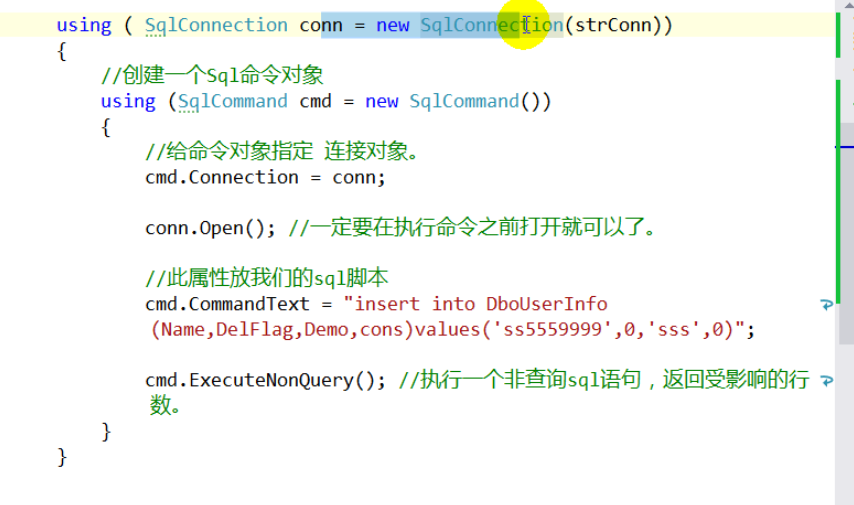
自动释放连接的语法糖
3、连接池
在连接字符串中有一个属性叫pooling,默认为true,意为启用连接池
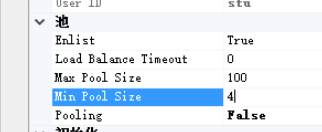
进程池是一个对象池,当我们第一次连接数据库时直接向数据库
请求连接,同时在连接池内生成一个innerConnection对象,当我们通过close释放
连接后,池内的对象不会释放,直接从连接池内取出来,节省我们需要频繁使用数据库的开销。
当连接池内的对象有空闲的,直接使用空闲的;当没有空闲的内连接对象时,未达到连接池上限时,直接向数据库创立一个,
达到上限时需要等待

4、制作一个连接字符串创建器
5、制作一个登陆窗体
using System;

using System.Collections.Generic;

using System.ComponentModel;

using System.Data;

using System.Data.SqlClient;

using System.Drawing;

using System.Linq;

using System.Text;

using System.Threading.Tasks;

using System.Windows.Forms;

namespace UserLogin

{

    public partial class UserLoginFrm : Form

    {

        public UserLoginFrm()

        {

            InitializeComponent();

        }

        private void UserLoginFrm_Load(object sender, EventArgs e)

        {

        }

        private void LoginBtn_Click(object sender, EventArgs e)

        {

            //取走窗体数据进行校验

            if (string.IsNullOrEmpty(UsernameBox.Text.Trim())||

                string.IsNullOrEmpty(PwdBox.Text.Trim()))

            {

                MessageBox.Show("用户名或密码不可为空");

                return;

            }

            //连接数据库进行查询

            string connStr = "server=127.0.0.1;uid=sa;pwd=123456;database=Demo";

            using (SqlConnection conn=new SqlConnection(connStr))

            {

                using (SqlCommand cmd = conn.CreateCommand())

                {

                    conn.Open();

                    string sql = string.Format("select count(1) from LoginUser where Username='{0}' and Password='{1}'",

                        UsernameBox.Text, PwdBox.Text);

                    cmd.CommandText = sql;

                    // 执行查询语句,并只返回查询出来的第一个单元格的值,返回的数据格式也不清楚

                    object result = cmd.ExecuteScalar();

                    int rows = int.Parse(result.ToString());

                    if (rows >= )

                    {

                        MessageBox.Show("成功登录!");

                    }

                    else

                    {

                        MessageBox.Show("登录失败!");

                    }

                }

            }

        }

    }

}
6、配置文件配置连接字符串
在App.config中进行配置:
<?xml version="1.0" encoding="utf-8" ?>

<configuration>

  <connectionStrings>

    <add name="sql" connectionString="server=127.0.0.1;uid=sa;pwd=123456;database=Demo"/>

  </connectionStrings>

    <startup>

        <supportedRuntime version="v4.0" sku=".NETFramework,Version=v4.7.2" />

    </startup>

</configuration>
在专门的一个类中进行引入:
using System.Configuration;

namespace UserLogin

{

    class ConnectionStringHelper

    {

        public static string GetCurrentConnectionString()

        {

            return ConfigurationManager.ConnectionStrings["sql"].ConnectionString;

        }

    }

}
在引用中引入:System.Configuration
之后使用上述类的静态方法即可
------------恢复内容结束------------
sql05的更多相关文章
- pivot 与 unpivot 函数是SQL05新提供的2个函数
pivot 与 unpivot 函数是SQL05新提供的2个函数 ----------------------------------------------------------------- ...
- winserver 08 64位安装sql05 64位提示asp版本注册
将打开 安装IIS 6.0的就可以了,然后重启下
- pivot 与 unpivot 函数是SQL05新提供的2个函数 灰常灰常的实用
转自:http://blog.sina.com.cn/s/blog_5ef755720100cyo3.html pivot函数: create table test(id int,name varch ...
- oracle根据某个字段去重实例
if not object_id('Tempdb..#T') is null drop table #T Go Create table #T([ID] int,[Name] nvarchar(1), ...
- 经典.net面试题目
1. 简述 private. protected. public. internal 修饰符的访问权限. 答 . private : 私有成员, 在类的内部才可以访问. protected : 保 ...
- net面试题
简述 private. protected. public. internal 修饰符的访问权限.答 . private : 私有成员, 在类的内部才可以访问. protected : 保护成 ...
- mysql 联合索引和唯一索引
一般来说.如果有where a=? and b=? and c=? 的语句. 如果表也有DML, 我一般只在a 上建索引. 这也是代价平衡的结果. 一方面 只在a 上建索引那么是 index ran ...
- SQL如何本地数据库连接服务器的数据库
当我们本地数据库的数据作为测试的时候,需要服务器上的数据,但是每次都远程服务器打开数据库查看数据是很麻烦的,那么我们如何让本地的数据库连接服务器上的数据库.前提是你本地的数据库的版本必须和服务器上的数 ...
- 经典.net试题
经典.net面试题目 1. 简述 private. protected. public. internal 修饰符的访问权限. 答 . private : 私有成员, 在类的内部才可以访问. pr ...
随机推荐
- 迅为IMX6Q开发板提供原理图_底板PCB_驱动程序源码_芯片和LCD数据手册_开发板环境_使用手册
迅为IMX6开发板: Android4.4/6.0系统 Linux + Qt5.7系统 Ubuntu12.04系统 部分案例:HMI:3D打印机:医疗设备:工控机:触控一体机:车载终端 核心板 ...
- Ubuntu中Unable to acquire the dpkg frontend lock解决方案
根据百度总结三种方式:第三种解决了我的问题 1. ps -e|grep apt-get 结果:6965 ? 00:00:01 apt-get 执行:sudo kill 6965 #强制解锁,会删除文件 ...
- Amsterdam Distance
题目描述 Your friend from Manhattan is visiting you in Amsterdam. Because she can only stay for a short ...
- Windows2012R2 设置NTP时间服务器
一.服务端配置 (Ntp服务器,客户端将根据这台服务器的时间进行同步) 1.微软键+R键,进入“运行”,输入“regedit”,进入注册表 2. HKEY_LOCAL_MACHINE\SYSTEM\C ...
- redis中间件
redis的集群:集群策略:主从复制(从库从主库同步获取数据,本身不提供服务)哨兵(监控主库和从库,当主库挂的时候自动把从库选一个切换为主库,主库存放的是全量数据)集群参考:https://blog. ...
- [从 0 开始的 Angular 生活]No.38 实现一个 Angular Router 切换组件页面(一)
前言 今天是进入公司的第三天,为了能尽快投入项目与成为团队可用的战力,我正在努力啃官方文档学习 Angular 的知识,所以这一篇文章主要是记录我如何阅读官方文档后,实现这个非常基本的.带导航的网页应 ...
- 奇点云数据中台技术汇(一) | DataSimba——企业级一站式大数据智能服务平台
在这个“数据即资产”的时代,大数据技术和体量都有了前所未有的进步,若企业能有效使用数据,让数据赚钱,这必将成为企业数字化转型升级的有力武器. 奇点云自研的一站式大数据智能服务平台——DataSimba ...
- SpringBoot:Shiro 整合 Redis
前言 前段时间做了一个图床的小项目,安全框架使用的是Shiro.为了使用户7x24小时访问,决定把项目由单机升级为集群部署架构.但是安全框架shiro只有单机存储的SessionDao,尽管Shrio ...
- Ubuntu16.04编译libjpeg-turbo库
一.环境依赖 CMake v2.8.12或以后 NASM or YASM (if building x86 or x86-64 SIMD extensions),如果使用NASM, 依赖2.10之后版 ...
- elasticsearch5.4安装
1.从官网下载ES 安装包: elasticsearch-.tar.gz 2.解压到要安装的目录 注意:一定要切换用户,不能用root用户解压,不能用root用户启动 tar -zxvf elasti ...