
Matlab——m_map指南(3)——实例
m_map 实例
1、
clear all

m_proj('ortho','lat', 48,'long',-123');%投影方式,范围

m_coast('patch','r');%红色填充

m_grid('linest','-','xticklabels',[],'yticklabels',[]);%标注为空

patch(.55*[-1 1 1 -1],.25*[-1 -1 1 1]-.55,'w');%四个点,白色填充

text(0,-.55,'M\_Map','fontsize',25,'color','b',...

   'vertical','middle','horizontal','center');%填充内容,属性要求,垂直水平居中,斜杠转义符

set(gcf,'units','inches','position',[2 2 3 3]);%设置图片大小

set(gcf,'paperposition',[3 16 6 6]);%[left bottom width height].

2.
clear all

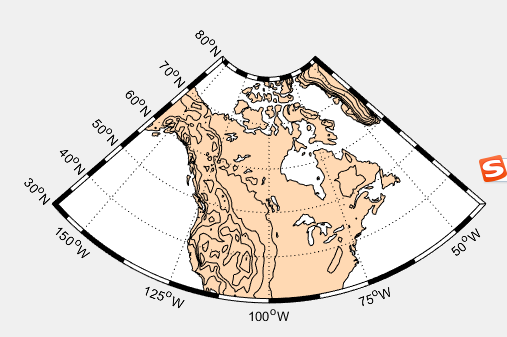
m_proj('lambert','long',[-160 -40],'lat',[30 80]);

m_coast('patch',[1 .85 .7]);%填充海岸线

m_elev('contourf',[500:500:6000]);%海深等高线

m_grid('box','fancy','tickdir','in');

colormap(flipud(copper));%翻转三原色的顺序排列,重新画图
3、
m_proj('stereographic','lat',90,'long',30,'radius',25);

m_elev('contour',[-3500:1000:-500],'edgecolor','b');

m_grid('xtick',12,'tickdir','out','ytick',[70 80],'linest','-');

m_coast('patch',[.7 .7 .7],'edgecolor','r');

4、
4.1默认的加载形式
clear all

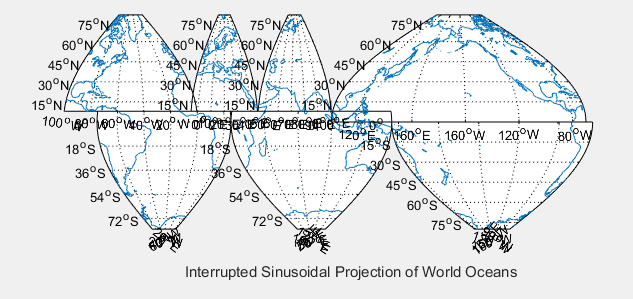
Slongs=[-100 0;-75 25;-5 45; 25 145;45 100;145 295;100 290];

Slats= [  8 80;-80  8; 8 80;-80   8; 8  80;-80   0;  0  80];

for l=1:7,

 m_proj('sinusoidal','long',Slongs(l,:),'lat',Slats(l,:));%分区块的载入地图

 m_grid;

 m_coast;

end;

xlabel('Interrupted Sinusoidal Projection of World Oceans');

% In order to see all the maps we must undo the axis limits set by m_grid calls:

set(gca,'xlimmode','auto','ylimmode','auto');%自动加载所有数据
4.2
clear all

subplot(211);

Slongs=[-100 0;-75 25;-5 45; 25 145;45 100;145 295;100 290];

Slats= [  8 80;-80  8; 8 80;-80   8; 8  80;-80   0;  0  80];

for l=1:7,

 m_proj('sinusoidal','long',Slongs(l,:),'lat',Slats(l,:));

 m_grid('fontsize',6,'xticklabels',[],'xtick',[-180:30:360],...%字体尺寸,隐藏坐标,坐标等距离排列

        'ytick',[-80:20:80],'yticklabels',[],'linest','-','color',[.9 .9 .9]);%线条形式实线,颜色

 m_coast('patch','g');%填充绿色

end;

xlabel('Interrupted Sinusoidal Projection of World Oceans');

% In order to see all the maps we must undo the axis limits set by m_grid calls:

set(gca,'xlimmode','auto','ylimmode','auto');

subplot(212);

Slongs=[-100 43;-75 20; 20 145;43 100;145 295;100 295];

Slats= [  0  90;-90  0;-90   0; 0  90;-90   0;  0  90];%比上面范围重叠更多

for l=1:6,

 m_proj('mollweide','long',Slongs(l,:),'lat',Slats(l,:));

 m_grid('fontsize',6,'xticklabels',[],'xtick',[-180:30:360],...

        'ytick',[-80:20:80],'yticklabels',[],'linest','-','color','k');

 m_coast('patch',[.6 .6 .6]);

end;

xlabel('Interrupted Mollweide Projection of World Oceans');

set(gca,'xlimmode','auto','ylimmode','auto');%自动加载所有数据范围

5、
clear all

% Nice looking data

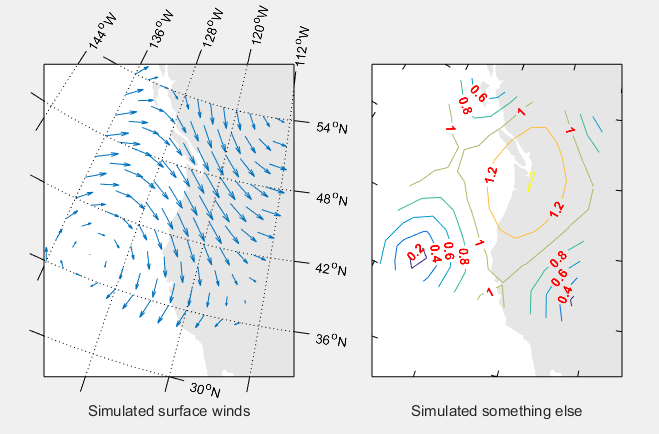
[lon,lat]=meshgrid([-136:2:-114],[36:2:54]);

u=sin(lat/6);%?

v=sin(lon/6);

m_proj('oblique','lat',[56 30],'lon',[-132 -120],'aspect',.8);%注意纬度顺序,高纬到低纬,'aspect'长宽比

subplot(121);

m_coast('patch',[.9 .9 .9],'edgecolor','none');

m_grid('tickdir','out','yaxislocation','right',...%边缘经纬线在外,纬度在右,经度在顶

       'xaxislocation','top','xlabeldir','end','ticklen',.05);%边缘经纬度宽度

hold on;%图层合并

m_quiver(lon,lat,u,v);%经度,纬度,向东,向北的速度分量,转化为矢量箭头

xlabel('Simulated surface winds');

subplot(122);

m_coast('patch',[.9 .9 .9],'edgecolor','none');

m_grid('tickdir','in','yticklabels',[],...

       'xticklabels',[],'linestyle','none','ticklen',.02);%经纬线去除

hold on;

[cs,h]=m_contour(lon,lat,sqrt(u.*u+v.*v));%画出轮廓

clabel(cs,h,'fontsize',10,'Color','red','FontWeight','bold');%标注轮廓,字体,字体大小,颜色

xlabel('Simulated something else');
6、
clear all

% Plot a circular orbit

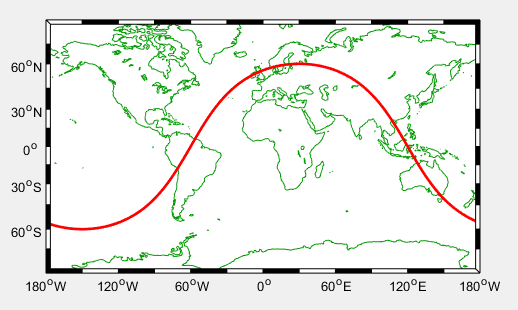
lon=[-180:180];

lat=atan(tan(60*pi/180)*cos((lon-30)*pi/180))*180/pi;

m_proj('miller','lat',80);%查询,纬度(-80 80),经度(-180 180)

m_coast('color',[0 .6 0]);

m_line(lon,lat,'linewi',2,'color','r');%线宽,2;颜色

m_grid('linestyle','none','box','fancy','tickdir','in');%没有网格,边框相间,
%m_line(lon,lat,'linewi',2,'color','r','linestyle',':');控制线条格式,点画线还是直线
7、
clear all

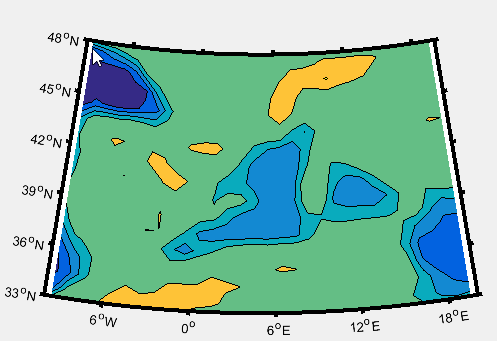
m_proj('lambert','lon',[-10 20],'lat',[33 48]);%范围设置与投影有关系

m_tbase('contourf');%画5-min数据库轮廓

m_grid('linestyle','none','tickdir','out','linewidth',3);
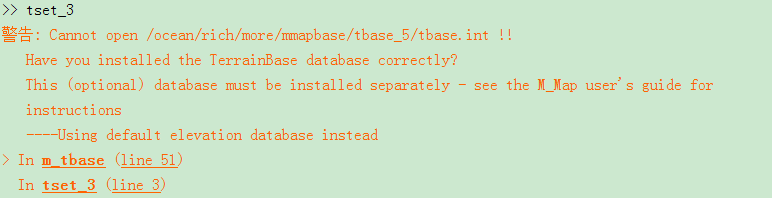
没有安装terrainbase,所以轮廓很简陋,这个坑用到的时候再填
8、不同分辨率情况下画的图
clear all

% Example showing the default coastline and all of the different resolutions

% of GSHHS coastlines as we zoom in on a section of Prince Edward Island.

clf

axes('position',[0.35 0.6 .37 .37]);%[left  bottom  width  height]

m_proj('albers equal-area','lat',[40 60],'long',[-90 -50],'rect','on');%方形,扇形

m_coast('patch',[0 1 0]);%填充

m_grid('linest','none','linewidth',2,'tickdir','out','xaxisloc','top','yaxisloc','right');

m_text(-69,41,'Standard coastline','color','r','fontweight','bold');%经纬度,内容,格式

axes('position',[.09 .5 .37 .37]);

m_proj('albers equal-area','lat',[40 54],'long',[-80 -55],'rect','on');

m_gshhs_c('patch',[.2 .8 .2]);

m_grid('linest','none','linewidth',2,'tickdir','out','xaxisloc','top');

m_text(-80,52.5,'GSHHS\_C (crude)','color','m','fontweight','bold','fontsize',14);

axes('position',[.13 .2 .37 .37]);

m_proj('albers equal-area','lat',[43 48],'long',[-67 -59],'rect','on');

m_gshhs_l('patch',[.4 .6 .4]);

m_grid('linest','none','linewidth',2,'tickdir','out');

m_text(-66.5,43.5,'GSHHS\_L (low)','color','m','fontweight','bold','fontsize',14);

axes('position',[.35 .05 .37 .37]);

m_proj('albers equal-area','lat',[45.8 47.2],'long',[-64.5 -62],'rect','on');

m_gshhs_i('patch',[.5 .6 .5]);

m_grid('linest','none','linewidth',2,'tickdir','out','yaxisloc','right');

m_text(-64.4,45.9,'GSHHS\_I (intermediate)','color','m','fontweight','bold','fontsize',14);

axes('position',[.55 .23 .37 .37]);

m_proj('albers equal-area','lat',[46.375 46.6],'long',[-64.2 -63.7],'rect','on');

m_gshhs_h('patch',[.6 .6 .6]);

m_grid('linest','none','linewidth',2,'tickdir','out','xaxisloc','top','yaxisloc','right');

m_text(-64.18,46.58,'GSHHS\_H (high)','color','m','fontweight','bold','fontsize',14);
运行出现这样问题
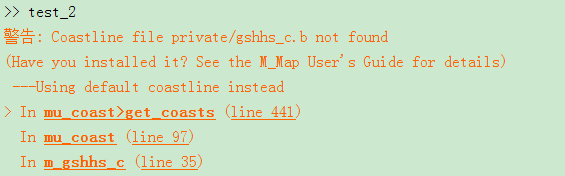
网站https://www.ngdc.noaa.gov/mgg/shorelines/data/gshhs/oldversions/version1.10/下载
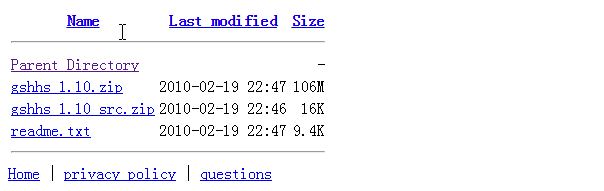
下载version1.10中 gshhs_1.10.zip 文件,将zip文件解压,把gshhs_*.b 文件复制到 matlab\R2009\toolbox\matlab\m_map\@private 文件夹内。打开m_gshhs_c.m,补全路径。
FILNAME='D:\MATLAB\toolbox\m_map\private/gshhs_c.b'
同理将所有的m_gshhs_*.m路径都补充完整。

9、
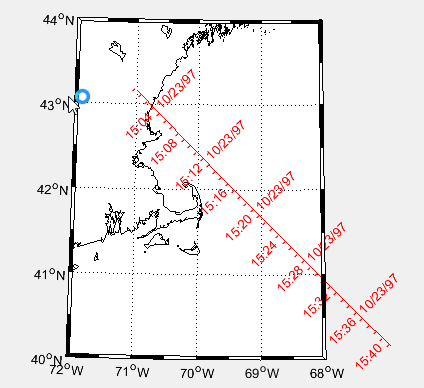
clear all

m_proj('UTM','long',[-72 -68],'lat',[40 44]);

m_gshhs_i('color','k');

m_grid('box','fancy','tickdir','in');

% fake up a trackline

lons=[-71:.1:-67];

lats=60*cos((lons+115)*pi/180);%轨迹经纬度

dates=datenum(1997,10,23,15,1:41,zeros(1,41));%轨迹时间,1分钟到41分钟

m_track(lons,lats,dates,'ticks',0,'times',4,'dates',8,...%刻度间隔,时间间隔4分钟,日期标签间隔8分钟

        'clip','off','color','r','orient','upright');%颜色标签方向
10、范围环
clear all

m_proj('hammer','clong',170);%缩放范围

m_grid('xtick',[],'ytick',[],'linestyle','-');

m_coast('patch','g');

m_line(100.5,13.5,'marker','square','color','r');%增加了一个标记点

m_range_ring(100.5,13.5,[1000:1000:15000],'color','b','linewi',2);%范围,颜色,线宽

xlabel('1000km range rings from Bangkok');%曼谷中心1000km的范围环

11、
clear all

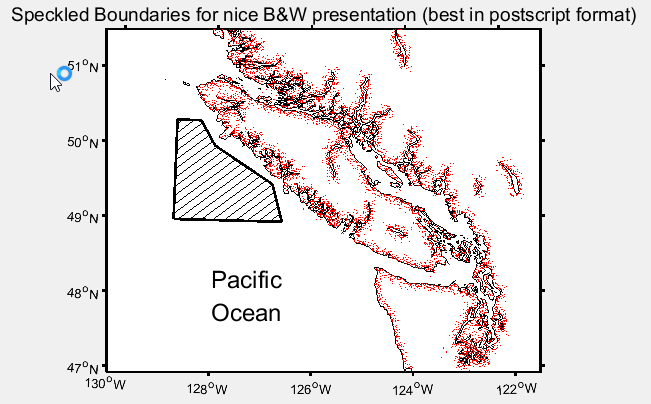
bndry_lon=[-128.8 -128.8 -128.3 -128 -126.8 -126.6 -128.8];

bndry_lat=[  49    50.33  50.33  50   49.5   49     49];

clf;

m_proj('lambert','long',[-130 -121.5],'lat',[47 51.5],'rectbox','on');

m_gshhs_i('color','k');              % Coastline...

m_gshhs_i('speckle','color','r');    % with speckle added,斑点添加

m_line(bndry_lon,bndry_lat,'linewi',2,'color','k');     % Area outline ...

m_hatch(bndry_lon,bndry_lat,'single',30,5,'color','k'); % ...with hatching added.斜线,30度,5个单位相距

m_grid('linewi',2,'linest','none','tickdir','out');

title('Speckled Boundaries for nice B&W presentation (best in postscript format)','fontsize',14);

m_text(-128,48,5,{'Pacific','Ocean'},'fontsize',18);
12
clear all

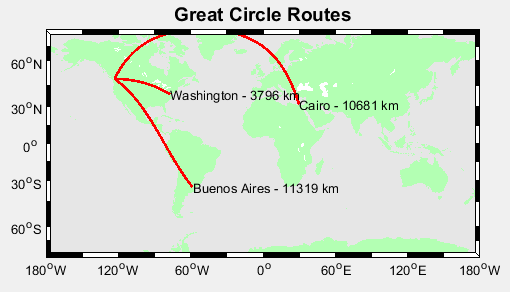
m_proj('miller','lat',[-75 75]);

m_coast('patch',[.7 1 .7],'edgecolor','none');

m_grid('box','fancy','linestyle','none','backcolor',[.9 .9 0.9]);

cities={'Cairo','Washington','Buenos Aires'};

lons=[ 30+2/60  -77-2/60   -58-22/60];

lats=[ 31+21/60  38+53/60  -34-45/60];

for k=1:3,

  [range,ln,lt]=m_lldist([-123-6/60 lons(k)],[49+13/60  lats(k)],40);

   %是两个位置之间分40个点,range返回距离,ln经度矩阵,lt纬度矩阵

  m_line(ln,lt,'color','r','linewi',2);

  m_text(ln(end),lt(end),sprintf('%s - %d km',cities{k},round(range)));

end;

title('Great Circle Routes','fontsize',14,'fontweight','bold');
13、 全球/地区温度图
(1)读取数据
clear all

setup_nctoolbox %调用工具包

tic %计时

%%

nc=ncgeodataset('tmpsfc.gdas.199401.grb2');   %读文件

tem_1=nc.variables   %浏览数据类型

%%

a1=nc.geovariable(tem_1(1));%取得数据类型为Temperature_surface的数据

b1=a1.data(1,:,:); %第一个时间点温度数据

c1=squeeze(b1)-273.16;%删除单一维度,换为摄氏温度

%%

a2=nc.geovariable(tem_1(2));%取得数据类型为lat的数据,纬度

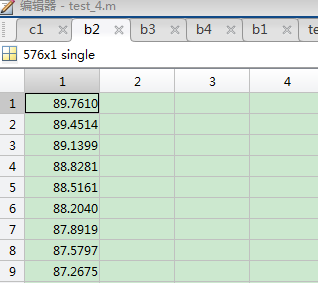
b2=a2.data(:,1)%提取数据

%%

a3=nc.geovariable(tem_1(3));%经度

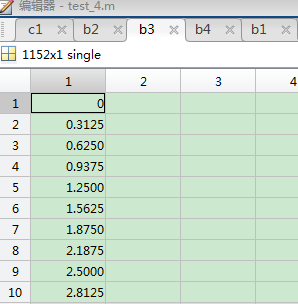
b3=a3.data(:,1)%

%%

a4=nc.geovariable(tem_1(4));%取得数据类型为time的数据

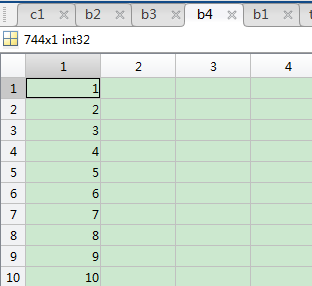
b4=a4.data(:,1)%

%%

save A b2 b3 c1

toc
读取的是NCEP/CFSR数据,1994年1月的温度数据。
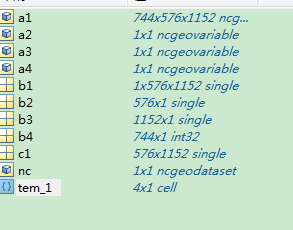
该数据一共四项。温度,纬度,经度,时间。
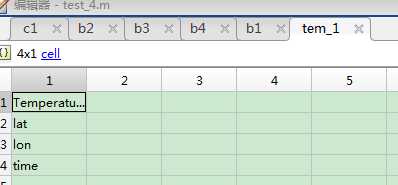
时间数据
经度数据
纬度数据
可以看出该数据集的数据组织形式,经度纬度构成世界地图,记录了744个时间点的温度数据。约等于1小时采集一次数据。
温度数据
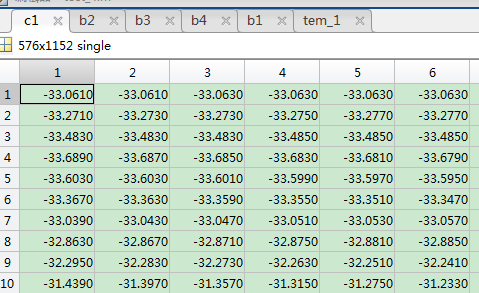
保存为mat格式数据,为画图做准备。
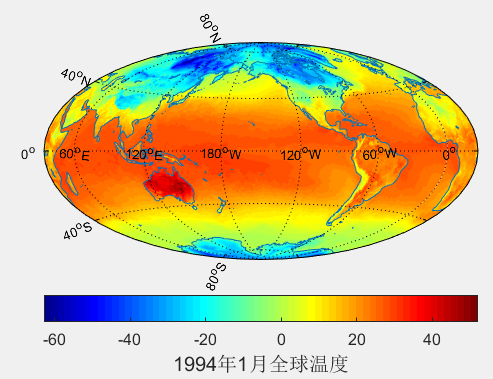
(2)画图
clear all

load A

[Plg,Plt]=meshgrid(b3',b2');%形成网格

 m_proj('hammer-aitoff','clongitude',-150);%投影模式

m_pcolor(Plg,Plt,c1);

shading flat;

colormap('jet');%颜色选择

hold on;

m_pcolor(Plg-360,Plt,c1);

shading flat; %着色模式

colormap('jet');

m_coast();

m_grid('xaxis','middle');

% h=colorbar('h');

% set(get(h,'title'),'string','1991年1月全球温度');

c=colorbar('southoutside','fontsize',12)

c.Label.String = '1994年1月全球温度';

c.Label.FontSize = 15;
(3)找出最大、最小温度的经纬度
clear all

load C

Max_col=max(c1);%列最大值

Max_row=max(c1,[],2)%行最大值

Max=max(max(c1));

[x1,y1]=find(c1==max(max(c1)));%x 行,y 列

T_1=Plt(x1,y1)%纬度

T_2=Plg(x1,y1)%经度

Min_col=min(c1);%列最大值

Min_row=min(c1,[],2)%行最大值

Min=min(min(c1));

[x,y]=find(c1==min(min(c1)));%x 行,y 列

T_x=Plt(x,y)%纬度

T_y=Plg(x,y)%经度
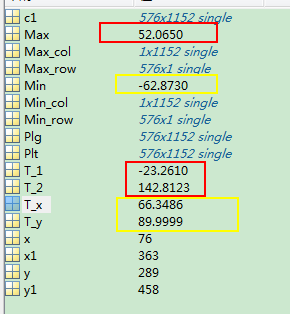
可以看出最热52度,在澳大利亚那块(142.8123E,23.2610S);最冷-62度,在北极圈那块(89.9999E,66.3486N)。
(4)中国(地区)温度图
clear all

load A

LATLIMS=[3 54];

LONLIMS=[72 134];%选定边界范围

[Plg,Plt]=meshgrid(b3',b2');%形成网格

 m_proj('lambert','lon',LONLIMS,'lat',LATLIMS);%投影模式

m_pcolor(Plg,Plt,c1);

shading flat;

colormap('jet');%颜色选择

hold on;

m_pcolor(Plg-360,Plt,c1);

shading flat; %着色模式

colormap('jet');

m_coast();

m_grid('box','fancy','tickdir','in');

% h=colorbar('h');

% set(get(h,'title'),'string','1991年1月全球温度');

c=colorbar('southoutside','fontsize',12)

c.Label.String = '1994年1月中国温度';

c.Label.FontSize = 15;
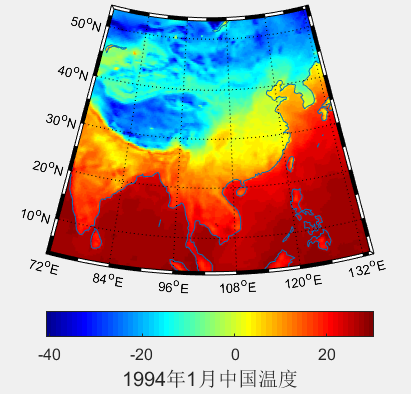
该方法是读取全球数据,只展示部分
(5)
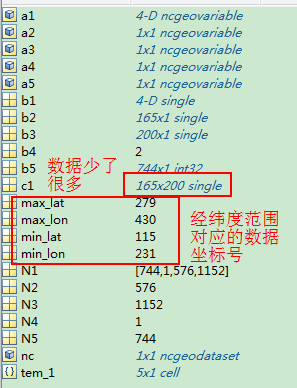
改进的区域方法,读取该区域的数据数据,
clear all

setup_nctoolbox %调用工具包

tic %计时

%%

min_lat=115;

max_lat=279;

min_lon=231;

max_lon=430;  %区域经纬度范围,在数据中的位置

%%

nc=ncgeodataset('tmp2m.gdas.199401.grb2');   %读文件

tem_1=nc.variables   %浏览数据类型

%%

N1=nc.size(tem_1(1));%读取数据大小,可以看出数据的组织形式

a1=nc.geovariable(tem_1(1));%取得数据类型为Temperature_surface的数据

b1=a1.data(1,1,min_lat:max_lat,min_lon:max_lon); %第一个时间点温度数据

c1=squeeze(b1)-273.16;%删除单一维度,换为摄氏温度

%%

N2=nc.size(tem_1(2));

a2=nc.geovariable(tem_1(2));%取得数据类型为lat的数据,纬度

b2=a2.data(min_lat:max_lat,1);%提取数据

%%

N3=nc.size(tem_1(3))

a3=nc.geovariable(tem_1(3));%经度

b3=a3.data(min_lon:max_lon,1);%

%%

N4=nc.size(tem_1(4))

a4=nc.geovariable(tem_1(4));%取得数据类型为time的数据

b4=a4.data(:,1);%

%%

N5=nc.size(tem_1(5));%读取数据大小

a5=nc.geovariable(tem_1(5));%取得数据类型为time的数据

b5=a5.data(:,1);%

%%

save tem b2 b3 c1

toc
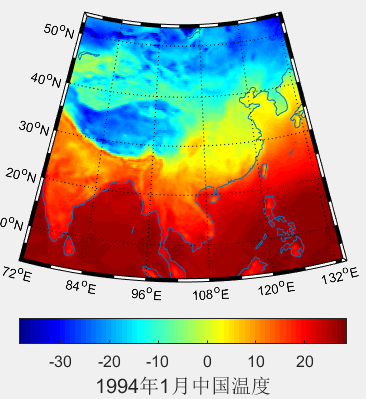
clear all

load tem

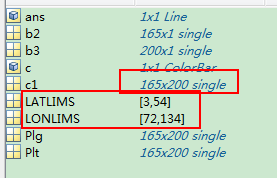
LATLIMS=[3 54];

LONLIMS=[72 134];%选定边界范围

[Plg,Plt]=meshgrid(b3',b2');%形成网格

 m_proj('lambert','lon',LONLIMS,'lat',LATLIMS);%投影模式

m_pcolor(Plg,Plt,c1);

shading flat;

colormap('jet');%颜色选择

hold on;

m_pcolor(Plg-360,Plt,c1);

shading flat; %着色模式

colormap('jet');

m_coast();

m_grid('box','fancy','tickdir','in');

% h=colorbar('h');

% set(get(h,'title'),'string','1991年1月全球温度');

c=colorbar('southoutside','fontsize',12)

c.Label.String = '1994年1月中国温度';

c.Label.FontSize = 15;
八、圆形区域的画图
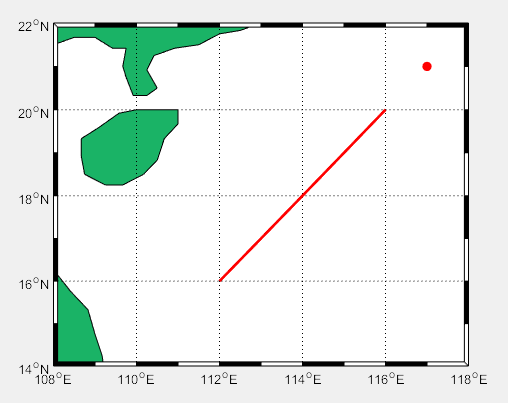
1、
clear all

LATLIMS=[14 22];

LONLIMS=[108 118];%南海边界范围

m_proj('miller','lon',LONLIMS,'lat',LATLIMS);%投影模式

m_coast('patch',[0.1 0.7 0.4]);%绿色填充

m_grid('box','fancy','tickdir','in');%没有网格,边框相间,%m_line(lon,lat,'linewi',2,'color','r','linestyle',':');控制线条格式,点画线还是直线

lon=112:1:116;

lat=16:1:20;

m_line(lon,lat,'linewi',2,'color','r');%线宽,2;颜色

[X,Y]=m_ll2xy(117,21);

line(X,Y,'marker','.','markersize',24','color','r')%画点
2、距离
clear all

%distance用法

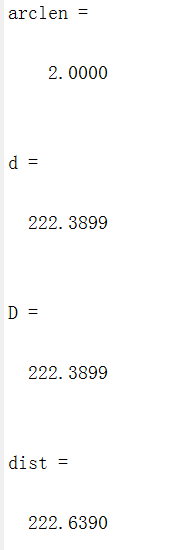
arclen=distance([37,0],[35,0])%返回两点间的相对球心的角度,以度为单位

d=distance([37,0],[35,0],6371)% [纬度,经度] [纬度,经度] [半径]

D=(arclen/180)*pi*6371

%m_map中函数

dist=m_lldist([0 0],[35 37])%[经度 经度] [纬度 纬度]
3、
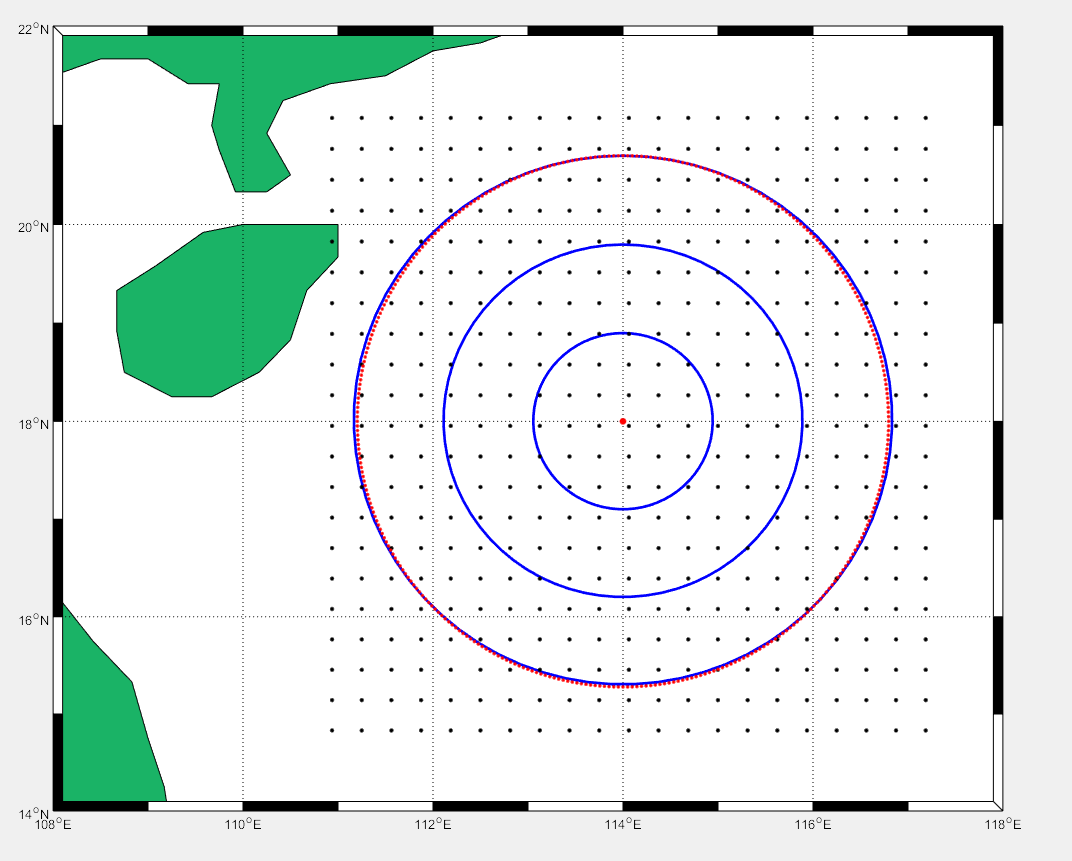
clear all

LATLIMS=[14 22];

LONLIMS=[108 118];%南海边界范围

m_proj('miller','lon',LONLIMS,'lat',LATLIMS);%投影模式

m_coast('patch',[0.1 0.7 0.4]);%绿色填充

m_grid('box','fancy','tickdir','in');%没有网格,边框相间,%m_line(lon,lat,'linewi',2,'color','r','linestyle',':');控制线条格式,点画线还是直线

load EDH_south_sea_2008

load coordi_south_sea_2008

m_range_ring(114,18,[1e2:1e2:3e2],'linewi',2,'color','b');%红色300km范围圆圈

% 矩形点阵

range_lat=4:24;%21N和15N对应的位置下标

range_lon=20:40;%111.5E和116.5E对应的下标

for i=1:length(range_lon)

    for j=1:length(range_lat)

        [X,Y]=m_ll2xy(lon_south_sea(range_lon(i)),lat_south_sea(range_lat(j)));%化为x,y坐标

        line(X,Y,'marker','.','markersize',10,'color','k')%画点

        hold on

    end

end

%离散圆

[X0,Y0]=m_ll2xy(114,18);%化为x,y坐标

line(X0,Y0,'marker','.','markersize',15,'color','r');%画圆心

DIST=m_lldist([114 114],[18 19]);%纬度加1度,增加的距离

R=300;%300km

[X1,Y1]=m_ll2xy(114,18+R/DIST);%找到300km的一个点

r=sqrt((X0-X1)^2+(Y0-Y1)^2);%地图距离到图上距离转换

theta=0:pi/180:2*pi;%360度,360个点。

x=X0+r*cos(theta); %(X0,Y0)圆心

y=Y0+r*sin(theta);

plot(x,y,'.','color','r')
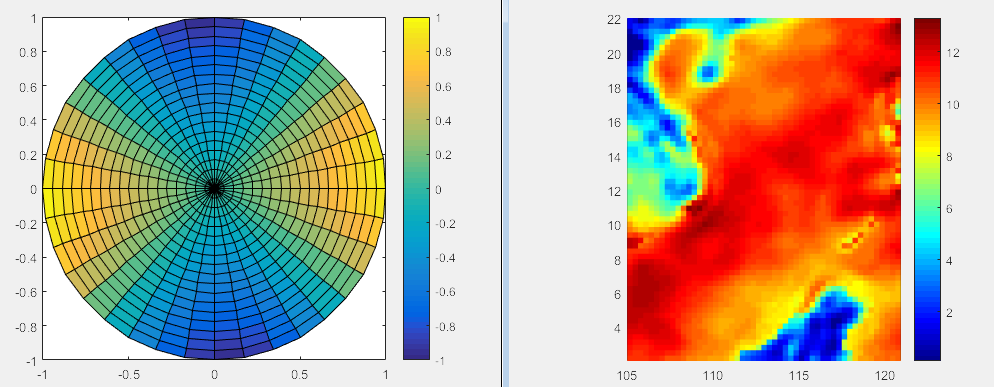
4、pcolor
clear all

n =18;

r = (0:n)'/n;

theta = pi*(-n:n)/n;

X = r*cos(theta);

Y = r*sin(theta);

C = r*cos(2*theta);

pcolor(X,Y,C)

axis equal tight

colorbar

figure

load PCOLOR %南海坐标和波导高度数据

colormap('jet');

shading flat;%平滑方式

gca=pcolor(Plg,Plt,EDH_south_sea)

set(gca, 'LineStyle','none');%去除网格

axis equal tight %按比例展示

colorbar %颜色条
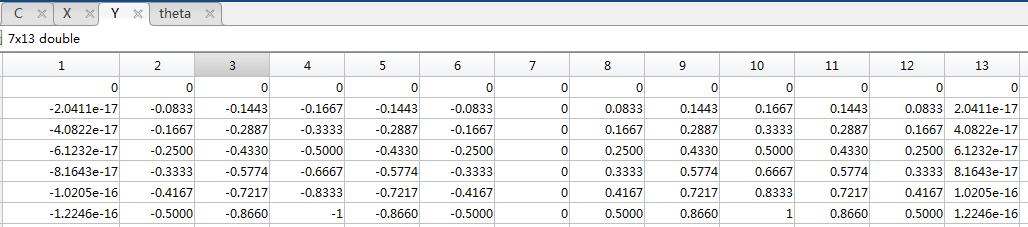
clear all

n =6;

r = (0:n)'/n;%0到6,半径上均分的数

theta = pi*(-n:n)/n;%将整个圆分成了13分。

X = r*cos(theta);

Y = r*sin(theta);

C = r*cos(2*theta);

pcolor(X,Y,C)

axis equal tight

colorbar


Matlab——m_map指南(3)——实例的更多相关文章
- Matlab——m_map指南(4)——实例
1. 全球/地区温度图 (1)读取数据 clear all setup_nctoolbox %调用工具包 tic %计时 %% nc=ncgeodataset('tmpsfc.gdas.199401. ...
- Matlab——m_map指南(2)
3.海岸线和深度测量 3.1.1 海岸线选项 m_coast('line', ...optional line arguments ); m_coast('line', ...optional lin ...
- MATLAB——m_map指南(1)
1.例图 (1) clear all m_proj('oblique mercator');%确定投影方式和绘图界线 m_coast;%画出海岸线 m_grid;%添加格网 第一行代码初始化投影,对于 ...
- MATLAB神经网络原理与实例精解视频教程
教程内容:<MATLAB神经网络原理与实例精解>随书附带源程序.rar9.随机神经网络.rar8.反馈神经网络.rar7.自组织竞争神经网络.rar6.径向基函数网络.rar5.BP神经网 ...
- C语言与MATLAB接口 编程与实例 李传军编着
罗列一下以前自己学习C语言与MATLAB混编的笔记,顺便复习一遍. <C语言与MATLAB接口 编程与实例 李传军编着>(未看完,目前看到P106) 目录P4-8 ************ ...
- matlab load函数用法 实例
一 语法: load(filename) load(filename,variables) load(filename,'-ascii') load(filename,'-mat') load(fil ...
- 【翻译】EXTJS 编码风格指南与实例
原文:EXTJS Code Style Guide with examples Ext JS风格指南: 熟知的且易于学习 快速开发,易于调试,轻松部署 组织良好.可扩展和可维护 Ext JS应用程序的 ...
- matlab文件读写处理实例(三)——读取文件特定行
(1) 读取文件特定行 CODE: ; ; if nline==line fprintf(fidout,'%s\n',tline); data ...
- matlab文件读写处理实例(二)——textread批量读取文件
问题:对文件夹下所有文件进行批量读取,跳过文件头部分,读取每个文件数据部分的7,8,9列,保存到变量并且输出到文件. 数据: 文件夹11m\
随机推荐
- 【每日一包0018】fecha
[github地址:https://github.com/ABCDdouyae...] fecha 比moment.js更加轻量级的时间解析和格式化包 format 用法:format(<Dat ...
- 前端每日实战:132# 视频演示如何用纯 CSS 创作一只思考的手
效果预览 按下右侧的"点击预览"按钮可以在当前页面预览,点击链接可以全屏预览. https://codepen.io/comehope/pen/WgdVyx/ 可交互视频 此视频是 ...
- 使用Blazor Server 线路处理程序 (circuit handler)跟踪打开的SignalR连接
Blazor服务器允许定义线路处理程序(circuit handler)代码,该处理程序(handler)允许在更改用户线路状态时运行此代码. 线路处理程序(circuit handler)是通过从C ...
- Linux进程操作记录
关于Gunicorn如何终止进程: 1.用进程树显示主进程PID: pstree -ap | grep gunicorn 2.如果有daemon进程无法用kill -9删除(可能是因为daemon屏蔽 ...
- 关于使用layui中的tree的一个坑
最近几天,因为项目需要,所以自学了下layui,在使用之前就对其比较感兴趣,毕竟封装的东西也不错(个人见解),在接触到layui之后,现在有个需要就是将部门做成tree的样子,开始觉得不怎么难,毕竟都 ...
- openwrt 为软件包添加服务
手动修改 rc.local 加入也可以实现自启动,缺点手动修改太麻烦,停止只能用 kill . 配置成服务最方便了,可以启用或禁用,启动,停止,重启非常方便. 在openwrt 中使用服务 servi ...
- TCP数据报结构以及三次握手(图解)
简要介绍 TCP(Transmission Control Protocol,传输控制协议)是一种面向连接的.可靠的.基于字节流的通信协议,数据在传输前要建立连接,传输完毕后还要断开连接.客户端在收发 ...
- Java多线程并发01——线程的创建与终止,你会几种方式
本文开始将开始介绍 Java 多线程与并发相关的知识,多谢各位一直以来的关注与支持.关注我的公众号「Java面典」了解更多 Java 相关知识点. 线程的创建方式 在 Java 中,用户常用的主动创建 ...
- Nodejs:md5入门介绍及crypto模块的应用
简介 MD5(Message-Digest Algorithm)是计算机安全领域广泛使用的散列函数(又称哈希算法.摘要算法),主要用来确保消息的完整和一致性.常见的应用场景有密码保护.下载文件校验等. ...
- Uiautomator1.0与Uiautomator2.0测试项目搭建与运行原理
Uiautomator是Android原生测试框架,可以用于白盒接口测试也可以用于UI自动化测试,Uiautomator分1.0版本与2.0版本,它们都是基于UiAutomation的测试框架,都是通 ...