
使用MockMvc进行springboot调试(SpringbootTest)
测试前关闭web项目。springboot启动程序WebApplication.class
笔者本地自定了端口SpringBootTest.WebEnvironment.DEFINED_PORT
代码如下:
import com.xxx.web.WebApplication;

import org.junit.Before;

import org.junit.Test;

import org.junit.runner.RunWith;

import org.springframework.beans.factory.annotation.Autowired;

import org.springframework.boot.test.autoconfigure.web.servlet.AutoConfigureMockMvc;

import org.springframework.boot.test.context.SpringBootTest;

import org.springframework.http.MediaType;

import org.springframework.mock.web.MockHttpSession;

import org.springframework.test.context.junit4.SpringRunner;

import org.springframework.test.web.servlet.MockMvc;

import org.springframework.test.web.servlet.request.MockHttpServletRequestBuilder;

import org.springframework.test.web.servlet.request.MockMvcRequestBuilders;

import org.springframework.test.web.servlet.result.MockMvcResultHandlers;

import org.springframework.test.web.servlet.setup.MockMvcBuilders;

import org.springframework.web.context.WebApplicationContext;

import java.time.Instant;

import java.util.Random;

import static org.springframework.test.web.servlet.request.MockMvcRequestBuilders.get;

import static org.springframework.test.web.servlet.request.MockMvcRequestBuilders.post;

import static org.springframework.test.web.servlet.result.MockMvcResultMatchers.status;

@RunWith(SpringRunner.class)

@SpringBootTest(classes = WebApplication.class, webEnvironment = SpringBootTest.WebEnvironment.DEFINED_PORT)

@AutoConfigureMockMvc

public class TestAppController {

    @Autowired

    private WebApplicationContext context;

    @Autowired

    private MockMvc mvc;

    private MockHttpSession session;// 1.定义一个变量保存session

    String pathOnClasspath;

    @Before

    public void setUp() throws Exception {

        mvc = MockMvcBuilders.webAppContextSetup(context).build();

        session = new MockHttpSession(); //2.初始化

    }

    @Test

    public void login() throws Exception {

        // 登陆

        MockHttpServletRequestBuilder loginRequestBuilder = MockMvcRequestBuilders.post("/user2/login")

                .param("loginName", "test")

                .param("password", "567")

                .contentType(MediaType.APPLICATION_JSON_UTF8)

                .accept(MediaType.APPLICATION_JSON)

                .session(session);//3.当某个请求需要session时,直接在构造器中绑定需要的session

        mvc.perform(loginRequestBuilder).andDo(MockMvcResultHandlers.print());

    }

    @Test

    public void save() throws Exception {

        //先登录

        login();

        mvc.perform(post("/app/save")

                .param("name","测试")

                .param("categoryId","567")

                .param("description","休闲益智类游戏语音识别测试")

                .session(session)

                .contentType(MediaType.APPLICATION_JSON))

                .andExpect(status().isOk())

                //.andExpect(jsonPath("$",hasSize(1)))

                //.andExpect(jsonPath("$.message").value(is("保存成功")))

                //.andExpect(jsonPath("$.message"),is("保存成功"))

                .andDo(MockMvcResultHandlers.print());

    }

    @Test

    public void update() throws Exception{

        Random rnd = new Random();

        int id = rnd.nextInt(6);

        mvc.perform(

                post("/app/update")

                        .param("id", String.valueOf(id))

                        .param("name", String.format("测试%s", Instant.now().toEpochMilli()))

                        .param("description", "描述12121")

        ).andDo(MockMvcResultHandlers.print());

    }

    @Test

    public void list() throws Exception {

        mvc.perform(get("/app/list")

                .contentType(MediaType.TEXT_HTML))

                .andExpect(status().isOk())

                .andDo(MockMvcResultHandlers.print());

    }

    @Test

    public void filteredList() throws Exception {

        mvc.perform(post("/app/list")

                .param("keyword","111")

                .contentType(MediaType.TEXT_HTML))

                .andExpect(status().isOk())

                .andDo(MockMvcResultHandlers.print());

    }

    @Test

    public void testisDuplicatedName() throws Exception

    {

        mvc.perform(post("/app/isDuplicatedName")

                .param("name","测试")

        ).andDo(MockMvcResultHandlers.print());

    }

}
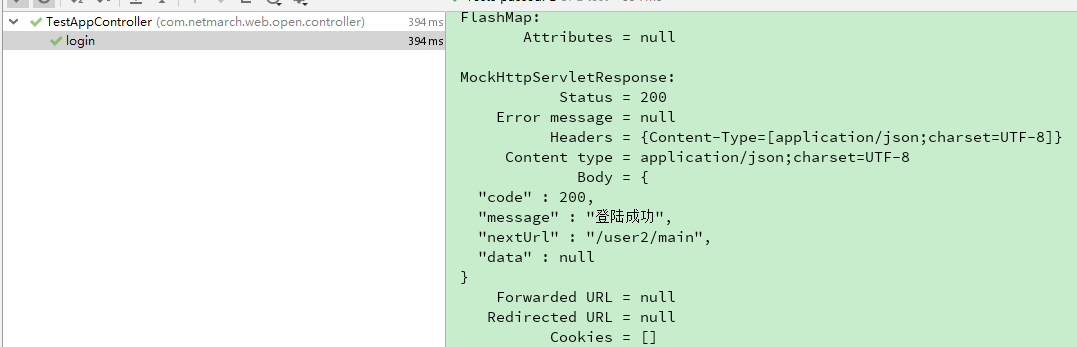
测试输出效果
其他参考:
https://www.petrikainulainen.net/programming/spring-framework/integration-testing-of-spring-mvc-applications-write-clean-assertions-with-jsonpath/
使用MockMvc进行springboot调试(SpringbootTest)的更多相关文章
- SpringBoot基础之MockMvc单元测试
SpringBoot创建的Maven项目中,会默认添加spring-boot-starter-test依赖.在<5分钟快速上手SpringBoot>中编写的单元测试使用了MockMvc.本 ...
- SpringBoot配置文件(1)
配置文件 1.配置文件 SpringBoot使用一个全局的配置文件 application.properties application.yml 配置文件名是固定的: 他的作用是修改SpringBoo ...
- SpringBoot详解
1.Hello,World! 1.1.SpringBoot简介 回顾什么是Spring Spring是一个开源框架,2003 年兴起的一个轻量级的Java 开发框架,作者:Rod Johnson . ...
- SpringBoot Maven项目 Helloworld 测试
SpringBoot 化繁为简,简化配置 SpringBoot官方:http://projects.spring.io/spring-boot/SpringBoot使用介绍:http://blog.c ...
- [02-01]Java学习路线(完整详细版)
Java基础课程 Java基础课程内容涉及:Java开发介绍.Java数组.Java面向对象.常用基础类.集合.IO流.多线程.异常.网络.反射. 第一阶段:Java基础 1 第一部分:Java开发介 ...
- SpringBoot------MockMvc单元测试
1.添加测试依赖 <project xmlns="http://maven.apache.org/POM/4.0.0" xmlns:xsi="http://www. ...
- 单元测试 - SpringBoot2+Mockito实战
单元测试 - SpringBoot2+Mockito实战 在真实的开发中,我们通常是使用SpringBoot的,目前SpringBoot是v2.4.x的版本(SpringBoot 2.2.2.RELE ...
- SpringBoot------单元测试
1.添加测试依赖 <dependency> <groupId>org.springframework.boot</groupId> <artifactId&g ...
- 分布式任务调度平台XXL-JOB学习笔记一
分布式任务调度平台XXL-JOB学习笔记一 XXL-JOB是一个轻量级分布式任务调度平台,其核心设计目标是开发迅速.学习简单.轻量级.易扩展.现已开放源代码并接入多家公司线上产品线,开箱即用.码云地址 ...
随机推荐
- HTML5 Web SQL 数据库
呼和浩特seo:Web SQL 数据库 API 并不是 HTML5 规范的一部分,但是它是一个独立的规范,引入了一组使用 SQL 操作客户端数据库的 APIs. 如果你是一个 Web 后端程序员,应该 ...
- CSS3限,2行3行等文字在块元素显示的文字内容超出显示省略号
大家都知道文字超出一行显示省略号用css就可以搞定,但2行.3行等多行超出显示省略号有的人就不知怎么搞了,我用js做过一个文字判断有兴趣的可以看一下传送门,今天就来试验一下多行超出省略号 使用时注意浏 ...
- spark提交任务报错: java.lang.SecurityException: Invalid signature file digest for Manifest main attributes
spark提交任务报错: java.lang.SecurityException: Invalid signature file digest for Manifest main attributes ...
- mysql kill所有Sleep/Execute进程
现查出需要kill的进程: SELECT GROUP_CONCAT(CONCAT('kill ',id) SEPARATOR '; ') AS cmd FROM information_schema. ...
- Qt在pro中实现条件编译
https://www.cnblogs.com/Braveliu/p/5107550.html https://blog.csdn.net/simonforfuture/article/details ...
- leetcode 198 动态规划
题目意思是:给一组数组,要使选取的子数组和(不用连续)最大,但不能同时选取相邻. 我的思路: 对于a[i]来说,要么选取,要么不选取.假设选取a[i],那么肯定不能选取a[i-1],只能看前0~i-2 ...
- 微信小程序的分享功能-css文字超过两行隐藏
.info{ width:100px; word-break:break-all; display:-webkit-box; -webkit-box-orient:vertical; -webkit- ...
- P1026 统计单词个数——substr
P1026 统计单词个数 string 基本操作: substr(x,y) x是起始位置,y是长度: 返回的是这一段字符串: 先预处理sum[i][j],表示以i开头,最多的单词数: 从后往前寻找,保 ...
- linux环境下固定ip操作
背景: 使用虚拟机管理软件VMvare workstation 安装好liunx虚拟机(centos)成功,下面为了固定linux的ip进行一系列设置 参考的文件有部分不是很详细,在借鉴它的基础上进行 ...
- iptables----sport、dport解释
以前一直对iptables的sport.dport不清楚,所以这里记录一下. (1)清理防火墙: iptables -F iptables -X iptables -Z (2)iptables命令选项 ...