
Spring Cloud Gateway(九):网关过滤器 GatewayFilter
本文基于 spring cloud gateway 2.0.1
1、简介
GatewayFilter 网关过滤器用于拦截并链式处理web请求,可以实现横切的与应用无关的需求,比如:安全、访问超时的设置等。
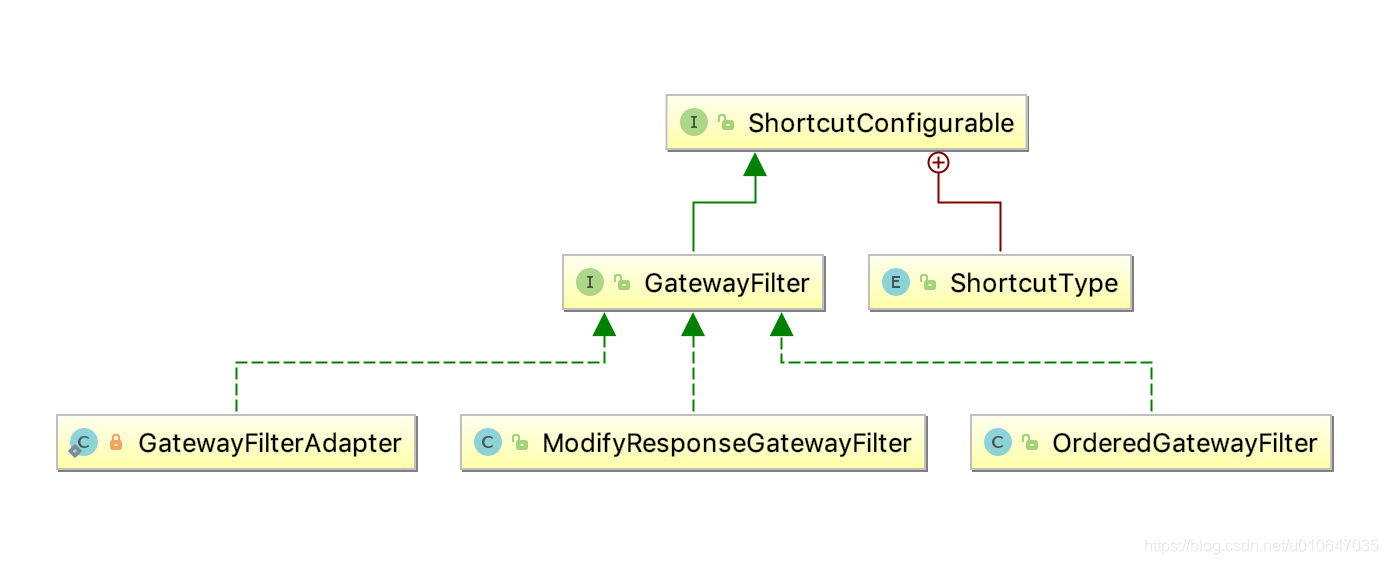
从类图中可以看到,GatewayFilter 有三个实现类:
OrderedGatewayFilter 是一个有序的网关过滤器
GatewayFilterAdapter 是一个适配器类,是web处理器(FilteringWebHandler)中的内部类
ModifyResponseGatewayFilter 是一个内部类,用于修改响应体
本文就分别介绍一下网关过滤器的实现类。
2、有序的网关过滤器 OrderedGatewayFilter
过滤器大多都是有优先级的,因此有序的网关过滤器的使用场景会很多。在实现过滤器接口的同时,有序网关过滤器也实现了 Ordered 接口,构造函数中传入需要代理的网关过滤器以及优先级就可以构造一个有序的网关过滤器。具体的过滤功能的实现在被代理的过滤器中实现的,因此在此只需要调用代理的过滤器即可。
public class OrderedGatewayFilter implements GatewayFilter, Ordered {

	private final GatewayFilter delegate;

	private final int order;

	public OrderedGatewayFilter(GatewayFilter delegate, int order) {

		this.delegate = delegate;

		this.order = order;

	}

	--------------------------------省略-------------------------------

}
3、网关过滤器适配器 GatewayFilterAdapter
在网关过滤器链 GatewayFilterChain 中会使用 GatewayFilter 过滤请求,GatewayFilterAdapter的作用就是将全局过滤器 GlobalFilter 适配成 网关过滤器 GatewayFilter。
// FilteringWebHandler.java
private static class GatewayFilterAdapter implements GatewayFilter {

		private final GlobalFilter delegate;

		public GatewayFilterAdapter(GlobalFilter delegate) {

			this.delegate = delegate;

		}

		@Override

		public Mono<Void> filter(ServerWebExchange exchange, GatewayFilterChain chain) {

			return this.delegate.filter(exchange, chain);

		}

		@Override

		public String toString() {

			final StringBuilder sb = new StringBuilder("GatewayFilterAdapter{");

			sb.append("delegate=").append(delegate);

			sb.append('}');

			return sb.toString();

		}

	}
4、ModifyResponseGatewayFilter
ModifyResponseGatewayFilter 是 ModifyResponseBodyGatewayFilterFactory 的内部类,用于修改响应体的信息
// ModifyResponseBodyGatewayFilterFactory.java
	public class ModifyResponseGatewayFilter implements GatewayFilter, Ordered {

		private final Config config;

		public ModifyResponseGatewayFilter(Config config) {

			this.config = config;

		}

		@Override

		@SuppressWarnings("unchecked")

		public Mono<Void> filter(ServerWebExchange exchange, GatewayFilterChain chain) {

			ServerHttpResponseDecorator responseDecorator = new ServerHttpResponseDecorator(exchange.getResponse()) {

				@Override

				public Mono<Void> writeWith(Publisher<? extends DataBuffer> body) {

					Class inClass = config.getInClass();

					Class outClass = config.getOutClass();

					String originalResponseContentType = exchange.getAttribute(ORIGINAL_RESPONSE_CONTENT_TYPE_ATTR);

					HttpHeaders httpHeaders = new HttpHeaders();

					//explicitly add it in this way instead of 'httpHeaders.setContentType(originalResponseContentType)'

					//this will prevent exception in case of using non-standard media types like "Content-Type: image"

					httpHeaders.add(HttpHeaders.CONTENT_TYPE, originalResponseContentType);

					ResponseAdapter responseAdapter = new ResponseAdapter(body, httpHeaders);

					DefaultClientResponse clientResponse = new DefaultClientResponse(responseAdapter, ExchangeStrategies.withDefaults());

					//TODO: flux or mono

					Mono modifiedBody = clientResponse.bodyToMono(inClass)

							.flatMap(originalBody -> config.rewriteFunction.apply(exchange, originalBody));

					BodyInserter bodyInserter = BodyInserters.fromPublisher(modifiedBody, outClass);

					CachedBodyOutputMessage outputMessage = new CachedBodyOutputMessage(exchange, exchange.getResponse().getHeaders());

					return bodyInserter.insert(outputMessage, new BodyInserterContext())

							.then(Mono.defer(() -> {

								long contentLength1 = getDelegate().getHeaders().getContentLength();

								Flux<DataBuffer> messageBody = outputMessage.getBody();

								//TODO: if (inputStream instanceof Mono) {

									HttpHeaders headers = getDelegate().getHeaders();

									if (/*headers.getContentLength() < 0 &&*/ !headers.containsKey(HttpHeaders.TRANSFER_ENCODING)) {

										messageBody = messageBody.doOnNext(data -> headers.setContentLength(data.readableByteCount()));

									}

								// }

								//TODO: use isStreamingMediaType?

								return getDelegate().writeWith(messageBody);

							}));

				}

				@Override

				public Mono<Void> writeAndFlushWith(Publisher<? extends Publisher<? extends DataBuffer>> body) {

					return writeWith(Flux.from(body)

							.flatMapSequential(p -> p));

				}

			};

			return chain.filter(exchange.mutate().response(responseDecorator).build());

		}

		@Override

		public int getOrder() {

			return NettyWriteResponseFilter.WRITE_RESPONSE_FILTER_ORDER - 1;

		}

	}
Spring Cloud Gateway(九):网关过滤器 GatewayFilter的更多相关文章
- Spring Cloud gateway 三 自定义过滤器GatewayFilter
之前zuul 网关介绍.他有过滤器周期是四种,也是四种类型的过滤器.而gateway 只有俩种过滤器:"pre" 和 "post". PRE: 这种过滤器在请求 ...
- Spring Cloud Gateway 服务网关快速上手
Spring Cloud Gateway 服务网关 API 主流网关有NGINX.ZUUL.Spring Cloud Gateway.Linkerd等:Spring Cloud Gateway构建于 ...
- Spring Cloud Gateway服务网关
原文:https://www.cnblogs.com/ityouknow/p/10141740.html Spring 官方最终还是按捺不住推出了自己的网关组件:Spring Cloud Gatewa ...
- Spring Cloud (14) 服务网关-过滤器
Spring Cloud Zuul作为网关所具备的最基本的功能:路由,还具备另外一个核心的功能:过滤器. 过滤器 通过Spring Cloud Zuul实现的路由功能,我们的微服务可以通过统一的API ...
- Spring Cloud Alibaba学习笔记(21) - Spring Cloud Gateway 自定义全局过滤器
在前文中,我们介绍了Spring Cloud Gateway内置了一系列的全局过滤器,本文介绍如何自定义全局过滤器. 自定义全局过滤需要实现GlobalFilter 接口,该接口和 GatewayFi ...
- Spring Cloud Gateway之全局过滤器在工作中的使用场景
一.使用注意事项 1.全局过滤器作用于所有的路由,不需要单独配置. 2.通过@Order来指定执行的顺序,数字越小,优先级越高. 二.默认全局拦截器的整体架构 三.实战场景,例如,校验token.记录 ...
- Spring Cloud gateway 网关四 动态路由
微服务当前这么火爆的程度,如果不能学会一种微服务框架技术.怎么能升职加薪,增加简历的筹码?spring cloud 和 Dubbo 需要单独学习.说没有时间?没有精力?要学俩个框架?而Spring C ...
- Spring Cloud gateway 五 Sentinel整合
微服务当前这么火爆的程度,如果不能学会一种微服务框架技术.怎么能升职加薪,增加简历的筹码?spring cloud 和 Dubbo 需要单独学习.说没有时间?没有精力?要学俩个框架?而Spring C ...
- Spring Cloud gateway 六 Sentinel nacos存储动态刷新
微服务当前这么火爆的程度,如果不能学会一种微服务框架技术.怎么能升职加薪,增加简历的筹码?spring cloud 和 Dubbo 需要单独学习.说没有时间?没有精力?要学俩个框架?而Spring C ...
- Spring Cloud Gateway GatewayFilter的使用
Spring Cloud Gateway GatewayFilter的使用 一.GatewayFilter的作用 二.Spring Cloud Gateway内置的 GatewayFilter 1.A ...
随机推荐
- Java QuickSelect
Java QuickSelect /** * <html> * <body> * <P> Copyright 1994-2018 JasonInternationa ...
- GRPC代替webapi Demo。
gRPC 是一种与语言无关的高性能远程过程调用 (RPC) 框架. gRPC 的主要优点是: 现代高性能轻量级 RPC 框架. 协定优先 API 开发,默认使用协议缓冲区,允许与语言无关的实现. 可用 ...
- 文件锁 flock/fcntl
多个进程同时操作一个文件 1. flock int flock(int fd, int operation); LOCK_SH 建立共享锁定.多个进程可同时对同一个文件作共享锁定(读锁定) LOCK_ ...
- JavaScript中进制和字符编码问题
1.进制: JavaScript中允许使用字面量的形式声明不同进制的数字: var a = 0b10; // 2 声明一个二进制 var b = 010; // 8 八进制,严格模式下会报错 var ...
- 在Linux命令行中操作PDF
pdftk 命令提供了许多处理 PDF 的命令行操作,包括合并页面.加密文件.添加水印.压缩文件,甚至还有修复 PDF. 虽然 PDF 通常被认为是相当稳定的文件,但在 Linux 和其他系统上你可以 ...
- jFinal的小知识点总结
sql批处理 // 批处理sql List<String> sqlList = new ArrayList<String>(); sqlList.add("delet ...
- linux使用文本编辑器vi常用命令
一:翻页 ctrl+u向上翻半页 ctrl+d 向下翻半页 ctrl+f/page up向上翻一页 ctrl+b/page on 向下翻一页 H光标移到当前页的第一个字符 M光标移到当前页的中 ...
- jQuery基础知识1
jquery的概念 js query jquery库 封装了大量js,封装js的入口函数.兼容性问题.DOM操作.事件.ajax 使用jquery 下载包 引用 <script src=&quo ...
- python学习之正则表达式,StringIO模块,异常处理,搭建测试环境
python正则表达式 引入一个强大的匹配功能来匹配字符串 import re 正则表达式的表示类型raw string类型(原生字符串类型) r'sa\\/sad/asd'用r转为raw strin ...
- vb开发最全教程
https://www.xin3721.com/eschool/VisualBasicenet/