
Python&Selenium 数据驱动【unittest+ddt+json】
一、摘要
本博文将介绍Python和Selenium做自动化测试的时候,基于unittest框架,借助ddt模块使用json文件作为数据文件作为测试输入,最后生成html测试报告
二、json文件
[

  "北京||北京","上海||上海","广州||广州","深圳||深圳","香港||香港"

]
三、ReportTemplate.py
# encoding = utf-8

"""

__title__ = 'DataDrivenTestByDDT use this template for generating testing report'

__author__ = 'davieyang'

__mtime__ = '2018/4/21'

"""

# encoding = utf-8

def htmlTemplate(trData):

    htmlStr = u'''<!DOCTYPE HTML>

    <html>

    <head>

    <title>单元测试报告</title>

    <style>

    body {

        width:80%;

        margin:40px auto;

        font-weight:bold;

        font-family: 'trebuchet MS', 'Lucida sans', SimSun;

        font-size:18px;

        color: #000;

    }

    table {

        * border-collapse:collapse;

        border-spacing:0;

        width:100%;

    }

    .tableStyle {

        /* border:solid #ggg 1px;*/

        border-style:outset;

        border-width:2px;

        /*border:2px;*/

        border-color:blue;

    }

    .tableStyle tr:hover {

        background: rgb(173.216.230);

    }

    .tableStyle td,.tableStyle th{

        border-left:solid 1px rgb(146,208,80);

        border-top:1px solid rgb(146,208,80);

        padding:15px

        text-align:center

    }

    .tableStyle th{

        padding:15px;

        background-color:rgb(146,208,80);

        /*表格标题栏设置渐变颜色*/

        background-image: -webkit -gradient(linear, left top, left bottom, from(#92D050), to(#A2D668))

        /*rgb(146,208,80)*/

    }

    </style>

    </head>

    <body>

        <center><h1>测试报告</h1></center><br />

        <table class="tableStyle">

            <thead>

            <tr>

            <th>Search Words</th>

            <th>Assert Words</th>

            <th>Start Time</th>

            <th>Waste Time(s)</th>

            <th>Status</th>

            </tr>

            </thead>'''

    endStr = u'''

        </table>

    </body>

    </html>'''

    html = htmlStr + trData + endStr

    print(html)

    with open("D:\\\Programs\\\Python\\\PythonUnittest\\\Reports\\testTemplate.html", "wb") as fp:

        fp.write(html.encode("gbk"))
四、测试脚本
# encoding = utf-8

"""

__title__ = ''

__author__ = 'davieyang'

__mtime__ = '2018/4/21'

"""

from selenium import webdriver

import unittest

import time

import logging

import traceback

import ddt

from DataDrivenTest.ReportTemplate import htmlTemplate

from selenium.common.exceptions import NoSuchElementException

# 初始化日志对象

logging.basicConfig(

    # 日志级别

    level=logging.INFO,

    # 时间、代码所在文件名、代码行号、日志级别名字、日志信息

    format='%(asctime)s %(filename)s[line: %(lineno)d] %(levelname)s %(message)s',

    # 打印日志的时间

    datefmt='%a, %d %b %Y %H:%M:%S',

    # 日志文件存放的目录及日志文件名

    filename='D:\\Programs\\Python\\PythonUnittest\\Reports\\TestResults.TestResults',

    # 打开日志的方式

    filemode='w'

)

@ddt.ddt

class DataDrivenTestByDDT(unittest.TestCase):

    @classmethod

    def setUpClass(cls):

        # 整个测试过程只调用一次

        DataDrivenTestByDDT.trStr = ""

    def setUp(self):

        self.driver = webdriver.Chrome(executable_path="D:\\Programs\\Python\\PythonUnittest\\BrowserDrivers\\chromedriver.exe")

        status = None  # 用于存放测试结果状态,失败‘fail’,成功‘pass’

        flag = 0  # 数据驱动测试结果的标志,失败置0,成功置1

    @ddt.file_data("D:\\Programs\\Python\\PythonUnittest\\TestData\\test_data_list.json")

    def test_dataDrivenByFile(self, value):

        # 决定测试报告中状态单元格中内容的颜色

        flagDict = {0: 'red', 1: '#00AC4E'}

        url = "http://www.baidu.com"

        self.driver.get(url)

        self.driver.maximize_window()

        print(value)

        # 从.json文件中读取出的数据用“||”分割成测试数据和期望的数据

        testdata, execptdata = tuple(value.strip().split("||"))

        # 设置隐式等待时间

        self.driver.implicitly_wait(10)

        try:

            # 获取当前的时间戳,用于后面计算查询耗时用

            start = time.time()

            # 获取当前时间的字符串,表示测试开始时间

            startTime = time.strftime("%Y-%m-%d %H:%M:%S", time.localtime())

            self.driver.find_element_by_id("kw").send_keys(testdata)

            self.driver.find_element_by_id("su").click()

            time.sleep(3)

            # 断言期望结果是否出现在页面中

            self.assertTrue(execptdata in self.driver.page_source)

        except NoSuchElementException as e:

            logging.error(u"查找的页面元素不存在,异常堆栈信息为:"+ str(traceback.format_exc()))

            status = 'fail'

            flag = 0

        except AssertionError as e:

            logging.info(u"搜索 ‘%s’,期望 ‘%s’ ,失败" %(testdata, execptdata))

            status = 'fail'

            flag = 0

        except Exception as e:

            logging.error(u"未知错误,错误信息:" + str(traceback.format_exc()))

            status = 'fail'

            flag = 0

        else:

            logging.info(u"搜索 ‘%s’,期望 ‘%s’ ,通过" %(testdata, execptdata))

            status = 'pass'

            flag = 1

        # 计算耗时,从将测试数据输入到输入框中到断言期望结果之间所耗时

            wasteTime = time.time() - start - 3  # 减去强制等待3秒

        # 每一组数据测试结束后,都将其测试结果信息插入表格行的HTML代码中,并将这些行HTML代码拼接到变量trStr变量中,

        # 等所有测试数据都被测试结束后,传入htmlTemplate()函数中,生成完整测试报告的HTML代码

            DataDrivenTestByDDT.trStr += u'''

            <tr>

                <td>%s</td>

                <td>%s</td>

                <td>%s</td>

                <td>%.2f</td>

                <td style = "color: %s">%s</td>

            </tr><br/>''' % (testdata, execptdata, startTime, wasteTime, flagDict[flag], status)

    def tearDown(self):

        self.driver.quit()

    @classmethod

    def tearDownClass(cls):

        # 写自定义的HTML测试报告,整个过程只被调用一次

        htmlTemplate(DataDrivenTestByDDT.trStr)

if __name__ == '__main__':

    unittest.main()
五、生成日志
Fri, 07 Dec 2018 15:05:36 DataDrivenTestByDDT.py[line: 81] INFO 搜索 ‘北京’,期望 ‘北京’ ,通过

Fri, 07 Dec 2018 15:05:50 DataDrivenTestByDDT.py[line: 81] INFO 搜索 ‘上海’,期望 ‘上海’ ,通过

Fri, 07 Dec 2018 15:06:04 DataDrivenTestByDDT.py[line: 81] INFO 搜索 ‘广州’,期望 ‘广州’ ,通过

Fri, 07 Dec 2018 15:06:18 DataDrivenTestByDDT.py[line: 81] INFO 搜索 ‘深圳’,期望 ‘深圳’ ,通过

Fri, 07 Dec 2018 15:06:32 DataDrivenTestByDDT.py[line: 81] INFO 搜索 ‘香港’,期望 ‘香港’ ,通过
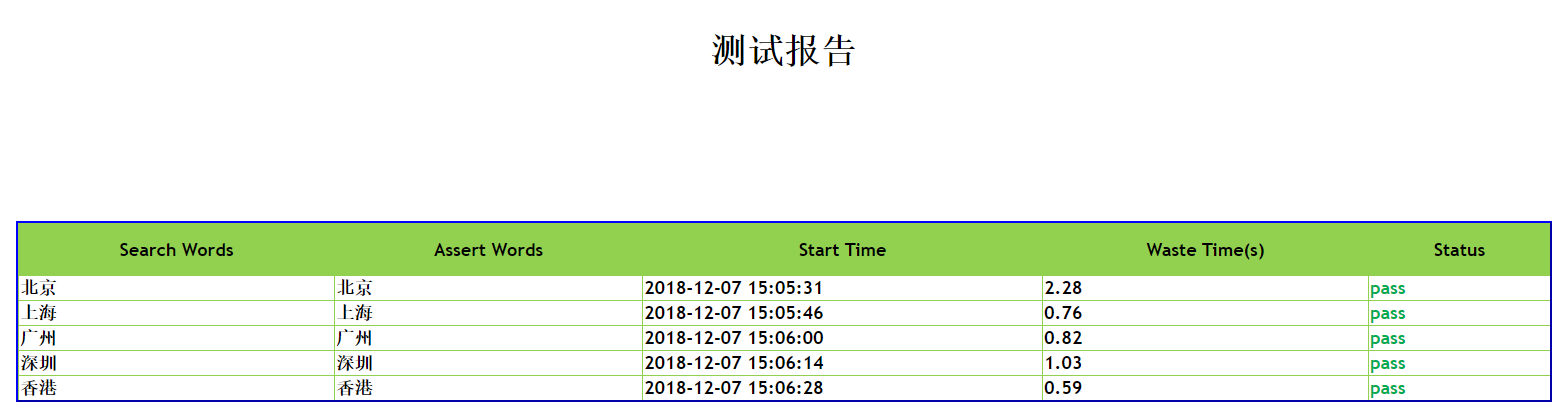
六、测试报告
Python&Selenium 数据驱动【unittest+ddt+json】的更多相关文章
- python selenium 使用unittest 示例
python selenium 使用unittest 示例 并等待某个元素示例 from selenium.webdriver.support.ui import WebDriverWait from ...
- python+requests+excel+unittest+ddt接口自动化数据驱动并生成html报告
1.环境准备: python3.6 requests xlrd openpyxl HTMLTestRunner_api 2.目前实现的功能: 封装requests请求方法 在excel填写接口请求参数 ...
- python+requests+excel+unittest+ddt接口自动化数据驱动并生成html报告(二)
可以参考 python+requests接口自动化完整项目设计源码(一)https://www.cnblogs.com/111testing/p/9612671.html 原文地址https://ww ...
- python+requests+excel+unittest+ddt接口自动化数据驱动并生成html报告(已弃用)
前言 1.环境准备: python3.6 requests xlrd openpyxl HTMLTestRunner_api 2.目前实现的功能: 封装requests请求方法 在excel填写接口请 ...
- Python 数据驱动 unittest + ddt
一数据驱动测试的含义: 在百度百科上的解释是: 数据驱动测试,即黑盒测试(Black-box Testing),又称为功能测试,是把测试对象看作一个黑盒子.利用黑盒测试法进行动态测试时,需要测试软件产 ...
- python+selenium九:ddt数据驱动
第一种,测试数据放在Excel里面 test_Login: import unittestimport timeimport ddtimport osfrom selenium import webd ...
- Python&Selenium 数据驱动【unittest+ddt+json+HTMLTestRunner】
一.摘要 本博文将介绍Python和Selenium做自动化测试的时候,基于unittest框架,借助ddt模块使用json文件作为数据文件作为测试输入,最后借助著名的HTMLTestRunner.p ...
- Python&Selenium 数据驱动【unittest+ddt】
一.摘要 本博文将介绍Python和Selenium做自动化测试的时候,基于unittest框架,借助ddt实现数据驱动 二.测试代码 # encoding = utf-8 ""& ...
- Python&Selenium 数据驱动测试【unittest+ddt+xml】
一.摘要 本博文将介绍Python和Selenium做自动化测试时,基于unittest框架,借助ddt模块,使用xml文件作为测试输入. 二.xml文件 保存路径:D:\\Programs\\Pyt ...
随机推荐
- 使用canal通过mysql复制协议从binlog实现热数据nosql缓存(2)
开启mysql binlog功能 以5.7版本为例,找到/etc/mysql/mysql.conf.d/mysqld.cnf [mysqld] pid-file = /var/run/mysqld/m ...
- linux基础之文件类型与权限
在终端以root身份登入linux之后,下达 ls -al 会获得如下结果
- 02.02 lamp环境搭建笔记
lamp环境 在linux中安装 apache.mysql.php三种软件环境,同时需要安装他 某些插件. cp /etc/apt/sources.list /etc/apt/sources.list ...
- 【计算机视觉】深度相机(八)--OpenNI及与Kinect for windows SDK的比较
OpenNI(开放自然交互)是一个多语言,跨平台的框架,它定义了编写应用程序,并利用其自然交互的API.OpenNI API由一组可用来编写通用自然交互应用的接口组成.OpenNI的主要目的是要形成一 ...
- OpenCV.概念(读书笔记)
ZC:学习OpenCV.pdf 1.多通道矩阵(学习OpenCV.pdf) 1.1.在学习opencv的时候看到多通道矩阵这一概率,恳求大神告诉我一下什么意思_百度知道.html(https://zh ...
- linux下jenkins的安装
构建伟大,无所不能 Jenkins是开源CI&CD软件领导者, 提供超过1000个插件来支持构建.部署.自动化, 满足任何项目的需要. 参考博客:https://www.cnblogs.com ...
- 使用 pyenv 可以在一个系统中安装多个python版本
Installl related yum install readline readline-devel readline-static -y yum install openssl openssl- ...
- HBase的简单介绍,寻址过程,读写过程
HBase是列族数据库,主要由,表,行键,列族,列标识,值,时间戳 组成, 表 其中HBase 主要底层存储依赖与hdfs,可以在HDFS中看到每个表名都作为一个独立的目录结构 ...
- Django生成数据表时报错
Django生成数据表时报错 WARNINGS: ?: (mysql.W002) MySQL Strict Mode is not set for database connection 'defau ...
- MySQL函数和过程(三)
--加密32位字符select md5('123456') --获取字符串的长度(一个中文三个长度)select LENGTH('呵呵') --获取字符串字符个数select CHAR_LENGTH( ...