
XMLHttpRequest 与 Ajax 概要
关于XMLHttpRequest
开发者使用XMLHttpRequest对象与服务端进行交互(发送http请求、接受返回数据等),可以在不打断用户下一步操作的情况下刷新局部页面。XMLHttpRequest在Ajax中被大量使用。
XMLHttpRequest被应用时的处理机制

(图片来源:developer.mozilla.org)
关于Ajax
Ajax(切勿读为汉语化的“阿贾克斯”,应读英音/ˈeɪˌdʒæks/--“A寨科泗”。。)全称:Asynchronous JavaScript And XML (异步的JavaScript和XML)。
Ajax不仅可以只更新页面中的部分DOM,而且工作流程是异步的,不会阻塞其后面代码的正常执行。
在现代Web标准和实际应用中,Ajax正在逐步地被一些JavaScript框架封装好的方法和官方新的 Fetch API 所替代。
在正式介绍Ajax的使用前,我们认识下IE中的一个与XMLHttpRequest对象相应的概念(尽管后续它不会再被提及):
var ajax = new ActiveXObject('Microsoft.XMLHTTP');
深入了解XMLHttpRequest
// xhr对象的构造函数,用来实例化一个xhr对象。

XMLHttpRequest()
// xhr的常用属性

/* 1. onreadystatechange属性将指向一个事件处理函数,当xhr的readyState属性发生变化时被触发 */

xhr.onreadystatechange

// usage:

xhr.onreadystatechange = callback;

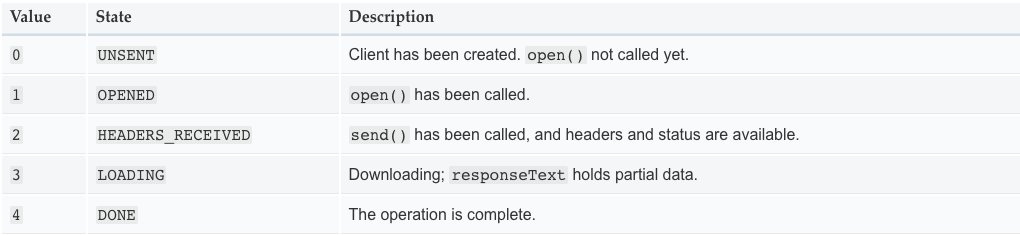
/* 2. --ReadOnly-- readyState属性将返回当前请求的状态 */

xhr.readyState

// usage:

const xhr = new XMLHttpRequest();

console.log('UNSENT', xhr.readyState); // readyState will be 0

xhr.open('GET', '/api', true);

console.log('OPENED', xhr.readyState); // readyState will be 1

xhr.onprogress = function () {

    console.log('LOADING', xhr.readyState); // readyState will be 3

};

xhr.onload = function () {

    console.log('DONE', xhr.readyState); // readyState will be 4

};

xhr.send();

// 具体示意如下图(插播一条广告):
/* 3. 获取或设置responseType(符合XMLHttpRequestResponseType规范的字符串) */

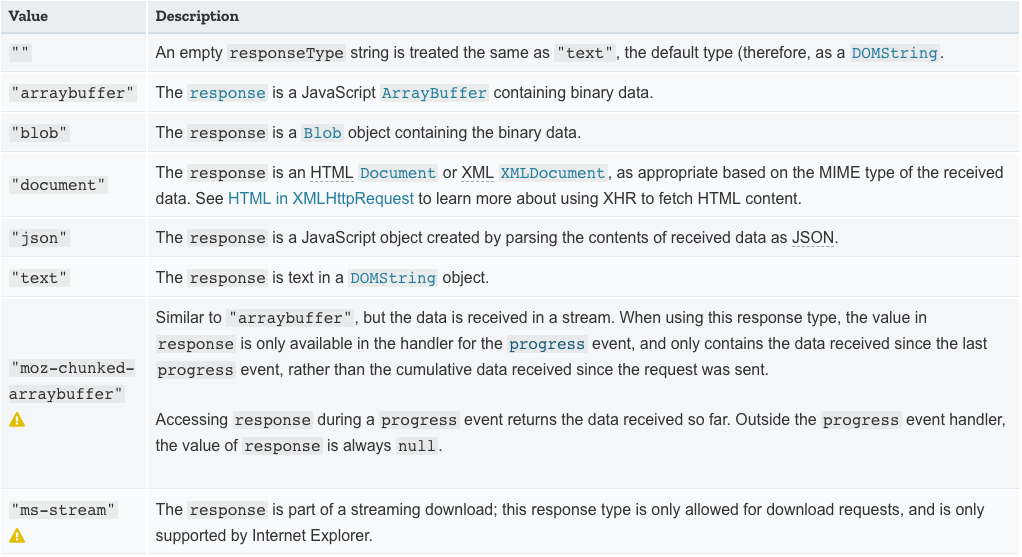
xhr.responseType

// usage:

const resType = xhr.responseType;

// or

xhr.responseType = 'json';

// XMLHttpRequestResponseType具体如下(插播第二条广告):
/* 4. --ReadOnly-- response返回响应体所包含的内容,内容格式由responseType决定 */

xhr.response

// usage:

const result = xhr.response;

// 注:在responseType为''或者'text'时,response 和 responseText 可以相互替用

/* 5. --ReadOnly-- status属性将返回数字类型的http状态码 */

xhr.status

// usage:

const status = xhr.status;

/* 6. --ReadOnly-- statusText将返回响应状态的文本描述,分别有''、'OK'、'Not Found' */

xhr.statusText

// usage:

const statusText = xhr.statusText;

/* 7. timeout属性将指定请求自动终止的毫秒数,默认为零,即没有超时设置 */

xhr.timeout

// usage:

const xhr = new XMLHttpRequest();

xhr.open('GET', '/api', true);

xhr.timeout = 5000;

xhr.onload = function () { // Request finished. };

xhr.ontimeout = function (e) {

  // when XMLHttpRequest timed out ...

};

xhr.send();
// xhr 的常用方法

/* 1. open 方法将创建一个新的http请求或者重新发送一个已有请求 */

xhr.open(method, url [, async, username, password])

// usage:

xhr.open('GET', '/api');

/* 2. send 方法将向服务器发送一个请求 */

xhr.send(body)

// usage:

xhr.send();

/* 3. abort 方法将退出一个已有请求 */

xhr.abort()

// usage:

xhr.abort();

/* 4. XMLHttpRequestEventTarget.onload (注:不是xhr的方法,而是事件)*/

xhr.onload

// usage:

xhr.onload = callback;

/* 5. setRequestHeader 可以设置一个http请求头的值 */

xhr.setRequestHeader(headername, value)

// usage:

const xhr = new XMLHttpRequest();

xhr.open('POST', '/api');

xhr.setRequestHeader("Content-Type", "application/x-www-form-urlencoded");

xhr.onreadystatechange = function() { //... };

xhr.send("foo=bar&lorem=ipsum");
实际编程中Ajax和XMLHttpRequest的应用
// 简单示例

const XHR = new XMLHttpRequest();

const handleReadyStateChange = () => {

  try {

    if (XHR.readyState === XHR.DONE) {

      if (XHR.status === 200) {

        console.log(XHR.response);

      } else {

        throw new Error('request failed!');

      }

    }

  } catch (ex) {

    console.error('Caught Exception: ' + ex.message);

  }

};

function generateRequest(type, api, body = null) {

  if (!XHR) {

    console.error('Cannot find XMLHttpRequest object!');

    return false;

  }

  XHR.onreadystatechange = handleReadyStateChange;

  XHR.open(type, api);

  XHR.send(body);

}
-- 待续
XMLHttpRequest 与 Ajax 概要的更多相关文章
- Ajax概要:
Ajax概要: Ajax不是个全新的技术,它是多种技术合并在一起产生的,包括XHTML,CSS,JavaScript,XmlHttpRequest,XML,JSON,DOM等 优点:(这也解释了为何我 ...
- 结合prototype和xmlhttprequest封装ajax请求
由于拖延症的严重以及年前准备年会(借口*^__^*) 导致这个小的的思考 现在才算完成 再怎么说也算是上班以来带我的前辈第一次这么正式的给我出题 不管是出于尊重还是自我要求我都决定把它简要的记下来 ...
- Ajax-03 XmlHttpRequest实现Ajax
概述 Ajax主要就是使用XmlHttpRequest对象来完成请求的操作,该对象在主流浏览器中均存在 XmlHttpRequest对象的主要方法 a. void open(String method ...
- XMLHttpRequest实现Ajax异步请求
一.XMLHttpRequest的方法 方法 描述 abort() ...
- C# XMLHttpRequest对象—Ajax实例
Get: <!DOCTYPE html> <html xmlns="http://www.w3.org/1999/xhtml"> <head> ...
- 《JavaScript权威指南》学习笔记之二十---XMLHttpRequest和AJAX解决方式
一.AJAX概述 AJAX是Asynchronous JavaScript and XML的缩写.中文译作异步JavaScript和XML.AJAX 不是新的编程语言,而是一种使用现有标准的新方法.在 ...
- 用纯XMLHttpRequest实现AJAX
<!DOCTYPE html> <html xmlns="http://www.w3.org/1999/xhtml"> <head> <m ...
- 使用 XMLHttpRequest实现Ajax
[XMLHttpRequest的概述] 1.XMLHttpRequest最早是在IE5中以ActiveX组件的形式实现的.非W3C标准 2.创建XMLHttpRequest对象(由于非标准所以实现方法 ...
- Ajax 学习之创建XMLHttpRequest对象------Ajax的核心
<%@ page language="java" contentType="text/html; charset=UTF-8" pageEncoding= ...
随机推荐
- C程序栈内存堆内存的地址
#include <stdio.h> #include <malloc.h> int main() { char * p1, * p2; p1=(char *)malloc(2 ...
- 浏览器get请求到java后台的值是乱码
get方式提交的参数编码,只支持iso8859-1编码. 因此,如果里面有中文,在后台就需要转换编码,如下 String zhongwen = request.getParameter(" ...
- Linux查看操作系统版本的几种方式
Linux查看操作系统版本的几种方式: 1.uname -a 2.lsb_release -a 3.cat /etc/issue 4.cat /proc/version 5.cat /etc/redh ...
- ROS indigo Ubuntu14.04 安装问题
错误信息:Unpacking ros-indigo-desktop-full (1.1.6-0trusty-20181006-135515-0800) ... Errors were encounte ...
- Ubuntu 复制 拷贝和自适应屏幕
ubuntu 16.04安装vmtools实测无效!!!!!!11 1.解决VMware workstation与主机的粘贴.复制.文件拖拽问题. 2.解决VMware workstations中Ub ...
- boost库中sleep方法详解
博客转载自:https://blog.csdn.net/huang_xw/article/details/8453506 boost库中sleep有两个方法: 1. 这个方法只能在线程中用, 在主线程 ...
- mvc json 日期问题的最简单解决方法
1.首先编写BaseController这个类,需要引入Newtonsoft.Json.dll程序集 using System;using System.Collections.Generic;usi ...
- RPLiDAR 激光雷达探测地面高程
LiDAR,又称激光探测与测量,全程Light Detection And Ranging,这种技术使用激光测量地物(如森林和建筑物)的高程.它的原理十分类似于使用声波来测绘海底地形的声呐技术,或使用 ...
- scala冒泡排序
scala冒泡排序: object Maopao { def main(args: Array[String]) { val list = List(1, 23, 432, 10, 23, 42, 3 ...
- Android Canvas的save(),saveLayer()和restore()浅谈
save() saveLayer() restore() 1.在自定义控件当中你onMeasure和onLayout的工作做完成以后就该绘制该控件了,有时候需要自己在控件上添加一些修饰来满足需求 ...