
Opennebula自定义VM 实现方法-Contextualizing Virtual Machines 2.2
from:http://archives.opennebula.org/documentation:archives:rel2.2:cong
There are two contextualization mechanisms available in OpenNebula: the automatic IP assignment, and a more generic way to give any file and configuration parameters. You can use any of them individually, or both.
Using Virtual Network Leases within a Virtual Machine
With OpenNebula you can derive the IP address assigned to the VM from the MAC address using the MAC_PREFFIX:IP rule. In order to achieve this we provide context scripts for Debian, Ubuntu, CentOS and openSUSE based systems. This scripts can be easily adapted for other distributions, check dev.opennebula.org.
To configure the Virtual Machine follow these steps:
 These actions are to configure the VM, the commands refer to the VMs root file system
- Copy the script
$ONE_SRC_CODE_PATH/share/scripts/vmcontext.shinto the/etc/init.ddirectory in the VM root file system.
- Execute the script at boot time before starting any network service, usually runlevel 2 should work.
$ ln /etc/init.d/vmcontext.sh /etc/rc2.d/S01vmcontext.sh
Having done so, whenever the VN boots it will execute this script, which in turn would scan the available network interfaces, extract their MAC addresses, make the MAC to IP conversion and construct a /etc/network/interfaces that will ensure the correct IP assignment to the corresponding interface.
Generic Contextualization
The method we provide to give configuration parameters to a newly started virtual machine is using an ISO image (OVF recommendation). This method is network agnostic so it can be used also to configure network interfaces. In the VM description file you can specify the contents of the iso file (files and directories), tell the device the ISO image will be accessible and specify the configuration parameters that will be written to a file for later use inside the virtual machine.
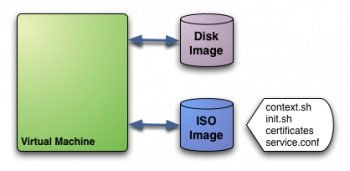
In this example we see a Virtual Machine with two associated disks. The Disk Image holds the filesystem where the Operating System will run from. The ISO image has the contextualization for that VM:
context.sh: file that contains configuration variables, filled by OpenNebula with the parameters specified in the VM description fileinit.sh: script called by VM at start that will configure specific services for this VM instancecertificates: directory that contains certificates for some serviceservice.conf: service configuration
This is just an example of what a contextualization image may look like. Only context.sh is included by default. You have to specify the values that will be written inside context.sh and the files that will be included in the image.Defining Context
In VM description file you can tell OpenNebula to create a contextualization image and to fill it with values using CONTEXTparameter. For example:
CONTEXT = [

  hostname   = "MAINHOST",

  ip_private = "$NIC[IP]",

  dns        = "$NETWORK[DNS, NAME=\"Public\"]",

  ip_gen     = "10.0.0.$VMID",

  files      = "/service/init.sh /service/certificates /service/service.conf"

]
Variables inside CONTEXT section will be added to context.sh file inside the contextualization image. These variables can be specified in three different ways:
- Hardcoded variables:
hostname = "MAINHOST"
- Using template variables
$<template_variable>: any single value variable of the VM template, like for example:\\ip_gen = "10.0.0.$VMID"
$<template_variable>[<attribute>]: Any single value contained in a multiple value variable in the VM template, like for example:ip_private = $NIC[IP]
$<template_variable>[<attribute>, <attribute2>=<value2>]: Any single value contained in a multiple value variable in the VM template, setting one atribute to discern between multiple variables called the same way, like for example:ip_public = "$NIC[IP, NETWORK=\"Public\"]"
- Using Virtual Network template variables
$NETWORK[<vnet_attribute>, NAME=<vnet_name>]: Any single value variable in the Virtual Network (vnet_name) template, like for example:dns = "$NETWORK[DNS, NAME=\"Public\"]"
The file generated will be something like this:
# Context variables generated by OpenNebula

hostname="MAINHOST"

ip_private="192.168.0.5"

dns="192.168.4.9"

ip_gen="10.0.0.85"

files="/service/init.sh /service/certificates /service/service.conf"

target="sdb"
Some of the variables have special meanings, but none of them are mandatory:
| Attribute | Description |
|---|---|
| files | Files and directories that will be included in the contextualization image |
| target | device where the contextualization image will be available to the VM instance. Please note that the proper device mapping may depend on the guest OS, e.g. ubuntu VMs should use hd* as the target device |
A default target attribute is generated automatically by OpenNebula as “hdb” or “sdb”, depending on the default prefix set at oned.conf. You can set here any other value, but you have to take into account the other disks defined in the VM template to avoid collisions.Using Context
The VM should be prepared to use the contextualization image. First of all it needs to mount the contextualization image somewhere at boot time. Also a script that executes after boot will be useful to make use of the information provided.
The file context.sh is compatible with bash syntax so you can easilly source it inside a shellscript to get the variables that it contains.
EXAMPLE
Here we propose a way to use this contextualization data. Each unix has their own filesystem layout and way of handling init scripts, this examples assumes a debian-based virtual machine.
We are going to use contextualization data to set the hostname, the IP address and a user with known ssh keys.
First thing, lets outline the CONTEXT section of the VM template:
CONTEXT = [

  hostname  = "$NAME",

  ip_public = "$NIC[IP, NETWORK=\"Public\"]",

  username  = virtualuser

  files     = "/vms_configuration/id_rsa.pub /vms_configuration/init.sh"

]
The OpenNebula front-end will thus require a /vms_configuration folder with:
id_rsa.pub: Public ssh key to be added to the trusted ssh keys of the new userinit.sh: script that will perform the configuration. Explained below.
Now we will need to configure the VM to make use of this data. We are going to place in /etc/rc.local as:
#!/bin/sh -e


mount -t iso9660 /dev/sdc /mnt


if [ -f /mnt/context.sh ]; then

  . /mnt/init.sh

fi


umount /mnt


exit 0
We use an indirection (rc.local calls init.sh) so changing the script means editing a file locally rather that changing it inside the VMs.
The init.sh script will be the one actually doing the work:
#!/bin/bash


if [ -f /mnt/context.sh ]; then

  . /mnt/context.sh

fi


hostname $HOSTNAME

ifconfig eth0 $IP_PUBLIC


useradd -m $USERNAME


mkdir -p ~$USERNAME/.ssh

cat /mnt/id_rsa.pub >> ~$USERNAME/.ssh/authorized_keys


chown -R $USERNAME /home/$USERNAME
Opennebula自定义VM 实现方法-Contextualizing Virtual Machines 2.2的更多相关文章
- PatentTips - Enhancing the usability of virtual machines
BACKGROUND Virtualization technology enables a single host computer running a virtual machine monito ...
- 《The Design of a Practical System for Fault-Tolerant Virtual Machines》论文总结
VM-FT 论文总结 说明:本文为论文 <The Design of a Practical System for Fault-Tolerant Virtual Machines> 的个人 ...
- 《The Design of a Practical System for Fault-Tolerant Virtual Machines》论文研读
VM-FT 论文研读 说明:本文为论文 <The Design of a Practical System for Fault-Tolerant Virtual Machines> 的个人 ...
- [SQL in Azure] High Availability and Disaster Recovery for SQL Server in Azure Virtual Machines
http://msdn.microsoft.com/en-us/library/azure/jj870962.aspx Microsoft Azure virtual machines (VMs) w ...
- [SQL in Azure] Getting Started with SQL Server in Azure Virtual Machines
This topic provides guidelines on how to sign up for SQL Server on a Azure virtual machine and how t ...
- PatentTips - Method for network interface sharing among multiple virtual machines
BACKGROUND Many computing systems include a network interface card (NIC) to provide for communicatio ...
- PatentTips - Transparent unification of virtual machines
BACKGROUND Virtualization technology enables a single host computer running a virtual machine monito ...
- PatentTips - Method to manage memory in a platform with virtual machines
BACKGROUND INFORMATION Various mechanisms exist for managing memory in a virtual machine environment ...
- Methods and systems to control virtual machines
Methods and systems are provided to control the execution of a virtual machine (VM). A VM Monitor (V ...
随机推荐
- MpVue开发之swiper的使用
用到的关键字如下: class :class current :current bindchange @change circular 是否实现无限滑动 true/false skip-hidden ...
- C++11新特性之线程操作
C++11之前没有对并发编程提供语言级别的支持,这使得我们在编写可移植的并发程序时,存在诸多的不便.现在C++11增加了线程以及线程相关的类,很方便地支持了并发编程,使得编写的多线程程序的可移植性得到 ...
- dynamic_caast操作符
dynamic_caast操作符,将基类的指针或引用安全的转换为派生类的指针或引用. 原理: 将一个基类对象指针或引用抛到继承类指针,dynamic_cast会根据基类指针是否真正指向继承类指针来做相 ...
- RabbitMQ学习系列三-C#代码接收处理消息
RabbitMQ学习系列三:.net 环境下 C#代码订阅 RabbitMQ 消息并处理 http://www.80iter.com/blog/1438251320680361 http://www. ...
- IQ/OQ/DQ/PQ
Installation Qualification (IQ) 安装验证,安装时在用户处进行.它提供文件证明用户安装环境所有的规格及参数完全符合制造商的描述和安全 要求. Operation Qual ...
- PHP使用curl请求https站点的常见错误及解决方案
使用curl请求http站点和https站点最大的不同就是https站点有证书验证这一环节,如果证书验证不通过则无法发起请求,不管是请求什么类型的站点遇到问题时先把错误码打印出来看一下,打印错误码的代 ...
- C# 实现程序只启动一次(总结)
我前面的三篇文章是从网上找到的(如下链接),都说是实现程序只启动一次的功能. C#防止程序多次运行C#检测程序重复运行的函数(可以在多用户登录情况下检测)C# 实现程序只启动一次(多次运行激活第一个实 ...
- UCloud 云服务器硬盘扩容后 如何挂载到本机
UCloud 云服务器硬盘扩容后如何挂载到本机 UCloud 提供的云服务器会根据不同的系统初始化不同空间大小的硬盘资源,此资源默认为 系统盘. 针对 Linux 系统默认初始化 20G 的空间,一般 ...
- JUnit测试,获取Spring MVC环境
@RunWith(SpringJUnit4ClassRunner.class) @WebAppConfiguration @ContextConfiguration(locations = { &qu ...
- golang动态调用方法
package main import ( "fmt" "reflect" ) type YourT1 struct { } func (y *YourT1) ...