
Vue--- VueX基础 (Vuex结构图数据流向)1.1
Vuex基础
https://vuex.vuejs.org/zh-cn
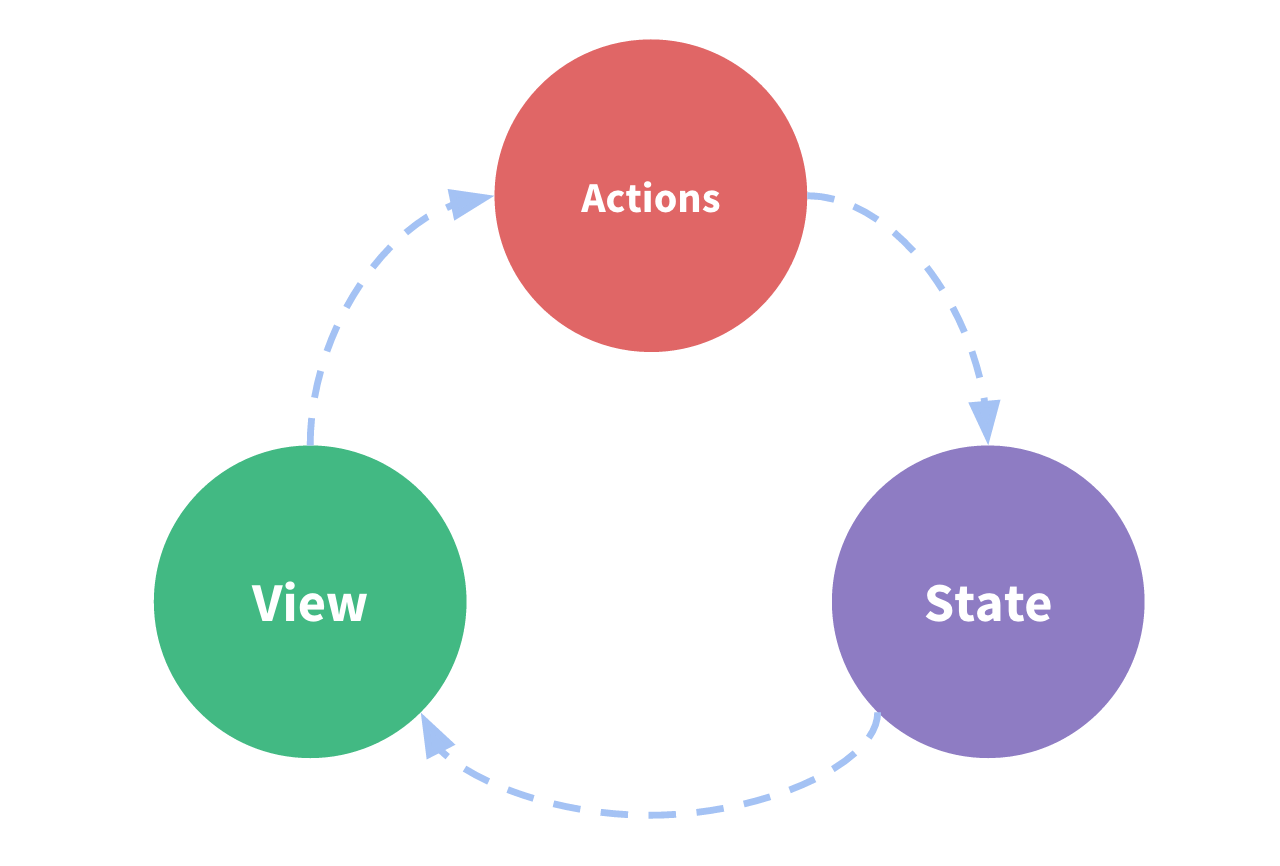
state --> view --> action -> state
多组件共享状态, 之前操作方式,由父组件传递到各个子组件。 当路由等加入后,会变得复杂。 引入viewx 解决共享问题。
原vue结构图
vuex结构图
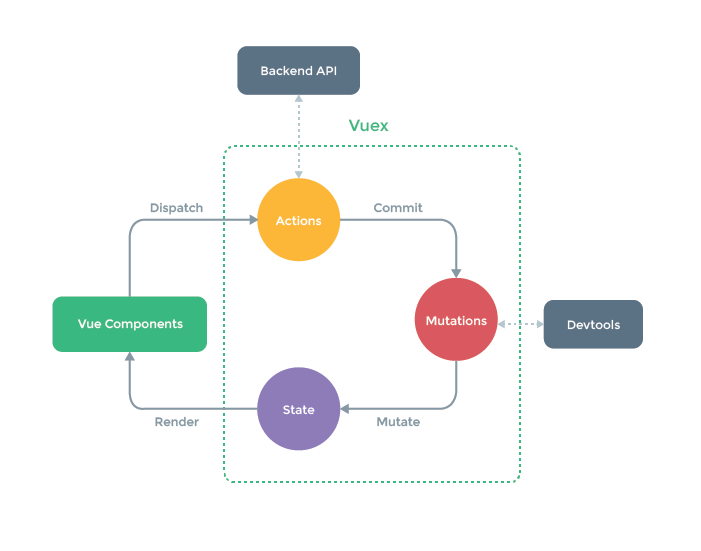
Vuex对象结构 (state,mutations,getters,actions)
state 对象数据
mutations 操作变更state数据
getters 计算state
actions 触发mutations
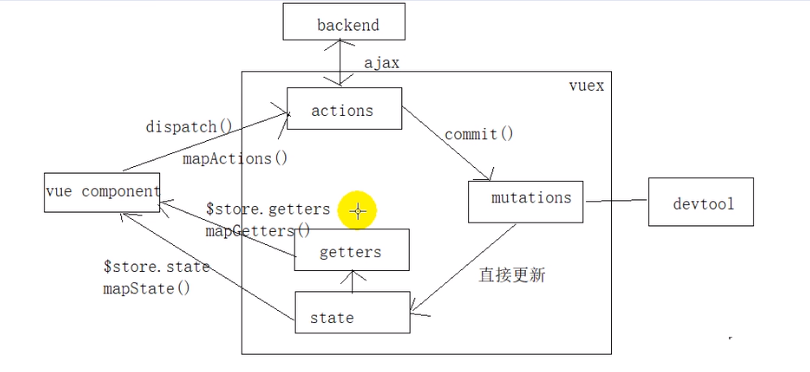
★学习之后分析数据流向图★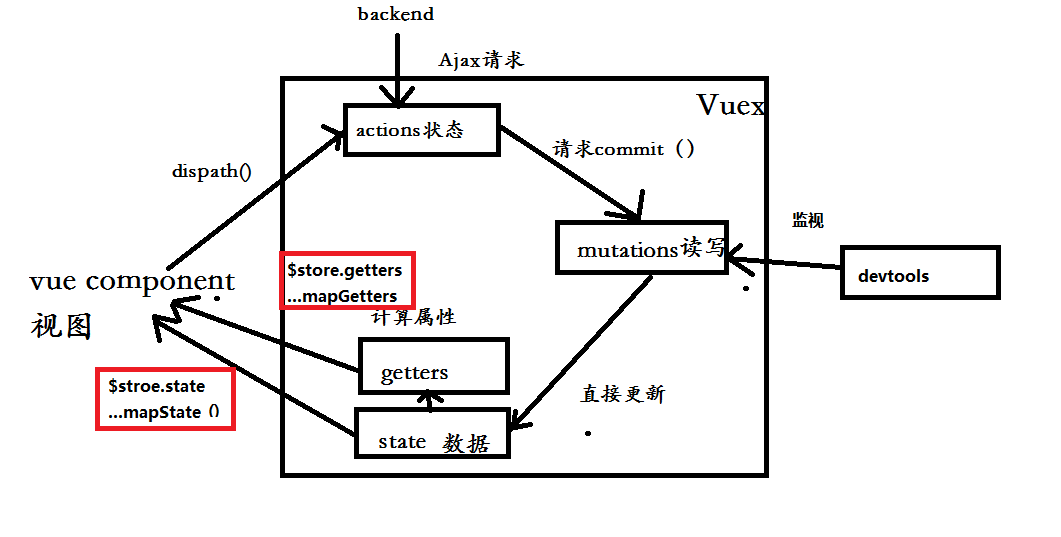
安装
npm install --save vuex
调试
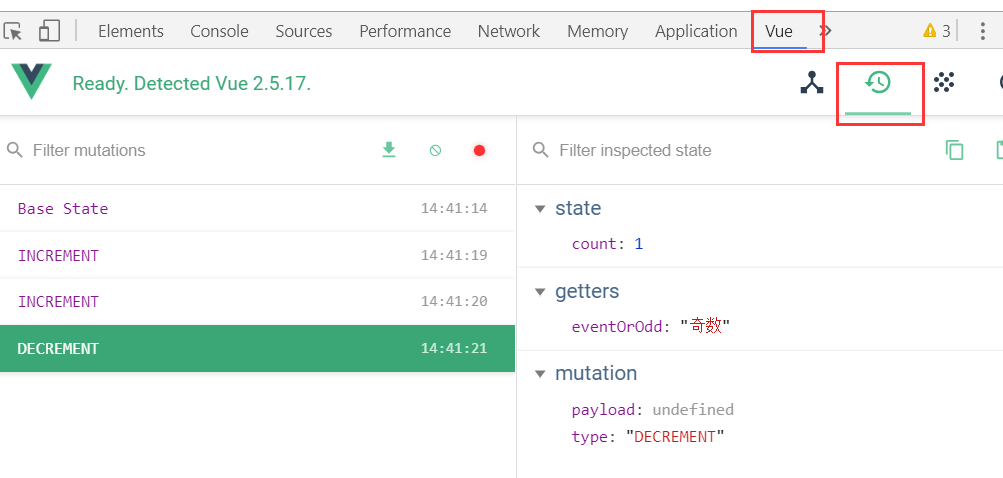
目标
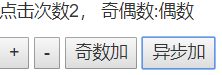
代码1 :原vue实现计数器
app.uve
<template>

<div>

  <p>点击次数{{count}}, 奇偶数:{{eventOrOdd}}</p>

  <button @click="increment">+</button>

  <button @click="decrement">-</button>

  <button @click="incrementIfOdd">奇数加</button>

  <button @click="incrementAsync">异步加</button>

</div>

</template>

<script>

export default {

  data () {

    return {

      count: 0

    }

  },

  computed: {

    eventOrOdd () {

      return this.count % 2 === 0 ? '偶数' : '奇数'

    }

  },

  methods: {

    increment () {

      const count = this.count

      this.count = count + 1

    },

    decrement () {

      const count = this.count

      this.count = count - 1

    },

    incrementIfOdd () {

      const count = this.count

      if (count % 2 === 1) {

        this.count = count + 1

      }

    },

    incrementAsync () {

      setTimeout(() => {

        const count = this.count

        this.count = count + 1

      }, 1000)

    }

  }

}

</script>

<style>

</style>
代码2: VUEX实现
store.js
/**

 * Created by infaa on 2018/9/22.

 */

import Vue from 'vue'

import Vuex from 'vuex'

Vue.use(Vuex)

const state = { // 初始化状态

  count: 0

}

const mutations = {

  INCREMENT (state) {

    state.count++

  },

  DECREMENT (state) {

    state.count--

  }

}

const actions = {

  increment ({commit}) {

    commit('INCREMENT')

  },

  decrement ({commit}) {

  commit('DECREMENT')

  },

  incrementIfOdd ({commit, state}) {

    if (state.count%2 === 1) {

      commit('INCREMENT')

    }

  },

  incrementAsync ({commit}) {

    setTimeout( () => {

      commit('INCREMENT')

    }, 1000)

  }

}

const getters = {

  eventOrOdd (state) {

    return state.count % 2 === 0 ? '偶数' : '奇数'

  }

}

export default new Vuex.Store({

  state, // 状态对象

  mutations, // 更新state函数的对象

  actions,// dispatch 对应actiong

  getters  // 对应computed 中getters

})
main.js
/**

 * Created by infaa on 2018/9/19.

 */

import Vue from 'vue'

import App from './App'

import store from './store'

/* eslint-disable no-new */

new Vue({

  el: '#app',

  components: {App},

  template: '<App/>',

  store // 所有组件对象多了一个属性$store

})
app.vue
<template>

<div>

  <!--<p>点击次数{{count}}, 奇偶数:{{eventOrOdd}}</p>-->

  <p>点击次数{{$store.state.count}}, 奇偶数:{{eventOrOdd}}</p>

  <button @click="increment">+</button>

  <button @click="decrement">-</button>

  <button @click="incrementIfOdd">奇数加</button>

  <button @click="incrementAsync">异步加</button>

</div>

</template>

<script>

export default {

//  data () {

//    return {

//      count: 0

//    }

//  },

  computed: {

    eventOrOdd () {

//      return this.count % 2 === 0 ? '偶数' : '奇数'

      return this.$store.getters.eventOrOdd // js中要写this,模版中不用直接写$store

    }

  },

  methods: {

    increment () {

      this.$store.dispatch('increment')

    },

    decrement () {

//      const count = this.count

//      this.count = count - 1

      this.$store.dispatch('decrement')

    },

    incrementIfOdd () {

      this.$store.dispatch('incrementIfOdd')

//      const count = this.count

//      if (count % 2 === 1) {

//        this.count = count + 1

//      }

    },

    incrementAsync () {

      this.$store.dispatch('incrementAsync')

//      setTimeout(() => {

//        const count = this.count

//        this.count = count + 1

//      }, 1000)

    }

  }

}

</script>

<style>

</style>
代码3 优化app.js
app.uve 如果对应名不同,由[ ] 改为{}即可
<template>

<div>

    <!-- <h2>点击的个数:{{count}}</h2> -->

    <!-- <h3>{{eventOrOdd}}</h3> -->

    <!-- Vuex 版本  -->

    <h2>点击次数{{$store.state.count}}, 奇偶数:{{eventOrOdd}}</h2>

    <button @click="increment">+</button>

    <button @click="decrement">-</button>

    <button @click="incrementIfOdd">奇数+</button>

    <button @click="incrementAsync">异步加</button>

</div>

</template>

<script type="text/ecmascript-6">

import {mapState, mapGetters, mapActions} from 'vuex'

    // export default{

    //     data(){

    //         return{

    //             count:0

    //         }

    //     },

    //     computed:{

    //         eventOrOdd(count){

    //         //     return this.count % 2 === 0?'偶数':'奇数'

    //             return this.$store.getters.eventOrOdd

    //         }

    //     },

    //     methods:{

    //         increment () {

    //             // const count = this.count;

    //             // this.count = count+1

    //             this.$store.dispatch('increment')

    //         },

    //         decrement (){

    //             // const count = this.count;

    //             // this.count = count -1

    //             this.$store.dispatch('decrement')

    //         },

    //         incrementIfOdd () {

    //             // const count = this.count;

    //             // if(count % 2 === 1 ){

    //             //     this.count = count + 1

    //             // }

    //             this.$store.dispatch('incrementIfOdd');

    //         },

    //         incrementAsync () {

    //           // setTimeout(() => {

    //             // const count = this.count

    //             // this.count = count + 1

    //           // }, 1000)

    //           this.$store.dispatch('incrementAsync')

    //         }

    //     }

    //     };

        // 优化 App.vue   代码格式

    export default{

        computed:{

            ...mapState['count'],

            ...mapGetters['eventOrOdd']

        },

        methods:{

            ...mapActions(['increment','decrement','incrementIfOdd','incrementAsync'])

        }

    };

</script>

<style type="stylus" rel="stylesheet/stylus">

</style>
官方另一个案例购物车, store以目录结构呈现
https://github.com/vuejs/vuex/tree/dev/examples/shopping-cart
Vue--- VueX基础 (Vuex结构图数据流向)1.1的更多相关文章
- Vuex 基础
其他章节请看: vue 快速入门 系列 Vuex 基础 Vuex 是 Vue.js 官方的状态管理器 在vue 的基础应用(上)一文中,我们已知道父子之间通信可以使用 props 和 $emit,而非 ...
- 解决vue不相关组件之间的数据传递----vuex的学习笔记,解决报错this.$store.commit is not a function
Vue的项目中,如果项目简单, 父子组件之间的数据传递可以使用 props 或者 $emit 等方式 进行传递 但是如果是大中型项目中,很多时候都需要在不相关的平行组件之间传递数据,并且很多数据需要 ...
- 【整理】解决vue不相关组件之间的数据传递----vuex的学习笔记,解决报错this.$store.commit is not a function
解决vue不相关组件之间的数据传递----vuex的学习笔记,解决报错this.$store.commit is not a function https://www.cnblogs.com/jaso ...
- vue进阶:vuex(数据池)
非父子组件传值 vuex 一.非父子组件传值 基于父子组件通信与传值实现非父子组件传值的示例关键代码: <template> <div> <!-- 学员展示 --> ...
- 十、Vue:Vuex实现data(){}内数据多个组件间共享
一.概述 官方文档:https://vuex.vuejs.org/zh/installation.html 1.1vuex有什么用 Vuex:实现data(){}内数据多个组件间共享一种解决方案(类似 ...
- Vue刷新页面VueX中数据清空了,怎么重新获取?
Vue刷新页面VueX数据清空了,怎么重新获取? 点击打开视频讲解更详细 在vue中刷新页面后,vuex中的数据就没有了,这时我们要想使用就要重新获取数据了, 怎么在刷新后重新获取数据呢??? 这时我 ...
- 从壹开始前后端分离 [ Vue2.0+.NET Core2.1] 二十三║Vue实战:Vuex 其实很简单
前言 哈喽大家周五好,马上又是一个周末了,下周就是中秋了,下下周就是国庆啦,这里先祝福大家一个比一个假日嗨皮啦~~转眼我们的专题已经写了第 23 篇了,好几次都坚持不下去想要中断,不过每当看到群里的交 ...
- vuex 基础:教程和说明
作者注:[2016.11 更新]这篇文章是基于一个非常旧的 vuex api 版本而写的,代码来自于2015年12月.但是,它仍能针对下面几个问题深入探讨: vuex 为什么重要 vuex 如何工作 ...
- 25、vuex改变store中数据
以登录为例: 1.安装vuex:npm install vuex --save 2.在main.js文件中引入: import store from '@/store/index.js'new Vue ...
随机推荐
- MySQL 查询多张表中相同字段的最大值
MySql : 有N张表,N未知,每张表都有一个字段(id),每张表的字段结构不完全一样,如何查询所有表里面所有id的最大值?如下图所示: 对上面三张表进行操作的话,结果应该为:9 SQL语句: se ...
- java中如何遍历实体类的属性和数据类型以及属性值
package com.walkerjava.test; import java.lang.reflect.Field; import java.lang.reflect.InvocationTa ...
- oracle UDT 有关数据字典的研究
1.数据及类型准备 创建了一个自定义类型 create or replace type addr_type as object( street varchar2(30); city varchar2( ...
- vuejs+axios发送请求
Vue 原本有一个官方推荐的 ajax 插件 vue-resource,但是自从 Vue 更新到 2.0 之后,官方就不再更新 vue-resource 目前主流的 Vue 项目,都选择 axios ...
- 数组reduce和map方法
1.有一个长度为100的数组,请以优雅的方式求出该数组的前10个元素之和 var a = [1, 2, 3, 4, 5, 6, 7, 8, 9, 10, 11, 12, 13, 14, 15],sum ...
- JS的封装(JS插件的封装)
JS中类的概念类,实际上就是一个function,同时也是这个类的构造方法,new创建该类的实例,new出的对象有属性有方法.方法也是一种特殊的对象. 类的方法在构造方法中初始化实例的方法(就是在构造 ...
- IE8按F12开发人员工具不显示
一直不喜欢用IE,不过为了项目需要,不得不使用IE 而且此功能只支持IE8,(⊙﹏⊙)b) 当按F12调出开发人员工具的时候发现显示不出来了,在任务栏里有显示,将鼠标放在任务栏的开发人员工具上, 背景 ...
- 01_Redis基础
[Redis定义(参考了百度百科)] Redis是一个key-value存储系统.与Memchached类似,Redis支持的value类型更多,包括String.list.set.zset(有序集合 ...
- redis 笔记(二)
在上一篇中提到了数据类型 ,在本章中就具体说说这几种数据类型: sting :set /get / del / append /strlen 简单的对key-->value 写入读取删除增减 i ...
- HTML:一个form表单有两个按钮,分别提交到不同的页面
<!DOCTYPE html> <html lang="en"> <head> <meta charset="UTF-8&quo ...