
Velodyne线性激光雷达pcap文件格式及写入、数据解析 Lebal:激光雷达
转载自https://blog.csdn.net/qq_25241325/article/details/80766305
roslaunch loam_velodyne loam_velodyne.launch
rosbag record -o out /velodyne_points
rosbag play nsh_indoor_outdoor.bag
最后会记录一个名为out_(记录时间)的.bag包
然后将.bag包转化为 .pcd文件
rosrun pcl_ros bag_to_pcd out_.bag(上面记录的那个包) /cloud pcd
此时转化为一个名为cloud的pcd集,进入pcd那个文件夹
用pcl_viewer last.pcd(最后一帧pcd)然后就看到了最终的结果
一 基本格式:
文件头 数据包头 数据报数据包头数据报......
二、文件头:
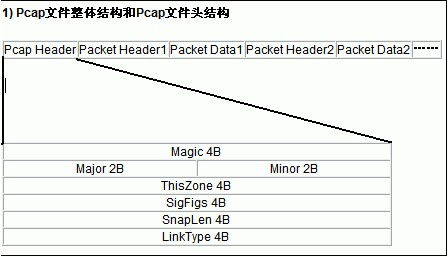
文件头结构体
 sturct pcap_file_header

 {

      DWORD           magic;

      DWORD           version_major;

      DWORD           version_minor;

      DWORD           thiszone;

      DWORD           sigfigs;

      DWORD           snaplen;

      DWORD           linktype;

 }
说明:
1、标识位:32位的,这个标识位的值是16进制的 0xa1b2c3d4。
a 32-bit magic number ,The magic number has the value hex a1b2c3d4.
2、主版本号:16位, 默认值为0x2。
a 16-bit major version number,The major version number should have the value 2.
3、副版本号:16位,默认值为0x04。
a 16-bit minor version number,The minor version number should have the value 4.
4、区域时间:32位,实际上该值并未使用,因此可以将该位设置为0。
a 32-bit time zone offset field that actually not used, so you can (and probably should) just make it 0;
5、精确时间戳:32位,实际上该值并未使用,因此可以将该值设置为0。
a 32-bit time stamp accuracy field tha not actually used,so you can (and probably should) just make it 0;
6、数据包最大长度:32位,该值设置所抓获的数据包的最大长度,如果所有数据包都要抓获,将该值设置为65535;例如:想获取数据包的前64字节,可将该值设置为64。
a 32-bit snapshot length" field;The snapshot length field should be the maximum number of bytes perpacket that will be captured. If the entire packet is captured, make it 65535; if you only capture, for example, the first 64 bytes of the packet, make it 64.
7、链路层类型:32位, 数据包的链路层包头决定了链路层的类型。
a 32-bit link layer type field.The link-layer type depends on the type of link-layer header that the
packets in the capture file have:以下是数据值与链路层类型的对应表
0 BSD loopback devices, except for later OpenBSD
1 Ethernet, and Linux loopback devices 以太网类型,大多数的数据包为这种类型。
6 802.5 Token Ring
7 ARCnet
8 SLIP
9 PPP
10
在使用velodyne的时候,PCAP数据解析比较麻烦,为此写了一点代码来专门解析PCAP文件,将PCAP格式数据转为XYZ格式的点云数据,写完之后发现其实代码也不多,更轻量级了,代码如下:
// readpcap.cpp : 定义控制台应用程序的入口点。

//

#define _CRT_SECURE_NO_DEPRECATE

#define _CRT_SECURE_NO_WARNINGS

#include "pcap.h"

#include "stdio.h"

#include "math.h"

#include<stdlib.h>

#include<conio.h>

#include "velodyneptk.h"

#define LINE_LEN 16

int Azimuth_[12];				//原始值

float Azimuth_Value_[12];

int Distance_[12][32];			//原始值

float Distance_Value_[12][32];

int Atten_[12][32];		//原始值

Usefulmessage UsefulData;

int framecount;

int frameint;

//计算时间戳函数

float Timeoffsetvec[384];

float lasersinvec[384];

float lasercosvec[384];

void Timeoffsetfun()

{

	for (int i = 0; i < 24; i++)

	{

		for (int j = 0; j < 16; j++)

		{

			Timeoffsetvec[i * 16 + j] = i*55.296 + j*2.304;

			lasersinvec[i * 16 + j] = LASER_SIN[j];

			lasercosvec[i * 16 + j] = LASER_COS[j];

		}

	}

}

void dispatcher_handler(u_char *, const struct pcap_pkthdr *, const u_char *);

//byte转int  Azimuth

int bytes2ToInt(byte* bytes)

{

	int addr = bytes[0] & 0xFF;

	addr |= (bytes[1]<<8 & 0xFF00);

	return addr;

}

int bytes1ToInt(byte* bytes)

{

	int addr = bytes[0] & 0xFF;

	return addr;

}

//byte转int  Azimuth

long int bytes4ToInt(byte* bytes)

{

	long int addr = bytes[0] & 0xFF;

	addr |= (bytes[1] << 8 & 0xFF00);

	addr |= ((bytes[2] << 16) & 0xFF0000);

	addr |= ((bytes[3] << 24) & 0xFF000000);

	return addr;

}

float stamptimecount = 0;

void UDPtoXYZfun(Usefulmessage data);

void UDPtoXYZfunALL(Usefulmessage data);

errno_t err;

int _tmain(int argc, _TCHAR* argv[])

{

	pcap_t *fp;

	char errbuf[PCAP_ERRBUF_SIZE];

	Usefulmessage UsefulData;

	Timeoffsetfun();

	framecount = 0;

	fp = pcap_open_offline("1.pcap",errbuf);

	pcap_loop(fp, 0, dispatcher_handler, NULL);

	pcap_close(fp);

	return 0;

}

void dispatcher_handler(u_char *temp1,

	const struct pcap_pkthdr *header,

	const u_char *pkt_data)

{

	u_int it = 0;

	(VOID*)temp1;

	//保存数据

	char fn[20];

	PointXYZ point;

	FILE *fp;

	long int ustime = header->ts.tv_usec;

	printf("%ld:%ld (%ld)\n", header->ts.tv_sec, header->ts.tv_usec, header->len);

	if (header->len==1248)

	{

		byte timestampl[4];

		byte factoryl[2];

		byte lo[1248];

		memcpy(&lo, pkt_data, 1248);

		memcpy(×tampl, pkt_data + 42 + 12 * 100, 4);

		memcpy(&factoryl, pkt_data + 42 + 12 * 100 + 4, 2);

		//float fValuet = *((float*)×tampl); //系统时间

		int fValue1 = *((float*)&factoryl[0]);

		long int fValue = bytes4ToInt(timestampl);

		if (stamptimecount == 0)

		{

			stamptimecount = fValue;

		}

		if ((fValue - stamptimecount) >= 100000)

		{

			stamptimecount = fValue;

			frameint++;

		}

		/////保存数据

		sprintf_s(fn, "%05d.txt", frameint);

		//err  = fopen_s( &stream, "crt_fopen_s.c", "r" )) !=0

		if ((fp = fopen(fn, "a")) == NULL)

		{

			printf("Create File failure 1");

			fclose(fp);

			//exit(1);

		}

		//read data

		byte datal[12][100];

		int packet_size = 100;

		int azimuth;

		float distance;

		int passway;

		for (int i = 0; i < 12; i++)

		{

			memcpy(&datal[i], pkt_data + 42 + i * 100, packet_size);

			BYTE b[2];

			BYTE b1[1];

			memcpy(&b, pkt_data + 42 + i * 100 + 2, 2);

			azimuth = bytes2ToInt(b);

			UsefulData.JIAODU_[i] = azimuth;

			UsefulData.JIAODU2_[i] = azimuth*0.01;

			UsefulData.Timesec = header->ts.tv_sec;

			//printf("%f\n", UsefulData.JIAODU2_[i]);

			UsefulData.TimeStamp = fValue;

			for (int j = 0; j < 32; j++)

			{

				memcpy(&b, pkt_data + 42 + i * 100 + 4 + j * 3, 2);

				memcpy(&b1, pkt_data + 42 + i * 100 + 4 + j * 3 + 2, 1);

				distance = float(bytes2ToInt(b))*0.002f;

				passway = bytes1ToInt(b1);

				if (distance<0.05)

				{

					UsefulData.JULI_[i][j] = 0;

					UsefulData.PointPos[i][j] = i * 32 + j;

					//printf("%d  ", UsefulData.PointPos[i][j]);

				}

				else

				{

					UsefulData.JULI_[i][j] = distance;

					UsefulData.PointPos[i][j] = i * 32 + j;

				}

				UsefulData.PASSEGEWAY_[i][j] = passway;

				UsefulData.TimeOffset[i][j] = Timeoffsetvec[i * 32 + j] + header->ts.tv_usec;  //时间戳

				UsefulData.SIN_[i][j] = lasersinvec[i * 32 + j];

				UsefulData.COS_[i][j] = lasercosvec[i * 32 + j];

				//	printf("%f ", UsefulData.PASSEGEWAY_[i][j]);

			}

		}

		//经度赋值

		for (int i1 = 0; i1 < 12; i1++)

		{

			for (int k = 0; k < 32; k++)

			{

				if (k < 16)

				{

					UsefulData.Azimuth[i1][k] = UsefulData.JIAODU2_[i1];// +LASER_vert_correction[k];

				}

				else if (k >= 16)

				{

					if (i1 < 11)//前11帧

					{

						if (UsefulData.JIAODU2_[i1 + 1] < UsefulData.JIAODU2_[i1])

						{

							UsefulData.JIAODU2_[i1 + 1] += 360.0;

							float azimuth2 = UsefulData.JIAODU2_[i1] + (UsefulData.JIAODU2_[i1 + 1] - UsefulData.JIAODU2_[i1]) / 2.0;

							if (azimuth2 > 360)// 角度变化了

							{

								azimuth2 -= 360;

								UsefulData.Azimuth[i1][k] = azimuth2;// +LASER_vert_correction[k - 16];

							}

							else

							{

								UsefulData.Azimuth[i1][k] = azimuth2;// +LASER_vert_correction[k - 16];

							}

						}

						else

						{

							float azimuth4 = UsefulData.JIAODU2_[i1] + (UsefulData.JIAODU2_[i1 + 1] - UsefulData.JIAODU2_[i1]) / 2.0;

							UsefulData.Azimuth[i1][k] = azimuth4;// +LASER_vert_correction[k - 16

						}

					}

					else if (i1 == 11)//最后一帧

					{

						float azimuth3 = UsefulData.JIAODU2_[i1] + 0.2;

						if (azimuth3 > 360)

						{

							azimuth3 -= 360;

						}

						else

						{

						}

						UsefulData.Azimuth[i1][k] = azimuth3;//;+LASER_vert_correction[k - 16];

					}

				}

				point.x = UsefulData.JULI_[i1][k] * UsefulData.COS_[i1][k] * sin(UsefulData.Azimuth[i1][k] / 180.0*3.1415926);

				point.y = UsefulData.JULI_[i1][k] * UsefulData.COS_[i1][k] * cos(UsefulData.Azimuth[i1][k] / 180.0*3.1415926);

				point.z = UsefulData.JULI_[i1][k] * UsefulData.SIN_[i1][k];

				point.r = UsefulData.PASSEGEWAY_[i1][k];

				point.tus = UsefulData.TimeOffset[i1][k];

				point.tsec = UsefulData.Timesec;

				if ((point.x == 0) && (point.y == 0) && (point.z == 0) || (UsefulData.JULI_[i1][k] <= 0.05))

				{

				}

				else

				{

					//X  Y  Z  Azimuth Distance Laser_ID

					fprintf(fp, "%f %f %f %f %f %d ", point.x, point.y, point.z, UsefulData.Azimuth[i1][k], UsefulData.JULI_[i1][k], UsefulData.PointPos[i1][k] % 16);

					fprintf(fp, "%f %f %ld %ld\n ", UsefulData.PASSEGEWAY_[i1][k], point.tus,  header->ts.tv_sec,ustime);

				}

			}

		}

		fclose(fp);

	}

	printf("\n\n");

}

void UDPtoXYZfunALL(Usefulmessage data)

{

	PointXYZ point[384];

	FILE *fp;

	if ((fp = fopen("all.txt", "a")) == NULL)

	{

		printf("Create File failure");

		//getch();

		exit(1);

	}

	for (int i = 0; i < 12; i++)

	{

		for (int j = 0; j < 32; j++)

		{

			point[i * 32 + j].x = data.JULI_[i][j] * data.COS_[i][j] * sin(data.Azimuth[i][j] / 180.0*3.1415926);

			point[i * 32 + j].y = data.JULI_[i][j] * data.COS_[i][j] * cos(data.Azimuth[i][j] / 180.0*3.1415926);

			point[i * 32 + j].z = data.JULI_[i][j] * data.SIN_[i][j];

			point[i * 32 + j].r = data.PASSEGEWAY_[i][j];

			point[i * 32 + j].tus = data.TimeOffset[i][j];

			point[i * 32 + j].tsec = data.Timesec;

			if ((point[i * 32 + j].x == 0) && (point[i * 32 + j].y == 0) && (point[i * 32 + j].z == 0) || (data.JULI_[i][j] <= 0.05))

			{

			}

			else

			{

				//X  Y  Z  Azimuth Distance Laser_ID

				fprintf(fp, "%f %f %f %f %f %d ", point[i * 32 + j].x, point[i * 32 + j].y, point[i * 32 + j].z, data.Azimuth[i][j], data.JULI_[i][j], data.PointPos[i][j] % 16);

				fprintf(fp, "%f %f %f %f \n ", data.PASSEGEWAY_[i][j], point[i * 32 + j].tus, data.TimeStamp, data.Timesec);

				//fprintf(fp, "%f %f %f \n", point[i * 32 + j].x, point[i * 32 + j].y, point[i * 32 + j].z);

			}

		}

	}

	fclose(fp);

}

void UDPtoXYZfun(Usefulmessage data)

{

	PointXYZ point[384];

	FILE *fp;

	if ((fp = fopen("my.txt", "a")) == NULL)

	{

		printf("Create File failure");

		//getch();

		exit(1);

	}

	for (int i = 0; i < 12; i++)

	{

		for (int j = 0; j < 32; j++)

		{

			point[i * 32 + j].x = data.JULI_[i][j]*data.COS_[i][j]*sin(data.Azimuth[i][j]/180.0*3.1415926);

			point[i * 32 + j].y = data.JULI_[i][j]*data.COS_[i][j]*cos(data.Azimuth[i][j]/180.0*3.1415926);

			point[i * 32 + j].z = data.JULI_[i][j] * data.SIN_[i][j];

			point[i * 32 + j].r = data.PASSEGEWAY_[i][j];

			point[i * 32 + j].tus = data.TimeOffset[i][j];

			point[i * 32 + j].tsec = data.Timesec;

			if ((point[i * 32 + j].x == 0) && (point[i * 32 + j].y == 0) && (point[i * 32 + j].z == 0)||(data.JULI_[i][j]<=0.05))

			{

			}

			else

			{

				//fprintf(fp, "%f %f %f %f %f %d\n", point[i * 32 + j].x, point[i * 32 + j].y, point[i * 32 + j].z,data.Azimuth[i][j],data.JULI_[i][j],data.PointPos[i][j]%16);

				fprintf(fp, "%f %f %f \n", point[i * 32 + j].x, point[i * 32 + j].y, point[i * 32 + j].z);

			}

		}

	}

	fclose(fp);

}
Velodyne线性激光雷达pcap文件格式及写入、数据解析 Lebal:激光雷达的更多相关文章
- PCAP文件格式分析(做抓包软件之必备)
转载源:http://blog.csdn.net/anzijin/article/details/2008333 http://www.ebnd.cn/2009/09/07/file-format-a ...
- pcap文件格式
pcap文件格式 pcap文件格式是bpf保存原始数据包的格式,很多软件都在使用,比如tcpdump.wireshark等等,了解pcap格式可以加深对原始数据包的了解,自己也可以手工构造任意的数 ...
- pcap文件格式解析
pcap文件格式是常用的数据报存储格式,包括wireshark在内的主流抓包软件都可以生成这种格式的数据包 下面对这种格式的文件简单分析一下: pcap文件的格式为: 文件头 24字节 ...
- 关于matlab向文件写入数据的方法——留着备用
MATLAB数据采集的时候,往往需要把得到的数据保存下来. fid = fopen(文件名,‘打开方式’): 说明:fid用于存储文件句柄值,如果fid>0,这说明文件打开成功.打开方式有如下选 ...
- IP流量重放与pcap文件格式解析
(作者:燕云 出处:http://www.cnblogs.com/SwordTao/ 欢迎转载,但也请保留这段声明,谢谢!) 君不见 黄河之水 天上来 奔流到海不复回 君不见 高堂明镜 悲 ...
- spark读取hdfs上的文件和写入数据到hdfs上面
def main(args: Array[String]): Unit = { val conf = new SparkConf() conf.set("spark.master" ...
- java向Excel文件写入数据
/*使用之前要记得导入第三的jar包这个是我之前使用的时候那别人的东西自己修改了一下 还没来得及好好地封装一下还望见谅,注释我感觉写的挺清楚的就在不进行解释代码了*/package com.zzp.E ...
- NPOI操作excel之写入数据到excel表
在上一篇<NPOI操作excel之读取excel数据>我们把excel数据写入了datatable中,本篇就讲如何把datatable数据写入excel中. using System; u ...
- Python中,添加写入数据到已经存在的Excel的xls文件,即打开excel文件,写入新数据
背景 Python中,想要打开已经存在的excel的xls文件,然后在最后新的一行的数据. 折腾过程 1.找到了参考资料: writing to existing workbook using xlw ...
随机推荐
- 使用maven创建项目时报错The superclass "javax.servlet.http.HttpServlet" was not found on the Java Build Path
Description Resource Path Location Type The superclass "javax.servlet.http.HttpServlet" wa ...
- unity 使用MVC模式
这两天看了下老大的项目,他基本都是用MVC模式,写的很好,在此把我理解的记录下来 Model:实体对象(对应数据库记录的类) View:视图 presenter(controller):业务处理 vi ...
- Appium 自动化测试(2)--环境安装:安装Android模拟器
一.安装java 环境-JDK 略,自行百度安装. 二.安装Android SDK Android SDK提供给我们API库和开发工具构建,测试和调试应用程序,Android.简单来讲,Android ...
- 一般处理程序ashx中用session存储数据
如果要使用session的话,在handler的代码中添加System.Web.SessionState的引用,并让这个handler继承IRequiresSessionState接口,一定要继承这个 ...
- Eclipse中Preference打开后找不到Server项解决方案。
该解决方案是假设你已经安装好了JDK,tomcat,eclipse,突然在Eclipse的配置时找不到选择菜单栏中的window——preferences-server——runtime enviro ...
- 二 web爬虫,scrapy模块以及相关依赖模块安装
当前环境python3.5 ,windows10系统 Linux系统安装 在线安装,会自动安装scrapy模块以及相关依赖模块 pip install Scrapy 手动源码安装,比较麻烦要自己手动安 ...
- shell中条件判断if中的-z到-d
shell中条件判断if中的-z到-d的意思 2011-09-05 10:30 [ -a FILE ] 如果 FILE 存在则为真. [ -b FILE ] 如果 FILE 存在且是一个块特殊文件则为 ...
- LeetCode OJ:Simplify Path(简化路径)
Given an absolute path for a file (Unix-style), simplify it. For example,path = "/home/", ...
- 【dlbook】深度网络
前向网络:无反馈 feedback 连接 [输出单元] 线性 -- 高斯分布 . sigmoid单元 -- bernoulli输出. softmax单元 -- multinoulli [隐藏单元] 整 ...
- Qt 出现“undefined reference to `vtable for”原因总结
http://blog.csdn.net/chenlong12580/article/details/7431104