
Wifite v2 is now available
Wifite v2 is now available
What's new in this version:
- support for cracking WPS-encrypted networks (via reaver)
- 2 new WEP attacks
- more accurate WPA handshake capture
- various bug fixes
Version 2 does not include a GUI, so everything must be done at the command-line.
mention in the New York Times
Wifite was mentioned in the New York Times' article "New Hacking Tools Pose Bigger Threats to Wi-Fi Users" from February 16, 2011. Here is a link to the article.
introduction
Designed and tested on Linux; works with Backtrack 5, BlackBuntu, BackBox, and Pentoo! Linux only; no windows or OSX support (but you're welcome to try).
purpose
To attack multiple WEP, WPA, and WPS encrypted networks in a row. This tool is customizable to be automated with only a few arguments. Wifite aims to be the "set it and forget it" wireless auditing tool.
features
- sorts targets by signal strength (in dB); cracks closest access points first
- automatically de-authenticates clients of hidden networks to reveal SSIDs
- numerous filters to specify exactly what to attack (wep/wpa/both, above certain signal strengths, channels, etc)
- customizable settings (timeouts, packets/sec, etc)
- "anonymous" feature; changes MAC to a random address before attacking, then changes back when attacks are complete
- all captured WPA handshakes are backed up to wifite.py's current directory
- smart WPA de-authentication; cycles between all clients and broadcast deauths
- stop any attack with Ctrl+C, with options to continue, move onto next target, skip to cracking, or exit
- displays session summary at exit; shows any cracked keys
- all passwords saved to cracked.txt
- built-in updater: ./wifite.py -upgrade
requirements
- linux operating system (confirmed working on Backtrack 5, BackBox, BlackBuntu, Pentoo, Ubuntu 8.10 (BT4R1), Ubuntu 10.04, Debian 6, Fedora 16)
- tested working with python 2.6.x, and python 2.7.x,
- wireless drivers patched for monitor mode and injection. Most security distributions (Backtrack, BlackBuntu, etc) come with wireless drivers pre-patched,
- aircrack-ng (v1.1) suite: available via apt: apt-get install aircrack-ng or at the aircrack-ng website,
suggested applications
- reaver, for attacking WPS-encrypted networks
- pyrit, cowpatty, tshark: not required, but help verify WPA handshake captures
For help installing any of these programs, see the installation guide (hosted on github)
execution
download the latest version:
wget -O wifite.py http://wifite.googlecode.com/svn/trunk/wifite.py
change permissions to executable:
chmod +x wifite.py
execute:
python wifite.py
or, to see a list of commands with info:
./wifite.py -help
screenshots
successful WEP attack (after 90 seconds):
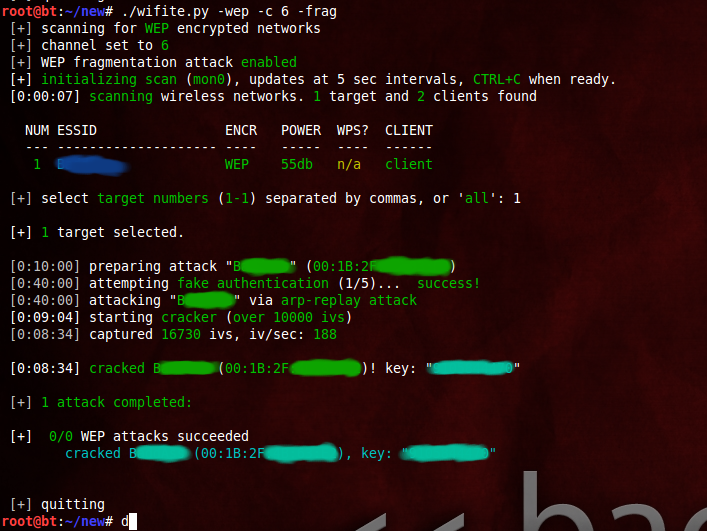
successful WPS attacks (after 17 hours):

examples
the program contains lots of interactivity (waits for user input). these command-line options are meant to make the program 100% automated -- no supervision required.
to crack all WEP access points:
./wifite.py -all -wep
to crack all WPS access points with signal strength greater than (or equal to) 50dB:
./wifite.py -p 50-wps
to attack all access points, use 'darkc0de.lst' for cracking WPA handshakes:
./wifite.py -all --dict /pentest/passwords/wordlists/darkc0de.lst
to attack all WPA access points, but do not try to crack -- any captured handshakes are saved automatically:
./wifite.py -all -wpa --dict none
to crack all WEP access points greater than 50dB in strength, giving 5 minutes for each WEP attack method, and send packets at 600 packets/sec:
./wifite.py --pow 50-wept 300-pps 600
to attempt to crack WEP-encrypted access point "2WIRE752" endlessly -- program will not stop until key is cracked or user interrrupts with ctrl+C):
./wifite.py -e "2WIRE752"-wept 0
Wifite v2 is now available的更多相关文章
- Wifite.py 修正版脚本代码
Kali2.0系统自带的WiFite脚本代码中有几行错误,以下是修正后的代码: #!/usr/bin/python # -*- coding: utf-8 -*- """ ...
- 自动化无线网破解工具wifite2
自动化无线网破解工具wifite2 wifite是一款自动化wifi密码破解工具,特点是支持多个wep.wpa加密的wifi网络,不支持windows和osx. wifite的特点是可以同时攻击多个采 ...
- 如何搭建自己的SPRING INITIALIZR server
这两天在慕课学Spring boot ,用idea通过spring initializr新建项目 即使用代理连不上.无奈. 参考了 GitHub - spring-io/initializr: A w ...
- Atitit. 破解 拦截 绕过 网站 手机 短信 验证码 方式 v2 attilax 总结
Atitit. 破解 拦截 绕过 网站 手机 短信 验证码 方式 v2 attilax 总结 1. 验证码的前世今生11.1. 第一代验证码 图片验证码11.2. 第二代验证码 用户操作 ,比如 ...
- [Android]Android端ORM框架——RapidORM(v2.1)
以下内容为原创,欢迎转载,转载请注明 来自天天博客:http://www.cnblogs.com/tiantianbyconan/p/6020412.html [Android]Android端ORM ...
- [Android]Android端ORM框架——RapidORM(v2.0)
以下内容为原创,欢迎转载,转载请注明 来自天天博客:http://www.cnblogs.com/tiantianbyconan/p/5626716.html [Android]Android端ORM ...
- JuCheap V2.0响应式后台管理系统模板正式发布beta版本
JuCheap V1.* 查看地址: http://blog.csdn.net/allenwdj/article/details/49155339 经过半年的努力,JuCheap后台通用响应式管理后台 ...
- Atitit. 项目文档目录大纲 总集合 v2
Atitit. 项目文档目录大纲 总集合 v2 -----Atitti.原有项目源码的架构,框架,配置与环境说明 v3 q511 -----Atitit.开发环境 与 工具 以及技术框架 以及 注意 ...
- python gettitle v2.0
#!/usr/bin/env python # coding=utf-8 import threading import requests import Queue import sys import ...
随机推荐
- Linux系统巡检常用命令
# uname -a # 查看内核/操作系统/CPU信息 # head -n 1 /etc/issue # 查看操作系统版本 # cat /proc/cpuinfo # 查看CPU信息 # hostn ...
- js 父窗体
1.关闭 父窗体 window.opener.opener=null;window.opener.close() 2.刷新父窗体 JS刷新父窗口的几种方式 浮层内嵌iframe及frame集合窗 ...
- ECMAScript 6教程 (二) 对象和函数
本文版权归作者和博客园共有,欢迎转载,但未经作者同意必须保留此段声明,且在文章页面明显位置给出 原文连接,博客地址为 http://www.cnblogs.com/jasonnode/ .该系列课程是 ...
- Azure web role, work role 以及其他role
Azure web role, work role 以及其他role 如果没有创建过web role 和work role的话可以参考如下文章来创建一下web role 和work role. htt ...
- Qt5程序参数包含中文GBK编码的问题
1.背景 Qt5程序(WeekReport.exe)的main函数里有如下代码: //only for test int main(int argc, char *argv[]) { QCoreApp ...
- notepad++代码自动补全功能
可以代码自动补全功能,默认他是没有开启这个功能的,在首选项->备份与自动完成 里面有自动完成这一个设置,可以设置单词补全,也可以设置函数补全,这样写代码就快多了
- TextView,EditText中添加不同颜色的文字
在很多时候,在我们项目里需要用到在一个TextView中要显示不同颜色的文字 private Spanned colorText(String text) { return Html.fromHtml ...
- ie11媒体查询以及其他hack
<!doctype html> <html> <head> <title>IE10/11 Media Query Test</title> ...
- JAVA-Semaphore信号灯-可实现维护自身线程访问数
import java.util.Random; import java.util.concurrent.ExecutorService; import java.util.concurrent.Ex ...
- 特征的SID表、M表、P表、Q表、X表、Y表、T表
声明:原创作品,转载时请注明文章来自SAP师太技术博客( 博/客/园www.cnblogs.com):www.cnblogs.com/jiangzhengjun,并以超链接形式标明文章原始出处,否则将 ...