
Wifite v2 is now available
Wifite v2 is now available
What's new in this version:
- support for cracking WPS-encrypted networks (via reaver)
- 2 new WEP attacks
- more accurate WPA handshake capture
- various bug fixes
Version 2 does not include a GUI, so everything must be done at the command-line.
mention in the New York Times
Wifite was mentioned in the New York Times' article "New Hacking Tools Pose Bigger Threats to Wi-Fi Users" from February 16, 2011. Here is a link to the article.
introduction
Designed and tested on Linux; works with Backtrack 5, BlackBuntu, BackBox, and Pentoo! Linux only; no windows or OSX support (but you're welcome to try).
purpose
To attack multiple WEP, WPA, and WPS encrypted networks in a row. This tool is customizable to be automated with only a few arguments. Wifite aims to be the "set it and forget it" wireless auditing tool.
features
- sorts targets by signal strength (in dB); cracks closest access points first
- automatically de-authenticates clients of hidden networks to reveal SSIDs
- numerous filters to specify exactly what to attack (wep/wpa/both, above certain signal strengths, channels, etc)
- customizable settings (timeouts, packets/sec, etc)
- "anonymous" feature; changes MAC to a random address before attacking, then changes back when attacks are complete
- all captured WPA handshakes are backed up to wifite.py's current directory
- smart WPA de-authentication; cycles between all clients and broadcast deauths
- stop any attack with Ctrl+C, with options to continue, move onto next target, skip to cracking, or exit
- displays session summary at exit; shows any cracked keys
- all passwords saved to cracked.txt
- built-in updater: ./wifite.py -upgrade
requirements
- linux operating system (confirmed working on Backtrack 5, BackBox, BlackBuntu, Pentoo, Ubuntu 8.10 (BT4R1), Ubuntu 10.04, Debian 6, Fedora 16)
- tested working with python 2.6.x, and python 2.7.x,
- wireless drivers patched for monitor mode and injection. Most security distributions (Backtrack, BlackBuntu, etc) come with wireless drivers pre-patched,
- aircrack-ng (v1.1) suite: available via apt: apt-get install aircrack-ng or at the aircrack-ng website,
suggested applications
- reaver, for attacking WPS-encrypted networks
- pyrit, cowpatty, tshark: not required, but help verify WPA handshake captures
For help installing any of these programs, see the installation guide (hosted on github)
execution
download the latest version:
wget -O wifite.py http://wifite.googlecode.com/svn/trunk/wifite.py
change permissions to executable:
chmod +x wifite.py
execute:
python wifite.py
or, to see a list of commands with info:
./wifite.py -help
screenshots
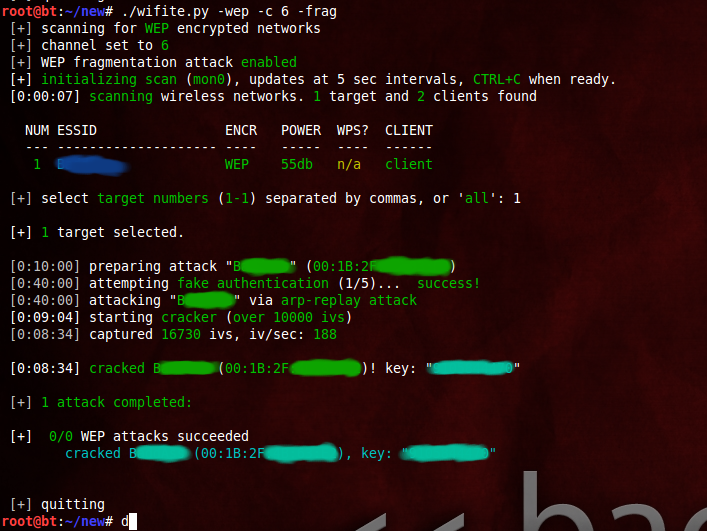
successful WEP attack (after 90 seconds):
successful WPS attacks (after 17 hours):

examples
the program contains lots of interactivity (waits for user input). these command-line options are meant to make the program 100% automated -- no supervision required.
to crack all WEP access points:
./wifite.py -all -wep
to crack all WPS access points with signal strength greater than (or equal to) 50dB:
./wifite.py -p 50-wps
to attack all access points, use 'darkc0de.lst' for cracking WPA handshakes:
./wifite.py -all --dict /pentest/passwords/wordlists/darkc0de.lst
to attack all WPA access points, but do not try to crack -- any captured handshakes are saved automatically:
./wifite.py -all -wpa --dict none
to crack all WEP access points greater than 50dB in strength, giving 5 minutes for each WEP attack method, and send packets at 600 packets/sec:
./wifite.py --pow 50-wept 300-pps 600
to attempt to crack WEP-encrypted access point "2WIRE752" endlessly -- program will not stop until key is cracked or user interrrupts with ctrl+C):
./wifite.py -e "2WIRE752"-wept 0
Wifite v2 is now available的更多相关文章
- Wifite.py 修正版脚本代码
Kali2.0系统自带的WiFite脚本代码中有几行错误,以下是修正后的代码: #!/usr/bin/python # -*- coding: utf-8 -*- """ ...
- 自动化无线网破解工具wifite2
自动化无线网破解工具wifite2 wifite是一款自动化wifi密码破解工具,特点是支持多个wep.wpa加密的wifi网络,不支持windows和osx. wifite的特点是可以同时攻击多个采 ...
- 如何搭建自己的SPRING INITIALIZR server
这两天在慕课学Spring boot ,用idea通过spring initializr新建项目 即使用代理连不上.无奈. 参考了 GitHub - spring-io/initializr: A w ...
- Atitit. 破解 拦截 绕过 网站 手机 短信 验证码 方式 v2 attilax 总结
Atitit. 破解 拦截 绕过 网站 手机 短信 验证码 方式 v2 attilax 总结 1. 验证码的前世今生11.1. 第一代验证码 图片验证码11.2. 第二代验证码 用户操作 ,比如 ...
- [Android]Android端ORM框架——RapidORM(v2.1)
以下内容为原创,欢迎转载,转载请注明 来自天天博客:http://www.cnblogs.com/tiantianbyconan/p/6020412.html [Android]Android端ORM ...
- [Android]Android端ORM框架——RapidORM(v2.0)
以下内容为原创,欢迎转载,转载请注明 来自天天博客:http://www.cnblogs.com/tiantianbyconan/p/5626716.html [Android]Android端ORM ...
- JuCheap V2.0响应式后台管理系统模板正式发布beta版本
JuCheap V1.* 查看地址: http://blog.csdn.net/allenwdj/article/details/49155339 经过半年的努力,JuCheap后台通用响应式管理后台 ...
- Atitit. 项目文档目录大纲 总集合 v2
Atitit. 项目文档目录大纲 总集合 v2 -----Atitti.原有项目源码的架构,框架,配置与环境说明 v3 q511 -----Atitit.开发环境 与 工具 以及技术框架 以及 注意 ...
- python gettitle v2.0
#!/usr/bin/env python # coding=utf-8 import threading import requests import Queue import sys import ...
随机推荐
- 。。。再战JQuery。。。
今天从学习JQurery的第一个函数开始!!! JQuery里面的show这个函数很不错,我很喜欢,他的使用方法如下:JQuery对象.show(speed,callback); speed你可以指定 ...
- 11.写一个函数,尽可能高效的,从一个标准 url 里取出文件的扩展名
//首先列出需要被操作的url $url_path = "http://www.sina.com.cn/abc/de/fg.php?id=1"; 方法一: ...
- poj 1888 Crossword Answers 模拟题
Crossword Answers Time Limit: 1000MS Memory Limit: 30000K Total Submissions: 869 Accepted: 405 D ...
- QTP
QTP支持功能测试和回归测试的自动化. 支持录制功能,可以对脚本设置检查点,也可以进行参数化.可以在一个ACTION中调用另外一个ACTION action可以调用外部脚本.可以复制已有的ACTION ...
- resque 遍历加载job目录下的类
<?php class resqueTest { public function actionWork() { #require dirname(__DIR__).'/commands/Test ...
- YTU 2345: 后序遍历二叉树
原文链接:https://www.dreamwings.cn/ytu2345/2611.html 2345: 后序遍历二叉树 时间限制: 1 Sec 内存限制: 128 MB 提交: 3 解决: ...
- vs2013-tfs-疑问之版本控制器路径有双引号解决办法
问题描述: 最近项目:“****”展示交易平台 ,所以版本控制器路径为: 导致生成解决方案提示:路径有问题 解决办法: 1.直接在版本控制器重命名是不支持的,需要安装: Visual Studio ...
- 公历和农历转换JS代码
<!-- function CalConv(M) { FIRSTYEAR = 1936; LASTYEAR = 2031; LunarCal = [ new tagLunarCal(23, 3, ...
- Stockbroker Grapevine(floyd+暴力枚举)
Stockbroker Grapevine Time Limit: 1000MS Memory Limit: 10000K Total Submissions: 31264 Accepted: 171 ...
- jQuery 遍历(上)
目录: 一:定义二:遍历 DOM三:jQuery 参考手册 - 遍历 定义:什么是遍历?jQuery 遍历,意为"移动",用于根据其相对于其他元素的关系来"查找" ...